解决v4版本的tailwindcss和elementplus样式冲突问题
摘要:在使用TailwindCSS v4覆盖Element Plus样式时,发现改变样式加载顺序无效。通过创建tailwindcss.config.ts配置文件,设置important:true强制覆盖样式,并可选添加prefix:'tw'前缀避免污染。TailwindCSS v4会自动修正前缀格式。这是目前找到的解决方案,欢迎提供更好的方法。
·
项目配置:
{
  "name": "frontend",
  "private": true,
  "version": "0.0.0",
  "type": "module",
  "scripts": {
    "dev": "vite",
    "build": "vue-tsc -b && vite build",
    "preview": "vite preview"
  },
  "dependencies": {
    "@tailwindcss/vite": "^4.1.16",
    "element-plus": "^2.11.5",
    "tailwindcss": "^4.1.16",
    "vue": "^3.5.22",
    "vue-router": "^4.6.3"
  },
  "devDependencies": {
    "@types/node": "^24.6.0",
    "@vitejs/plugin-vue": "^6.0.1",
    "@vue/tsconfig": "^0.8.1",
    "typescript": "~5.9.3",
    "vite": "^7.1.7",
    "vue-tsc": "^3.1.0"
  }
}
尝试改变加载顺序
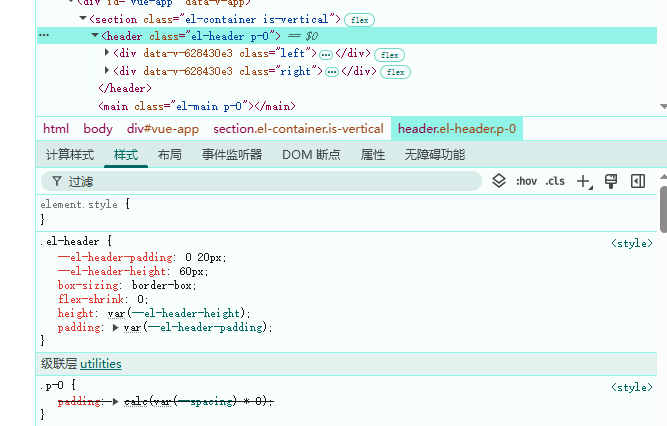
在使用tailwindcss为el-header添加样式时,发现无法覆盖elementplus的样式,即使是更换了引入顺序也没有效果
先引用element-plus样式的情况
// 先引用element-plus样式

import { createApp } from 'vue'
import App from './App.vue'
import { router } from './router'
import ElementPlus from 'element-plus'

// 导入 Element Plus 样式
import 'element-plus/dist/index.css';
// 导入全局样式
import './style.css'

import PageHeader from './components/PageHeader.vue'


// 多个挂载点
const mounts = [
  { el: '#vue-header', component: PageHeader },
  { el: '#vue-app', component: App },
]

mounts.forEach(({ el, component }) => {
  const root = document.querySelector(el)
  if (root) {
    const app = createApp(component)
    app.use(ElementPlus)
    app.use(router)
    app.mount(root)
  }
})
先引用tailwindcss样式的情况:
// 先引入tailwindcss

import { createApp } from 'vue'
import App from './App.vue'
import { router } from './router'
import ElementPlus from 'element-plus'

// 导入全局样式
import './style.css'
// 导入 Element Plus 样式
import 'element-plus/dist/index.css';

import PageHeader from './components/PageHeader.vue'


// 多个挂载点
const mounts = [
  { el: '#vue-header', component: PageHeader },
  { el: '#vue-app', component: App },
]

mounts.forEach(({ el, component }) => {
  const root = document.querySelector(el)
  if (root) {
    const app = createApp(component)
    app.use(ElementPlus)
    app.use(router)
    app.mount(root)
  }
})
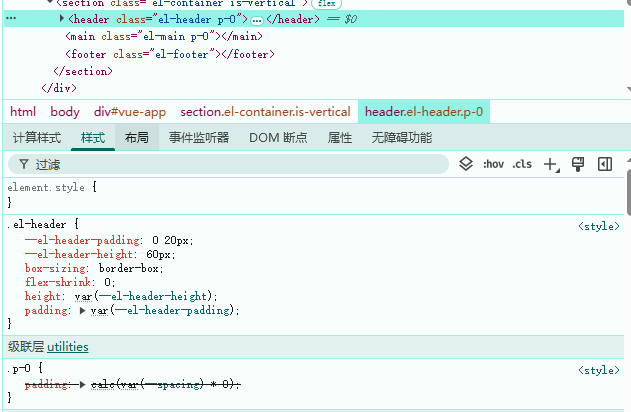
可以看到,改变引用顺序似乎没有效果,我猜测可能和项目的构建方式有关
解决方法
由于我使用的是v4版本的tailwindcss,使用官方文档中vite安装并没有配置文件,但是可以手动创建tailwindcss.config.ts
import type { Config } from 'tailwindcss'

export default {
  prefix: 'tw',
  content: [
    './index.html',
    './src/**/*.{vue,js,ts,jsx,tsx}',
  ],
  // 添加自定义样式
  theme: {
    extend: {},
  },
  // 添加插件
  plugins: [],
  // 开启 !important, 强制覆盖其他样式
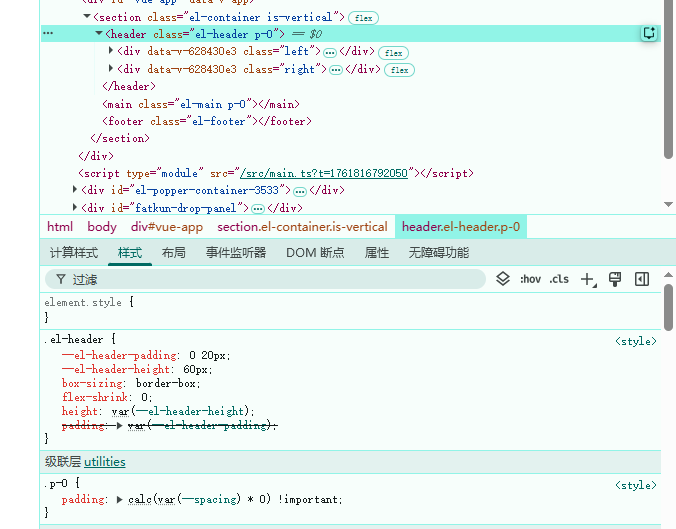
  important: true,
} satisfies Config
不过还需要在引入的样式文件中加载这个配置,我这里是根目录下的style.css,也就是之前引入的tailwindcss
@config "../../frontend/tailwindcs.config.ts";
@import "tailwindcss";

body {
  margin: 0;
  padding: 0;
}
添加完之后可以看到element-plus的样式被覆盖了:
如果怕污染其它样式,可以再配置文件中添加前缀prefix:"tw"。注意:Tailwind CSS v4 里配置的前缀(tw-)不再符合 v4 的规则,Tailwind 自动“修正”了它,"-" 会自动加上
由于本人水平有限,目前能想到的办法只有这个了,如果有更好的解决方法欢迎留言讨论。

腾讯云面向开发者汇聚海量精品云计算使用和开发经验,营造开放的云计算技术生态圈。
更多推荐
 3
3 0
0- 0


 已为社区贡献1条内容

所有评论(0)