使用腾讯云的函数服务,转发到第三方接口,省了一千块
【无服务器HTTPS接口转发方案】在无自有服务器情况下,可通过云函数实现HTTPS到HTTP的接口转发。方案要点:1)使用备案域名创建云函数,开启公网访问;2)通过Flask编写代理代码,修改TARGET_BASE_URL为目标接口地址;3)函数支持GET/POST等请求方法,自动处理CORS和请求头过滤;4)可绑定自定义域名并配置HTTPS证书。该方案特别适用于静态网站需要访问第三方HTTP接口
·
没有购买服务器的情况下,怎么做接口转发?
场景:自有HTTPS的静态站,无法请求第三方的HTTP,需要通过另外一个HTTPS进行反向代理做中转。
一、必要条件
1、拥有备案域名
2、需要接入第三方接口
二、创建函数
找到函数服务,创建一个函数,函数URL配置的公网访问 要勾上
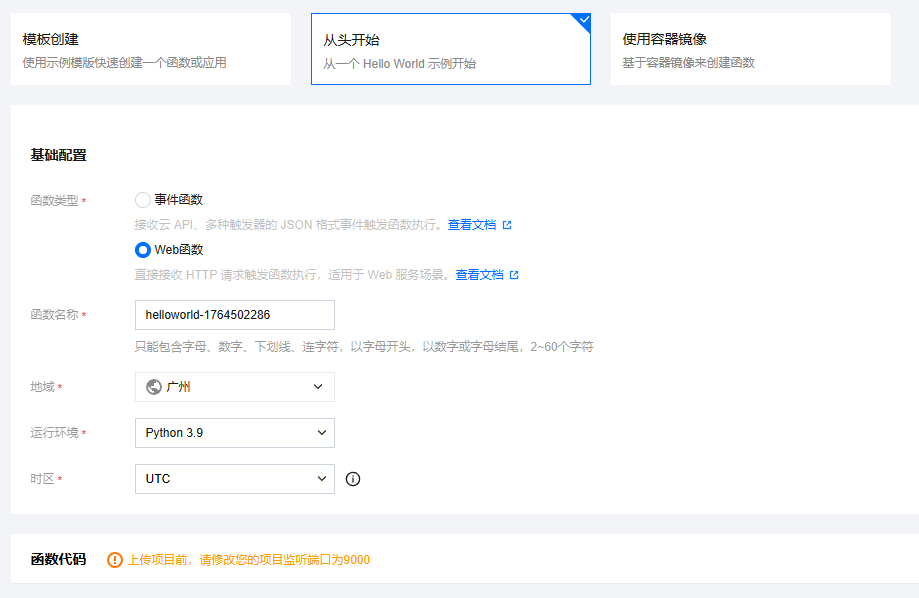
创建后,直接在线修改代码;
将TARGET_BASE_URL的地址改为你的地址、然后点击部署;
这里简单粗暴,懂PY的自己去精炼下。
from flask import Flask, jsonify, request, Response
import json
import urllib.request
import urllib.parse
import urllib.error
import logging
from urllib.parse import urljoin

# 配置日志
logging.basicConfig(level=logging.INFO)
logger = logging.getLogger(__name__)

app = Flask(__name__)

# 目标服务器基础URL:我的实际接口前缀为http://127.0.0.1:8888/API,在target_path加了/API,如果不需要则去掉
TARGET_BASE_URL = 'http://127.0.0.1:8888'

def make_request_to_target(method, path, headers=None, data=None, params=None):
    """
    使用 urllib 向目标服务器发送请求
    """
    try:
        # 构建完整URL
        url = urljoin(TARGET_BASE_URL, path)

        # 添加查询参数
        if params:
            query_string = urllib.parse.urlencode(params)
            url += '?' + query_string

        # 准备请求头
        request_headers = {}
        if headers:
            for key, value in headers.items():
                key_lower = key.lower()
                # 过滤掉代理相关的头
                if key_lower not in ['host', 'content-length']:
                    request_headers[key] = value

        # 准备请求体
        body_data = None
        if data:
            if isinstance(data, str):
                body_data = data.encode('utf-8')
            else:
                body_data = data

        logger.info(f"转发请求: {method} {url}")
        logger.info(f"请求头: {request_headers}")

        # 创建请求
        req = urllib.request.Request(
            url=url,
            data=body_data,
            headers=request_headers,
            method=method.upper()
        )

        # 发送请求
        with urllib.request.urlopen(req, timeout=10) as response:
            # 读取响应
            response_content = response.read()
            response_headers = dict(response.headers)

            logger.info(f"收到响应: 状态码 {response.getcode()}")

            # 返回简化响应对象
            return type('Response', (), {
                'status_code': response.getcode(),
                'content': response_content,
                'headers': response_headers
            })()

    except urllib.error.HTTPError as e:
        logger.error(f"HTTP错误: {e.code} {e.reason}")
        # 即使是HTTP错误,也返回响应内容
        return type('Response', (), {
            'status_code': e.code,
            'content': e.read(),
            'headers': dict(e.headers)
        })()
    except urllib.error.URLError as e:
        logger.error(f"URL错误: {e.reason}")
        raise Exception(f"无法连接到目标服务器: {e.reason}")
    except Exception as e:
        logger.error(f"请求异常: {str(e)}")
        raise e

@app.route('/')
def hello_world():
    return '代理服务运行中 - 使用 /api/<path:subpath> 进行代理'

@app.route('/api/<path:subpath>', methods=['GET', 'POST', 'PUT', 'DELETE', 'OPTIONS', 'PATCH'])
def proxy_handler(subpath):
    """
    通用代理处理器 - 使用 urllib 替代 requests
    """
    # CORS头
    cors_headers = {
        'Access-Control-Allow-Origin': '*',
        'Access-Control-Allow-Methods': 'GET, POST, PUT, DELETE, OPTIONS, PATCH',
        'Access-Control-Allow-Headers': 'Content-Type, Authorization, X-Requested-With'
    }

    # 处理OPTIONS预检请求
    if request.method == 'OPTIONS':
        return jsonify({
            'status': 'success',
            'message': 'CORS preflight handled'
        }), 200, cors_headers

    try:
        # 准备请求数据
        method = request.method

        # 获取请求头
        headers = {}
        for key, value in request.headers:
            headers[key] = value

        # 获取请求体
        if request.data:
            data = request.data
        else:
            data = None

        # 获取查询参数
        params = request.args.to_dict()

        # 构建目标路径
        target_path = f"/api/{subpath}" if subpath else "/"

        # 发送请求到目标服务器
        response = make_request_to_target(method, target_path, headers, data, params)

        # 构建响应头
        response_headers = dict(response.headers) if hasattr(response, 'headers') else {}
        response_headers.update(cors_headers)

        # 处理响应内容类型
        content_type = response_headers.get('Content-Type', 'application/octet-stream')

        return Response(
            response=response.content,
            status=response.status_code,
            headers=response_headers,
            content_type=content_type
        )

    except Exception as e:
        logger.error(f"代理处理失败: {str(e)}")
        error_response = {
            'status': 'error',
            'message': '代理请求失败',
            'error': str(e),
            'target_server': TARGET_BASE_URL,
            'request_path': f"/{subpath}" if subpath else "/"
        }

        return jsonify(error_response), 500, cors_headers

@app.route('/api/health', methods=['GET'])
def health_check():
    """
    健康检查端点 - 使用 urllib 测试连接
    """
    cors_headers = {
        'Access-Control-Allow-Origin': '*',
        'Content-Type': 'application/json'
    }

    try:
        # 测试连接到目标服务器
        test_url = f"{TARGET_BASE_URL}/"
        req = urllib.request.Request(test_url, method='GET')

        with urllib.request.urlopen(req, timeout=5) as response:
            health_status = {
                'proxy_service': 'running',
                'target_server': 'reachable',
                'target_status': response.getcode(),
                'timestamp': '2024-01-01T00:00:00Z'
            }

            return jsonify(health_status), 200, cors_headers

    except Exception as e:
        health_status = {
            'proxy_service': 'running',
            'target_server': 'unreachable',
            'error': str(e),
            'timestamp': '2024-01-01T00:00:00Z'
        }

        return jsonify(health_status), 200, cors_headers

@app.route('/api/test/echo', methods=['GET', 'POST'])
def test_echo():
    """
    测试端点 - 返回接收到的请求信息
    """
    cors_headers = {
        'Access-Control-Allow-Origin': '*',
        'Content-Type': 'application/json'
    }

    echo_data = {
        'method': request.method,
        'headers': dict(request.headers),
        'args': request.args.to_dict(),
        'data': request.data.decode('utf-8', errors='ignore') if request.data else None,
        'json': request.get_json(silent=True),
        'endpoint': 'echo',
        'timestamp': '2024-01-01T00:00:00Z',
        'note': '此响应来自代理服务器,未转发到目标服务器'
    }

    return jsonify(echo_data), 200, cors_headers

# 简化版本 - 避免复杂的代理逻辑
@app.route('/api/simple/<path:subpath>', methods=['GET', 'POST'])
def simple_proxy(subpath):
    """
    简化版代理 - 只处理基本功能
    """
    cors_headers = {
        'Access-Control-Allow-Origin': '*',
        'Content-Type': 'application/json'
    }

    if request.method == 'OPTIONS':
        return jsonify({'status': 'ok'}), 200, cors_headers

    try:
        # 构建目标URL
        target_url = f"{TARGET_BASE_URL}/{subpath}"

        # 添加查询参数
        if request.args:
            query_string = urllib.parse.urlencode(request.args)
            target_url += '?' + query_string

        # 准备请求
        headers = {}
        for key, value in request.headers:
            if key.lower() not in ['host']:
                headers[key] = value

        # 准备数据
        data = request.data if request.data else None

        # 发送请求
        req = urllib.request.Request(
            url=target_url,
            data=data,
            headers=headers,
            method=request.method
        )

        # 获取响应
        with urllib.request.urlopen(req, timeout=10) as response:
            content = response.read()
            content_type = response.headers.get('Content-Type', 'application/octet-stream')

            # 返回响应
            return Response(
                response=content,
                status=response.getcode(),
                headers={
                    'Access-Control-Allow-Origin': '*',
                    'Content-Type': content_type
                }
            )

    except urllib.error.HTTPError as e:
        # 处理HTTP错误
        error_content = e.read()
        return Response(
            response=error_content,
            status=e.code,
            headers={
                'Access-Control-Allow-Origin': '*',
                'Content-Type': e.headers.get('Content-Type', 'application/json')
            }
        )
    except Exception as e:
        return jsonify({
            'error': str(e),
            'message': '代理请求失败'
        }), 500, cors_headers

if __name__ == '__main__':
    print("启动代理服务器(使用 urllib)...")
    print(f"目标服务器: {TARGET_BASE_URL}")
    print("可用端点:")
    print("  GET  /api/health          - 健康检查")
    print("  GET  /api/test/echo       - 测试回显")
    print("  ANY  /api/simple/<path>   - 简化代理")
    print("  ANY  /api/<path>          - 完整代理")

    app.run(host='0.0.0.0', port=9000, debug=True)
三、自定义域名
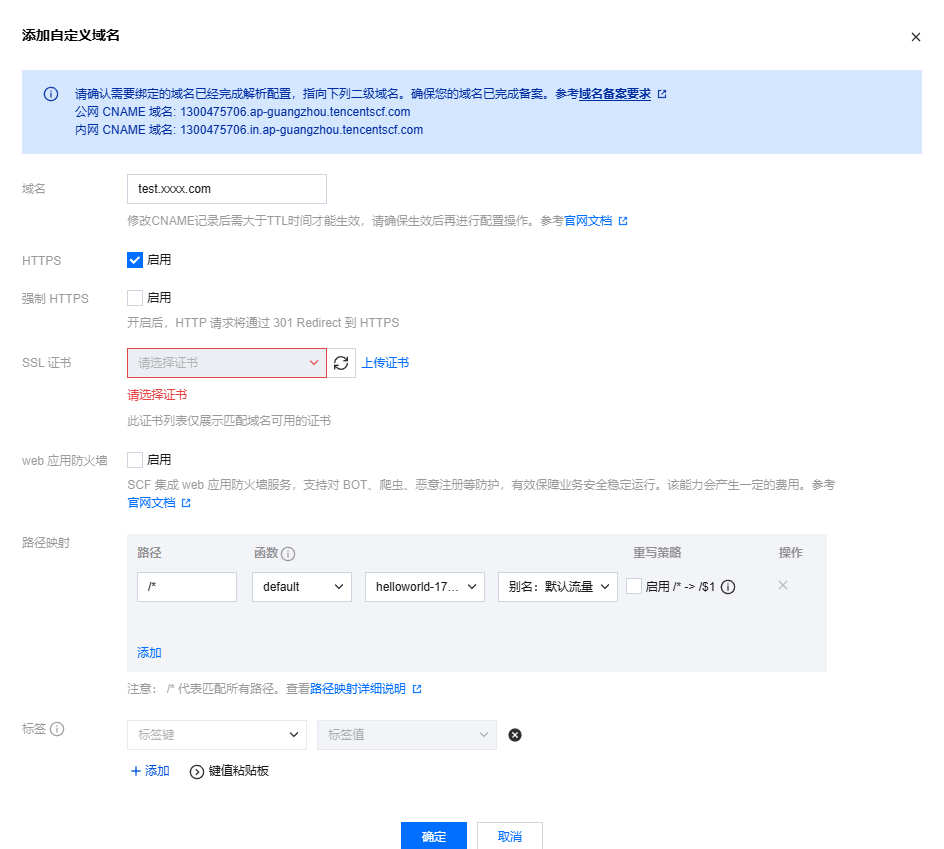
按以下添加,绑定对应的函数;
如果需要HTTPS,点击上传证书,申请免费证书。

腾讯云面向开发者汇聚海量精品云计算使用和开发经验,营造开放的云计算技术生态圈。
更多推荐
 2
2 0
0- 0


 已为社区贡献2条内容

所有评论(0)