frp本地服务内网穿透+(配合阿里云服务器)实现本地服务的公网访问(已实现)
·
1.阿里云 ECS(服务端)
这里是之前就有的,我就直接用的这种方式
1.防火墙开放
2.安全组开放端口
- 安全组开放端口:
7000(frp 控制端口)8080(HTTP 服务端口,用于反向代理)443(如果需要 HTTPS)6443(可选,用于其他 TCP 服务)- 8081(这里我的本地服务是8081端口,这个也加上)
3.终端开放规则
2.服务端安装frps
2.1下载并安装 frps(服务端)
# 登录你的 ECS(通过 SSH)
ssh root@47.95.xxx.xxx

# 下载 frp(以 v0.54.0 为例,最新版见 https://github.com/fatedier/frp/releases)
wget https://github.com/fatedier/frp/releases/download/v0.54.0/frp_0.54.0_linux_amd64.tar.gz

# 解压
tar -zxvf frp_0.54.0_linux_amd64.tar.gz
cd frp_0.54.0_linux_amd64

# 编辑服务端配置文件
nano frps.toml
2.2frps.toml 内容(最简配置)
[common]
bind_port = 7000
vhost_http_port = 8080
token = "your_secure_token_here"  # 必须设置!用于客户端认证
⚠️
vhost_http_port = 8080表示:所有 HTTP 请求会通过ECS_IP:8080转发到本地服务。
3. 启动 frps(后台运行)
# 启动(前台测试)
./frps -c frps.toml

# 或使用 nohup 后台运行
nohup ./frps -c frps.toml > frps.log 2>&1 &

# 查看日志
tail -f frps.log
already use的话查看7000端口删除
sudo lsof -i :7000

sudo kill -9 [PID]
✅ 如果看到 [I] [service.go:XXX] frps started successfully,说明服务端启动成功!
3.本地开发机配置 frpc(客户端)
3.1下载开发机配置frpc(客户端)
- 打开 https://github.com/fatedier/frp/releases
- Windows:下载 frp_xxx_windows_amd64.zip
macOS:frp_xxx_darwin_amd64.tar.gz
Linux:frp_xxx_linux_amd64.tar.gz
解压后进入目录。
3.2编辑客户端配置文件 frpc.toml
[common]
server_addr = 47.95.xxx.xxx   # 替换为你的阿里云 ECS 公网 IP
server_port = 7000
token = "your_secure_token_here"  # 必须和服务端一致

[web]
type = http
local_port = 8081
custom_domains = dev.yourdomain.com  # 可选:如果你有域名
# 如果没有域名,可以注释掉 custom_domains,直接用 IP 访问
🔹 如果你没有域名,可以这样写(直接用 IP):
[web]
type = tcp
local_port = 8081
remote_port = 8081
然后通过
http://47.95.xxx.xxx:8081访问!!!!!!!!这里注意密码最好
1.用字母简单的,有数字的时候,我编辑完两个不符合然后配置的简单字母就行了
2.字段后面不要有# XXXX,在这种文件里面应该解析不出来,然后用默认配置,后面连接直接报错
4.启动frpc
Windows(命令提示符):
frpc.exe -c frpc.toml5.访问本地服务(直接用IP)
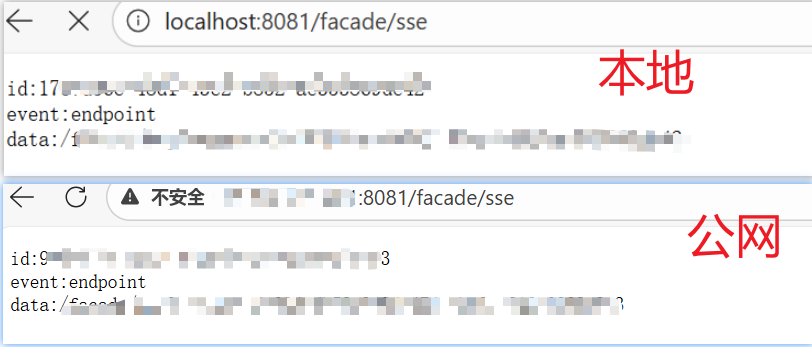
http://47.95.xxx.xxx:8081/facade/sse✅ 成功!你的本地服务已通过公网暴露。
6.效果
服务器服务端

windows本地客户端

最终效果
当你在本地电脑上跑一个服务,其他主机可以公网访问调用

腾讯云面向开发者汇聚海量精品云计算使用和开发经验,营造开放的云计算技术生态圈。
更多推荐
 3
3 0
0- 0


 已为社区贡献9条内容

所有评论(0)