解决 unable to access ‘https://github.com/...‘: Failed to connect to github.com 问题
·
解决 unable to access ‘https://github.com/…’: Failed to connect to github.com 问题
解决 error: RPC failed; curl 56 Recv failure: Connection timed out 问题
一、报错:fatal: unable to access ‘https://github.com/…/’: Failed to connect to github.com port 443 after 21065 ms: Couldn’t connect to server.
报错内容如下:
fatal: unable to access 'https://github.com/llvm/llvm-project.git/': Failed to connect to github.com port 443 after 21065 ms: Couldn't connect to server
错误分析:根据报错内容提示,可以看出通过 HTTPS 协议访问https://github.com服务器时失效。
二、报错:error: RPC failed; curl 56 Recv failure: Connection timed out
报错内容如下:
error: RPC failed; curl 56 Recv failure: Connection timed out
error: 1002 bytes of body are still expected
fetch-pack: unexpected disconnect while reading sideband packet
fatal: early EOF
fatal: fetch-pack: invalid index-pack output
错误分析:网络连接中途超时断开,还没接收完仓库数据,网络被掐断。
三、解决方法
方法一:通过 SSH 协议访问https://github.com。
具体修改方法:将https://github.com/改为git@github.com:,其他保持不变。
修改前:
git clone https://github.com/llvm/llvm-project.git
修改后:
git clone git@github.com:llvm/llvm-project.git
该种方法依赖本地生成的 SSH 密钥对(公钥需添加到 GitHub 账户的 SSH and GPG keys 中)。
首先,在本地服务器生成密钥,命令如下:
ssh-keygen -t rsa -b 4096 -C "your_email@example.com"
这个命令会生成一个 RSA 类型的 SSH 密钥对,长度为 4096 位,并将电子邮件作为注释。
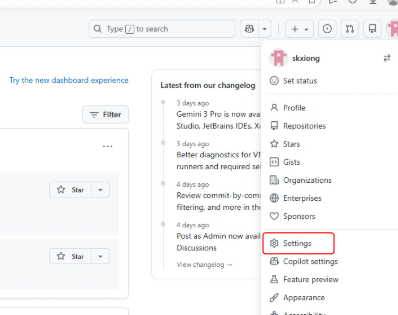
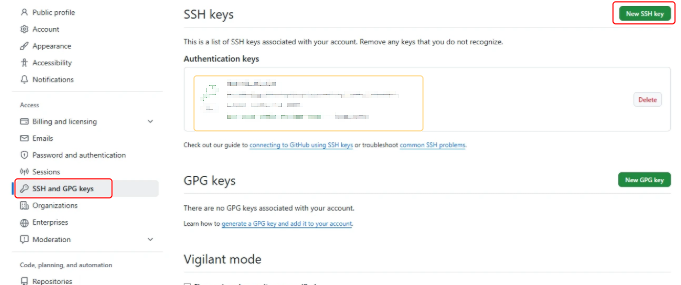
生成密钥对之后,需要将公钥文件(文件路径:~/.ssh/id_rsa.pub)内容添加到 GitHub 上。登录 GitHub,前往Settings -> SSH and GPG keys -> New SSH key,把复制的公钥粘贴到文本框中,并给密钥起一个容易辨识的名称。
一旦配置好,无需每次输入用户名或密码/token。
更换为 SSH 协议后,拉 GitHub 仓的代码不再报错!
参考资料

腾讯云面向开发者汇聚海量精品云计算使用和开发经验,营造开放的云计算技术生态圈。
更多推荐
 3
3 0
0- 0


 已为社区贡献2条内容

所有评论(0)