Windows系统中将PostgreSQL 9.2版本数据库使用pg_dump.exe备份数据以及使用pg_restore.exe恢复数据,将备份数据共享到另一台服务器备份
·
步骤一:设计一个方案,现在需要定时备份数据,我的数据库是pg版本是9.2,在windows系统中。然后我需要备份两个库,一个库是gis数据的,另一个库是业务数据的,gis数据的一年备份一次,业务数据一个月一次。备份前需要判断系统空间磁盘是否满足备份条件,如果满足才能备份,不满足直接忽略。传递完成后windows备份删除。
步骤二:在windows中备份后,需要传给另外一台服务器,另外一台服务器是linux系统,两台服务器都处于同网段。总体就是window备份数据,备份完成后传递给Linux系统,
1. 备份pg数据
备份命令如下:(我们会在1.2中使用写脚本的形式去dump文件)
pg_dump.exe --host localhost --port 5432 --username "postgres" --format custom --blobs --verbose --file "D:\PostgreSQL_Backup\gis_backup\hzyztgis_YEARLY_20251219_145216.dump" hzyztg
is
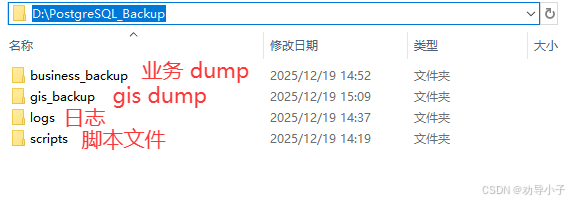
1.1 创建目录结构
D:\PostgreSQL_Backup\
├── scripts\          # 存放备份脚本
├── logs\            # 存放备份日志
├── gis_backup\      # GIS数据库备份
└── business_backup\ # 业务数据库备份
1.2 在scripts目录下创建pg_backup.ps1脚本
# PostgreSQL备份脚本
# 作者:服务器运维专家
# 日期:$(Get-Date -Format "yyyy-MM-dd")
# 注意:需要以管理员权限运行

# ============ 配置区域 ============
$BackupRoot = "D:\PostgreSQL_Backup"
$PostgresBin = "C:\Program Files\PostgreSQL\9.2\bin"  # 根据实际安装路径调整
$PostgresHost = "localhost" #host
$PostgresPort = "5432" #port
$PostgresUser = "postgres"  # 建议使用专用备份用户
$PostgresPassword = "你的密码"  # PostgreSQL密码

# 数据库配置
$GisDatabase = "hzyztgis"      # GIS数据库名
$BusinessDatabase = "test"  # 业务数据库名

# 备份配置
$GisBackupDir = "$BackupRoot\gis_backup"
$BusinessBackupDir = "$BackupRoot\business_backup"
$LogDir = "$BackupRoot\logs"
$ScriptDir = "$BackupRoot\scripts"

# 空间检查阈值(GB)
$MinFreeSpaceGB = 10  # 需要至少10GB空间才进行备份

# 保留策略
$GisKeepDays = 365    # GIS备份保留1年
$BusinessKeepDays = 180  # 业务备份保留6个月
# ============ 配置结束 ============

# 创建必要目录
$Dirs = @($BackupRoot, $GisBackupDir, $BusinessBackupDir, $LogDir, $ScriptDir)
foreach ($dir in $Dirs) {
    if (!(Test-Path $dir)) {
        New-Item -ItemType Directory -Path $dir -Force
    }
}

# 日志函数
function Write-Log {
    param([string]$Message, [string]$Level = "INFO")

    $LogFile = "${LogDir}\pg_backup_$(Get-Date -Format 'yyyy-MM').log"
    $Timestamp = Get-Date -Format "yyyy-MM-dd HH:mm:ss"
    $LogMessage = "${Timestamp} [${Level}] ${Message}"

    Add-Content -Path $LogFile -Value $LogMessage

    # 同时输出到控制台
    switch ($Level) {
        "ERROR" { Write-Host $LogMessage -ForegroundColor Red }
        "WARN"  { Write-Host $LogMessage -ForegroundColor Yellow }
        default { Write-Host $LogMessage -ForegroundColor Green }
    }
}

# 检查磁盘空间
function Test-DiskSpace {
    param([string]$Path)

    try {
        $Drive = Split-Path $Path -Qualifier
        if (!$Drive) {
            $Drive = (Get-Location).Drive.Name + ":"
        }

        Write-Log "检查驱动器: ${Drive}"

        $Disk = Get-WmiObject Win32_LogicalDisk -Filter "DeviceID='$Drive'"
        if ($Disk) {
            $FreeSpaceGB = [math]::Round($Disk.FreeSpace / 1GB, 2)
            $TotalSpaceGB = [math]::Round($Disk.Size / 1GB, 2)

            Write-Log "驱动器 ${Drive} 空间信息: 总计 ${TotalSpaceGB}GB, 可用 ${FreeSpaceGB}GB"

            if ($FreeSpaceGB -lt $MinFreeSpaceGB) {
                Write-Log "磁盘空间不足!需要 ${MinFreeSpaceGB}GB,当前仅剩 ${FreeSpaceGB}GB" "ERROR"
                return $false
            }
            Write-Log "磁盘空间检查通过"
            return $true
        }
        else {
            Write-Log "无法获取驱动器 ${Drive} 的信息" "ERROR"
            return $false
        }
    }
    catch {
        Write-Log "磁盘空间检查失败: $_" "WARN"
        Write-Log "磁盘空间检查失败,但继续执行备份" "WARN"
        return $true
    }
}

# 测试数据库连接
function Test-PostgresConnection {
    try {
        Write-Log "测试PostgreSQL连接..."

        if (!(Test-Path "${PostgresBin}\psql.exe")) {
            Write-Log "PostgreSQL客户端工具不存在: ${PostgresBin}\psql.exe" "ERROR"
            return $false
        }

        # 设置环境变量
        $env:PGPASSWORD = $PostgresPassword

        # 使用您提供的正确格式测试连接
        Write-Log "执行连接测试..."
        $TestResult = & "${PostgresBin}\psql.exe" --host $PostgresHost --port $PostgresPort --username $PostgresUser -l 2>&1
        $ExitCode = $LASTEXITCODE

        if ($ExitCode -eq 0) {
            Write-Log "PostgreSQL连接测试成功"
            return $true
        } else {
            Write-Log "PostgreSQL连接失败, 退出代码: ${ExitCode}" "ERROR"
            if ($TestResult) {
                $ErrorMsg = ($TestResult | Out-String).Trim()
                Write-Log "连接错误详情: $ErrorMsg" "ERROR"
            }
            return $false
        }
    }
    catch {
        Write-Log "连接测试异常: $_" "ERROR"
        return $false
    }
    finally {
        # 清理密码
        Remove-Item Env:\PGPASSWORD -ErrorAction SilentlyContinue
    }
}

# 备份数据库 - 使用您提供的正确格式
function Backup-Database {
    param(
        [string]$Database,
        [string]$BackupDir,
        [string]$BackupType = "FULL"
    )

    $Timestamp = Get-Date -Format "yyyyMMdd_HHmmss"
    $BackupFile = "${BackupDir}\${Database}_${BackupType}_${Timestamp}.dump"
    $LogFile = "${BackupDir}\${Database}_${BackupType}_${Timestamp}.log"

    Write-Log "开始备份数据库: ${Database}"
    Write-Log "备份文件: ${BackupFile}"

    # 检查pg_dump.exe是否存在
    if (!(Test-Path "${PostgresBin}\pg_dump.exe")) {
        Write-Log "找不到pg_dump.exe: ${PostgresBin}\pg_dump.exe" "ERROR"
        return $false
    }

    # 检查备份目录是否存在
    if (!(Test-Path $BackupDir)) {
        New-Item -ItemType Directory -Path $BackupDir -Force
        Write-Log "创建备份目录: ${BackupDir}"
    }

    try {
        # 设置环境变量
        $env:PGPASSWORD = $PostgresPassword

        Write-Log "正在备份数据库 ${Database}..."

        # 使用您提供的正确命令格式
        $BackupCommand = "pg_dump.exe --host $PostgresHost --port $PostgresPort --username `"$PostgresUser`" --format custom --blobs --verbose --file `"$BackupFile`" $Database"
        Write-Log "执行命令: ${BackupCommand}"

        # 执行备份
        $StartTime = Get-Date
        & "${PostgresBin}\pg_dump.exe" --host $PostgresHost --port $PostgresPort --username $PostgresUser --format custom --blobs --verbose --file $BackupFile $Database 2>&1 | Tee-Object -FilePath $LogFile
        $ExitCode = $LASTEXITCODE
        $EndTime = Get-Date
        $Duration = [math]::Round(($EndTime - $StartTime).TotalSeconds, 2)

        Write-Log "备份耗时: ${Duration} 秒"

        if ($ExitCode -eq 0) {
            # 计算备份文件大小
            if (Test-Path $BackupFile) {
                $FileSizeMB = [math]::Round((Get-Item $BackupFile).Length / 1MB, 2)
                Write-Log "备份成功: ${Database} (${FileSizeMB} MB)"

                # 验证备份文件
                Write-Log "验证备份文件..." "INFO"
                try {
                    $env:PGPASSWORD = $PostgresPassword
                    $TestRestore = & "${PostgresBin}\pg_restore.exe" --list $BackupFile 2>&1
                    if ($LASTEXITCODE -eq 0) {
                        Write-Log "备份文件验证成功" "INFO"
                    } else {
                        Write-Log "备份文件验证失败: $TestRestore" "WARN"
                    }
                }
                catch {
                    Write-Log "备份文件验证时出错: $_" "WARN"
                }
                finally {
                    Remove-Item Env:\PGPASSWORD -ErrorAction SilentlyContinue
                }

                return $true
            } else {
                Write-Log "备份文件未创建: ${BackupFile}" "ERROR"
                Write-Log "请检查日志: ${LogFile}" "ERROR"
                return $false
            }
        }
        else {
            Write-Log "备份失败: ${Database}, 退出代码: ${ExitCode}" "ERROR"
            Write-Log "请检查日志文件: ${LogFile}" "ERROR"

            # 显示错误信息
            if (Test-Path $LogFile) {
                Write-Log "=== 备份错误详情 ===" "ERROR"
                $ErrorLines = Get-Content $LogFile -Tail 20
                foreach ($Line in $ErrorLines) {
                    Write-Log "${Line}" "ERROR"
                }
            }

            return $false
        }
    }
    catch {
        Write-Log "备份过程中出错: $_" "ERROR"
        return $false
    }
    finally {
        # 清理密码
        Remove-Item Env:\PGPASSWORD -ErrorAction SilentlyContinue
    }
}

# 清理旧备份
function Cleanup-OldBackups {
    param(
        [string]$BackupDir,
        [int]$KeepDays
    )

    try {
        $CutoffDate = (Get-Date).AddDays(-$KeepDays)
        Write-Log "清理${BackupDir}中超过${KeepDays}天(${CutoffDate}之前)的备份"

        if (!(Test-Path $BackupDir)) {
            Write-Log "备份目录不存在: ${BackupDir}" "WARN"
            return
        }

        $BackupFiles = Get-ChildItem -Path $BackupDir -Filter "*.dump" -File -ErrorAction SilentlyContinue

        if (!$BackupFiles) {
            Write-Log "没有找到备份文件" "INFO"
            return
        }

        $DeletedCount = 0
        foreach ($File in $BackupFiles) {
            if ($File.LastWriteTime -lt $CutoffDate) {
                Write-Log "删除旧备份: $($File.Name) (创建于: $($File.LastWriteTime))"
                try {
                    Remove-Item $File.FullName -Force
                    $DeletedCount++

                    # 同时删除对应的日志文件
                    $LogFile = $File.FullName -replace '\.dump$', '.log'
                    if (Test-Path $LogFile) {
                        Remove-Item $LogFile -Force
                    }
                }
                catch {
                    Write-Log "删除文件失败: $($File.FullName) - $_" "ERROR"
                }
            }
        }

        if ($DeletedCount -gt 0) {
            Write-Log "清理完成: 删除了 ${DeletedCount} 个旧备份文件"
        } else {
            Write-Log "没有需要清理的旧备份文件" "INFO"
        }
    }
    catch {
        Write-Log "清理旧备份失败: $_" "ERROR"
    }
}

# 生成备份报告
function Generate-BackupReport {
    param([bool]$Success, [string]$BackupType)

    $ReportFile = "${LogDir}\backup_report_$(Get-Date -Format 'yyyyMMdd').txt"
    $CurrentTime = Get-Date -Format "yyyy-MM-dd HH:mm:ss"

    $Report = @"
===========================================
PostgreSQL 备份报告
===========================================
备份时间: ${CurrentTime}
备份类型: ${BackupType}
备份结果: $(if ($Success) { "成功" } else { "失败" })
系统磁盘空间检查: 通过
===========================================
GIS数据库备份位置: ${GisBackupDir}
业务数据库备份位置: ${BusinessBackupDir}
===========================================
最新备份文件:
"@

    # 添加最新备份文件信息
    try {
        $LatestBackups = Get-ChildItem -Path $BackupRoot -Filter "*.dump" -Recurse -File -ErrorAction SilentlyContinue |
                        Sort-Object LastWriteTime -Descending |
                        Select-Object -First 5

        if ($LatestBackups) {
            foreach ($Backup in $LatestBackups) {
                $SizeMB = [math]::Round($Backup.Length / 1MB, 2)
                $Report += "`n- $($Backup.Name) ($($Backup.LastWriteTime) - ${SizeMB}MB)"
            }
        } else {
            $Report += "`n(暂无备份文件)"
        }
    }
    catch {
        $Report += "`n(获取备份文件列表失败)"
    }

    $Report | Out-File -FilePath $ReportFile -Encoding UTF8
    Write-Log "备份报告已生成: ${ReportFile}"
}

# 主程序
function Main {
    Write-Log "========== PostgreSQL 备份任务开始 =========="
    Write-Log "服务器: ${PostgresHost}:${PostgresPort}"
    Write-Log "备份根目录: ${BackupRoot}"
    Write-Log "数据库: GIS=${GisDatabase}, 业务=${BusinessDatabase}"

    # 1. 检查磁盘空间
    if (!(Test-DiskSpace -Path $BackupRoot)) {
        Write-Log "磁盘空间检查失败或不足,跳过本次备份" "ERROR"
        return
    }

    # 2. 测试数据库连接
    if (!(Test-PostgresConnection)) {
        Write-Log "数据库连接失败,跳过备份" "ERROR"
        return
    }

    # 3. 备份业务数据库
    $BusinessSuccess = $false
    $GisSuccess = $false

    # 先备份业务数据库
    Write-Log "开始备份业务数据库..." "INFO"
    $BusinessSuccess = Backup-Database -Database $BusinessDatabase -BackupDir $BusinessBackupDir -BackupType "MONTHLY"

    if ($BusinessSuccess) {
        Write-Log "业务数据库备份完成" "INFO"
    } else {
        Write-Log "业务数据库备份失败" "ERROR"
    }

    # 短暂等待
    Start-Sleep -Seconds 2

    # 备份GIS数据库
    Write-Log "开始备份GIS数据库..." "INFO"
    $GisSuccess = Backup-Database -Database $GisDatabase -BackupDir $GisBackupDir -BackupType "YEARLY"

    if ($GisSuccess) {
        Write-Log "GIS数据库备份完成" "INFO"
    } else {
        Write-Log "GIS数据库备份失败" "ERROR"
    }

    # 4. 清理旧备份
    if ($BusinessSuccess) {
        Write-Log "清理业务数据库旧备份..." "INFO"
        Cleanup-OldBackups -BackupDir $BusinessBackupDir -KeepDays $BusinessKeepDays
    }

    if ($GisSuccess) {
        Write-Log "清理GIS数据库旧备份..." "INFO"
        Cleanup-OldBackups -BackupDir $GisBackupDir -KeepDays $GisKeepDays
    }

    # 5. 生成报告
    $OverallSuccess = $BusinessSuccess -or $GisSuccess
    Generate-BackupReport -Success $OverallSuccess -BackupType "MANUAL"

    Write-Log "========== PostgreSQL 备份任务结束 =========="
}

# 执行主程序
try {
    Main
}
catch {
    Write-Log "备份程序发生未预期错误: $_" "ERROR"
    exit 1
}
1.3 测试脚本执行
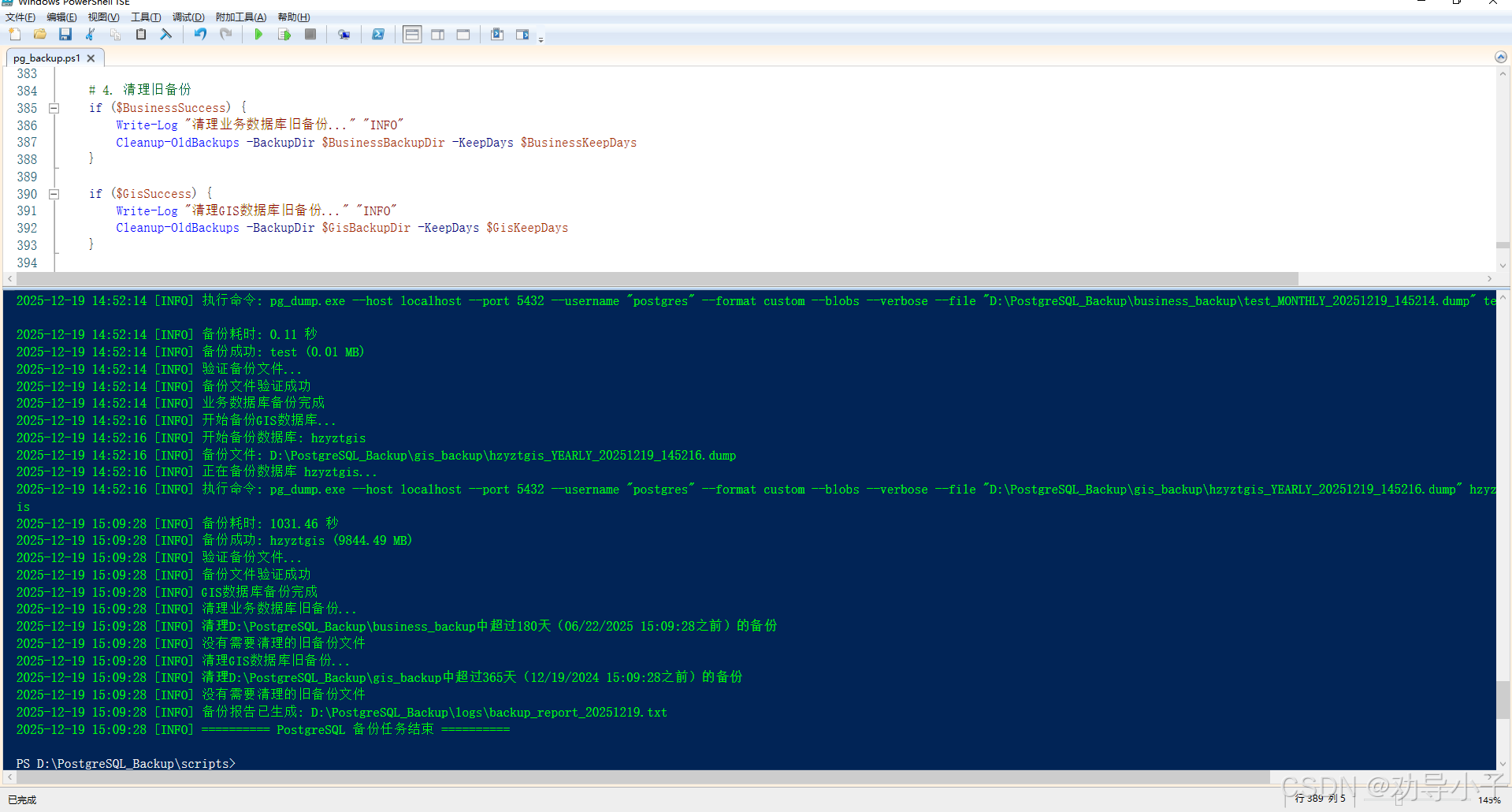
执行成功后会在对应的目录生成.dump文件
1.4 测试恢复数据
-h+主机名
-U+用户名
-d+数据库名
#恢复数据命令
pg_restore.exe -hlocalhost -Upostgres -dtest -v "D:\PostgreSQL_Backup\business_backup\test_MONTHLY_20251219_144757.dump"
1.4.1 把hzyztgis数据库删除
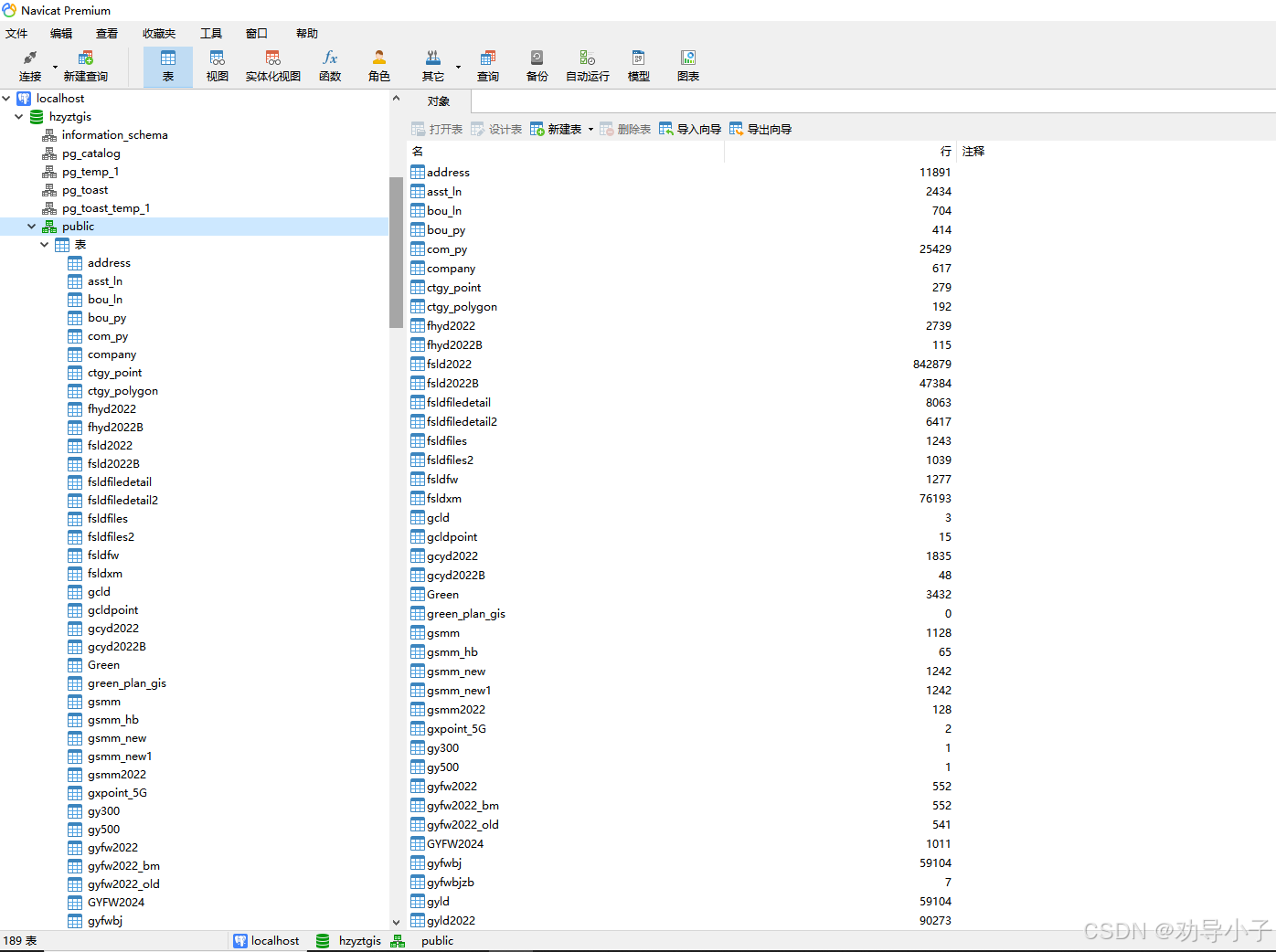
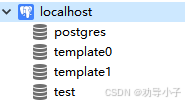
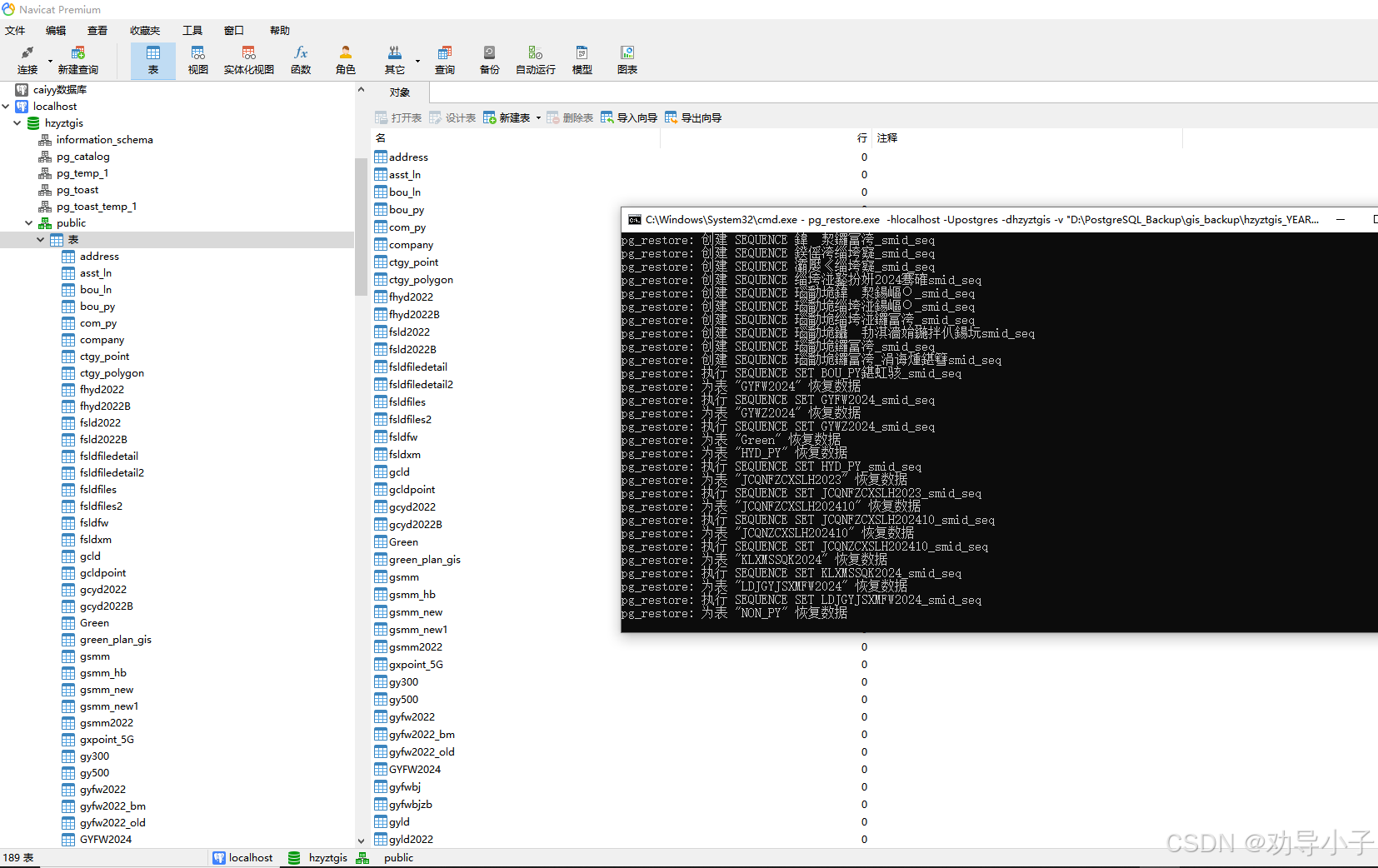
1.4.2 开始执行命令恢复数据
如果出现下面报错,则先去数据库中创建hzyztgis数据库
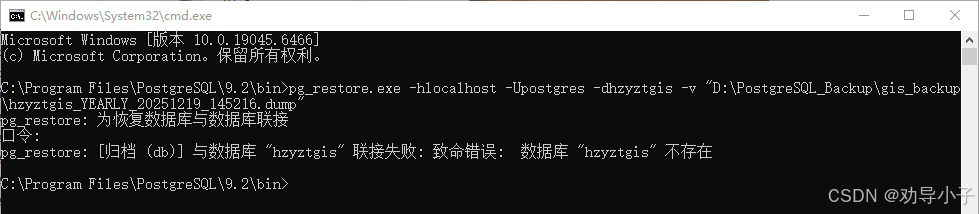
再次执行命令,等待执行完成即可!
2. 备份pg数据共享到另一台服务器Linux中
2.1 在windows中安装ssh命令(如果已安装请忽略)
https://github.com/PowerShell/Win32-OpenSSH/releases
2.2 在windows中创建密钥
# 生成密钥对
ssh-keygen -t rsa -b 4096
# 或使用 ed25519(更安全)
ssh-keygen -t ed25519
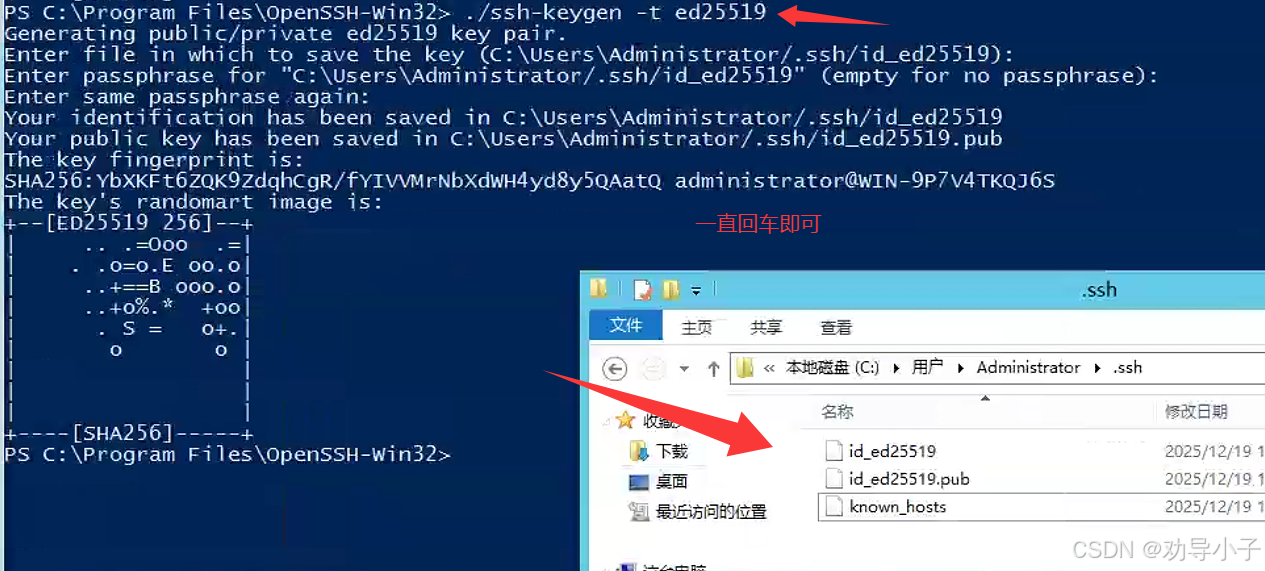
2.3 密钥上传Linux
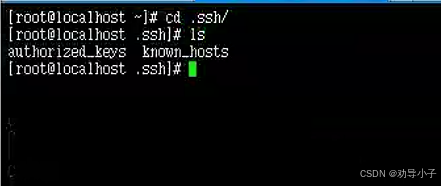
# 1. 创建 .ssh 目录(如不存在)
mkdir -p ~/.ssh
chmod 700 ~/.ssh

# 2. 从 Windows 获取公钥
# 方法A:如果可以直接复制
# 复制 C:\Users\[用户名]\.ssh\id_ed25519.pub 内容

# 方法B:从 Windows 上传公钥
# 在 Windows PowerShell 中:
scp C:\Users\[用户名]\.ssh\id_ed25519.pub user@linux_ip:~/

# 3. 在 Linux 上添加公钥到授权文件
cat ~/id_ed25519.pub >> ~/.ssh/authorized_keys
chmod 600 ~/.ssh/authorized_keys

# 4. 确保 SSH 服务配置允许密钥登录
sudo vim /etc/ssh/sshd_config
PubkeyAuthentication yes
AuthorizedKeysFile .ssh/authorized_keys
PasswordAuthentication no  # 可选,禁用密码登录更安全
# 重启 SSH 服务
sudo systemctl restart sshd
2.4 在windows中测试免密登录
在windows即可连接

2.5 配置ssh连接脚本(transfer_config.ps1)
# 传输配置
$LinuxServer = "192.168.1.140"       # Linux服务器IP
$LinuxPort = "22"                     # SSH端口
$LinuxUser = "root"                   # Linux用户名
$LinuxBackupRoot = "/data/backups"   # Linux备份目录

# 传输设置
$GisRemotePath = "$LinuxBackupRoot/gis"      # Linux端GIS备份目录
$BusinessRemotePath = "$LinuxBackupRoot/business"  # Linux端业务备份目录
$LogRemotePath = "$LinuxBackupRoot/logs"     # Linux端日志目录

# 传输超时设置(秒)
$TransferTimeout = 1800  # 30分钟
$ConnectionTimeout = 30  # 30秒

# 不需要密钥路径,因为已经配置了免密登录
2.5 创建生成环境使用的备份主脚本(pg_backup_complete.ps1)
# PostgreSQL备份脚本(完整版)
# 作者:服务器运维专家
# 日期:$(Get-Date -Format "yyyy-MM-dd")
# 注意:需要以管理员权限运行

# ============ 配置区域 ============
# 基本配置
$BackupRoot = "D:\PostgreSQL_Backup"
$PostgresBin = "E:\postgresql\bin"
$PostgresHost = "192.168.1.140"
$PostgresPort = "5432"
$PostgresUser = "postgres"
$PostgresPassword = "password"

# 数据库配置
$GisDatabase = "gis_data"
$BusinessDatabase = "business_data"

# 备份目录配置
$GisBackupDir = "$BackupRoot\gis_backup"
$BusinessBackupDir = "$BackupRoot\business_backup"
$LogDir = "$BackupRoot\logs"
$ScriptDir = "$BackupRoot\scripts"
$ConfigDir = "$BackupRoot\config"

# 空间检查阈值(GB)
$MinFreeSpaceGB = 10

# 备份保留策略
$GisKeepDays = 365
$BusinessKeepDays = 180

# 备份频率控制文件
$LastBackupFile = "$ConfigDir\last_backup.json"

# Linux服务器传输配置
# 导入传输配置文件
$TransferConfigFile = "$ScriptDir\transfer_config.ps1"
if (Test-Path $TransferConfigFile) {
    . $TransferConfigFile
} else {
    # 默认配置
    $LinuxServer = "192.168.1.140"
    $LinuxUser = "root"
    $LinuxBackupRoot = "/data/backups"
    $GisRemotePath = "$LinuxBackupRoot/gis"
    $BusinessRemotePath = "$LinuxBackupRoot/business"
    $LogRemotePath = "$LinuxBackupRoot/logs"
    $TransferTimeout = 1800
    $ConnectionTimeout = 30
}

# 备份频率控制
$BusinessBackupDay = 1  # 每月1号执行业务数据备份
$GisBackupMonth = 1    # 1月
$GisBackupDay = 1      # 1月1号执行GIS数据备份
# ============ 配置结束 ============

# 创建必要目录
$Dirs = @($BackupRoot, $GisBackupDir, $BusinessBackupDir, $LogDir, $ScriptDir, $ConfigDir)
foreach ($dir in $Dirs) {
    if (!(Test-Path $dir)) {
        New-Item -ItemType Directory -Path $dir -Force | Out-Null
    }
}

# 日志函数
function Write-Log {
    param([string]$Message, [string]$Level = "INFO")

    $LogFile = "${LogDir}\pg_backup_$(Get-Date -Format 'yyyy-MM').log"
    $Timestamp = Get-Date -Format "yyyy-MM-dd HH:mm:ss"
    $LogMessage = "${Timestamp} [${Level}] ${Message}"

    Add-Content -Path $LogFile -Value $LogMessage -ErrorAction SilentlyContinue

    # 同时输出到控制台
    switch ($Level) {
        "ERROR" { Write-Host $LogMessage -ForegroundColor Red }
        "WARN"  { Write-Host $LogMessage -ForegroundColor Yellow }
        default { Write-Host $LogMessage -ForegroundColor Green }
    }
}

# 检查是否需要备份
function Should-Backup {
    param(
        [string]$BackupType,
        [string]$LastBackupFile
    )

    $CurrentDate = Get-Date
    $CurrentDay = $CurrentDate.Day
    $CurrentMonth = $CurrentDate.Month

    # 如果首次运行,返回true
    if (!(Test-Path $LastBackupFile)) {
        Write-Log "首次运行,执行$BackupType备份"
        return $true
    }

    try {
        $LastBackup = Get-Content $LastBackupFile | ConvertFrom-Json
    }
    catch {
        Write-Log "读取上次备份记录失败,将执行备份" "WARN"
        return $true
    }

    if ($BackupType -eq "BUSINESS") {
        # 业务数据:每月1号备份
        if ($CurrentDay -eq $BusinessBackupDay) {
            $LastBackupMonth = [datetime]$LastBackup.BusinessLastBackup
            if ($LastBackupMonth.Month -ne $CurrentMonth -or $LastBackupMonth.Year -ne $CurrentDate.Year) {
                Write-Log "到业务数据备份时间(每月$BusinessBackupDay号)"
                return $true
            } else {
                Write-Log "本月已备份过业务数据,跳过"
                return $false
            }
        } else {
            Write-Log "今天不是业务数据备份日(每月$BusinessBackupDay号),跳过"
            return $false
        }
    }
    elseif ($BackupType -eq "GIS") {
        # GIS数据:每年1月1号备份
        if ($CurrentMonth -eq $GisBackupMonth -and $CurrentDay -eq $GisBackupDay) {
            $LastBackupYear = [datetime]$LastBackup.GisLastBackup
            if ($LastBackupYear.Year -ne $CurrentDate.Year) {
                Write-Log "到GIS数据备份时间(每年$GisBackupMonth月$GisBackupDay号)"
                return $true
            } else {
                Write-Log "今年已备份过GIS数据,跳过"
                return $false
            }
        } else {
            Write-Log "今天不是GIS数据备份日(每年$GisBackupMonth月$GisBackupDay号),跳过"
            return $false
        }
    }

    # 显式返回false
    return $false
}

# 更新备份记录
function Update-BackupRecord {
    param(
        [string]$BackupType,
        [string]$LastBackupFile
    )

    $CurrentTime = Get-Date

    try {
        if (Test-Path $LastBackupFile) {
            $BackupRecord = Get-Content $LastBackupFile | ConvertFrom-Json
        } else {
            $BackupRecord = New-Object PSObject
        }

        if ($BackupType -eq "BUSINESS") {
            $BackupRecord | Add-Member -NotePropertyName "BusinessLastBackup" -NotePropertyValue $CurrentTime -Force
        } elseif ($BackupType -eq "GIS") {
            $BackupRecord | Add-Member -NotePropertyName "GisLastBackup" -NotePropertyValue $CurrentTime -Force
        }

        $BackupRecord | ConvertTo-Json | Out-File -FilePath $LastBackupFile -Encoding UTF8
        Write-Log "更新${BackupType}备份记录: $CurrentTime"
    }
    catch {
        Write-Log "更新备份记录失败: $_" "WARN"
    }
}

# 磁盘空间检查
function Test-DiskSpace {
    param([string]$Path)

    try {
        $Drive = Split-Path $Path -Qualifier
        if (!$Drive) {
            $Drive = (Get-Location).Drive.Name + ":"
        }

        Write-Log "检查驱动器: ${Drive}"

        $Disk = Get-WmiObject Win32_LogicalDisk -Filter "DeviceID='$Drive'"
        if ($Disk) {
            $FreeSpaceGB = [math]::Round($Disk.FreeSpace / 1GB, 2)
            $TotalSpaceGB = [math]::Round($Disk.Size / 1GB, 2)

            Write-Log "驱动器 ${Drive} 空间信息: 总计 ${TotalSpaceGB}GB, 可用 ${FreeSpaceGB}GB"

            if ($FreeSpaceGB -lt $MinFreeSpaceGB) {
                Write-Log "磁盘空间不足!需要 ${MinFreeSpaceGB}GB,当前仅剩 ${FreeSpaceGB}GB" "ERROR"
                return $false
            }
            Write-Log "磁盘空间检查通过"
            return $true
        }
        else {
            Write-Log "无法获取驱动器 ${Drive} 的信息" "ERROR"
            return $false
        }
    }
    catch {
        Write-Log "磁盘空间检查失败: $_" "WARN"
        Write-Log "磁盘空间检查失败,但继续执行备份" "WARN"
        return $true
    }
}

# 数据库连接测试
function Test-PostgresConnection {
    try {
        Write-Log "测试PostgreSQL连接..."

        if (!(Test-Path "${PostgresBin}\psql.exe")) {
            Write-Log "PostgreSQL客户端工具不存在: ${PostgresBin}\psql.exe" "ERROR"
            return $false
        }

        $env:PGPASSWORD = $PostgresPassword

        Write-Log "执行连接测试..."
        $TestResult = & "${PostgresBin}\psql.exe" --host $PostgresHost --port $PostgresPort --username $PostgresUser -l 2>&1
        $ExitCode = $LASTEXITCODE

        if ($ExitCode -eq 0) {
            Write-Log "PostgreSQL连接测试成功"
            return $true
        } else {
            Write-Log "PostgreSQL连接失败, 退出代码: ${ExitCode}" "ERROR"
            if ($TestResult) {
                $ErrorMsg = ($TestResult | Out-String).Trim()
                Write-Log "连接错误详情: $ErrorMsg" "ERROR"
            }
            return $false
        }
    }
    catch {
        Write-Log "连接测试异常: $_" "ERROR"
        return $false
    }
    finally {
        Remove-Item Env:\PGPASSWORD -ErrorAction SilentlyContinue
    }
}

# 备份数据库
function Backup-Database {
    param(
        [string]$Database,
        [string]$BackupDir,
        [string]$BackupType = "FULL"
    )

    $Timestamp = Get-Date -Format "yyyyMMdd"
    $BackupFile = "${BackupDir}\${Database}_${BackupType}_${Timestamp}.dump"
    $LogFile = "${BackupDir}\${Database}_${BackupType}_${Timestamp}.log"

    # 如果文件已存在,跳过备份
    if (Test-Path $BackupFile) {
        Write-Log "备份文件已存在: ${BackupFile},跳过备份"
        return $true
    }

    Write-Log "开始备份数据库: ${Database}"
    Write-Log "备份文件: ${BackupFile}"

    if (!(Test-Path "${PostgresBin}\pg_dump.exe")) {
        Write-Log "找不到pg_dump.exe: ${PostgresBin}\pg_dump.exe" "ERROR"
        return $false
    }

    if (!(Test-Path $BackupDir)) {
        New-Item -ItemType Directory -Path $BackupDir -Force
        Write-Log "创建备份目录: ${BackupDir}"
    }

    try {
        $env:PGPASSWORD = $PostgresPassword

        Write-Log "正在备份数据库 ${Database}..."

        $BackupCommand = "pg_dump.exe --host $PostgresHost --port $PostgresPort --username `"$PostgresUser`" --format custom --blobs --verbose --file `"$BackupFile`" $Database"
        Write-Log "执行命令: ${BackupCommand}"

        $StartTime = Get-Date
        & "${PostgresBin}\pg_dump.exe" --host $PostgresHost --port $PostgresPort --username $PostgresUser --format custom --blobs --verbose --file $BackupFile $Database 2>&1 | Tee-Object -FilePath $LogFile
        $ExitCode = $LASTEXITCODE
        $EndTime = Get-Date
        $Duration = [math]::Round(($EndTime - $StartTime).TotalSeconds, 2)

        Write-Log "备份耗时: ${Duration} 秒"

        if ($ExitCode -eq 0) {
            if (Test-Path $BackupFile) {
                $FileSizeMB = [math]::Round((Get-Item $BackupFile).Length / 1MB, 2)
                Write-Log "备份成功: ${Database} (${FileSizeMB} MB)"
                return $true
            } else {
                Write-Log "备份文件未创建: ${BackupFile}" "ERROR"
                return $false
            }
        }
        else {
            Write-Log "备份失败: ${Database}, 退出代码: ${ExitCode}" "ERROR"
            return $false
        }
    }
    catch {
        Write-Log "备份过程中出错: $_" "ERROR"
        return $false
    }
    finally {
        Remove-Item Env:\PGPASSWORD -ErrorAction SilentlyContinue
    }
}

# 传输备份文件到Linux服务器
function Transfer-ToLinux {
    param(
        [string]$LocalPath,
        [string]$RemotePath,
        [string]$BackupType
    )

    $FileName = Split-Path $LocalPath -Leaf
    $RemoteFile = "${RemotePath}/${FileName}"

    Write-Log "开始传输${BackupType}备份到Linux服务器: $LinuxServer"

    try {
        $SSHPath = "C:\Program Files\OpenSSH-Win32\ssh.exe"
        $SCPPath = "C:\Program Files\OpenSSH-Win32\scp.exe"

        if (!(Test-Path $SSHPath) -or !(Test-Path $SCPPath)) {
            Write-Log "找不到OpenSSH客户端工具" "ERROR"
            return $false
        }

        # 测试SSH连接
        Write-Log "测试SSH连接到 $LinuxServer..."
        $TestResult = & $SSHPath -o ConnectTimeout=$ConnectionTimeout -o StrictHostKeyChecking=no ${LinuxUser}@${LinuxServer} "echo 'SSH连接测试成功'" 2>&1
        $ExitCode = $LASTEXITCODE

        if ($ExitCode -ne 0) {
            Write-Log "SSH连接测试失败: $TestResult" "ERROR"
            return $false
        }

        Write-Log "SSH连接测试成功"

        # 创建远程目录
        Write-Log "在Linux服务器创建目录: $RemotePath"
        $CreateDirResult = & $SSHPath -o ConnectTimeout=$ConnectionTimeout ${LinuxUser}@${LinuxServer} "mkdir -p $RemotePath && chmod 750 $RemotePath" 2>&1

        if ($LASTEXITCODE -ne 0) {
            Write-Log "创建远程目录失败: $CreateDirResult" "WARN"
        }

        # 传输文件
        Write-Log "开始传输文件: $FileName"

        $StartTime = Get-Date
        $TransferResult = & $SCPPath -o ConnectTimeout=$ConnectionTimeout $LocalPath ${LinuxUser}@${LinuxServer}:${RemoteFile} 2>&1
        $ExitCode = $LASTEXITCODE
        $EndTime = Get-Date
        $Duration = [math]::Round(($EndTime - $StartTime).TotalSeconds, 2)

        if ($ExitCode -eq 0) {
            $FileSizeMB = [math]::Round((Get-Item $LocalPath).Length / 1MB, 2)
            Write-Log "传输成功: ${FileName} (${FileSizeMB} MB, 耗时: ${Duration}秒)"
            return $true
        } else {
            Write-Log "传输失败: $TransferResult" "ERROR"
            return $false
        }
    }
    catch {
        Write-Log "传输过程中出错: $_" "ERROR"
        return $false
    }
}

# 清理旧备份
function Cleanup-OldBackups {
    param(
        [string]$BackupDir,
        [int]$KeepDays
    )

    try {
        $CutoffDate = (Get-Date).AddDays(-$KeepDays)
        Write-Log "清理${BackupDir}中超过${KeepDays}天(${CutoffDate}之前)的备份"

        if (!(Test-Path $BackupDir)) {
            Write-Log "备份目录不存在: ${BackupDir}" "WARN"
            return
        }

        $BackupFiles = Get-ChildItem -Path $BackupDir -Filter "*.dump" -File -ErrorAction SilentlyContinue

        if (!$BackupFiles) {
            Write-Log "没有找到备份文件" "INFO"
            return
        }

        $DeletedCount = 0
        foreach ($File in $BackupFiles) {
            if ($File.LastWriteTime -lt $CutoffDate) {
                Write-Log "删除旧备份: $($File.Name) (创建于: $($File.LastWriteTime))"
                try {
                    Remove-Item $File.FullName -Force
                    $DeletedCount++

                    $LogFile = $File.FullName -replace '\.dump$', '.log'
                    if (Test-Path $LogFile) {
                        Remove-Item $LogFile -Force
                    }
                }
                catch {
                    Write-Log "删除文件失败: $($File.FullName) - $_" "ERROR"
                }
            }
        }

        if ($DeletedCount -gt 0) {
            Write-Log "清理完成: 删除了 ${DeletedCount} 个旧备份文件"
        } else {
            Write-Log "没有需要清理的旧备份文件" "INFO"
        }
    }
    catch {
        Write-Log "清理旧备份失败: $_" "ERROR"
    }
}

# 删除已传输的本地备份
function Cleanup-TransferredBackups {
    param(
        [string]$LocalPath,
        [string]$RemotePath
    )

    $FileName = Split-Path $LocalPath -Leaf
    $RemoteFile = "${RemotePath}/${FileName}"

    try {
        $SSHPath = "C:\Program Files\OpenSSH-Win32\ssh.exe"
        $CheckResult = & $SSHPath -o ConnectTimeout=10 ${LinuxUser}@${LinuxServer} "test -f $RemoteFile && echo 'exists'" 2>&1

        if ($CheckResult -contains "exists") {
            Write-Log "远程文件验证存在,删除本地备份: $FileName"
            Remove-Item $LocalPath -Force -ErrorAction SilentlyContinue

            $LogFile = $LocalPath -replace '\.dump$', '.log'
            if (Test-Path $LogFile) {
                Remove-Item $LogFile -Force -ErrorAction SilentlyContinue
            }

            Write-Log "本地备份已删除: $FileName"
            return $true
        } else {
            Write-Log "远程文件不存在,保留本地备份: $FileName" "WARN"
            return $false
        }
    }
    catch {
        Write-Log "清理本地备份失败: $_" "ERROR"
        return $false
    }
}

# 生成备份报告
function Generate-BackupReport {
    param(
        [bool]$BusinessSuccess,
        [bool]$GisSuccess,
        [bool]$BusinessTransferred,
        [bool]$GisTransferred
    )

    $ReportFile = "${LogDir}\backup_report_$(Get-Date -Format 'yyyyMMdd').txt"

    $Report = @"
===========================================
PostgreSQL 备份报告
===========================================
备份时间: $(Get-Date -Format "yyyy-MM-dd HH:mm:ss")
备份类型: 定时备份
===========================================
业务数据备份: $(if ($BusinessSuccess) { "✓ 成功" } else { "✗ 失败" })
GIS数据备份: $(if ($GisSuccess) { "✓ 成功" } else { "✗ 失败" })
业务数据传输: $(if ($BusinessTransferred) { "✓ 成功" } else { "✗ 失败" })
GIS数据传输: $(if ($GisTransferred) { "✓ 成功" } else { "✗ 失败" })
===========================================
备份目录:
本地GIS备份: $GisBackupDir
本地业务备份: $BusinessBackupDir
远程GIS备份: $GisRemotePath
远程业务备份: $BusinessRemotePath
===========================================
"@

    $Report | Out-File -FilePath $ReportFile -Encoding UTF8
    Write-Log "备份报告已生成: ${ReportFile}"
}

# 主程序
function Main {
    Write-Log "========== PostgreSQL 定时备份任务开始 =========="
    Write-Log "服务器: ${PostgresHost}:${PostgresPort}"
    Write-Log "当前时间: $(Get-Date -Format 'yyyy-MM-dd HH:mm:ss')"

    # 1. 检查磁盘空间
    if (!(Test-DiskSpace -Path $BackupRoot)) {
        Write-Log "磁盘空间检查失败或不足,跳过本次备份" "ERROR"
        return
    }

    # 2. 测试数据库连接
    if (!(Test-PostgresConnection)) {
        Write-Log "数据库连接失败,跳过备份" "ERROR"
        return
    }

    # 初始化变量
    [bool]$BusinessSuccess = $false
    [bool]$BusinessTransfer = $false
    [bool]$GisSuccess = $false
    [bool]$GisTransfer = $false

    # 3. 备份业务数据库
    $shouldBusiness = Should-Backup -BackupType "BUSINESS" -LastBackupFile $LastBackupFile
    Write-Log "检查业务数据库备份: $shouldBusiness"

    if ($shouldBusiness) {
        Write-Log "执行业务数据库备份..."
        $BusinessSuccess = Backup-Database -Database $BusinessDatabase -BackupDir $BusinessBackupDir -BackupType "BUSINESS"

        if ($BusinessSuccess) {
            Write-Log "业务数据库备份完成" "INFO"

            # 获取最新的备份文件
            $BusinessFiles = @(Get-ChildItem -Path $BusinessBackupDir -Filter "*BUSINESS_*.dump" -ErrorAction SilentlyContinue)
            Write-Log "找到业务备份文件数: $($BusinessFiles.Count)"

            if ($BusinessFiles.Count -gt 0) {
                $BusinessFile = $BusinessFiles | Sort-Object LastWriteTime -Descending | Select-Object -First 1

                # 传输到Linux
                Write-Log "开始传输业务数据库备份..."
                $BusinessTransfer = Transfer-ToLinux -LocalPath $BusinessFile.FullName -RemotePath $BusinessRemotePath -BackupType "业务数据"

                if ($BusinessTransfer) {
                    Write-Log "业务数据库备份传输成功"

                    # 删除本地备份
                    if (Cleanup-TransferredBackups -LocalPath $BusinessFile.FullName -RemotePath $BusinessRemotePath) {
                        Write-Log "已删除本地业务数据库备份"
                    }
                } else {
                    Write-Log "业务数据库备份传输失败" "ERROR"
                }
            } else {
                Write-Log "未找到业务数据库备份文件" "WARN"
            }

            Update-BackupRecord -BackupType "BUSINESS" -LastBackupFile $LastBackupFile
        } else {
            Write-Log "业务数据库备份失败" "ERROR"
        }
    } else {
        Write-Log "跳过业务数据库备份(未到备份时间)" "INFO"
    }

    # 4. 备份GIS数据库
    $shouldGis = Should-Backup -BackupType "GIS" -LastBackupFile $LastBackupFile
    Write-Log "检查GIS数据库备份: $shouldGis"

    if ($shouldGis) {
        Write-Log "执行GIS数据库备份..."
        $GisSuccess = Backup-Database -Database $GisDatabase -BackupDir $GisBackupDir -BackupType "GIS"

        if ($GisSuccess) {
            Write-Log "GIS数据库备份完成" "INFO"

            # 获取最新的备份文件
            $GisFiles = @(Get-ChildItem -Path $GisBackupDir -Filter "*GIS_*.dump" -ErrorAction SilentlyContinue)
            Write-Log "找到GIS备份文件数: $($GisFiles.Count)"

            if ($GisFiles.Count -gt 0) {
                $GisFile = $GisFiles | Sort-Object LastWriteTime -Descending | Select-Object -First 1

                # 传输到Linux
                Write-Log "开始传输GIS数据库备份..."
                $GisTransfer = Transfer-ToLinux -LocalPath $GisFile.FullName -RemotePath $GisRemotePath -BackupType "GIS数据"

                if ($GisTransfer) {
                    Write-Log "GIS数据库备份传输成功"

                    # 删除本地备份
                    if (Cleanup-TransferredBackups -LocalPath $GisFile.FullName -RemotePath $GisRemotePath) {
                        Write-Log "已删除本地GIS数据库备份"
                    }
                } else {
                    Write-Log "GIS数据库备份传输失败" "ERROR"
                }
            } else {
                Write-Log "未找到GIS数据库备份文件" "WARN"
            }

            Update-BackupRecord -BackupType "GIS" -LastBackupFile $LastBackupFile
        } else {
            Write-Log "GIS数据库备份失败" "ERROR"
        }
    } else {
        Write-Log "跳过GIS数据库备份(未到备份时间)" "INFO"
    }

    # 5. 清理旧备份
    Write-Log "清理旧备份文件..."
    Cleanup-OldBackups -BackupDir $BusinessBackupDir -KeepDays $BusinessKeepDays
    Cleanup-OldBackups -BackupDir $GisBackupDir -KeepDays $GisKeepDays

    # 6. 生成报告
    Write-Log "生成备份报告..."
    Write-Log "业务备份结果: $BusinessSuccess (类型: $($BusinessSuccess.GetType()))"
    Write-Log "GIS备份结果: $GisSuccess (类型: $($GisSuccess.GetType()))"

    Generate-BackupReport -BusinessSuccess $BusinessSuccess -GisSuccess $GisSuccess -BusinessTransferred $BusinessTransfer -GisTransferred $GisTransfer

    Write-Log "========== PostgreSQL 定时备份任务结束 =========="
}

# 执行主程序
try {
    Main
}
catch {
    Write-Log "备份程序发生未预期错误: $_" "ERROR"
    exit 1
}
2.6 创建Windows任务计划脚本(create_task.ps1)
# 创建Windows计划任务
# 以管理员权限运行

$ScriptPath = "D:\PostgreSQL_Backup\scripts\pg_backup_complete.ps1"
$TaskName = "PostgreSQL定时备份任务"
$TaskDescription = "自动备份PostgreSQL数据库并传输到Linux服务器"

# PowerShell执行策略
Set-ExecutionPolicy RemoteSigned -Scope Process -Force

# 创建计划任务
$Action = New-ScheduledTaskAction -Execute "PowerShell.exe" -Argument "-NoProfile -ExecutionPolicy Bypass -File `"$ScriptPath`""
$Trigger1 = New-ScheduledTaskTrigger -Daily -At "02:00"  # 每天凌晨2点执行
$Trigger2 = New-ScheduledTaskTrigger -AtStartup  # 开机启动
$Settings = New-ScheduledTaskSettingsSet -StartWhenAvailable -DontStopIfGoingOnBatteries -AllowStartIfOnBatteries
$Principal = New-ScheduledTaskPrincipal -UserId "SYSTEM" -LogonType ServiceAccount -RunLevel Highest

# 创建或更新任务
Register-ScheduledTask -TaskName $TaskName -Description $TaskDescription `
    -Action $Action -Trigger $Trigger1, $Trigger2 -Settings $Settings -Principal $Principal -Force

Write-Host "计划任务创建成功!" -ForegroundColor Green
Write-Host "任务名称: $TaskName"
Write-Host "执行时间: 每天凌晨2:00"
Write-Host "执行脚本: $ScriptPath"

# 立即测试运行
$RunNow = Read-Host "是否立即运行一次测试? (Y/N)"
if ($RunNow -eq "Y" -or $RunNow -eq "y") {
    Write-Host "开始测试运行..." -ForegroundColor Yellow
    & PowerShell.exe -NoProfile -ExecutionPolicy Bypass -File $ScriptPath
}
2.7 Linux服务器配置脚本 setup_linux_backup.sh
#!/bin/bash
# Linux服务器备份目录设置脚本
# 在Linux服务器上执行

# 配置
BACKUP_ROOT="/data/backups"
GIS_DIR="${BACKUP_ROOT}/gis"
BUSINESS_DIR="${BACKUP_ROOT}/business"
LOGS_DIR="${BACKUP_ROOT}/logs"

# 创建目录
echo "创建备份目录..."
mkdir -p ${GIS_DIR}
mkdir -p ${BUSINESS_DIR}
mkdir -p ${LOGS_DIR}

# 设置权限
chmod 755 ${BACKUP_ROOT}
chmod 750 ${GIS_DIR} ${BUSINESS_DIR} ${LOGS_DIR}
chown root:root ${BACKUP_ROOT}

# 创建清理脚本
cat > /usr/local/bin/cleanup_backups.sh << 'EOF'
#!/bin/bash
# 清理旧备份文件
# 保留策略: GIS数据2年,业务数据1年

GIS_DIR="/data/backups/gis"
BUSINESS_DIR="/data/backups/business"
LOGS_DIR="/data/backups/logs"

# 清理GIS备份(保留2年)
find ${GIS_DIR} -name "*.dump" -type f -mtime +730 -delete
find ${GIS_DIR} -name "*.log" -type f -mtime +730 -delete

# 清理业务备份(保留1年)
find ${BUSINESS_DIR} -name "*.dump" -type f -mtime +365 -delete
find ${BUSINESS_DIR} -name "*.log" -type f -mtime +365 -delete

# 清理旧日志(保留6个月)
find ${LOGS_DIR} -name "*.log" -type f -mtime +180 -delete

echo "$(date '+%Y-%m-%d %H:%M:%S') 备份清理完成"
EOF

chmod +x /usr/local/bin/cleanup_backups.sh

# 添加到crontab
(crontab -l 2>/dev/null; echo "0 3 * * * /usr/local/bin/cleanup_backups.sh >> /var/log/backup_cleanup.log 2>&1") | crontab -

# 检查磁盘空间
echo "检查磁盘空间..."
df -h ${BACKUP_ROOT}

echo "Linux服务器备份目录设置完成!"
echo "备份目录: ${BACKUP_ROOT}"
echo "GIS备份: ${GIS_DIR}"
echo "业务备份: ${BUSINESS_DIR}"
echo "日志目录: ${LOGS_DIR}"
待完善···

腾讯云面向开发者汇聚海量精品云计算使用和开发经验,营造开放的云计算技术生态圈。
更多推荐
 24
24 0
0- 0


 已为社区贡献10条内容

所有评论(0)