openvas入门docker安装大坑
https://forum.greenbone.net/t/missing-socket-file-possibly-after-latest-system-change/18213/5 https://forum.greenbone.net/t/missing-socket-file-possibly-after-latest-system-change/18213/5执行两次扫描后,就发现再执行新扫描时,系统没用反应了,cpu占用了0%~1%
日志报错:
pluginlaunch_wait_for_free_process. Number of running processes >= maximum running processes (1 >= 1). Waiting for free slot for processes.
官方论坛上,老哥说用源码安装就不再出现类似问题了。
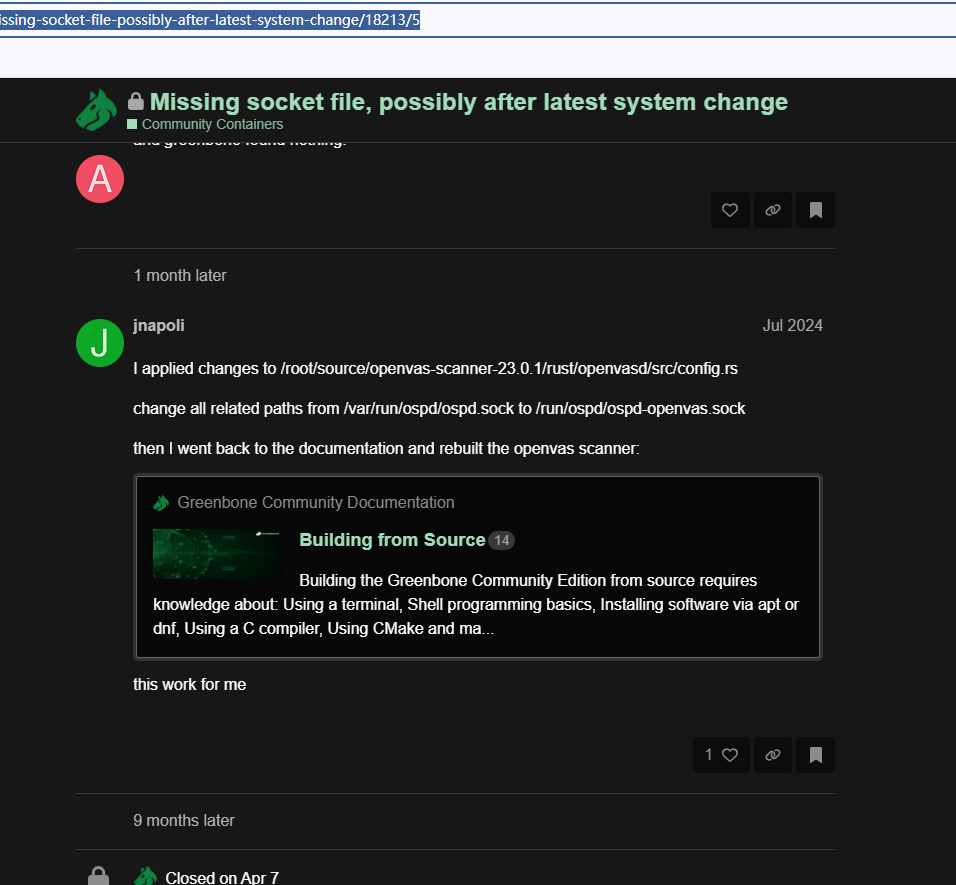
于是,我就按照官网的源码安装教程安装了,结果遇到另一个坑:
openvas@openvas:~$ sudo tail -20 /var/log/gvm/gvmd.log
md manage:   INFO:2025-12-24 04h32.54 utc:619418: osp_scanner_feed_version: No feed version available yet. OSPd OpenVAS is still starting
md manage:   INFO:2025-12-24 04h33.04 utc:619482: osp_scanner_feed_version: No feed version available yet. OSPd OpenVAS is still starting
md manage:   INFO:2025-12-24 04h33.14 utc:619539: osp_scanner_feed_version: No feed version available yet. OSPd OpenVAS is still starting
md manage:   INFO:2025-12-24 04h33.24 utc:619603: osp_scanner_feed_version: No feed version available yet. OSPd OpenVAS is still starting
md manage:   INFO:2025-12-24 04h33.34 utc:619666: osp_scanner_feed_version: No feed version available yet. OSPd OpenVAS is still starting
md manage:   INFO:2025-12-24 04h33.44 utc:619730: osp_scanner_feed_version: No feed version available yet. OSPd OpenVAS is still starting
md manage:   INFO:2025-12-24 04h33.54 utc:619793: osp_scanner_feed_version: No feed version available yet. OSPd OpenVAS is still starting
md manage:   INFO:2025-12-24 04h34.04 utc:619857: osp_scanner_feed_version: No feed version available yet. OSPd OpenVAS is still starting
md   main:MESSAGE:2025-12-24 08h28.00 utc:704068:    Greenbone Vulnerability Manager version 26.0.0 (DB revision 259)
md manage:   INFO:2025-12-24 08h28.00 utc:704068:    Rebuilding SCAP data
md manage:WARNING:2025-12-24 08h28.10 utc:704068: update_scap: Full rebuild requested, resetting SCAP db
md manage:   INFO:2025-12-24 08h28.14 utc:704068: update_scap: Updating data from feed
md manage:   INFO:2025-12-24 08h28.14 utc:704068: Updating CPEs
md manage:   INFO:2025-12-24 08h28.14 utc:704068: Updating /var/lib/gvm/scap-data/nvd-cpes.json.gz
md manage:WARNING:2025-12-24 08h28.47 utc:704068: handle_json_cpe_item: 'deprecatedBy' array is empty
md manage:   INFO:2025-12-24 08h28.49 utc:704068: Updating Max CVSS for DFN-CERT
md manage:   INFO:2025-12-24 08h28.52 utc:704068: Updating DFN-CERT CVSS max succeeded.
md manage:   INFO:2025-12-24 08h28.52 utc:704068: Updating Max CVSS for CERT-Bund
md manage:   INFO:2025-12-24 08h28.53 utc:704068: Updating CERT-Bund CVSS max succeeded.
md manage:   INFO:2025-12-24 08h28.53 utc:704068: abort_scap_update: Updating SCAP data aborted
关键错误点:
-
handle_json_cpe_item: 'deprecatedBy' array is empty- 处理 CPE 数据时遇到问题 -
abort_scap_update: Updating SCAP data aborted- SCAP 更新被中止
这是Greenbone Vulnerability Manager(gvm) 26.0.0 的bug:
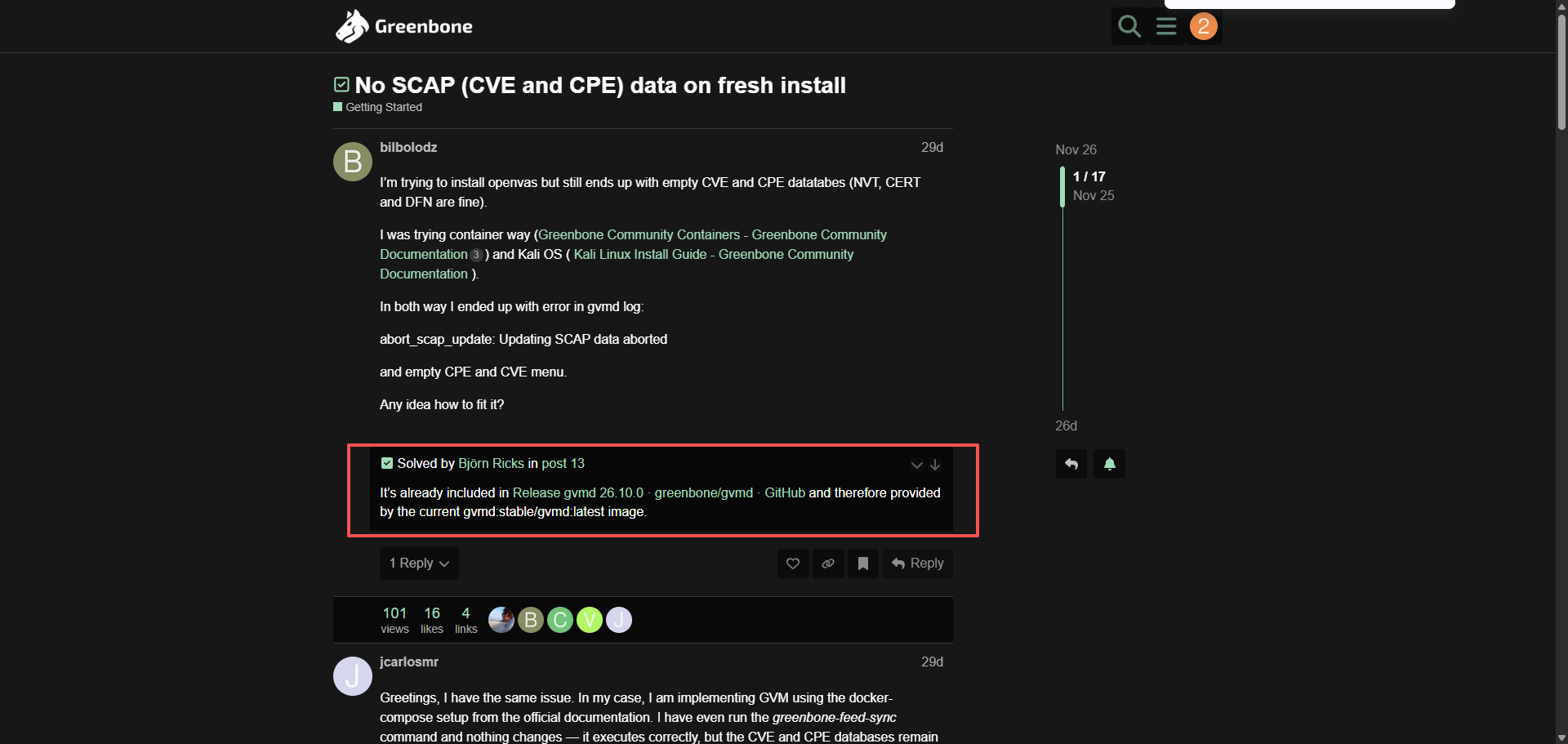
需要手动源码安装26.10.0版本解决
安装方法如下:
令人费解的是,本来就是按照官网源码按照教程安装的,结果安装教程里的源码还不是最新版本。
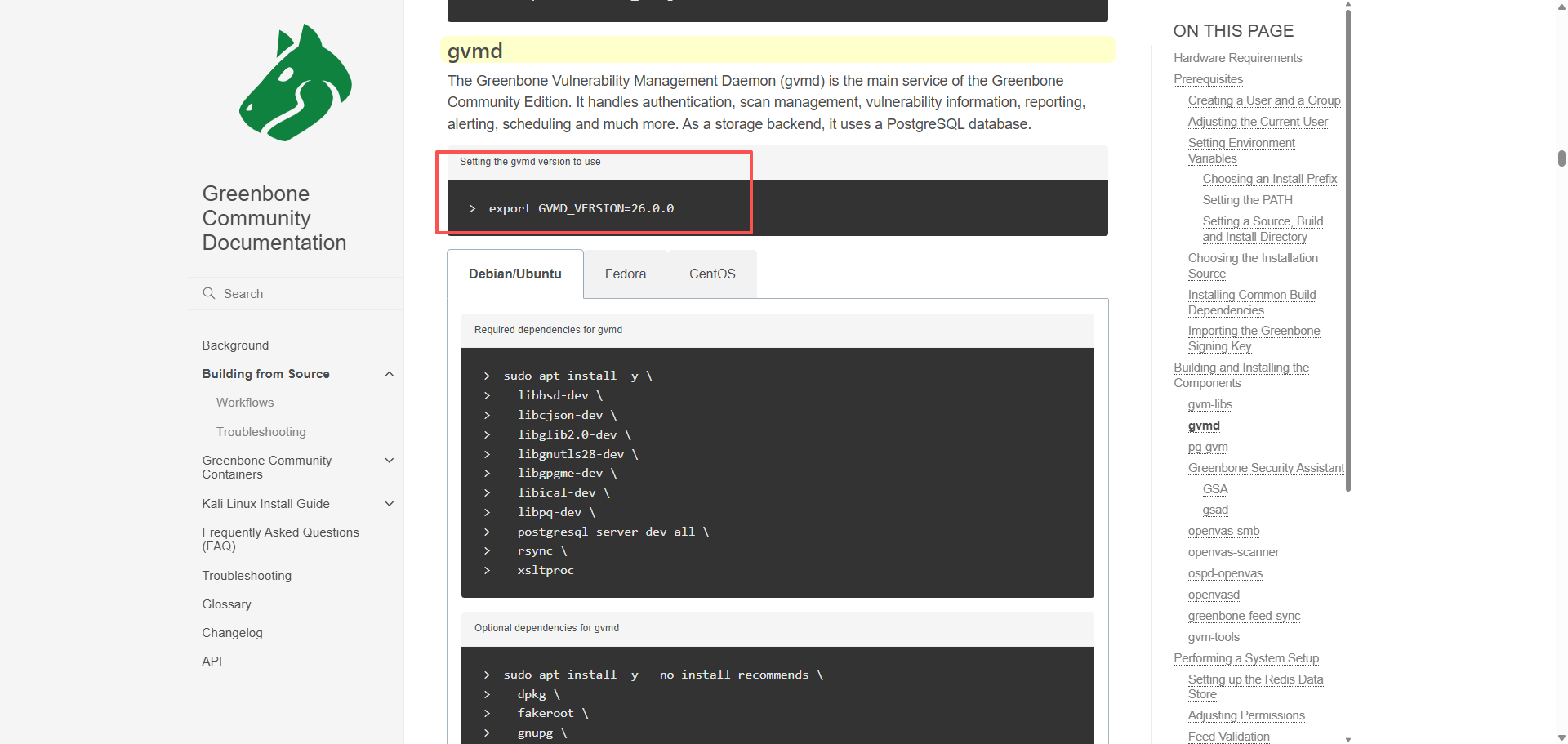
安装gvmd 26.10.0时,提示需要依赖libgvm_base >= 22.30
openvas@openvas:~$ cmake \
  -S $SOURCE_DIR/gvmd-$GVMD_VERSION \
  -B $BUILD_DIR/gvmd \
  -DCMAKE_INSTALL_PREFIX=$INSTALL_PREFIX \
  -DCMAKE_BUILD_TYPE=Release \
  -DLOCALSTATEDIR=/var \
  -DSYSCONFDIR=/etc \
  -DGVM_DATA_DIR=/var \
  -DGVM_LOG_DIR=/var/log/gvm \
  -DGVMD_RUN_DIR=/run/gvmd \
  -DOPENVAS_DEFAULT_SOCKET=/run/ospd/ospd-openvas.sock \
  -DGVM_FEED_LOCK_PATH=/var/lib/gvm/feed-update.lock \
  -DLOGROTATE_DIR=/etc/logrotate.d
CMake Error: The source "/home/openvas/source/gvmd-26.10.0/CMakeLists.txt" does not match the source "/home/openvas/source/gvmd-26.0.0/CMakeLists.txt" used to generate cache.  Re-run cmake with a different source directory.
openvas@openvas:~$ mkdir -p $BUILD_DIR/gvmd
openvas@openvas:~$ cmake   -S $SOURCE_DIR/gvmd-$GVMD_VERSION   -B $BUILD_DIR/gvmd   -DCMAKE_INSTALL_PREFIX=$INSTALL_PREFIX   -DCMAKE_BUILD_TYPE=Release   -DLOCALSTATEDIR=/var   -DSYSCONFDIR=/etc   -DGVM_DATA_DIR=/var   -DGVM_LOG_DIR=/var/log/gvm   -DGVMD_RUN_DIR=/run/gvmd   -DOPENVAS_DEFAULT_SOCKET=/run/ospd/ospd-openvas.sock   -DGVM_FEED_LOCK_PATH=/var/lib/gvm/feed-update.lock   -DLOGROTATE_DIR=/etc/logrotate.d
-- Configuring Greenbone Vulnerability Manager...
-- The C compiler identification is GNU 13.3.0
-- Detecting C compiler ABI info
-- Detecting C compiler ABI info - done
-- Check for working C compiler: /usr/bin/cc - skipped
-- Detecting C compile features
-- Detecting C compile features - done
-- Found PkgConfig: /usr/bin/pkg-config (found version "1.8.1")
-- Could NOT find Git (missing: GIT_EXECUTABLE)
-- Looking for clang-format...
-- clang-format not found.
-- Install prefix: /usr/local
-- Log file: /var/log/gvm/gvmd.log
-- Performing Test CMAKE_HAVE_LIBC_PTHREAD
-- Performing Test CMAKE_HAVE_LIBC_PTHREAD - Success
-- Found Threads: TRUE
-- Checking for module 'libcjson>=1.7.14'
--   Found libcjson, version 1.7.17
-- Checking for module 'libgvm_base>=22.30'
--   Package dependency requirement 'libgvm_base >= 22.30' could not be satisfied.
Package 'libgvm_base' has version '22.22.0', required version is '>= 22.30'
CMake Error at /usr/share/cmake-3.28/Modules/FindPkgConfig.cmake:619 (message):
  The following required packages were not found:

   - libgvm_base>=22.30

Call Stack (most recent call first):
  /usr/share/cmake-3.28/Modules/FindPkgConfig.cmake:841 (_pkg_check_modules_internal)
  src/CMakeLists.txt:30 (pkg_check_modules)


-- Configuring incomplete, errors occurred!
而源码安装里的gvm-libs版本是22.22.0
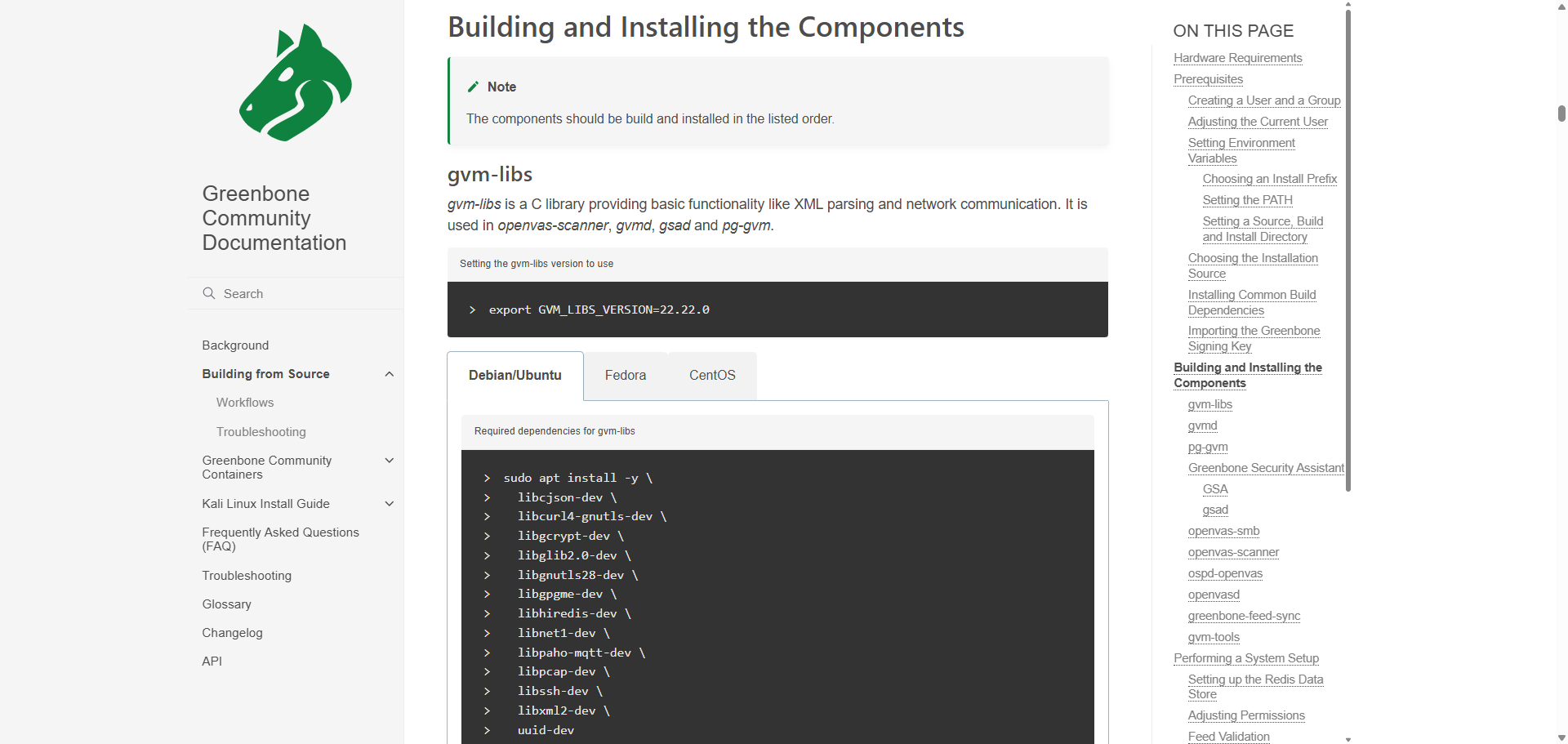
还得先升级gvm-libs,20225年12月的gvm-libs最新版本是gvm-libs 22.34.1
升级完gvm-libs和gvmd,发现pg-gvm数据库也需要升级
openvas@openvas:~/build/gvmd$ sudo gvmd --migrate
openvas@openvas:~/build/gvmd$ sudo -u gvm gvmd --rebuild-scap --verbose 2>&1 | tee /tmp/scap_rebuild.log
Database is wrong version.
Your database is too old for this version of gvmd.
Please migrate to the current data model.
Use a command like this: gvmd --migrate
Failed to rebuild SCAP data.
安装指导中明确说了要安装pg-gvm
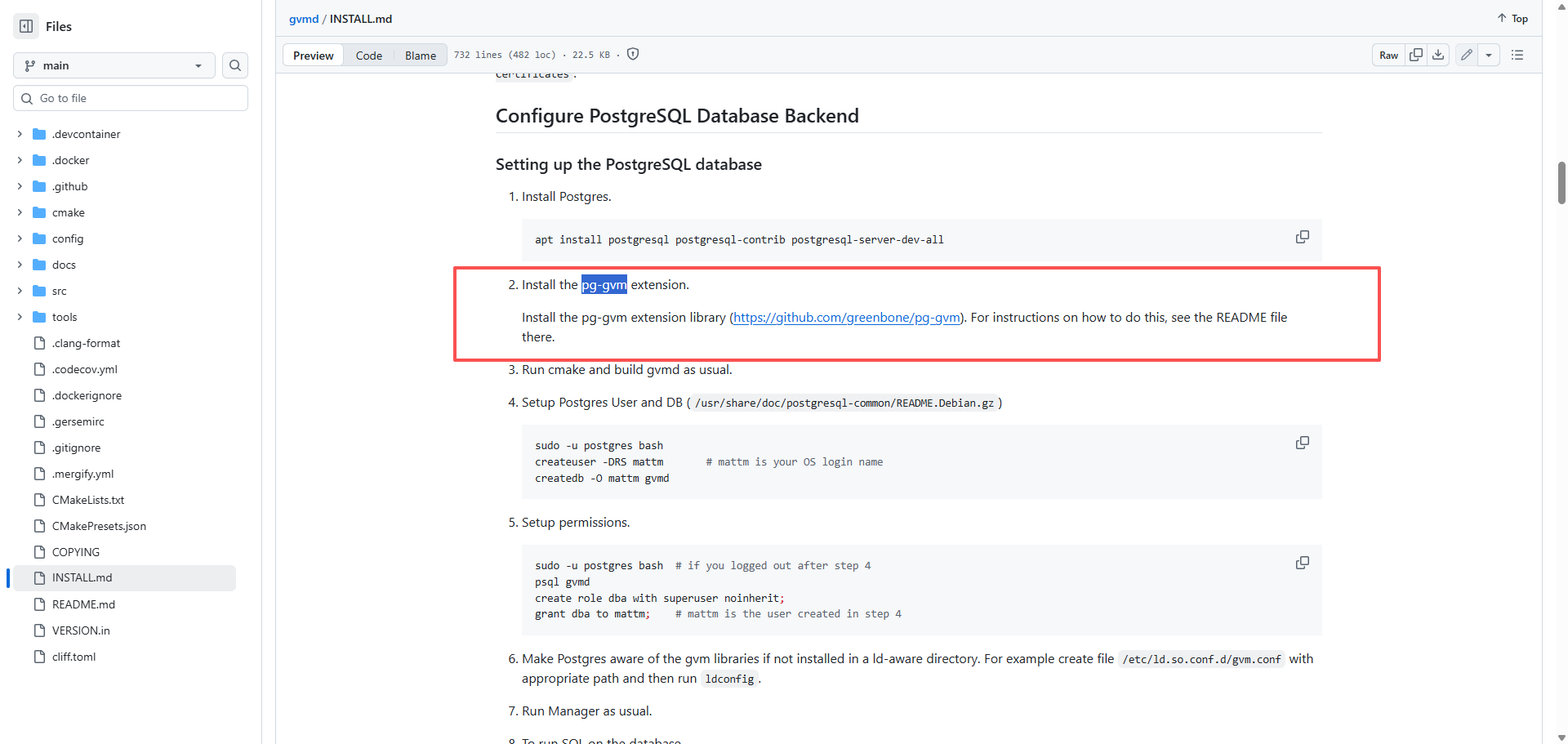
但是没有找到版本对应关系,虽然后来找到了,但是源码安装太麻烦了,改用Kali Linux系统安装,kali是漏洞检测专用系统。
先下载iso镜像
Get Kali | Kali Linuxhttps://www.kali.org/get-kali/#kali-installer-images用ventoy启动引导安装Kali Linux系统,图形化安装教程如下:
Installing Kali Linux | Kali Linux Documentationhttps://www.kali.org/docs/installation/hard-disk-install/启动后再执行openvas安装命令:
https://greenbone.github.io/docs/latest/22.4/kali/index.htmlhttps://greenbone.github.io/docs/latest/22.4/kali/index.html这个过程比源码安装简单得多,但是也会遇到trouble:
The database was created using collation version 2.41, but the operating system provides version 2.42.
┌──(kali㉿kali)-[~]
└─$ sudo gvm-setup
This script is provided and maintained by Debian and Kali.
 If you find any issue in this script, please report it directly to Debian or Kali

[>] Starting PostgreSQL service

[>] Creating GVM's certificate files

[>] Creating PostgreSQL database
警告:  database "postgres" has a collation version mismatch
描述:  The database was created using collation version 2.41, but the operating system provides version 2.42.
提示:  Rebuild all objects in this database that use the default collation and run ALTER DATABASE postgres REFRESH COLLATION VERSION, or build PostgreSQL with the right library version.

[*] Creating database user
警告:  database "postgres" has a collation version mismatch
描述:  The database was created using collation version 2.41, but the operating system provides version 2.42.
提示:  Rebuild all objects in this database that use the default collation and run ALTER DATABASE postgres REFRESH COLLATION VERSION, or build PostgreSQL with the right library version.
警告:  database "postgres" has a collation version mismatch
描述:  The database was created using collation version 2.41, but the operating system provides version 2.42.
提示:  Rebuild all objects in this database that use the default collation and run ALTER DATABASE postgres REFRESH COLLATION VERSION, or build PostgreSQL with the right library version.

[*] Creating database
警告:  database "postgres" has a collation version mismatch
描述:  The database was created using collation version 2.41, but the operating system provides version 2.42.
提示:  Rebuild all objects in this database that use the default collation and run ALTER DATABASE postgres REFRESH COLLATION VERSION, or build PostgreSQL with the right library version.
createdb: 错误: 创建数据库失败: 错误:  template database "template1" has a collation version mismatch
描述:  The template database was created using collation version 2.41, but the operating system provides version 2.42.
提示:  Rebuild all objects in the template database that use the default collation and run ALTER DATABASE template1 REFRESH COLLATION VERSION, or build PostgreSQL with the right library version.
警告:  database "postgres" has a collation version mismatch
描述:  The database was created using collation version 2.41, but the operating system provides version 2.42.
提示:  Rebuild all objects in this database that use the default collation and run ALTER DATABASE postgres REFRESH COLLATION VERSION, or build PostgreSQL with the right library version.

[*] Creating permissions
psql: 错误: 连接到套接字"/var/run/postgresql/.s.PGSQL.5432"上的服务器失败:致命错误:  数据库 "gvmd" 不存在

[*] Applying permissions
psql: 错误: 连接到套接字"/var/run/postgresql/.s.PGSQL.5432"上的服务器失败:致命错误:  数据库 "gvmd" 不存在
psql: 错误: 连接到套接字"/var/run/postgresql/.s.PGSQL.5432"上的服务器失败:致命错误:  数据库 "gvmd" 不存在

[*] Creating extension uuid-ossp
psql: 错误: 连接到套接字"/var/run/postgresql/.s.PGSQL.5432"上的服务器失败:致命错误:  数据库 "gvmd" 不存在
psql: 错误: 连接到套接字"/var/run/postgresql/.s.PGSQL.5432"上的服务器失败:致命错误:  数据库 "gvmd" 不存在

[*] Creating extension pgcrypto
psql: 错误: 连接到套接字"/var/run/postgresql/.s.PGSQL.5432"上的服务器失败:致命错误:  数据库 "gvmd" 不存在
psql: 错误: 连接到套接字"/var/run/postgresql/.s.PGSQL.5432"上的服务器失败:致命错误:  数据库 "gvmd" 不存在

[*] Creating extension pg-gvm
psql: 错误: 连接到套接字"/var/run/postgresql/.s.PGSQL.5432"上的服务器失败:致命错误:  数据库 "gvmd" 不存在
[>] Migrating database
[>] Checking for GVM admin user
[*] Creating user admin for gvm
[*] Please note the generated admin password
[*]
[*] Configure Feed Import Owner
psql: 错误: 连接到套接字"/var/run/postgresql/.s.PGSQL.5432"上的服务器失败:致命错误:  数据库 "gvmd" 不存在
[*] Define Feed Import Owner

(gvmd:54765): md   main-CRITICAL **: 16:41:25.138: gvmd: g_option_context_parse: Missing argument for --value
[*] Update GVM feeds
Running as root. Switching to user '_gvm' and group '_gvm'.
Trying to acquire lock on /var/lib/openvas/feed-update.lock
Acquired lock on /var/lib/openvas/feed-update.lock
⠦ Downloading Notus files from
rsync://feed.community.greenbone.net/community/vulnerability-feed/24.10/vt-da
ta/notus/ to /var/lib/notus
⠙ Downloading NASL files from
rsync://feed.community.greenbone.net/community/vulnerability-feed/24.10/vt-da
ta/nasl/ to /var/lib/openvas/plugins
Releasing lock on /var/lib/openvas/feed-update.lock

Trying to acquire lock on /var/lib/gvm/feed-update.lock
Acquired lock on /var/lib/gvm/feed-update.lock
⠇ Downloading SCAP data from
rsync://feed.community.greenbone.net/community/vulnerability-feed/24.10/scap-
data/ to /var/lib/gvm/scap-data
⠋ Downloading CERT-Bund data from
rsync://feed.community.greenbone.net/community/vulnerability-feed/24.10/cert-
data/ to /var/lib/gvm/cert-data
⠙ Downloading gvmd data from
rsync://feed.community.greenbone.net/community/data-feed/24.10/ to
/var/lib/gvm/data-objects/gvmd
Releasing lock on /var/lib/gvm/feed-update.lock

[*] Checking Default scanner
[*] Modifying Default Scanner

[+] Done
[i] Admin user already exists for GVM
[i] If you have forgotten it, you can change it. See gvmd manpage for more information

[>] You can now run gvm-check-setup to make sure everything is correctly configured
好在,官网有解决办法:
实际上打印消息里也给了要执行得命令:
sudo su postgres

psql

postgres=# ALTER DATABASE postgres REFRESH COLLATION VERSION;

postgres=# ALTER DATABASE template1 REFRESH COLLATION VERSION;


postgres-# \q
postgres@kali:/home/dev$ exit
ALTER DATABASE postgres REFRESH COLLATION VERSION;
ALTER DATABASE template1 REFRESH COLLATION VERSION;
安装完毕后,需要经过漫长的等待,系统才能完成漏洞数据同步,等待时间可能要周六周日两天,周五安装完,周六周日没有管,周一再看漏洞库已同步到最新的数据,NVT:170329条,CVE:324340条,CPE:1535098条。
然后,在执行扫描任务时,会遇到启动扫描后,扫描任务立刻被打断(Interrupted)的问题。
在/var/log/gvm/gvmd.log日志里,有Could not connect to Scanner at /run/ospd/ospd.sock记录:
md manage:   INFO:2025-12-29 02h17.37 utc:2898157: osp_scanner_feed_version: No feed version available yet. OSPd OpenVAS is still starting
event task:MESSAGE:2025-12-29 02h18.14 utc:2898526: Task 10.2.10.177 (e9df4827-b5b4-4c66-8ce8-cad2944277f0) has been deleted by admin
event task:MESSAGE:2025-12-29 02h18.32 utc:2898754: Status of task  (18c315c4-0055-4b9a-a78a-07293453cc93) has changed to New
event task:MESSAGE:2025-12-29 02h18.32 utc:2898754: Task 10.2.10.177 (18c315c4-0055-4b9a-a78a-07293453cc93) has been created by admin
event task:MESSAGE:2025-12-29 02h21.49 utc:2900760: Status of task 10.2.10.177 (18c315c4-0055-4b9a-a78a-07293453cc93) has changed to Requested
event task:MESSAGE:2025-12-29 02h21.49 utc:2900760: Task 10.2.10.177 (18c315c4-0055-4b9a-a78a-07293453cc93) has been requested to start by admin
md manage:WARNING:2025-12-29 02h21.53 utc:2900771: Could not connect to Scanner at /run/ospd/ospd.sock
md manage:WARNING:2025-12-29 02h21.54 utc:2900771: OSP start_scan 997c2928-cc9a-4261-8c20-5fa2443c6a05: Could not connect to Scanner
event task:MESSAGE:2025-12-29 02h21.54 utc:2900771: Status of task 10.2.10.177 (18c315c4-0055-4b9a-a78a-07293453cc93) has changed to Done
event task:MESSAGE:2025-12-29 02h21.54 utc:2900771: Status of task 10.2.10.177 (18c315c4-0055-4b9a-a78a-07293453cc93) has changed to Interrupted
原因是gvm数据库中的套接字配置与ospd创建的套接字不同。
ospd程序创建的套接字是unix_socket = /run/ospd/ospd-openvas.sock
gvmd程序默认尝试连接的套接字是 /run/ospd/ospd.sock
套接字就是unix内部的端口,功能类似于网络端口,使用文件路径作为地址,但是不对外暴漏。
https://forum.greenbone.net/t/gvmd-could-not-connect-to-scanner/11109https://forum.greenbone.net/t/gvmd-could-not-connect-to-scanner/11109在greenbone社区论坛查到的解决方法是修改gvm配置的默认套接字
https://github.com/greenbone/gvmd/blob/v21.4.4/INSTALL.md#configure-the-default-ospd-scanner-socket-pathhttps://github.com/greenbone/gvmd/blob/v21.4.4/INSTALL.md#configure-the-default-ospd-scanner-socket-path但是我尝试使用gvmd命令修改无效,这是因为数据库连接身份验证问题导致的。
可以通过修改数据库表中字段的值实现与gvmd命令相同的效果。
# 1. 连接到 gvmd 数据库
sudo -u postgres psql gvmd

# 2. 在 psql 中执行查询
\dt scanners*  # 查看所有 scanner 相关表
# SELECT * FROM scanners;
# SELECT COUNT(*) FROM scanners;  # 查看记录数
SELECT uuid, name, host, type FROM scanners;
\q  # 退出


└─$ sudo -u postgres psql gvmd
[sudo] kali 的密码:
psql (18.1 (Debian 18.1-2))
输入 "help" 来获取帮助信息.

gvmd=# \dt scanners*
               List of tables
 架构模式 |      名称      |  类型  | 拥有者
----------+----------------+--------+--------
 public   | scanners       | 数据表 | _gvm
 public   | scanners_trash | 数据表 | _gvm
(2 行记录)

gvmd=# SELECT * FROM scanners;
gvmd=# SELECT uuid, name, host, type FROM scanners;
                 uuid                 |      name       |        host         | type
--------------------------------------+-----------------+---------------------+------
 6acd0832-df90-11e4-b9d5-28d24461215b | CVE             |                     |    3
 08b69003-5fc2-4037-a479-93b440211c73 | OpenVAS Default | /run/ospd/ospd.sock |    2
(2 行记录)


# 更新 OpenVAS 默认扫描器的套接字路径  改完数据库内容没用变
# sudo gvmd --modify-scanner=08b69003-5fc2-4037-a479-93b440211c73 --scanner-host=/run/ospd/ospd-openvas.sock

# 直接修改数据库
sudo -u postgres psql gvmd -c "
UPDATE scanners
SET host = '/run/ospd/ospd-openvas.sock',
    modification_time = EXTRACT(EPOCH FROM NOW())
WHERE uuid = '08b69003-5fc2-4037-a479-93b440211c73';
"

UPDATE scanners SET host = '/run/ospd/ospd-openvas.sock', modification_time = EXTRACT(EPOCH FROM NOW()) WHERE uuid = '08b69003-5fc2-4037-a479-93b440211c73';
关于数据库连接身份验证问题,现象是gvmd管理命令失效
同时日志出现报错:致命错误: 角色 "root" 不存在
md manage:WARNING:2025-12-29 08h31.42 utc:3100942: sql_open: PQconnectPoll failed
md manage:WARNING:2025-12-29 08h31.42 utc:3100942: sql_open: PQerrorMessage (conn): connection to server on socket "/var/run/postgresql/.s.PGSQL.5432" failed: 致命错误:  角色 "root" 不存在
md manage:WARNING:2025-12-29 08h31.42 utc:3100942: init_manage_open_db: sql_open failed
md   main:MESSAGE:2025-12-29 08h32.06 utc:3101189:    Greenbone Vulnerability Manager version 26.12.1 (DB revision 262)
md manage:   INFO:2025-12-29 08h32.06 utc:3101189:    Getting scanners.
md manage:WARNING:2025-12-29 08h32.06 utc:3101189: sql_open: PQconnectPoll failed
md manage:WARNING:2025-12-29 08h32.06 utc:3101189: sql_open: PQerrorMessage (conn): connection to server on socket "/var/run/postgresql/.s.PGSQL.5432" failed: 致命错误:  角色 "root" 不存在
md manage:WARNING:2025-12-29 08h32.06 utc:3101189: init_manage_open_db: sql_open failed
md   main:MESSAGE:2025-12-29 08h33.30 utc:3101948:    Greenbone Vulnerability Manager version 26.12.1 (DB revision 262)
md manage:   INFO:2025-12-29 08h33.30 utc:3101948:    Getting scanners.
md manage:WARNING:2025-12-29 08h33.30 utc:3101948: sql_open: PQconnectPoll failed
md manage:WARNING:2025-12-29 08h33.30 utc:3101948: sql_open: PQerrorMessage (conn): connection to server on socket "/var/run/postgresql/.s.PGSQL.5432" failed: 致命错误:  角色 "root" 不存在
md manage:WARNING:2025-12-29 08h33.30 utc:3101948: init_manage_open_db: sql_open failed
md   main:MESSAGE:2025-12-29 08h53.26 utc:3117106:    Greenbone Vulnerability Manager version 26.12.1 (DB revision 262)
md manage:   INFO:2025-12-29 08h53.26 utc:3117106:    Modifying scanner.
md manage:WARNING:2025-12-29 08h53.26 utc:3117106: sql_open: PQconnectPoll failed
md manage:WARNING:2025-12-29 08h53.26 utc:3117106: sql_open: PQerrorMessage (conn): connection to server on socket "/var/run/postgresql/.s.PGSQL.5432" failed: 致命错误:  角色 "root" 不存在
md manage:WARNING:2025-12-29 08h53.26 utc:3117106: init_manage_open_db: sql_open failed
md   main:MESSAGE:2025-12-29 08h57.58 utc:3121132:    Greenbone Vulnerability Manager version 26.12.1 (DB revision 262)
md manage:   INFO:2025-12-29 08h57.58 utc:3121132:    Getting scanners.
md manage:WARNING:2025-12-29 08h57.58 utc:3121132: sql_open: PQconnectPoll failed
md manage:WARNING:2025-12-29 08h57.58 utc:3121132: sql_open: PQerrorMessage (conn): connection to server on socket "/var/run/postgresql/.s.PGSQL.5432" failed: 致命错误:  角色 "root" 不存在
md manage:WARNING:2025-12-29 08h57.58 utc:3121132: init_manage_open_db: sql_open failed
解决方法(未验证)是:
# 1. 查看 gvmd 应该使用的用户
sudo grep -r "db_" /etc/gvm/gvmd.toml 2>/dev/null || \
sudo grep -r "db_" /etc/gvm/gvmd.conf 2>/dev/null

# 2. 通常应该使用 'gvm' 用户
sudo -u postgres createuser gvm 2>/dev/null

# 3. 修改 gvmd 配置
sudo nano /etc/gvm/gvmd.toml
# 或
sudo nano /etc/gvm/gvmd.conf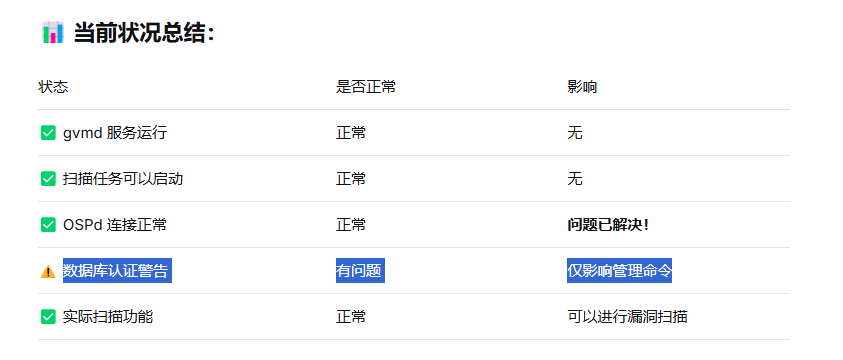
但是因为数据库连接身份验证问题,不影响扫描,所以我没有处理。

腾讯云面向开发者汇聚海量精品云计算使用和开发经验,营造开放的云计算技术生态圈。
更多推荐
 20
20 0
0- 0


 已为社区贡献12条内容

所有评论(0)