.vscode配置文件(c环境)
·
一、单一文件
ctrl+F5编译运行,F5编译调试,ctrl+shift+B 编译
右上角插件ctrl+alt+n直接运行,插件自带其他操作,与tasks.json等无关
C/C++ 插件(ms-vscode.cpptools)自动生成的配置不一定可靠
1.c_cpp_properties.json
补全头文件路径,缺了:红线、跳转、补全失效,但编译照常
{
    "configurations": [
        {
            "name": "Win64_Qt",
            "includePath": [
                "${workspaceFolder}/**",
                "D:/apps/qt/qt/Tools/mingw1120_64/x86_64-w64-mingw32/include",
                "D:/apps/qt/qt/Tools/mingw1120_64/lib/gcc/x86_64-w64-mingw32/11.2.0/include",
                "D:/apps/qt/qt/Tools/mingw1120_64/lib/gcc/x86_64-w64-mingw32/11.2.0/include-fixed"
            ],
            "defines": [
                "_DEBUG",
                "UNICODE",
                "_UNICODE"
            ],
            "compilerPath": "D:/apps/qt/qt/Tools/mingw1120_64/bin/gcc.exe",
            "cStandard": "c17",
            "cppStandard": "gnu++17",
            "intelliSenseMode": "windows-gcc-x64"
        }
    ],
    "version": 4
}
2.launch.json
f5一键调试功能
{
    "version": "0.2.0",
    "configurations": [
        {
            "name": "Debug",
            "type": "cppdbg",
            "request": "launch",
            "program": "${fileDirname}\\${fileBasenameNoExtension}.exe",      // ⭐️ 必须存在!确保exe确实编译好
            "cwd": "${workspaceFolder}",
            "MIMode": "gdb",
            "miDebuggerPath": "gdb"  // 或者换成你自己的 g++)
        }
    ]
}
3.settings.json
设置字体大小之类的
{
    "files.associations": {
        "*.c": "c",
        "*.h": "c"
    },
    "editor.fontSize": 16,
    "editor.fontFamily": "Consolas, 'Courier New', monospace",
    "terminal.integrated.fontSize": 16
}
4.tasks.json
一键编译功能
{
    "version": "2.0.0",
    "tasks": [
        {
            "label": "build_all_c",
            "type": "shell",
            "command": "gcc",
            "args": [
                "${workspaceFolder}/*.c",
                "-o",
                "${workspaceFolder}/${workspaceFolderBasename}.exe",
                "-g",
                "-Wall"
            ],
            "group": "build",
            "detail": "Compile all .c files in workspace to <folder>.exe",
            "presentation": {
                "echo": true,
                "focus": true,
                "reveal": "always"
            },
            "problemMatcher": "$gcc"
}
二、多文件(只含一个main)
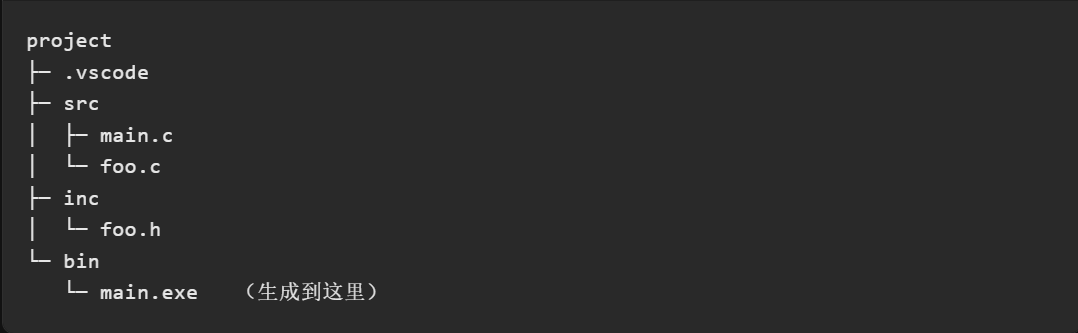
建议新建一个工作路径放这种工程代码,后期调试方便
目录:
1.c_cpp_properties.json
加上自己写的头文件
{
    "configurations": [
        {
            "name": "Win64_Qt",
            "includePath": [
                "${workspaceFolder}/**",
                "D:/apps/qt/qt/Tools/mingw1120_64/x86_64-w64-mingw32/include",
                "D:/apps/qt/qt/Tools/mingw1120_64/lib/gcc/x86_64-w64-mingw32/11.2.0/include",
                "D:/apps/qt/qt/Tools/mingw1120_64/lib/gcc/x86_64-w64-mingw32/11.2.0/include-fixed",
                "${workspaceFolder}/inc"  // 头文件目录
            ],
            "defines": [
                "_DEBUG",
                "UNICODE",
                "_UNICODE"
            ],
            "compilerPath": "gcc",
            "cStandard": "c17",
            "cppStandard": "gnu++17",
            "intelliSenseMode": "windows-gcc-x64"
        }
    ],
    "version": 4
}
2.launch.json
提前需要配置好tasks.json才有.exe文件
{
    "version": "0.2.0",
    "configurations": [

        {
            "name": "gcc debug",
            "type": "cppdbg",
            "request": "launch",
            "program": "${workspaceFolder}/bin/a.exe",
            "cwd": "${workspaceFolder}",
            "MIMode": "gdb",
            "miDebuggerPath": "gdb",
            "preLaunchTask": "build",
            "setupCommands": [
                {
                    "description": "pretty print",
                    "text": "-enable-pretty-printing",
                    "ignoreFailures": true
                }
            ]
        },
    ]
}
3.settings.json
插件run code才能跑多个文件
{
    "files.associations": {
        "*.c": "c",
        "*.h": "c"
    },
  // 只对这个工作区生效
    "code-runner.executorMap": {
        "c": "cd $dir && gcc -I \"$workspaceRoot/inc\" \"$workspaceRoot/src/*.c\" -o \"$fileNameWithoutExt\" && \"$fileNameWithoutExt\""
    },
    "editor.fontSize": 16,
    "editor.fontFamily": "Consolas, 'Courier New', monospace",
    "terminal.integrated.fontSize": 16
}
4.tasks.json
一次编译多个.c文件
{
    "version": "2.0.0",
    "tasks": [
        {
            "label": "build",
            "type": "shell",
            "command": "gcc",
            "args": [
                "-g",
                "-I",
                "${workspaceFolder}/inc",
                "${workspaceFolder}/src/*.c",
                "-o",
                "${workspaceFolder}/bin/a.exe"
            ],
            "options": {
                "cwd": "${workspaceFolder}"
            },
            "group": {
                "kind": "build",
                "isDefault": true
            },
            "problemMatcher": [
                "$gcc"
            ],
            "detail": "Custom full-project build"
        },
    ]
}

腾讯云面向开发者汇聚海量精品云计算使用和开发经验,营造开放的云计算技术生态圈。
更多推荐
 3
3 0
0- 0


 已为社区贡献2条内容

所有评论(0)