Rainmeter 皮肤的桌面时钟
·
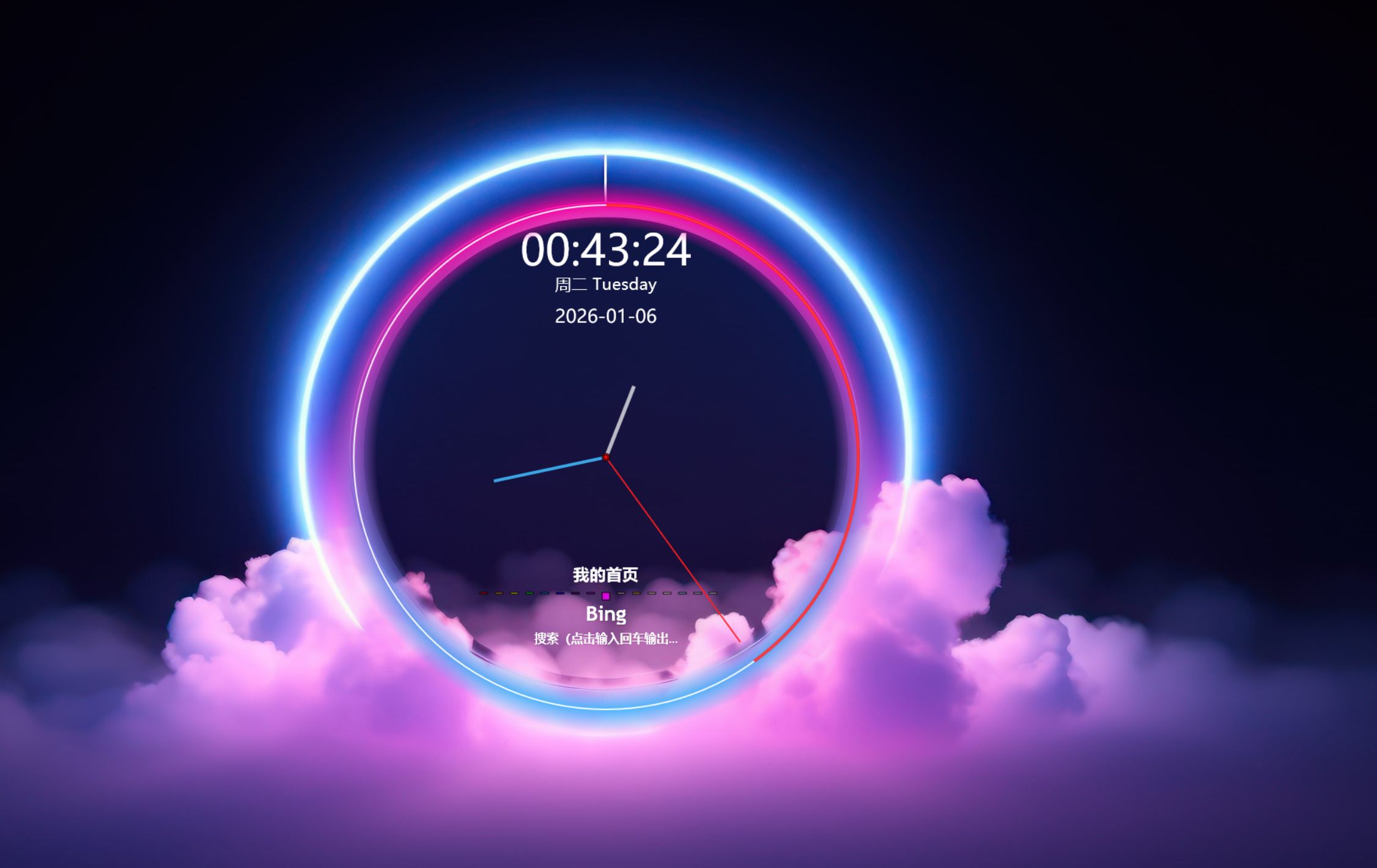
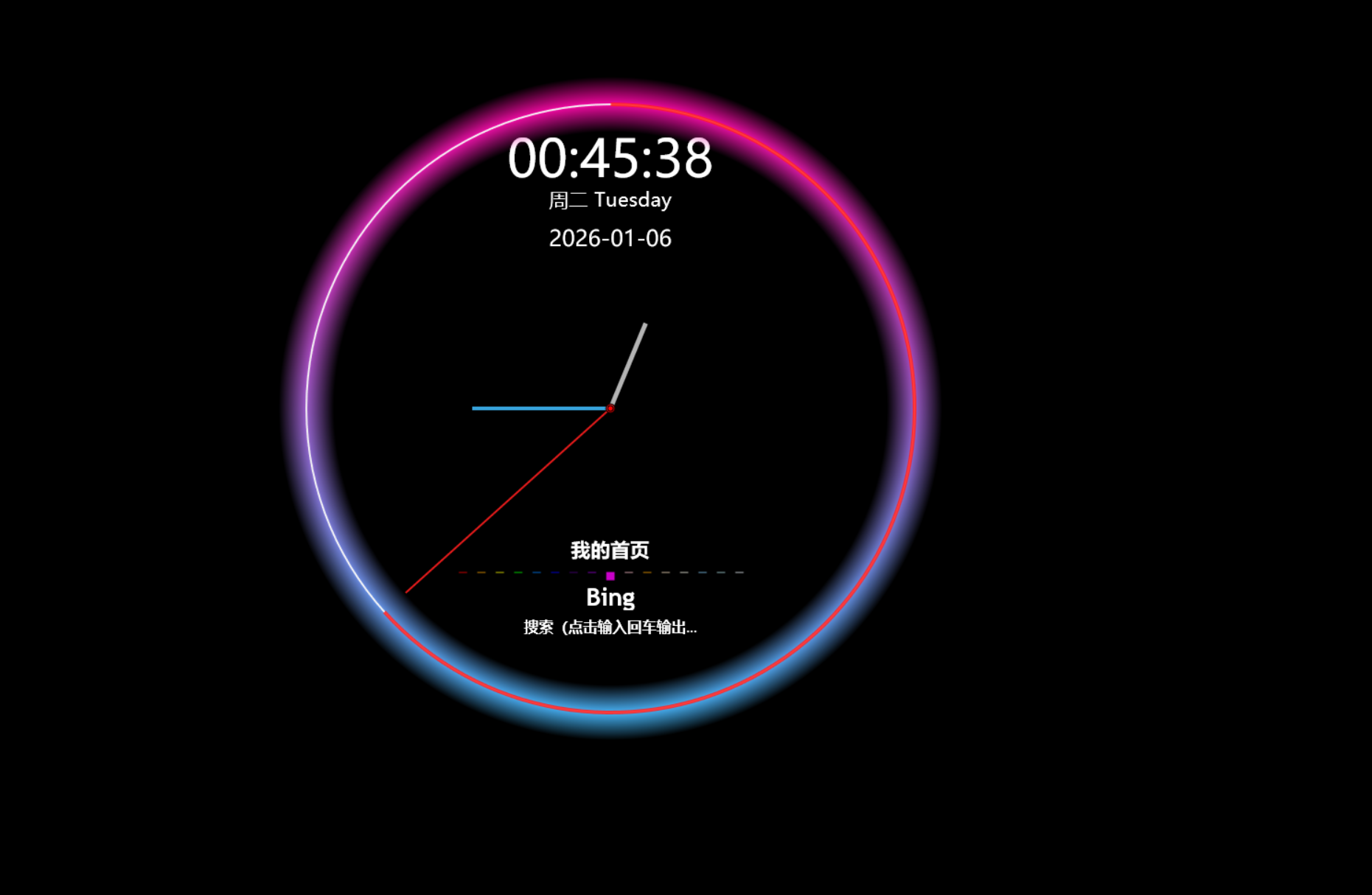
[Rainmeter]
Update=1000
AccurateText=1
DynamicWindowSize=1
BackgroundMode=2
SolidColor=0,0,0,1

[Metadata]
Name=MyClock with Bing
Author=YourName
Description=时钟(时间/中英星期/日期)+ 必应搜索 + 霓虹表盘
Version=1.3

; ==================================================
; 全局变量定义:统一管理缩放、尺寸、颜色和字体,便于维护和适配
; ==================================================

[Variables]
; 全局缩放因子,用于响应 DPI 变化或自定义大小
Scale=1

; 文字垂直微调偏移,补偿字体渲染的基线差异
TextStartOffset=(1 * #Scale#)

; 霓虹表盘几何参数(基于 360px 外径设计)
BaseCentre=360
CCentre=(#BaseCentre# * #Scale#)
COut=(360 * #Scale#)
CIn=(300 * #Scale#)
CDAR=((#COut#+#CIn#)/2)
ClockLineStart=(#CDAR# - 2*#Scale#)
ClockLineLength=(#CDAR# + 2*#Scale#)

; 指针长度(从中心向外延伸的距离)
SecondHandLength=(#CIn# - 1*#Scale#)
MinuteHandLength=(#CIn# - 150*#Scale#)
HourHandLength=(#CIn# - 200*#Scale#)

; 整体绘制区域尺寸(确保完整显示 720px 直径表盘)
CircleDiameter=(720 * #Scale#)
CircleRadius=(#CircleDiameter# / 2)

; 表盘逻辑中心点(注意:Y = COut,非窗口中心,因表盘底部对齐布局)
CenterX=#CCentre#
CenterY=#COut#

; 布局元素间的垂直间距(用于文本区块排布)
Spacing=(25 * #Scale#)

; 主信息区字体设置(时间、星期、日期)
FontName=Microsoft YaHei
FontSizeTime=(42 * #Scale#)
FontSizeWeekday=(16 * #Scale#)
FontSizeDate=(18 * #Scale#)
FontColor=255,255,255

; 功能区字体设置(搜索提示、标题等)
SearchFont=Trebuchet MS
SearchTextSize=(12 * #Scale#)
SearchTextColor=255,255,255,255

; 霓虹表盘视觉颜色定义(增强区分度)
GlowColor1=255,0,160
GlowColor2=65,190,255
RingColor=255,255,255,245
SecTrailColor=255,30,30,220
SecondHandColor=255,30,30,230
MinuteHandColor=65,190,255,220
HourHandColor=255,255,255,180
SetGrad=270

; ==================================================
; 时间与日期数据源:提供格式化的字符串用于显示
; ==================================================

[MeasureTime]
Measure=Time
Format=%H:%M:%S

[MeasureWeekdayCN]
Measure=Time
Format=%A
Substitute="Sunday":"周日","Monday":"周一","Tuesday":"周二","Wednesday":"周三","Thursday":"周四","Friday":"周五","Saturday":"周六"

[MeasureWeekdayEN]
Measure=Time
Format=%A

[MeasureFullDate]
Measure=Time
Format=%Y-%m-%d

; ==================================================
; 指针角度计算:将当前时间转换为旋转角度(-90° 使 12 点朝上)
; ==================================================


[MeasureSeconds]
Measure=Time
Format=%S

[MeasureTimeForAngles]
Measure=Time
Format=%H.%M.%S

[MeasureTotalSeconds]
Measure=Calc
Formula=( ( ( Floor(MeasureTimeForAngles) % 24 ) * 3600 ) + ( ( Floor(MeasureTimeForAngles * 100) % 100 ) * 60 ) + ( MeasureTimeForAngles * 10000 % 100 ) )

[MeasureHourAngle]
Measure=Calc
Formula=( (MeasureTotalSeconds % 43200) * 360 / 43200 - 90 )

[MeasureMinuteAngle]
Measure=Calc
Formula=( (MeasureTotalSeconds % 3600) * 360 / 3600 - 90 )

[MeasureSecAngle]
Measure=Calc
Formula=(MeasureSeconds * 6 - 90)

[MeasureSecondPercent]
Measure=Calc
Formula=(MeasureSeconds / 60)

; ==================================================
; 背景容器:创建透明圆形区域作为整体绘制基底
; ==================================================

[MeterBackground]
Meter=Shape
Shape=Ellipse #CircleRadius#,#CircleRadius#,#CircleRadius#,#CircleRadius# | Fill Color 19,18,60,0 | StrokeWidth 0
X=0
Y=0
W=#CircleDiameter#
H=#CircleDiameter#
DynamicVariables=1

; ==================================================
; 顶部信息显示区:居中显示时间、中英双语星期、完整日期
; ==================================================

[MeterTime]
Meter=String
MeasureName=MeasureTime
X=#CenterX#
Y=50
FontFace=#FontName#
FontSize=#FontSizeTime#
FontColor=#FontColor#
StringAlign=Center
AntiAlias=1
Text=%1

[MeterWeekday]
Meter=String
MeasureName=MeasureWeekdayCN
MeasureName2=MeasureWeekdayEN
X=#CenterX#
Y=(50 + #TextStartOffset# + #FontSizeTime# + #Spacing#)
FontFace=#FontName#
FontSize=#FontSizeWeekday#
FontColor=#FontColor#
StringAlign=Center
AntiAlias=1
Text=%1 %2

[MeterFullDate]
Meter=String
MeasureName=MeasureFullDate
X=#CenterX#
Y=(50 + #TextStartOffset# + #FontSizeTime# + #Spacing# + #FontSizeWeekday# + #Spacing#)
FontFace=#FontName#
FontSize=#FontSizeDate#
FontColor=#FontColor#
StringAlign=Center
AntiAlias=1
Text=%1

; ==================================================
; 功能交互区:包含“我的首页”链接、“Bing”标题和搜索输入触发器
; ==================================================

[meterHome]
Meter=String
X=#CenterX#
Y=(#CenterY# + #TextStartOffset# + #FontSizeTime# + 2.5*#Spacing# + #FontSizeWeekday# + #FontSizeDate#)
W=(200 * #Scale#)
H=(28 * #Scale#)
FontFace=#SearchFont#
FontSize=(16 * #Scale#)
FontColor=#SearchTextColor#
StringStyle=Bold
StringAlign=Center
AntiAlias=1
ClipString=1
Text=我的首页
LeftMouseUpAction=["file:///C:/Users/90917/Documents/HTML5/我的首页.html"]
ToolTipText=点击打开我的首页
MouseOverAction=[!SetOption meterHome FontColor "255,255,0"][!UpdateMeter meterHome][!Redraw]
MouseLeaveAction=[!SetOption meterHome FontColor "#SearchTextColor#"][!UpdateMeter meterHome][!Redraw]

; ==================================================
; 彩虹分隔装饰条
; ==================================================

[meterSeperator]
Meter=Shape
Shape=Rectangle (#CenterX# - 165*#Scale# + 0*20*#Scale#), #CenterY#, (10*#Scale#), (2*#Scale#) | Fill Color 255,0,0,200
Shape2=Rectangle (#CenterX# - 165*#Scale# + 1*20*#Scale#), #CenterY#, (10*#Scale#), (2*#Scale#) | Fill Color 255,165,0,200
Shape3=Rectangle (#CenterX# - 165*#Scale# + 2*20*#Scale#), #CenterY#, (10*#Scale#), (2*#Scale#) | Fill Color 255,255,0,200
Shape4=Rectangle (#CenterX# - 165*#Scale# + 3*20*#Scale#), #CenterY#, (10*#Scale#), (2*#Scale#) | Fill Color 0,255,0,200
Shape5=Rectangle (#CenterX# - 165*#Scale# + 4*20*#Scale#), #CenterY#, (10*#Scale#), (2*#Scale#) | Fill Color 0,127,255,200
Shape6=Rectangle (#CenterX# - 165*#Scale# + 5*20*#Scale#), #CenterY#, (10*#Scale#), (2*#Scale#) | Fill Color 0,0,255,200
Shape7=Rectangle (#CenterX# - 165*#Scale# + 6*20*#Scale#), #CenterY#, (10*#Scale#), (2*#Scale#) | Fill Color 75,0,130,200
Shape8=Rectangle (#CenterX# - 165*#Scale# + 7*20*#Scale#), #CenterY#, (10*#Scale#), (2*#Scale#) | Fill Color 148,0,211,200
Shape9=Rectangle (#CenterX# - 165*#Scale# + 8*20*#Scale#), #CenterY#, (10*#Scale#), (10*#Scale#) | Fill Color 255,0,255,200
Shape10=Rectangle (#CenterX# - 165*#Scale# + 9*20*#Scale#), #CenterY#, (10*#Scale#), (2*#Scale#) | Fill Color 255,192,203,200
Shape11=Rectangle (#CenterX# - 165*#Scale# + 10*20*#Scale#), #CenterY#, (10*#Scale#), (2*#Scale#) | Fill Color 255,165,0,200
Shape12=Rectangle (#CenterX# - 165*#Scale# + 11*20*#Scale#), #CenterY#, (10*#Scale#), (2*#Scale#) | Fill Color 255,228,196,200
Shape13=Rectangle (#CenterX# - 165*#Scale# + 12*20*#Scale#), #CenterY#, (10*#Scale#), (2*#Scale#) | Fill Color 255,255,240,200
Shape14=Rectangle (#CenterX# - 165*#Scale# + 13*20*#Scale#), #CenterY#, (10*#Scale#), (2*#Scale#) | Fill Color 135,206,250,200
Shape15=Rectangle (#CenterX# - 165*#Scale# + 14*20*#Scale#), #CenterY#, (10*#Scale#), (2*#Scale#) | Fill Color 176,224,230,200
Shape16=Rectangle (#CenterX# - 165*#Scale# + 15*20*#Scale#), #CenterY#, (10*#Scale#), (2*#Scale#) | Fill Color 240,248,255,200
X=0
Y=(#TextStartOffset# + #FontSizeTime# + 4*#Spacing# + #FontSizeWeekday# + #FontSizeDate#)
DynamicVariables=1

[meterTitle]
Meter=String
X=#CenterX#
Y=(#CenterY# + #TextStartOffset# + #FontSizeTime# + 4.5*#Spacing# + #FontSizeWeekday# + #FontSizeDate#)
W=(200 * #Scale#)
H=(30 * #Scale#)
FontFace=#SearchFont#
FontSize=(20 * #Scale#)
FontColor=#SearchTextColor#
StringStyle=Bold
StringEffect=Shadow
FontEffectColor=0,0,0,50
StringAlign=Center
AntiAlias=1
ClipString=1
Text=Bing

[meterSearch]
Meter=String
X=#CenterX#
Y=(#CenterY# + #TextStartOffset# + #FontSizeTime# + #FontSizeWeekday# + #FontSizeDate# + #Spacing# * 6)
W=(200 * #Scale#)
H=(28 * #Scale#)
FontFace=#SearchFont#
FontSize=#SearchTextSize#
FontColor=#SearchTextColor#
StringStyle=Bold
StringEffect=Shadow
FontEffectColor=0,0,0,20
StringAlign=Center
AntiAlias=1
ClipString=1
Text=搜索(点击输入回车输出)...
ToolTipText=点击搜索
MouseOverAction=[!SetOption meterSearch FontColor "255,255,0"][!UpdateMeter meterSearch][!Redraw]
MouseLeaveAction=[!SetOption meterSearch FontColor "#SearchTextColor#"][!UpdateMeter meterSearch][!Redraw]
LeftMouseUpAction=[!CommandMeasure measureInput "ExecuteBatch 1"]

; ==================================================
; 文本输入测量器:弹出输入框并将用户输入传递给 Bing 搜索
; ==================================================

[measureInput]
Measure=Plugin
Plugin=InputText
FontFace=#SearchFont#
FontSize=#SearchTextSize#
FontColor=0,0,0,255
SolidColor=255,255,255,255
StringStyle=Bold
X=(#CenterX# - 94*#Scale#)
Y=(#CenterY# + #TextStartOffset# + #FontSizeTime# + #FontSizeWeekday# + #FontSizeDate# + #Spacing# * 6)
W=(188 * #Scale#)
H=(30 * #Scale#)
FocusDismiss=1
DefaultValue=""
Command1=["https://www.bing.com/search?q=$UserInput$"]
UpdateDivider=-1


; ==================================================
; 霓虹表盘容器:使用径向渐变遮罩限制内部元素可见范围
; ==================================================

[MeterClockContainer]
Meter=Shape
X=0
Y=0
W=(#COut#*2)
H=(#COut#*2)
Shape=Ellipse #CCentre#,#COut#,#COut#,#COut# | StrokeWidth 0 | Fill RadialGradient ClockContGrad
ClockContGrad=0,0,0,0,#COut#,#COut# | 0,0,0,0;0.0 | 0,0,0,0;(#CIn#/#COut#) | 0,0,0,250;((#CIn#+#COut#)/(2*#COut#)) | 0,0,0,0;1
DynamicVariables=1

; ==================================================
; 霓虹发光环与刻度环:叠加在线性渐变背景上,形成炫彩表圈
; ==================================================

[MeterClockGlow]
Meter=Shape
X=0
Y=0
W=(#COut#*2)
H=(#COut#*2)
Shape=Ellipse #CCentre#,#COut#,#COut#,#COut# | StrokeWidth 0 | Fill LinearGradient ClockGlowGrad
Shape2=Ellipse #CCentre#,#COut#,((#CIn#+#COut#)/2),((#CIn#+#COut#)/2) | Fill Color 0,0,0,1 | StrokeWidth (2*#Scale#) | StrokeColor #RingColor#
ClockGlowGrad=#SetGrad# | #GlowColor1#;0.0 | #GlowColor2#;1.0
Container=MeterClockContainer
DynamicVariables=1

; ==================================================
; 秒针动态轨迹:随秒针移动绘制半透明红色弧线,营造拖尾效果
; ==================================================

[MeterClockTrail]
Meter=Roundline
X=#CCentre#
Y=#COut#
StartAngle=(Rad(270))
RotationAngle=(Rad(360))
LineStart=#ClockLineStart#
LineLength=#ClockLineLength#
Solid=1
LineColor=#SecTrailColor#
MeasureName=MeasureSecondPercent
AntiAlias=1
DynamicVariables=1

; ==================================================
; 时钟指针组:使用统一变量控制长度,颜色区分明确
; ==================================================

[MeterHourHand]
Meter=Shape
X=0
Y=0
W=#CircleDiameter#
H=#CircleDiameter#
Shape=Line #CenterX#,#CenterY#,(#CenterX# + Cos(Rad([MeasureHourAngle])) * #HourHandLength#),(#CenterY# + Sin(Rad([MeasureHourAngle])) * #HourHandLength#) | StrokeWidth (5*#Scale#) | StrokeColor #HourHandColor#
DynamicVariables=1

[MeterMinuteHand]
Meter=Shape
X=0
Y=0
W=#CircleDiameter#
H=#CircleDiameter#
Shape=Line #CenterX#,#CenterY#,(#CenterX# + Cos(Rad([MeasureMinuteAngle])) * #MinuteHandLength#),(#CenterY# + Sin(Rad([MeasureMinuteAngle])) * #MinuteHandLength#) | StrokeWidth (4*#Scale#) | StrokeColor #MinuteHandColor#
DynamicVariables=1

[MeterSecondHand]
Meter=Shape
X=0
Y=0
W=#CircleDiameter#
H=#CircleDiameter#
Shape=Line #CenterX#,#CenterY#,(#CenterX# + Cos(Rad([MeasureSecAngle])) * #SecondHandLength#),(#CenterY# + Sin(Rad([MeasureSecAngle])) * #SecondHandLength#) | StrokeWidth (2*#Scale#) | StrokeColor #SecondHandColor#
Shape2=Ellipse #CenterX#,#CenterY#,(5*#Scale#),(5*#Scale#) | Fill Color 255,0,0,200
Shape3=Ellipse #CenterX#,#CenterY#,(3*#Scale#),(3*#Scale#) | Fill Color 255,0,0,255
DynamicVariables=1

腾讯云面向开发者汇聚海量精品云计算使用和开发经验,营造开放的云计算技术生态圈。
更多推荐
 3
3 0
0- 0


 已为社区贡献1条内容

所有评论(0)