mysql 8.4最新版主从同步配置
·
1、主库配置
1.1 修改主库my.cnf配置文件
[root@mysql-master ~]# vim /etc/my.cnf
server-id = 1
log_bin = mysql-bin
binlog_format = ROW
max_binlog_size = 100M
mysql_native_password = ON
1.2 重启mysql服务并创建复制用户
-- 重启服务
sudo systemctl restart mysqld

-- 登录 MySQL
mysql -u root -p

-- 创建复制用户
CREATE USER 'repl'@'%' IDENTIFIED WITH mysql_native_password BY 'ReplPassword123!';
GRANT REPLICATION SLAVE ON *.* TO 'repl'@'%';
FLUSH PRIVILEGES;

-- 查看主库状态
SHOW BINARY LOG STATUS;
2、从库配置
2.1 修改从库my.cnf配置文件
[root@mysql-slave ~]# vim /etc/my.cnf
server-id = 2
relay_log = mysql-relay-bin
log_bin = mysql-bin
read_only = 1
super_read_only = 1
relay_log_recovery = 1
mysql_native_password = ON
2.2 重启mysql服务并配置复制
-- 重启服务
sudo systemctl restart mysqld

-- 登录 MySQL
mysql -u root -p

-- 停止复制(如果已存在)
STOP REPLICA;
RESET REPLICA ALL;

-- 配置主库连接
CHANGE REPLICATION SOURCE TO
    SOURCE_HOST='192.168.80.131',
    SOURCE_USER='repl',
    SOURCE_PASSWORD='ReplPassword123!',
    SOURCE_LOG_FILE='mysql-bin.000010',
    SOURCE_LOG_POS=158002;

-- 开启复制
START REPLICA;

-- 查看复制状态
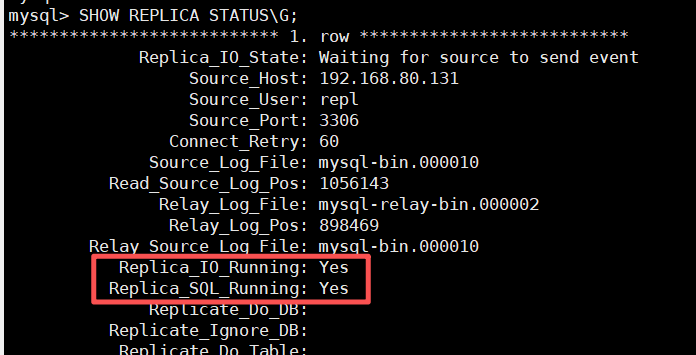
SHOW REPLICA STATUS\G;
2.3 验证主从同步
3、问题汇总
问题一:Error connecting to source ‘repl@192.168.80.131:3306’. This was attempt 1/10, with a delay of 60 seconds between attempts. Message: Authentication plugin ‘caching_sha2_password’ reported error: Authentication requires secure connection.
解决方法:
永久开启mysql_native_password身份验证插件
# 开启身份验证插件
vim /etc/my.cnf
mysql_native_password = ON

# 重启服务
sudo systemctl restart mysqld

# 查看插件状态
SHOW PLUGINS;
确定mysql_native_password插件状态为active状态

问题二:Coordinator stopped because there were error(s) in the worker(s). The most recent failure being: Worker 1 failed executing transaction ‘ANONYMOUS’ at source log mysql-bin.000004, end_log_pos 182629. See error log and/or performance_schema.replication_applier_status_by_worker table for more details about this failure or others, if any.
解决方法:
# 主库上全量备份
mysqldump -u root -p --all-databases --single-transaction --flush-logs --master-data=2 > backup.sql

# 从库上恢复备份
mysql -u root -p < backup.sql

# 停止并重置复制
STOP REPLICA;
RESET REPLICA ALL;

# 重新配置复制
CHANGE REPLICATION SOURCE TO
    SOURCE_HOST='192.168.80.131',
    SOURCE_USER='repl',
    SOURCE_PASSWORD='ReplPassword123!',
    SOURCE_LOG_FILE='mysql-bin.000010',
    SOURCE_LOG_POS=158002;

# 启动复制
START REPLICA;

# 查看复制状态
SHOW REPLICA STATUS\G;

腾讯云面向开发者汇聚海量精品云计算使用和开发经验,营造开放的云计算技术生态圈。
更多推荐
 4
4 0
0- 0


 已为社区贡献3条内容

所有评论(0)