H3C防火墙IRF堆叠配置
摘要:本实验通过配置IRF(智能弹性架构)实现防火墙堆叠,提升网络转发能力。实验分四个步骤:1)配置防火墙A的IRF端口和物理端口绑定;2)将防火墙B成员编号改为2并重启;3)设备间进行主设备竞选,失败方重启后形成IRF;4)配置BFD MAD检测机制,包括三层聚合接口、MAD IP地址设置、安全域配置及ACL规则。实验采用双机堆叠方案,在保护现有投资基础上将转发能力提升一倍,同时满足易管理、易维
·
实验组网图: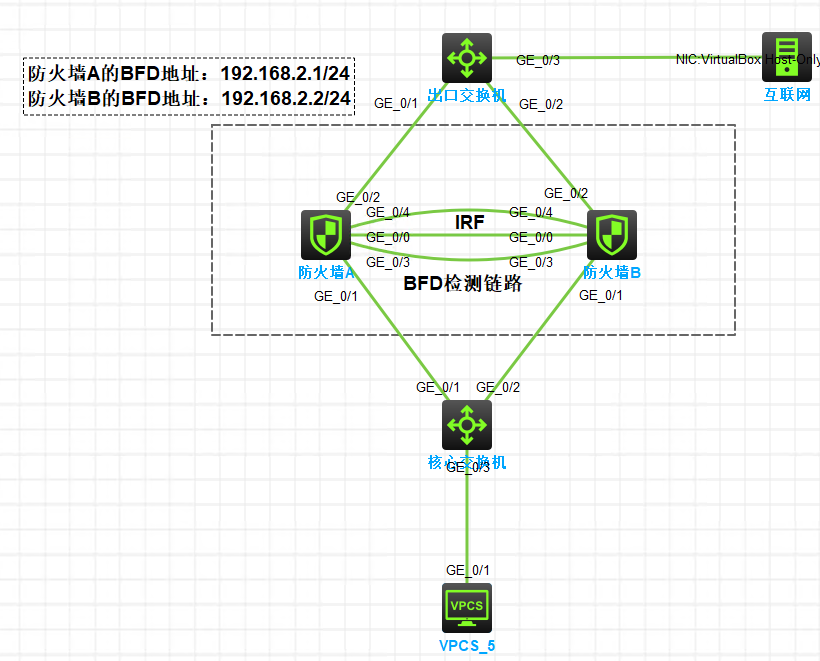
背景需求
由于网络规模迅速扩大,当前中心设备(防火墙A)转发能力已经不能满足需求,现需要在保护现有投资的基础上将网络转发能力提高一倍,并要求网络易管理、易维护。
实验过程
步骤一:配置防火墙A
#配置IRF端口1/2,并将它与物理端口GE_0/0绑定,并保存配置。
<H3C>system-view
[H3C]int g 1/0/0
[H3C-GigabitEthernet1/0/0]shutdown
[H3C-GigabitEthernet1/0/0]quit

[H3C]irf-port 1/2

[H3C-irf-port1/2]port group interface GigabitEthernet 1/0/0
You must perform the following tasks for a successful IRF setup:
Save the configuration after completing IRF configuration.
Execute the "irf-port-configuration active" command to activate the IRF ports.
[H3C-irf-port1/2]dis thi
#
irf-port 1/2
 port group interface GigabitEthernet1/0/0
#
return
[H3C-irf-port1/2]quit

[H3C]interface GigabitEthernet 1/0/0
[H3C-GigabitEthernet1/0/0]undo shutdown
[H3C-GigabitEthernet1/0/0]quit

[H3C]int g 1/0/4
[H3C-GigabitEthernet1/0/4]shutdown
[H3C-GigabitEthernet1/0/4]quit
[H3C]irf-port 1/1
[H3C-irf-port1/1]port group interface GigabitEthernet 1/0/4
You must perform the following tasks for a successful IRF setup:
Save the configuration after completing IRF configuration.
Execute the "irf-port-configuration active" command to activate the IRF ports.
[H3C-irf-port1/1]dis thi
#
irf-port 1/1
 port group interface GigabitEthernet1/0/4
#
return
[H3C-irf-port1/1]quit

[H3C]interface GigabitEthernet 1/0/4
[H3C-GigabitEthernet1/0/4]undo shutdown
[H3C-GigabitEthernet1/0/4]quit

[H3C]sa fo
Validating file. Please wait...
Saved the current configuration to mainboard device successfully.

[H3C]irf-port-configuration active
步骤二:配置防火墙B
#将防火墙B第二成员编号配置为2,并重启设备使新编号生效。
<H3C>system-view

[H3C]irf member 1 renumber 2
Renumbering the member ID may result in configuration change or loss. Continue?[Y/N]:y
[H3C]quit
<H3C>reboot
<H3C>system-view
System View: return to User View with Ctrl+Z.

[H3C]interface GigabitEthernet 2/0/0
[H3C-GigabitEthernet2/0/0]shutdown
[H3C-GigabitEthernet2/0/0]quit
[H3C]sa fo
Validating file. Please wait...
Saved the current configuration to mainboard device successfully.
[H3C]irf-port 2/1

[H3C-irf-port2/1]port group interface GigabitEthernet 2/0/0
You must perform the following tasks for a successful IRF setup:
Save the configuration after completing IRF configuration.
Execute the "irf-port-configuration active" command to activate the IRF ports.
[H3C-irf-port2/1]dis thi
#
irf-port 2/1
 port group interface GigabitEthernet2/0/0
 sa fo
#
return
[H3C-irf-port2/1]quit

[H3C]interface GigabitEthernet 2/0/0
[H3C-GigabitEthernet2/0/0]undo shutdown
[H3C-GigabitEthernet2/0/0]quit

[H3C]interface GigabitEthernet 2/0/4
[H3C-GigabitEthernet2/0/4]shutdown
[H3C-GigabitEthernet2/0/4]quit
[H3C]irf-port 2/2
[H3C-irf-port2/2]port group interface GigabitEthernet 2/0/4
You must perform the following tasks for a successful IRF setup:
Save the configuration after completing IRF configuration.
Execute the "irf-port-configuration active" command to activate the IRF ports.
[H3C-irf-port2/2]quit
[H3C]sa fo
[H3C]interface GigabitEthernet 2/0/4
[H3C-GigabitEthernet2/0/4]undo shutdown
[H3C-GigabitEthernet2/0/4]quit
[H3C]sa fo
[H3C]irf-port-configuration active
步骤三:设备竞选
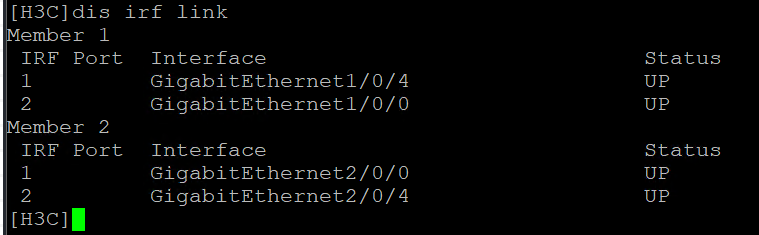
防火墙A和防火墙B间将会进行主设备竞选,竞选失败的一方将重启,重启完成后,IRF形成。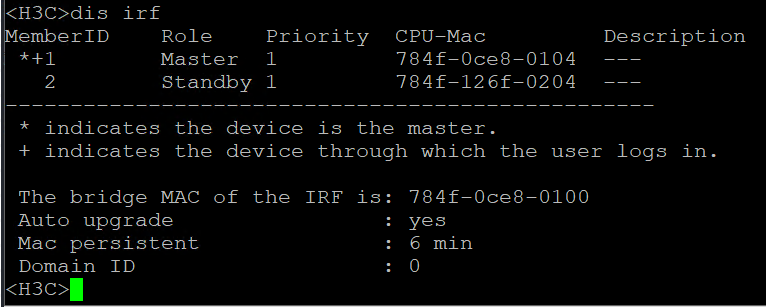
步骤四:配置BFD MAD检测
#创建三层聚合接口3
<H3C>system-view
System View: return to User View with Ctrl+Z.

[H3C]interface Route-Aggregation 3
[H3C-Route-Aggregation3]quit

[H3C]interface GigabitEthernet 1/0/3

[H3C-GigabitEthernet1/0/3]port link-aggregation group 3
[H3C-GigabitEthernet1/0/3]quit

[H3C]interface GigabitEthernet 2/0/3

[H3C-GigabitEthernet2/0/3]port link-aggregation group 3
[H3C-GigabitEthernet2/0/3]quit
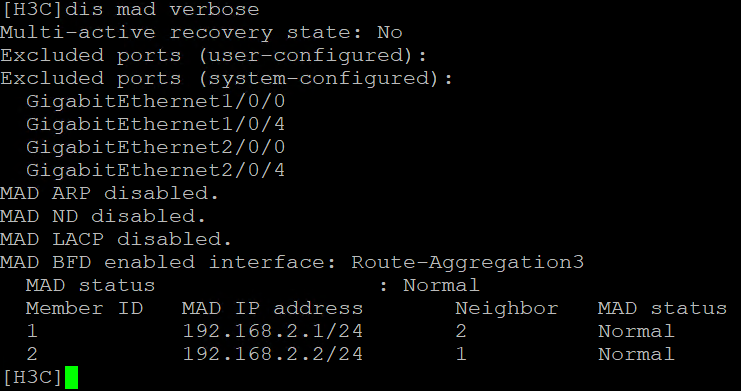
#配置三层聚合接口3的MAD IP地址。
[H3C]interface Route-Aggregation 3
[H3C-Route-Aggregation3]mad bfd enable
[H3C-Route-Aggregation3]mad ip address 192.168.2.1 24 member 1
[H3C-Route-Aggregation3]mad ip address 192.168.2.2 24 member 2
[H3C-Route-Aggregation3]quit
#向安全域Trust中添加三层聚合接口3。
<H3C>system-view
System View: return to User View with Ctrl+Z.

[H3C]security-zone name trust

[H3C-security-zone-Trust]import interface Route-Aggregation 3
[H3C-security-zone-Trust]quit
#配置ACL 2000,定义规则:今允许来自192.168.2.0网段的报文通过。
<H3C>sys
System View: return to User View with Ctrl+Z.
[H3C]acl number 2000

[H3C-acl-ipv4-basic-2000]rule permit source 192.168.2.0 0.0.0.255
[H3C-acl-ipv4-basic-2000]quit
#创建源安全域Trust到目的安全域Local的安全域间实例,并在该域间实例上应用包过滤策略
[H3C]zone-pair security source trust destination local
[H3C-zone-pair-security-Trust-Local]packet-filter 2000
[H3C-zone-pair-security-Trust-Local]quit
#创建源安全域Local到目的安全域Trust的安全域间实例,并在该域间实例上应用包过滤策略
[H3C]zone-pair security source local destination trust
[H3C-zone-pair-security-Local-Trust]packet-filter 2000
[H3C-zone-pair-security-Local-Trust]quit
[H3C]sa fo
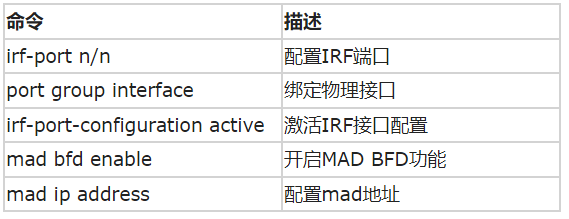
命令列表:
1

腾讯云面向开发者汇聚海量精品云计算使用和开发经验,营造开放的云计算技术生态圈。
更多推荐
 35
35 0
0- 0


 已为社区贡献7条内容

所有评论(0)