【从0实现gpu加速】yolo图像分类模型OpenVINO推理
写在前面 :本文说明的gpu指的并不是英伟达的N卡,而是intel的集成显卡!
新建工程
方法1:参照 这个文章,新建项目。
方法2 【本教程为该方法】:直接这份代码的源码工程文件夹,命名为:cpp-yolo11-clas-gpu-openvino。

下载OpenVINO开发包
打开intel官网网址,如下:

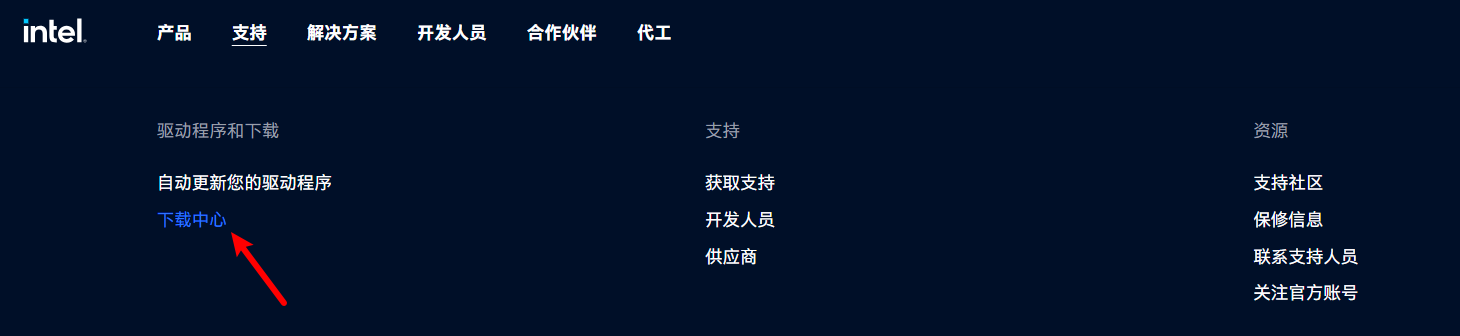
点击支持->下载中心:
进入如下界面:

搜索OpenVINO:

或者在 驱动程序和软件,软件开发套件中,找到OpenVINO。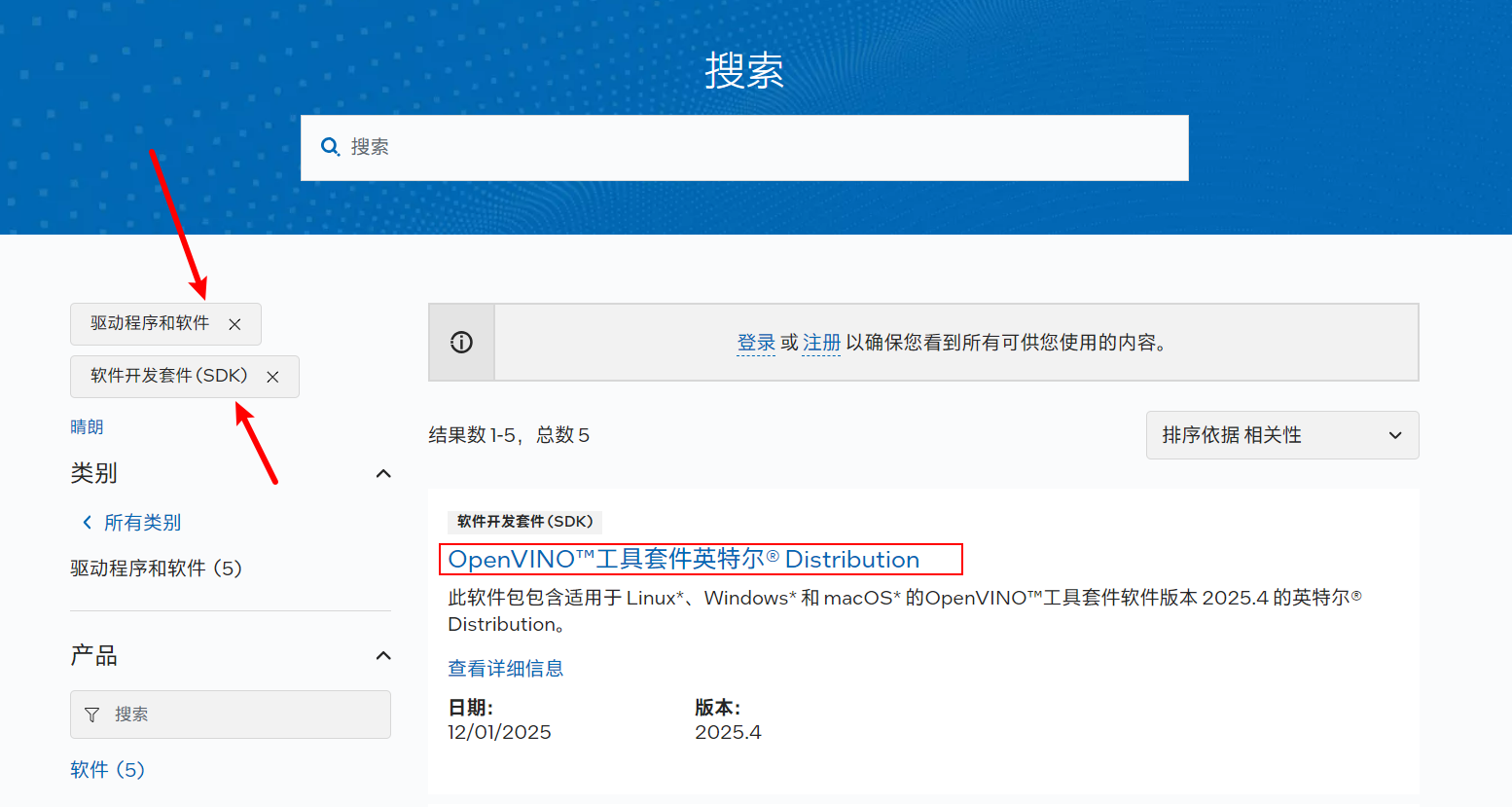 点击进去,就会看到许多版本,由于我们使用的图像分类模型是yolo11(2024年9月发布的),因此,我们不能选择最新的版本,而是选择2024版本。
说明:作者已经尝试,一开始下载了最新版本的2025版,经过编码,编译总是失败。提示错误❌如下:
严重性	代码	说明	项目	文件	行	禁止显示状态
错误	C4996	'ov::Tensor::data': This function will return const T* in 2026.0. Check if used  correctly
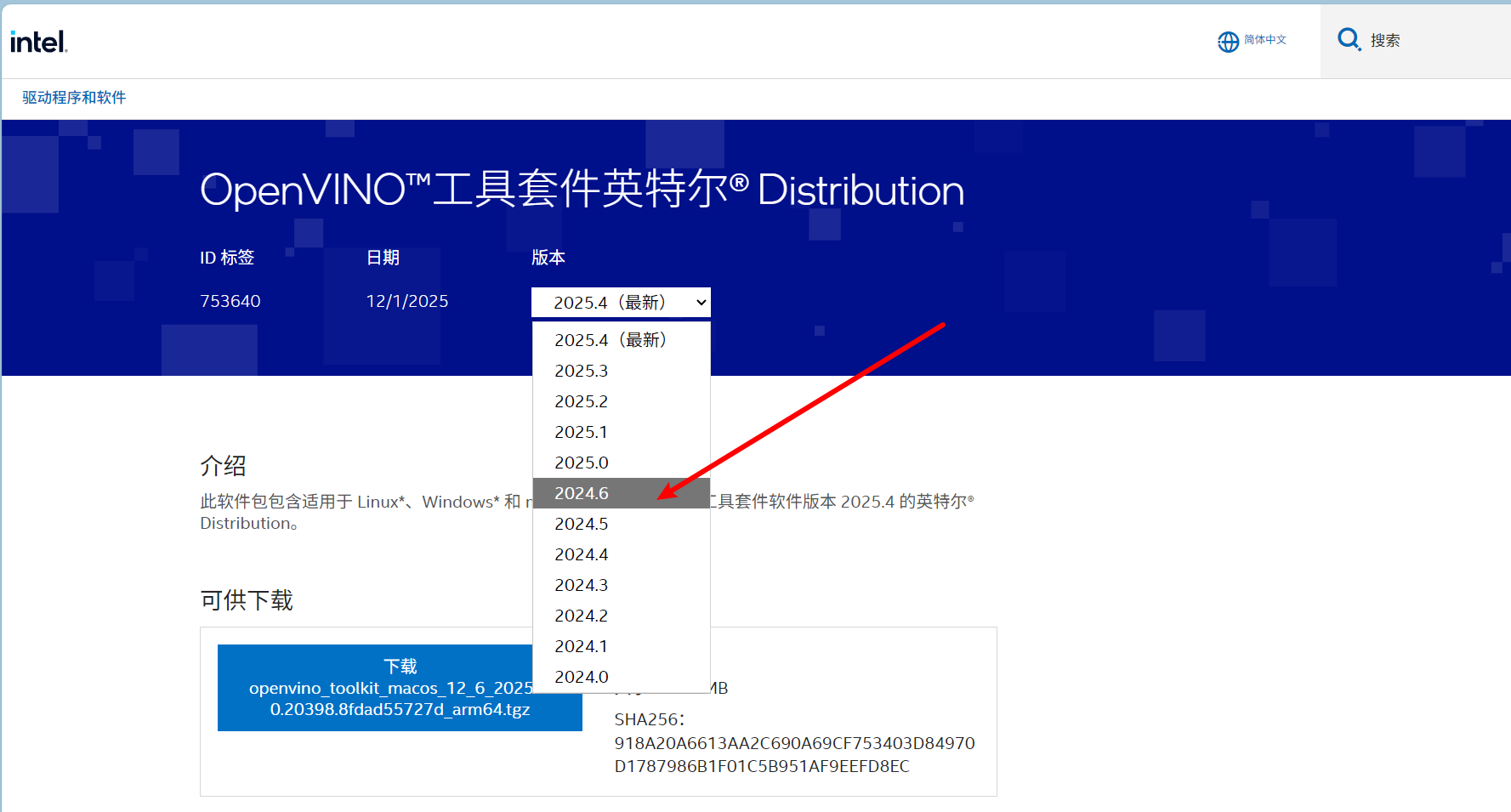
然后,往下拉,找到这个windows系统的版本,点击下载:
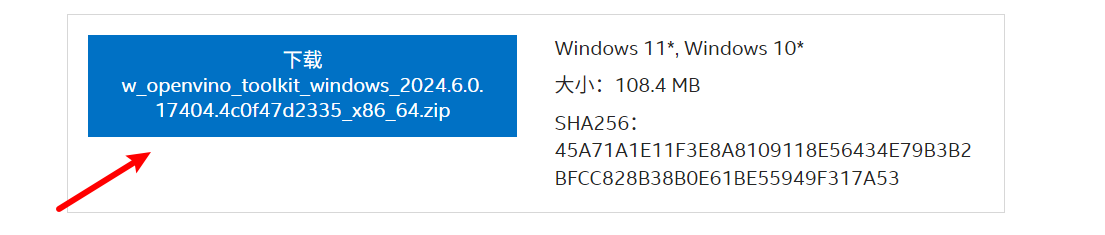
下载后,就会看到:
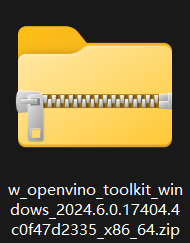
将这个zip包解压,并且拷贝到项目文件夹中: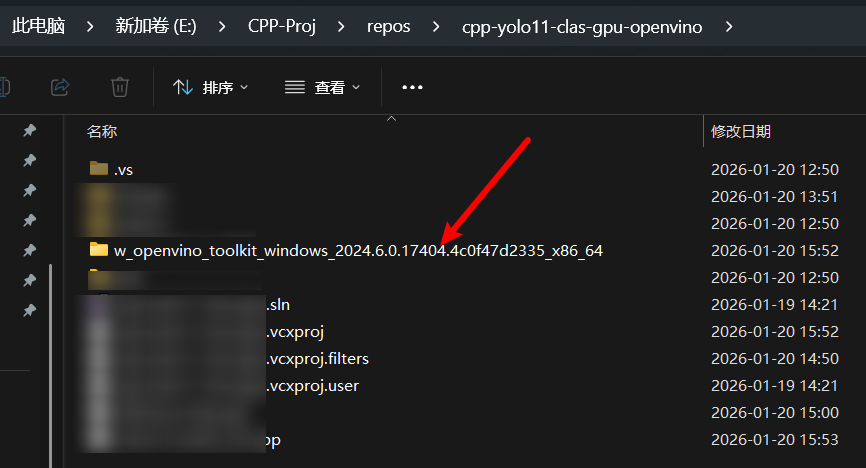
打开工程sln
我们主要是对环境进行配置。
包含目录【include】
配置opencv和openvino:
 E:\CPP-Proj\repos\cpp-yolo11-clas-gpu-openvino\w_openvino_toolkit_windows_2024.6.0.17404.4c0f47d2335_x86_64\runtime\include
 .\opencv\build\include
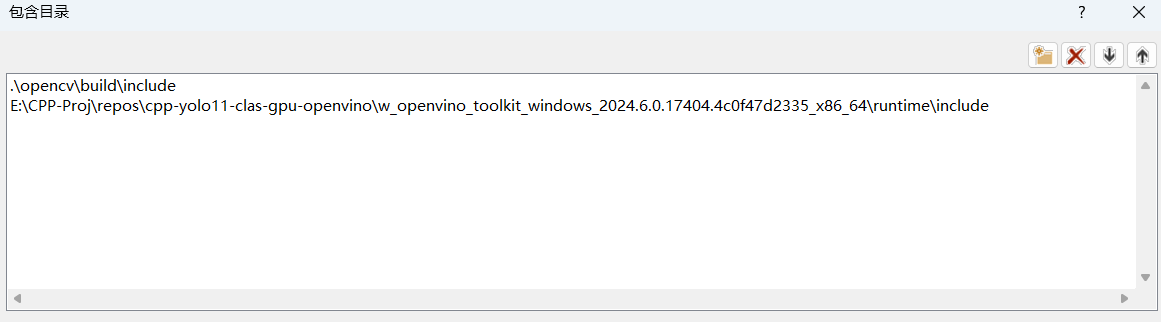
库目录【lib】
也是配置opencv和openvino:
E:\CPP-Proj\repos\cpp-yolo11-clas-gpu-openvino\w_openvino_toolkit_windows_2024.6.0.17404.4c0f47d2335_x86_64\runtime\lib\intel64\Release
.\opencv\build\x64\vc16\lib

附加依赖项
openvino.lib
opencv_world4100.lib
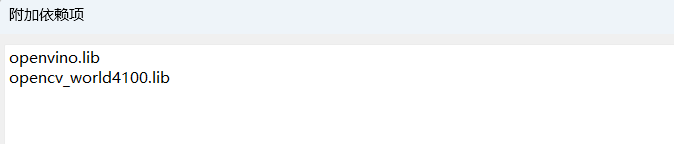
编写代码
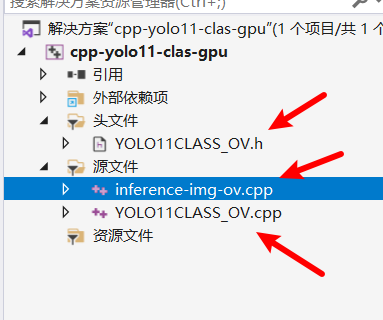
首先,我们需要修改原来的3个文件名为:
 1. inference-img-ov.cpp
 2. YOLO11CLASS_OV.cpp
 3. YOLO11CLASS_OV.h
其实,就是在原来文件名后面加了一个后缀ov表示:【openvino】!
inference-img-ov.cpp
// inference-img-ov.cpp
#include "include/YOLO11CLASS_OV.h"
#include <opencv2/highgui/highgui.hpp>
#include <iostream>
#include <string>
#include <chrono>
#include <stdexcept>
#include <fstream>
#include <vector>
#include <filesystem>
#include <iomanip>
#include <algorithm>
namespace fs = std::filesystem;
/**
* @brief 获取目录中的所有图片文件
*/
std::vector<std::string> getImageFiles(const std::string& directory) {
std::vector<std::string> imageFiles;
try {
for (const auto& entry : fs::directory_iterator(directory)) {
if (entry.is_regular_file()) {
std::string ext = entry.path().extension().string();
std::transform(ext.begin(), ext.end(), ext.begin(), ::tolower);
if (ext == ".jpg" || ext == ".jpeg" || ext == ".png" ||
ext == ".bmp" || ext == ".tiff" || ext == ".webp") {
imageFiles.push_back(entry.path().string());
}
}
}
// 按文件名排序
std::sort(imageFiles.begin(), imageFiles.end());
}
catch (const std::exception& e) {
std::cerr << "Error reading directory " << directory << ": " << e.what() << std::endl;
}
return imageFiles;
}
/**
* @brief 批量处理图片
*/
void batchProcessImages(YOLO11Classifier_OV& classifier,
const std::vector<std::string>& imagePaths,
const std::string& outputDir = "results_ov") {
// 创建输出目录
if (!fs::exists(outputDir)) {
fs::create_directory(outputDir);
}
std::cout << "\n" << std::string(60, '=') << std::endl;
std::cout << "BATCH PROCESSING STARTED (OpenVINO)" << std::endl;
std::cout << "Total images to process: " << imagePaths.size() << std::endl;
std::cout << std::string(60, '=') << std::endl;
// 统计信息
std::vector<double> processingTimes;
int successCount = 0;
int failCount = 0;
// 创建CSV文件记录结果
std::ofstream csvFile(outputDir + "/results.csv");
csvFile << "Image,Class,Class_ID,Confidence(%),Processing_Time(ms),Status\n";
// 处理每张图片
for (size_t i = 0; i < imagePaths.size(); ++i) {
const std::string& imagePath = imagePaths[i];
std::cout << "\n" << std::string(40, '-') << std::endl;
std::cout << "Processing image " << (i + 1) << "/" << imagePaths.size() << std::endl;
std::cout << "File: " << fs::path(imagePath).filename().string() << std::endl;
try {
// 加载图片
cv::Mat image = cv::imread(imagePath, cv::IMREAD_COLOR);
if (image.empty()) {
std::cerr << "Failed to load image: " << imagePath << std::endl;
csvFile << fs::path(imagePath).filename().string() << ",,,-1,FAILED_TO_LOAD\n";
failCount++;
continue;
}
// 开始计时
auto startTime = std::chrono::high_resolution_clock::now();
// 进行分类
ClassificationResult result = classifier.classify(image);
// 结束计时
auto endTime = std::chrono::high_resolution_clock::now();
auto duration = std::chrono::duration_cast<std::chrono::milliseconds>(endTime - startTime);
processingTimes.push_back(duration.count());
// 显示结果
std::cout << " Result: ";
if (result.classId == -1) {
std::cout << "❌ Classification failed" << std::endl;
csvFile << fs::path(imagePath).filename().string() << ",,,-1,"
<< duration.count() << ",FAILED\n";
failCount++;
}
else {
std::cout << "✅ " << result.className
<< " (ID: " << result.classId
<< ", Conf: " << std::fixed << std::setprecision(2)
<< result.confidence * 100 << "%)" << std::endl;
std::cout << " Time: " << duration.count() << " ms" << std::endl;
// 保存到CSV
csvFile << fs::path(imagePath).filename().string() << ","
<< result.className << ","
<< result.classId << ","
<< std::fixed << std::setprecision(2) << result.confidence * 100 << ","
<< duration.count() << ",SUCCESS\n";
// 在图像上绘制结果
classifier.drawResult(image, result);
// 保存结果图像
std::string outputFilename = outputDir + "/" +
fs::path(imagePath).stem().string() + "_result.jpg";
cv::imwrite(outputFilename, image);
successCount++;
}
}
catch (const std::exception& e) {
std::cerr << "Error processing " << imagePath << ": " << e.what() << std::endl;
csvFile << fs::path(imagePath).filename().string() << ",,,-1,ERROR\n";
failCount++;
}
}
// 关闭CSV文件
csvFile.close();
// 打印统计信息
std::cout << "\n" << std::string(60, '=') << std::endl;
std::cout << "BATCH PROCESSING COMPLETE" << std::endl;
std::cout << std::string(60, '=') << std::endl;
if (!processingTimes.empty()) {
double totalTime = 0;
double minTime = processingTimes[0];
double maxTime = processingTimes[0];
for (double time : processingTimes) {
totalTime += time;
if (time < minTime) minTime = time;
if (time > maxTime) maxTime = time;
}
double avgTime = totalTime / processingTimes.size();
std::cout << "\nPERFORMANCE STATISTICS:" << std::endl;
std::cout << " • Total images processed: " << imagePaths.size() << std::endl;
std::cout << " • Successful: " << successCount << std::endl;
std::cout << " • Failed: " << failCount << std::endl;
std::cout << " • Total processing time: " << totalTime << " ms" << std::endl;
std::cout << " • Average time per image: " << avgTime << " ms" << std::endl;
std::cout << " • Fastest image: " << minTime << " ms" << std::endl;
std::cout << " • Slowest image: " << maxTime << " ms" << std::endl;
if (successCount > 1) {
double fps = 1000.0 / avgTime;
std::cout << " • Estimated FPS: " << std::fixed << std::setprecision(2) << fps << std::endl;
}
}
std::cout << "\nResults saved to: " << outputDir << "/" << std::endl;
std::cout << "Detailed results in: " << outputDir << "/results.csv" << std::endl;
}
/**
* @brief 异步批量处理图片(性能优化版)
*/
void batchProcessImagesAsync(YOLO11Classifier_OV& classifier,
const std::vector<std::string>& imagePaths,
const std::string& outputDir = "results_ov_async",
size_t batchSize = 4) {
// 创建输出目录
if (!fs::exists(outputDir)) {
fs::create_directory(outputDir);
}
std::cout << "\n" << std::string(60, '=') << std::endl;
std::cout << "ASYNC BATCH PROCESSING STARTED (OpenVINO)" << std::endl;
std::cout << "Batch size: " << batchSize << std::endl;
std::cout << "Total images to process: " << imagePaths.size() << std::endl;
std::cout << std::string(60, '=') << std::endl;
// 统计信息
std::vector<double> processingTimes;
int successCount = 0;
int failCount = 0;
// 创建CSV文件记录结果
std::ofstream csvFile(outputDir + "/results.csv");
csvFile << "Image,Class,Class_ID,Confidence(%),Processing_Time(ms),Status\n";
// 按批次处理图片
for (size_t batchStart = 0; batchStart < imagePaths.size(); batchStart += batchSize) {
size_t batchEnd = std::min(batchStart + batchSize, imagePaths.size());
std::cout << "\nProcessing batch " << (batchStart / batchSize + 1)
<< " (images " << batchStart + 1 << "-" << batchEnd << ")" << std::endl;
// 收集当前批次的图片
std::vector<cv::Mat> batchImages;
std::vector<std::string> batchImagePaths;
for (size_t i = batchStart; i < batchEnd; ++i) {
try {
cv::Mat image = cv::imread(imagePaths[i], cv::IMREAD_COLOR);
if (image.empty()) {
std::cerr << "Failed to load image: " << imagePaths[i] << std::endl;
csvFile << fs::path(imagePaths[i]).filename().string() << ",,,-1,FAILED_TO_LOAD\n";
failCount++;
continue;
}
batchImages.push_back(image);
batchImagePaths.push_back(imagePaths[i]);
}
catch (const std::exception& e) {
std::cerr << "Error loading " << imagePaths[i] << ": " << e.what() << std::endl;
failCount++;
}
}
if (batchImages.empty()) continue;
// 批量处理
auto startTime = std::chrono::high_resolution_clock::now();
// 这里可以实现OpenVINO的批量推理
// 注意:需要修改YOLO11Classifier_OV类以支持批量推理
std::vector<ClassificationResult> batchResults;
// 暂时使用循环单张处理(可以后续优化为真正的批量推理)
for (size_t i = 0; i < batchImages.size(); ++i) {
try {
ClassificationResult result = classifier.classify(batchImages[i]);
batchResults.push_back(result);
}
catch (const std::exception& e) {
std::cerr << "Error processing image in batch: " << e.what() << std::endl;
batchResults.push_back(ClassificationResult());
}
}
auto endTime = std::chrono::high_resolution_clock::now();
auto duration = std::chrono::duration_cast<std::chrono::milliseconds>(endTime - startTime);
double avgTimePerImage = duration.count() / static_cast<double>(batchImages.size());
processingTimes.push_back(avgTimePerImage);
// 处理结果
for (size_t i = 0; i < batchResults.size(); ++i) {
const std::string& imagePath = batchImagePaths[i];
const ClassificationResult& result = batchResults[i];
std::cout << " " << fs::path(imagePath).filename().string() << ": ";
if (result.classId == -1) {
std::cout << "❌ Failed" << std::endl;
csvFile << fs::path(imagePath).filename().string() << ",,,-1,"
<< avgTimePerImage << ",FAILED\n";
failCount++;
}
else {
std::cout << "✅ " << result.className
<< " (" << std::fixed << std::setprecision(2) << result.confidence * 100 << "%)" << std::endl;
csvFile << fs::path(imagePath).filename().string() << ","
<< result.className << ","
<< result.classId << ","
<< std::fixed << std::setprecision(2) << result.confidence * 100 << ","
<< avgTimePerImage << ",SUCCESS\n";
// 保存结果图像
cv::Mat resultImage = batchImages[i].clone();
classifier.drawResult(resultImage, result);
std::string outputFilename = outputDir + "/" +
fs::path(imagePath).stem().string() + "_result.jpg";
cv::imwrite(outputFilename, resultImage);
successCount++;
}
}
}
// 关闭CSV文件
csvFile.close();
// 打印统计信息
std::cout << "\n" << std::string(60, '=') << std::endl;
std::cout << "ASYNC BATCH PROCESSING COMPLETE" << std::endl;
std::cout << std::string(60, '=') << std::endl;
if (!processingTimes.empty()) {
double totalTime = 0;
double minTime = processingTimes[0];
double maxTime = processingTimes[0];
for (double time : processingTimes) {
totalTime += time;
if (time < minTime) minTime = time;
if (time > maxTime) maxTime = time;
}
double avgTime = totalTime / processingTimes.size();
std::cout << "\nPERFORMANCE STATISTICS:" << std::endl;
std::cout << " • Total images processed: " << imagePaths.size() << std::endl;
std::cout << " • Successful: " << successCount << std::endl;
std::cout << " • Failed: " << failCount << std::endl;
std::cout << " • Average time per image: " << avgTime << " ms" << std::endl;
std::cout << " • Fastest batch (avg): " << minTime << " ms/image" << std::endl;
std::cout << " • Slowest batch (avg): " << maxTime << " ms/image" << std::endl;
if (successCount > 1) {
double fps = 1000.0 / avgTime;
std::cout << " • Estimated FPS: " << std::fixed << std::setprecision(2) << fps << std::endl;
}
}
std::cout << "\nResults saved to: " << outputDir << "/" << std::endl;
std::cout << "Detailed results in: " << outputDir << "/results.csv" << std::endl;
}
int main(int argc, char* argv[]) {
try {
std::cout << "\n" << std::string(60, '=') << std::endl;
std::cout << "YOLO11 Batch Image Classification Demo (OpenVINO)" << std::endl;
std::cout << std::string(60, '=') << std::endl;
// 默认配置
const std::string labelsPath = "./models/classes.txt";
const std::string modelPath = "./models/best.xml"; // OpenVINO IR模型
std::string imageInput = "./data"; // 默认使用目录
std::string deviceType = "GPU"; // 使用Intel集成显卡
bool useAsync = false;
bool singleImageMode = false;
// 从命令行参数获取配置
for (int i = 1; i < argc; ++i) {
std::string arg = argv[i];
if (arg == "--gpu" || arg == "-g") {
deviceType = "GPU";
}
else if (arg == "--cpu" || arg == "-c") {
deviceType = "CPU";
}
else if (arg == "--auto" || arg == "-a") {
deviceType = "AUTO";
}
else if (arg == "--image" || arg == "-i") {
if (i + 1 < argc) {
imageInput = argv[++i];
singleImageMode = true;
}
}
else if (arg == "--dir" || arg == "-d") {
if (i + 1 < argc) {
imageInput = argv[++i];
singleImageMode = false;
}
}
else if (arg == "--async" || arg == "-async") {
useAsync = true;
}
else if (arg == "--help" || arg == "-h") {
std::cout << "\nUsage: " << argv[0] << " [options]" << std::endl;
std::cout << "Options:" << std::endl;
std::cout << " -g, --gpu Use Intel GPU (default)" << std::endl;
std::cout << " -c, --cpu Use CPU" << std::endl;
std::cout << " -a, --auto Auto-select device (AUTO)" << std::endl;
std::cout << " -i, --image <path> Process single image" << std::endl;
std::cout << " -d, --dir <path> Process all images in directory (default)" << std::endl;
std::cout << " --async Use async batch processing" << std::endl;
std::cout << " -h, --help Show this help message" << std::endl;
std::cout << "\nDevice options: GPU, CPU, AUTO (GPU is best for Intel UHD Graphics)" << std::endl;
return 0;
}
}
// 检查模型文件是否存在
std::ifstream modelFile(modelPath);
if (!modelFile.good()) {
std::cerr << "Error: OpenVINO model file not found: " << modelPath << std::endl;
std::cerr << "Expected IR model files: .xml and .bin" << std::endl;
return -1;
}
modelFile.close();
// 检查标签文件是否存在
std::ifstream labelsFile(labelsPath);
if (!labelsFile.good()) {
std::cerr << "Warning: Labels file not found: " << labelsPath << std::endl;
}
else {
labelsFile.close();
}
std::cout << "Configuration:" << std::endl;
std::cout << " • Model: " << modelPath << " (OpenVINO IR format)" << std::endl;
std::cout << " • Labels: " << labelsPath << std::endl;
std::cout << " • Device: " << deviceType << std::endl;
std::cout << " • Processing mode: " << (useAsync ? "Async batch" : (singleImageMode ? "Single image" : "Batch")) << std::endl;
// 创建OpenVINO分类器
std::cout << "\nInitializing OpenVINO classifier..." << std::endl;
YOLO11Classifier_OV classifier(modelPath, labelsPath, deviceType);
// 处理图片
if (singleImageMode) {
// 单图模式
std::cout << "\nProcessing single image: " << imageInput << std::endl;
std::ifstream imageFile(imageInput);
if (!imageFile.good()) {
std::cerr << "Error: Image file not found: " << imageInput << std::endl;
return -1;
}
imageFile.close();
cv::Mat image = cv::imread(imageInput, cv::IMREAD_COLOR);
if (image.empty()) {
std::cerr << "Error: Failed to load image from: " << imageInput << std::endl;
return -1;
}
auto startTime = std::chrono::high_resolution_clock::now();
ClassificationResult result = classifier.classify(image);
auto endTime = std::chrono::high_resolution_clock::now();
auto totalDuration = std::chrono::duration_cast<std::chrono::milliseconds>(endTime - startTime);
std::cout << "\n" << std::string(60, '*') << std::endl;
std::cout << "RESULT (OpenVINO)" << std::endl;
std::cout << std::string(60, '*') << std::endl;
if (result.classId == -1) {
std::cout << "❌ Classification failed!" << std::endl;
}
else {
std::cout << "✅ Classification Successful!" << std::endl;
std::cout << " • File: " << fs::path(imageInput).filename().string() << std::endl;
std::cout << " • Predicted class: " << result.className << std::endl;
std::cout << " • Class ID: " << result.classId << std::endl;
std::cout << " • Confidence: " << std::fixed << std::setprecision(2)
<< result.confidence * 100 << "%" << std::endl;
std::cout << " • Processing time: " << totalDuration.count() << " ms" << std::endl;
// 保存结果
classifier.drawResult(image, result);
std::string outputPath = "single_result_ov.jpg";
cv::imwrite(outputPath, image);
std::cout << " • Result saved to: " << outputPath << std::endl;
}
}
else {
// 批量模式
std::cout << "\nProcessing directory: " << imageInput << std::endl;
std::vector<std::string> imageFiles = getImageFiles(imageInput);
if (imageFiles.empty()) {
std::cerr << "Error: No image files found in directory: " << imageInput << std::endl;
// 检查是否是单个文件
if (fs::is_regular_file(imageInput)) {
std::cout << "Found single file, switching to single image mode..." << std::endl;
std::string ext = fs::path(imageInput).extension().string();
std::transform(ext.begin(), ext.end(), ext.begin(), ::tolower);
if (ext == ".jpg" || ext == ".jpeg" || ext == ".png" ||
ext == ".bmp" || ext == ".tiff") {
imageFiles.push_back(imageInput);
singleImageMode = true;
// 重新运行单图模式逻辑
cv::Mat image = cv::imread(imageInput, cv::IMREAD_COLOR);
if (image.empty()) {
std::cerr << "Error: Failed to load image from: " << imageInput << std::endl;
return -1;
}
auto startTime = std::chrono::high_resolution_clock::now();
ClassificationResult result = classifier.classify(image);
auto endTime = std::chrono::high_resolution_clock::now();
auto totalDuration = std::chrono::duration_cast<std::chrono::milliseconds>(endTime - startTime);
std::cout << "\n" << std::string(60, '*') << std::endl;
std::cout << "RESULT (OpenVINO)" << std::endl;
std::cout << std::string(60, '*') << std::endl;
if (result.classId == -1) {
std::cout << "❌ Classification failed!" << std::endl;
}
else {
std::cout << "✅ Classification Successful!" << std::endl;
std::cout << " • File: " << fs::path(imageInput).filename().string() << std::endl;
std::cout << " • Predicted class: " << result.className << std::endl;
std::cout << " • Class ID: " << result.classId << std::endl;
std::cout << " • Confidence: " << std::fixed << std::setprecision(2)
<< result.confidence * 100 << "%" << std::endl;
std::cout << " • Processing time: " << totalDuration.count() << " ms" << std::endl;
classifier.drawResult(image, result);
std::string outputPath = "single_result_ov.jpg";
cv::imwrite(outputPath, image);
std::cout << " • Result saved to: " << outputPath << std::endl;
}
return 0;
}
}
if (imageFiles.empty()) {
return -1;
}
}
std::cout << "Found " << imageFiles.size() << " image(s)" << std::endl;
if (useAsync) {
batchProcessImagesAsync(classifier, imageFiles);
} else {
batchProcessImages(classifier, imageFiles);
}
}
std::cout << "\n" << std::string(60, '=') << std::endl;
std::cout << "OpenVINO Program Completed" << std::endl;
std::cout << std::string(60, '=') << std::endl;
return 0;
}
catch (const std::exception& e) {
std::cerr << "\n" << std::string(60, '!') << std::endl;
std::cerr << "FATAL ERROR: " << e.what() << std::endl;
std::cerr << std::string(60, '!') << std::endl;
return -1;
}
}
YOLO11CLASS_OV.cpp
// YOLO11CLASS_OV.cpp
#include "include/YOLO11CLASS_OV.h"
#include <fstream>
#include <iostream>
#include <sstream>
#include <iomanip>


namespace utils_ov {
    std::vector<std::string> getClassNames(const std::string& path) {
        std::vector<std::string> classNames;
        std::ifstream infile(path);
        std::string line;
        while (std::getline(infile, line)) {
            if (!line.empty()) {
                if (line.back() == '\r') line.pop_back();
                classNames.push_back(line);
            }
        }
        if (classNames.empty()) {
            std::cerr << "警告: 类别名称文件为空或加载失败: " << path << std::endl;
        }
        return classNames;
    }

    void preprocessImage(const cv::Mat& image, cv::Mat& outImage, const cv::Size& targetShape) {
        if (image.empty()) return;
        cv::resize(image, outImage, targetShape, 0, 0, cv::INTER_LINEAR);
    }

    void drawClassificationResult(cv::Mat& image, const ClassificationResult& result, const cv::Point& position) {
        if (result.classId == -1) return;
        std::ostringstream ss;
        ss << result.className << ": " << std::fixed << std::setprecision(2) << result.confidence * 100 << "%";
        std::string text = ss.str();
        int fontFace = cv::FONT_HERSHEY_SIMPLEX;
        double fontScale = 0.7;
        int thickness = 2;
        int baseline = 0;
        cv::Size textSize = cv::getTextSize(text, fontFace, fontScale, thickness, &baseline);
        cv::rectangle(image, position, cv::Point(position.x + textSize.width, position.y + textSize.height + baseline), cv::Scalar(0, 0, 0), cv::FILLED);
        cv::putText(image, text, cv::Point(position.x, position.y + textSize.height), fontFace, fontScale, cv::Scalar(0, 255, 0), thickness);
    }
}

// 构造函数:加载OpenVINO IR模型
YOLO11Classifier_OV::YOLO11Classifier_OV(const std::string& modelPath, const std::string& labelsPath, const std::string& device)
    : device_(device) {
    try {
        // 1. 读取模型
        model_ = core_.read_model(modelPath);
        std::cout << "模型读取成功: " << modelPath << std::endl;

        // 2. 配置并编译模型
        ov::preprocess::PrePostProcessor ppp(model_);
        // 配置输入(假设模型只有一个输入)
        auto& input = ppp.input();
        input.tensor()
            .set_element_type(ov::element::f32)
            .set_layout("NCHW"); // 设置内存布局为NCHW
        input.model().set_layout("NCHW");
        model_ = ppp.build();

        // 编译模型到指定设备(如"GPU")
        compiled_model_ = core_.compile_model(model_, device_);
        infer_request_ = compiled_model_.create_infer_request();
        std::cout << "模型编译成功,运行在设备: " << device_ << std::endl;

        // 3. 获取输入输出信息
        auto input_port = compiled_model_.input();
        inputTensorShape_ = input_port.get_shape(); // 形如 [1, 3, H, W]
        if (inputTensorShape_.size() == 4) {
            inputImageShape_.height = static_cast<int>(inputTensorShape_[2]);
            inputImageShape_.width = static_cast<int>(inputTensorShape_[3]);
            std::cout << "模型输入尺寸: " << inputImageShape_.width << "x" << inputImageShape_.height << std::endl;
        }

        auto output_port = compiled_model_.output();
        outputTensorShape_ = output_port.get_shape();
        std::cout << "模型输出形状: ";
        for (auto dim : outputTensorShape_) std::cout << dim << " ";
        std::cout << std::endl;

        // 4. 加载类别名
        classNames_ = utils_ov::getClassNames(labelsPath);
        std::cout << "加载类别数量: " << classNames_.size() << std::endl;

    }
    catch (const std::exception& e) {
        std::cerr << "初始化失败: " << e.what() << std::endl;
        throw;
    }
}

// 预处理:调整尺寸、BGR2RGB、归一化、HWC转CHW
void YOLO11Classifier_OV::preprocess(const cv::Mat& image, std::vector<float>& blob) {
    cv::Mat resized, rgb;
    utils_ov::preprocessImage(image, resized, inputImageShape_);
    cv::cvtColor(resized, rgb, cv::COLOR_BGR2RGB);
    rgb.convertTo(rgb, CV_32FC3, 1.0 / 255.0);

    // HWC [H, W, C] -> CHW [C, H, W]
    int channels = 3;
    int height = inputImageShape_.height;
    int width = inputImageShape_.width;
    blob.resize(channels * height * width);
    std::vector<cv::Mat> splitChannels;
    cv::split(rgb, splitChannels);
    for (int c = 0; c < channels; ++c) {
        memcpy(blob.data() + c * height * width, splitChannels[c].data, height * width * sizeof(float));
    }
}

// 核心分类函数
// 在 classify 函数中修改:
ClassificationResult YOLO11Classifier_OV::classify(const cv::Mat& image) {
    if (image.empty()) {
        std::cerr << "输入图像为空。" << std::endl;
        return ClassificationResult();
    }
    try {
        // 1. 预处理
        std::vector<float> inputBlob;
        preprocess(image, inputBlob);

        // 2. 创建输入Tensor并填充数据(修复的方法)
        ov::Tensor inputTensor(ov::element::f32, inputTensorShape_, inputBlob.data());

        // 3. 设置输入张量
        infer_request_.set_input_tensor(inputTensor);

        // 4. 同步推理
        infer_request_.infer();

        // 5. 获取输出并后处理
        auto outputTensor = infer_request_.get_output_tensor();
        return postprocess(outputTensor);

    }
    catch (const std::exception& e) {
        std::cerr << "推理过程中发生错误: " << e.what() << std::endl;
        return ClassificationResult();
    }
}

// 绘制结果 (直接调用工具函数)
void YOLO11Classifier_OV::drawResult(cv::Mat& image, const ClassificationResult& result, const cv::Point& position) const {
    utils_ov::drawClassificationResult(image, result, position);
}

// 修改后的 postprocess 函数
ClassificationResult YOLO11Classifier_OV::postprocess(const ov::Tensor& outputTensor) {
    if (outputTensor.get_element_type() != ov::element::f32) {
        std::cerr << "错误: 输出张量数据类型不是 f32" << std::endl;
        return ClassificationResult(-1, 0.0f, "无效输出");
    }
    const float* rawOutput = outputTensor.data<const float>();
    if (!rawOutput) {
        std::cerr << "错误: 输出张量为空" << std::endl;
        return ClassificationResult(-1, 0.0f, "无效输出");
    }


    ov::Shape shape = outputTensor.get_shape();
    if (shape.empty()) {
        std::cerr << "错误: 输出张量形状为空" << std::endl;
        return ClassificationResult(-1, 0.0f, "无效输出");
    }

    size_t numClasses = shape.back(); // 输出形状通常为[1, num_classes]

    if (numClasses == 0) {
        std::cerr << "错误: 输出张量类别数为0" << std::endl;
        return ClassificationResult(-1, 0.0f, "无效输出");
    }

    // 找到最大值的索引
    int bestClassId = 0;
    float maxScore = rawOutput[0];
    for (size_t i = 1; i < numClasses; ++i) {
        if (rawOutput[i] > maxScore) {
            maxScore = rawOutput[i];
            bestClassId = static_cast<int>(i);
        }
    }

    std::string className;
    if (!classNames_.empty() && bestClassId >= 0 && bestClassId < static_cast<int>(classNames_.size())) {
        className = classNames_[bestClassId];
    }
    else {
        className = "Class_" + std::to_string(bestClassId);
    }
    return ClassificationResult(bestClassId, maxScore, className);
}
YOLO11CLASS_OV.h
// YOLO11CLASS_OV.h
#pragma once

#include <opencv2/opencv.hpp>
#include <openvino/openvino.hpp> // 核心变更:包含OpenVINO头文件
#include <string>
#include <vector>
#include <memory>

// 分类结果结构体保持不变
struct ClassificationResult {
    int classId;
    float confidence;
    std::string className;
    ClassificationResult(int id = -1, float conf = 0.0f, const std::string& name = "")
        : classId(id), confidence(conf), className(name) {}
};

namespace utils_ov {
    // 工具函数声明 (实现部分变化不大)
    std::vector<std::string> getClassNames(const std::string& path);
    void preprocessImage(const cv::Mat& image, cv::Mat& outImage, const cv::Size& targetShape);
    void drawClassificationResult(cv::Mat& image, const ClassificationResult& result, const cv::Point& position = cv::Point(10, 10));
}

class YOLO11Classifier_OV {
public:
    // 构造函数:接收IR模型路径(.xml)和标签路径
    YOLO11Classifier_OV(const std::string& modelPath, const std::string& labelsPath, const std::string& device = "GPU");
    ~YOLO11Classifier_OV() = default;

    ClassificationResult classify(const cv::Mat& image);
    void drawResult(cv::Mat& image, const ClassificationResult& result, const cv::Point& position = cv::Point(10, 10)) const;

private:
    void preprocess(const cv::Mat& image, std::vector<float>& blob);
    ClassificationResult postprocess(const ov::Tensor& outputTensor);

    // OpenVINO 核心对象[citation:2]
    ov::Core core_;
    std::shared_ptr<ov::Model> model_;
    ov::CompiledModel compiled_model_;
    ov::InferRequest infer_request_;

    // 模型信息
    cv::Size inputImageShape_;
    std::vector<std::string> classNames_;
    ov::Shape inputTensorShape_;
    ov::Shape outputTensorShape_;
    std::string device_;
};
编译运行
然后,我们编译代码,就会生成:cpp-yolo11-clas-gpu.exe。
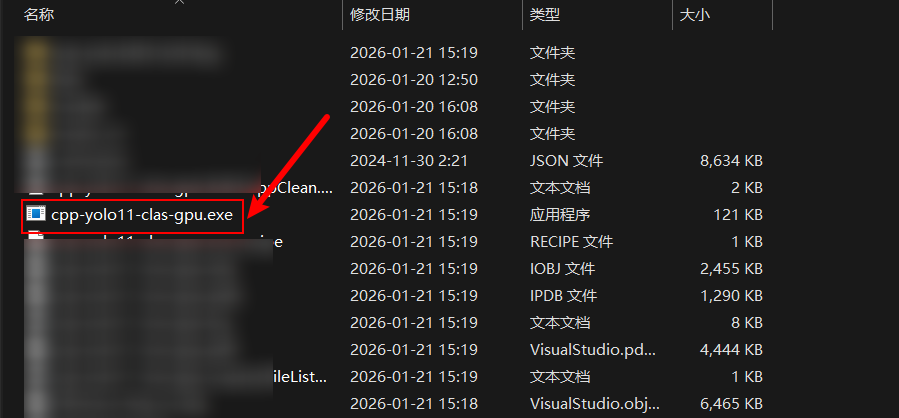
直接运行一定会提示缺少dll文件。因此,还需继续往下操作。
拷贝dll
我们首先删除cuda和cudnn相关的依赖dll文件。
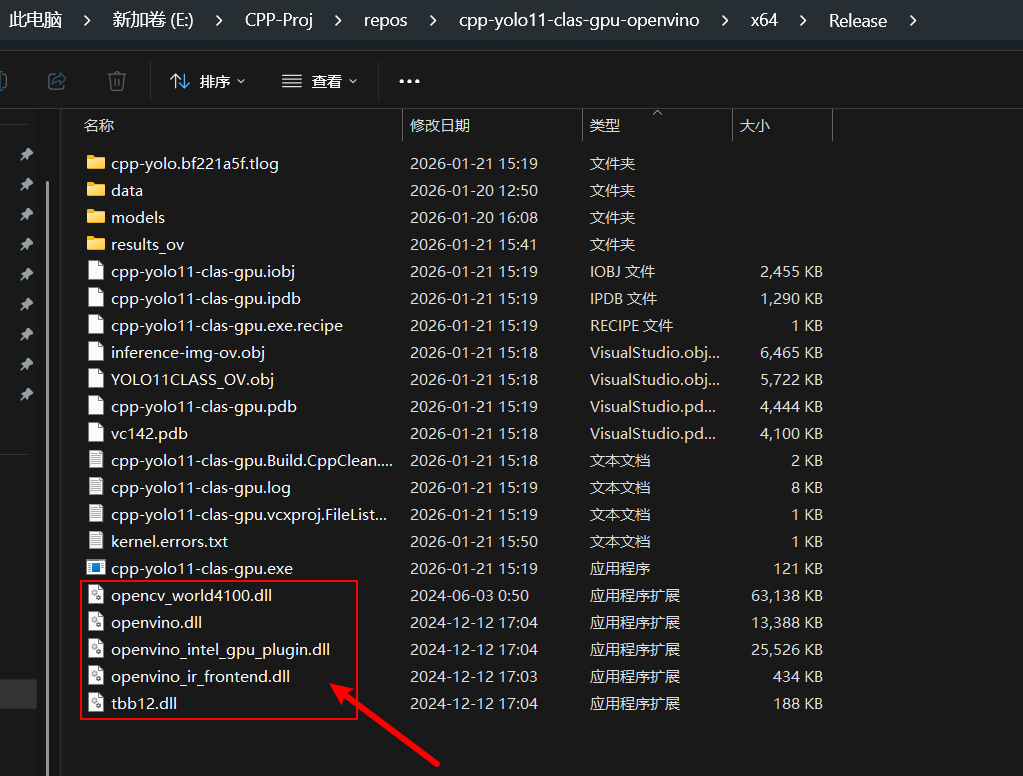
然后,从openvino的文件夹里面:
E:\CPP-Proj\repos\cpp-yolo11-clas-gpu-openvino\w_openvino_toolkit_windows_2024.6.0.17404.4c0f47d2335_x86_64\runtime\bin\intel64\Release

E:\CPP-Proj\repos\cpp-yolo11-clas-gpu-openvino\w_openvino_toolkit_windows_2024.6.0.17404.4c0f47d2335_x86_64\runtime\3rdparty\tbb\bin
中,把所有的dll复制过来。后来经过测试;发现以下几个是必须的的dll:
模型转换
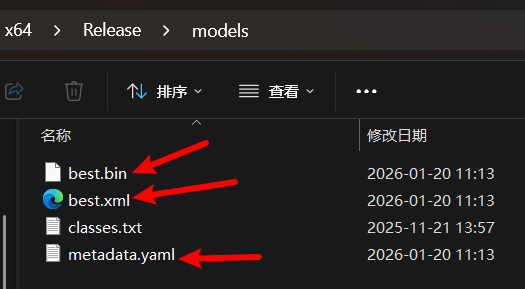
使用训练后得到的pt模型转换为OpenVINO模型,转换后会得到3个文件:
best.bin
best.xml
metadata.yaml
然后,我们将标签文件也放到models里面去,如下:
大功告成!
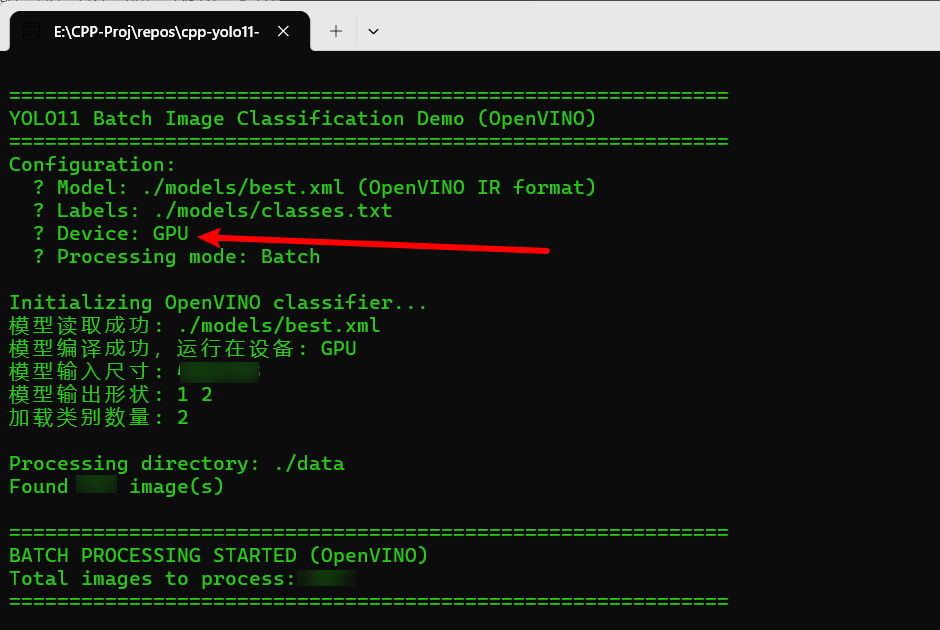
这样,运行exe,就会成功!

腾讯云面向开发者汇聚海量精品云计算使用和开发经验,营造开放的云计算技术生态圈。
更多推荐
 20
20 0
0- 0



 已为社区贡献15条内容

所有评论(0)