ailabel标注工具回显矩形,支持移动端图片放大缩小拖动
·
// "ailabel": "^5.1.15"
npm i ailabel -s -d
pc端的一些配置,画框功能看文档:http://81.70.243.137/aiLabel/
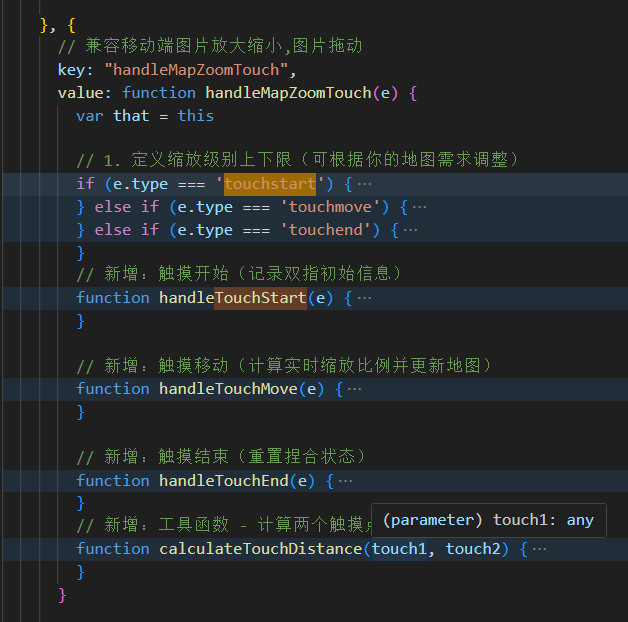
移动端只添加了图片双指放大,单指拖动效果
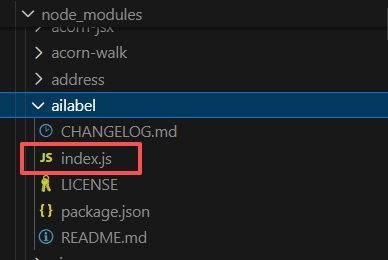
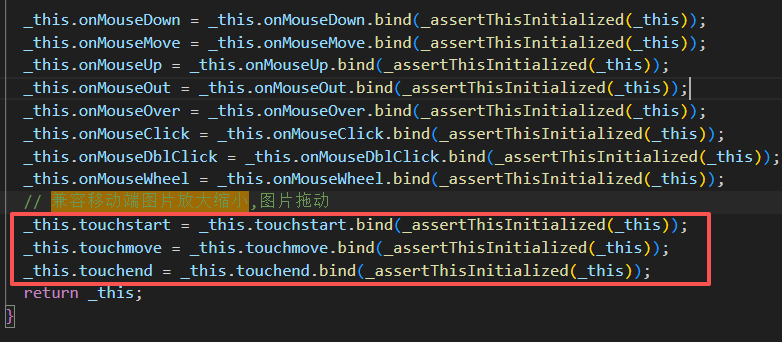
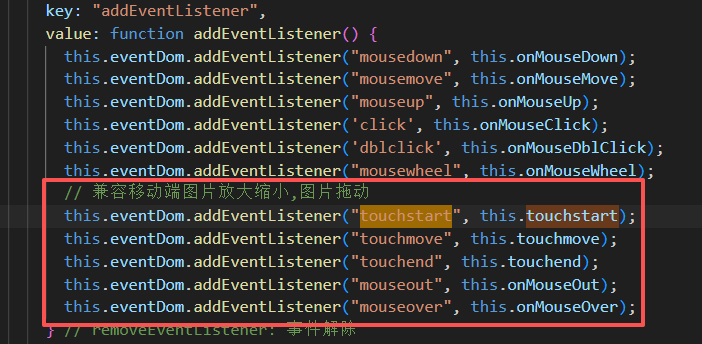
页面:去node_modules中把aILabel中的index.js拷贝到项目中引用,里边需要添加一些移动端的touch事件
<template>
	<div class="imgBox" id="map">
</template>
<script>
//
import AILabel from "../../utils/AILabel.js";
export default {
  data() {
    return {
      gMap: null, //AILabel实例
      gFirstFeatureLayer: null, //矢量图层实例(矩形,多边形等矢量)
      gFirstTextLayer: null, // 文本图层
      res: {
        pic_name: "20230302122901861_Dalsa上5_0.png",
        pic_height: 14000,
        pic_width: 8192,
        imageShowResultBboxes: [
          {
            detect_name: "绊丝",
            detect_x: 6368,
            detect_y: 5523,
            detect_w: 480,
            detect_h: 875,
          },
          {
            detect_name: "夹丝",
            detect_x: 6688,
            detect_y: 5386,
            detect_w: 376,
            detect_h: 273,
          }
        ]
      },
      imgUrl: require('../../assets/66.jpg'),
    };
  },
  mounted() {
    this.initMap()
  },

  methods: {
    initMap(res) {
      res = this.res
      // 清除上个label实例
      this.gMap && this.gMap.destroy();
      let src = this.imgUrl;
      let that = this;
      const gMap = new AILabel.Map("map", {
        center: { x: res.pic_width / 2, y: res.pic_height / 2 }, // 为了让图片居中
        zoom: res.pic_width > res.pic_height ? res.pic_width : res.pic_height, // 按图片大小缩放无需重新计算坐标点缩放
        mode: "PAN", // PAN 抓取  RECT 矩形   POINT 点
        refreshDelayWhenZooming: true, // 缩放时是否允许刷新延时,性能更优
        zoomWhenDrawing: true,
        panWhenDrawing: true,
        zoomWheelRatio: 5, // 控制滑轮缩放缩率[0, 10), 值越小,则缩放越快,反之越慢
        withHotKeys: true, // 关闭快捷键
      });
      that.gMap = gMap;
      // 图片层添加
      const gFirstImageLayer = new AILabel.Layer.Image("first-layer-image", { src, width: res.pic_width, height: res.pic_height, crossOrigin: false, position: { x: 0, y: 0, }, }, { name: "第一个图片图层" }, { zIndex: 5 });
      // 添加到gMap对象
      gMap.addLayer(gFirstImageLayer);
      // 添加矢量图层
      const gFirstFeatureLayer = new AILabel.Layer.Feature("first-layer-feature", { name: "第一个矢量图层" }, { zIndex: 10 });
      this.gFirstFeatureLayer = gFirstFeatureLayer;
      gMap.addLayer(gFirstFeatureLayer);
      this.gFirstTextLayer = new AILabel.Layer.Text("first-layer-text", { name: "第一个文本图层" }, { zIndex: 12, opacity: 1 });
      this.gMap.addLayer(this.gFirstTextLayer);
      // 回显 矩形
      if (res.imageShowResultBboxes && res.imageShowResultBboxes.length > 0) {
        res.imageShowResultBboxes.map((item, index) => {
          this.addFeature({ x: item.detect_x, y: item.detect_y, width: item.detect_w, height: item.detect_h }, index, item.detect_name, index + 1);
        });
      gMap.disableDrawingTip();// 绘制过程中提示文字关闭
      gMap.disableDrawingCrosshair();// 绘制过程中十字丝关闭w
      // gMap.disableZoomWhenDrawing();// 绘制时禁止滚动
      window.onresize = function () {
        this.gMap && this.gMap.resize();
      };
    },
    // 添加图形
    addFeature(data, id, name, index, filtered) {
      let that = this;
      //矩形
      let featureStyle = { strokeStyle: "#F53F3F", lineWidth: 1 };
      let textStyle = { font: 'bold 10px Arial', fillStyle: "rgba(255, 234, 234, 1)", strokeStyle: "rgba(255, 234, 234, 1)", background: true, globalAlpha: 1, fontColor: "rgba(245, 63, 63, 1)" };
      if (filtered) {
        featureStyle = { strokeStyle: "rgba(245, 161, 63, 1)", lineWidth: 1 };
        textStyle = { font: 'bold 10px Arial', fillStyle: "rgba(255, 248, 234, 1)", strokeStyle: "rgba(255, 248, 234, 1)", background: true, globalAlpha: 1, fontColor: "rgba(245, 161, 63, 1)" };
      }
      const rectFeature = new AILabel.Feature.Rect(id, data, { name, index }, featureStyle);
      that.gFirstFeatureLayer.addFeature(rectFeature);
      this.addText(data, id, name, textStyle, index);
    },
    // 添加文本
    addText(data, id, name, style, index) {
      const text = new AILabel.Text(
        id,
        {
          text: index + name,
          position: { x: data.x, y: data.y - 10 },// 11111111111   - 50 文字和框保持距离
          offset: { x: 0, y: 0 },
        },
        { name: "text" },
        style
      );
      this.gFirstTextLayer.addText(text);

    },

  },
};
</script>
<style lang="less" scoped>
.imgBox {
  width: 100%;
  height: 450px;
  position: relative;
  overflow: hidden;
  background-color: #fff;
}
</style>

腾讯云面向开发者汇聚海量精品云计算使用和开发经验,营造开放的云计算技术生态圈。
更多推荐
 0
0 0
0- 0


 已为社区贡献1条内容

所有评论(0)