claude报错:Note: Claude Code might not be available in your country. Check supported解决
·
问题路径
用命令行安装claude code:
npm install -g @anthropic-ai/claude-code
验证版本
claude --version
运行
claude
发现会报错:
Note: Claude Code might not be available in your country. Check supported
 countries at https://anthropic.com/supported-countries
问题解决
在~目录里查找.claude.json文件。
编辑该文件:
# 编辑配置文件
nano ~/.claude.json

# 或者使用 VS Code
code ~/.claude.json
在json里增加hasCompletedOnboarding": true这一句,记得要给上一句字段增加英文逗号,保证其符合json规范。
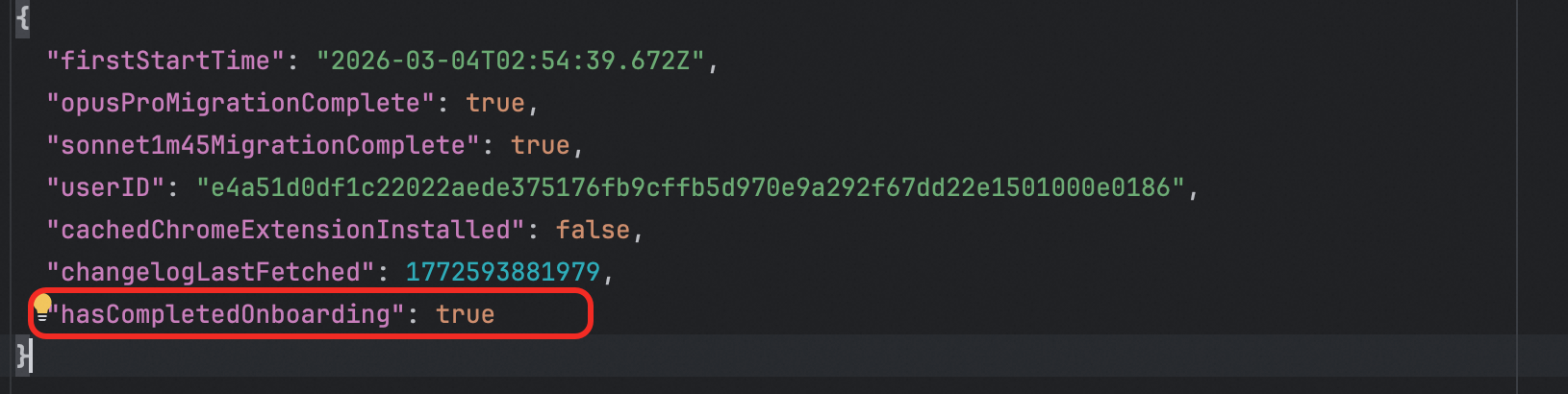
修改保存后,再启动claude就好了。

腾讯云面向开发者汇聚海量精品云计算使用和开发经验,营造开放的云计算技术生态圈。
更多推荐
 20
20 0
0- 0


 已为社区贡献4条内容

所有评论(0)