k8s-在Ubuntu24上使用sealos快速部署kubernetes集群
注意:在删除节点,尤其是 Master 节点时,请确保集群中剩余节点数量能满足高可用需求。如果遇到节点删除失败的问题(例如 SSH 认证失败),请检查并确保所有节点的 SSH 凭据一致。在所有节点上配置 /etc/hosts,确保能通过主机名解析到正确的IP地址。--masters:指定 Master 节点 IP 地址列表。--nodes:指定 Worker 节点 IP 地址列表。#删除worke
目录
1.环境准备
1.1环境描述
|
主机名 |
主机ip |
角色 |
操作系统 |
备注 |
|
k8s-master01 |
10.9.254.31 |
master |
Ubuntu24.04 |
|
|
k8s-master02 |
10.9.254.32 |
master |
Ubuntu24.04 |
|
|
k8s-master03 |
10.9.254.33 |
master |
Ubuntu24.04 |
|
|
k8s-worker01 |
10.9.254.34 |
worker |
Ubuntu24.04 |
|
|
k8s-worker02 |
10.9.254.35 |
worker |
Ubuntu24.04 |
1.2修改主机名(所有节点)
为每台服务器设置唯一的主机名,且不包含下划线。
|
root@ubuntu:~# hostnamectl set-hostname k8s-master01 root@ubuntu:~# bash root@k8s-master01:~# |
1.3配置主机解析(所有节点)
在所有节点上配置 /etc/hosts,确保能通过主机名解析到正确的IP地址。
|
root@k8s-master01:~# vim /etc/hosts |
|
127.0.0.1 localhost 127.0.1.1 ubuntu # The following lines are desirable for IPv6 capable hosts ::1 ip6-localhost ip6-loopback fe00::0 ip6-localnet ff00::0 ip6-mcastprefix ff02::1 ip6-allnodes ff02::2 ip6-allrouters 10.9.254.31 k8s-master01 10.9.254.32 k8s-master02 10.9.254.33 k8s-master03 10.9.254.34 k8s-worker01 10.9.254.35 k8s-worker02 |
1.4配置时钟同步(所有节点)
|
root@k8s-master01:~# apt install systemd-timesyncd root@k8s-master01:~# timedatectl set-timezone Asia/Shanghai root@k8s-master01:~# ln -sf /usr/share/zoneinfo/Asia/Shanghai /etc/localtime root@k8s-master01:~# timedatectl set-local-rtc 1 root@k8s-master01:~# timedatectl status |
|
Local time: Wed 2024-10-30 17:08:23 CST Universal time: Wed 2024-10-30 09:08:23 UTC RTC time: Wed 2024-10-30 09:08:23 Time zone: Asia/Shanghai (CST, +0800) System clock synchronized: yes NTP service: n/a RTC in local TZ: no |
|
root@k8s-master01:~# timedatectl set-ntp true root@k8s-master01:~# vim /etc/systemd/timesyncd.conf |
|
NTP=ntp.tencent.com FallbackNTP=ntp1.tencent.com,ntp2.tencent.com,ntp3.tencent.com RootDistanceMaxSec=5 PollIntervalMinSec=32 PollIntervalMaxSec=2048 |
|
root@k8s-master01:~# systemctl restart systemd-timesyncd root@k8s-master01:~# timedatectl show-timesync |
|
SystemNTPServers=ntp.tencent.com FallbackNTPServers=ntp1.tencent.com,ntp2.tencent.com,ntp3.tencent.com ServerName=ntp.tencent.com ServerAddress=106.55.184.199 RootDistanceMaxUSec=5s PollIntervalMinUSec=32s PollIntervalMaxUSec=34min 8s PollIntervalUSec=32s Frequency=0 |
|
root@k8s-master01:~# vim /etc/default/locale |
|
LANG=en_US.UTF-8 LC_TIME=en_DK.UTF-8 |
|
root@k8s-master01:~# reboot |
1.5关闭防火墙(所有节点)
|
root@k8s-master01:~# apt list --installed | grep ufw |
|
WARNING: apt does not have a stable CLI interface. Use with caution in scripts. ufw/noble,now 0.36.2-6 all [installed,automatic] |
|
root@k8s-master01:~# ufw disable |
|
Firewall stopped and disabled on system startup |
|
journalctl 命令自动维护文件大小 |
|
只保留近一周的日志 root@k8s-master01:~# journalctl --vacuum-time=1w |
|
Vacuuming done, freed 0B of archived journals from /var/log/journal/a012fa6cac384fefa4ee34c9da66fc85. Vacuuming done, freed 0B of archived journals from /run/log/journal. Vacuuming done, freed 0B of archived journals from /var/log/journal. |
|
只保留500MB的日志 root@k8s-master01:~# journalctl --vacuum-size=500M |
|
Vacuuming done, freed 0B of archived journals from /var/log/journal. Vacuuming done, freed 0B of archived journals from /var/log/journal/a012fa6cac384fefa4ee34c9da66fc85. Vacuuming done, freed 0B of archived journals from /run/log/journal. |
2.安装Sealos
2.1下载Sealos(k8s-master01)
https://github.com/labring/sealos/releases
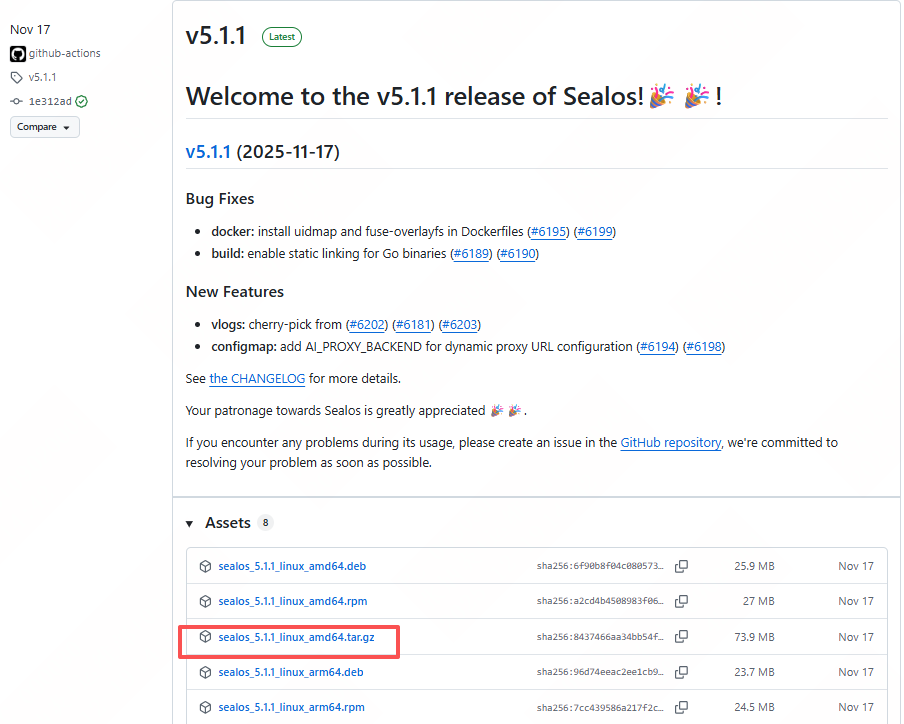
https://github.com/labring/sealos/releases/download/v5.1.1/sealos_5.1.1_linux_amd64.tar.gz
https://gh-proxy.org/https://github.com/labring/sealos/releases/download/v5.1.1/sealos_5.1.1_linux_amd64.tar.gz
|
root@k8s-master01:~# wget https://gh-proxy.org/https://github.com/labring/sealos/releases/download/v5.1.1/sealos_5.1.1_linux_amd64.tar.gz root@k8s-master01:~# ll |
|
-rw-r--r-- 1 root root 77489647 Nov 17 12:24 sealos_5.1.1_linux_amd64.tar.gz |
2.2安装sealos
|
root@k8s-master01:~# tar -zxvf sealos_5.1.1_linux_amd64.tar.gz sealos |
|
sealos |
|
root@k8s-master01:~# chmod +x sealos root@k8s-master01:~# mv sealos /usr/local/bin/ |
2.3验证安装
|
root@k8s-master01:~# sealos --help |
|
sealos is a Kubernetes distribution, a unified OS to manage cloud native applications. Cluster Management Commands: apply Run cloud images within a kubernetes cluster with Clusterfile cert update Kubernetes API server's cert run Run cloud native applications with ease, with or without a existing cluster reset Reset all, everything in the cluster status state of sealos Node Management Commands: add Add nodes into cluster delete Remove nodes from cluster Remote Operation Commands: exec Execute shell command or script on specified nodes scp Copy file to remote on specified nodes Experimental Commands: registry registry related Container and Image Commands: build Build an image using instructions in a Containerfile or Kubefile create Create a cluster without running the CMD, for inspecting image diff Inspect changes to the object's file systems inspect Inspect the configuration of a container or image images List images in local storage load Load image(s) from archive file login Login to a container registry logout Logout of a container registry manifest Manipulate manifest lists and image indexes merge merge multiple images into one pull Pull images from the specified location push Push an image to a specified destination rmi Remove one or more images from local storage save Save image into archive file tag Add an additional name to a local image Other Commands: completion Generate the autocompletion script for the specified shell docs generate API reference env prints out all the environment information in use by sealos gen generate a Clusterfile with all default settings version Print version info Use "sealos --help" for more information about a given command. |
|
root@k8s-master01:~# sealos version |
|
SealosVersion: buildDate: "2025-11-17T04:16:18Z" compiler: gc gitCommit: 1e312ad2c gitVersion: 5.1.1 goVersion: go1.23.12 platform: linux/amd64 |
3.在线部署kubernetes集群
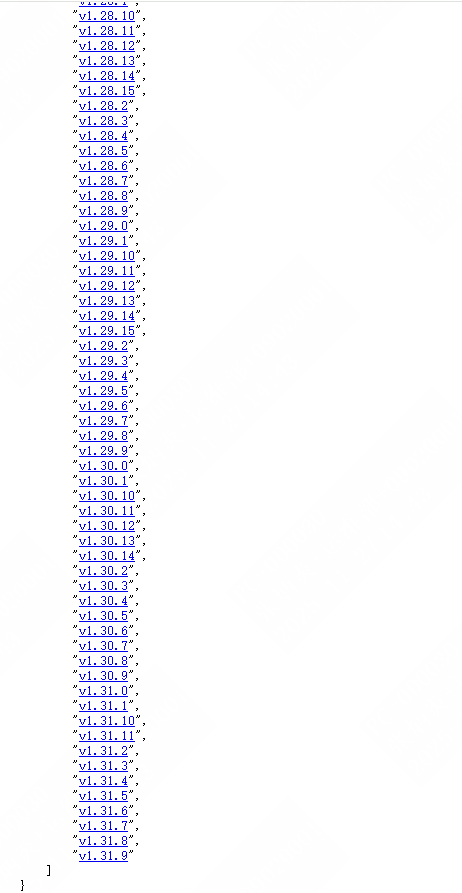
3.1查看kubernetes版本支持
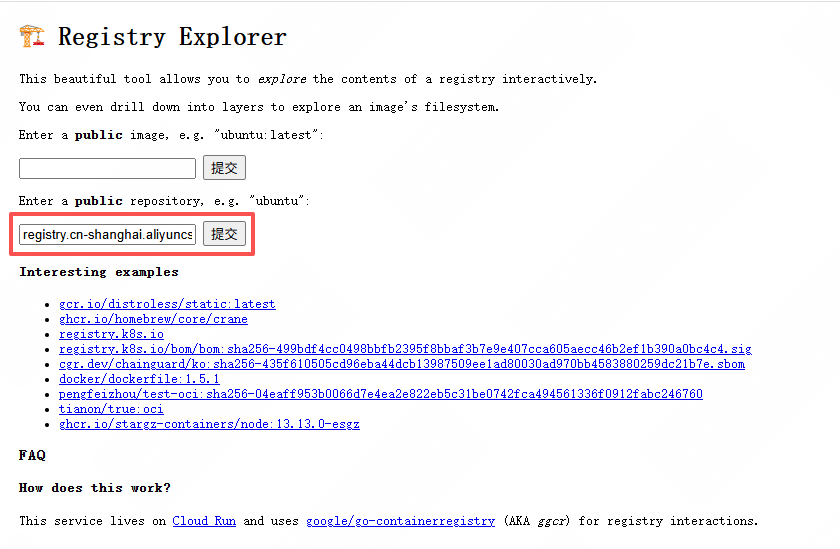
使用 Registry Explorer 可以查看 K8s 集群镜像的所有版本,直接输入 registry.cn-shanghai.aliyuncs.com/labring/kubernetes,然后点击“Submit Query”:
3.2安装指定版本的Kubernetes集群
|
sealos run registry.cn-shanghai.aliyuncs.com/labring/kubernetes:v1.31.9 registry.cn-shanghai.aliyuncs.com/labring/helm:v3.9.4 registry.cn-shanghai.aliyuncs.com/labring/cilium:v1.13.4 --masters 10.9.254.31,10.9.254.32,10.9.254.33 --nodes 10.9.254.34,10.9.254.35 -p Cywetc.c0m |
|
root@k8s-master01:~# sealos run registry.cn-shanghai.aliyuncs.com/labring/kubernetes:v1.31.9 registry.cn-shanghai.aliyuncs.com/labring/helm:v3.9.4 registry.cn-shanghai.aliyuncs.com/labring/cilium:v1.13.4 --masters 10.9.254.31,10.9.254.32,10.9.254.33 --nodes 10.9.254.34,10.9.254.35 -p Cywetc.c0m |
|
2025-12-19T14:58:20 info succeeded in creating a new cluster, enjoy it! 2025-12-19T14:58:20 info ___ ___ ___ ___ ___ ___ /\ \ /\ \ /\ \ /\__\ /\ \ /\ \ /::\ \ /::\ \ /::\ \ /:/ / /::\ \ /::\ \ /:/\ \ \ /:/\:\ \ /:/\:\ \ /:/ / /:/\:\ \ /:/\ \ \ _\:\~\ \ \ /::\~\:\ \ /::\~\:\ \ /:/ / /:/ \:\ \ _\:\~\ \ \ /\ \:\ \ \__\ /:/\:\ \:\__\ /:/\:\ \:\__\ /:/__/ /:/__/ \:\__\ /\ \:\ \ \__\ \:\ \:\ \/__/ \:\~\:\ \/__/ \/__\:\/:/ / \:\ \ \:\ \ /:/ / \:\ \:\ \/__/ \:\ \:\__\ \:\ \:\__\ \::/ / \:\ \ \:\ /:/ / \:\ \:\__\ \:\/:/ / \:\ \/__/ /:/ / \:\ \ \:\/:/ / \:\/:/ / \::/ / \:\__\ /:/ / \:\__\ \::/ / \::/ / \/__/ \/__/ \/__/ \/__/ \/__/ \/__/ Website: https://sealos.io/ Address: github.com/labring/sealos Version: 5.1.1-1e312ad2c |
|
root@k8s-master01:~# kubectl get nodes |
|
NAME STATUS ROLES AGE VERSION k8s-master01 Ready control-plane 2m25s v1.31.9 k8s-master02 Ready control-plane 107s v1.31.9 k8s-master03 Ready control-plane 69s v1.31.9 k8s-worker01 Ready 61s v1.31.9 k8s-worker02 Ready 61s v1.31.9 |
参数说明:
--masters:指定 Master 节点 IP 地址列表。
--nodes:指定 Worker 节点 IP 地址列表。
-p:SSH 登录密码。
3.3安装指定版本的kubernetes单机版
|
$ sealos run registry.cn-shanghai.aliyuncs.com/labring/kubernetes:v1.31.9 registry.cn-shanghai.aliyuncs.com/labring/helm:v3.9.4 registry.cn-shanghai.aliyuncs.com/labring/cilium:v1.13.4 --single |
3.4 安装分布式应用
|
sealos run registry.cn-shanghai.aliyuncs.com/labring/helm:v3.9.4 # install helm sealos run registry.cn-shanghai.aliyuncs.com/labring/openebs:v3.9.0 # install openebs sealos run registry.cn-shanghai.aliyuncs.com/labring/minio-operator:v4.5.5 registry.cn-shanghai.aliyuncs.com/labring/ingress-nginx:4.1.0 |
4.离线部署kubernetes集群
4.1下载集群镜像
|
[root@k8s-master01 ~]# sealos pull registry.cn-shanghai.aliyuncs.com/labring/kubernetes-docker:v1.31.9 [root@k8s-master01 ~]# sealos pull registry.cn-shanghai.aliyuncs.com/labring/helm:v3.9.4 [root@k8s-master01 ~]# sealos pull registry.cn-shanghai.aliyuncs.com/labring/calico:v3.28.1 |
|
[root@k8s-master01 ~]# sealos images |
|
REPOSITORY TAG IMAGE ID CREATED SIZE registry.cn-shanghai.aliyuncs.com/labring/helm v3.9.4 333b1a3d00b4 3 months ago 46.4 MB registry.cn-shanghai.aliyuncs.com/labring/kubernetes-docker v1.31.9 ae02ececbccc 6 months ago 674 MB registry.cn-shanghai.aliyuncs.com/labring/calico v3.28.1 3d5490e2bcb4 2 years ago 355 MB |
|
[root@k8s-master01 ~]# sealos save -o kubernetes.tar registry.cn-shanghai.aliyuncs.com/labring/kubernetes-docker:v1.31.9 [root@k8s-master01 ~]# sealos save -o helm.tar registry.cn-shanghai.aliyuncs.com/labring/helm:v3.9.4 [root@k8s-master01 ~]# sealos save -o calico.tar registry.cn-shanghai.aliyuncs.com/labring/calico:v3.28.1 |
4.2导入离线镜像
将打包文件拷贝到离线环境,使用 load 命令导入镜像即可
|
[root@k8s-master01 ~]# sealos load -i kubernetes.tar [root@k8s-master01 ~]# sealos load -i helm.tar [root@k8s-master01 ~]# sealos load -i calico.tar [root@k8s-master01 ~]# sealos images |
|
REPOSITORY TAG IMAGE ID CREATED SIZE registry.cn-shanghai.aliyuncs.com/labring/helm v3.9.4 333b1a3d00b4 3 months ago 46.4 MB registry.cn-shanghai.aliyuncs.com/labring/kubernetes-docker v1.31.9 ae02ececbccc 6 months ago 674 MB registry.cn-shanghai.aliyuncs.com/labring/calico v3.28.1 3d5490e2bcb4 2 years ago 355 MB |
4.3安装kubernetes集群
生成配置文件
sealos gen registry.cn-shanghai.aliyuncs.com/labring/kubernetes-docker:v1.31.9 registry.cn-shanghai.aliyuncs.com/labring/helm:v3.9.4 registry.cn-shanghai.aliyuncs.com/labring/calico:v3.28.1 \
--masters 10.9.254.31,10.9.254.32,10.9.254.33 \
--nodes 10.9.254.34,10.9.254.35 --passwd 'Cywetc.c0m' -o Clusterfile
|
[root@k8s-master01 ~]# sealos gen registry.cn-shanghai.aliyuncs.com/labring/kubernetes-docker:v1.31.9 registry.cn-shanghai.aliyuncs.com/labring/helm:v3.9.4 registry.cn-shanghai.aliyuncs.com/labring/calico:v3.28.1 \ > --masters 10.9.254.31,10.9.254.32,10.9.254.33 \ > --nodes 10.9.254.34,10.9.254.35 --passwd 'Cywetc.c0m' -o Clusterfile |
|
2025-12-01T16:47:48 info using v1beta4 kubeadm config |
|
[root@k8s-master01 ~]# ll |
|
-rw-r--r-- 1 root root 6631 Dec 1 16:47 Clusterfile |
|
[root@k8s-master01 ~]# cat Clusterfile |
|
apiVersion: apps.sealos.io/v1beta1 kind: Cluster metadata: creationTimestamp: null name: default spec: hosts: - ips: - 10.9.254.31:22 - 10.9.254.32:22 - 10.9.254.33:22 roles: - master - amd64 - ips: - 10.9.254.34:22 - 10.9.254.35:22 roles: - node - amd64 image: - registry.cn-shanghai.aliyuncs.com/labring/kubernetes-docker:v1.31.9 - registry.cn-shanghai.aliyuncs.com/labring/helm:v3.9.4 - registry.cn-shanghai.aliyuncs.com/labring/calico:v3.28.1 ssh: passwd: Cywetc.c0m status: {} --- apiVersion: kubeadm.k8s.io/v1beta4 kind: InitConfiguration localAPIEndpoint: advertiseAddress: 10.9.254.31 bindPort: 6443 nodeRegistration: kubeletExtraArgs: - name: node-ip value: 10.9.254.31 taints: null --- apiServer: certSANs: - 127.0.0.1 - apiserver.cluster.local - 10.103.97.2 - 10.9.254.31 - 10.9.254.32 - 10.9.254.33 extraArgs: - name: audit-log-format value: json - name: audit-log-maxage value: "7" - name: audit-log-maxbackup value: "10" - name: audit-log-maxsize value: "100" - name: audit-log-path value: /var/log/kubernetes/audit.log - name: audit-policy-file value: /etc/kubernetes/audit-policy.yml - name: enable-aggregator-routing value: "true" - name: feature-gates value: "" extraVolumes: - hostPath: /etc/kubernetes mountPath: /etc/kubernetes name: audit pathType: DirectoryOrCreate - hostPath: /var/log/kubernetes mountPath: /var/log/kubernetes name: audit-log pathType: DirectoryOrCreate - hostPath: /etc/localtime mountPath: /etc/localtime name: localtime pathType: File readOnly: true apiVersion: kubeadm.k8s.io/v1beta4 controlPlaneEndpoint: apiserver.cluster.local:6443 controllerManager: extraArgs: - name: bind-address value: 0.0.0.0 - name: cluster-signing-duration value: 876000h - name: feature-gates value: "" extraVolumes: - hostPath: /etc/localtime mountPath: /etc/localtime name: localtime pathType: File readOnly: true dns: {} etcd: local: dataDir: "" extraArgs: - name: listen-metrics-urls value: http://0.0.0.0:2381 kind: ClusterConfiguration kubernetesVersion: v1.31.9 networking: podSubnet: 100.64.0.0/10 serviceSubnet: 10.96.0.0/22 proxy: {} scheduler: extraArgs: - name: bind-address value: 0.0.0.0 - name: feature-gates value: "" extraVolumes: - hostPath: /etc/localtime mountPath: /etc/localtime name: localtime pathType: File readOnly: true --- apiVersion: kubeadm.k8s.io/v1beta4 caCertPath: /etc/kubernetes/pki/ca.crt controlPlane: localAPIEndpoint: bindPort: 6443 discovery: {} kind: JoinConfiguration nodeRegistration: taints: null --- apiVersion: kubeproxy.config.k8s.io/v1alpha1 bindAddress: 0.0.0.0 bindAddressHardFail: false clientConnection: acceptContentTypes: "" burst: 10 contentType: application/vnd.kubernetes.protobuf kubeconfig: "" qps: 5 clusterCIDR: "" configSyncPeriod: 15m0s conntrack: maxPerCore: 32768 min: 131072 tcpBeLiberal: false tcpCloseWaitTimeout: 1h0m0s tcpEstablishedTimeout: 24h0m0s udpStreamTimeout: 0s udpTimeout: 0s detectLocal: bridgeInterface: "" interfaceNamePrefix: "" detectLocalMode: "" enableProfiling: false healthzBindAddress: 0.0.0.0:10256 hostnameOverride: "" iptables: localhostNodePorts: true masqueradeAll: false masqueradeBit: 14 minSyncPeriod: 1s syncPeriod: 30s ipvs: excludeCIDRs: - 10.103.97.2/32 minSyncPeriod: 0s scheduler: "" strictARP: false syncPeriod: 30s tcpFinTimeout: 0s tcpTimeout: 0s udpTimeout: 0s kind: KubeProxyConfiguration logging: flushFrequency: 5s format: text options: json: infoBufferSize: "0" text: infoBufferSize: "0" verbosity: 0 metricsBindAddress: 0.0.0.0:10249 mode: ipvs nftables: masqueradeAll: false masqueradeBit: 14 minSyncPeriod: 1s syncPeriod: 30s nodePortAddresses: null oomScoreAdj: -999 portRange: "" showHiddenMetricsForVersion: "" winkernel: enableDSR: false forwardHealthCheckVip: false networkName: "" rootHnsEndpointName: "" sourceVip: "" --- address: 0.0.0.0 apiVersion: kubelet.config.k8s.io/v1beta1 authentication: anonymous: enabled: false webhook: cacheTTL: 2m0s enabled: true x509: clientCAFile: /etc/kubernetes/pki/ca.crt authorization: mode: Webhook webhook: cacheAuthorizedTTL: 5m0s cacheUnauthorizedTTL: 30s cgroupDriver: cgroupfs cgroupsPerQOS: true configMapAndSecretChangeDetectionStrategy: Watch containerLogMaxFiles: 5 containerLogMaxSize: 10Mi containerLogMaxWorkers: 1 containerLogMonitorInterval: 10s containerRuntimeEndpoint: unix:///run/containerd/containerd.sock contentType: application/vnd.kubernetes.protobuf cpuCFSQuota: true cpuCFSQuotaPeriod: 100ms cpuManagerPolicy: none cpuManagerReconcilePeriod: 10s enableControllerAttachDetach: true enableDebugFlagsHandler: true enableDebuggingHandlers: true enableProfilingHandler: true enableServer: true enableSystemLogHandler: true enforceNodeAllocatable: - pods eventBurst: 100 eventRecordQPS: 50 evictionHard: imagefs.available: 10% memory.available: 100Mi nodefs.available: 10% nodefs.inodesFree: 5% evictionPressureTransitionPeriod: 5m0s failSwapOn: true fileCheckFrequency: 20s hairpinMode: promiscuous-bridge healthzBindAddress: 0.0.0.0 healthzPort: 10248 httpCheckFrequency: 20s imageGCHighThresholdPercent: 85 imageGCLowThresholdPercent: 80 imageMaximumGCAge: 0s imageMinimumGCAge: 2m0s iptablesDropBit: 15 iptablesMasqueradeBit: 14 kind: KubeletConfiguration kubeAPIBurst: 100 kubeAPIQPS: 50 localStorageCapacityIsolation: true logging: flushFrequency: 5000000000 format: text options: json: infoBufferSize: "0" text: infoBufferSize: "0" verbosity: 0 makeIPTablesUtilChains: true maxOpenFiles: 1000000 maxPods: 110 memoryManagerPolicy: None memorySwap: {} memoryThrottlingFactor: 0.8 nodeLeaseDurationSeconds: 40 nodeStatusMaxImages: 50 nodeStatusReportFrequency: 10s nodeStatusUpdateFrequency: 10s oomScoreAdj: -999 podLogsDir: /var/log/pods podPidsLimit: -1 port: 10250 registerNode: true registryBurst: 100 registryPullQPS: 50 rotateCertificates: true runtimeRequestTimeout: 2m0s seccompDefault: false serializeImagePulls: false shutdownGracePeriod: 0s shutdownGracePeriodCriticalPods: 0s staticPodPath: /etc/kubernetes/manifests streamingConnectionIdleTimeout: 4h0m0s syncFrequency: 1m0s topologyManagerPolicy: none topologyManagerScope: container volumePluginDir: /usr/libexec/kubernetes/kubelet-plugins/volume/exec/ volumeStatsAggPeriod: 1m0s |
启动集群
|
[root@k8s-master01 ~]# sealos apply -f Clusterfile |
|
2025-12-01T17:14:22 info succeeded in creating a new cluster, enjoy it! 2025-12-01T17:14:22 info ___ ___ ___ ___ ___ ___ /\ \ /\ \ /\ \ /\__\ /\ \ /\ \ /::\ \ /::\ \ /::\ \ /:/ / /::\ \ /::\ \ /:/\ \ \ /:/\:\ \ /:/\:\ \ /:/ / /:/\:\ \ /:/\ \ \ _\:\~\ \ \ /::\~\:\ \ /::\~\:\ \ /:/ / /:/ \:\ \ _\:\~\ \ \ /\ \:\ \ \__\ /:/\:\ \:\__\ /:/\:\ \:\__\ /:/__/ /:/__/ \:\__\ /\ \:\ \ \__\ \:\ \:\ \/__/ \:\~\:\ \/__/ \/__\:\/:/ / \:\ \ \:\ \ /:/ / \:\ \:\ \/__/ \:\ \:\__\ \:\ \:\__\ \::/ / \:\ \ \:\ /:/ / \:\ \:\__\ \:\/:/ / \:\ \/__/ /:/ / \:\ \ \:\/:/ / \:\/:/ / \::/ / \:\__\ /:/ / \:\__\ \::/ / \::/ / \/__/ \/__/ \/__/ \/__/ \/__/ \/__/ Website: https://sealos.io/ Address: github.com/labring/sealos Version: 5.1.1-1e312ad2c |
|
[root@k8s-master01 ~]# kubectl get nodes |
|
NAME STATUS ROLES AGE VERSION k8s-master01 Ready control-plane 2m3s v1.31.9 k8s-master02 Ready control-plane 95s v1.31.9 k8s-master03 Ready control-plane 63s v1.31.9 k8s-worker01 Ready 53s v1.31.9 k8s-worker02 Ready 54s v1.31.9 |
5.日常运维操作
5.1添加节点
#添加worker节点10.9.254.37
|
root@ubuntu:~# hostnamectl set-hostname k8s-worker03 root@ubuntu:~# bash root@k8s-worker03:~# vim /etc/hosts |
|
127.0.0.1 localhost 127.0.1.1 ubuntu # The following lines are desirable for IPv6 capable hosts ::1 ip6-localhost ip6-loopback fe00::0 ip6-localnet ff00::0 ip6-mcastprefix ff02::1 ip6-allnodes ff02::2 ip6-allrouters 10.9.254.31 k8s-master01 10.9.254.32 k8s-master02 10.9.254.33 k8s-master03 10.9.254.34 k8s-worker01 10.9.254.35 k8s-worker02 10.9.254.37 k8s-worker03 |
|
root@k8s-master01:~# sealos add --nodes 10.9.254.37 |
|
2025-12-19T15:03:37 info succeeded in joining 10.9.254.37:22 as worker 2025-12-19T15:03:37 info start to sync lvscare static pod to node: 10.9.254.37:22 master: [10.9.254.31:6443 10.9.254.32:6443 10.9.254.33:6443] 10.9.254.37:22 2025-12-19T15:03:38 info generator lvscare static pod is success 2025-12-19T15:03:38 info Executing pipeline RunGuest in ScaleProcessor. 2025-12-19T15:03:38 info succeeded in scaling this cluster 2025-12-19T15:03:39 info ___ ___ ___ ___ ___ ___ /\ \ /\ \ /\ \ /\__\ /\ \ /\ \ /::\ \ /::\ \ /::\ \ /:/ / /::\ \ /::\ \ /:/\ \ \ /:/\:\ \ /:/\:\ \ /:/ / /:/\:\ \ /:/\ \ \ _\:\~\ \ \ /::\~\:\ \ /::\~\:\ \ /:/ / /:/ \:\ \ _\:\~\ \ \ /\ \:\ \ \__\ /:/\:\ \:\__\ /:/\:\ \:\__\ /:/__/ /:/__/ \:\__\ /\ \:\ \ \__\ \:\ \:\ \/__/ \:\~\:\ \/__/ \/__\:\/:/ / \:\ \ \:\ \ /:/ / \:\ \:\ \/__/ \:\ \:\__\ \:\ \:\__\ \::/ / \:\ \ \:\ /:/ / \:\ \:\__\ \:\/:/ / \:\ \/__/ /:/ / \:\ \ \:\/:/ / \:\/:/ / \::/ / \:\__\ /:/ / \:\__\ \::/ / \::/ / \/__/ \/__/ \/__/ \/__/ \/__/ \/__/ Website: https://sealos.io/ Address: github.com/labring/sealos Version: 5.1.1-1e312ad2c |
|
root@k8s-master01:~# kubectl get nodes |
|
NAME STATUS ROLES AGE VERSION k8s-master01 Ready control-plane 7m25s v1.31.9 k8s-master02 Ready control-plane 6m47s v1.31.9 k8s-master03 Ready control-plane 6m9s v1.31.9 k8s-worker01 Ready 6m1s v1.31.9 k8s-worker02 Ready 6m1s v1.31.9 k8s-worker03 Ready 38s v1.31.9 |
#添加master节点10.9.254.36
|
root@ubuntu:~# hostnamectl set-hostname k8s-master04 root@ubuntu:~# bash root@k8s-master04:~# vim /etc/hosts |
|
127.0.0.1 localhost 127.0.1.1 ubuntu # The following lines are desirable for IPv6 capable hosts ::1 ip6-localhost ip6-loopback fe00::0 ip6-localnet ff00::0 ip6-mcastprefix ff02::1 ip6-allnodes ff02::2 ip6-allrouters 10.9.254.31 k8s-master01 10.9.254.32 k8s-master02 10.9.254.33 k8s-master03 10.9.254.34 k8s-worker01 10.9.254.35 k8s-worker02 10.9.254.36 k8s-master04 |
|
root@k8s-master01:~# sealos add --masters 10.9.254.36 |
|
2025-12-19T15:09:37 info succeeded in joining 10.9.254.36:22 as master 2025-12-19T15:09:37 info start to sync lvscare static pod to node: 10.9.254.37:22 master: [10.9.254.31:6443 10.9.254.32:6443 10.9.254.33:6443 10.9.254.36:6443] 2025-12-19T15:09:37 info start to sync lvscare static pod to node: 10.9.254.34:22 master: [10.9.254.31:6443 10.9.254.32:6443 10.9.254.33:6443 10.9.254.36:6443] 2025-12-19T15:09:37 info start to sync lvscare static pod to node: 10.9.254.35:22 master: [10.9.254.31:6443 10.9.254.32:6443 10.9.254.33:6443 10.9.254.36:6443] 10.9.254.35:22 2025-12-19T15:09:38 info generator lvscare static pod is success 10.9.254.34:22 2025-12-19T15:09:38 info generator lvscare static pod is success 10.9.254.37:22 2025-12-19T15:09:38 info generator lvscare static pod is success 2025-12-19T15:09:38 info Executing pipeline RunGuest in ScaleProcessor. 2025-12-19T15:09:38 info succeeded in scaling this cluster 2025-12-19T15:09:39 info ___ ___ ___ ___ ___ ___ /\ \ /\ \ /\ \ /\__\ /\ \ /\ \ /::\ \ /::\ \ /::\ \ /:/ / /::\ \ /::\ \ /:/\ \ \ /:/\:\ \ /:/\:\ \ /:/ / /:/\:\ \ /:/\ \ \ _\:\~\ \ \ /::\~\:\ \ /::\~\:\ \ /:/ / /:/ \:\ \ _\:\~\ \ \ /\ \:\ \ \__\ /:/\:\ \:\__\ /:/\:\ \:\__\ /:/__/ /:/__/ \:\__\ /\ \:\ \ \__\ \:\ \:\ \/__/ \:\~\:\ \/__/ \/__\:\/:/ / \:\ \ \:\ \ /:/ / \:\ \:\ \/__/ \:\ \:\__\ \:\ \:\__\ \::/ / \:\ \ \:\ /:/ / \:\ \:\__\ \:\/:/ / \:\ \/__/ /:/ / \:\ \ \:\/:/ / \:\/:/ / \::/ / \:\__\ /:/ / \:\__\ \::/ / \::/ / \/__/ \/__/ \/__/ \/__/ \/__/ \/__/ Website: https://sealos.io/ Address: github.com/labring/sealos Version: 5.1.1-1e312ad2c |
|
root@k8s-master01:~# kubectl get nodes |
|
NAME STATUS ROLES AGE VERSION k8s-master01 Ready control-plane 13m v1.31.9 k8s-master02 Ready control-plane 13m v1.31.9 k8s-master03 Ready control-plane 12m v1.31.9 k8s-master04 Ready control-plane 69s v1.31.9 k8s-worker01 Ready 12m v1.31.9 k8s-worker02 Ready 12m v1.31.9 k8s-worker03 Ready 7m1s v1.31.9 |
5.2删除节点
#删除worker节点10.9.254.37
|
root@k8s-master01:~# sealos delete --nodes 10.9.254.37 |
|
2025-12-19T15:12:16 info Executing pipeline UnMountRootfs in ScaleProcessor. 2025-12-19T15:12:17 info succeeded in scaling this cluster 2025-12-19T15:12:18 info ___ ___ ___ ___ ___ ___ /\ \ /\ \ /\ \ /\__\ /\ \ /\ \ /::\ \ /::\ \ /::\ \ /:/ / /::\ \ /::\ \ /:/\ \ \ /:/\:\ \ /:/\:\ \ /:/ / /:/\:\ \ /:/\ \ \ _\:\~\ \ \ /::\~\:\ \ /::\~\:\ \ /:/ / /:/ \:\ \ _\:\~\ \ \ /\ \:\ \ \__\ /:/\:\ \:\__\ /:/\:\ \:\__\ /:/__/ /:/__/ \:\__\ /\ \:\ \ \__\ \:\ \:\ \/__/ \:\~\:\ \/__/ \/__\:\/:/ / \:\ \ \:\ \ /:/ / \:\ \:\ \/__/ \:\ \:\__\ \:\ \:\__\ \::/ / \:\ \ \:\ /:/ / \:\ \:\__\ \:\/:/ / \:\ \/__/ /:/ / \:\ \ \:\/:/ / \:\/:/ / \::/ / \:\__\ /:/ / \:\__\ \::/ / \::/ / \/__/ \/__/ \/__/ \/__/ \/__/ \/__/ Website: https://sealos.io/ Address: github.com/labring/sealos Version: 5.1.1-1e312ad2c |
|
root@k8s-master01:~# kubectl get nodes |
|
NAME STATUS ROLES AGE VERSION k8s-master01 Ready control-plane 15m v1.31.9 k8s-master02 Ready control-plane 15m v1.31.9 k8s-master03 Ready control-plane 14m v1.31.9 k8s-master04 Ready control-plane 3m14s v1.31.9 k8s-worker01 Ready 14m v1.31.9 k8s-worker02 Ready 14m v1.31.9 |
#删除master节点10.9.254.36
|
root@k8s-master01:~# sealos delete --masters 10.9.254.36 |
|
2025-12-19T15:14:09 info Executing pipeline UnMountRootfs in ScaleProcessor. 2025-12-19T15:14:09 info succeeded in scaling this cluster 2025-12-19T15:14:10 info ___ ___ ___ ___ ___ ___ /\ \ /\ \ /\ \ /\__\ /\ \ /\ \ /::\ \ /::\ \ /::\ \ /:/ / /::\ \ /::\ \ /:/\ \ \ /:/\:\ \ /:/\:\ \ /:/ / /:/\:\ \ /:/\ \ \ _\:\~\ \ \ /::\~\:\ \ /::\~\:\ \ /:/ / /:/ \:\ \ _\:\~\ \ \ /\ \:\ \ \__\ /:/\:\ \:\__\ /:/\:\ \:\__\ /:/__/ /:/__/ \:\__\ /\ \:\ \ \__\ \:\ \:\ \/__/ \:\~\:\ \/__/ \/__\:\/:/ / \:\ \ \:\ \ /:/ / \:\ \:\ \/__/ \:\ \:\__\ \:\ \:\__\ \::/ / \:\ \ \:\ /:/ / \:\ \:\__\ \:\/:/ / \:\ \/__/ /:/ / \:\ \ \:\/:/ / \:\/:/ / \::/ / \:\__\ /:/ / \:\__\ \::/ / \::/ / \/__/ \/__/ \/__/ \/__/ \/__/ \/__/ Website: https://sealos.io/ Address: github.com/labring/sealos Version: 5.1.1-1e312ad2c |
|
root@k8s-master01:~# kubectl get nodes |
|
NAME STATUS ROLES AGE VERSION k8s-master01 Ready control-plane 17m v1.31.9 k8s-master02 Ready control-plane 17m v1.31.9 k8s-master03 Ready control-plane 16m v1.31.9 k8s-worker01 Ready 16m v1.31.9 k8s-worker02 Ready 16m v1.31.9 |
注意:在删除节点,尤其是 Master 节点时,请确保集群中剩余节点数量能满足高可用需求。如果遇到节点删除失败的问题(例如 SSH 认证失败),请检查并确保所有节点的 SSH 凭据一致。
5.3清理集群
|
root@k8s-master01:~# sealos reset |
|
2025-11-27T15:53:18 info succeeded in deleting current cluster 2025-11-27T15:53:18 info using v1beta3 kubeadm config 2025-11-27T15:53:18 info ___ ___ ___ ___ ___ ___ /\ \ /\ \ /\ \ /\__\ /\ \ /\ \ /::\ \ /::\ \ /::\ \ /:/ / /::\ \ /::\ \ /:/\ \ \ /:/\:\ \ /:/\:\ \ /:/ / /:/\:\ \ /:/\ \ \ _\:\~\ \ \ /::\~\:\ \ /::\~\:\ \ /:/ / /:/ \:\ \ _\:\~\ \ \ /\ \:\ \ \__\ /:/\:\ \:\__\ /:/\:\ \:\__\ /:/__/ /:/__/ \:\__\ /\ \:\ \ \__\ \:\ \:\ \/__/ \:\~\:\ \/__/ \/__\:\/:/ / \:\ \ \:\ \ /:/ / \:\ \:\ \/__/ \:\ \:\__\ \:\ \:\__\ \::/ / \:\ \ \:\ /:/ / \:\ \:\__\ \:\/:/ / \:\ \/__/ /:/ / \:\ \ \:\/:/ / \:\/:/ / \::/ / \:\__\ /:/ / \:\__\ \::/ / \::/ / \/__/ \/__/ \/__/ \/__/ \/__/ \/__/ Website: https://sealos.io/ Address: github.com/labring/sealos Version: 5.1.1-1e312ad2c |
6.集群部署与运维核心命令速查
|
阶段 |
任务 |
核心命令 |
|
环境准备 |
设置主机名 |
hostnamectl set-hostname |
|
配置主机解析 |
vi /etc/hosts |
|
|
时间同步 |
chronyd |
|
|
关闭防火墙 |
systemctl disable --now firewalld |
|
|
安装Sealos |
下载并安装 |
yum -y install sealos_5.1.1_linux_amd64.rpm |
|
验证安装 |
sealos version |
|
|
部署集群 |
集群安装 |
sealos run registry.cn-shanghai.aliyuncs.com/labring/kubernetes:v1.31.9 ...... |
|
日常运维 |
添加节点 |
sealos add --nodes 10.9.254.37 |
|
删除节点 |
sealos delete --nodes 10.9.254.37 |
|
|
清理集群 |
sealos reset |
|
|
集群状态检查 |
kubectl get nodes |

腾讯云面向开发者汇聚海量精品云计算使用和开发经验,营造开放的云计算技术生态圈。
更多推荐
 9
9 0
0- 0


 已为社区贡献4条内容

所有评论(0)