centos 防火墙配置
·
- CentOS 配置防火墙操作实例(启、停、开、闭端口)
- 关闭firewall安装iptables并配置
CentOS 7.0默认使用的是firewall作为防火墙,这里改为iptables防火墙。
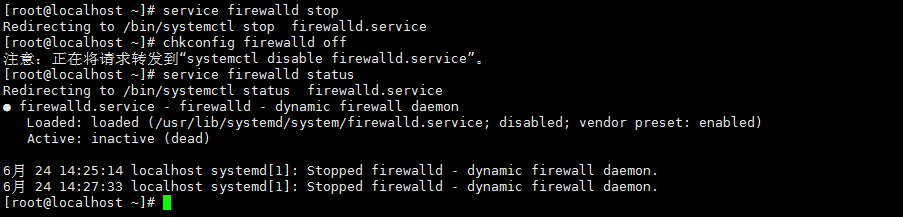
1、关闭firewall:
[root@localhost ~]# systemctl stop firewalld.service #停止firewall
注:(centos7之前的命令形式为:server firewalld stop)
[root@localhost ~]# systemctl disable firewalld.service #禁止firewall开机启动
注:(centos7之前的命令形式为:chkconfig firewalld off)
2、安装iptables防火墙
[root@localhost ~]# yum install -y iptables-services
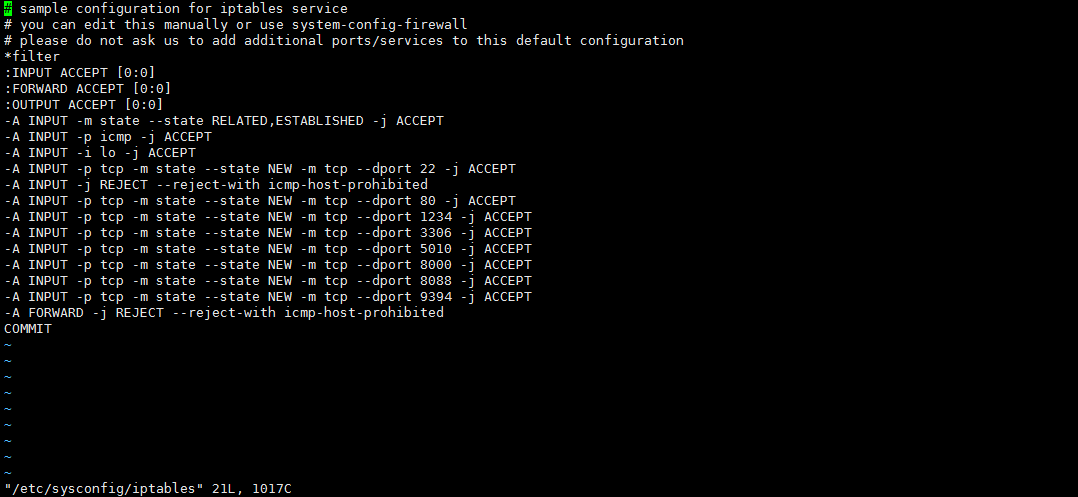
[root@localhost ~]# vi /etc/sysconfig/iptables #编辑防火墙配置文件
[root@localhost ~]# systemctl restart iptables.service #重启防火墙使配置生效
[root@localhost ~]# systemctl enable iptables.service #设置防火墙开机启动 - 防火墙的基本操作命令:
查询防火墙状态:
[root@localhost ~]# service iptables status
停止防火墙:
[root@localhost ~]# service iptables stop
启动防火墙:
[root@localhost ~]# service iptables start
重启防火墙:
[root@localhost ~]# service iptables restart
永久关闭防火墙:
[root@localhost ~]# chkconfig iptables off
永久关闭后启用:
[root@localhost ~]# chkconfig iptables on
编辑/etc/sysconfig/iptables文件。我们实例中要打开8000端口和8888端口
用编辑器打开/etc/sysconfig/iptables
命令:[root@localhost ~]# vi /etc/sysconfig/iptables
保存/etc/sysconfig/iptables文件,并在终端执行
[root@localhost ~]# service iptables restart


腾讯云面向开发者汇聚海量精品云计算使用和开发经验,营造开放的云计算技术生态圈。
更多推荐
 0
0 0
0- 0


 已为社区贡献2条内容

所有评论(0)