下载github项目的两种方法:通过https或者ssh地址
github的项目可以通过两种地址来clone,通过https或ssh,ssh地址是带.git后缀的,如:git clone https://github.com/xmanrui/autoftp或者git clone git@github.com:xmanrui/autoftp.git如何获得https和ssh地址呢?在浏览器进入github项目,浏览器的地
·
github的项目可以通过两种地址来clone,通过https或ssh,如:
git clone https://github.com/xmanrui/autoftp 或者
git clone git@github.com:xmanrui/autoftp.git
如何获得https和ssh地址呢?
在浏览器进入github项目,浏览器的地址就是https地址,复制下来再clone即可。也可以通过点击项目页面的clone or download获取https和ssh地址。
获得https地址,先点击Use HTTPS,在点击右边的箭头拷贝:
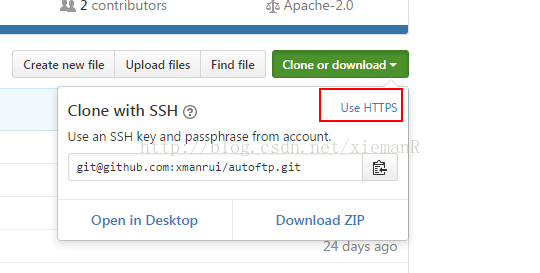
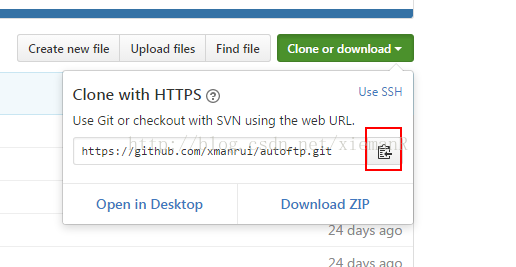
获得ssh地址,先点击Use SSH,在点击右边的箭头拷贝:
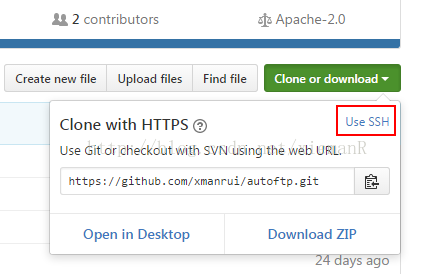
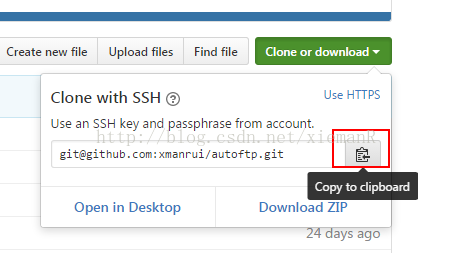
在git-bash中修改访问方式也就是修改remote方式(https或者ssh):
1. 查看当前的remote方式 git remote -v:

2.修改为https:
git remote set-url origin https://github.com/xmanrui/autoftp.git
3.修改为ssh:
git remote set-url origin git@github.com:xmanrui/timerecord.git

腾讯云面向开发者汇聚海量精品云计算使用和开发经验,营造开放的云计算技术生态圈。
更多推荐
 4
4 0
0- 0


 已为社区贡献3条内容

所有评论(0)