代码版本管理工具repo&git常用命令
代码版本管理工具repo&git常用命令
- repo常用命令
- git 常用命令
- git命令参数:
- git代码审核配置:
- git 强制回退到某提交
- git取消提交文件跟踪
- git取消恢复文件跟踪
- git删除提交文件或目录
- git提交本地分支到远程仓库
- git保存用户密码
- git查看远端分支:
- git更改远端仓库
- git补丁文件生成与应用:
- 切换远程分支
- Git报错解决
- Git查看配置列表信息
- Git 配置和删除配置
- Git版本代码拷贝后所有文件每行都多个^M
- 提交不了可以设置如下参数:
- 权限缓存(输入一次正确的账号密码,之后的git操作就不用每次输入账号密码了)
- error: RPC failed; curl 18 transfer closed with outstanding read data remaining
- git 提交部分修改文件
repo常用命令
Android SDK源码使用repo管理版本
repo命令参数:
  abandon        Permanently abandon a development branch
  branch         View current topic branches
  branches       View current topic branches
  checkout       Checkout a branch for development
  cherry-pick    Cherry-pick a change.
  diff           Show changes between commit and working tree
  diffmanifests  Manifest diff utility
  download       Download and checkout a change
  forall         Run a shell command in each project
  gitc-delete    Delete a GITC Client.
  gitc-init      Initialize a GITC Client.
  grep           Print lines matching a pattern
  help           Display detailed help on a command
  info           Get info on the manifest branch, current branch or unmerged branches
  init           Initialize repo in the current directory
  list           List projects and their associated directories
  manifest       Manifest inspection utility
  overview       Display overview of unmerged project branches
  prune          Prune (delete) already merged topics
  rebase         Rebase local branches on upstream branch
  selfupdate     Update repo to the latest version
  smartsync      Update working tree to the latest known good revision
  stage          Stage file(s) for commit
  start          Start a new branch for development
  status         Show the working tree status
  sync           Update working tree to the latest revision
  upload         Upload changes for code review
  version        Display the version of repo
repo相关操作:
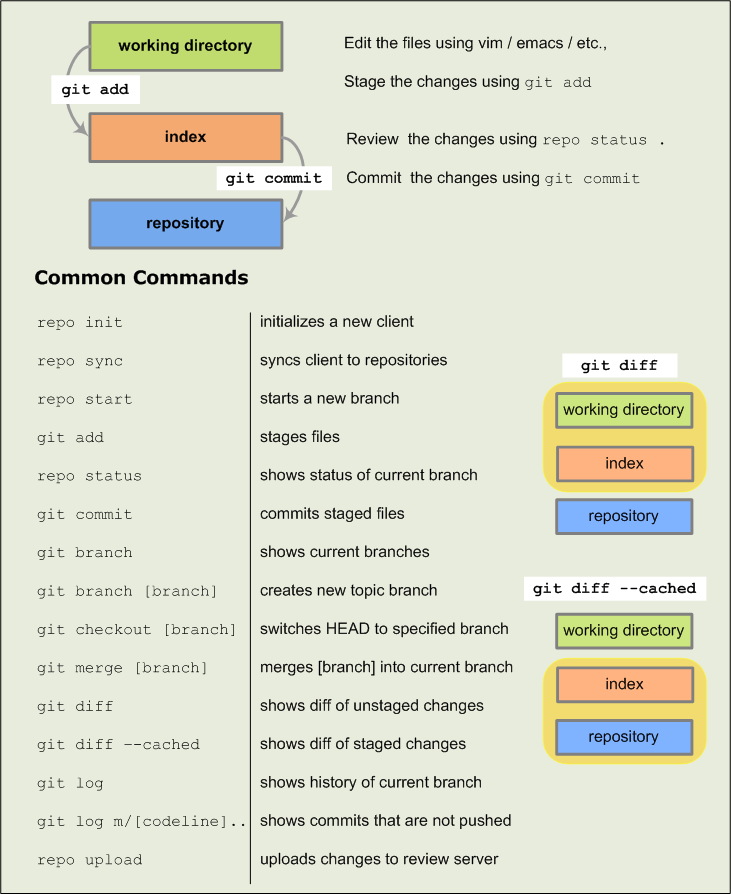
repo构建本地版本管理:
-
$repo init -u [OPTIONS]
在当前目录下初始化repo,会在当前目录生生成一个.repo目录,像Git Project下的.git一样,-u指定url,可以加参数-m指定manifest文件,默认是default.xml,.repo/manifests保存manifest文件。.repo/projects下有所有的project的数据信息,repo是一系列git project的集合,每个git project下的.git目录中的refs等目录都是链接到.repo/manifests下的。 -
$repo init xxxxx // 初始化repo
-
$repo sync //同步远程仓库代码,下载代码。
-
$repo start newbranch --all //创建repo分支 --all所有manifest project, 也可以指定project.
-
$repo checkout otherbranch //检出到otherbranch分支,
-
$repo diff //显示差异,只对已跟踪的文件有效,
-
$repo status //显示当前分支状态
- 第一个字符表示暂存区的状态。
no change same in HEAD and index
A added not in HEAD, in index
M modified in HEAD, modified in index
D deleted in HEAD, not in index
R renamed not in HEAD, path changed in index
C copied not in HEAD, copied from another in index
T mode changed same content in HEAD and index, mode changed
U unmerged conflict between HEAD and index; resolution required - 第二个字符表示工作区的状态
letter meaning description
new/unknown not in index, in work tree
m modified in index, in work tree, modified
d deleted in index, not in work tree
- 第一个字符表示暂存区的状态。
repo分支管理操作
- $repo prune //删除已经merge的分支
- $repo abandon //删除分支,无论是否merged,比较危险,建议少用!!!
- $repo branch或repo branches //查看所有分支
- $repo upload //上传本地提交至服务器
//$repo forall [PROJECT_LIST]-c COMMAND
//对指定的Project列表或所有Project执行命令COMMAND,加上-p参数可打印出Project的路径。
repo遍历所有project 执行git命令操作
- $repo forall -c
- $repo forall -c git merge other // 将other分支合并到当前分支
- $repo forall -c git branch -m oldname newname //重命名分支
- $repo forall -c git branc -D branchname //删除分支
repo manifest 管理
$repo manifest //可以根据当前各Project的版本信息生成一个manifest文件
$repo manifest -o - //查看manifest 清单
repo sync -l 拉取本地分支
$repo sync -l #拉取本地分支后
$repo start master --all # 创建分支
- repo sync拉取分支后repo branch和所有仓库下面执行git branch 都显示“no branches”,这是正常的。
- .repo/manifests/default.xml中revision定义的版本进行更新的,我们默认定义的是master,它是按master对应的revision更新的,无branch,后续必须执行repo start 分支名 --all 建分支才能开发。
基于当前分支创建新分支
$ .repo/repo/repo forall -c git checkout -b ota-debug
git 常用命令
git命令参数:
add                       clone                     fetch-pack                ls-files                  notes                     remote-http               stash
add--interactive          column                    filter-branch             ls-remote
p4                        remote-https              status
am                        commit                    fmt-merge-msg             ls-tree                   pack-objects              remote-testsvn            stripspace
annotate                  commit-tree               for-each-ref              mailinfo                  pack-redundant            repack                    submodule
apply                     config                    format-patch              mailsplit                 pack-refs                 replace                   subtree
archive                   count-objects             fsck                      merge                     patch-id                  request-pull              symbolic-ref
bisect                    credential                fsck-objects              merge-base                prune                     rerere                    tag
bisect--helper            credential-cache          gc                        merge-file                prune-packed              reset                     unpack-file
blame                     credential-cache--daemon  get-tar-commit-id         merge-index               pull                      rev-list                  unpack-objects
branch                    credential-store          grep                      merge-octopus             push                      rev-parse                 update-index
bundle                    daemon                    hash-object               merge-one-file            quiltimport               revert                    update-ref
cat-file                  describe                  help                      merge-ours                read-tree                 rm                        update-server-info
check-attr                diff                      http-backend              merge-recursive           rebase                    send-pack                 upload-archive
check-ignore              diff-files                http-fetch                merge-resolve             receive-pack              sh-i18n--envsubst         upload-pack
check-mailmap             diff-index                http-push                 merge-subtree             reflog                    shell                     var
check-ref-format          diff-tree                 imap-send                 merge-tree                relink                    shortlog                  verify-pack
checkout                  difftool                  index-pack                mergetool                 remote                    show                      verify-tag
checkout-index            difftool--helper          init                      mktag                     remote-ext                show-branch               web--browse
cherry                    fast-export               init-db                   mktree                    remote-fd                 show-index                whatchanged
cherry-pick               fast-import               instaweb                  mv                        remote-ftp                show-ref                  write-tree
clean                     fetch                     log                       name-rev                  remote-ftps               stage
The most commonly used git commands are:
   add        Add file contents to the index
   bisect     Find by binary search the change that introduced a bug
   branch     List, create, or delete branches
   checkout   Checkout a branch or paths to the working tree
   clone      Clone a repository into a new directory
   commit     Record changes to the repository
   diff       Show changes between commits, commit and working tree, etc
   fetch      Download objects and refs from another repository
   grep       Print lines matching a pattern
   init       Create an empty Git repository or reinitialize an existing one
   log        Show commit logs
   merge      Join two or more development histories together
   mv         Move or rename a file, a directory, or a symlink
   pull       Fetch from and integrate with another repository or a local branch
   push       Update remote refs along with associated objects
   rebase     Forward-port local commits to the updated upstream head
   reset      Reset current HEAD to the specified state
   rm         Remove files from the working tree and from the index
   show       Show various types of objects
   status     Show the working tree status
   tag        Create, list, delete or verify a tag object signed with GPG
git代码审核配置:
-
可以使用下面的配置来关闭代码检查:
git config core.autocrlf true
git config core.safecrlf true -
还可以在提交代码时禁止代码检查:
git commit --no-verify-a -
或者可以这样做:
git config core.whitespace “trailing-space,space-before-tab”
git config apply.whitespace “trailing-space,space-before-tab”
还有另外一个办法,就是在pre-commit添加如下语句:
if(/\s$/){#bad_line(“trailing whitespace”, $_);}
git 强制回退到某提交
退回到某一提交:(要慎用会删掉退回处之前的所有提交!!!)
- git reset --hard <commit_id>
git取消提交文件跟踪
- git rm --cached abc.txt # 不在跟踪abc.txt文件
git取消恢复文件跟踪
- git update-index --assume-unchanged test.c # 不再追踪文件改动
- git update-index --no-assume-unchanged text.c # 恢复追踪文件改动
git删除提交文件或目录
- git 删除被管理的文件 git rm --cached text.c
- git 删除被管理的目录 git rm -r -f --cached src/demo/
git提交本地分支到远程仓库
- git remote add origin in http://192.168.199.111:9090/git/xxx/xxx_linux.git
- git push -u origin master
- git push -f origin master //(non-fast-forward)出现冲突强推!!!
- git push origin test:master // 提交本地test分支作为远程的master分支
- git push origin test:test // 提交本地test分支作为远程的test分支
git保存用户密码
git config --global credential.helper store
git查看远端分支:
- git branch -r
fetch远程demo分支到本地test分支,(test分支原先并不存在)
git fetch origin demo:test
git更改远端仓库
git remote remove origin
git remote add origin git@xxx:xxx.git
git push origin master
git补丁文件生成与应用:
-
生成补丁:
方法1 $git format-patch 9cd15047c* //生成当前提交之前的差分补丁
方法2 $git show 4ff7d9ce* > 0001.patch //生成本次提交的差分补丁,文件名为0001.patch -
手动打补丁:
- 先检查patch文件:git apply --stat newpatch.patch
- 检查能否应用成功:git apply --check newpatch.patch
- 打补丁:git am --signoff < newpatch.patch (使用-s或–signoff选项,可以commit信息中加入Signed-off-by信息)
- 以上命令打补丁失败有冲突,可以手动打补丁:
$patch -p1 < 0002-1.patch
-
git format-patch:
$ git format-patch HEAD^ #生成最近的1次commit的patch
$ git format-patch HEAD^^ #生成最近的2次commit的patch
$ git format-patch HEAD^^^ #生成最近的3次commit的patch
$ git format-patch HEAD^^^^ #生成最近的4次commit的patch
$ git format-patch … #生成两个commit间的修改的patch(包含两个commit. 和都是具体的commit号)
$ git format-patch -1 #生成单个commit的patch
$ git format-patch #生成某commit以来的修改patch(不包含该commit)
$ git format-patch --root #生成从根到r1提交的所有patch -
git am:
$ git apply --stat 0001-limit-log-function.patch # 查看patch的情况
$ git apply --check 0001-limit-log-function.patch # 检查patch是否能够打上,如果没有任何输出,则说明无冲突,可以打上
(注:git apply是另外一种打patch的命令,其与git am的区别是,git apply并不会将commit message等打上去,打完patch后需要重新git add和git commit,而git am会直接将patch的所有信息打上去,而且不用重新git add和git commit,author也是patch的author而不是打patch的人)
$ git am 0001-limit-log-function.patch # 将名字为0001-limit-log-function.patch的patch打上
$ git am --signoff 0001-limit-log-function.patch # 添加-s或者–signoff,还可以把自己的名字添加为signed off by信息,作用是注明打patch的人是谁,因为有时打patch的人并不是patch的作者
$ git am ~/patch-set/.patch # 将路径~/patch-set/.patch 按照先后顺序打上
$ git am --abort # 当git am失败时,用以将已经在am过程中打上的patch废弃掉(比如有三个patch,打到第三个patch时有冲突,那么这条命令会把打上的前两个patch丢弃掉,返回没有打patch的状态)
$ git am --resolved #当git am失败,解决完冲突后,这条命令会接着打patch
参看修改的文件
$ git show --stat [commit id]
切换远程分支
- git checkout -b 本地分支名 origin/远程分支名
- $git branch -a
- $git checkout -b release/v8.3 remotes/origin/release/v8.3
Git报错解决
- OpenSSL SSL_read: Connection was reset, errno 10054
$ git config --global http.sslVerify false
$ git config --global https.sslVerify false
Git查看配置列表信息
- git config --list
- git config --global --list
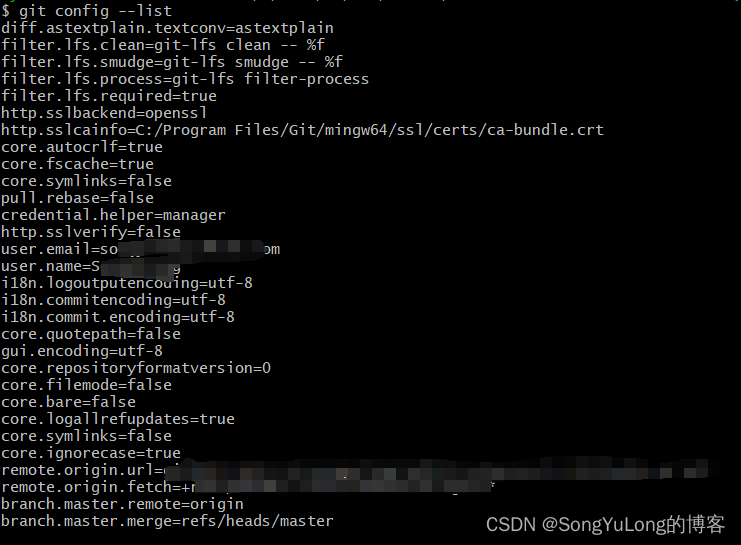
Git 配置和删除配置
添加配置
- git config --global 配置名 参数值
git config --global user.name “你的用户名”
git config --global user.email “你的邮箱”
删除配置值
- git config --global --unset 配置名
Git版本代码拷贝后所有文件每行都多个^M
使用 Git 进行版本控制时,有时会遇到文件每行结尾有 ^M 字符的情况。通常出现在 Windows 操作系统中,并且会影响文件在不同操作系统之间的可移植性。
- ^M 字符是回车符的表示,在 Windows 操作系统中,每个文本行的结尾都是由回车符 (\r) 和换行符 (\n) 组成的,而在类 Unix 系统中只使用换行符 (\n)。
- 使用 Git 提供的 core.autocrlf 选项来自动地处理回车符。可以使用以下命令来设置 core.autocrlf 选项:
- 在 Windows 系统中,将回车符转换为换行符提交到 Git 仓库,在检出时自动转换回来(即恢复为回车符)。
$ git config --global core.autocrlf true - 在 Linux 或 macOS 系统中,提交时不会将回车符转换为换行符,在检出时也不会进行转换。
$ git config --global core.autocrlf input
- 在 Windows 系统中,将回车符转换为换行符提交到 Git 仓库,在检出时自动转换回来(即恢复为回车符)。
提交不了可以设置如下参数:
$ git config core.safecrlf false
权限缓存(输入一次正确的账号密码,之后的git操作就不用每次输入账号密码了)
$ git config --global credential.helper store
error: RPC failed; curl 18 transfer closed with outstanding read data remaining
error: RPC failed; curl 18 transfer closed with outstanding read data remaining
fatal: the remote end hung up unexpectedly
fatal: early EOF
fatal: index-pack failed
$ git config --global http.postbuffer=1048576000
$ git config --global http.lowspeedlimit=0
$ git config --global http.lowspeedtime=999999
git 提交部分修改文件
有时候我们修改了多个功能模块的代码,需要单独提交功能模块代码修改时可以按照如下步骤操作:
- git status -s #查看当前仓库状态
- git add src/modules/xxx.c #添加需要提交的文件
- git stash -u -k #忽略其他文件,此时再git status会发现未被add的文件以被隐藏
- git commit -m “提交描述…”
- git pull # 拉取合并(如果有远程仓库需要先同步合并)
- git push # 推送到远程仓库(如果有远程仓库)
- git stash pop # 恢复隐藏忽略的文件(这一步非常重要!!!)
- git status # 此时之前被隐藏的改动文件恢复显示。

腾讯云面向开发者汇聚海量精品云计算使用和开发经验,营造开放的云计算技术生态圈。
更多推荐
 0
0 0
0- 0


 已为社区贡献4条内容

所有评论(0)