gitkraken把github上的东西clone到本地
·
首先要用github账号登录GitKraken
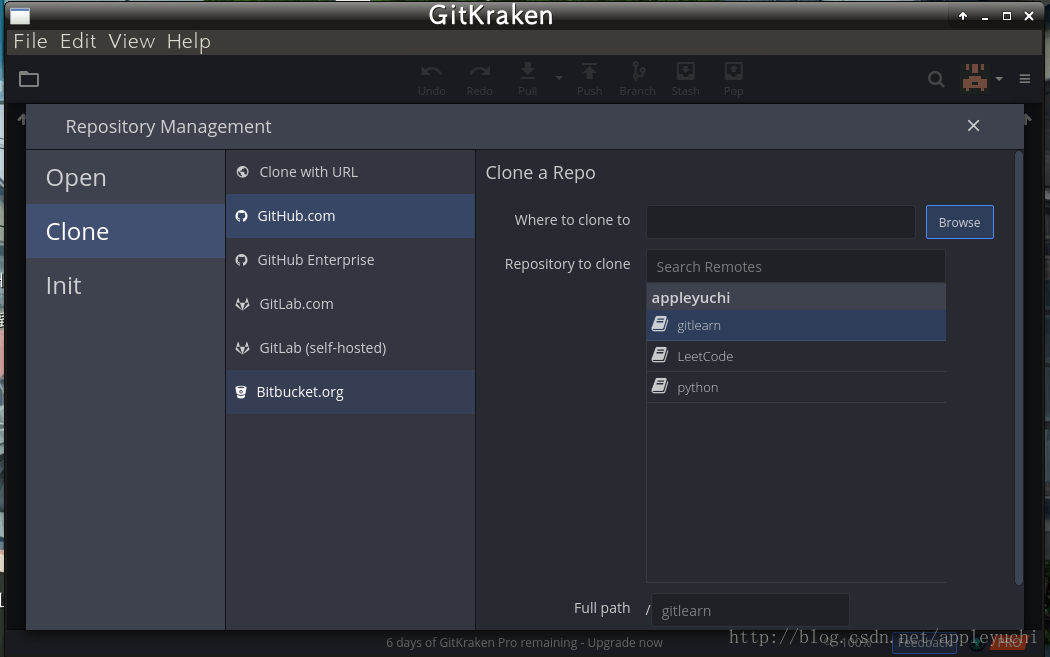
然后选择File->Clone Repo弹出以下界面,因为已经用GitHub登录了,
所以选择Clone->GitHub.com后,会发现自己github上的repository已经会自动在右边显示了。
然后在右侧的Where to clone to选择好要保存的路径

腾讯云面向开发者汇聚海量精品云计算使用和开发经验,营造开放的云计算技术生态圈。
更多推荐
 1
1 0
0- 0


 已为社区贡献27条内容

所有评论(0)