[github] 克隆、删除分支,覆盖本地仓库等操作
文章目录
前言
在此记录Github中git的基础指令,如:怎么将fork项目和源仓库同步;怎么删除分支;抛弃本地修改;上传本地修改;克隆github项目分支 等。
最近一直在用github,提交文件之类的操作常常需要用到git。所以在此记录。
1 从github上克隆项目
这个最简单:git clone <github-project-url>
<github-project-url>就是项目所在的github网址,如下图,则克隆命令为:git clone https://github.com/SpoonLabs/nopol.git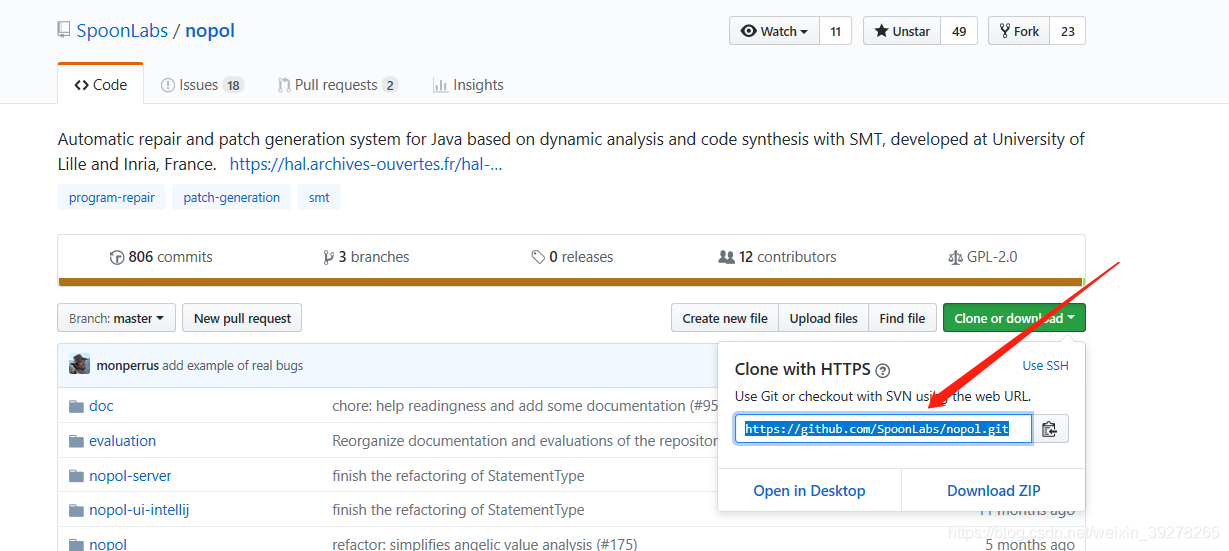
2 从github上fork项目
fork项目的话,我没用git指令,而是直接在github中你想要fork到自己仓库的项目主页,点击fork按钮即可,如下:
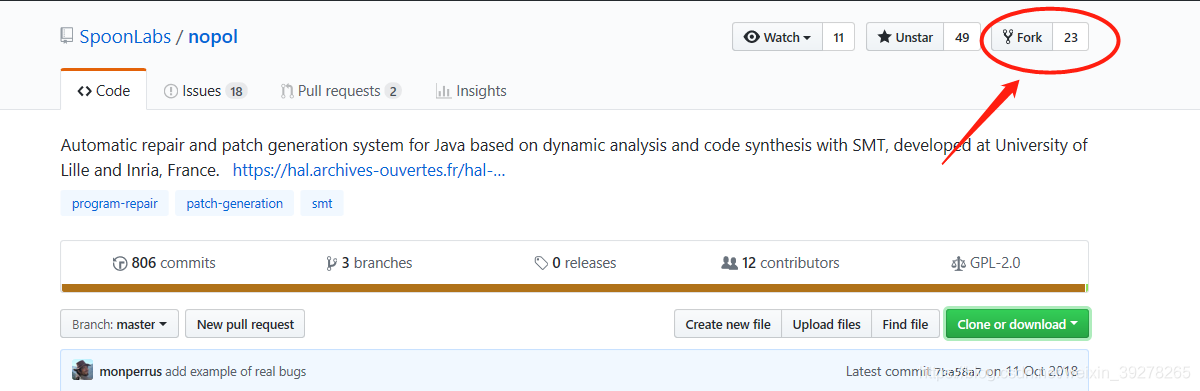
3 从github上克隆项目分支
克隆分支使用命令:git clone -b <branch-name> <github-project-url>
如:git clone -b march2017 https://github.com/SpoonLabs/nopol.git
4 将自己fork的项目与Github原项目同步(更新)
这个比较难。
先描述一下场景 :github上有一个项目Nopol ( https://github.com/SpoonLabs/nopol.git ),我将Nopol这个项目fork到了我的仓库中( https://github.com/DehengYang/nopol ),然后使用git clone https://github.com/DehengYang/nopol.git下载到了本地,原本Nopol总共有4个分支,现在Nopol作者给Nopol添加了一个march2017分支,我想把这个march2017分支添加到我fork过来的Nopol中,这时候需要怎么操作呢?
在本地中打开终端(命令行):
git branch -a # 查看我本地的fork项目Nopol的分支;发现没有march2017
git remote -v # 查看这个项目的远程目录;发现只有我的github fork项目地址,即 https://github.com/DehengYang/nopol.git ,但是没有原项目的地址(https://github.com/SpoonLabs/nopol.git)
git remote add upstream https://github.com/SpoonLabs/nopol.git # 添加github原项目的地址
git remote -v # 再次查看本项目的远程目录,发现已经包含原项目地址
git branch -a # 这时候再次查看项目分支,发现有remote:march2017 这个分支存在,但是不在本地
git fetch upstream march2017 # 从upstream,即Nopol原仓库地址中拉取march2017分支
git checkout march2017 #切换到march2017分支
git branch -a #确认是否切换到这个分支
后面几步我记得不是很清楚了,大概应该就是这样的(有待实践中进一步确认)。
参考 [1],[2]。
5 在本地删除分支
场景:在本地不小心使用 git branch -b march2017 误创建了一个新的march2017分支。现在需要删除分支,应该如何呢?
如下:
git branch -d march2017
参考 [5] 。
6 将本地修改上传到github
git status #查看哪些文件被修改了
git add <file-name> # 把对应的文件添加到缓存区。注意:git add * 表示缓存所有有变化的文件
git commit -m "Write your desciption here" # 添加commit描述
git push origin master # 如果要上传分支代码的话,那么先要git checkout <branch-name>,然后git push origin <branch-name>
参考 [6] 。
7 将本地做的修改抛弃
场景:我在本地项目中修改了几个文件,但是我现在不想要了,想删除修改,并在本地和github仓库中的代码同步。
在终端输入:
git status # 查看自己修改了什么文件
git checkout .  # 如果自己的修改还没有用git add 缓存,则使用这个来放弃这些尚未缓存的修改
git pull origin master # 我没记错的话应该是这个指令,就是把github仓库的项目同步到本地,如果本地没有修改,会显示already-up-to-date这类信息
参考 [3] 和 [4]。
参考文献
[1] Github进行fork后如何与原仓库同步 https://blog.csdn.net/matrix_google/article/details/80676034
[2] git分支查看及切换 https://blog.csdn.net/qq_26710805/article/details/80674006
[3] git 放弃本地修改 https://www.cnblogs.com/qufanblog/p/7606105.html
[4] git 拉取远程分支到本地 https://blog.csdn.net/carfge/article/details/79691360
[5] git删除本地分支 https://blog.csdn.net/github_27263697/article/details/79373997
[6] git上传本地分支到github项目分支 https://blog.csdn.net/qq_27437967/article/details/71189571
此外,还有如下网址也给了一些指导,故在此记录:
git常用命令以及如何与fork别人的仓库保持同步 https://www.cnblogs.com/-walker/p/7278951.html
git fetch 更新远程代码到本地仓库 https://www.cnblogs.com/chenlogin/p/6592228.html
更新
创建时间:2019年02月16日 21:48:12 笔记:Github中git的基础指令
修改时间:2019年3月21日16:04:55 [github] 克隆、删除分支,覆盖本地仓库等操作
8 将远程仓库代码强行覆盖本地仓库
场景: 我去年上传了一个github项目,但是当时还是小白,直接从本地各个地方拖拽文件夹上传,,,所以本地的文件不完整。
这次想用git clone命令下载远程仓库代码,发现太大了。
但是呢,我本地的又不完整,所以我先参考的 [7],执行的是:git fetch origin master,有一点用:
$ git fetch origin master
remote: Enumerating objects: 64, done.
remote: Counting objects: 100% (64/64), done.
remote: Total 2508 (delta 64), reused 64 (delta 64), pack-reused 2444
Receiving objects: 100% (2508/2508), 139.08 MiB | 162.00 KiB/s, done.
Resolving deltas: 100% (614/614), completed with 11 local objects.
From https://github.com/DehengYang/sfa-rfa
* branch master -> FETCH_HEAD
37a4543…4542980 master -> origin/master
可以看到reuse 64,我感觉是本地已有的文件没有重复下载。
但是呢,有一个不完整的文件夹没有覆盖掉,我现在得强行覆盖。
方案:
1)输入:git fetch --all && git reset --hard origin/master && git pull (也可以分开输入,这样心里有底。) [8]
2)理论上这样就可以了,可以用git status看一下当前的状况,如果还不行就输入:git pull origin master,感觉这个命令非常过硬,强制执行。
$ git pull origin master
From https://github.com/DehengYang/sfa-rfa
* branch master -> FETCH_HEAD
Already up-to-date.
此外,在这样的场景下,我一开始输入git status的时候显示很多 untracked files,参考[9],主要是两个命令:git add <these-untracked-files> 可以添加这些没有被追踪的文件,使用git rm <-r> --cached <file-or-dir> 就可以移除。
正如上文所说,Git在未进行commit操作之前,存在三种状态:Untracked files,Changes not staged for commit及Changes to be committed,每种状态之间可以随意进行互相转换。了解这三种状态各自所对应的不同情况,能够帮助你方便有效的使用Git来管理项目。
9 github的readme文件如果想要引用有空格的url怎么办
场景: 我的一个图片名字叫A and B.png
我想在readme里面展示这张图,我写的是:[A and B](A and B.png) (大概这样吧,好像也要加上图片对应的网页地址)
但是显示不出这张图片。
解决:
参考[10],改成:[A and B](A%20and%20B.png)
即可。
10 在push到远程仓库之后修改某一个文件的commit message
这个问题我还没研究透,不想多写了。大概列出文献。
Is there a way to edit a commit message on GitHub? https://superuser.com/questions/751699/is-there-a-way-to-edit-a-commit-message-on-github
git 查看某个文件下的某个commit的修改记录 https://blog.csdn.net/m_review/article/details/79315556
如何修改Git commit的信息 https://www.cnblogs.com/shenh062326/p/git.html
更新:2019年5月6日
1 如何把本地删除的文件同步到github
场景:在本地仓库中,我删除了一个文件夹,然后git status就会发现:有很多deleted files。但是这种删除怎么同步到github仓库(origin master)呢?
解决方案:
git add -u
git commit -m "<your comments>"
git push origin master
参考:
How to remove multiple deleted files in Git repository https://stackoverflow.com/questions/6004453/how-to-remove-multiple-deleted-files-in-git-repository
git add -A 和 git add . 的区别 https://www.cnblogs.com/skura23/p/5859243.html
2 更新远程代码到本地仓库
git fetch origin master
git log -p master.. origin/master
git merge origin/master
参考:git fetch 更新远程代码到本地仓库 http://www.cnblogs.com/chenlogin/p/6592228.html
参考文献2
[7] git fetch 更新远程代码到本地仓库 https://www.cnblogs.com/chenlogin/p/6592228.html
[8] git强制覆盖本地代码和强制推送本地到远程仓库 https://blog.csdn.net/sheep8521/article/details/81383865
关于pull、fetch还参考了:
git pull命令 https://www.yiibai.com/git/git_pull.html
详解git pull和git fetch的区别: https://blog.csdn.net/weixin_41975655/article/details/82887273
[9] Git中三种文件状态及其转换 https://phplaber.iteye.com/blog/1699926
[10] URLs with spaces do not render a links in markdown cells https://github.com/nteract/nteract/issues/914
出错:fatal: unable to access ‘https://github.com/*.git/’: Failed to connect to github.com port 443: Timed out
在运行:git push origin master 的时候,出错:
fatal: unable to access ‘https://github.com/DehengYang/FL-APR-research.git/’: Failed to connect to github.com port 443: Timed out
参考:
+ git clone fatal: unable to access ‘https://github.com/carlon/demo.git/’: Failed to connect to github.com port 443: Timed out https://www.cnblogs.com/wy1935/p/7210114.html
先后在命令行(我的是windows git bash)中输入:
git config --global http.proxy
git config --global --unset http.proxy
当然,也可能是网络不好,多试几次就行。
github md文件的编写
GihubMarkdown中的复选框按钮的实现 https://blog.csdn.net/Erice_s/article/details/80202536
How to add color to Github’s README.md file https://stackoverflow.com/questions/11509830/how-to-add-color-to-githubs-readme-md-file
如何向Github README.md中添加图片 https://blog.csdn.net/qq_33207292/article/details/80068154
git查看指定的commit id对应的信息
- git 获取最近一次提交的commit id https://blog.csdn.net/lonewolf521125/article/details/52192474
- 在 GitHub 上利用 SHA-1 值(commit ID)搜索某一次的提交内容 https://blog.csdn.net/weixin_41929524/article/details/94589105
回退到之前的commit id版本
- github,退回之前的commit https://www.cnblogs.com/xiaomengzhang/p/3240788.html
git reset --hard <commit_id>
git diff指定文件(夹)
- 修改文件,查看修改内容,git status、git diff(四) https://blog.csdn.net/qq_40415721/article/details/82145156
值得一看。
查看commit提交记录
- git查看commit提交记录详情 https://blog.csdn.net/weixin_37697277/article/details/80250879
- Git 历史提交日志导出到文件中 https://blog.csdn.net/ianly123/article/details/82348723
git log 查看所有的commit提交记录
git show 查看提交的详情
git show commitId
git show commitId fileName

还可以把log输出到文件:
git log > xxx.txt

git log --pretty=format:"%ai , %an: %s" --since=“100 day ago” >> ~/Desktop/commit.log
- git查看某一次commit里面的内容,即本次commit相对于原来的版本进行了哪些修改 https://www.cnblogs.com/hustdc/p/6596080.html

腾讯云面向开发者汇聚海量精品云计算使用和开发经验,营造开放的云计算技术生态圈。
更多推荐
 2
2 0
0- 0


 已为社区贡献16条内容

所有评论(0)