数据分析与爬虫实战视频——学习笔记(五)(京东爬虫、 json数据、分布式爬虫概念、Linux基础)
1、补充内容json数据的处理json数据是一种数据格式,长得比较像字典名称/值“firstname”:“John”可以用表达式去处理,也可以使用python里面的json模块去解决它。接下来重点讲一下使用json模块去解决他。import jsondata='{"id":13145,"name":"外观漂亮"}'jdata=json.loads(data)#json加载数据j...
https://www.bilibili.com/video/av22571713/?p=39
1、补充内容
json数据的处理
json数据是一种数据格式,长得比较像字典
名称/值 “firstname”:“John”
可以用表达式去处理,也可以使用python里面的json模块去解决它。接下来重点讲一下使用json模块去解决他。
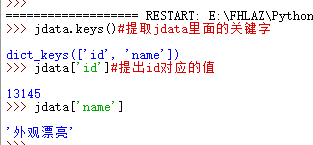
import json
data='{"id":13145,"name":"外观漂亮"}'
jdata=json.loads(data)#json加载数据
jdata.keys()#提取jdata里面的关键字
jdata['id']#提出id对应的值
jdata['name']
分布式爬虫的构建思路
scrapy也支持分布式。
scrapy
scrapy-redis 相当于将scrapy和redis结合。
redis做集群 也支持windows.
做分布式爬虫需要这三个东西。
pip stall scrapy-redis
Linux基础
Linux和windows的最大区别就是windows可视化比较多,Linux多是命令。
韦玮老师推荐了视频:
Linux零基础快速入门视频课程_共2课时-51CTO学院 https://edu.51cto.com/course/6784.html
基本上看完这个linux基础就ok了。
关于爬虫工程师工作
前程无忧(51job)
找python爬虫工程师
初级1万-1.5万
熟悉urllib库,scrapy框架
封账号和ip可以通过用户代理以及ip代理池。
JS页面间数据传递的各种方法。前端数据加密。可以使用抓包分析。
爬虫项目(可以使用京东项目)。
中级
oop面向对象
算法
分布式的数据库redis
高级7万-9万
算法
反爬 数据屏蔽 (抓包) 数据提取(表达式)
2上节课作业讲解
2019.5.28更新
先打开京东的链接https://www.jd.com/
然后点击任意的链接,比如说手机,然后查看源代码,看看手机的链接在不在源代码里面,是否需要抓包分析。这里不需要
然后点击手机,进入一个页面,这个时候也要查看源代码,任选一个商品信息,查看链接在不在源代码里面,不在就需要抓包,这里不需要
现在点开一个手机商品,查看源代码。看看标题,店名,商店链接,商品价格,评论数,好评度可不可以找到,大部分可以找到,但是商品价格,评论数,好评度不能找到,这时候需要抓包分析。
cd E:\FHLAZ\Python37\Anaconda3\scrapy_document\first\第7次课\dangdang
scrapy genspider -t crawl jd  jd.com
scrapy crawl jd
把代码写下来把,爬取还有点问题
# -*- coding: utf-8 -*-
import scrapy
from scrapy.linkextractors import LinkExtractor
from scrapy.spiders import CrawlSpider, Rule
from dangdang.items import DangdangItem
import re
import urllib.request


class JdSpider(CrawlSpider):
    name = 'jd'
    allowed_domains = ['jd.com']
    start_urls = ['http://jd.com/']

    rules = (
        Rule(LinkExtractor(allow=''), callback='parse_item', follow=True),#这一步爬取所有链接
    )

    def parse_item(self, response):
        item =DangdangItem()
        #item['domain_id'] = response.xpath('//input[@id="sid"]/@value').get()
        #item['name'] = response.xpath('//div[@id="name"]').get()
        #item['description'] = response.xpath('//div[@id="description"]').get()
        thisurl=response.url
        pat="item.jd.com/(.*?).html"
        x=re.search(pat,thisurl)#这一步从所有链接中寻找符合商品页面的链接
        if(x):
            thisid=re.compile(pat).findall(thisurl)[0]#这一步获取商品id
            print(thisid)
            title=response.xpath("/html/head/title/text()").extract()#商品标题
            shop=response.xpath("//a[@clstag='shangpin|keycount|product|dianpuname1'/text()]").extract()#商品店名
            shoplink=response.xpath("//a[@clstag='shangpin|keycount|product|dianpuname1'/@href]").extract()#商品链接
            #print(title)
            #print(shop)
            #print(shoplink)
            priceurl="https://c0.3.cn/stock?skuId="+thisid+"&cat=9987,653,655&venderId=1000003443&area=1_72_4137_0&buyNum=1&choseSuitSkuIds=&extraParam={%22originid%22:%221%22}&ch=1&fqsp=0&pduid=1539669746784797257006&pdpin=&callback=jQuery9745757"
            commenturl="https://sclub.jd.com/comment/productPageComments.action?callback=fetchJSON_comment98vv2212&productId="+thisid+"&score=0&sortType=5&page=1&pageSize=10&isShadowSku=0&rid=0&fold=1"
            #print(priceurl)
            #print(commenturl)
            pricedata=urllib.request.urlopen(priceurl).read().decode("utf-8","ignore")
            commentdata = urllib.request.urlopen(commenturl).read().decode("utf-8", "ignore")
            pricepat='"p":"(.*?)"'
            commentpat='"goodRateShow":(.*?),'
            price=re.compile(pricepat).findall(pricedata)
            comment=re.compile(commentpat).findall(commentdata)
            #print(price)
            #print(comment)
            if(len(title) and len(shop) and len(shoplink) and len(price) and len(comment)):
                print(title[0])
                print(shop[0])
                print(shoplink[0])
                print(price[0])
                print(comment[0])
                print("__________")
            else:
                pass
        else:
            pass
        return item
cd C:\Program Files\MySQL\MySQL Server 8.0\bin
mysql -uroot -p
show databases;
create database jd;
use jd;
create table jdshop(title char(100) primary key,shop char(100),shoplink char(100),price char(20));
select * from jdshop;
select count(*) from jdshop;
# -*- coding: utf-8 -*-
import scrapy
import pymysql
from scrapy.linkextractors import LinkExtractor
from scrapy.spiders import CrawlSpider, Rule
from dangdang.items import DangdangItem
import re
import urllib.request


class JdSpider(CrawlSpider):
    name = 'jd'
    allowed_domains = ['jd.com']
    start_urls = ['http://jd.com/']

    rules = (
        Rule(LinkExtractor(allow=''), callback='parse_item', follow=True),#这一步爬取所有链接
    )

    def parse_item(self, response):
        conn = pymysql.connect(host="127.0.0.1", user="root", passwd="root", db="jd")
        try:
            item = DangdangItem()
            # item['domain_id'] = response.xpath('//input[@id="sid"]/@value').get()
            # item['name'] = response.xpath('//div[@id="name"]').get()
            # item['description'] = response.xpath('//div[@id="description"]').get()
            thisurl = response.url
            pat = "item.jd.com//(.*?).html"
            x = re.search(pat, thisurl)  # 这一步从所有链接中寻找符合商品页面的链接
            print(x)
            if (x):
                thisid = re.compile(pat).findall(thisurl)[0]  # 这一步获取商品id

                print(thisid)
                title = response.xpath("/html/head/title/text()").extract()  # 商品标题
                shop = response.xpath('//div[@class="name"]/a/text()').extract()  # 商品店名
                shoplink = response.xpath('//div[@class="name"]/a/@href').extract()  # 商品链接
                #print(title)
                #print(shop)
                #print(shoplink)
                priceurl = "https://c0.3.cn/stock?skuId=" + thisid + "&cat=9987,653,655&venderId=1000003443&area=1_72_4137_0&buyNum=1&choseSuitSkuIds=&extraParam={%22originid%22:%221%22}&ch=1&fqsp=0&pduid=1539669746784797257006&pdpin=&callback=jQuery9745757"
                #commenturl打不开,我就不怕去这个了
                #commenturl = "https://sclub.jd.com/comment/productPageComments.action?callback=fetchJSON_comment98vv2212&productId=" + thisid + "&score=0&sortType=5&page=1&pageSize=10&isShadowSku=0&rid=0&fold=1"
                # print(priceurl)
                # print(commenturl)
                pricedata = urllib.request.urlopen(priceurl).read().decode("utf-8", "ignore")
                #commentdata = urllib.request.urlopen(commenturl).read().decode("utf-8", "ignore")
                #print(commentdata)
                pricepat = '"p":"(.*?)"'
                #commentpat = '"goodRateShow":(.*?),'
                price = re.compile(pricepat).findall(pricedata)
                #comment = re.compile(commentpat).findall(commentdata)
                #print(price)
                #print(comment)
                if (len(title) and len(shop) and len(shoplink) and len(price)):
                    print(title[0])
                    print(shop[0])
                    print(shoplink[0])
                    print(price[0])
                    #print(comment[0])
                    print("__________")
                    sql = "insert into jdshop(title,shop,shoplink,price) values('" + title[0] + "','" + shop[0] + "','" + shoplink[0] + "','" + price[0] + "')"
                    conn.query(sql)
                    conn.commit()
                else:
                    pass

            else:
                pass
            conn.close()
            return item
        except Exception as e:
            print(e)
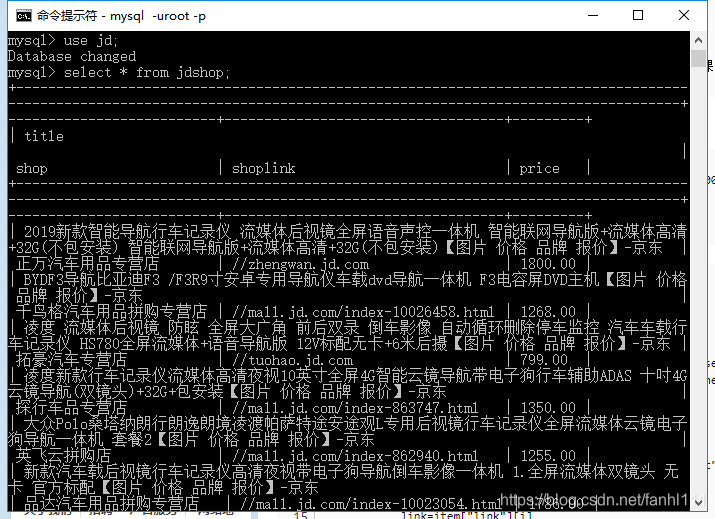
除了评论 其他的我都成功爬取了。评论的链接不知道为啥在网页上打不开。这个可能需要后续的学习把。
我现在就想知道我创建爬取的数据表在哪里,额,我要找一下。
https://www.cnblogs.com/pkangping/p/9462720.html
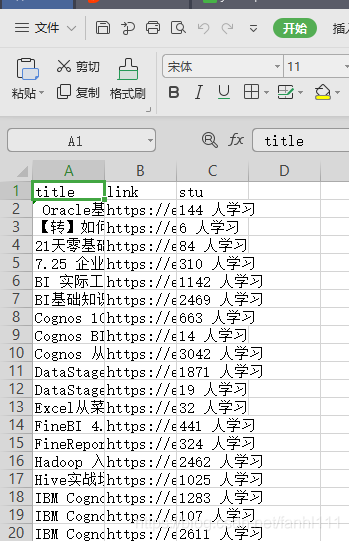
通过这个链接可以把表格提取出来。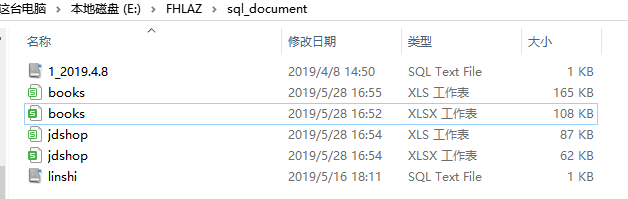
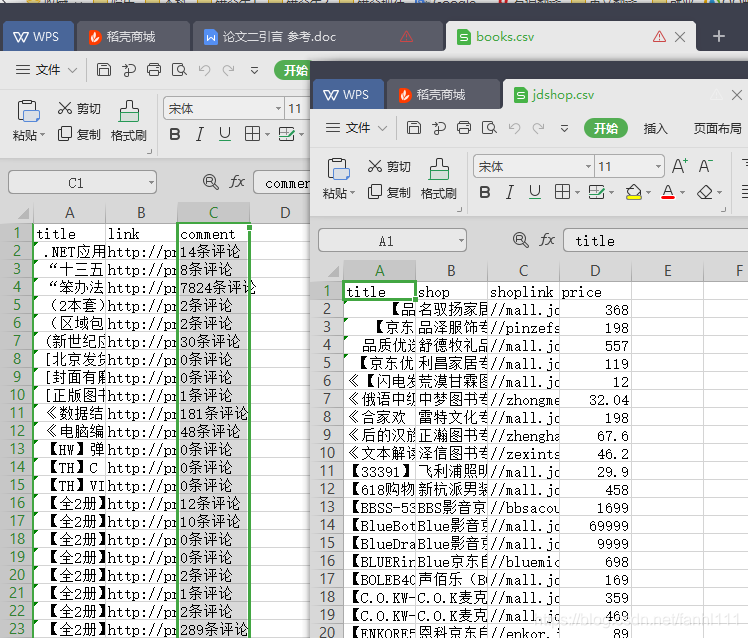
这个是当当的和京东的表格
其实我看视频里面 当当爬取的里面,那个评论是只有数字的,sql创建的时候也是int数据。我记得当时输不进去,因为格式不对应。也可以思考一下。
后面将数据分析好像用到了天山智能的数据,所以我也改下代码,把它爬取下来吧。
cd C:\Program Files\MySQL\MySQL Server 8.0\bin
mysql -uroot -p
show databases;
create database ts;
use ts;
create table tszn(title char(100) primary key,link char(100),stu int(100));
drop table tszn;
create table tszn (title char(100) primary key,link char(100),stu char(100));
cd E:\FHLAZ\Python37\Anaconda3\scrapy_document\first\第7次课\ta
scrapy crawl lesson --nolog
select * from tszn;
select count(*) from tszn;
import pymysql
class TaPipeline(object):
    def __init__(self):
        self.fh=open("E:/FHLAZ/Python37/Anaconda3/scrapy_document/first/第7次课/result/1.txt","a")#打开方式是追加a
    def process_item(self, item, spider):
        conn = pymysql.connect(host="127.0.0.1", user="root", passwd="自己的密码", db="ts")
        print(item["title"])
        print(item["link"])
        print(item["stu"])
        print("——————")
        self.fh.write(item["title"][0]+"\n"+item["link"][0]+"\n"+item["stu"][0]+"\n"+"——————"+"\n")
        sql = "insert into tszn(title,link,stu) values('" + item["title"][0] + "','" + item["link"][0] + "','" + item["stu"][0] + "')"
        conn.query(sql)
        conn.commit()
        return item
    def close_spider(self):
        self.fh.close()
3答疑

腾讯云面向开发者汇聚海量精品云计算使用和开发经验,营造开放的云计算技术生态圈。
更多推荐
 0
0 0
0- 0


 已为社区贡献2条内容

所有评论(0)