参考链接:
https://stackoverflow.com/questions/47860772/gitlab-remote-http-basic-access-denied-and-fatal-authentication
步骤:
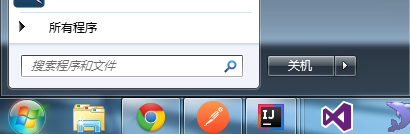
1.点击win菜单(或者键盘的win键),在“搜索程序和文件”中输入credential
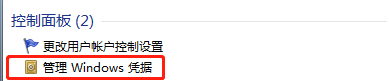
2.点击“管理Windows凭据”
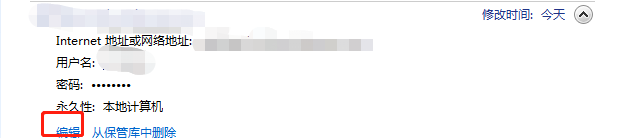
3.点击编辑修改git凭据密码
参考链接:
https://stackoverflow.com/questions/47860772/gitlab-remote-http-basic-access-denied-and-fatal-authentication
步骤:
1.点击win菜单(或者键盘的win键),在“搜索程序和文件”中输入credential
2.点击“管理Windows凭据”
3.点击编辑修改git凭据密码
转载于:https://www.cnblogs.com/ming-szu/p/11112770.html

腾讯云面向开发者汇聚海量精品云计算使用和开发经验,营造开放的云计算技术生态圈。
更多推荐
 0
0 0
0

 已为社区贡献2条内容


所有评论(0)