Flutter开发BottomNavigationBar+PageView实现底部导航栏
本文介绍了Flutter中使用PageView+AutomaticKeepAliveClientMixin实现底部导航栏的方案。该方案通过PageView管理页面切换,结合AutomaticKeepAliveClientMixin保持页面状态,解决了传统实现中页面切换时状态丢失的问题。文章详细说明了实现步骤,包括主页面框架搭建、底部导航栏配置,以及如何在各子页面中混入AutomaticKeepAl
文章目录
前言
在Flutter开发中,底部导航栏是一个非常常见的UI组件,几乎所有的应用都会用到它。实现底部导航栏的方式有很多种,比如使用BottomNavigationBar配合IndexedStack,或者使用BottomNavigationBar配合PageView。本文将介绍一种使用PageView + AutomaticKeepAliveClientMixin的实现方式,这种方式不仅可以实现流畅的页面切换,还可以保持页面的状态,提升用户体验。
项目概述
本项目是一个Flutter应用,实现了一个带有底部导航栏的基本框架,包含四个页面:首页、影库、游戏和我的。项目使用了PageView来管理页面切换,使用AutomaticKeepAliveClientMixin来保持页面状态。
项目结构
lib/
  ├── main.dart          # 主应用文件
  ├── home/index.dart    # 首页
  ├── movie/index.dart   # 影库页面
  ├── game/index.dart    # 游戏页面
  └── mine/index.dart    # 我的页面
核心实现
主应用文件 (main.dart)
主应用文件实现了底部导航栏和PageView的集成,主要代码如下:
import 'package:bottomnavigationbar/game/index.dart';
import 'package:bottomnavigationbar/home/index.dart';
import 'package:bottomnavigationbar/mine/index.dart';
import 'package:flutter/material.dart';
import 'movie/index.dart';
void main() {
runApp(const MyApp());
}
class MyApp extends StatelessWidget {
const MyApp({super.key});
Widget build(BuildContext context) {
return MaterialApp(
title: 'Flutter Demo',
theme: ThemeData(colorScheme: .fromSeed(seedColor: Colors.deepPurple)),
home: const MyHomePage(title: 'Flutter 底部导航栏'),
);
}
}
class MyHomePage extends StatefulWidget {
const MyHomePage({super.key, required this.title});
final String title;
State<MyHomePage> createState() => _MyHomePageState();
}
class _MyHomePageState extends State<MyHomePage> {
late PageController _pageController;
int _currentIndex = 0;
void initState() {
super.initState();
_pageController = PageController(initialPage: _currentIndex);
}
List<BottomNavigationBarItem> _getBottomNavigationBarItem() {
return [
BottomNavigationBarItem(icon: Icon(Icons.home), label: '首页'),
BottomNavigationBarItem(icon: Icon(Icons.movie), label: '影库'),
BottomNavigationBarItem(icon: Icon(Icons.games), label: '游戏'),
BottomNavigationBarItem(icon: Icon(Icons.person), label: '我的'),
];
}
Widget build(BuildContext context) {
return Scaffold(
appBar: AppBar(
backgroundColor: Theme.of(context).colorScheme.inversePrimary,
title: Text(widget.title),
),
body: PageView(
controller: _pageController,
physics: NeverScrollableScrollPhysics(),// 禁止滑动
children: [HomeView(), MovieView(),GameView(), MineView()],
),
bottomNavigationBar: BottomNavigationBar(
currentIndex: _currentIndex,
type: BottomNavigationBarType.fixed,// 当底部导航页面超过三个时,必须要添加type属性
onTap: (index) {
setState(() {
_currentIndex = index;
});
_pageController.jumpToPage(index);
},
items: _getBottomNavigationBarItem(),
),
);
}
}
页面实现
以首页为例,其他页面类似:
import 'package:flutter/cupertino.dart';
import 'package:flutter/material.dart';
class HomeView extends StatefulWidget {
const HomeView({super.key});
State<HomeView> createState() => _HomeViewState();
}
class _HomeViewState extends State<HomeView> with AutomaticKeepAliveClientMixin{
void initState() {
super.initState();
print('initState HomeView----------------------');
}
Widget build(BuildContext context) {
return Center(child: Text('HomeView'));
}
bool get wantKeepAlive => true;
}
为什么使用AutomaticKeepAliveClientMixin
这是本文的重点,我们来详细分析为什么要使用AutomaticKeepAliveClientMixin:
问题背景
在Flutter中,当使用PageView时,默认情况下,当页面切换到不可见状态时,Flutter会销毁该页面的状态。这意味着,当用户从页面A切换到页面B,再切回页面A时,页面A会重新初始化,执行initState方法。
这种行为在某些情况下是合理的,但在大多数情况下,我们希望页面能够保持其状态,比如:
- 页面中有网络请求,我们不希望每次切换回来都重新请求数据
- 页面中有用户输入,我们希望保留用户的输入内容
- 页面中有动画或其他状态,我们希望保持动画的状态或其他状态
AutomaticKeepAliveClientMixin的作用
AutomaticKeepAliveClientMixin是Flutter提供的一个混入类,它可以帮助我们保持页面的状态。使用它需要做两件事:
- 在State类中混入
AutomaticKeepAliveClientMixin - 实现
wantKeepAlivegetter方法,返回true
当我们使用AutomaticKeepAliveClientMixin后,即使页面切换到不可见状态,Flutter也不会销毁该页面的状态,而是会将其保存在内存中。当页面再次变得可见时,它会使用之前保存的状态,而不是重新初始化。
实现效果
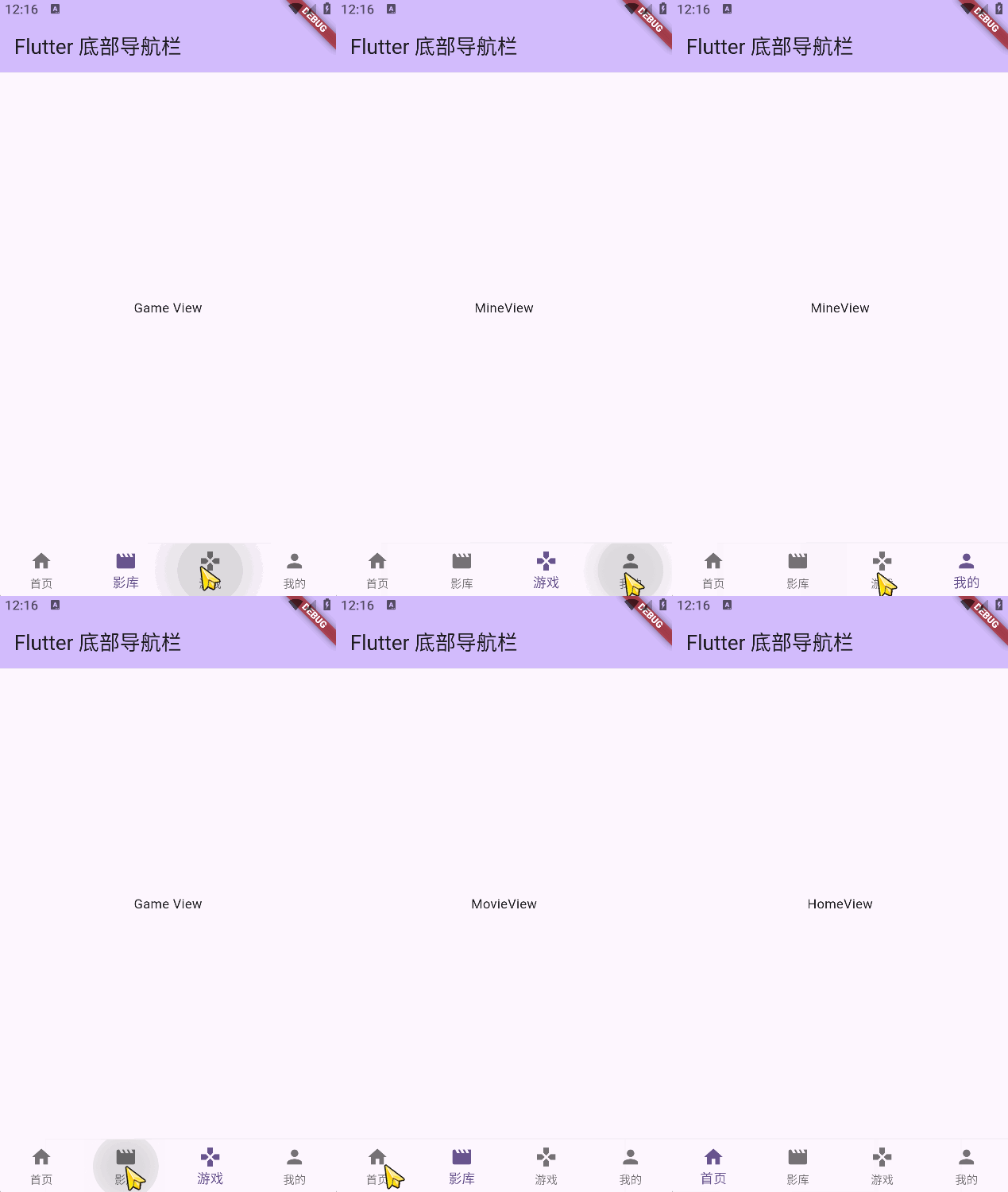
在本项目中,我们可以看到,当我们进入应用时,只有被当前tab选中的页面的initState方法会被调用,但当我们在页面之间切换时,initState方法不会再次被调用,这说明页面的状态已经被成功保持。
当我们在页面之间切换时,控制台不会再输出这些信息,这说明页面的状态已经被成功保持。
总结
本文介绍了一种使用PageView + AutomaticKeepAliveClientMixin实现底部导航栏的方法,这种方法不仅可以实现流畅的页面切换,还可以保持页面的状态,提升用户体验。
AutomaticKeepAliveClientMixin是一个非常实用的工具,它可以帮助我们解决页面状态管理的问题,特别是在使用PageView、TabView等组件时。通过使用它,我们可以避免不必要的页面重新初始化,提升应用的性能和用户体验。
运行效果图

腾讯云面向开发者汇聚海量精品云计算使用和开发经验,营造开放的云计算技术生态圈。
更多推荐
 8
8 0
0- 0


 已为社区贡献6条内容

所有评论(0)