Screen Area Monitor
·
刚好遇到一个AOI 软体的上位机(过保N年),因为very Very Long time,与PLC 的通讯出现偶发性时序问题。
自己用python 做一个出现time out 的弹窗,后期会做一个PLC 触发...
上图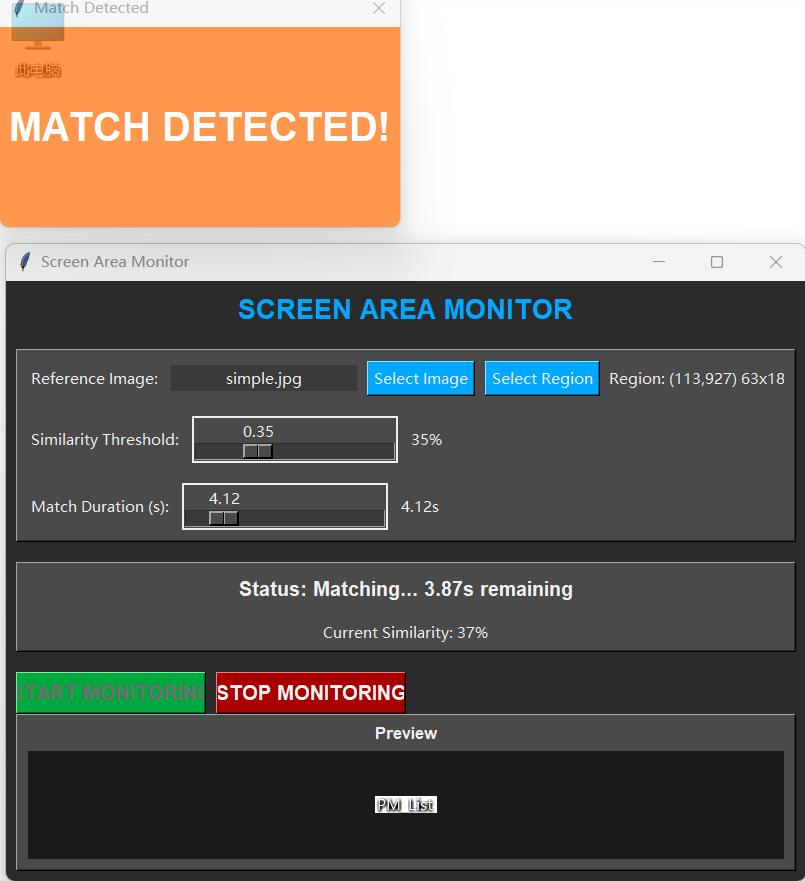
# Design By Tim

import tkinter as tk
from tkinter import ttk, messagebox, filedialog
import cv2
import numpy as np
from PIL import Image, ImageTk
import pyautogui
import time
import threading
import os
from datetime import datetime

class ScreenMonitor:
    def __init__(self, root):
        self.root = root
        self.root.title("Screen Area Monitor")
        self.root.geometry("800x600")
        self.root.configure(bg="#2b2b2b")

        # Variables
        self.monitoring = False
        self.reference_image = None
        self.monitor_region = None
        self.similarity_threshold = tk.DoubleVar(value=0.8)
        self.match_duration = tk.DoubleVar(value=6.66)
        self.match_start_time = None
        self.matched_duration = 0

        # Industrial style colors
        self.bg_color = "#2b2b2b"
        self.fg_color = "#f0f0f0"
        self.button_color = "#4a4a4a"
        self.accent_color = "#00a8ff"
        self.warning_color = "#ff6b00"

        self.setup_ui()

    def setup_ui(self):
        # Main frame
        main_frame = tk.Frame(self.root, bg=self.bg_color)
        main_frame.pack(fill=tk.BOTH, expand=True, padx=10, pady=10)

        # Title
        title_label = tk.Label(main_frame, text="SCREEN AREA MONITOR",
                              font=("Arial", 16, "bold"),
                              bg=self.bg_color, fg=self.accent_color)
        title_label.pack(pady=(0, 20))

        # Control panel
        control_frame = tk.Frame(main_frame, bg=self.button_color, relief=tk.RAISED, bd=2)
        control_frame.pack(fill=tk.X, pady=(0, 20))

        # Row 1: Reference image and region selection
        row1_frame = tk.Frame(control_frame, bg=self.button_color)
        row1_frame.pack(fill=tk.X, padx=10, pady=10)

        tk.Label(row1_frame, text="Reference Image:", bg=self.button_color, fg=self.fg_color).pack(side=tk.LEFT, padx=(0, 10))

        self.ref_image_label = tk.Label(row1_frame, text="No image selected", bg="#3a3a3a", fg=self.fg_color, width=20)
        self.ref_image_label.pack(side=tk.LEFT, padx=(0, 10))

        tk.Button(row1_frame, text="Select Image", command=self.select_reference_image,
                 bg=self.accent_color, fg=self.fg_color).pack(side=tk.LEFT, padx=(0, 10))

        tk.Button(row1_frame, text="Select Region", command=self.select_monitor_region,
                 bg=self.accent_color, fg=self.fg_color).pack(side=tk.LEFT, padx=(0, 10))

        self.region_label = tk.Label(row1_frame, text="Region: Full Screen", bg=self.button_color, fg=self.fg_color)
        self.region_label.pack(side=tk.LEFT)

        # Row 2: Similarity threshold
        row2_frame = tk.Frame(control_frame, bg=self.button_color)
        row2_frame.pack(fill=tk.X, padx=10, pady=10)

        tk.Label(row2_frame, text="Similarity Threshold:", bg=self.button_color, fg=self.fg_color).pack(side=tk.LEFT, padx=(0, 10))

        self.similarity_scale = tk.Scale(row2_frame, from_=0.1, to=1.0, resolution=0.01,
                                        orient=tk.HORIZONTAL, variable=self.similarity_threshold,
                                        bg=self.button_color, fg=self.fg_color,
                                        troughcolor="#3a3a3a", activebackground=self.accent_color,
                                        length=200)
        self.similarity_scale.pack(side=tk.LEFT, padx=(0, 10))

        self.similarity_value_label = tk.Label(row2_frame, text="80%", bg=self.button_color, fg=self.fg_color)
        self.similarity_value_label.pack(side=tk.LEFT)

        # Update similarity value label
        self.similarity_threshold.trace('w', self.update_similarity_label)

        # Row 3: Match duration
        row3_frame = tk.Frame(control_frame, bg=self.button_color)
        row3_frame.pack(fill=tk.X, padx=10, pady=10)

        tk.Label(row3_frame, text="Match Duration (s):", bg=self.button_color, fg=self.fg_color).pack(side=tk.LEFT, padx=(0, 10))

        self.duration_scale = tk.Scale(row3_frame, from_=0.01, to=30.0, resolution=0.01,
                                      orient=tk.HORIZONTAL, variable=self.match_duration,
                                      bg=self.button_color, fg=self.fg_color,
                                      troughcolor="#3a3a3a", activebackground=self.accent_color,
                                      length=200)
        self.duration_scale.pack(side=tk.LEFT, padx=(0, 10))

        self.duration_value_label = tk.Label(row3_frame, text="6.66s", bg=self.button_color, fg=self.fg_color)
        self.duration_value_label.pack(side=tk.LEFT)

        # Update duration value label
        self.match_duration.trace('w', self.update_duration_label)

        # Status panel
        status_frame = tk.Frame(main_frame, bg=self.button_color, relief=tk.RAISED, bd=2)
        status_frame.pack(fill=tk.X, pady=(0, 20))

        self.status_label = tk.Label(status_frame, text="Status: Idle",
                                    font=("Arial", 12, "bold"),
                                    bg=self.button_color, fg=self.fg_color)
        self.status_label.pack(pady=10)

        self.similarity_status = tk.Label(status_frame, text="Current Similarity: N/A",
                                         bg=self.button_color, fg=self.fg_color)
        self.similarity_status.pack(pady=5)

        # Control buttons
        button_frame = tk.Frame(main_frame, bg=self.bg_color)
        button_frame.pack(fill=tk.X)

        self.start_button = tk.Button(button_frame, text="START MONITORING",
                                      command=self.start_monitoring,
                                      bg="#00a840", fg=self.fg_color,
                                      font=("Arial", 12, "bold"),
                                      width=15)
        self.start_button.pack(side=tk.LEFT, padx=(0, 10))

        self.stop_button = tk.Button(button_frame, text="STOP MONITORING",
                                     command=self.stop_monitoring,
                                     bg="#a80000", fg=self.fg_color,
                                     font=("Arial", 12, "bold"),
                                     width=15,
                                     state=tk.DISABLED)
        self.stop_button.pack(side=tk.LEFT)

        # Preview frame
        preview_frame = tk.Frame(main_frame, bg=self.button_color, relief=tk.RAISED, bd=2)
        preview_frame.pack(fill=tk.BOTH, expand=True)

        tk.Label(preview_frame, text="Preview", bg=self.button_color, fg=self.fg_color,
                font=("Arial", 10, "bold")).pack(pady=5)

        self.preview_label = tk.Label(preview_frame, bg="#1a1a1a")
        self.preview_label.pack(fill=tk.BOTH, expand=True, padx=10, pady=(0, 10))

    def update_similarity_label(self, *args):
        value = self.similarity_threshold.get()
        self.similarity_value_label.config(text=f"{int(value*100)}%")

    def update_duration_label(self, *args):
        value = self.match_duration.get()
        self.duration_value_label.config(text=f"{value:.2f}s")

    def select_reference_image(self):
        file_path = filedialog.askopenfilename(
            title="Select Reference Image",
            filetypes=[("Image Files", "*.png *.jpg *.jpeg *.bmp *.gif")]
        )

        if file_path:
            self.reference_image = cv2.imread(file_path)
            if self.reference_image is not None:
                filename = os.path.basename(file_path)
                self.ref_image_label.config(text=filename)
                self.update_preview()
            else:
                messagebox.showerror("Error", "Failed to load image")

    def select_monitor_region(self):
        if self.monitoring:
            messagebox.showwarning("Warning", "Stop monitoring before selecting a new region")
            return

        # Hide main window temporarily
        self.root.withdraw()

        # Give user time to switch to the target window
        messagebox.showinfo("Region Selection", "Click OK, then drag to select monitoring region")

        try:
            # Get screen dimensions
            screen_width, screen_height = pyautogui.size()

            # Create a fullscreen window for selection
            selection_window = tk.Toplevel(self.root)
            selection_window.attributes('-fullscreen', True)
            selection_window.attributes('-alpha', 0.3)
            selection_window.configure(bg='black')

            # Create a canvas to draw the selection rectangle and store it as instance variable
            self.selection_canvas = tk.Canvas(selection_window, highlightthickness=0)
            self.selection_canvas.pack(fill=tk.BOTH, expand=True)

            # Variables to store selection
            self.selection_start = None
            self.selection_rect = None

            def on_mouse_down(event):
                self.selection_start = (event.x, event.y)
                if self.selection_rect:
                    self.selection_canvas.delete(self.selection_rect)

            def on_mouse_drag(event):
                if self.selection_start:
                    if self.selection_rect:
                        self.selection_canvas.delete(self.selection_rect)
                    self.selection_rect = self.selection_canvas.create_rectangle(
                        self.selection_start[0], self.selection_start[1],
                        event.x, event.y,
                        outline='blue', width=1.8
                    )

            def on_mouse_up(event):
                if self.selection_start:
                    x1, y1 = self.selection_start
                    x2, y2 = event.x, event.y

                    # Ensure coordinates are in correct order
                    x_min, x_max = min(x1, x2), max(x1, x2)
                    y_min, y_max = min(y1, y2), max(y1, y2)

                    # Store the selected region
                    self.monitor_region = (x_min, y_min, x_max - x_min, y_max - y_min)
                    self.region_label.config(text=f"Region: ({x_min},{y_min}) {x_max-x_min}x{y_max-y_min}")

                    selection_window.destroy()
                    self.root.deiconify()

            # Bind mouse events to canvas
            self.selection_canvas.bind('<Button-1>', on_mouse_down)
            self.selection_canvas.bind('<B1-Motion>', on_mouse_drag)
            self.selection_canvas.bind('<ButtonRelease-1>', on_mouse_up)

            selection_window.mainloop()

        except Exception as e:
            self.root.deiconify()
            messagebox.showerror("Error", f"Failed to select region: {str(e)}")

    def update_preview(self):
        if self.reference_image is None:
            return

        # Convert BGR to RGB
        rgb_image = cv2.cvtColor(self.reference_image, cv2.COLOR_BGR2RGB)

        # Resize to fit preview
        h, w = rgb_image.shape[:2]
        max_size = 300

        if h > max_size or w > max_size:
            if h > w:
                new_h = max_size
                new_w = int(w * max_size / h)
            else:
                new_w = max_size
                new_h = int(h * max_size / w)

            rgb_image = cv2.resize(rgb_image, (new_w, new_h))

        # Convert to PIL Image and then to PhotoImage
        pil_image = Image.fromarray(rgb_image)
        photo_image = ImageTk.PhotoImage(image=pil_image)

        # Update preview
        self.preview_label.config(image=photo_image)
        self.preview_label.image = photo_image  # Keep a reference

    def calculate_similarity(self, img1, img2):
        # Resize images to match if needed
        h1, w1 = img1.shape[:2]
        h2, w2 = img2.shape[:2]

        if h1 != h2 or w1 != w2:
            img2 = cv2.resize(img2, (w1, h1))

        # Convert to grayscale
        gray1 = cv2.cvtColor(img1, cv2.COLOR_BGR2GRAY)
        gray2 = cv2.cvtColor(img2, cv2.COLOR_BGR2GRAY)

        # Calculate similarity using template matching
        result = cv2.matchTemplate(gray1, gray2, cv2.TM_CCOEFF_NORMED)
        _, max_val, _, _ = cv2.minMaxLoc(result)

        return max_val

    def monitoring_loop(self):
        while self.monitoring:
            try:
                # Capture screen region
                if self.monitor_region:
                    x, y, w, h = self.monitor_region
                    screen_img = pyautogui.screenshot(region=(x, y, w, h))
                else:
                    screen_img = pyautogui.screenshot()

                # Convert to numpy array
                screen_np = np.array(screen_img)
                screen_bgr = cv2.cvtColor(screen_np, cv2.COLOR_RGB2BGR)

                # Calculate similarity
                similarity = self.calculate_similarity(self.reference_image, screen_bgr)

                # Update status
                self.root.after(0, self.update_status, similarity)

                # Check if similarity threshold is met
                if similarity >= self.similarity_threshold.get():
                    if self.match_start_time is None:
                        self.match_start_time = time.time()
                    else:
                        self.matched_duration = time.time() - self.match_start_time

                        # Check if match duration is reached
                        if self.matched_duration >= self.match_duration.get():
                            self.root.after(0, self.show_match_notification)
                            self.match_start_time = None
                            self.matched_duration = 0
                else:
                    self.match_start_time = None
                    self.matched_duration = 0

                # Small delay to prevent excessive CPU usage
                time.sleep(0.1)

            except Exception as e:
                self.root.after(0, self.monitoring_error, str(e))
                break

    def update_status(self, similarity):
        self.similarity_status.config(text=f"Current Similarity: {int(similarity*100)}%")

        if self.match_start_time:
            remaining = max(0, self.match_duration.get() - self.matched_duration)
            self.status_label.config(text=f"Status: Matching... {remaining:.2f}s remaining")
        else:
            self.status_label.config(text="Status: Monitoring")

    def monitoring_error(self, error_msg):
        messagebox.showerror("Monitoring Error", error_msg)
        self.stop_monitoring()

    def show_match_notification(self):
        # Create notification window
        notification = tk.Toplevel(self.root)
        notification.title("Match Detected")
        notification.geometry("400x200")
        notification.configure(bg=self.warning_color)

        # Center the notification
        notification.transient(self.root)
        notification.grab_set()

        # Add content
        tk.Label(notification, text="MATCH DETECTED!",
                font=("Arial", 24, "bold"),
                bg=self.warning_color, fg="white").pack(expand=True)

        # Auto-close after 2 seconds with animation
        self.animate_notification(notification, 2.0)

    def animate_notification(self, window, duration):
        steps = 20
        step_duration = duration / steps * 1000  # Convert to milliseconds

        def fade(step):
            if step < steps:
                alpha = 1.0 - (step / steps)
                window.attributes('-alpha', alpha)
                window.after(int(step_duration), lambda: fade(step + 1))
            else:
                window.destroy()

        fade(0)

    def start_monitoring(self):
        if self.reference_image is None:
            messagebox.showwarning("Warning", "Please select a reference image first")
            return

        self.monitoring = True
        self.match_start_time = None
        self.matched_duration = 0

        # Update UI
        self.start_button.config(state=tk.DISABLED)
        self.stop_button.config(state=tk.NORMAL)
        self.status_label.config(text="Status: Starting...")

        # Start monitoring thread
        self.monitor_thread = threading.Thread(target=self.monitoring_loop)
        self.monitor_thread.daemon = True
        self.monitor_thread.start()

    def stop_monitoring(self):
        self.monitoring = False

        # Update UI
        self.start_button.config(state=tk.NORMAL)
        self.stop_button.config(state=tk.DISABLED)
        self.status_label.config(text="Status: Stopped")
        self.similarity_status.config(text="Current Similarity: N/A")

        # Wait for thread to finish
        if hasattr(self, 'monitor_thread'):
            self.monitor_thread.join(timeout=1.0)

if __name__ == "__main__":
    root = tk.Tk()
    app = ScreenMonitor(root)
    root.mainloop()
腾讯云面向开发者汇聚海量精品云计算使用和开发经验,营造开放的云计算技术生态圈。
更多推荐
 1
1 0
0- 0


 已为社区贡献1条内容

所有评论(0)