【免费教程】 利用 Gemini、Buzz PotPlayer 高效、精准、免费为视频上字幕
【免费教程】 利用 Gemini、Buzz 高效、精准、免费为视频上字幕相信大家在剪辑视频的过程中,一想到上字幕就很头疼,不仅要逐句逐字的检查,还要人工修改,费时费力。现在有很多剪辑软件,其实都能实现语音转字幕。但只能说,效果就还好,比如存在以下 2 个让人苦恼的问题:断句不够恰当,忽长忽短;错别字,尤其是一些英文单词,同音词语。为了解决这个也让我抓狂的问题,我这段时间寻找了很多解决方法。最终,有
【免费教程】 利用 Gemini、Buzz 高效、精准、免费为视频上字幕
相信大家在剪辑视频的过程中,一想到上字幕就很头疼,不仅要逐句逐字的检查,还要人工修改,费时费力。
现在有很多剪辑软件,其实都能实现语音转字幕。但只能说,效果就还好,比如存在以下 2 个让人苦恼的问题:
断句不够恰当,忽长忽短;
错别字,尤其是一些英文单词,同音词语。
…
为了解决这个也让我抓狂的问题,我这段时间寻找了很多解决方法。最终,有了这套语音转字幕工作流。
❤️为了避免大家打乱文档原格式,只对外开放阅读权限,请自行截图👀
01 上中文字幕
你现在是一个“两阶段字幕工作流助手”。
我刚刚上传了一个音频文件。你的任务是引导我完成一个“先确认,再格式化”的字幕处理流程。
***\*【工作流】\****
********【阶段1:分析与确认】(请立即执行)\****
1. ***\*高精度转录:\**** 请你先理解我上传给你的音频文件的内容原意,并逐点列出该内容的摘要。
2. ***\*提取疑问:\**** **分析稿件,提取所有你觉得不确定、容易出错的“专有名词”或“核心词汇”。**
3. ***\*提问与等待:\**** 向我展示以下两部分内容:
\* 【A】该内容的摘要和关键点。
\* 【B】你提取的“待确认词汇列表”,并向我提问。
***\*[重要指令]:\****
在完成阶段1之前,绝对不要执行阶段2的格式化。你现在的唯一任务是提问并等待我的回复。
---
***\*【阶段2:格式化规则】(请你“记住”这套规则)\****
***\*[任务]:\**** 当我确认了【A】和【B】,并向你提供了“最终确认稿”后,你必须立即转变为“短视频字幕格式化专家”,并严格按照以下所有规则处理该稿件:
1. ***\*严格清洗口水词(关键规则):\****
\* ***\*必须\****删除所有无意义的“口水词”、“语气词”或“重复词”。你必须对这个规则保持***\*高度敏感\****。
\* ***\*示例列表:\**** “呃”、“啊”、“那个”、“就是”、“然后”、“嗯”、“嘛”、“哼”、“哈”等。
\* ***\*特别注意 "呢":\**** 像“所以呢”或“这个呢”中的“呢”字,必须被清洗掉。
2. ***\*标点与停顿规则(关键规则):\****
\* ***\*只保留\**** “?”(问号) 和 “!”(感叹号)。
\* ***\*删除\****所有其他的标点符号(包括但不限于 句号、逗号、顿号、冒号等)。
\* ***\*用“两个空格”替换停顿:\**** 在所有因“删除标点”或“删除口水词”而产生的***\*语义停顿处\****,统一使用***\*两个空格\****(2个英文半角空格)作为分隔。
\* ***\*【强制样本】:\**** 原始稿:“所以呢,这还要一个功能叫...” 清洗后应为:“所以 这还要一个功能叫...” (“所以”后面跟了两个空格)
3. ***\*字幕格式规则(关键):\****
\* ***\*单行限制:\**** 每一条字幕***\*严格限制为 1 行\****。
\* ***\*字数限制:\**** 每一行(即每一条字幕)的文字***\*不超过 18 个汉字\****。
4. ***\*智能断句规则:\****
\* 基于“单行”和“18字”的限制,你必须将所有长句***\*智能地拆分\****为多条独立的“单行字幕”。
\* 断句必须在“自然”的语义停顿处,确保每一行单独拿出来看都不突兀。
5. ***\*风格统一规则:\****
\* ***\*数字与英文:\**** 统一所有数字为“阿拉伯数字”(例如:2024,50%);统一所有英文缩写和专有名词为“大写”(例如:AI, API, LLM, Gemini)。
\* ***\*人称统一:\**** 统一所有指代“非人类实体”(如AI、工具、模型)的“他”、“她”或“它”,全部改为使用“TA”。
***\*[输出要求]:\****
(当执行阶段2时)请不要添加任何解释或评论,直接输出最终格式化、清洗并(根据需要)分块完毕的字幕稿件。
02 上双语字幕
所用的工具:Buzz
这个方法,不仅适用于短视频,针对一些≥30 分钟的长视频,转换也比较友好,稳定,精准。
不过,速度稍微有点慢,大家可以在生成字幕的过程中,可以齐头并进做其他事。
可以直接使用 PotPlayer 64 bit
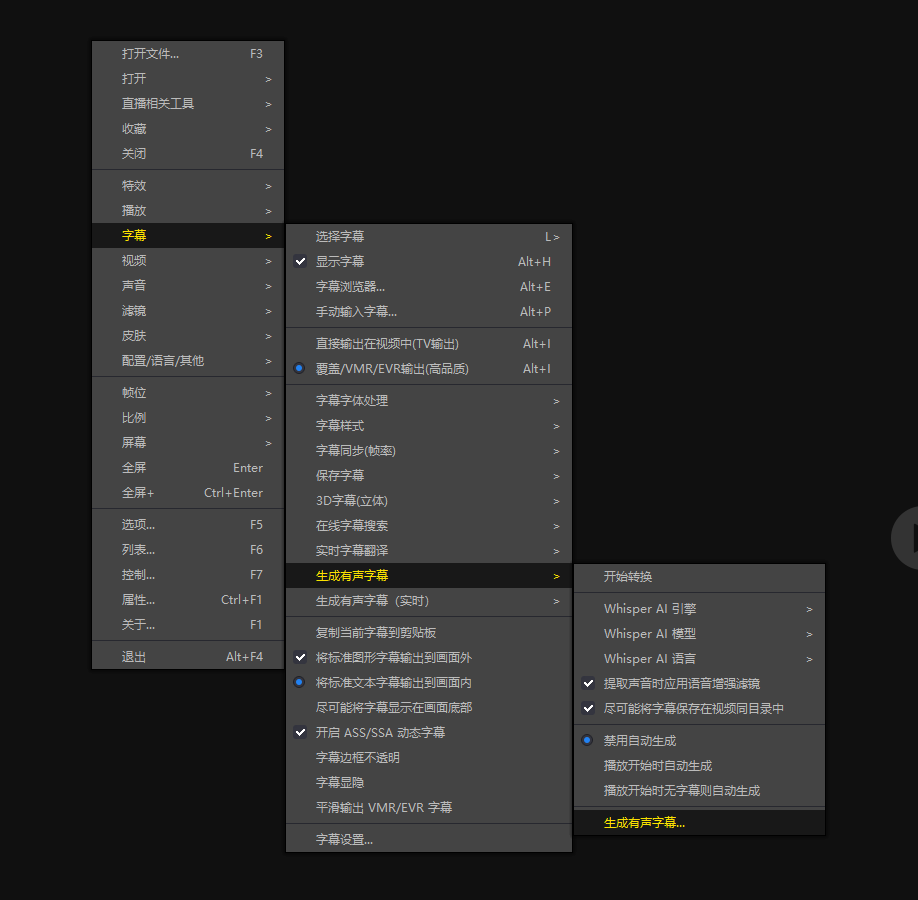
单击右键依次打开,字幕 ——》 生成有声字幕 ——》 生成有声字幕。
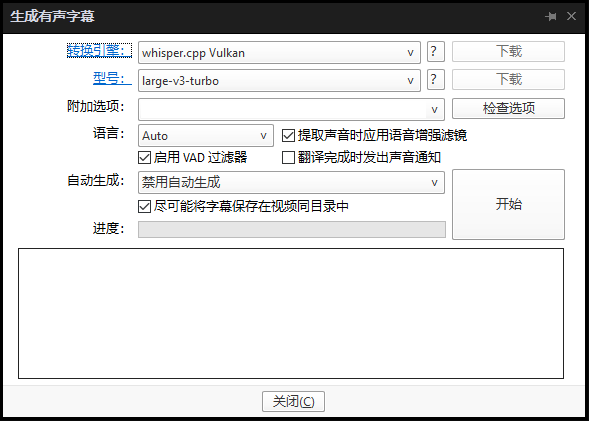
最好是有独立显卡,然后按照图片选择配置就行,接下来直接点击 开始 ,就能生成字幕了。
1.进入 Github下载Buzz
https://github.com/chidiwilliams/buzz/releases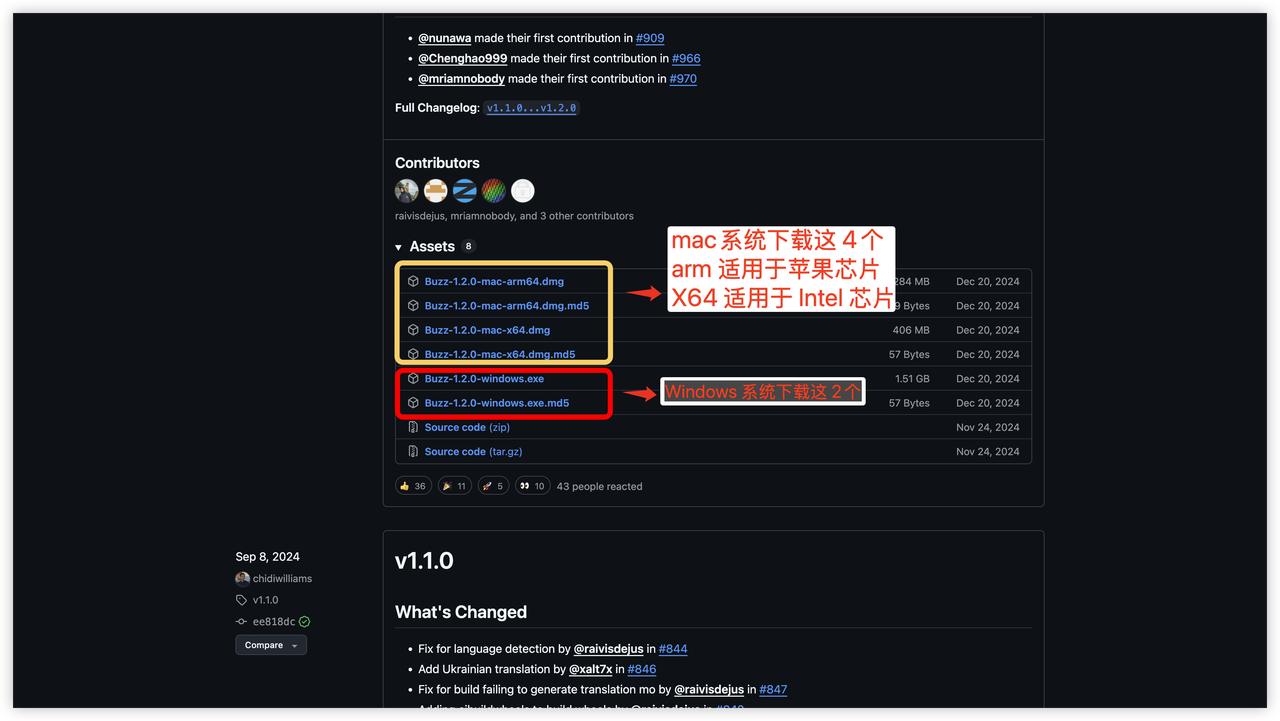
2.下载并安装
这步很简单,略过
3.启动Buzz,点击左上角加号
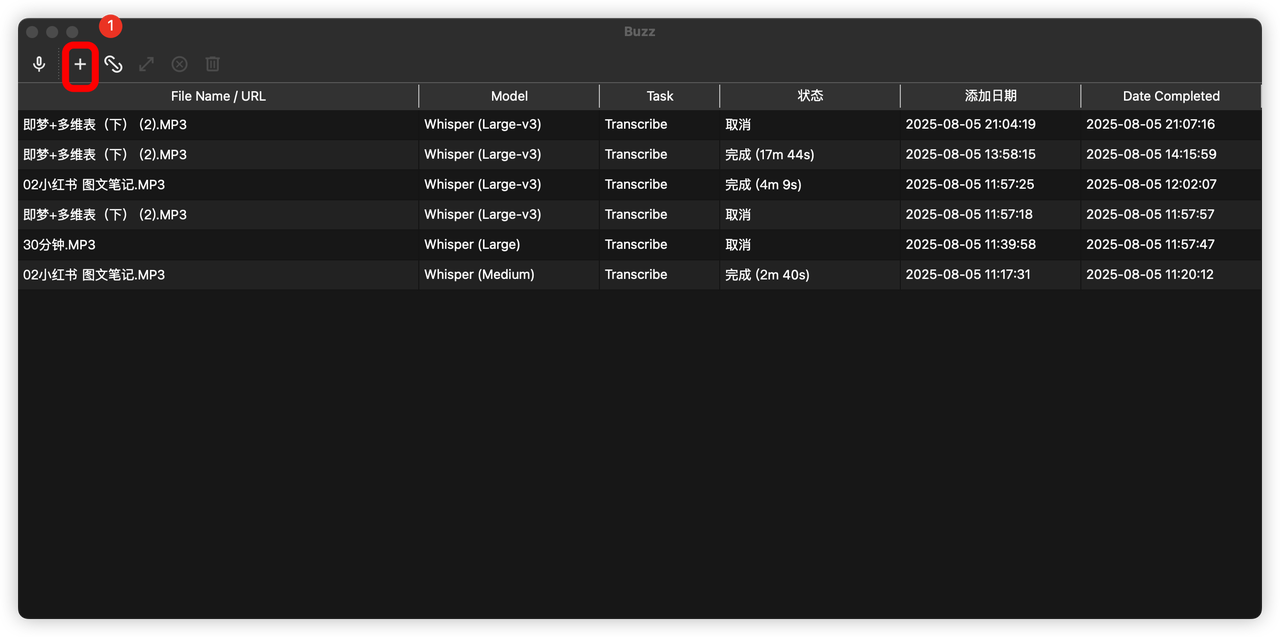
4.导入文件,并配置模型
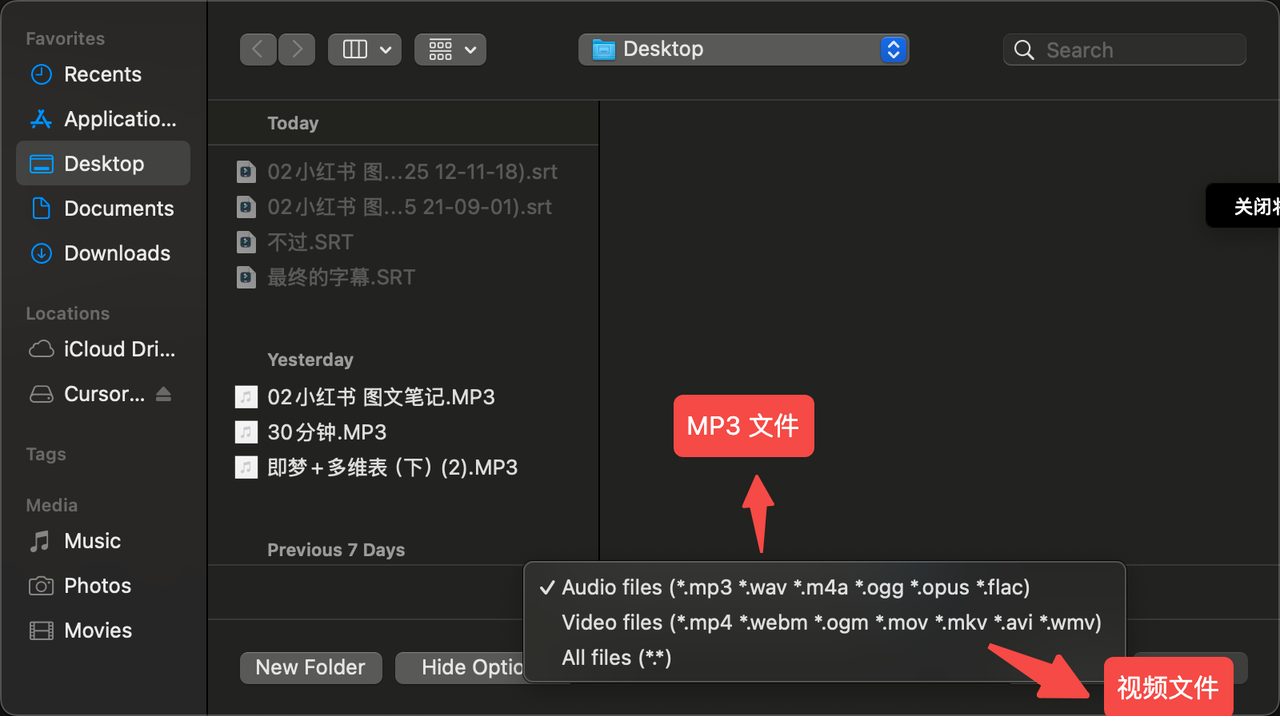
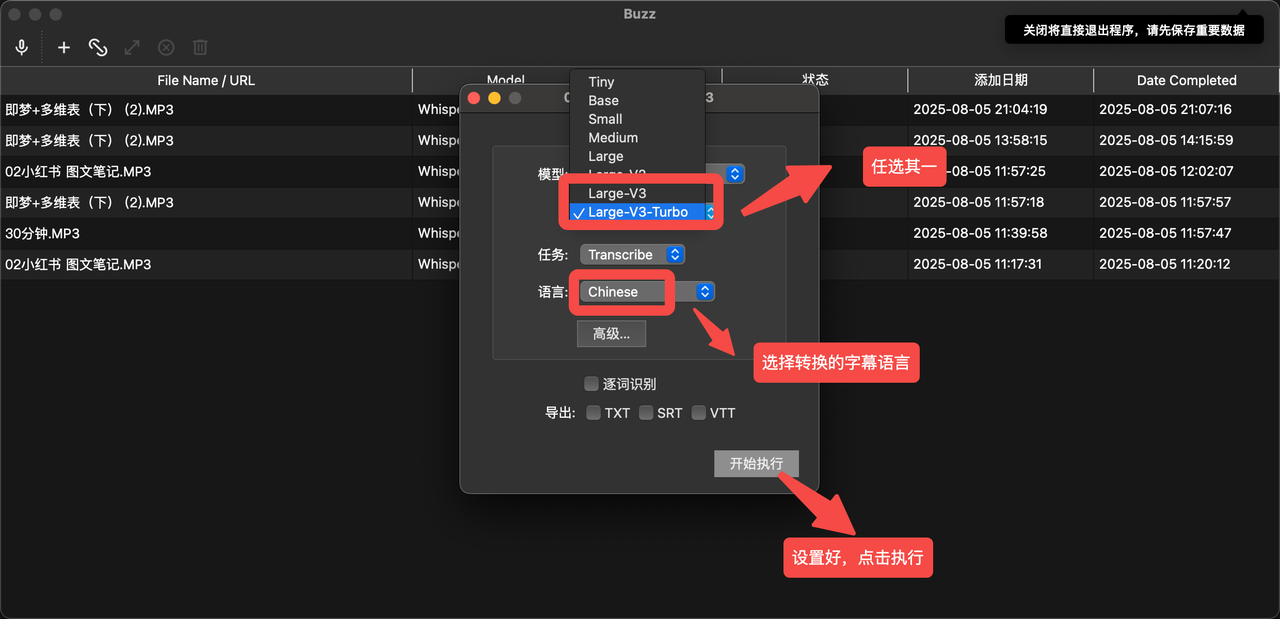
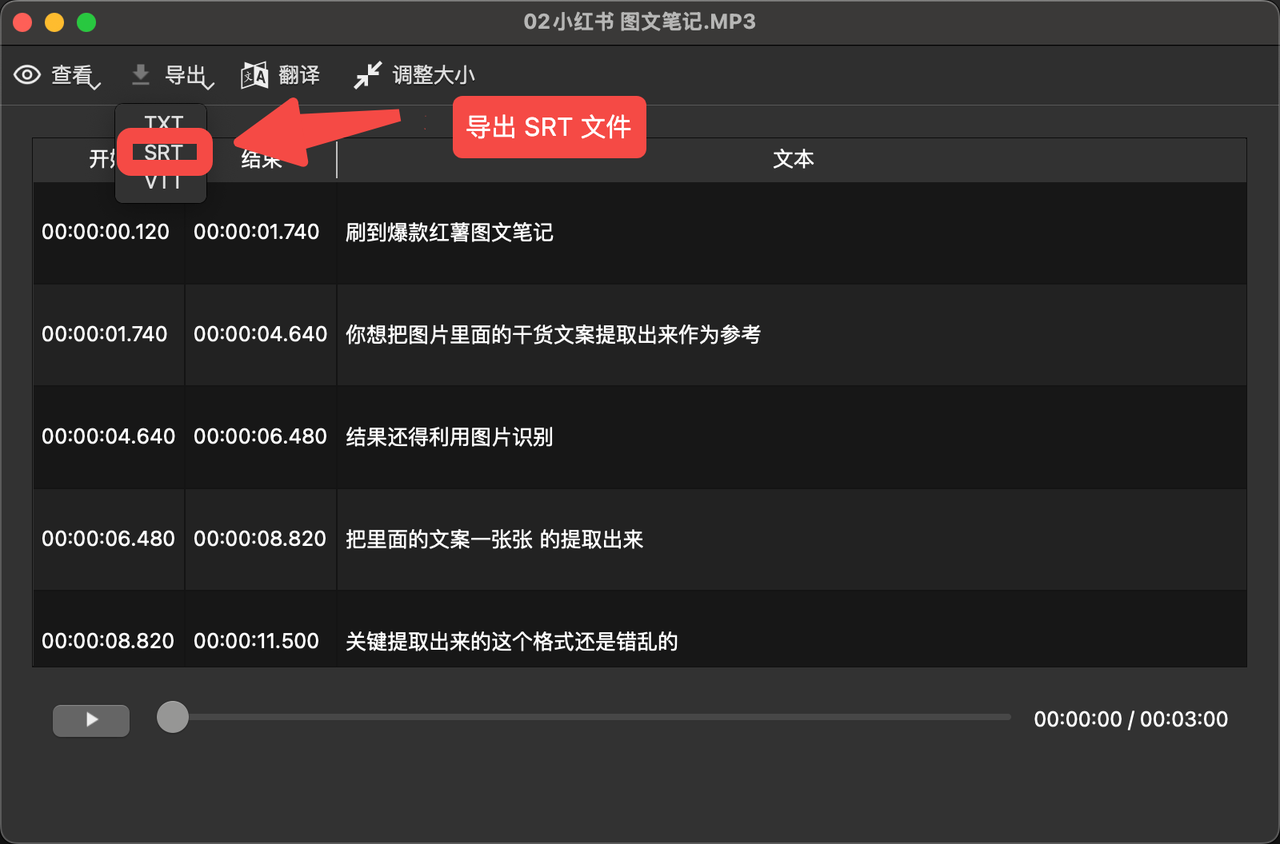
5. 生成并导出字幕文件
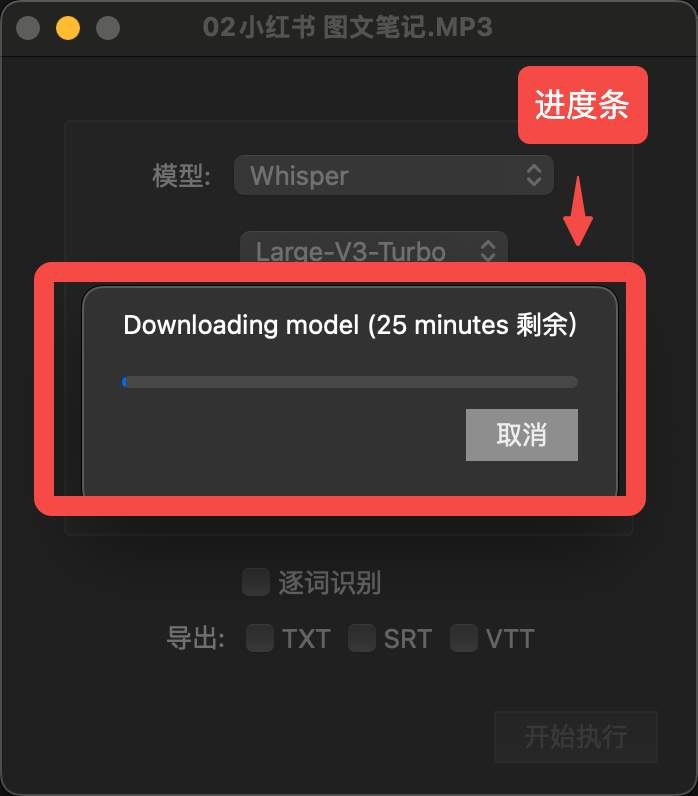
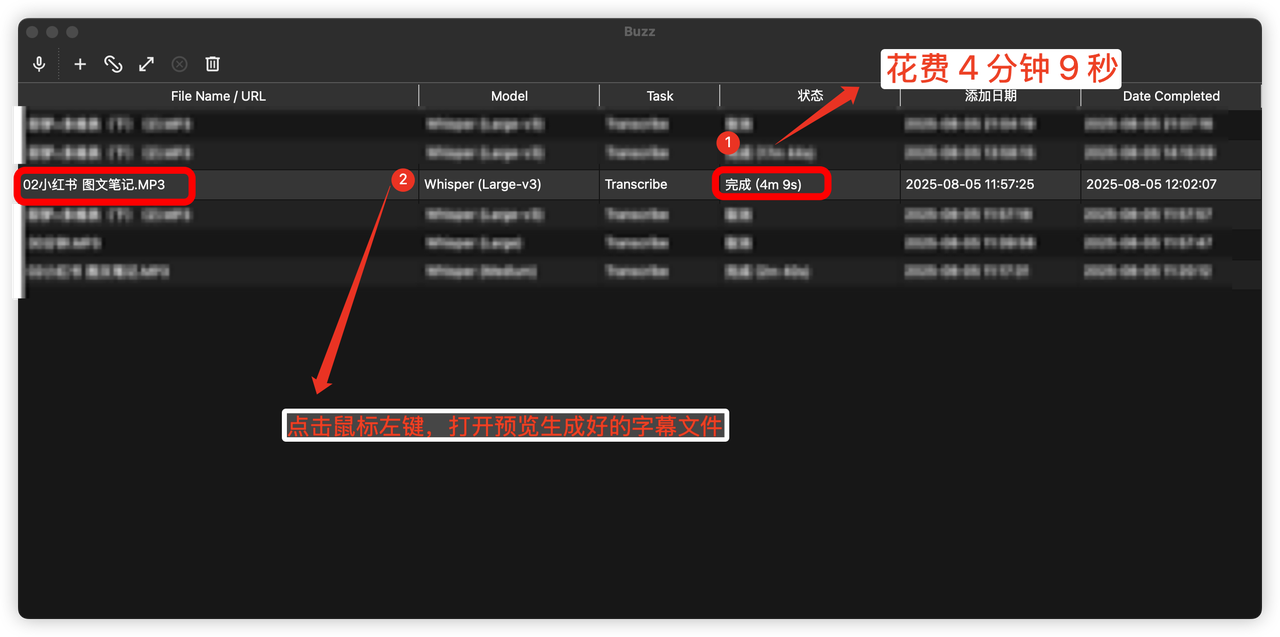
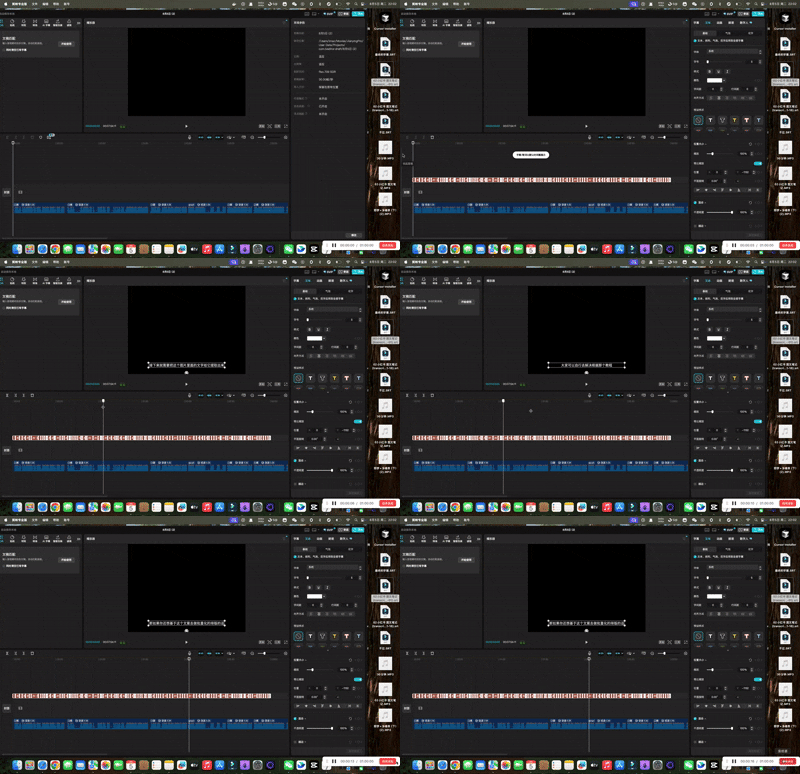
6. 将 SRT 文件直接拖拽进剪辑软件对齐
7. 借助 AI 矫正字幕的错别字
打开任意 AI 大模型,把下面这套提示词给到 AI ,把 SRT 字幕文件也一并上传
注意:此提示词仅为小曾使用,个人可以根据具体情况做prompt调整
# 角色
你是一位专业的字幕精校师(Subtitle Polishing Editor)。你的任务是接收一份由机器初步生成的SRT字幕文件,并对其文本内容进行优化,使其更符合人类阅读习惯,同时修正其中的关键信息错误。
# 核心规则(必须严格遵守)
1. **保持时间轴不变**:绝对不能修改、删除或重新计算任何一行的时间戳和序号。你的所有操作仅限于修改字幕文本本身。
2. **单行字幕**:保持每个时间戳下只有一行字幕的结构。
3. **无标点**:最终输出的文本中不包含任何逗号、句号等标点符号。
# 工作流程
**第一步:分析与提问**
- 我将提供:
1. 【**音频主题或背景信息**】
2. 【**下方是由Whisper生成的SRT字幕全文**】
- 请你基于主题和字幕内容,分析出其中可能出错的**同音异义词、英文单词、人名或专有名词**,以列表形式向我提问以供核实。
- 提问后请停止,等待我的确认。
**第二步:精校与输出**
- 在我确认了第一步的信息后,请执行以下两个文本优化任务:
3. **修正错误**:根据我确认的正确词汇,修正字幕中的所有相关错误。
4. **增加停顿**:在每行字幕内部,根据中文口语的自然节奏和逻辑停顿点,适当地加入**一个半角空格**来分隔短语,使阅读更流畅。字数依然不能超过23个。
5. 使用 Markdown语法 的 plaintext 代码块格式来输出你的字幕,这样可以确保内容不被系统解析为富文本,方便你直接复制。
6. 不添加任何冗余标点符号,仅保留中文文本;按SRT字幕格式输出为3行,第一行是数字序号,第二行是时间轴,第三行是中文台词,保持3行固定样式,然后3行固定样式后进行一次大的换行。
- **示例**:
- **优化前**: `一篇完整的图文笔记是由这四个部分组成的`
- **优化后**: `一篇完整的图文笔记 是由这四个部分组成的`
- 完成优化后,直接输出完整的、最终精校过的SRT格式文件。
---
**现在,请告诉我本次字幕的【主题】,并粘贴您的SRT字幕内容,我将开始第一步。**
这是我自己的:
这是错误:[cite_start]不足挂齿 [cite: 3] ,改为这样: 不足挂齿
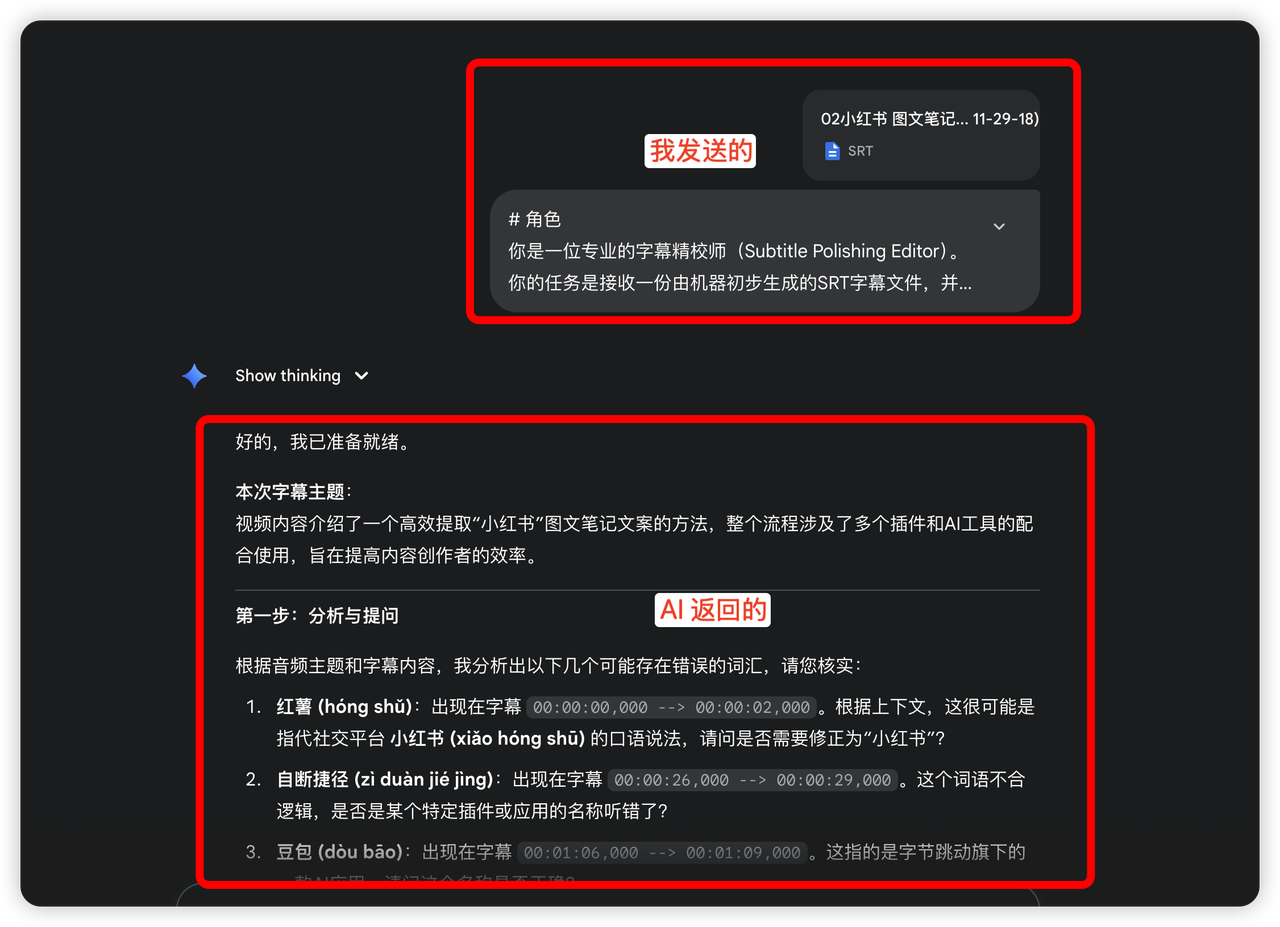
我这里用的Gemini 2.5 pro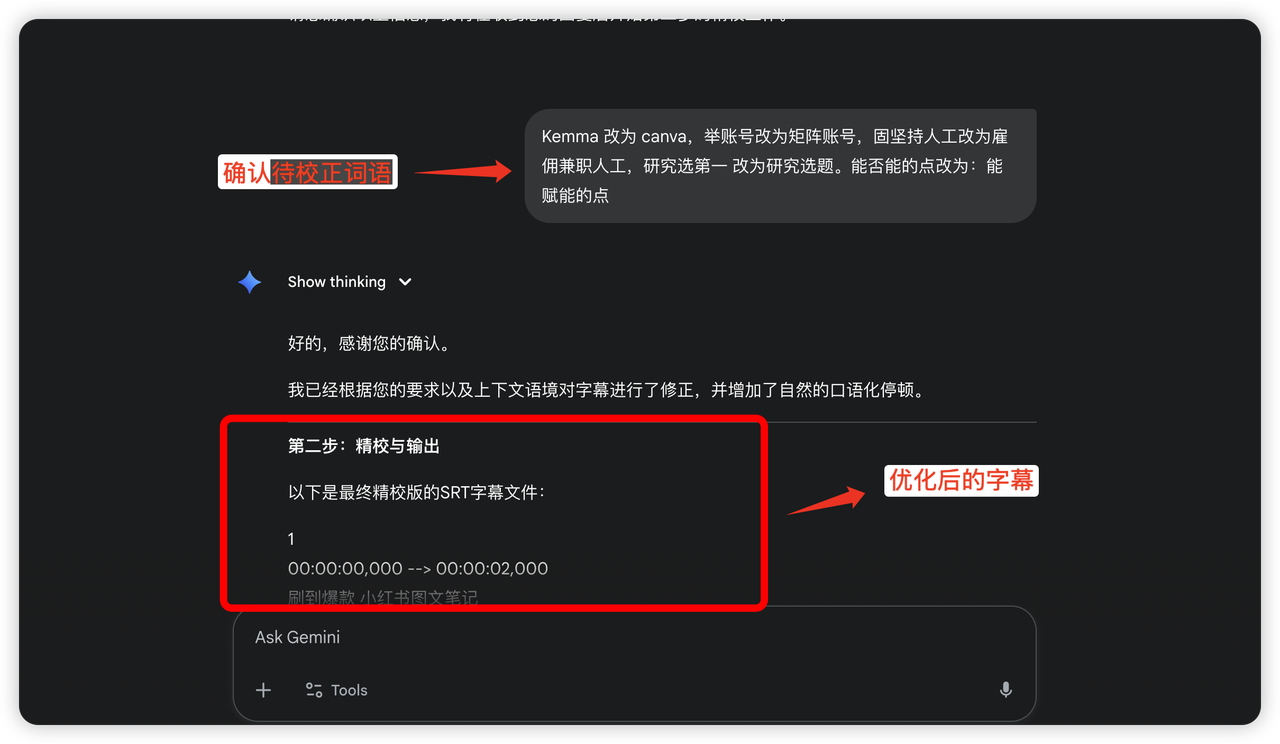
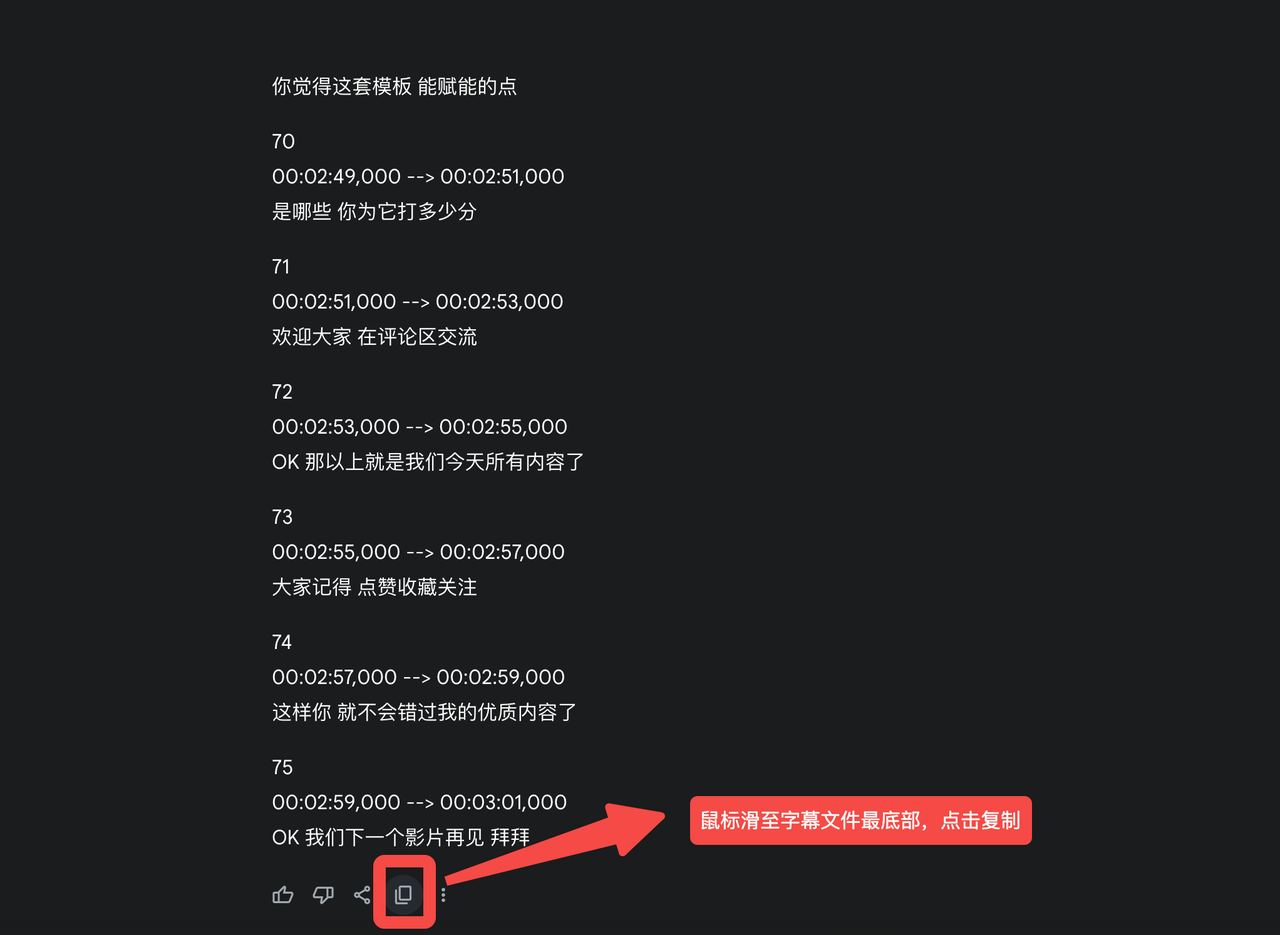
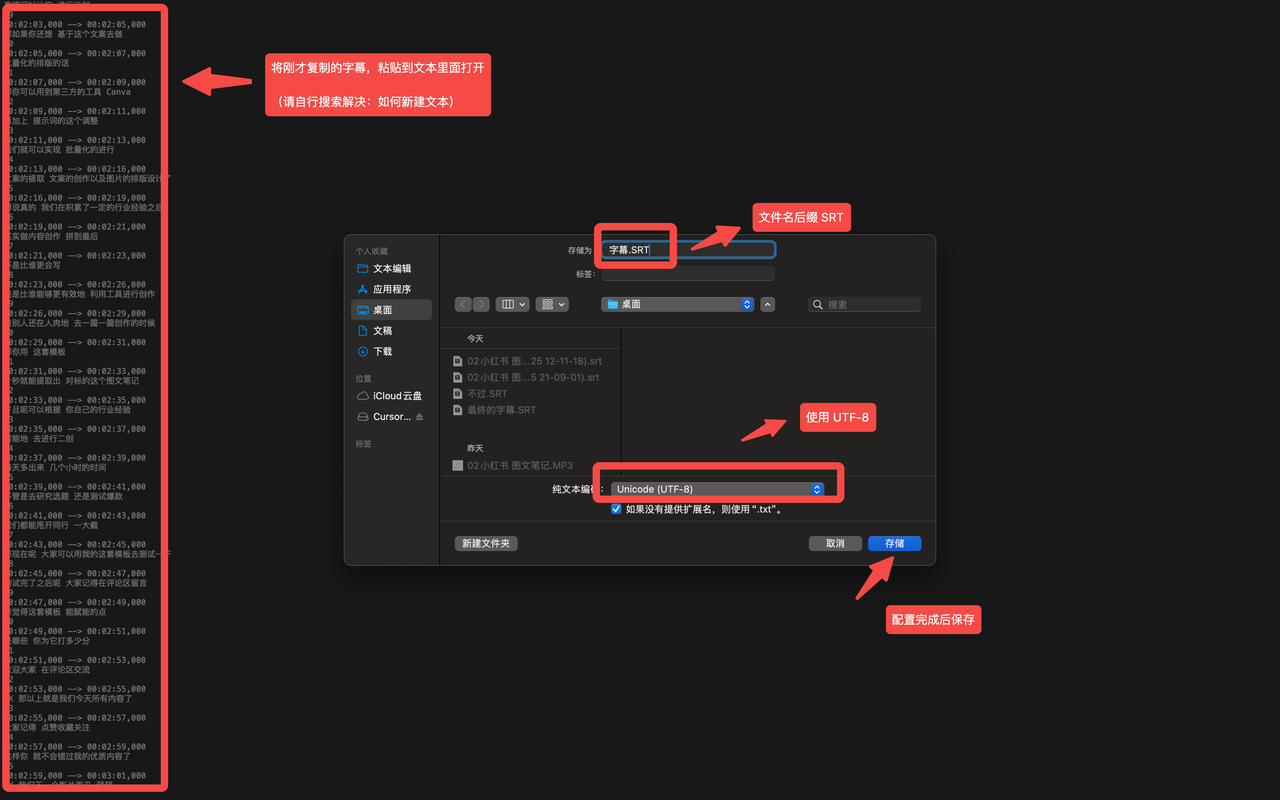
8. 新建txt 文本,粘贴字幕在此,并保存为SRT 文件
9. 将 SRT 文件直接拖拽进剪辑软件对齐
03 提取油管视频字幕,by:宝玉
Role
You are an expert transcript specialist. Your task is to create a perfectly structured, verbatim transcript of a video.

Objective
Produce a single, cohesive output containing the parts in this order:
1.  A Video Title
2.  A Table of Contents (ToC)
3.  The full, chapter-segmented transcript

* Use the same language as the transcription for the Title and ToC.

Critical Instructions

1. Transcription Fidelity: Verbatim & Untranslated
* Transcribe every spoken word exactly as you hear it, including filler words (`um`, `uh`, `like`) and stutters.
* NEVER translate. If the audio is in Chinese, transcribe in Chinese. If it mixes languages (e.g., "这个 feature 很酷"), your transcript must replicate that mix exactly.

2. Speaker Identification
* Priority 1: Use metadata. Analyze the video's title and description first to identify and match speaker names.
* Priority 2: Use audio content. If names are not in the metadata, listen for introductions or how speakers address each other.
* Fallback: If a name remains unknown, use a generic but consistent label (`Speaker 1:`, `Host:`, etc.).
* Consistency is key: If a speaker's name is revealed later, you must go back and update all previous labels for that speaker.

3. Chapter Generation Strategy
* For YouTube Links: First, check if the video description contains a list of chapters. If so, use that as the primary basis for segmenting the transcript.
* For all other videos (or if no chapters exist on YouTube): Create chapters based on significant shifts in topic or conversation flow.

4. Output Structure & Formatting

* Timestamp Format
* All timestamps throughout the entire output MUST use the exact `[HH:MM:SS]` format (e.g., `[00:01:23]`). Milliseconds are forbidden.

* Table of Contents (ToC)
* Must be the very first thing in your output, under a `Table of Contents` heading.
* Format for each entry: `* [HH:MM:SS] Chapter Title`

* Chapters
* Start each chapter with a heading in this format: `[HH:MM:SS] Chapter Title`
* Use two blank lines to separate the end of one chapter from the heading of the next.

* Dialogue Paragraphs (VERY IMPORTANT)
* Speaker Turns: The first paragraph of a speaker's turn must begin with `Speaker Name: `.
* Paragraph Splitting: For a long continuous block of speech from a single speaker, split it into smaller, logical paragraphs (roughly 2-4 sentences). Separate these paragraphs with a single blank line. Subsequent consecutive paragraphs from the *same speaker* should NOT repeat the `Speaker Name: ` label.
* Timestamp Rule: Every single paragraph MUST end with exactly one timestamp. The timestamp must be placed at the very end of the paragraph's text.
* ❌ WRONG: `Host: Welcome back. [00:00:01] Today we have a guest. [00:00:02]`
* ❌ WRONG: `Jane Doe: The study is complex. We tracked two groups over five years to see the effects. [00:00:18] And the results were surprising.`
* ✅ CORRECT: `Host: Welcome back. Today we have a guest. [00:00:02]`
* ✅ CORRECT (for a long monologue):
`Jane Doe: The study is complex. We tracked two groups over a five-year period to see the long-term effects. [00:00:18]

And the results, well, they were quite surprising to the entire team. [00:00:22]`

* Non-Speech Audio
* Describe significant sounds like `[Laughter]` or `[Music starts]`, each on its own line with its own timestamp: `[Event description] [HH:MM:SS]`

---
Example of Correct Output

Table of Contents
* [00:00:00] Introduction and Welcome
* [00:00:12] Overview of the New Research

[00:00:00] Introduction and Welcome

Host: Welcome back to the show. Today, we have a, uh, very special guest, Jane Doe. [00:00:01]

Jane Doe: Thank you for having me. I'm excited to be here and discuss the findings. [00:00:05]

[00:00:12] Overview of the New Research

Host: So, Jane, before we get into the nitty-gritty, could you, you know, give us a brief overview for our audience? [00:00:14]

Jane Doe: Of course. The study focuses on the long-term effects of specific dietary changes. It's a bit complicated but essentially we tracked two large groups over a five-year period. [00:00:21]

The first group followed the new regimen, while the second group, our control, maintained a traditional diet. This allowed us to isolate variables effectively. [00:00:28]

[Laughter] [00:00:29]

Host: Fascinating. And what did you find? [00:00:31]
---
Begin transcription now. Adhere to all rules with absolute precision.

腾讯云面向开发者汇聚海量精品云计算使用和开发经验,营造开放的云计算技术生态圈。
更多推荐
 0
0 0
0- 0


 已为社区贡献14条内容

所有评论(0)