基于Python的硬币背景分割和计数
·
一、引言
在日常场景中,物体计数依赖人工不仅效率低,还易出错。下面以硬币的背景分割与自动化计数为例,借助 Python 的图像处理库,核心仅需几十行代码,可以快速实现硬币的的背景分割和计数,且思路可拓展到其他物体的分割计数场景。
二、硬币图像
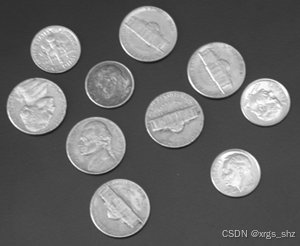
二、环境准备
首先安装所需库,打开终端执行以下命令即可:
pip install opencv-python numpy matplotlib scikit-image scipy
其中:OpenCV 负责图像读取,NumPy 处理数组运算,Matplotlib 用于可视化,scikit-image 实现连通域分析,SciPy 完成孔洞填充。
三、Python程序代码
# 对灰度图像coins.png进行背景分割和计数
# 2026年3月14日 Python实现
import cv2
import numpy as np
import matplotlib.pyplot as plt
from skimage import measure, morphology
from scipy import ndimage

# 1. 读取图像
# 如果当前目录没有 coins.png,可使用 skimage.data.coins() 加载示例图像
try:
    I = cv2.imread('coins.png', cv2.IMREAD_GRAYSCALE)
    if I is None:
        raise FileNotFoundError
except FileNotFoundError:
    print("未找到 coins.png,使用 scikit-image 自带的硬币图像代替")
    from skimage import data
    I = data.coins()  # 返回的是灰度图像

# 2. 显示原图和直方图
plt.figure(figsize=(12, 4))
plt.subplot(1, 3, 1)
plt.imshow(I, cmap='gray')
plt.title('Original Image')
plt.axis('off')

plt.subplot(1, 3, 2)
plt.hist(I.ravel(), bins=256, range=[0, 256])
plt.title('Histogram')
plt.xlabel('Intensity')
plt.ylabel('Count')

# 3. 阈值分割(阈值 100/255 ≈ 0.392,对应灰度值 100)
threshold = 100
bw = (I > threshold).astype(np.uint8) * 255  # 生成二值图像(0 和 255)
# 或使用 cv2.threshold: _, bw = cv2.threshold(I, threshold, 255, cv2.THRESH_BINARY)

# 4. 填充孔洞
# 方法一:使用 scipy.ndimage.binary_fill_holes
bw_filled = ndimage.binary_fill_holes(bw).astype(np.uint8) * 255
# 方法二:使用 morphology.remove_small_holes(需要二值逻辑图像)
# bw_filled = morphology.remove_small_holes(bw.astype(bool), area_threshold=64).astype(np.uint8)*255

# 显示二值图像和填充后的图像
plt.subplot(1, 3, 3)
plt.imshow(bw_filled, cmap='gray')
plt.title('After Filling Holes')
plt.axis('off')
plt.tight_layout()
plt.show()

# 5. 连通域标记并计数
label_image = measure.label(bw_filled, connectivity=2, background=0)  # 8连通
coins_num = label_image.max()   # 获取连通域数量(背景为0,所以最大值即为硬币数)
print(f'===== Detecting results =====')
print(f'Total detecting coins equal to {coins_num}')


# 6. 获取边界框并绘制在原图上
stats = measure.regionprops(label_image)  # 返回属性列表

plt.figure()
plt.imshow(I, cmap='gray')
for prop in stats:
    minr, minc, maxr, maxc = prop.bbox
    rect = plt.Rectangle((minc, minr), maxc - minc, maxr - minr,
                         fill=False, edgecolor='red', linewidth=2)
    plt.gca().add_patch(rect)
plt.title(f'Detected Coins: {coins_num}')
plt.axis('off')
plt.show()
三、核心实现步骤
- 图像读取:兼容本地
coins.png和 scikit-image 自带的硬币示例图像,避免因文件缺失导致代码报错,确保代码可直接运行。 - 阈值分割:通过灰度阈值(本文设为 100)将图像转为二值图,分离硬币(前景)与背景,这是分割的核心步骤,阈值可根据实际图像调整。
- 孔洞填充:硬币二值图可能存在内部孔洞,通过 SciPy 的
binary_fill_holes填充孔洞,保证每个硬币为完整连通区域。 - 计数与可视化:利用 scikit-image 的
measure.label标记连通域,背景为 0,连通域最大值即为硬币数量;同时绘制红色边界框,直观展示每个检测到的硬币。
四、运行结果和分析
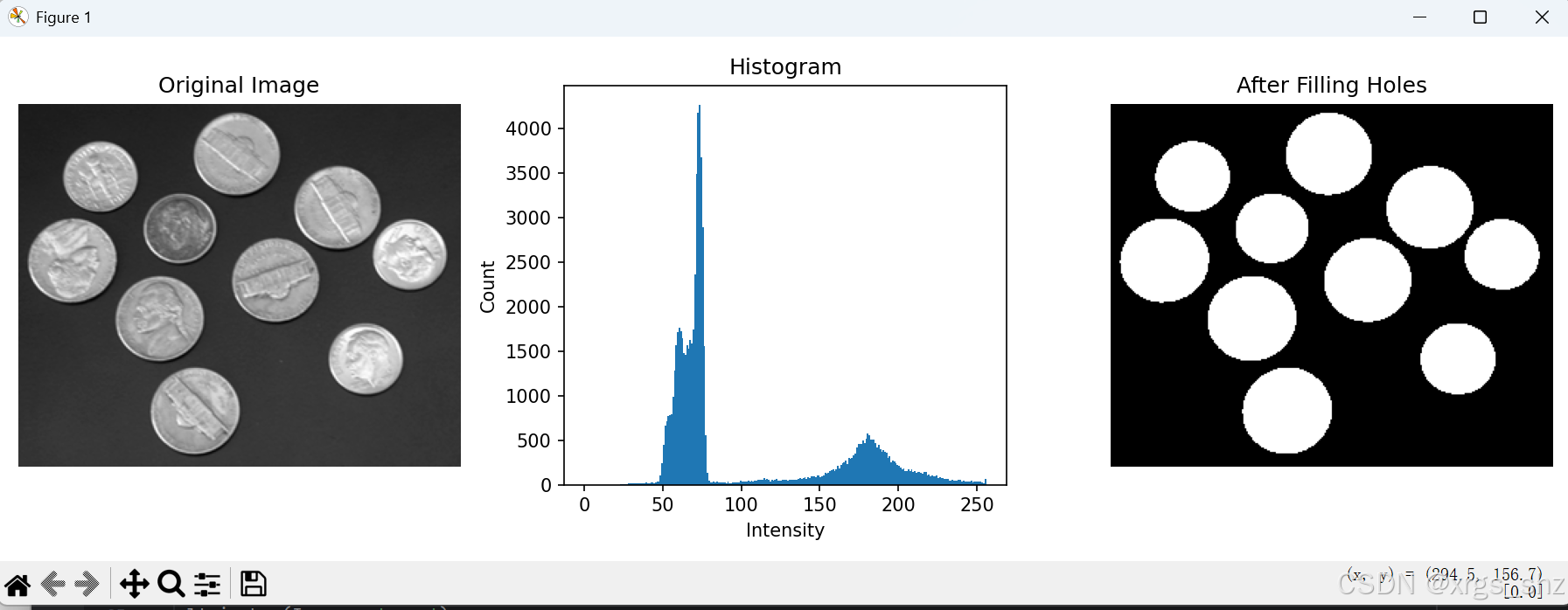
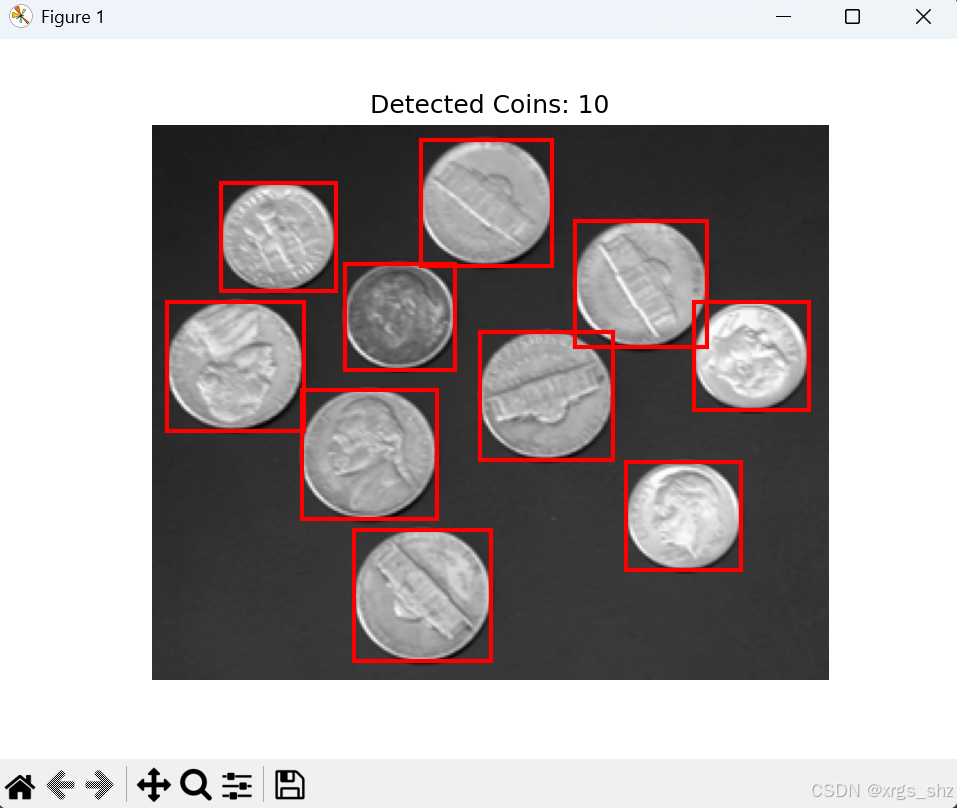

运行代码后,会依次展示原图、灰度直方图、填充后的二值图,最终输出硬币数量,并在原图上标注每个硬币的位置。测试结果显示,该方法能精准分割硬币与背景,计数无遗漏或重复,解决了硬币自动化计数的问题。
总结
Python 与图像处理库的组合使用,让图像分割与计数变得简单高效。本文的核心思路(阈值分割→孔洞填充→连通域计数)不仅适用于硬币,还可迁移到纽扣、零件等规则物体的自动化计数场景,具有一定的实用价值。
撰写博客不易,你的关注、点赞是我撰写博客的最大动力,欢迎转发,感谢支持!

腾讯云面向开发者汇聚海量精品云计算使用和开发经验,营造开放的云计算技术生态圈。
更多推荐
 11
11 0
0- 0


 已为社区贡献2条内容

所有评论(0)