《ElasticSearch》04 索引:索引模板(Index Template)详解
Elasticsearch索引模板是一种预定义配置,用于在创建新索引时自动应用设置、映射和别名。
索引模板是一种告诉Elasticsearch在创建索引时如何配置索引的方法。
- 使用方式
在创建索引之前可以先配置模板,这样在创建索引(手动创建索引或通过对文档建立索引)时,模板设置将用作创建索引的基础。
模板类型
模板有两种类型:索引模板和组件模板。
-
组件模板是可重用的构建块,用于配置映射,设置和别名;它们不会直接应用于一组索引。
-
索引模板可以包含组件模板的集合,也可以直接指定设置,映射和别名。
索引模板中的优先级
-
可组合模板优先于旧模板。如果没有可组合模板匹配给定索引,则旧版模板可能仍匹配并被应用。
-
如果使用显式设置创建索引并且该索引也与索引模板匹配,则创建索引请求中的设置将优先于索引模板及其组件模板中指定的设置。
-
如果新数据流或索引与多个索引模板匹配,则使用优先级最高的索引模板。
内置索引模板
Elasticsearch具有内置索引模板,每个索引模板的优先级为100,适用于以下索引模式:
-
logs-*-* -
metrics-*-* -
synthetics-*-*
所以在涉及内建索引模板时,要避免索引模式冲突。更多可以参考这里
案例
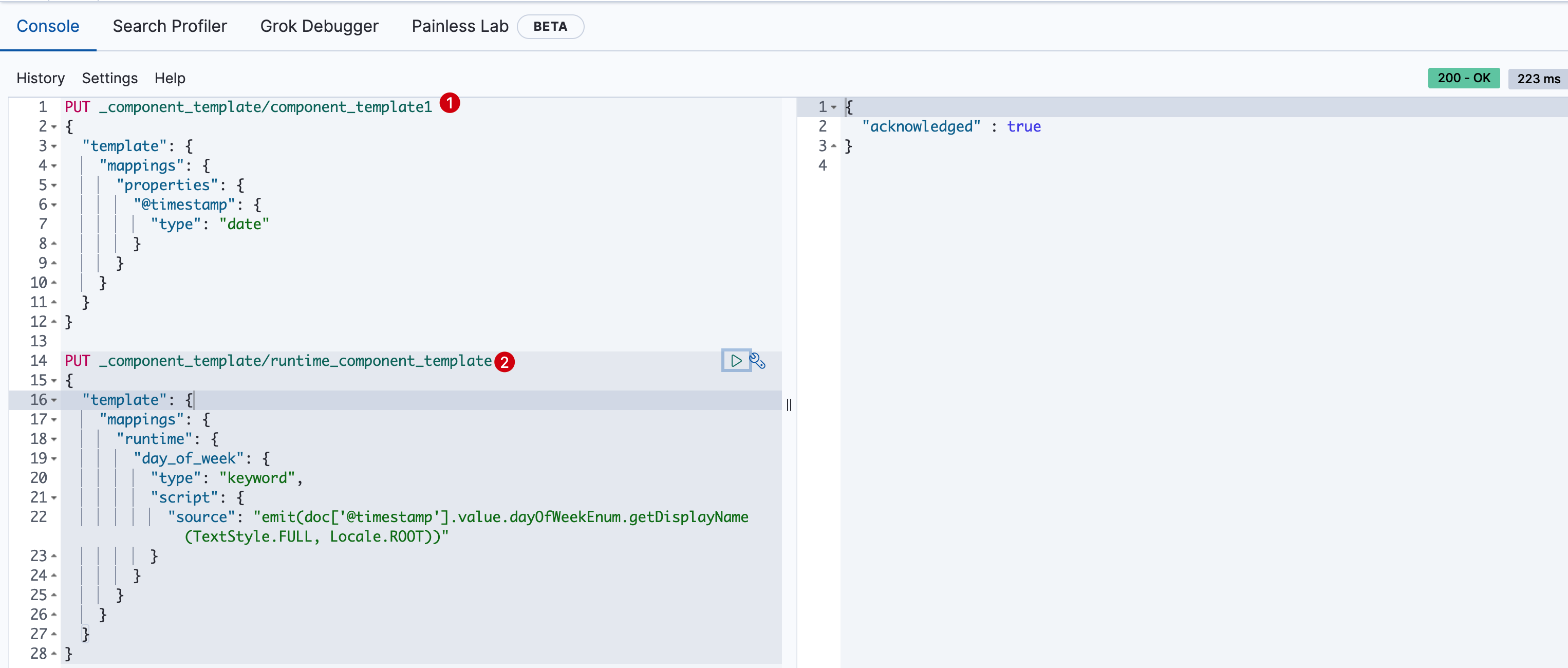
- 首先创建两个索引组件模板:
PUT _component_template/component_template1
{
  "template": {
    "mappings": {
      "properties": {
        "@timestamp": {
          "type": "date"
        }
      }
    }
  }
}

PUT _component_template/runtime_component_template
{
  "template": {
    "mappings": {
      "runtime": {
        "day_of_week": {
          "type": "keyword",
          "script": {
            "source": "emit(doc['@timestamp'].value.dayOfWeekEnum.getDisplayName(TextStyle.FULL, Locale.ROOT))"
          }
        }
      }
    }
  }
}
执行结果如下
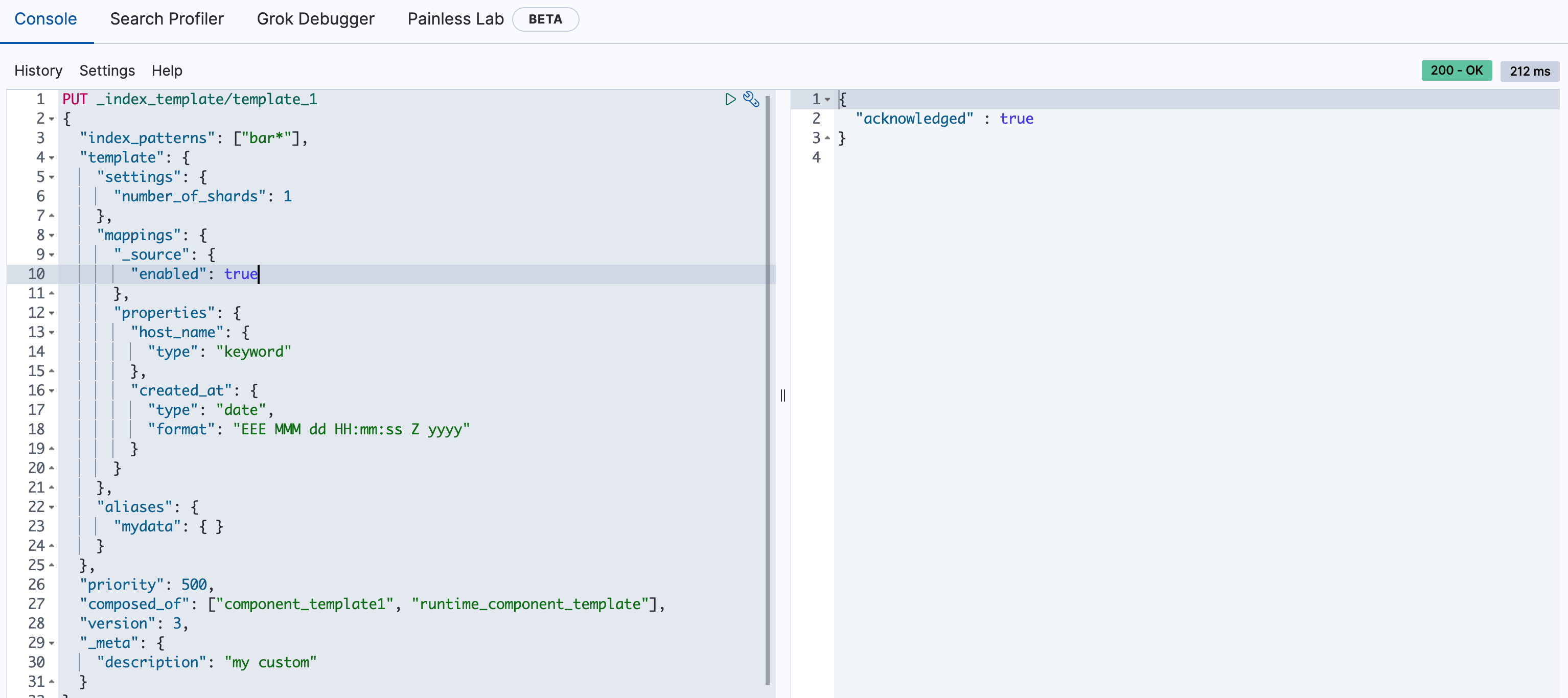
- 创建使用组件模板的索引模板
PUT _index_template/template_1
{
  "index_patterns": ["bar*"],
  "template": {
    "settings": {
      "number_of_shards": 1
    },
    "mappings": {
      "_source": {
        "enabled": true
      },
      "properties": {
        "host_name": {
          "type": "keyword"
        },
        "created_at": {
          "type": "date",
          "format": "EEE MMM dd HH:mm:ss Z yyyy"
        }
      }
    },
    "aliases": {
      "mydata": { }
    }
  },
  "priority": 500,
  "composed_of": ["component_template1", "runtime_component_template"],
  "version": 3,
  "_meta": {
    "description": "my custom"
  }
}
执行结果如下
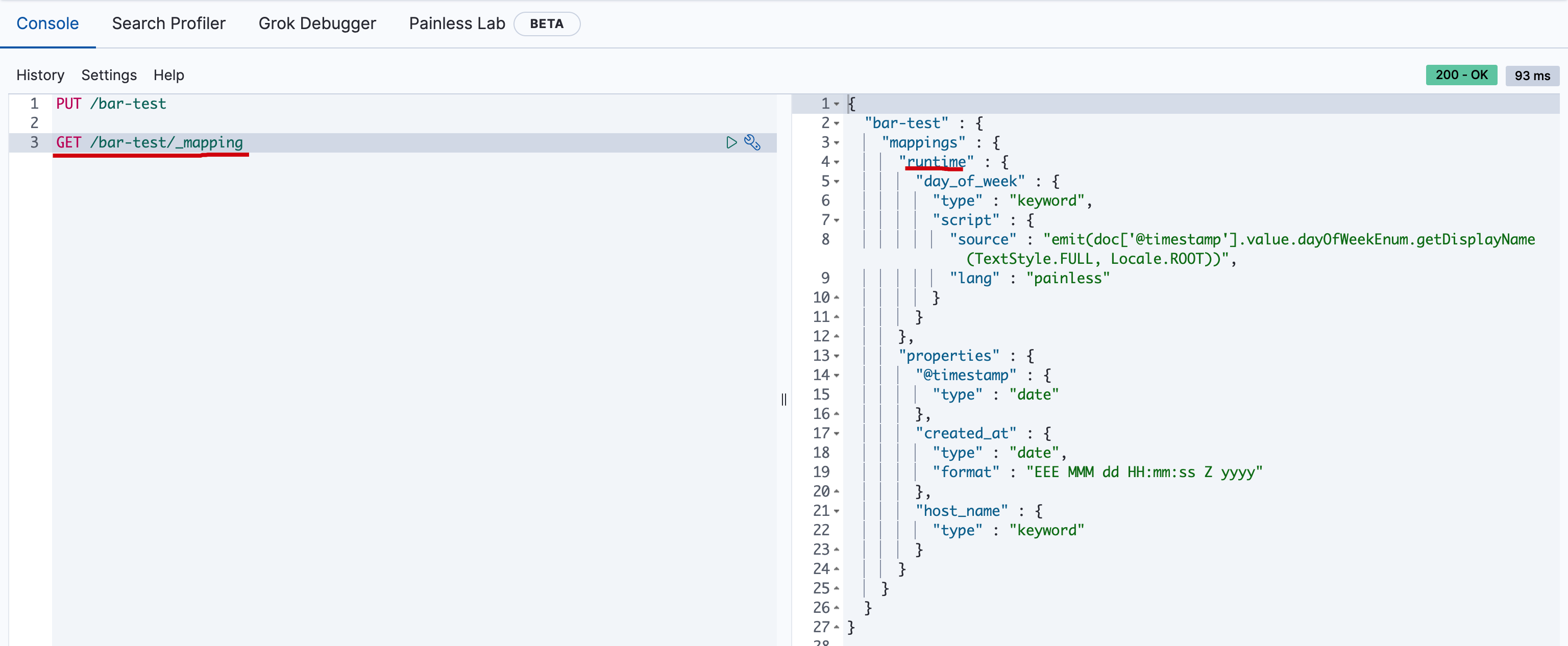
- 创建一个匹配
bar*的索引bar-test
PUT /bar-test
然后获取mapping
GET /bar-test/_mapping
执行结果如下
模拟多组件模板
由于模板不仅可以由多个组件模板组成,还可以由索引模板自身组成;那么最终的索引设置将是什么呢?ElasticSearch设计者考虑到这个,提供了API进行模拟组合后的模板的配置。
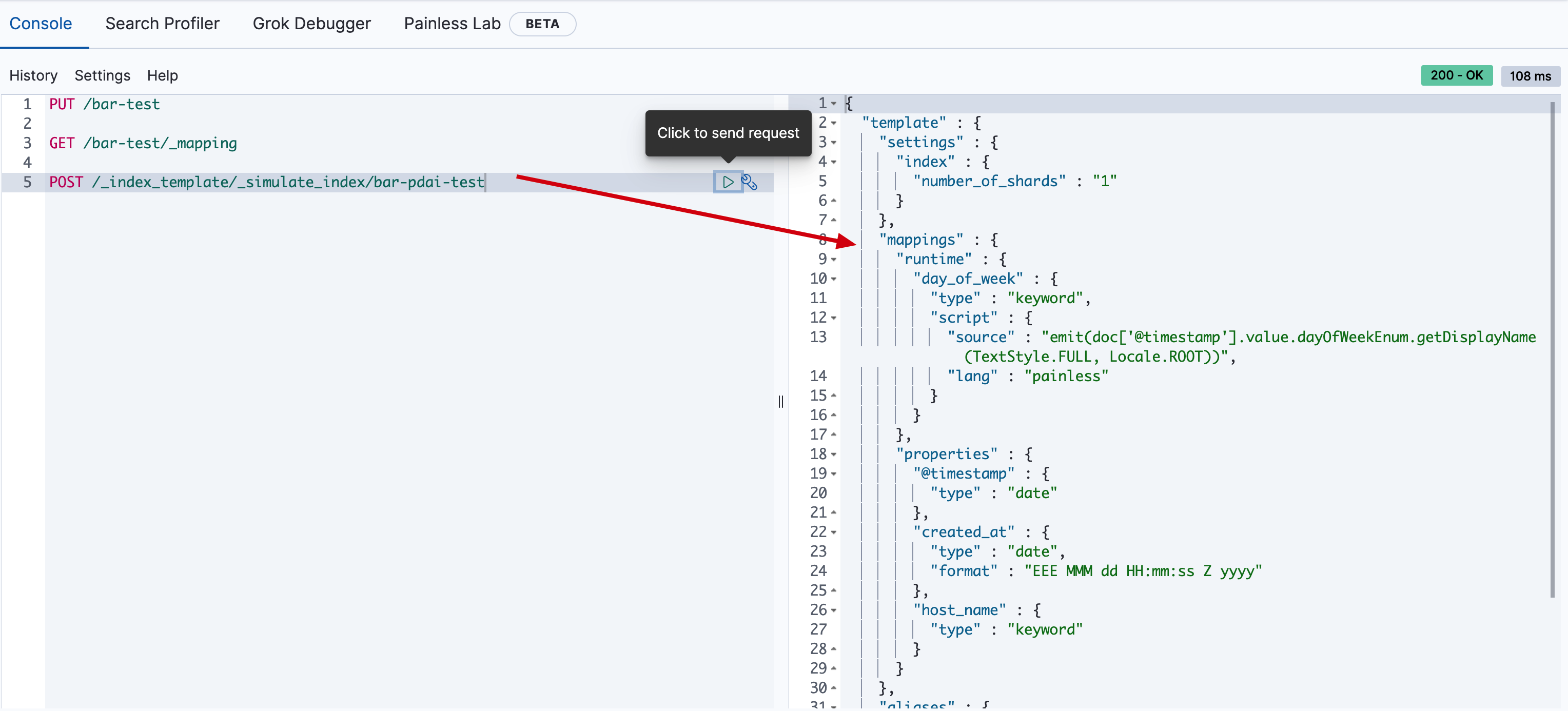
模拟某个索引结果
比如上面的template_1, 我们不用创建bar*的索引(这里模拟bar-pdai-test),也可以模拟计算出索引的配置:
POST /_index_template/_simulate_index/bar-pdai-test
执行结果如下
模拟组件模板结果
当然,由于template_1模板是由两个组件模板组合的,我们也可以模拟出template_1被组合后的索引配置:
POST /_index_template/_simulate/template_1
执行结果如下:
{
  "template" : {
    "settings" : {
      "index" : {
        "number_of_shards" : "1"
      }
    },
    "mappings" : {
      "runtime" : {
        "day_of_week" : {
          "type" : "keyword",
          "script" : {
            "source" : "emit(doc['@timestamp'].value.dayOfWeekEnum.getDisplayName(TextStyle.FULL, Locale.ROOT))",
            "lang" : "painless"
          }
        }
      },
      "properties" : {
        "@timestamp" : {
          "type" : "date"
        },
        "created_at" : {
          "type" : "date",
          "format" : "EEE MMM dd HH:mm:ss Z yyyy"
        },
        "host_name" : {
          "type" : "keyword"
        }
      }
    },
    "aliases" : {
      "mydata" : { }
    }
  },
  "overlapping" : [ ]
}
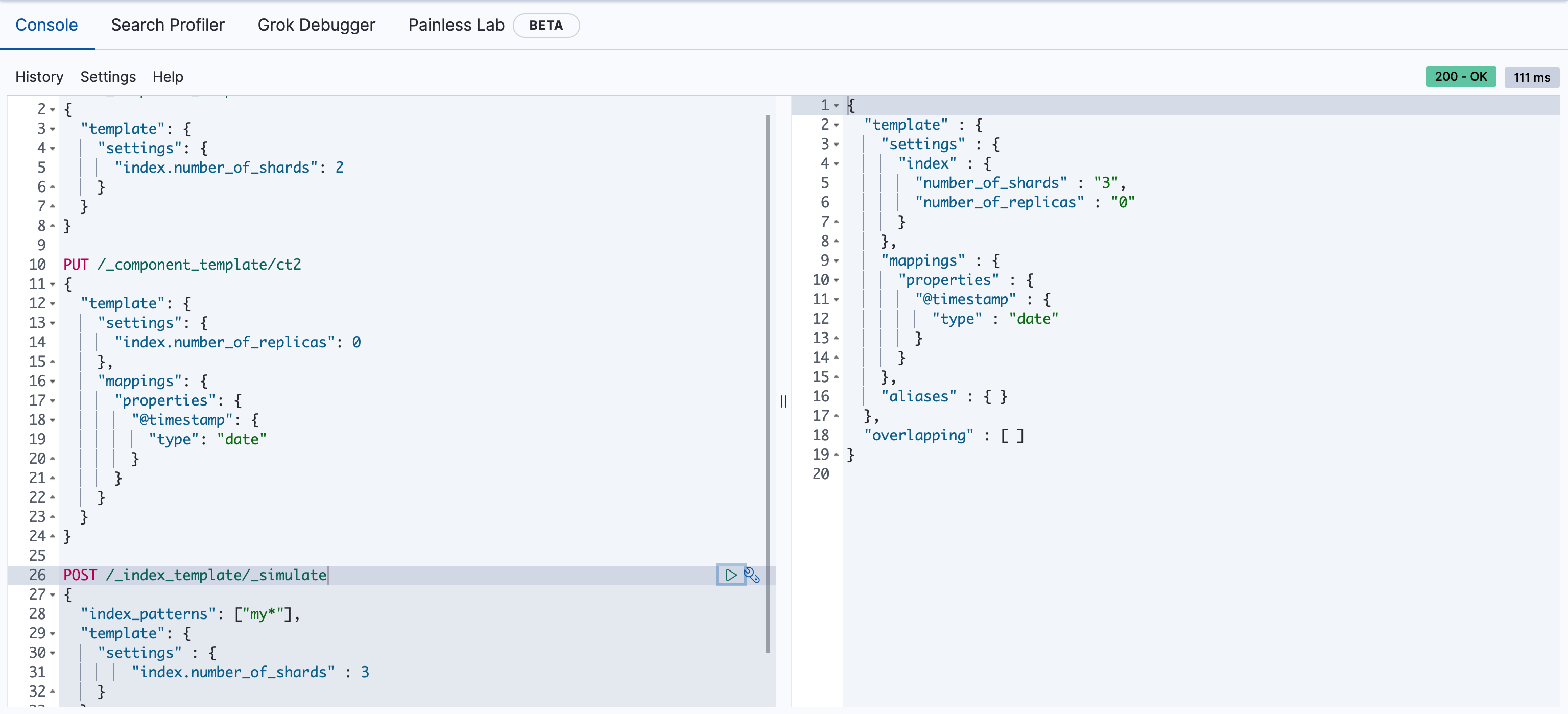
模拟组件模板和自身模板结合后的结果
- 新建两个模板
PUT /_component_template/ct1
{
  "template": {
    "settings": {
      "index.number_of_shards": 2
    }
  }
}

PUT /_component_template/ct2
{
  "template": {
    "settings": {
      "index.number_of_replicas": 0
    },
    "mappings": {
      "properties": {
        "@timestamp": {
          "type": "date"
        }
      }
    }
  }
}
模拟在两个组件模板的基础上,添加自身模板的配置
POST /_index_template/_simulate
{
  "index_patterns": ["my*"],
  "template": {
    "settings" : {
        "index.number_of_shards" : 3
    }
  },
  "composed_of": ["ct1", "ct2"]
}
执行的结果如下
{
  "template" : {
    "settings" : {
      "index" : {
        "number_of_shards" : "3",
        "number_of_replicas" : "0"
      }
    },
    "mappings" : {
      "properties" : {
        "@timestamp" : {
          "type" : "date"
        }
      }
    },
    "aliases" : { }
  },
  "overlapping" : [ ]
}
面试题:什么是es的索引模板,如何创建,有什么作用?
⭐索引模板是 Elasticsearch中一种预先定义的配置模板。它的核心作用是在索引被创建时,自动应用预设的Settings(设置)和Mappings(映射),从而确保新创建的索引能够符合预定义的规范。
你可以把它理解为一个“模具”,当新的数据(符合某种模式的新索引)流入时,ES会自动用这个模具去“铸造”它,保证其结构一致。
⭐索引模板的核心组成
1、Index patterns (索引模式):这是模板的匹配规则,使用通配符(例如logs-、app--2024*)。当一个新索引的名称与该模式匹配时,该模板就会被应用。
2、Settings (索引设置):定义索引的物理属性,如分片数、副本数、刷新间隔、压缩算法等。3、Mappings (字段映射):定义索引的结构,如字段的数据类型(text, keyword, integer, date等)、分词器、是否被索引等。
4、Aliases (索引别名):可以为匹配到的索引自动绑定别名,方便业务层统一访问。
⭐如何创建索引模板
在ES中,主要有两种管理方式,这也是面试中可能会深入探讨的点。
方式一:传统的Index Templates (已弃用,但老项目可能还在用),使用 _template 端点。
方式二:可组合索引模板 (推荐,ES 7.8+ 引入)
这是目前的主流方式,它将模板拆分为组件模板和最终模板,体现了“组合优于继承”的设计思想,非常适合微服务或多团队协作的场景。
步骤1:创建组件模板(可复用的模块)
# 通用设置组件
PUT _component_template/common_settings
{
  "template": {
    "settings": {
      "number_of_shards": 3,
      "number_of_replicas": 1
    }
  }
}

# 日志映射组件
PUT _component_template/logs_mappings
{
  "template": {
    "mappings": {
      "properties": {
        "@timestamp": { "type": "date" },
        "message": { "type": "text" }
      }
    }
  }
}
步骤2:创建可组合模板(组装组件)
PUT _index_template/my_app_logs
{
  "index_patterns": ["app-logs-*"],
  "composed_of": ["common_settings", "logs_mappings"],
  "priority": 100,
  "version": 1
}
⭐索引模板的核心作用:
1、确保数据结构的规范统一
在Java中,我们通常会用Logstash或Filebeat收集日志,并将日志按日期写入不同的索引(如order-service-2024.05.21)。如果没有模板,ES会启动动态映射,导致:a. 整数字段有时被映射为long,有时为integer。
b. message字段可能因为包含JSON而导致映射爆炸。
c. 不同索引的字段类型不一致,导致查询报错。
d. 模板则保证了每个以order-service-开头的索引都有完全一致的、符合Java POJO类定义的映射。2、运维自动化与性能调优
模板允许预设索引的分片数和副本数。作为后端开发者,可能需要根据数据量预估来调整分片策略。通过模板,新创建的索引会自动拥有最佳实践配置,无需人工干预。3、简化索引管理
结合索引生命周期管理,模板是实现冷热数据分离、索引滚动的基础。例如,可以设定索引创建后10天转为只读,20天后删除,所有这些都可以通过模板配合ILM策略自动完成。
⭐加分项
1、模板优先级:当一个索引名匹配多个模板时,order 或 priority值高的模板会覆盖值低的。可组合模板的优先级通常高于传统模板。
2、动态模板:可以在Mappings中定义动态模板,根据字段名或数据类型来匹配并应用规则。例如,所有以 _text 结尾的字段都自动使用 ik_smart 分词器。
3、严格 vs 动态:Mappings中可以设置 dynamic:strict,这意味着如果Java应用尝试写入一个未在模板中定义的字段,ES会直接拒绝写入。这可以防止脏数据,但需要开发同学严格把控版本变更。

腾讯云面向开发者汇聚海量精品云计算使用和开发经验,营造开放的云计算技术生态圈。
更多推荐
 32
32 0
0- 0


 已为社区贡献10条内容

所有评论(0)