别再调用API了!5分钟用SpringBoot和JiaJiaOCR,自建一个企业级OCR服务
哈喽,大家好,我是番石榴AI,老番。
作为一名Java程序员,你是不是也想过在项目里加点“AI”魔法,比如让程序能看懂图片里的文字?
但一想到OCR,脑海里就浮现出各种头疼的问题:
- 调用第三方API?
又贵又慢,还担心敏感数据泄露。
- 自己部署开源模型?
Python环境配置劝退,依赖冲突让人抓狂。
- 想找个Java的轮子?
不是功能太弱,就是文档缺失,最后只能放弃。
今天,老番就带你终结这个烦恼!
我们将用我开源的java版的OCR库——JiaJiaOCR库(https://github.com/jiangnanboy/JiaJiaOCR),结合最熟悉的 SpringBoot,5分钟搭建一个完全自主可控、高性能的Java OCR服务。
第一步:创建SpringBoot项目
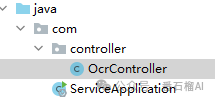
这一步,相信大家都烂熟于心了。
下载JiaJiaOCR库放在自己的项目中。
pom.xml 中引入依赖。
<?xml version="1.0" encoding="UTF-8"?>
<project xmlns="http://maven.apache.org/POM/4.0.0"
         xmlns:xsi="http://www.w3.org/2001/XMLSchema-instance"
         xsi:schemaLocation="http://maven.apache.org/POM/4.0.0 http://maven.apache.org/xsd/maven-4.0.0.xsd">
    <modelVersion>4.0.0</modelVersion>

    <groupId>org.example</groupId>
    <artifactId>test_jiajiaocr</artifactId>
    <version>1.0-SNAPSHOT</version>

    <properties>
        <project.build.sourceEncoding>UTF-8</project.build.sourceEncoding>
        <java.version>8</java.version>
        <maven.compiler.source>${java.version}</maven.compiler.source>
        <maven.compiler.target>${java.version}</maven.compiler.target>
        <project.build.sourceEncoding>UTF-8</project.build.sourceEncoding>
        <project.reporting.outputEncoding>UTF-8</project.reporting.outputEncoding>

        <!-- 统一管理依赖版本 -->
        <lombok.version>1.18.36</lombok.version>
        <commons-lang3.version>3.17.0</commons-lang3.version>
        <poi.version>5.3.0</poi.version>
        <dom4j.version>1.6.1</dom4j.version>
        <commons-collections.version>3.2.2</commons-collections.version>
        <fastjson2.version>2.0.53</fastjson2.version>
        <onnxruntime.version>1.19.0</onnxruntime.version>
        <djl.version>0.31.0</djl.version>
        <jsoup.version>1.15.3</jsoup.version>
        <slf4j-nop.version>2.0.16</slf4j-nop.version>
    </properties>

    <parent>
        <groupId>org.springframework.boot</groupId>
        <artifactId>spring-boot-starter-parent</artifactId>
        <version>2.6.4</version>
        <relativePath/> <!-- lookup parent from repository -->
    </parent>

    <dependencies>
        <dependency>
            <groupId>org.springframework.boot</groupId>
            <artifactId>spring-boot-starter-web</artifactId>
            <version>2.6.4</version>
        </dependency>

        <dependency>
            <groupId>org.projectlombok</groupId>
            <artifactId>lombok</artifactId>
            <version>${lombok.version}</version>
            <scope>provided</scope>
        </dependency>

        <dependency>
            <groupId>org.apache.commons</groupId>
            <artifactId>commons-lang3</artifactId>
            <version>${commons-lang3.version}</version>
        </dependency>

        <dependency>
            <groupId>org.apache.poi</groupId>
            <artifactId>poi</artifactId>
            <version>${poi.version}</version>
        </dependency>

        <dependency>
            <groupId>dom4j</groupId>
            <artifactId>dom4j</artifactId>
            <version>${dom4j.version}</version>
        </dependency>

        <dependency>
            <groupId>commons-collections</groupId>
            <artifactId>commons-collections</artifactId>
            <version>${commons-collections.version}</version>
        </dependency>

        <dependency>
            <groupId>com.alibaba.fastjson2</groupId>
            <artifactId>fastjson2</artifactId>
            <version>${fastjson2.version}</version>
        </dependency>
        <dependency>
            <groupId>org.jsoup</groupId>
            <artifactId>jsoup</artifactId>
            <version>${jsoup.version}</version>
        </dependency>

        <dependency>
            <groupId>org.slf4j</groupId>
            <artifactId>slf4j-nop</artifactId>
            <version>${slf4j-nop.version}</version>
        </dependency>
        <!-- Maven 依赖(自动打包进 JAR) -->
        <dependency>
            <groupId>com.microsoft.onnxruntime</groupId>
            <artifactId>onnxruntime</artifactId>
            <version>1.19.0</version>
        </dependency>
        <dependency>
            <groupId>ai.djl.mxnet</groupId>
            <artifactId>mxnet-engine</artifactId>
            <version>0.31.0</version>
        </dependency>
        <dependency>
            <groupId>ai.djl.opencv</groupId>
            <artifactId>opencv</artifactId>
            <version>0.31.0</version>
        </dependency>
        <dependency>
            <groupId>ai.djl</groupId>
            <artifactId>api</artifactId>
            <version>0.31.0</version>
        </dependency>

        <dependency>
            <groupId>org.apache.commons</groupId>
            <artifactId>commons-lang3</artifactId>
            <version>3.17.0</version>
        </dependency>

        <dependency>
        <groupId>org.apache.pdfbox</groupId>
        <artifactId>pdfbox</artifactId>
        <version>3.0.2</version>
        </dependency>

    </dependencies>

    <build>
        <plugins>
            <plugin>
                <groupId>org.springframework.boot</groupId>
                <artifactId>spring-boot-maven-plugin</artifactId>
                <version>2.6.4</version>
                <executions>
                    <execution>
                        <goals>
                            <goal>repackage</goal>
                        </goals>
                    </execution>
                </executions>
            </plugin>

            <!-- 编译插件 -->
            <plugin>
                <groupId>org.apache.maven.plugins</groupId>
                <artifactId>maven-compiler-plugin</artifactId>
                <version>3.8.1</version>
                <configuration>
                    <source>${java.version}</source>
                    <target>${java.version}</target>
                </configuration>
            </plugin>

            <!-- Shade 插件:打包 Maven 依赖,但排除 JiaJiaOCR.jar -->
            <plugin>
                <groupId>org.apache.maven.plugins</groupId>
                <artifactId>maven-shade-plugin</artifactId>
                <version>3.4.1</version>
                <executions>
                    <execution>
                        <phase>package</phase>
                        <goals>
                            <goal>shade</goal>
                        </goals>
                    </execution>
                </executions>
            </plugin>
        </plugins>
    </build>
</project>
项目启动类ServiceApplication
package com;

import org.springframework.boot.SpringApplication;
import org.springframework.boot.autoconfigure.SpringBootApplication;

@SpringBootApplication
public class ServiceApplication
{
  public static void main(String[] args) {
     SpringApplication.run(ServiceApplication.class, args);
  }
}
第二步:编写核心OCR接口
好戏开场!我们来创建一个 OcrController,暴露两个核心接口:通用文字识别 和 文本行检测。
package com.controller;

 import com.alibaba.fastjson2.JSON;

 import lombok.Generated;
 import org.apache.commons.lang3.tuple.Pair;
 import org.opencv.core.Mat;
 import org.opencv.core.MatOfByte;
 import org.opencv.imgcodecs.Imgcodecs;
 import org.opencv.imgproc.Imgproc;
 import org.slf4j.Logger;
 import org.slf4j.LoggerFactory;
 import org.springframework.web.bind.annotation.PostMapping;
 import org.springframework.web.bind.annotation.RequestMapping;
 import org.springframework.web.bind.annotation.RequestPart;
 import org.springframework.web.bind.annotation.RestController;
 import org.springframework.web.multipart.MultipartFile;

 import java.io.IOException;
 import java.util.HashMap;
 import java.util.List;
 import java.util.Map;


 import com.jiajia.common_object.*;
 import com.jiajia.core.JiaJiaOCR;

 @RestController
 @RequestMapping({"jiajiaocr_project"})
 public class OcrController {
   @Generated
   private static final Logger log = LoggerFactory.getLogger(OcrController.class);

   JiaJiaOCR jiaJiaOCR = JiaJiaOCR.builder();

   @PostMapping(value = {"/general_ocr"}, consumes = {"multipart/form-data"})
   public String generalOCR(@RequestPart("file") MultipartFile file) throws IOException {

       Map resultMap = new HashMap();
     if (file.equals("") || file.getSize() <= 0L) {
         resultMap.put("error", "图片格式有误!");
         return JSON.toJSONString(resultMap);
     }

     if (isImage(file)) {
         //     saveImg(file, "ocr");
         List<Pair<Text, Box>> pairList = null;

       byte[] bytes = file.getBytes();
       Mat mat = Imgcodecs.imdecode(new MatOfByte(bytes), 1);
       Imgproc.cvtColor(mat, mat, 4);
       try {
           pairList = jiaJiaOCR.recognizeGeneralText(mat);
       } catch (Exception e) {
         throw new RuntimeException(e);
       } finally {
         mat.release();
       }
       return JSON.toJSONString(pairList);
     }
     return JSON.toJSONString(resultMap);
   }

     @PostMapping(value = {"/textline"}, consumes = {"multipart/form-data"})
     public String textLine(@RequestPart("file") MultipartFile file) throws IOException {

         Map resultMap = new HashMap();
         if (file.equals("") || file.getSize() <= 0L) {
             resultMap.put("error", "图片格式有误!");
             return JSON.toJSONString(resultMap);
         }

         if (isImage(file)) {
             //     saveImg(file, "ocr");
             Boxes boxes = null;

             byte[] bytes = file.getBytes();
             Mat mat = Imgcodecs.imdecode(new MatOfByte(bytes), 1);
             Imgproc.cvtColor(mat, mat, 4);
             try {
                 boxes = jiaJiaOCR.detectTextLines(mat);
             } catch (Exception e) {
                 throw new RuntimeException(e);
             } finally {
                 mat.release();
             }
             return JSON.toJSONString(boxes);
         }
         return JSON.toJSONString(resultMap);
     }

   private boolean isImage(MultipartFile file) {
     String contentType = file.getContentType();
     return (contentType != null && (contentType.equals("image/jpeg") || contentType.equals("image/png") || contentType.equals("image/gif") || contentType.equals("image/jpeg/jpg/png/bmp")));
   }

//   private void saveImg(MultipartFile file, String operationType) throws IOException {
//     String savePath = "/opt/jiajiaocr/imgs_save/";
//     if (!file.equals("") && file.getSize() > 0L) {
//       LocalDateTime dateTimeNow = LocalDateTime.now();
//       int year = dateTimeNow.getYear();
//       int month = dateTimeNow.getMonthValue();
//       int day = dateTimeNow.getDayOfMonth();
//       int hour = dateTimeNow.getHour();
//       int min = dateTimeNow.getMinute();
//       int secd = dateTimeNow.getSecond();
//       String dateTime = String.join("-", new CharSequence[] { operationType, String.valueOf(year), String.valueOf(month),
//             String.valueOf(day), String.valueOf(hour), String.valueOf(min), String.valueOf(secd) });
//       String fileName = StringUtils.cleanPath(file.getOriginalFilename());
//       if (fileName.isEmpty()) {
//         fileName = fileName + "filename.jpg";
//       }
//       fileName = dateTime + "-" + fileName;
//       Path path = Path.of(savePath + fileName);
//       Files.copy(file.getInputStream(), path, new CopyOption[] { StandardCopyOption.REPLACE_EXISTING });
//     }
//   }

}- Builder模式初始化
:
JiaJiaOCR.builder()一行代码搞定,无需关心复杂的模型加载过程。 - 内存管理
:在
finally块中mat.release()是OpenCV开发的最佳实践,能有效避免内存泄漏,保证服务稳定。 - 灰度预处理
:
Imgproc.cvtColor将图片转为灰度图,这是提升OCR识别率非常有效的一步。
第三步:启动与测试
大功告成!运行 ServiceApplication,我们的OCR服务就启动了。
打开 Postman 或任何API测试工具,我们来测试一下。
请求地址:POST http://localhost:8080/jiajiaocr_project/general_ocr
请求参数:form-data,key为 file,value选择一张包含文字的图片。
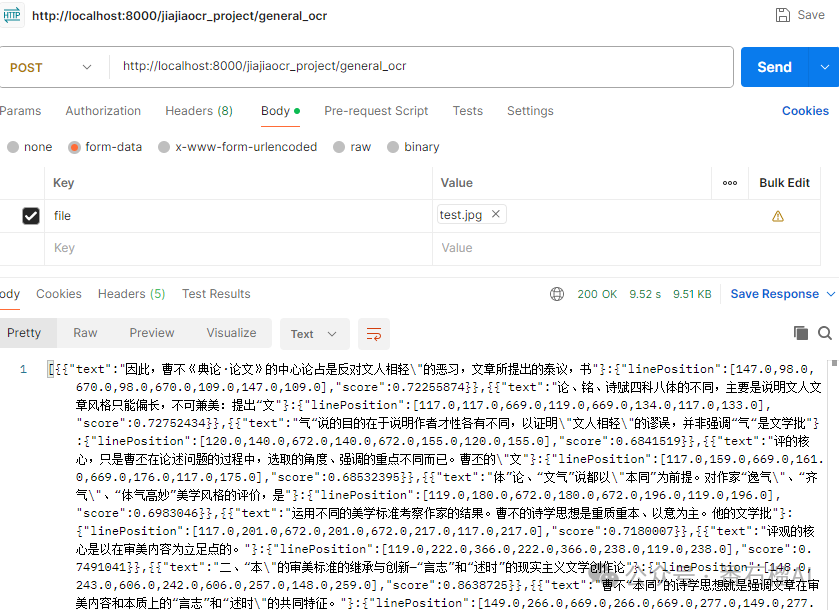
看,图片里的文字被精准地识别出来了,并且返回了每行文字的坐标和内容。
一个属于你自己的、免费的、高性能的OCR服务,就这么诞生了!
如果 JiaJiaOCR 对您有帮助,欢迎到我的GitHub给它一个Star⭐️,您的支持是我持续创作的最大动力!项目地址:https://github.com/jiangnanboy/JiaJiaOCR

腾讯云面向开发者汇聚海量精品云计算使用和开发经验,营造开放的云计算技术生态圈。
更多推荐
 7
7 0
0- 0


 已为社区贡献7条内容

所有评论(0)