Flutter 框架跨平台鸿蒙开发 - 默契挑战
运行效果图默契挑战应用是一款趣味社交游戏,让两位玩家同时回答相同的问题,通过对比答案来测试彼此的默契程度。应用以紫色为主色调,传递神秘、有趣的氛围。核心玩法在于"同时作答"机制——两位玩家轮流在同一设备上作答,答案互不可见,最终揭晓默契度。应用涵盖了玩家设置、问题分类、答题挑战、结果展示四大模块,支持6种问题分类和30道预设问题,每种分类对应独特的主题色。通过倒计时机制、答案对比、默契度计算等功能
默契挑战应用
欢迎加入开源鸿蒙跨平台社区:
https://openharmonycrossplatform.csdn.net
一、项目概述
运行效果图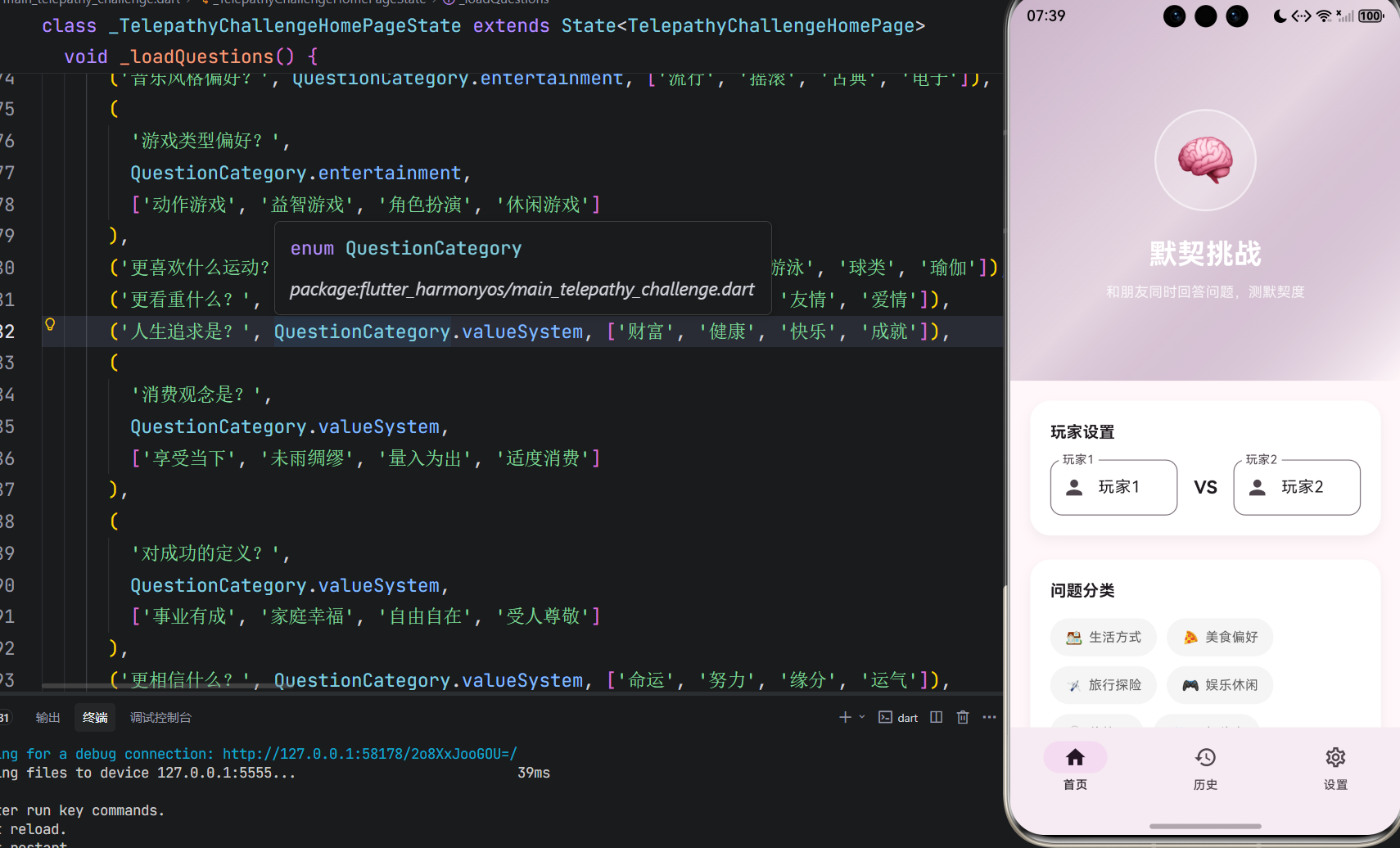
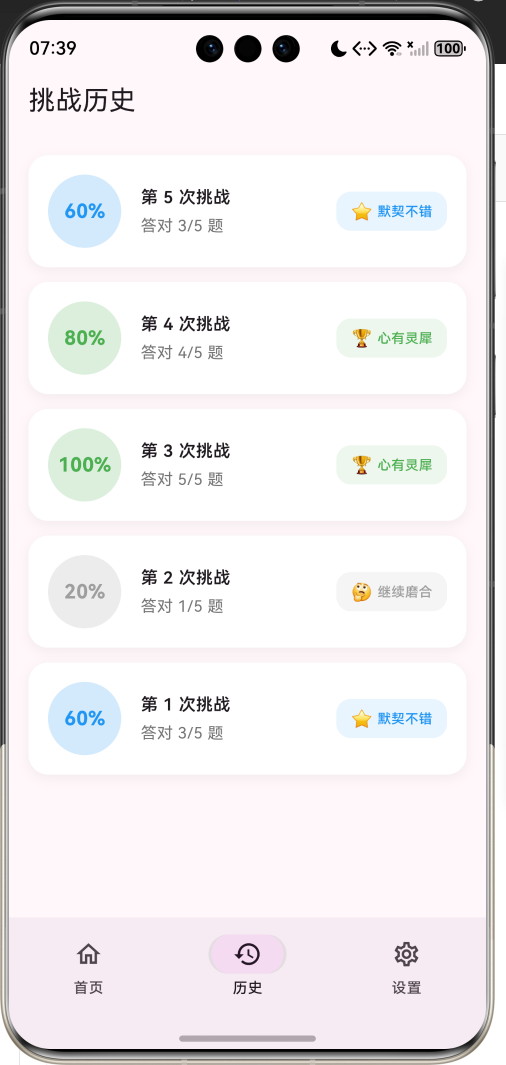
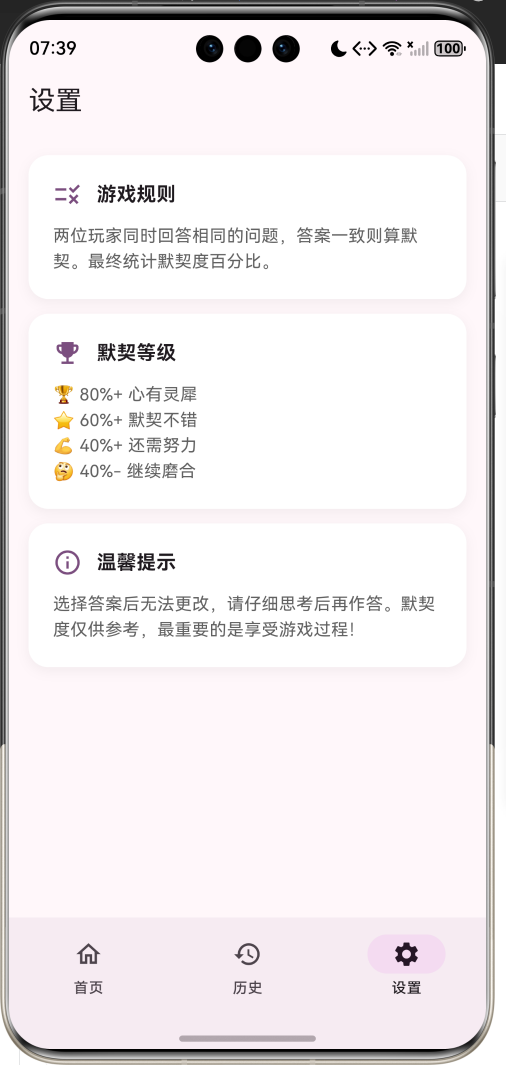
1.1 应用简介
默契挑战应用是一款趣味社交游戏,让两位玩家同时回答相同的问题,通过对比答案来测试彼此的默契程度。应用以紫色为主色调,传递神秘、有趣的氛围。核心玩法在于"同时作答"机制——两位玩家轮流在同一设备上作答,答案互不可见,最终揭晓默契度。
应用涵盖了玩家设置、问题分类、答题挑战、结果展示四大模块,支持6种问题分类和30道预设问题,每种分类对应独特的主题色。通过倒计时机制、答案对比、默契度计算等功能,让朋友之间的互动更加有趣。
1.2 核心功能
| 功能模块 | 功能描述 | 实现方式 |
|---|---|---|
| 玩家设置 | 设置两位玩家名字 | 文本输入 |
| 问题分类 | 6种问题类型选择 | 分类筛选 |
| 答题挑战 | 双人轮流作答 | 状态切换 |
| 倒计时 | 10秒答题时限 | Timer定时器 |
| 默契计算 | 答案匹配度计算 | 算法计算 |
| 结果展示 | 详细答案对比 | 列表展示 |
1.3 问题分类定义
| 序号 | 分类名称 | Emoji | 主题色 | 问题数量 |
|---|---|---|---|---|
| 1 | 生活方式 | 🏠 | #4CAF50 | 5题 |
| 2 | 美食偏好 | 🍕 | #FF9800 | 5题 |
| 3 | 旅行探险 | ✈️ | #2196F3 | 5题 |
| 4 | 娱乐休闲 | 🎮 | #E91E63 | 5题 |
| 5 | 价值观 | 💭 | #9C27B0 | 5题 |
| 6 | 回忆往事 | 📸 | #00BCD4 | 5题 |
1.4 默契等级定义
| 等级 | 默契度 | Emoji | 描述 |
|---|---|---|---|
| 心有灵犀 | 80%+ | 🏆 | 默契满分 |
| 默契不错 | 60%+ | ⭐ | 配合良好 |
| 还需努力 | 40%+ | 💪 | 有待提高 |
| 继续磨合 | 40%- | 🤔 | 需要磨合 |
1.5 技术栈
| 技术领域 | 技术选型 | 版本要求 |
|---|---|---|
| 开发框架 | Flutter | >= 3.0.0 |
| 编程语言 | Dart | >= 2.17.0 |
| 设计规范 | Material Design 3 | - |
| 动画控制 | AnimationController | - |
| 定时器 | Timer | - |
| 状态管理 | setState | - |
| 目标平台 | 鸿蒙OS / Web | API 21+ |
1.6 项目结构
lib/
└── main_telepathy_challenge.dart
    ├── TelepathyChallengeApp     # 应用入口
    ├── QuestionCategory          # 问题分类枚举
    ├── ChallengeQuestion         # 问题模型
    ├── PlayerAnswer              # 玩家答案模型
    ├── ChallengeResult           # 挑战结果模型
    ├── QuestionResult            # 问题结果模型
    ├── TelepathyChallengeHomePage # 主页面
    ├── ChallengeGamePage         # 游戏页面
    └── ResultPage                # 结果页面
二、系统架构
2.1 整体架构图
2.2 类图设计
2.3 页面导航流程
2.4 答题流程
三、核心模块设计
3.1 数据模型设计
3.1.1 问题分类枚举 (QuestionCategory)
enum QuestionCategory {
  lifestyle('生活方式', '🏠', Color(0xFF4CAF50)),
  food('美食偏好', '🍕', Color(0xFFFF9800)),
  travel('旅行探险', '✈️', Color(0xFF2196F3)),
  entertainment('娱乐休闲', '🎮', Color(0xFFE91E63)),
  values('价值观', '💭', Color(0xFF9C27B0)),
  memories('回忆往事', '📸', Color(0xFF00BCD4));

  final String label;  // 分类名称
  final String emoji;  // 分类图标
  final Color color;   // 主题颜色
}
3.1.2 问题模型 (ChallengeQuestion)
class ChallengeQuestion {
  final String id;                    // 唯一标识
  final String question;              // 问题内容
  final QuestionCategory category;    // 问题分类
  final List<String> options;         // 选项列表
  final int correctIndex;             // 正确答案索引(-1表示无正确答案)
}
3.1.3 玩家答案模型 (PlayerAnswer)
class PlayerAnswer {
  final String playerId;      // 玩家ID
  final String playerName;    // 玩家名称
  final int questionIndex;    // 问题索引
  final int answerIndex;      // 答案索引
  final DateTime answeredAt;  // 作答时间
}
3.1.4 挑战结果模型 (ChallengeResult)
class ChallengeResult {
  final int totalQuestions;           // 总问题数
  final int matchCount;               // 匹配数量
  final double matchRate;             // 默契度百分比
  final List<QuestionResult> questionResults; // 问题结果列表
}
3.1.5 问题结果模型 (QuestionResult)
class QuestionResult {
  final ChallengeQuestion question;   // 问题
  final int? player1Answer;           // 玩家1答案
  final int? player2Answer;           // 玩家2答案
  final bool isMatch;                 // 是否匹配
}
3.2 页面结构设计
3.2.1 主页面布局
3.2.2 游戏页面结构
3.2.3 结果页面结构
3.3 答题流程
3.4 默契度计算
四、UI设计规范
4.1 配色方案
应用以紫色为主色调,传递神秘、有趣的氛围:
| 颜色类型 | 色值 | 用途 |
|---|---|---|
| 主色 | #9C27B0 (Purple) | 导航、强调元素 |
| 生活方式 | #4CAF50 | 绿色 |
| 美食偏好 | #FF9800 | 橙色 |
| 旅行探险 | #2196F3 | 蓝色 |
| 娱乐休闲 | #E91E63 | 粉色 |
| 价值观 | #9C27B0 | 紫色 |
| 回忆往事 | #00BCD4 | 青色 |
4.2 默契等级配色
| 等级 | 颜色 | 用途 |
|---|---|---|
| 心有灵犀 | #4CAF50 | 高匹配度 |
| 默契不错 | #2196F3 | 良好匹配 |
| 还需努力 | #FF9800 | 中等匹配 |
| 继续磨合 | #9E9E9E | 低匹配度 |
4.3 字体规范
| 元素 | 字号 | 字重 | 颜色 |
|---|---|---|---|
| 应用标题 | 28px | Bold | 白色 |
| 默契度 | 48px | Bold | 等级色 |
| 问题内容 | 20px | SemiBold | 黑色 |
| 选项文字 | 15px | Medium | 黑色 |
| 倒计时 | 14px | Bold | 灰色/红色 |
4.4 组件规范
4.4.1 主页布局
┌─────────────────────────────────────┐
│           🧠 默契挑战              │
│     和朋友同时回答问题,测默契度    │
├─────────────────────────────────────┤
│  ┌─────────────────────────────┐   │
│  │ 玩家设置                    │   │
│  │ [玩家1] VS [玩家2]          │   │
│  └─────────────────────────────┘   │
│  ┌─────────────────────────────┐   │
│  │ 问题分类                    │   │
│  │ 🏠生活 🍕美食 ✈️旅行 ...    │   │
│  └─────────────────────────────┘   │
│  ┌─────────────────────────────┐   │
│  │ 问题数量: [5] [10] [15] [20]│   │
│  └─────────────────────────────┘   │
│  ┌─────────────────────────────┐   │
│  │        开始挑战             │   │
│  └─────────────────────────────┘   │
└─────────────────────────────────────┘
4.4.2 答题界面
┌─────────────────────────────────────┐
│  第 1/5 题                    10秒 ⏱️│
│  ━━━━━━━━━━━━━━━━━━━━━━━━━━━━━━━━ │
│                                     │
│        👤 玩家1 作答               │
│                                     │
│  ┌─────────────────────────────┐   │
│  │ 🏠 生活方式                  │   │
│  │                             │   │
│  │    你更喜欢哪种天气?       │   │
│  └─────────────────────────────┘   │
│                                     │
│  ┌──────────┐  ┌──────────┐        │
│  │   晴天   │  │   雨天   │        │
│  └──────────┘  └──────────┘        │
│  ┌──────────┐  ┌──────────┐        │
│  │   雪天   │  │   多云   │        │
│  └──────────┘  └──────────┘        │
└─────────────────────────────────────┘
4.4.3 结果界面
┌─────────────────────────────────────┐
│              🏆                     │
│             80%                     │
│          心有灵犀                   │
│        玩家1 & 玩家2               │
├─────────────────────────────────────┤
│  📝 5      ✅ 4      📊 80%        │
│ 总题数    答对数    默契度         │
├─────────────────────────────────────┤
│  答题对比                           │
│  ┌─────────────────────────────┐   │
│  │ ① 你更喜欢哪种天气?   ✓   │   │
│  │    玩家1: 晴天 玩家2: 晴天 │   │
│  └─────────────────────────────┘   │
│  ┌─────────────────────────────┐   │
│  │ ② 周末更喜欢做什么?   ✗   │   │
│  │    玩家1: 宅家 玩家2: 出游  │   │
│  └─────────────────────────────┘   │
└─────────────────────────────────────┘
五、核心功能实现
5.1 倒计时实现
void _startCountdown() {
  _countdown = 10;
  _progressController.forward(from: 0);

  _countdownTimer?.cancel();
  _countdownTimer = Timer.periodic(const Duration(seconds: 1), (timer) {
    setState(() {
      _countdown--;
    });

    if (_countdown <= 0) {
      timer.cancel();
      _handleTimeout();
    }
  });
}

void _handleTimeout() {
  if (_currentPlayer == 1 && _player1Answers[_currentQuestionIndex] == null) {
    _player1Answers[_currentQuestionIndex] = -1;
  }
  _switchPlayer();
}
5.2 答案选择实现
void _selectAnswer(int answerIndex) {
  _countdownTimer?.cancel();

  if (_currentPlayer == 1) {
    setState(() {
      _player1Answers[_currentQuestionIndex] = answerIndex;
    });
    _switchPlayer();
  } else {
    setState(() {
      _player2Answers[_currentQuestionIndex] = answerIndex;
    });
    _nextQuestion();
  }
}
5.3 玩家切换实现
void _switchPlayer() {
  setState(() {
    _showingTransition = true;
  });

  Future.delayed(const Duration(milliseconds: 800), () {
    setState(() {
      _currentPlayer = 2;
      _showingTransition = false;
    });
    _startCountdown();
  });
}
5.4 默契度计算实现
void _showResults() {
  final results = <QuestionResult>[];
  int matchCount = 0;

  for (int i = 0; i < widget.questions.length; i++) {
    final p1Answer = _player1Answers[i];
    final p2Answer = _player2Answers[i];
    final isMatch = p1Answer != null && p1Answer == p2Answer && p1Answer != -1;

    if (isMatch) matchCount++;

    results.add(QuestionResult(
      question: widget.questions[i],
      player1Answer: p1Answer,
      player2Answer: p2Answer,
      isMatch: isMatch,
    ));
  }

  final result = ChallengeResult(
    totalQuestions: widget.questions.length,
    matchCount: matchCount,
    matchRate: (matchCount / widget.questions.length) * 100,
    questionResults: results,
  );

  widget.onComplete(result);
}
5.5 问题筛选实现
List<ChallengeQuestion> _getSelectedQuestions() {
  var filtered = _selectedCategory != null
      ? _questions.where((q) => q.category == _selectedCategory).toList()
      : _questions.toList();

  filtered.shuffle(_random);
  return filtered.take(_questionCount).toList();
}
六、交互设计
6.1 开始挑战流程
6.2 答题交互流程
6.3 结果展示流程
七、扩展功能规划
7.1 后续版本规划
7.2 功能扩展建议
7.2.1 自定义问题
用户创建问题:
- 添加自定义问题
- 设置选项内容
- 分享给朋友
7.2.2 多人模式
扩展游戏模式:
- 3-4人同时挑战
- 团队对抗模式
- 淘汰赛模式
7.2.3 在线对战
网络对战功能:
- 实时同步答题
- 语音/视频通话
- 好友匹配系统
八、注意事项
8.1 开发注意事项
-
Timer管理:倒计时定时器需要在切换玩家时取消
-
状态同步:玩家切换时需要正确保存和恢复状态
-
答案记录:使用Map存储答案,键为问题索引
-
超时处理:超时答案用-1标记
8.2 常见问题
| 问题 | 原因 | 解决方案 |
|---|---|---|
| 答案不匹配 | 索引错误 | 检查问题索引 |
| 倒计时异常 | Timer未取消 | 确保取消旧Timer |
| 玩家切换卡住 | 状态未更新 | 检查setState调用 |
| 结果计算错误 | 匹配逻辑错误 | 检查isMatch判断 |
8.3 默契挑战寄语
🧠 默契挑战寄语 🧠
默契不是天生的,
而是在一次次互动中培养的。
通过这个小游戏,
希望朋友们能更加了解彼此,
在欢笑中增进感情。
无论默契度高低,
重要的是一起玩的过程!
愿你们的友谊长存 💜
九、运行说明
9.1 环境要求
| 环境 | 版本要求 |
|---|---|
| Flutter SDK | >= 3.0.0 |
| Dart SDK | >= 2.17.0 |
| 鸿蒙OS | API 21+ |
9.2 运行命令
# 查看可用设备
flutter devices

# 运行到Web服务器
flutter run -d web-server -t lib/main_telepathy_challenge.dart --web-port 8121

# 运行到鸿蒙设备
flutter run -d 127.0.0.1:5555 lib/main_telepathy_challenge.dart

# 运行到Windows
flutter run -d windows -t lib/main_telepathy_challenge.dart

# 代码分析
flutter analyze lib/main_telepathy_challenge.dart
十、总结
默契挑战应用通过玩家设置、问题分类、答题挑战、结果展示四大模块,为用户提供了一个趣味社交游戏平台。应用支持6种问题分类和30道预设问题,通过双人轮流作答的方式测试彼此的默契程度。
核心功能涵盖玩家设置、问题筛选、倒计时答题、玩家切换、默契度计算五大模块。玩家设置支持自定义玩家名字;问题筛选支持分类和数量选择;倒计时答题提供10秒作答时限;玩家切换通过过渡动画实现;默契度计算根据答案匹配度确定等级。
应用采用Material Design 3设计规范,以紫色为主色调,配合问题分类色彩和默契等级配色,营造神秘有趣的氛围。通过本应用,希望能够让朋友之间的互动更加有趣,在游戏中增进了解和感情。
和朋友同时回答问题,测默契度

腾讯云面向开发者汇聚海量精品云计算使用和开发经验,营造开放的云计算技术生态圈。
更多推荐
 5
5 0
0- 0


 已为社区贡献11条内容

所有评论(0)