快速构建 Nexior AI 平台使用 GitCode
是一个开源项目,旨在帮助用户一键部署自己的 AI 应用网站,功能涵盖 AI 问答、Midjourney 绘画、知识库问答、艺术二维码等。它不需要进行 AI 系统开发、购买 AI 账户、担心 API 支持或配置支付系统,具有零启动成本和无风险的 AI 收益生成特性。本文将介绍如何使用(一个国内的代码托管平台)来托管和部署 Nexior 项目。GitCode 是 CSDN 推出的代码托管与协作平台,支
Nexior 是一个开源项目,旨在帮助用户一键部署自己的 AI 应用网站,功能涵盖 AI 问答、Midjourney 绘画、知识库问答、艺术二维码等。它不需要进行 AI 系统开发、购买 AI 账户、担心 API 支持或配置支付系统,具有零启动成本和无风险的 AI 收益生成特性。
本文将介绍如何使用 GitCode(一个国内的代码托管平台)来托管和部署 Nexior 项目。GitCode 是 CSDN 推出的代码托管与协作平台,支持从 GitHub 导入项目,并提供内置的 CI/CD 流水线,适合国内用户的推广。
环境准备
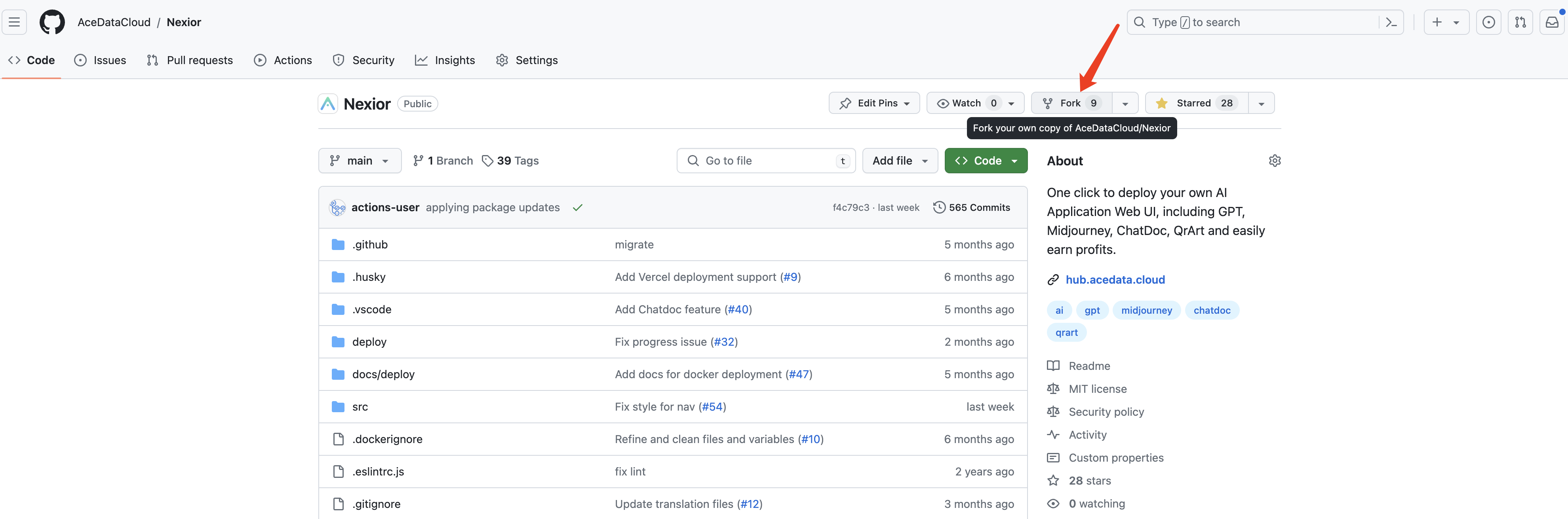
首先,打开 Nexior 的 GitHub 仓库:https://github.com/AceDataCloud/Nexior。然后注册或登录你的 GitHub 账户,点击 Fork 将代码克隆到自己的仓库,如下图所示:
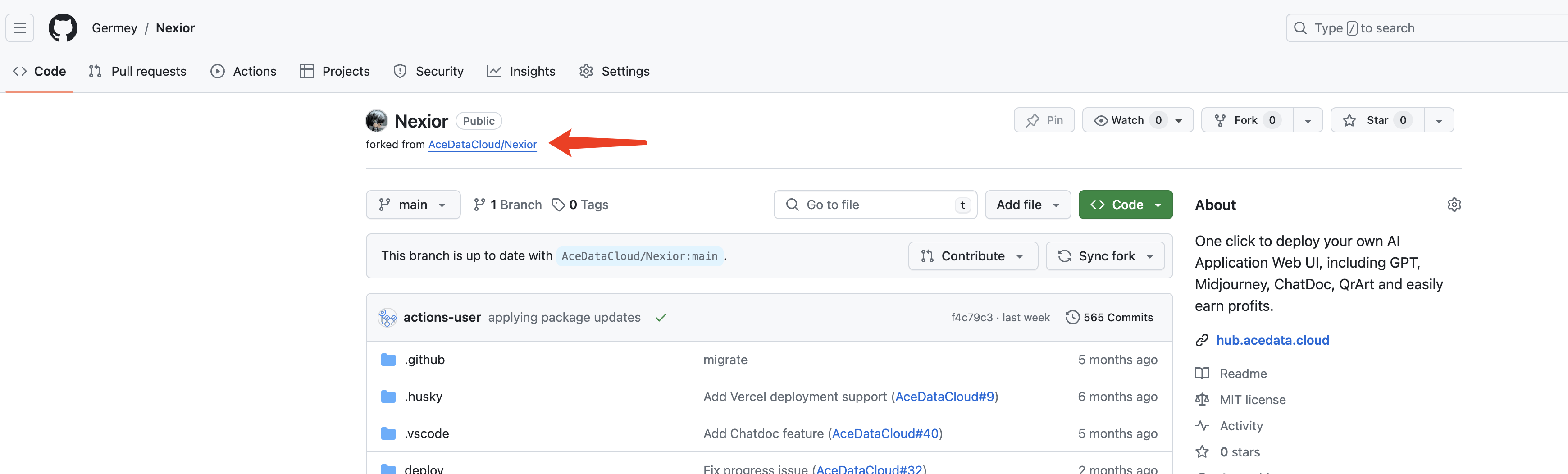
Fork 完成后,你将拥有一个带有“forked from AceDataCloud/Nexior”标签的个人仓库,如下图所示:
准备工作完成。
将项目导入 GitCode
访问 https://gitcode.com/ 并使用你的 CSDN 账户、手机号码、微信等方式登录。
登录后,点击右上角的 "+" 按钮,选择“导入项目”。
在导入页面,选择从 GitHub 导入,并输入你 Fork 的 Nexior 仓库 URL,例如:
https://github.com/<your-username>/Nexior
GitCode 支持直接从 GitHub 导入,一旦导入成功,你将能在 GitCode 上看到完整的 Nexior 代码仓库。
配置 CI/CD 流水线
GitCode 提供了类似于 GitHub Actions 的内置 CI/CD 流水线功能,使用 .gitcode/workflows/ 目录下的 YAML 文件定义构建和部署过程。
创建工作流文件
在项目根目录创建文件 .gitcode/workflows/deploy.yml,内容如下:
name: Build and Deploy Nexior

on:
  push:
    branches: ["main"]

jobs:
  build:
    runs-on: euleros-2.10.1
    steps:
      - uses: checkout-action@0.0.1

      - name: Setup Node.js
        uses: setup-node@0.0.1
        with:
          node-version: '20.10.0'

      - name: Install dependencies
        run: cd repo_workspace && npm install --legacy-peer-deps

      - name: Build
        run: cd repo_workspace && npm run build

      - name: Upload artifacts
        run: |
          cd repo_workspace
          tar -czf dist.tar.gz -C dist .
          echo "Build completed, dist.tar.gz generated"
注意: GitCode 流水线的工作目录是
repo_workspace,因此命令需要在执行前切换到该目录。运行器使用的是 EulerOS。
提交工作流文件
将上述文件提交到你的仓库的 main 分支。GitCode 会自动检测 .gitcode/workflows/ 下的 YAML 文件并注册流水线。
或者,你可以直接在 GitCode 界面中创建流水线:进入项目的“流水线”标签,点击“新建流水线”,选择适合的模板或直接编辑 YAML 配置。
部署方式
GitCode 主要是一个代码托管平台,不提供像 Vercel 或 Netlify 那样的静态网站托管服务。因此,你需要将构建产物(dist 目录)部署到其他服务。以下是适合国内用户的几种部署选项:
选项 1:使用腾讯云服务器(推荐)
这是最适合国内用户的选项。使用 GitCode 作为代码托管和 CI/CD 构建平台,并将构建输出自动部署到腾讯云服务器。
1. 准备服务器
购买一台腾讯云轻量应用服务器(推荐 2 核心,2GB 内存,Ubuntu 22.04),并安装 Nginx:
# 在服务器上执行
apt update && apt upgrade -y
apt install -y nginx
systemctl start nginx
systemctl enable nginx
2. 配置 Nginx
创建 Nginx 配置文件 /etc/nginx/sites-available/nexior:
server {
    listen 80;
    server_name your-domain.com;  # 替换为你的域名或服务器 IP

    root /var/www/nexior;
    index index.html;

    location /api/v1/ {
        proxy_pass https://platform.acedata.cloud;
        proxy_http_version 1.1;
        proxy_set_header X-Forwarded-For $proxy_add_x_forwarded_for;
        proxy_set_header X-Real-IP $remote_addr;
        proxy_set_header X-Forwarded-Proto $scheme;
        proxy_set_header Host $host;
        client_max_body_size 20m;
    }

    location / {
        try_files $uri $uri/ /index.html;
    }
}
启用配置:
ln -sf /etc/nginx/sites-available/nexior /etc/nginx/sites-enabled/
rm -f /etc/nginx/sites-enabled/default
nginx -t && systemctl reload nginx
3. 配置自动部署
在 GitCode 流水线中,你可以通过 SSH 将构建产物部署到服务器。首先,在 GitCode 项目的“设置”→“流水线”中添加以下变量作为秘密变量:
DEPLOY_HOST: 你的服务器公网 IPDEPLOY_USER: SSH 登录用户名(例如root)DEPLOY_KEY: SSH 私钥内容
更新工作流文件 .gitcode/workflows/deploy.yml:
name: Build and Deploy Nexior

on:
  push:
    branches: ["main"]

jobs:
  build-and-deploy:
    runs-on: euleros-2.10.1
    steps:
      - uses: checkout-action@0.0.1

      - name: Setup Node.js
        uses: setup-node@0.0.1
        with:
          node-version: '20.10.0'

      - name: Install dependencies
        run: cd repo_workspace && npm install --legacy-peer-deps

      - name: Build
        run: cd repo_workspace && npm run build

      - name: Deploy to server
        run: |
          cd repo_workspace
          mkdir -p ~/.ssh
          echo "$DEPLOY_KEY" > ~/.ssh/id_rsa
          chmod 600 ~/.ssh/id_rsa
          ssh-keyscan -H $DEPLOY_HOST >> ~/.ssh/known_hosts 2>/dev/null
          tar -czf dist.tar.gz -C dist .
          scp dist.tar.gz $DEPLOY_USER@$DEPLOY_HOST:/tmp/
          ssh $DEPLOY_USER@$DEPLOY_HOST "rm -rf /var/www/nexior/* && tar -xzf /tmp/dist.tar.gz -C /var/www/nexior/ && rm /tmp/dist.tar.gz"
        env:
          DEPLOY_HOST: ${{ secrets.DEPLOY_HOST }}
          DEPLOY_USER: ${{ secrets.DEPLOY_USER }}
          DEPLOY_KEY: ${{ secrets.DEPLOY_KEY }}
现在,每次你将代码推送到 main 分支时,GitCode 流水线将自动构建并部署到你的腾讯云服务器。
选项 2:使用 Docker 部署
如果你喜欢使用 Docker,可以直接在服务器上运行 Nexior。
1. 安装 Docker
curl -fsSL https://get.docker.com | sh
systemctl start docker && systemctl enable docker
2. 克隆并运行
# 从 GitCode 克隆代码
git clone https://gitcode.com/<your-username>/Nexior.git
cd Nexior

# 构建并运行
docker compose up -d --build
容器启动后,Nexior 将运行在服务器的 8080 端口。
3. 更新代码
要更新,拉取最新代码并重建:
cd Nexior
git pull origin main
docker compose up -d --build
选项 3:使用其他国内云服务
如果你不想管理自己的服务器,可以将代码从 GitCode 同步到其他支持一键部署的平台:
- Zeabur:支持从 Git 仓库一键部署,适合亚太地区的快速部署
- **[腾讯云 Web 应用托管](https://cloud

腾讯云面向开发者汇聚海量精品云计算使用和开发经验,营造开放的云计算技术生态圈。
更多推荐
 13
13 0
0- 0


 已为社区贡献1条内容

所有评论(0)