网络综合实验报告
1. 实验目标
- 完成 VLAN 划分,将终端按需求归属到不同 VLAN。
- 配置 DHCP 服务,实现所有终端自动获取 IP 地址。
- 通过 ACL 实现精细化访问控制,满足 “PC2 可访问 PC4/5/6、PC4 可访问 PC5 但不能访问 PC6” 的需求。
- 保证 PC1/PC3 可以正常访问 PC2/4/5/6,且 PC4/5/6 处于同一网段。
2. 实验拓扑
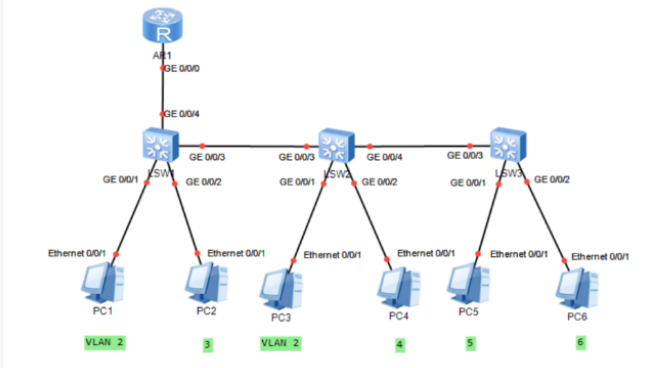
3.实验环境与地址规划
| VLAN ID | 所属终端 | IP 网段 | 网关地址 |
|---|---|---|---|
| 2 | PC1、PC3 | 192.168.2.0/24 | 192.168.2.254 |
| 3 | PC2 | 192.168.3.0/24 | 192.168.3.254 |
| 4 | PC4 | 192.168.1.0/24 | 192.168.1.254 |
| 5 | PC5 | 192.168.1.0/24 | 192.168.1.253 |
| 6 | PC6 | 192.168.1.0/24 | 192.168.1.252 |
4.完整配置脚本
system-view
sysname R
# 配置 DHCP 地址池
dhcp enable
ip pool VLAN2
gateway-list 192.168.2.254
network 192.168.2.0 mask 255.255.255.0
ip pool VLAN3
gateway-list 192.168.3.254
network 192.168.3.0 mask 255.255.255.0
ip pool VLAN4-6
gateway-list 192.168.1.254
network 192.168.1.0 mask 255.255.255.0
# 配置子接口(连接交换机 SW1)
interface GigabitEthernet 0/0/1.2
dot1q termination vid 2
ip address 192.168.2.254 255.255.255.0
dhcp select global
interface GigabitEthernet 0/0/1.3
dot1q termination vid 3
ip address 192.168.3.254 255.255.255.0
dhcp select global
interface GigabitEthernet 0/0/1.4
dot1q termination vid 4
ip address 192.168.1.254 255.255.255.0
dhcp select global
interface GigabitEthernet 0/0/1.5
dot1q termination vid 5
ip address 192.168.1.253 255.255.255.0
dhcp select global
interface GigabitEthernet 0/0/1.6
dot1q termination vid 6
ip address 192.168.1.252 255.255.255.0
dhcp select global
# 配置 ACL 访问控制
acl number 3000
rule permit ip source 192.168.3.0 0.0.0.255 destination 192.168.1.0 0.0.0.255
rule permit ip source 192.168.1.0 0.0.0.255 destination 192.168.1.0 0.0.0.255
rule deny ip source 192.168.1.0 0.0.0.255 destination 192.168.1.192 0.0.0.63
# 应用 ACL 到子接口
interface GigabitEthernet 0/0/1.3
traffic-filter outbound acl 3000
interface GigabitEthernet 0/0/1.4
traffic-filter outbound acl 3000
quit
save
system-view
sysname SW1
vlan batch 2 3 4 5 6
# 接入端口配置
interface GigabitEthernet 0/0/1
port link-type access
port default vlan 2
interface GigabitEthernet 0/0/2
port link-type access
port default vlan 3
# 上联路由器端口(Trunk模式)
interface GigabitEthernet 0/0/4
port link-type trunk
port trunk allow-pass vlan all
# 下联 SW2 端口(Trunk模式)
interface GigabitEthernet 0/0/3
port link-type trunk
port trunk allow-pass vlan all
quit
save
system-view
sysname SW2
vlan batch 2 3 4 5 6
# 接入端口配置
interface GigabitEthernet 0/0/1
port link-type access
port default vlan 2
interface GigabitEthernet 0/0/2
port link-type access
port default vlan 4
# 上联 SW1 端口(Trunk模式)
interface GigabitEthernet 0/0/3
port link-type trunk
port trunk allow-pass vlan all
# 下联 SW3 端口(Trunk模式)
interface GigabitEthernet 0/0/4
port link-type trunk
port trunk allow-pass vlan all
quit
save
system-view
sysname SW3
vlan batch 2 3 4 5 6
# 接入端口配置
interface GigabitEthernet 0/0/1
port link-type access
port default vlan 5
interface GigabitEthernet 0/0/2
port link-type access
port default vlan 6
# 上联 SW2 端口(Trunk模式)
interface GigabitEthernet 0/0/3
port link-type trunk
port trunk allow-pass vlan all
quit
save

腾讯云面向开发者汇聚海量精品云计算使用和开发经验,营造开放的云计算技术生态圈。
更多推荐
 11
11 0
0- 0


 已为社区贡献1条内容

所有评论(0)