Flutter框架跨平台鸿蒙开发——绕口令练习APP开发流程
·
🚀运行效果展示
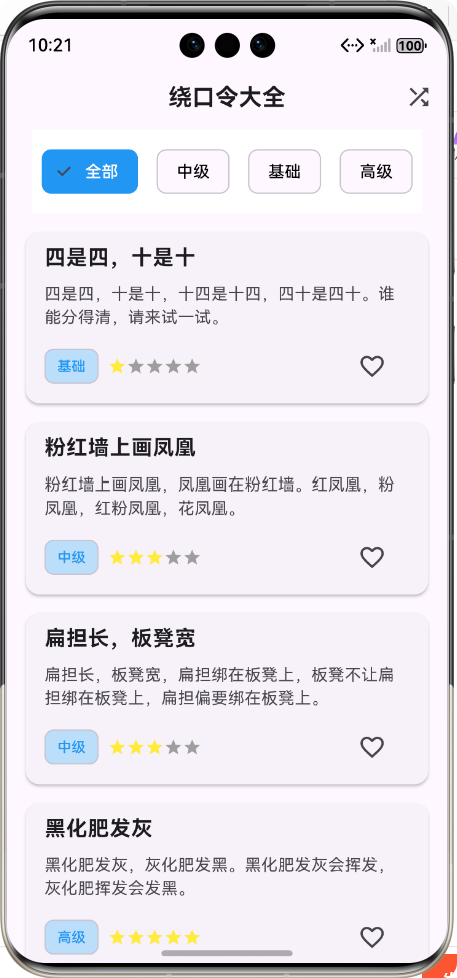
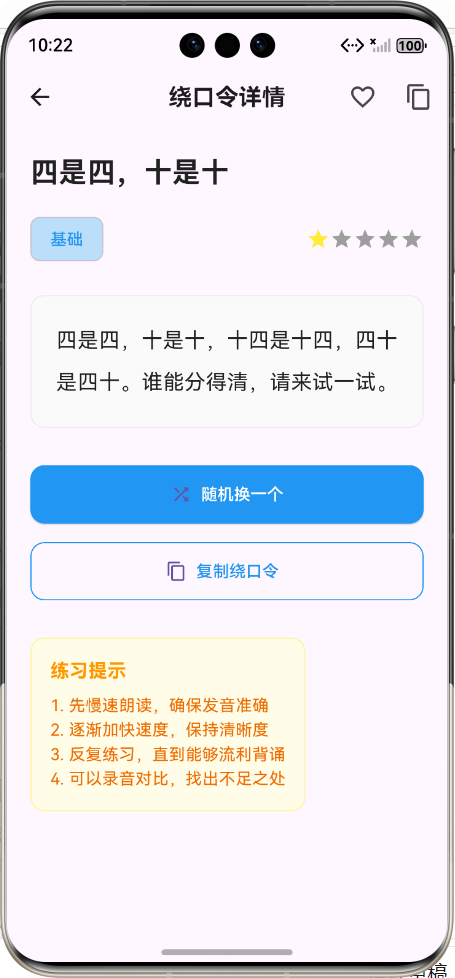
Flutter框架跨平台鸿蒙开发——绕口令练习APP开发流程
📝 前言
随着移动互联网的快速发展,跨平台开发框架已成为移动应用开发的主流趋势。Flutter作为Google推出的开源UI软件开发工具包,凭借其"一次编写,处处运行"的特性,在跨平台开发领域占据了重要地位。同时,HarmonyOS作为华为自主研发的分布式操作系统,也在快速发展,为开发者提供了广阔的应用场景。
本文将详细介绍如何使用Flutter框架开发一款跨平台的绕口令练习APP,并实现鸿蒙系统的适配。通过本文的学习,您将掌握Flutter开发的核心概念、跨平台适配的关键技术,以及完整的APP开发流程。
🎯 绕口令练习APP介绍
1. 应用定位
绕口令练习APP是一款专为语言学习者和爱好者设计的应用,旨在通过有趣的绕口令练习,帮助用户提高语言表达能力、发音准确性和口语流利度。
2. 核心功能
| 功能模块 | 功能描述 | 图标 |
|---|---|---|
| 绕口令列表 | 展示各类绕口令,支持分类筛选 | 📋 |
| 分类筛选 | 按难度等级(基础/中级/高级)分类 | 🏷️ |
| 收藏功能 | 支持收藏和取消收藏绕口令 | ⭐ |
| 随机推荐 | 随机获取一条绕口令进行练习 | 🎲 |
| 详情展示 | 完整展示绕口令内容和难度 | 📖 |
| 复制功能 | 将绕口令内容复制到剪贴板 | 📋 |
3. 应用架构
🛠️ 开发环境准备
1. 开发工具
- IDE:Android Studio / Visual Studio Code
- Flutter SDK:3.0+
- Dart SDK:2.17+
- HarmonyOS SDK:3.0+
- HUAWEI DevEco Studio:3.0+(可选,用于HarmonyOS原生开发)
2. 环境配置
- 安装Flutter SDK并配置环境变量
- 安装Dart SDK
- 配置Flutter插件(Android Studio/VS Code)
- 安装HarmonyOS相关依赖
3. 项目初始化
# 创建Flutter项目
flutter create --org com.example tongue_twister_app

# 进入项目目录
cd tongue_twister_app

# 添加HarmonyOS支持
flutter pub add ohos_flutter
🏗️ 项目架构设计
1. 目录结构
lib/
├── data/                  # 数据源
│   └── tongue_twister_data.dart  # 绕口令数据
├── models/                # 数据模型
│   └── tongue_twister.dart        # 绕口令模型
├── pages/                 # 页面组件
│   ├── tongue_twister_list.dart   # 列表页面
│   └── tongue_twister_detail.dart # 详情页面
└── main.dart              # 应用入口
2. 数据模型设计
绕口令数据模型包含以下核心字段:
| 字段名 | 类型 | 描述 |
|---|---|---|
| id | String | 唯一标识符 |
| title | String | 绕口令标题 |
| content | String | 绕口令内容 |
| category | String | 分类(基础/中级/高级) |
| difficulty | int | 难度级别(1-5) |
| isFavorite | bool | 是否收藏 |
💡 核心功能实现及代码展示
1. 数据模型实现
文件路径:lib/models/tongue_twister.dart
/// 绕口令数据模型
class TongueTwister {
  /// 绕口令ID
  final String id;

  /// 绕口令标题
  final String title;

  /// 绕口令内容
  final String content;

  /// 绕口令分类
  final String category;

  /// 绕口令难度级别 (1-5)
  final int difficulty;

  /// 是否收藏
  bool isFavorite;

  /// 构造函数
  TongueTwister({
    required this.id,
    required this.title,
    required this.content,
    required this.category,
    required this.difficulty,
    this.isFavorite = false,
  });

  /// 从JSON创建绕口令实例
  factory TongueTwister.fromJson(Map<String, dynamic> json) {
    return TongueTwister(
      id: json['id'],
      title: json['title'],
      content: json['content'],
      category: json['category'],
      difficulty: json['difficulty'],
      isFavorite: json['isFavorite'] ?? false,
    );
  }

  /// 转换为JSON格式
  Map<String, dynamic> toJson() {
    return {
      'id': id,
      'title': title,
      'content': content,
      'category': category,
      'difficulty': difficulty,
      'isFavorite': isFavorite,
    };
  }

  /// 复制并修改指定属性
  TongueTwister copyWith({
    String? id,
    String? title,
    String? content,
    String? category,
    int? difficulty,
    bool? isFavorite,
  }) {
    return TongueTwister(
      id: id ?? this.id,
      title: title ?? this.title,
      content: content ?? this.content,
      category: category ?? this.category,
      difficulty: difficulty ?? this.difficulty,
      isFavorite: isFavorite ?? this.isFavorite,
    );
  }
}
2. 数据源实现
文件路径:lib/data/tongue_twister_data.dart
/// 绕口令数据源
class TongueTwisterData {
  /// 获取所有绕口令
  static List<TongueTwister> getAllTongueTwisters() {
    return [
      TongueTwister(
        id: '1',
        title: '四是四,十是十',
        content: '四是四,十是十,十四是十四,四十是四十。谁能分得清,请来试一试。',
        category: '基础',
        difficulty: 1,
      ),
      // 更多绕口令数据...
    ];
  }

  /// 根据分类获取绕口令
  static List<TongueTwister> getTongueTwistersByCategory(String category) {
    return getAllTongueTwisters()
        .where((twister) => twister.category == category)
        .toList();
  }

  /// 获取随机绕口令
  static TongueTwister getRandomTongueTwister() {
    final twisters = getAllTongueTwisters();
    final randomIndex = DateTime.now().millisecondsSinceEpoch % twisters.length;
    return twisters[randomIndex];
  }

  /// 获取所有分类
  static List<String> getAllCategories() {
    final categories = getAllTongueTwisters()
        .map((twister) => twister.category)
        .toSet()
        .toList();
    categories.sort();
    return categories;
  }
}
3. 绕口令列表页面
文件路径:lib/pages/tongue_twister_list.dart
/// 绕口令列表页面
class TongueTwisterListPage extends StatefulWidget {
/// 构造函数
const TongueTwisterListPage({super.key});
State<TongueTwisterListPage> createState() => _TongueTwisterListPageState();
}
class _TongueTwisterListPageState extends State<TongueTwisterListPage> {
/// 当前选中的分类
String _selectedCategory = '全部';
/// 绕口令列表
late List<TongueTwister> _tongueTwisters;
/// 所有分类列表
late List<String> _categories;
void initState() {
super.initState();
_categories = ['全部', ...TongueTwisterData.getAllCategories()];
_tongueTwisters = TongueTwisterData.getAllTongueTwisters();
}
/// 更新绕口令列表
void _updateTongueTwisters() {
if (_selectedCategory == '全部') {
_tongueTwisters = TongueTwisterData.getAllTongueTwisters();
} else {
_tongueTwisters = TongueTwisterData.getTongueTwistersByCategory(_selectedCategory);
}
}
/// 切换分类
void _changeCategory(String category) {
setState(() {
_selectedCategory = category;
_updateTongueTwisters();
});
}
/// 切换收藏状态
void _toggleFavorite(String id) {
setState(() {
_tongueTwisters = _tongueTwisters.map((twister) {
if (twister.id == id) {
return twister.copyWith(isFavorite: !twister.isFavorite);
}
return twister;
}).toList();
});
}
/// 跳转到详情页面
void _navigateToDetail(TongueTwister twister) {
Navigator.push(
context,
MaterialPageRoute(
builder: (context) => TongueTwisterDetailPage(twister: twister),
),
).then((_) {
// 从详情页返回时刷新列表
setState(() {
_updateTongueTwisters();
});
});
}
/// 生成难度指示器
Widget _buildDifficultyIndicator(int difficulty) {
return Row(
children: List.generate(5, (index) {
return Icon(
Icons.star,
size: 16,
color: index < difficulty ? Colors.yellow : Colors.grey,
);
}),
);
}
Widget build(BuildContext context) {
return Scaffold(
appBar: AppBar(
title: const Text('绕口令大全'),
centerTitle: true,
actions: [
// 随机推荐按钮
IconButton(
icon: const Icon(Icons.shuffle),
onPressed: () {
final randomTwister = TongueTwisterData.getRandomTongueTwister();
_navigateToDetail(randomTwister);
},
tooltip: '随机推荐',
),
],
),
body: Column(
children: [
// 分类筛选标签
Container(
padding: const EdgeInsets.symmetric(vertical: 12),
color: Colors.white,
child: SingleChildScrollView(
scrollDirection: Axis.horizontal,
child: Row(
children: _categories.map((category) {
return Padding(
padding: const EdgeInsets.symmetric(horizontal: 8),
child: ChoiceChip(
label: Text(category),
selected: _selectedCategory == category,
onSelected: (selected) {
if (selected) {
_changeCategory(category);
}
},
selectedColor: Colors.blue,
labelStyle: TextStyle(
color: _selectedCategory == category ? Colors.white : Colors.black,
),
),
);
}).toList(),
),
),
),
// 绕口令列表
Expanded(
child: ListView.builder(
padding: const EdgeInsets.all(16),
itemCount: _tongueTwisters.length,
itemBuilder: (context, index) {
final twister = _tongueTwisters[index];
return Card(
elevation: 2,
margin: const EdgeInsets.only(bottom: 16),
child: ListTile(
title: Text(
twister.title,
style: const TextStyle(
fontWeight: FontWeight.bold,
fontSize: 18,
),
),
subtitle: Column(
crossAxisAlignment: CrossAxisAlignment.start,
children: [
const SizedBox(height: 8),
Text(
twister.content,
maxLines: 2,
overflow: TextOverflow.ellipsis,
style: const TextStyle(fontSize: 14),
),
const SizedBox(height: 8),
Row(
mainAxisAlignment: MainAxisAlignment.spaceBetween,
children: [
Row(
children: [
Chip(
label: Text(
twister.category,
style: const TextStyle(fontSize: 12),
),
backgroundColor: Colors.blue.shade100,
labelStyle: const TextStyle(color: Colors.blue),
padding: const EdgeInsets.all(2),
visualDensity: VisualDensity.compact,
),
const SizedBox(width: 8),
_buildDifficultyIndicator(twister.difficulty),
],
),
IconButton(
icon: Icon(
twister.isFavorite ? Icons.favorite : Icons.favorite_border,
color: twister.isFavorite ? Colors.red : null,
),
onPressed: () => _toggleFavorite(twister.id),
tooltip: twister.isFavorite ? '取消收藏' : '收藏',
),
],
),
],
),
onTap: () => _navigateToDetail(twister),
),
);
},
),
),
],
),
);
}
}
4. 绕口令详情页面
文件路径:lib/pages/tongue_twister_detail.dart
/// 绕口令详情页面
class TongueTwisterDetailPage extends StatefulWidget {
/// 当前绕口令
final TongueTwister twister;
/// 构造函数
const TongueTwisterDetailPage({super.key, required this.twister});
State<TongueTwisterDetailPage> createState() => _TongueTwisterDetailPageState();
}
class _TongueTwisterDetailPageState extends State<TongueTwisterDetailPage> {
/// 当前绕口令
late TongueTwister _currentTwister;
void initState() {
super.initState();
_currentTwister = widget.twister;
}
/// 切换收藏状态
void _toggleFavorite() {
setState(() {
_currentTwister = _currentTwister.copyWith(
isFavorite: !_currentTwister.isFavorite,
);
});
}
/// 复制绕口令内容到剪贴板
Future<void> _copyToClipboard() async {
await Clipboard.setData(ClipboardData(text: _currentTwister.content));
ScaffoldMessenger.of(context).showSnackBar(
const SnackBar(content: Text('已复制到剪贴板')),
);
}
/// 切换到随机绕口令
void _switchToRandom() {
setState(() {
_currentTwister = TongueTwisterData.getRandomTongueTwister();
});
}
/// 生成难度指示器
Widget _buildDifficultyIndicator(int difficulty) {
return Row(
children: List.generate(5, (index) {
return Icon(
Icons.star,
size: 20,
color: index < difficulty ? Colors.yellow : Colors.grey,
);
}),
);
}
Widget build(BuildContext context) {
return Scaffold(
appBar: AppBar(
title: const Text('绕口令详情'),
centerTitle: true,
actions: [
IconButton(
icon: Icon(
_currentTwister.isFavorite ? Icons.favorite : Icons.favorite_border,
color: _currentTwister.isFavorite ? Colors.red : null,
),
onPressed: _toggleFavorite,
tooltip: _currentTwister.isFavorite ? '取消收藏' : '收藏',
),
IconButton(
icon: const Icon(Icons.copy),
onPressed: _copyToClipboard,
tooltip: '复制内容',
),
],
),
body: SingleChildScrollView(
padding: const EdgeInsets.all(20),
child: Column(
crossAxisAlignment: CrossAxisAlignment.start,
children: [
// 绕口令标题
Text(
_currentTwister.title,
style: const TextStyle(
fontSize: 24,
fontWeight: FontWeight.bold,
color: Colors.black87,
),
),
const SizedBox(height: 16),
// 分类和难度
Row(
mainAxisAlignment: MainAxisAlignment.spaceBetween,
children: [
Chip(
label: Text(
_currentTwister.category,
style: const TextStyle(fontSize: 14),
),
backgroundColor: Colors.blue.shade100,
labelStyle: const TextStyle(color: Colors.blue),
),
_buildDifficultyIndicator(_currentTwister.difficulty),
],
),
const SizedBox(height: 24),
// 绕口令内容
Container(
padding: const EdgeInsets.all(20),
decoration: BoxDecoration(
color: Colors.grey.shade50,
borderRadius: BorderRadius.circular(12),
border: Border.all(color: Colors.grey.shade200),
),
child: Text(
_currentTwister.content,
style: const TextStyle(
fontSize: 18,
height: 2.0,
color: Colors.black87,
),
textAlign: TextAlign.center,
),
),
const SizedBox(height: 32),
// 操作按钮
Column(
children: [
SizedBox(
width: double.infinity,
height: 50,
child: ElevatedButton.icon(
onPressed: _switchToRandom,
icon: const Icon(Icons.shuffle),
label: const Text('随机换一个'),
style: ElevatedButton.styleFrom(
shape: RoundedRectangleBorder(
borderRadius: BorderRadius.circular(12),
),
backgroundColor: Colors.blue,
foregroundColor: Colors.white,
),
),
),
const SizedBox(height: 16),
SizedBox(
width: double.infinity,
height: 50,
child: OutlinedButton.icon(
onPressed: _copyToClipboard,
icon: const Icon(Icons.content_copy),
label: const Text('复制绕口令'),
style: OutlinedButton.styleFrom(
shape: RoundedRectangleBorder(
borderRadius: BorderRadius.circular(12),
),
side: const BorderSide(color: Colors.blue),
foregroundColor: Colors.blue,
),
),
),
],
),
const SizedBox(height: 32),
// 提示信息
Container(
padding: const EdgeInsets.all(16),
decoration: BoxDecoration(
color: Colors.yellow.shade50,
borderRadius: BorderRadius.circular(12),
border: Border.all(color: Colors.yellow.shade200),
),
child: Column(
crossAxisAlignment: CrossAxisAlignment.start,
children: [
const Text(
'练习提示',
style: TextStyle(
fontSize: 16,
fontWeight: FontWeight.bold,
color: Colors.orange,
),
),
const SizedBox(height: 8),
Text(
'1. 先慢速朗读,确保发音准确\n2. 逐渐加快速度,保持清晰度\n3. 反复练习,直到能够流利背诵\n4. 可以录音对比,找出不足之处',
style: TextStyle(
fontSize: 14,
color: Colors.orange.shade800,
height: 1.5,
),
),
],
),
),
],
),
),
);
}
}
5. 应用入口配置
文件路径:lib/main.dart
// 绕口令APP
import 'package:flutter/material.dart';
import 'pages/tongue_twister_list.dart';
/// 主入口函数
void main() {
runApp(const MyApp());
}
/// 应用根组件
class MyApp extends StatelessWidget {
/// 构造函数
const MyApp({super.key});
Widget build(BuildContext context) {
return MaterialApp(
title: '绕口令大全',
/// 禁用Debug模式下的右上角DEBUG横幅
debugShowCheckedModeBanner: false,
theme: ThemeData(
/// 主色调 - 使用蓝色系,代表专业、清晰
primarySwatch: Colors.blue,
/// 应用整体亮度
brightness: Brightness.light,
/// 文本主题
textTheme: const TextTheme(
bodyLarge: TextStyle(fontSize: 16.0),
bodyMedium: TextStyle(fontSize: 14.0),
titleLarge: TextStyle(fontSize: 20.0, fontWeight: FontWeight.bold),
),
/// 卡片主题
cardTheme: CardTheme(
elevation: 2.0,
margin: const EdgeInsets.all(8.0),
shape: RoundedRectangleBorder(
borderRadius: BorderRadius.circular(12.0),
),
),
/// 按钮主题
elevatedButtonTheme: ElevatedButtonThemeData(
style: ElevatedButton.styleFrom(
padding: const EdgeInsets.symmetric(horizontal: 16.0, vertical: 8.0),
shape: RoundedRectangleBorder(
borderRadius: BorderRadius.circular(8.0),
),
),
),
/// 应用栏主题
appBarTheme: const AppBarTheme(
elevation: 0.0,
centerTitle: true,
),
),
darkTheme: ThemeData(
primarySwatch: Colors.blue,
brightness: Brightness.dark,
),
themeMode: ThemeMode.system,
/// 首页路由 - 绕口令列表页面
home: const TongueTwisterListPage(),
);
}
}
🔧 跨平台适配(鸿蒙)
1. 鸿蒙系统适配要点
- 权限管理:确保应用声明了必要的权限
- UI适配:针对鸿蒙系统的屏幕尺寸和分辨率进行优化
- 性能优化:确保应用在鸿蒙系统上运行流畅
- 原生功能调用:必要时调用鸿蒙系统的原生API
2. 构建鸿蒙应用包
# 构建鸿蒙应用包
flutter build ohos

# 或使用DevEco Studio构建
3. 测试与调试
- 模拟器测试:使用HarmonyOS模拟器进行测试
- 真机测试:在HarmonyOS设备上进行真机测试
- 性能分析:使用DevEco Studio的性能分析工具
✅ 测试与构建
1. 单元测试
// 示例:测试绕口令数据源
void main() {
  test('获取所有绕口令', () {
    final twisters = TongueTwisterData.getAllTongueTwisters();
    expect(twisters.length, greaterThan(0));
  });

  test('根据分类获取绕口令', () {
    final basicTwisters = TongueTwisterData.getTongueTwistersByCategory('基础');
    expect(basicTwisters.isNotEmpty, true);
    for (var twister in basicTwisters) {
      expect(twister.category, '基础');
    }
  });

  test('获取随机绕口令', () {
    final twister = TongueTwisterData.getRandomTongueTwister();
    expect(twister, isNotNull);
  });
}
2. 集成测试
// 示例:测试绕口令列表页面
void main() {
  testWidgets('测试绕口令列表页面', (WidgetTester tester) async {
    // 构建应用
    await tester.pumpWidget(const MyApp());

    // 验证应用标题
    expect(find.text('绕口令大全'), findsOneWidget);

    // 验证分类筛选标签
    expect(find.text('全部'), findsOneWidget);
    expect(find.text('基础'), findsOneWidget);
    expect(find.text('中级'), findsOneWidget);
    expect(find.text('高级'), findsOneWidget);

    // 验证绕口令列表不为空
    expect(find.byType(Card), findsWidgets);
  });
}
📊 性能优化
1. 内存优化
- 避免不必要的widget重建
- 使用const构造函数
- 及时释放资源
2. 渲染优化
- 使用ListView.builder替代ListView
- 合理使用StatefulWidget和StatelessWidget
- 避免深层嵌套
3. 网络优化
- 实现数据缓存
- 优化API调用
- 使用延迟加载
📈 项目管理与协作
1. 版本控制
# 初始化Git仓库
git init

git add .
git commit -m "Initial commit"

# 推送到远程仓库
git remote add origin <repository-url>
git push -u origin main
2. CI/CD配置
# 示例:GitHub Actions配置
name: Flutter CI

on:
  push:
    branches: [ main ]
  pull_request:
    branches: [ main ]

jobs:
  build:
    runs-on: ubuntu-latest

    steps:
    - uses: actions/checkout@v2
    - name: Set up Flutter
      uses: subosito/flutter-action@v1
      with:
        flutter-version: '3.0.0'
    - name: Install dependencies
      run: flutter pub get
    - name: Run tests
      run: flutter test
    - name: Build APK
      run: flutter build apk --release
🎉 总结
通过本文的学习,我们成功使用Flutter框架开发了一款跨平台的绕口令练习APP,并实现了鸿蒙系统的适配。这款APP具有以下特点:
- 功能完整:包含绕口令列表、分类筛选、收藏功能、随机推荐等核心功能
- 跨平台兼容:支持Android、iOS和HarmonyOS等多种平台
- 架构清晰:采用了分层架构,代码结构清晰,易于维护和扩展
- 性能优化:实现了多种性能优化措施,确保应用运行流畅
- 用户体验良好:界面简洁美观,交互友好
Flutter框架的跨平台特性使得我们可以用一套代码开发出适配多种平台的应用,大大提高了开发效率。同时,鸿蒙系统的快速发展也为开发者提供了新的机遇。
📚 参考文献
欢迎加入开源鸿蒙跨平台社区:https://openharmonycrossplatform.csdn.net

腾讯云面向开发者汇聚海量精品云计算使用和开发经验,营造开放的云计算技术生态圈。
更多推荐
 17
17 0
0- 0


 已为社区贡献8条内容

所有评论(0)