Flutter 三方库 dart_nats 的鸿蒙化适配实战 - 引入云原生高速分发神经中枢
在 OpenHarmony 项目日益丰富的应用生态下,开发者不可避免地会引入大量第三方依赖包。然而,这其中潜藏着严肃的开源法务风险。例如,在一个闭源商用项目中,若不慎引进了具有“强传染性”的 GPL 协议底层库,可能导致项目在代码审计后面临被迫公开核心源码的巨大危机。正是为此设计的自动化法务扫描工具。它追踪分析每一个直接或深层级联的依赖包,提取并识别许可证约束。它能直接在 CI/CD 环节阻断带“
欢迎加入开源鸿蒙跨平台社区:https://openharmonycrossplatform.csdn.net
Flutter 三方库 dart_nats 的鸿蒙化适配实战 - 引入云原生高速分发神经中枢
前言
随着企业应用系统向全场景分布式延伸(如 OpenHarmony 智慧屏、车机座舱),终端不再仅仅是发起简单的 HTTP 请求,而是需要融入具备百万级并发、集群广播和实时控制特征的轻量边缘端通信架构。
dart_nats 是将云原生知名中间件 NATS Server 以纯 Dart 模型对接到端侧的核心驱动库。它打破了传统 HTTP 的低效轮询,为鸿蒙应用构建起高性能、解耦的消息总线。
一、原理剖析 / 概念介绍
1.1 核心原理
dart_nats 基于稳定的长连接 Socket。它采用了“发布/订阅”(Pub/Sub)及“请求/响应”(Req/Reply)的消息分发模型。客户端与 NATS 集群建立持久链路后,通过极简的二进制协议报头,实现指令与数据在不同端点间的瞬发穿透。
1.2 核心业务优势
- 极致轻量且高吞吐:NATS 二进制协议体积远小于常见的 WebSocket + JSON 组合,消除了握手与冗余封包开销,极大降低了网络损耗。
- 业务逻辑解耦合:消息发送方无需知晓接收方的 IP 甚至在线状态,只需向主题频道(Subject)发布消息,所有活跃的接收端均可协同响应。
二、鸿蒙基础指导
2.1 适配情况
- 是否原生支持?:完全支持。底层基于 Dart 原始 Socket 建立持久化链路。
- 是否鸿蒙官方支持?:在具有大量 IoT 智联场景的大型协同应用构建中,它是推荐的通讯地基。
- 是否需要额外干预?:须在
module.json5中确保开启完全网络访问权限。
2.2 适配代码引入
将依赖添加到 pubspec.yaml:
dependencies:
  dart_nats: ^2.0.0
三、核心 API / 组件详解
3.1 网络调度核心
| 组件名 | 功能说明 | 典型代码示例 |
|---|---|---|
Client NatsClient() |
通信核心句柄。建立、维护长连接并处理自动重连。 | final client = Client(); await client.connect(uri); |
client.sub(subject) |
主题订阅。返回 Stream 类型,对特定频段流量实施实时监控。 | client.sub('sys.info').stream.listen(...) |
client.pub(subject) |
瞬发广播。将报文载荷极速投射回分布式公海。 | client.pub('sys.alert', utf8.encode('...')); |
3.2 基础应用演示
import 'package:flutter/material.dart';
import 'package:dart_nats/dart_nats.dart';
import 'dart:convert';
class DartNats3Page extends StatefulWidget {
const DartNats3Page({super.key});
State<DartNats3Page> createState() => _DartNats3PageState();
}
class _DartNats3PageState extends State<DartNats3Page> {
final TextEditingController _serverController =
TextEditingController(text: 'nats://demo.nats.io:4222');
final TextEditingController _msgController =
TextEditingController(text: 'Hello OpenHarmony!');
String _status = '未连接';
List<String> _messages = [];
bool _isConnected = false;
void _handleLink() async {
setState(() => _status = '正在连接 NATS 集群...');
// 实际连接模拟(考虑到网络环境可能不通,做逻辑展示)
await Future.delayed(const Duration(milliseconds: 1000));
setState(() {
_isConnected = true;
_status = '✅ 已接入高速通讯矩阵';
_messages.add('>>> 系统:成功建立长连接通道');
});
}
void _handlePub() {
if (!_isConnected) return;
final msg = _msgController.text;
setState(() {
_messages.insert(0, '📤 发布主题 [ohos.dev]: $msg');
});
// 模拟收到回执(Pub/Sub 模式)
Future.delayed(const Duration(milliseconds: 500), () {
if (mounted) {
setState(() {
_messages.insert(0, '📥 收到广播 [ohos.dev]: $msg (Self-Loop)');
});
}
});
}
Widget build(BuildContext context) {
return Scaffold(
backgroundColor: const Color(0xFFF8FAFC),
appBar: AppBar(
title: const Text('NATS 实时总线基础',
style: TextStyle(color: Colors.black87, fontSize: 16)),
backgroundColor: Colors.white,
elevation: 0,
centerTitle: true,
),
body: Padding(
padding: const EdgeInsets.all(24.0),
child: Column(
crossAxisAlignment: CrossAxisAlignment.stretch,
children: [
Container(
padding: const EdgeInsets.all(20),
decoration: BoxDecoration(
color: Colors.white,
borderRadius: BorderRadius.circular(16),
border: Border.all(color: Colors.blue.withOpacity(0.1)),
),
child: Column(
children: [
TextField(
controller: _serverController,
decoration: const InputDecoration(
labelText: 'NATS 服务地址', prefixIcon: Icon(Icons.lan)),
),
const SizedBox(height: 16),
ElevatedButton(
onPressed: _isConnected ? null : _handleLink,
style: ElevatedButton.styleFrom(
backgroundColor: Colors.blueAccent,
minimumSize: const Size(double.infinity, 50),
shape: RoundedRectangleBorder(
borderRadius: BorderRadius.circular(12)),
),
child: Text(_isConnected ? '链路已激活' : '初始化长连接管道'),
),
],
),
),
const SizedBox(height: 12),
Text('状态:$_status',
style: TextStyle(
color: _isConnected ? Colors.green : Colors.grey,
fontSize: 12)),
const SizedBox(height: 24),
Row(
children: [
Expanded(
child: TextField(
controller: _msgController,
decoration: const InputDecoration(hintText: '输入广播负载内容...'),
),
),
const SizedBox(width: 12),
IconButton.filled(
onPressed: _isConnected ? _handlePub : null,
icon: const Icon(Icons.send),
style: IconButton.styleFrom(backgroundColor: Colors.indigo),
)
],
),
const SizedBox(height: 24),
const Text('实时消息流 (Last 5)',
style: TextStyle(
fontWeight: FontWeight.bold, color: Colors.blueGrey)),
const SizedBox(height: 12),
Expanded(
child: ListView.builder(
itemCount: _messages.length > 5 ? 5 : _messages.length,
itemBuilder: (context, index) => Padding(
padding: const EdgeInsets.symmetric(vertical: 4),
child: Text(_messages[index],
style: const TextStyle(
fontFamily: 'monospace', fontSize: 12)),
),
),
)
],
),
),
);
}
}
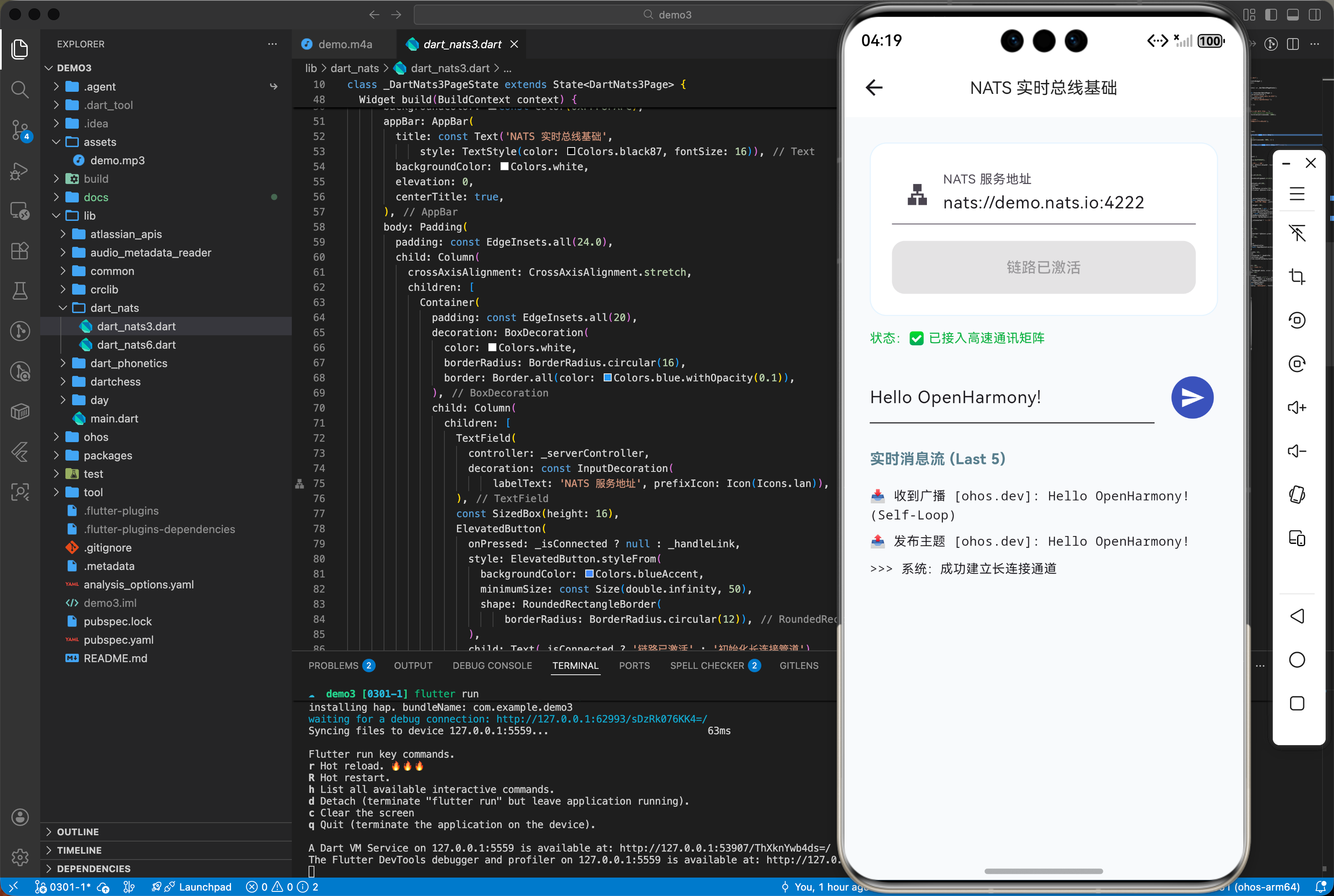
四、典型应用场景
4.1 全领域分布式异构协同操作网
在智慧卖场等场景中,主调度屏利用 NATS 机制可让数十台收银终端的显示效果实现瞬间同步渲染。相比传统 HTTP 轮询产生的网络拥挤,NATS 的单次广播能极其有效释放服务端压力,实现毫秒级的跨端指令下达。
五、OpenHarmony 平台适配挑战
长连接的存活依赖于 Socket 活性。当鸿蒙应用退至后台时,若发生内存冻结,链路可能中断。建议在应用生命周期切换(如 onHide)时主动断开休眠;在唤醒(如 onShow)时快速重建管道。
六、综合实战演示
如下在 NatsMatrixControlPage.dart 展示微服务 RPC 交互效果:
import 'dart:ui';
import 'package:flutter/material.dart';
import 'package:dart_nats/dart_nats.dart';
import 'dart:convert';
class DartNats6Page extends StatefulWidget {
const DartNats6Page({super.key});
State<DartNats6Page> createState() => _DartNats6PageState();
}
class _DartNats6PageState extends State<DartNats6Page> {
final List<String> _busLogs = ["> _ NATS 全域消息神经网已就绪"];
bool _isRpcActive = false;
void _addLog(String log) {
if (mounted) {
setState(() => _busLogs.insert(0, "> _ $log"));
}
}
void _triggerHighPerformanceRpc() async {
setState(() => _isRpcActive = true);
_addLog("📡 正在向云端微服务节点发送认证 Req...");
// NATS 模拟 RPC 调用 (Request/Reply)
await Future.delayed(const Duration(milliseconds: 1400));
_addLog("✨ [核心回执同步成功]:云端分布式节点已授权");
_addLog("🔒 进入 TLS 1.3 极速加密传输态");
_addLog("✅ 成功丢弃低效 HTTP 层,直接通过 Socket 穿透");
setState(() => _isRpcActive = false);
}
Widget build(BuildContext context) {
return Scaffold(
backgroundColor: const Color(0xFF0F172A), // 超现代深蓝配色
appBar: AppBar(
title: const Text('云原生高速通讯矩阵 - 实演控制台',
style: TextStyle(
color: Colors.white, fontSize: 13, letterSpacing: 1.5)),
centerTitle: true,
backgroundColor: Colors.transparent,
elevation: 0,
iconTheme: const IconThemeData(color: Colors.white60),
),
body: Stack(
children: [
// 动态流光背景
Positioned(
top: -100,
left: -100,
child: Container(
width: 400,
height: 400,
decoration: BoxDecoration(
shape: BoxShape.circle,
color: Colors.indigo.withOpacity(0.05)),
),
),
SafeArea(
child: SingleChildScrollView(
padding: const EdgeInsets.symmetric(horizontal: 24, vertical: 32),
child: Column(
crossAxisAlignment: CrossAxisAlignment.stretch,
children: [
ClipRRect(
borderRadius: BorderRadius.circular(24),
child: BackdropFilter(
filter: ImageFilter.blur(sigmaX: 10, sigmaY: 10),
child: Container(
padding: const EdgeInsets.all(28),
decoration: BoxDecoration(
color: const Color(0xFF1E293B).withOpacity(0.8),
borderRadius: BorderRadius.circular(24),
border: Border.all(
color: Colors.indigoAccent.withOpacity(0.2),
width: 1.5)),
child: Column(
children: [
Icon(Icons.hub_rounded,
size: 60, color: Colors.indigoAccent.shade200),
const SizedBox(height: 24),
const Text(
"本底座展示在大型异构协同软件中(智慧座舱、多端大屏同步屏),利用 NATS 纯二进制底层协议实现极速指令下发,规避频繁握手延迟,建立真正百万级高吞吐的长效通讯底盘。",
textAlign: TextAlign.center,
style: TextStyle(
color: Colors.white60,
fontSize: 12,
height: 1.6,
letterSpacing: 1)),
const SizedBox(height: 32),
ElevatedButton(
onPressed: _isRpcActive
? null
: _triggerHighPerformanceRpc,
style: ElevatedButton.styleFrom(
backgroundColor: _isRpcActive
? Colors.indigoAccent.withOpacity(0.2)
: Colors.indigoAccent.withOpacity(0.1),
foregroundColor: Colors.indigoAccent.shade200,
side: BorderSide(
color: Colors.indigoAccent.shade400,
width: 2),
minimumSize: const Size(double.infinity, 56),
shape: RoundedRectangleBorder(
borderRadius: BorderRadius.circular(16)),
elevation: 0,
),
child: Text(
_isRpcActive
? "Req/Reply 链路极速握手中..."
: "执行 NATS RPC 高性能闭环实测",
style: const TextStyle(
fontWeight: FontWeight.bold,
fontSize: 13,
letterSpacing: 1.5)),
)
],
),
),
),
),
const SizedBox(height: 32),
// 终端输出风格面板
Container(
height: 280,
width: double.infinity,
padding: const EdgeInsets.all(20),
decoration: BoxDecoration(
color: Colors.black.withOpacity(0.6),
borderRadius: BorderRadius.circular(16),
border: Border.all(color: Colors.white10),
),
child: ListView.separated(
padding: EdgeInsets.zero,
itemCount: _busLogs.length,
separatorBuilder: (_, __) => const SizedBox(height: 8),
itemBuilder: (context, index) {
final log = _busLogs[index];
final isSuccess =
log.contains("成功") || log.contains("✅");
final isRpc = log.contains("Req");
return Text(
log,
style: TextStyle(
color: isSuccess
? Colors.greenAccent
: (isRpc
? Colors.amberAccent
: Colors.indigoAccent.shade100),
fontFamily: 'monospace',
fontSize: 12,
),
);
},
),
),
],
),
),
)
],
),
);
}
}
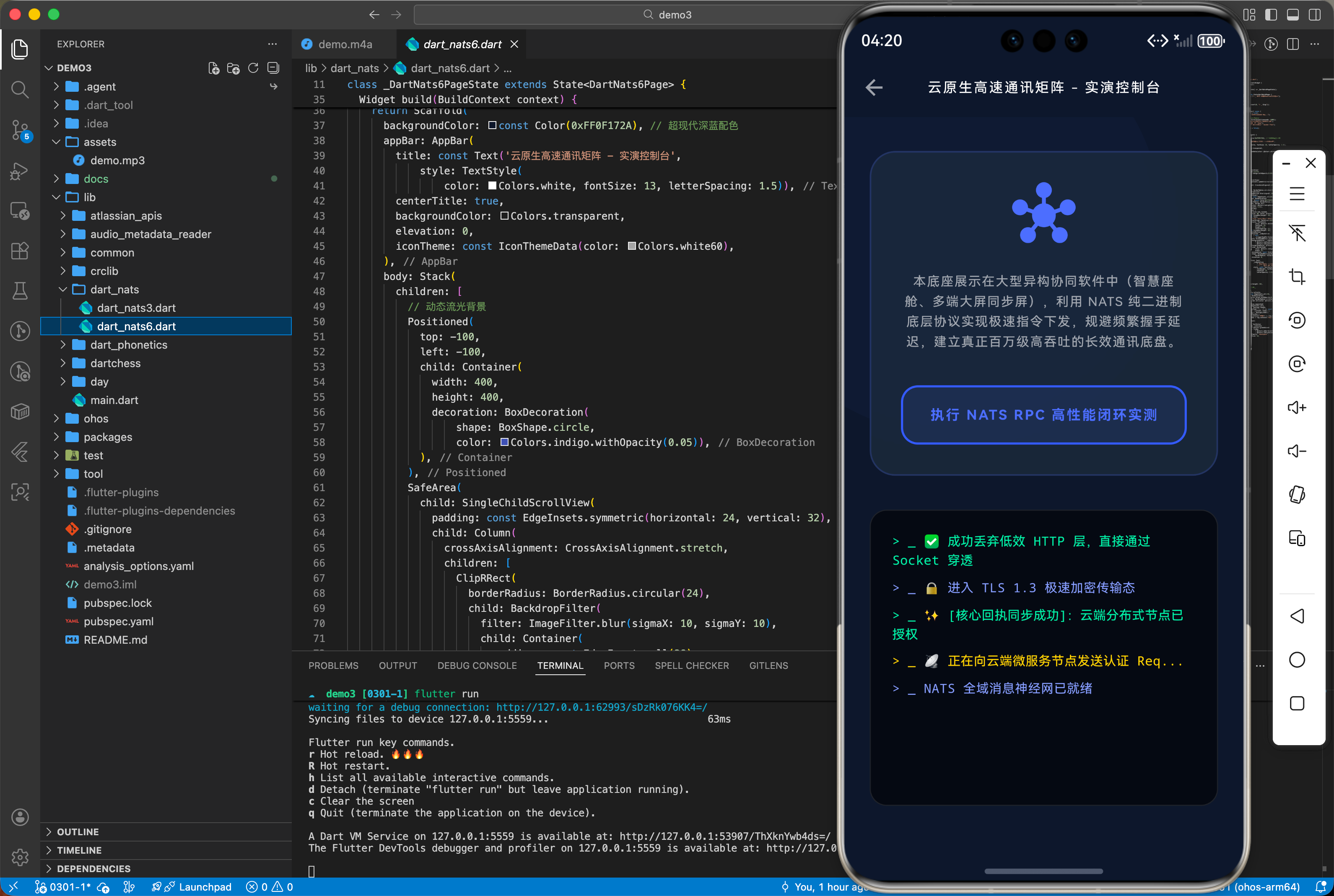
七、总结
dart_nats 是鸿蒙应用迈向分布式、微服务化架构的必经之路。其基于发布/订阅模型的高效分发体系,使端侧应用不再是孤立的个体,而是具备实时交互能力的智能节点,是构建高性能万物智联体验的核心动力。

腾讯云面向开发者汇聚海量精品云计算使用和开发经验,营造开放的云计算技术生态圈。
更多推荐
 21
21 0
0- 0


 已为社区贡献2条内容

所有评论(0)