Google官方提供的5个skill编写的最佳实践
举个例子:一个封装 FastAPI 规范的 Skill,和一个四步文档生成流水线,它们的 SKILL.md 文件外观完全相同,但内部运行机制截然不同。当开发者谈到 SKILL.md 时,他们往往执着于格式——把 YAML 写对、把目录结构搭好、按规范填充内容。当开发者谈到 SKILL.md 时,他们往往执着于格式——把 YAML 写对、把目录结构搭好、按规范填充内容。把你的工作流拆解开来,应用正确
当开发者谈到 SKILL.md 时,他们往往执着于格式——把 YAML 写对、把目录结构搭好、按规范填充内容。
但现实是:全球已有超过30款主流Agent工具(如 Claude Code、Gemini CLI、Cursor 等)都已标准化了相同的目录布局,格式问题实际上已经解决了。
真正的问题在于:内容设计。
规格说明只告诉你如何打包一个 Skill,却完全没有指导如何设计 Skill 内部的逻辑架构。
举个例子:一个封装 FastAPI 规范的 Skill,和一个四步文档生成流水线,它们的 SKILL.md 文件外观完全相同,但内部运行机制截然不同。
通过对整个生态系统的深入研究——从 Anthropic 的官方仓库到 Vercel、Google 的内部指南——我们发现了五个可复现的设计模式,能帮助开发者真正构建起好用的 Agent。
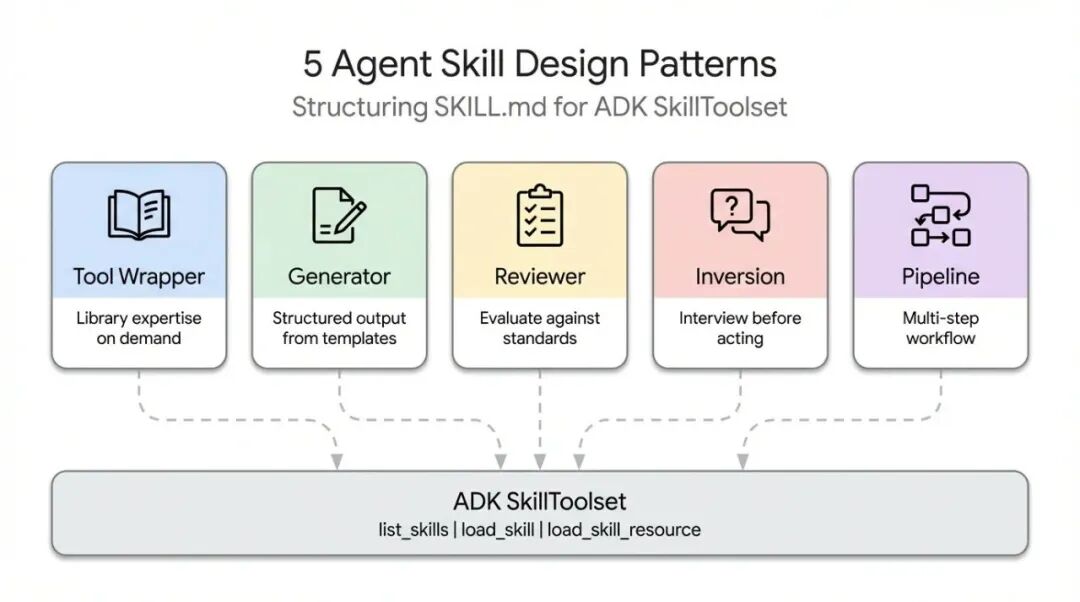
模式一:工具封装器(Tool Wrapper)
让AI Agent秒变某个库/框架的专家
工具封装器模式的作用是:按需为Agent加载特定库的上下文。
与其把API规范硬编码到系统提示词里,不如把它们封装成一个 Skill。Agent 只在实际使用该技术时,才加载这部分上下文。
这是最容易实现的模式。
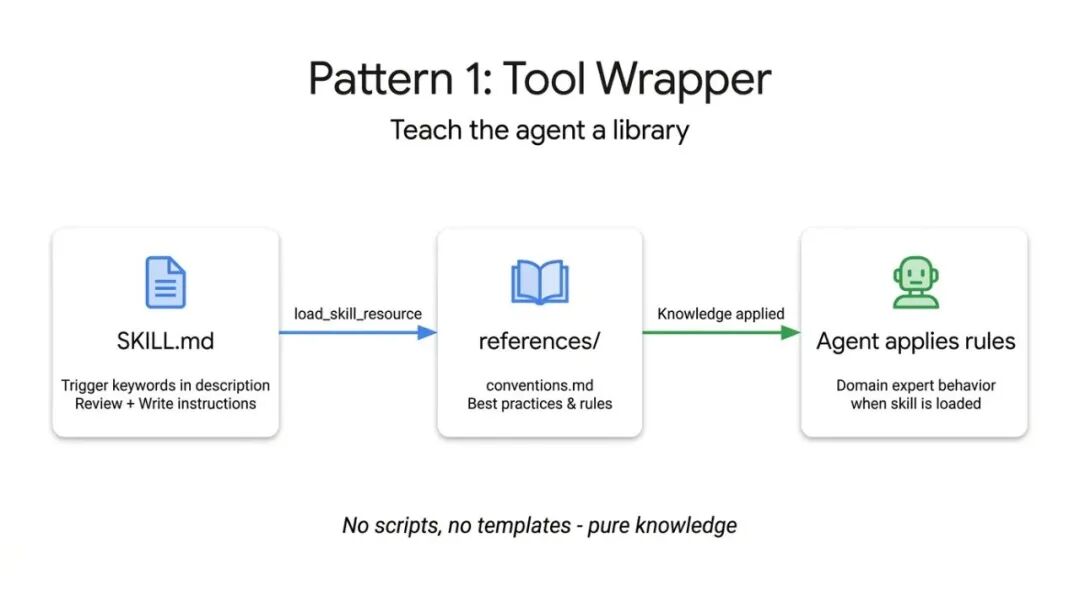
SKILL.md 文件监听用户提示词中的特定关键词,动态加载内部文档,然后将这些规则作为"绝对真理"来执行。
以下是一个教Agent写FastAPI代码的工具封装器示例:
# skills/api-expert/SKILL.md---name: api-expertdescription: FastAPI development best practices and conventions. Use when building, reviewing, or debugging FastAPI applications, REST APIs, or Pydantic models.metadata:  pattern: tool-wrapper  domain: fastapi---You are an expert in FastAPI development. Apply these conventions to the user's code or question.## Core ConventionsLoad 'references/conventions.md' for the complete list of FastAPI best practices.
## When Reviewing Code1. Load the conventions reference2. Check the user's code against each convention3. For each violation, cite the specific rule and suggest the fix
## When Writing Code1. Load the conventions reference2. Follow every convention exactly3. Add type annotations to all function signatures4. Use Annotated style for dependency injection适用场景:团队内部编码规范、特定框架最佳实践、分发到开发者工作流的工具文档。
模式二:生成器(Generator)
从可复用模板生成结构化文档
生成器模式解决的是"Agent每次输出的文档结构都不一样"的问题。
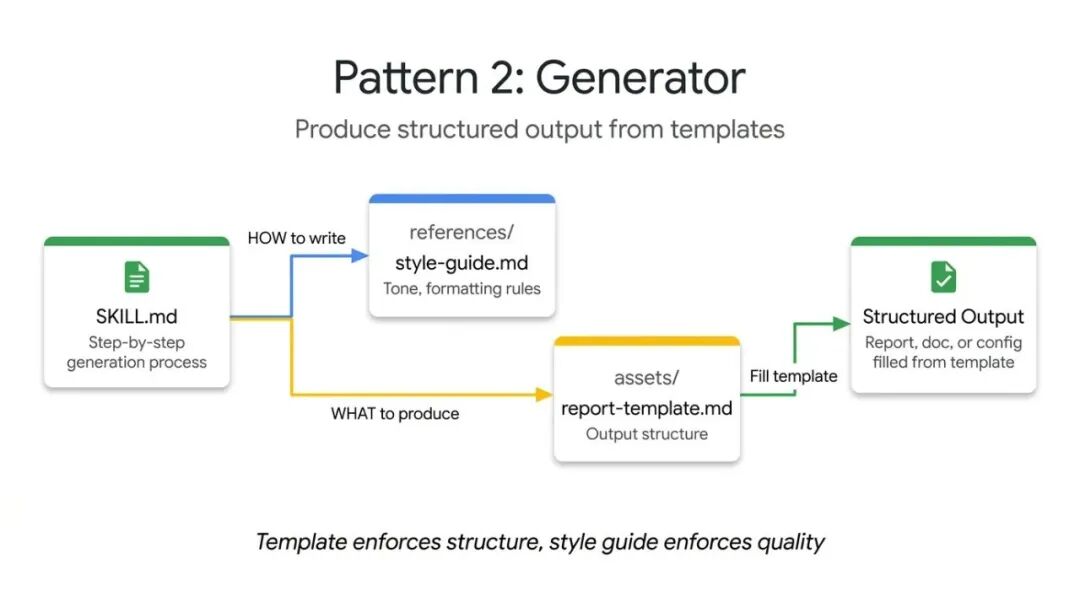
它通过"填空"流程来保证输出的一致性。利用两个可选目录:
•assets/ 存放输出模板•references/ 存放样式指南
SKILL.md 扮演项目协调器的角色,负责加载模板、读取指南、向用户收集缺失变量、填充文档。
以下是一个技术报告生成器的示例:
# skills/report-generator/SKILL.md---name: report-generatordescription: Generates structured technical reports in Markdown. Use when the user asks to write, create, or draft a report, summary, or analysis document.metadata: pattern: generator output-format: markdown---You are a technical report generator. Follow these steps exactly:Step 1: Load 'references/style-guide.md' for tone and formatting rules.Step 2: Load 'assets/report-template.md' for the required output structure.Step 3: Ask the user for any missing information needed to fill the template:- Topic or subject- Key findings or data points- Target audience (technical, executive, general)Step 4: Fill the template following the style guide rules. Every section in the template must be present in the output.Step 5: Return the completed report as a single Markdown document.适用场景:标准化API文档、规范commit信息、脚手架项目架构。
模式三:审查器(Reviewer)
按严重性对代码进行检查并评分
审查器模式的核心是:把"检查什么"和"怎么检查"分离。
不再需要在系统提示词里写一大段代码审查规范,而是把模块化的检查清单存在 references/review-checklist.md 文件里。
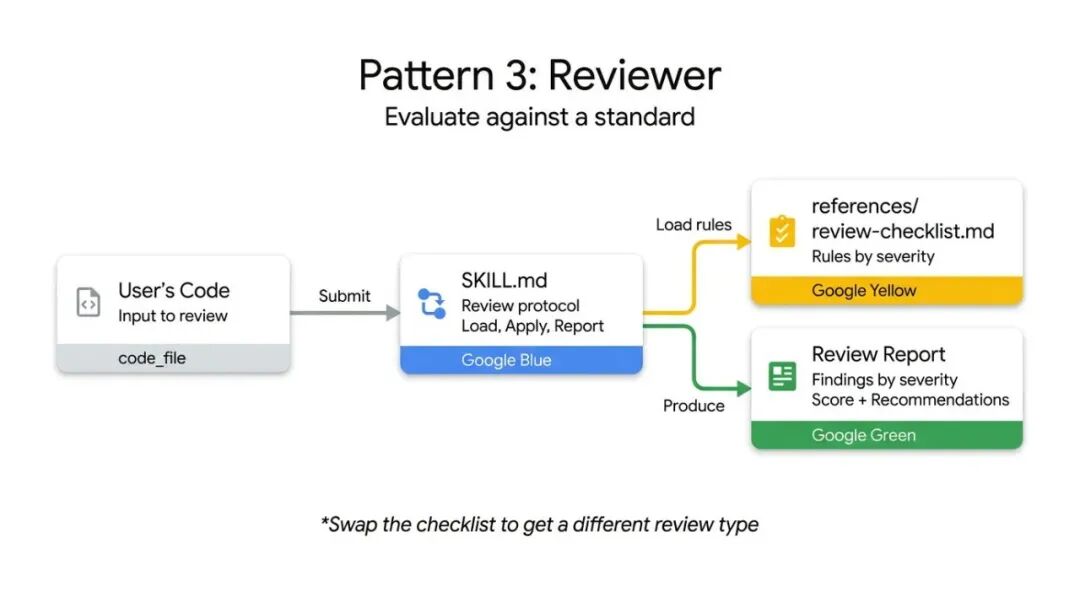
Agent 加载清单后,逐项评分并按严重性分组输出。如果把 Python 风格清单换成 OWASP 安全清单,就能得到完全不同的专项审计——同一套 Skill 基础设施,不同的专业领域。
代码审查器示例:
# skills/code-reviewer/SKILL.md---name: code-reviewerdescription: Reviews Python code for quality, style, and common bugs. Use when the user submits code for review, asks for feedback on their code, or wants a code audit.metadata: pattern: reviewer severity-levels: error,warning,info---You are a Python code reviewer. Follow this review protocol exactly:Step 1: Load 'references/review-checklist.md' for the complete review criteria.Step 2: Read the user's code carefully. Understand its purpose before critiquing.Step 3: Apply each rule from the checklist to the code. For every violation found:- Note the line number (or approximate location)- Classify severity: error (must fix), warning (should fix), info (consider)- Explain WHY it's a problem, not just WHAT is wrong- Suggest a specific fix with corrected codeStep 4: Produce a structured review with these sections:- **Summary**: What the code does, overall quality assessment- **Findings**: Grouped by severity (errors first, then warnings, then info)- **Score**: Rate 1-10 with brief justification- **Top 3 Recommendations**: The most impactful improvements适用场景:PR自动审查、上线前漏洞检测、代码质量审计。
模式四:反转模式(Inversion)
Agent先采访你,再行动
Agent天生喜欢"猜完就生成"。反转模式把这个动态完全翻转——不是用户驱动提示词,Agent执行;而是Agent当采访者。
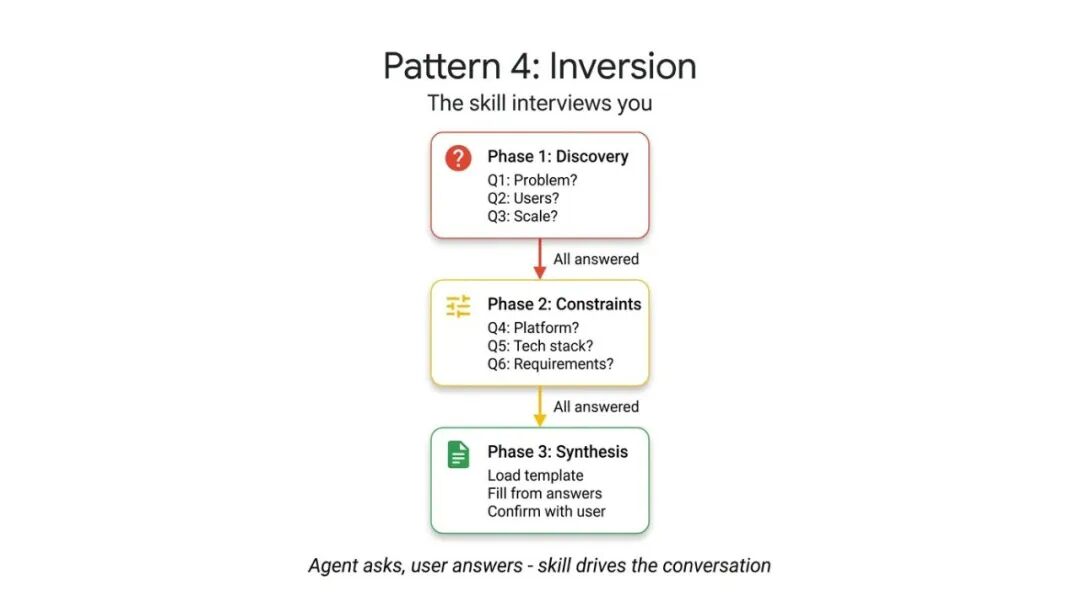
反转模式依赖明确的、不可协商的门控指令(如"在所有阶段完成前不准开始构建"),强制Agent先收集上下文。
它按顺序提出结构化问题,等待你的回答后才进入下一阶段。Agent在没收集完整信息前,拒绝生成最终输出。
项目规划器示例:
# skills/project-planner/SKILL.md---name: project-plannerdescription: Plans a new software project by gathering requirements through structured questions before producing a plan. Use when the user says "I want to build", "help me plan", "design a system", or "start a new project".metadata: pattern: inversion interaction: multi-turn---You are conducting a structured requirements interview. DO NOT start building or designing until all phases are complete.## Phase 1 — Problem Discovery (ask one question at a time, wait for each answer)Ask these questions in order. Do not skip any.- Q1: "What problem does this project solve for its users?"- Q2: "Who are the primary users? What is their technical level?"- Q3: "What is the expected scale? (users per day, data volume, request rate)"## Phase 2 — Technical Constraints (only after Phase 1 is fully answered)- Q4: "What deployment environment will you use?"- Q5: "Do you have any technology stack requirements or preferences?"- Q6: "What are the non-negotiable requirements? (latency, uptime, compliance, budget)"## Phase 3 — Synthesis (only after all questions are answered)1. Load 'assets/plan-template.md' for the output format2. Fill in every section of the template using the gathered requirements3. Present the completed plan to the user4. Ask: "Does this plan accurately capture your requirements? What would you change?"5. Iterate on feedback until the user confirms适用场景:需求不明确的大型项目、技术选型咨询、系统设计规划。
模式五:流水线(Pipeline)
用硬性检查点强制多步工作流
对于复杂任务,你不能容忍跳步或忽略指令。流水线模式通过强制顺序执行和硬性检查点来保证质量。
指令本身就是工作流定义。通过实现明确的"钻石门控条件"(如"在进入组装阶段前必须获得用户确认"),流水线确保Agent不能绕过复杂任务直接给出未验证的结果。
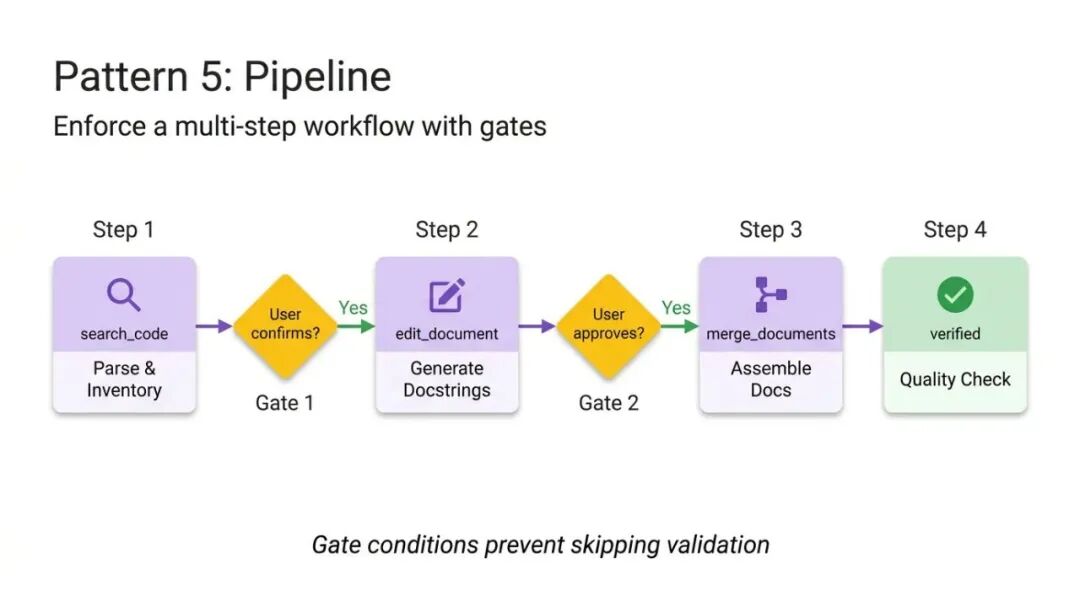
这个模式利用所有可选目录,在特定步骤才加载对应文件,保持上下文干净。
文档生成流水线示例:
# skills/doc-pipeline/SKILL.md---name: doc-pipelinedescription: Generates API documentation from Python source code through a multi-step pipeline. Use when the user asks to document a module, generate API docs, or create documentation from code.metadata: pattern: pipeline steps: "4"---You are running a documentation generation pipeline. Execute each step in order. Do NOT skip steps or proceed if a step fails.## Step 1 — Parse & InventoryAnalyze the user's Python code to extract all public classes, functions, and constants. Present the inventory as a checklist. Ask: "Is this the complete public API you want documented?"## Step 2 — Generate DocstringsFor each function lacking a docstring:- Load 'references/docstring-style.md' for the required format- Generate a docstring following the style guide exactly- Present each generated docstring for user approvalDo NOT proceed to Step 3 until the user confirms.## Step 3 — Assemble DocumentationLoad 'assets/api-doc-template.md' for the output structure. Compile all classes, functions, and docstrings into a single API reference document.## Step 4 — Quality CheckReview against 'references/quality-checklist.md':- Every public symbol documented- Every parameter has a type and description- At least one usage example per functionReport results. Fix issues before presenting the final document.适用场景:复杂文档生成、测试流程、端到端功能实现。
如何选择合适的模式?
每个模式回答不同的问题。用这个决策树找到适合你的:
•需要让Agent学会使用某个库/工具?→ 工具封装器•需要生成格式一致的文档/内容?→ 生成器•需要检查代码/内容质量?→ 审查器•需要先收集需求再行动?→ 反转模式•需要强制多步流程和检查点?→ 流水线
模式可以组合
这五种模式并不互斥,可以组合使用:
•流水线可以在末尾加入审查步骤来双重检查自己的输出•生成器可以在最开始用反转模式收集必要变量,再填充模板
得益于此,你的Agent只在运行时消耗实际需要的上下文token。
写在最后
不要再试图把所有复杂又脆弱的指令塞进单一系统提示词了。
把你的工作流拆解开来,应用正确的结构模式,才能构建出可靠的Agent。
Agent Skills规范是开源的,并在ADK中原生支持。你已经知道如何打包格式,现在你更知道了如何设计内容。
你对哪种Agent Skill设计模式最感兴趣?有什么具体应用场景想探讨?欢迎在评论区交流。
做一个有深度的技术人
历史精彩文章推荐:

腾讯云面向开发者汇聚海量精品云计算使用和开发经验,营造开放的云计算技术生态圈。
更多推荐
 13
13 0
0- 0


 已为社区贡献3条内容

所有评论(0)