Flutter for OpenHarmony 个人理财管理App实战 - 货币设置页面
不同用户可能使用不同的货币进行记账,货币设置页面让用户可以选择自己常用的货币符号。本篇将实现一个支持多种货币的设置页面,包括货币列表展示、选择交互、搜索过滤和本地存储等功能。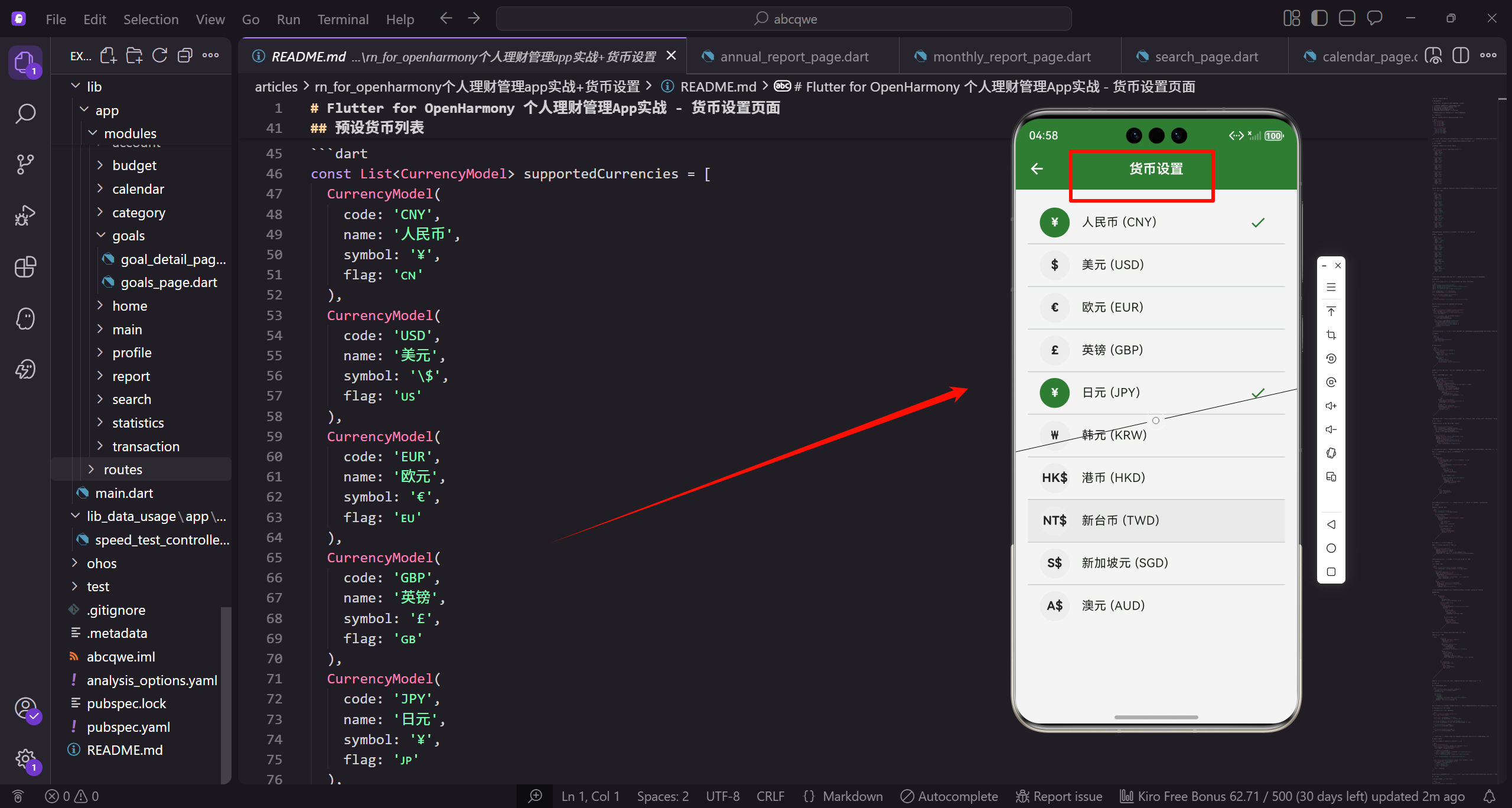
功能需求分析
货币设置看起来简单,但要做好用户体验需要考虑几个方面:
- 展示支持的货币列表,包含货币名称、代码和符号
- 显示当前选中的货币,让用户知道当前设置
- 点击即可切换货币,操作要简单直接
- 支持搜索过滤,方便快速找到目标货币
- 持久化存储用户选择,下次打开应用保持设置
货币符号会影响整个应用中金额的显示,所以这个设置很重要。
货币数据模型
首先定义货币的数据结构,包含代码、名称、符号和国旗:
class CurrencyModel {
  final String code;
  final String name;
  final String symbol;
  final String flag;

  const CurrencyModel({
    required this.code,
    required this.name,
    required this.symbol,
    required this.flag,
  });
}
code 是国际标准的货币代码,如 CNY、USD。name 是货币的中文名称。symbol 是货币符号,如 ¥、$。flag 是国旗 emoji,增加辨识度。
使用 const 构造函数,因为货币数据是不变的,可以在编译时创建,提高性能。
预设货币列表
定义支持的货币列表,覆盖主要国家和地区:
const List<CurrencyModel> supportedCurrencies = [
  CurrencyModel(
    code: 'CNY',
    name: '人民币',
    symbol: '¥',
    flag: '🇨🇳'
  ),
  CurrencyModel(
    code: 'USD',
    name: '美元',
    symbol: '\$',
    flag: '🇺🇸'
  ),
  CurrencyModel(
    code: 'EUR',
    name: '欧元',
    symbol: '€',
    flag: '🇪🇺'
  ),
  CurrencyModel(
    code: 'GBP',
    name: '英镑',
    symbol: '£',
    flag: '🇬🇧'
  ),
  CurrencyModel(
    code: 'JPY',
    name: '日元',
    symbol: '¥',
    flag: '🇯🇵'
  ),
人民币和日元都用 ¥ 符号,但货币代码不同,可以通过代码区分。美元符号需要转义 $,因为 $ 在 Dart 字符串中有特殊含义。
继续添加更多货币:
  CurrencyModel(
    code: 'KRW',
    name: '韩元',
    symbol: '₩',
    flag: '🇰🇷'
  ),
  CurrencyModel(
    code: 'HKD',
    name: '港币',
    symbol: 'HK\$',
    flag: '🇭🇰'
  ),
  CurrencyModel(
    code: 'TWD',
    name: '新台币',
    symbol: 'NT\$',
    flag: '🇹🇼'
  ),
  CurrencyModel(
    code: 'SGD',
    name: '新加坡元',
    symbol: 'S\$',
    flag: '🇸🇬'
  ),
  CurrencyModel(
    code: 'AUD',
    name: '澳元',
    symbol: 'A\$',
    flag: '🇦🇺'
  ),
港币、新台币、新加坡元、澳元都在美元符号前加了前缀,这是它们的标准写法。
补充更多货币选项:
  CurrencyModel(
    code: 'CAD',
    name: '加拿大元',
    symbol: 'C\$',
    flag: '🇨🇦'
  ),
  CurrencyModel(
    code: 'CHF',
    name: '瑞士法郎',
    symbol: 'CHF',
    flag: '🇨🇭'
  ),
  CurrencyModel(
    code: 'THB',
    name: '泰铢',
    symbol: '฿',
    flag: '🇹🇭'
  ),
  CurrencyModel(
    code: 'INR',
    name: '印度卢比',
    symbol: '₹',
    flag: '🇮🇳'
  ),
  CurrencyModel(
    code: 'RUB',
    name: '俄罗斯卢布',
    symbol: '₽',
    flag: '🇷🇺'
  ),
];
瑞士法郎没有专门的符号,直接用代码 CHF 作为符号。总共 15 种货币,覆盖了大部分用户的需求。
页面实现
创建 currency_page.dart,使用 StatelessWidget 因为状态由 GetX 管理:
import 'package:flutter/material.dart';
import 'package:flutter_screenutil/flutter_screenutil.dart';
import 'package:get/get.dart';
import '../../core/services/storage_service.dart';
const _primaryColor = Color(0xFF2E7D32);
const _textSecondary = Color(0xFF757575);
class CurrencyPage extends StatefulWidget {
const CurrencyPage({super.key});
State<CurrencyPage> createState() => _CurrencyPageState();
}
这里改用 StatefulWidget,因为需要管理搜索框的状态。
定义状态类:
class _CurrencyPageState extends State<CurrencyPage> {
  final _storage = Get.find<StorageService>();
  final _searchController = TextEditingController();
  String _searchQuery = '';

  List<CurrencyModel> get _filteredCurrencies {
    if (_searchQuery.isEmpty) {
      return supportedCurrencies;
    }
    final query = _searchQuery.toLowerCase();
    return supportedCurrencies.where((c) =>
      c.name.toLowerCase().contains(query) ||
      c.code.toLowerCase().contains(query) ||
      c.symbol.contains(query)
    ).toList();
  }
_filteredCurrencies 是一个计算属性,根据搜索关键词过滤货币列表。支持按名称、代码或符号搜索,满足不同用户的搜索习惯。
释放资源:
void dispose() {
_searchController.dispose();
super.dispose();
}
页面主体结构
Widget build(BuildContext context) {
return Scaffold(
appBar: AppBar(
title: const Text('货币设置'),
centerTitle: true,
),
body: Column(
children: [
_buildSearchBar(),
_buildCurrentCurrency(),
Expanded(child: _buildCurrencyList()),
],
),
);
}
页面分为三部分:搜索栏、当前货币显示、货币列表。搜索栏和当前货币固定在顶部,列表可滚动。
搜索栏
搜索栏让用户可以快速找到目标货币:
  Widget _buildSearchBar() {
    return Padding(
      padding: EdgeInsets.all(16.w),
      child: TextField(
        controller: _searchController,
        onChanged: (value) => setState(() => _searchQuery = value),
        decoration: InputDecoration(
          hintText: '搜索货币名称或代码',
          prefixIcon: const Icon(Icons.search),
          suffixIcon: _searchQuery.isNotEmpty
            ? IconButton(
                icon: const Icon(Icons.clear),
                onPressed: () {
                  _searchController.clear();
                  setState(() => _searchQuery = '');
                },
              )
            : null,
          border: OutlineInputBorder(
            borderRadius: BorderRadius.circular(12.r),
            borderSide: BorderSide.none,
          ),
          filled: true,
          fillColor: Colors.grey[100],
          contentPadding: EdgeInsets.symmetric(
            horizontal: 16.w,
            vertical: 12.h
          ),
        ),
      ),
    );
  }
搜索框左边有搜索图标,右边在有输入内容时显示清除按钮。使用圆角边框和灰色背景,视觉上更柔和。onChanged 实时更新搜索关键词,列表会立即过滤。
当前货币显示
在列表上方显示当前选中的货币,让用户一目了然:
  Widget _buildCurrentCurrency() {
    final currentSymbol = _storage.currency;
    final current = supportedCurrencies.firstWhere(
      (c) => c.symbol == currentSymbol,
      orElse: () => supportedCurrencies.first,
    );

    return Container(
      margin: EdgeInsets.symmetric(horizontal: 16.w),
      padding: EdgeInsets.all(16.w),
      decoration: BoxDecoration(
        color: _primaryColor.withOpacity(0.1),
        borderRadius: BorderRadius.circular(12.r),
        border: Border.all(
          color: _primaryColor.withOpacity(0.3)
        ),
      ),
从 StorageService 获取当前货币符号,然后在列表中找到对应的货币对象。如果找不到(比如数据损坏),默认使用第一个货币。
容器使用主题色的浅色背景和边框,和普通列表项区分开。
显示货币信息:
      child: Row(
        children: [
          Text(current.flag, style: TextStyle(fontSize: 32.sp)),
          SizedBox(width: 12.w),
          Expanded(
            child: Column(
              crossAxisAlignment: CrossAxisAlignment.start,
              children: [
                Text(
                  '当前货币',
                  style: TextStyle(
                    fontSize: 12.sp,
                    color: _textSecondary
                  ),
                ),
                SizedBox(height: 4.h),
                Text(
                  '${current.name} (${current.symbol})',
                  style: TextStyle(
                    fontSize: 16.sp,
                    fontWeight: FontWeight.bold,
                    color: _primaryColor,
                  ),
                ),
              ],
            ),
          ),
          Icon(
            Icons.check_circle,
            color: _primaryColor,
            size: 24.sp
          ),
        ],
      ),
    );
  }
左边是大号国旗 emoji,中间是标签和货币名称,右边是对勾图标表示当前选中。这种布局信息层次清晰。
货币列表
列表展示所有可选的货币:
  Widget _buildCurrencyList() {
    final currencies = _filteredCurrencies;

    if (currencies.isEmpty) {
      return Center(
        child: Column(
          mainAxisAlignment: MainAxisAlignment.center,
          children: [
            Icon(
              Icons.search_off,
              size: 64.sp,
              color: Colors.grey[300]
            ),
            SizedBox(height: 16.h),
            Text(
              '未找到匹配的货币',
              style: TextStyle(
                color: _textSecondary,
                fontSize: 14.sp
              ),
            ),
          ],
        ),
      );
    }
如果搜索结果为空,显示友好的提示。
列表使用 ListView.separated 添加分隔线:
    return ListView.separated(
      padding: EdgeInsets.all(16.w),
      itemCount: currencies.length,
      separatorBuilder: (_, __) => SizedBox(height: 8.h),
      itemBuilder: (_, index) => _buildCurrencyItem(currencies[index]),
    );
  }
separatorBuilder 返回一个 SizedBox 作为间距,比 Divider 更简洁。
货币列表项
每个货币项的实现:
  Widget _buildCurrencyItem(CurrencyModel currency) {
    final isSelected = _storage.currency == currency.symbol;

    return Card(
      elevation: isSelected ? 2 : 0,
      shape: RoundedRectangleBorder(
        borderRadius: BorderRadius.circular(12.r),
        side: BorderSide(
          color: isSelected ? _primaryColor : Colors.grey[200]!,
          width: isSelected ? 2 : 1,
        ),
      ),
      child: InkWell(
        onTap: () => _selectCurrency(currency),
        borderRadius: BorderRadius.circular(12.r),
        child: Padding(
          padding: EdgeInsets.all(16.w),
选中的货币有阴影、主题色边框,未选中的没有阴影、灰色边框。InkWell 提供点击水波纹效果。
列表项内容:
          child: Row(
            children: [
              Text(
                currency.flag,
                style: TextStyle(fontSize: 28.sp)
              ),
              SizedBox(width: 12.w),
              Expanded(
                child: Column(
                  crossAxisAlignment: CrossAxisAlignment.start,
                  children: [
                    Text(
                      currency.name,
                      style: TextStyle(
                        fontSize: 16.sp,
                        fontWeight: FontWeight.w500,
                      ),
                    ),
                    SizedBox(height: 2.h),
                    Text(
                      currency.code,
                      style: TextStyle(
                        fontSize: 12.sp,
                        color: _textSecondary,
                      ),
                    ),
                  ],
                ),
              ),
左边是国旗,中间是货币名称和代码,右边是符号和选中标记。
符号显示和选中标记:
              Container(
                padding: EdgeInsets.symmetric(
                  horizontal: 12.w,
                  vertical: 6.h
                ),
                decoration: BoxDecoration(
                  color: isSelected
                    ? _primaryColor
                    : Colors.grey[100],
                  borderRadius: BorderRadius.circular(8.r),
                ),
                child: Text(
                  currency.symbol,
                  style: TextStyle(
                    fontSize: 16.sp,
                    fontWeight: FontWeight.bold,
                    color: isSelected ? Colors.white : Colors.black87,
                  ),
                ),
              ),
              if (isSelected) ...[
                SizedBox(width: 8.w),
                Icon(
                  Icons.check,
                  color: _primaryColor,
                  size: 20.sp
                ),
              ],
            ],
          ),
        ),
      ),
    );
  }
符号放在一个小标签中,选中时背景变为主题色、文字变白。选中的货币还会显示对勾图标。
选择货币
点击货币项时的处理逻辑:
  void _selectCurrency(CurrencyModel currency) {
    _storage.setCurrency(currency.symbol);
    setState(() {});

    Get.back();
    Get.snackbar(
      '切换成功',
      '货币已切换为 ${currency.name} (${currency.symbol})',
      snackPosition: SnackPosition.BOTTOM,
      duration: const Duration(seconds: 2),
    );
  }
调用 StorageService 保存新的货币符号,然后返回上一页并显示成功提示。setState 触发界面刷新,更新当前货币显示。
StorageService 中的货币管理
在 StorageService 中实现货币的存取:
class StorageService extends GetxService {
  final _box = GetStorage();

  static const _currencyKey = 'currency';
  static const _currencyCodeKey = 'currency_code';

  String get currency => _box.read(_currencyKey) ?? '¥';
  String get currencyCode => _box.read(_currencyCodeKey) ?? 'CNY';

  void setCurrency(String symbol) {
    _box.write(_currencyKey, symbol);
  }

  void setCurrencyCode(String code) {
    _box.write(_currencyCodeKey, code);
  }
}
使用 GetStorage 进行本地存储,默认货币是人民币。同时存储符号和代码,方便后续扩展功能如汇率转换。
金额格式化工具
创建一个通用的金额格式化工具类,在整个应用中使用:
class CurrencyFormatter {
  static String format(double amount, {int decimals = 2}) {
    final storage = Get.find<StorageService>();
    final symbol = storage.currency;

    if (amount >= 100000000) {
      return '$symbol${(amount / 100000000).toStringAsFixed(1)}亿';
    } else if (amount >= 10000) {
      return '$symbol${(amount / 10000).toStringAsFixed(1)}万';
    }
    return '$symbol${amount.toStringAsFixed(decimals)}';
  }

  static String formatWithSign(double amount, {bool showPlus = true}) {
    final formatted = format(amount.abs());
    if (amount > 0 && showPlus) {
      return '+$formatted';
    } else if (amount < 0) {
      return '-$formatted';
    }
    return formatted;
  }
}
format 方法智能处理大数字,超过一亿显示"亿",超过一万显示"万",让数字更易读。formatWithSign 方法在金额前加正负号,用于显示收支变化。
使用示例
在应用的其他页面中使用货币格式化:
// 简单格式化
Text(CurrencyFormatter.format(1234.56));
// 输出: ¥1234.56

// 大数字格式化
Text(CurrencyFormatter.format(12345678));
// 输出: ¥1234.6万

// 带符号格式化
Text(CurrencyFormatter.formatWithSign(500));
// 输出: +¥500.00

Text(CurrencyFormatter.formatWithSign(-300));
// 输出: -¥300.00
小结
货币设置页面虽然功能简单,但细节处理很重要:
- 搜索功能让用户快速找到目标货币
- 当前货币显示让用户知道当前设置
- 国旗 emoji 增加辨识度
- 选中状态有明显的视觉反馈
- 切换后立即生效并给出提示
这些细节加在一起,构成了良好的用户体验。下一篇将实现关于我们页面,展示应用信息和开发者联系方式。
欢迎加入开源鸿蒙跨平台社区:https://openharmonycrossplatform.csdn.net

腾讯云面向开发者汇聚海量精品云计算使用和开发经验,营造开放的云计算技术生态圈。
更多推荐
 13
13 0
0- 0


 已为社区贡献17条内容

所有评论(0)