openssh.build
ubuntu22@NYX:~/ssl/openssl-3.3.0$ ssh -V
OpenSSH_8.9p1 Ubuntu-3ubuntu0.13, OpenSSL 3.0.2 15 Mar 2022
wget https://cdn.openbsd.org/pub/OpenBSD/OpenSSH/portable/openssh-9.8p1.tar.gz
tar -zxvf openssh-9.8p1.tar.gz
cd openssh-9.8p1
sudoaptinstall-y libpam0g-dev
build.sh
./configure \
--prefix=/home/ubuntu22/ssh/openssh-9.8p1/output \
--sysconfdir=/home/ubuntu22/ssh/openssh-9.8p1/output/ \
--with-zlib \
--with-pam \
--with-md5-passwords \
--enable-debug
make -j4
/////////
ubuntu22@NYX:~/ssh/openssh-9.8p1/output$ ./bin/ssh ubuntu22@localhost
The authenticity of host 'localhost (127.0.0.1)' can't be established.
ED25519 key fingerprint is SHA256:LA5VhYGW3txOBzQRnMYZPhaDnk/3zUzlGQH+s2FAack.
This key is not known by any other names.
Are you sure you want to continue connecting (yes/no/[fingerprint])? no
Host key verification failed.
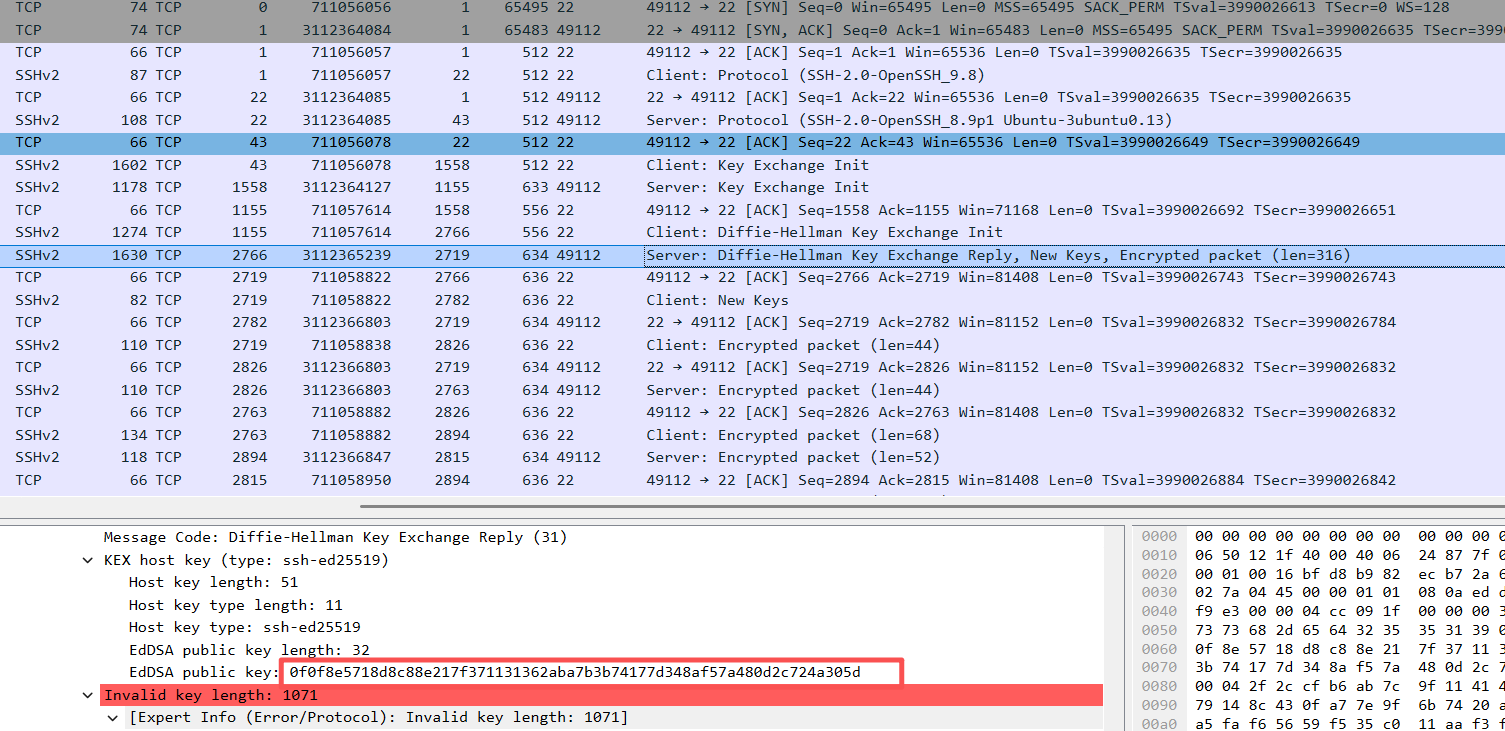
echo -n -e '\x00\x00\x00\x0bssh-ed25519\x00\x00\x00\x20\x0f\x0f\x8e\x57\x18\xd8\xc8\x8e\x21\x7f\x37\x11\x31\x36\x2a\xba\x7b\x3b\x74\x17\x7d\x34\x8a\xf5\x7a\x48\x0d\x2c\x72\x4a\x30\x5d' \
| openssl dgst -sha256 -binary \
| openssl base64 | sed -e 's/=*$//'
LA5VhYGW3txOBzQRnMYZPhaDnk/3zUzlGQH+s2FAack
////////// python
import base64
import hashlib
# 抓包中的 ssh-ed25519 公钥
pub_key_bytes = bytes.fromhex("0f0f8e5718d8c88e217f371131362aba7b3b74177d348af57a480d2c724a305d")
SSH 公钥 wire format(必须这样组装)
data = b"\x00\x00\x00\x0bssh-ed25519" # 类型
data += b"\x00\x00\x00\x20" # 公钥长度(32)
data += pub_key_bytes
计算指纹
fp = base64.b64encode(hashlib.sha256(data).digest()).decode().strip("=")
print("SHA256:" + fp)
/////////////////
中间细节省略一万字...TODO
/////////////
免密认证的一些笔记.
约定:
P = p · G
(公钥 P,私钥 p,基点 G)
r = k · G
(r 是随机点,k 是随机数)
s ≡ k + p·H (mod q)
(这里 q 是阶,实际是 mod q,不是真除法)
两边都*G
s · G = k·G + (p·H) · G
s · G = r + H · P
///////////////
import hashlib
# ==========================
# Ed25519 真实固定参数
# ==========================
q = 2**252 + 27742317777372353535851937790883648493
G = 0x216936D3CD6E53FEC0A4E231FDD6DC5C692CC7609525A7B2C9562D608F25D51A # 真实基点
def hash512(m):
return int.from_bytes(hashlib.sha512(m).digest(), "little") % q
# ==========================
# 1. 密钥生成(真实)
# P = p * G
# ==========================
p = 1234567890123456789012345678901234567890 # 私钥
P = (p * G) % q # 真实公钥(点乘)
# ==========================
# 2. 客户端签名(真实公式)
# r = k * G
# s = (k + p*H) mod q
# ==========================
msg = b"user login request"
k = 987654321 # 临时随机数
r = (k * G) % q
H = hash512(msg)
s = (k + p * H) % q
# ==========================
# 3. 服务器验证(真实公式!)
# s*G == r + H*P
# ==========================
left = (s * G) % q
right = (r + H * P) % q
print("左 s·G =", left)
print("右 r+H·P =", right)
print("验证成功 =", left == right)
//////////////
ubuntu22@NYX:~/ssh$ python3 s.py
左 s·G = 2159268331895220357609781363353716817408525335649604777245886844440816493889
右 r+H·P = 2159268331895220357609781363353716817408525335649604777245886844440816493889
验证成功 = True

腾讯云面向开发者汇聚海量精品云计算使用和开发经验,营造开放的云计算技术生态圈。
更多推荐
 10
10 0
0- 0


 已为社区贡献1条内容

所有评论(0)