Flutter三方库 pin_code_fields 适配 OpenHarmony —— 实现OTP验证
在移动应用开发中,安全的用户验证是保障应用数据安全的重要环节。OTP(一次性密码)验证作为一种常见的验证方式,广泛应用于用户登录、注册、密码重置等场景。随着 OpenHarmony 生态的快速发展,如何将成熟的 Flutter 应用适配到这一新兴平台,成为开发者需要面对的重要挑战。本次开发基于 Flutter 生态中成熟的 pin_code_fields 库,通过适配使其在 OpenHarmony
欢迎加入开源鸿蒙跨平台社区: https://openharmonycrossplatform.csdn.net
目录
前言:OTP验证的跨平台实现
在移动应用开发中,安全的用户验证是保障应用数据安全的重要环节。OTP(一次性密码)验证作为一种常见的验证方式,广泛应用于用户登录、注册、密码重置等场景。随着 OpenHarmony 生态的快速发展,如何将成熟的 Flutter 应用适配到这一新兴平台,成为开发者需要面对的重要挑战。
本次开发基于 Flutter 生态中成熟的 pin_code_fields 库,通过适配使其在 OpenHarmony 平台上正常运行,实现了一个高度自定义的 OTP 验证组件。这一实践不仅验证了跨平台开发的可行性,也为开发者提供了在 OpenHarmony 平台上构建安全、美观 OTP 验证功能的参考方案。
混合工程结构解析
项目目录架构
当 Flutter 项目集成鸿蒙支持后,项目结构会发生显著变化。以下是当前项目的实际结构:
fluuter_openHarmony/
├── lib/                          # Flutter 业务代码
│   ├── main.dart                 # 应用入口
│   └── otp_verification.dart     # OTP 验证组件
├── pubspec.yaml                  # Flutter 依赖配置
├── ohos/                         # 鸿蒙原生层
│   ├── entry/                    # 主模块
│   │   └── src/main/
│   │       ├── ets/              # ArkTS 代码
│   │       │   ├── entryability/
│   │       │   │   └── EntryAbility.ets       # 主 Ability
│   │       │   └── pages/
│   │       │       └── Index.ets           # 主页面
│   │       ├── resources/        # 鸿蒙资源文件
│   │       └── module.json5      # 应用核心配置
│   ├── AppScope/                 # 应用全局配置
│   └── build-profile.json5      # 构建配置
└── README.md
展示效果图片
flutter 实时预览 效果展示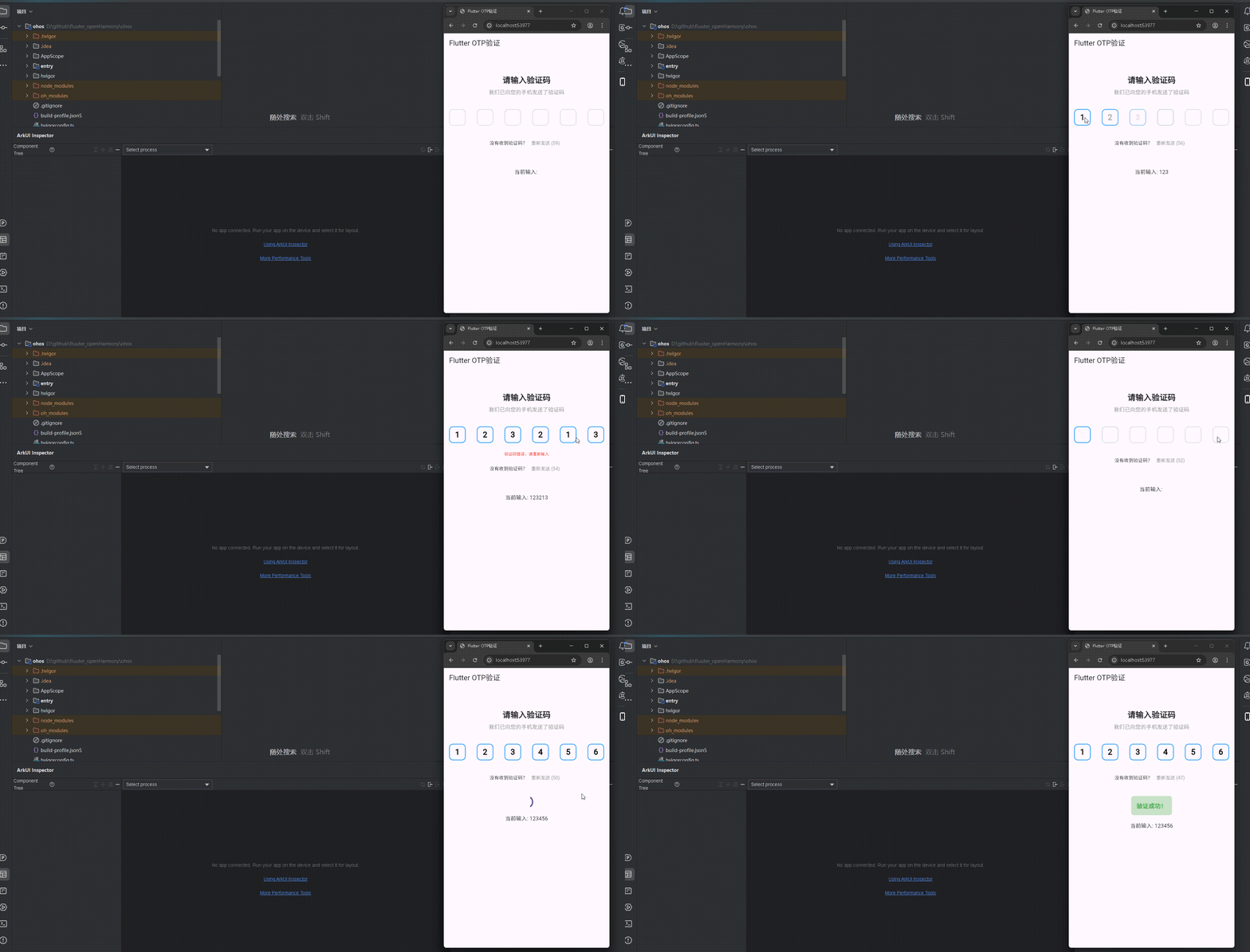
运行到鸿蒙虚拟设备中效果展示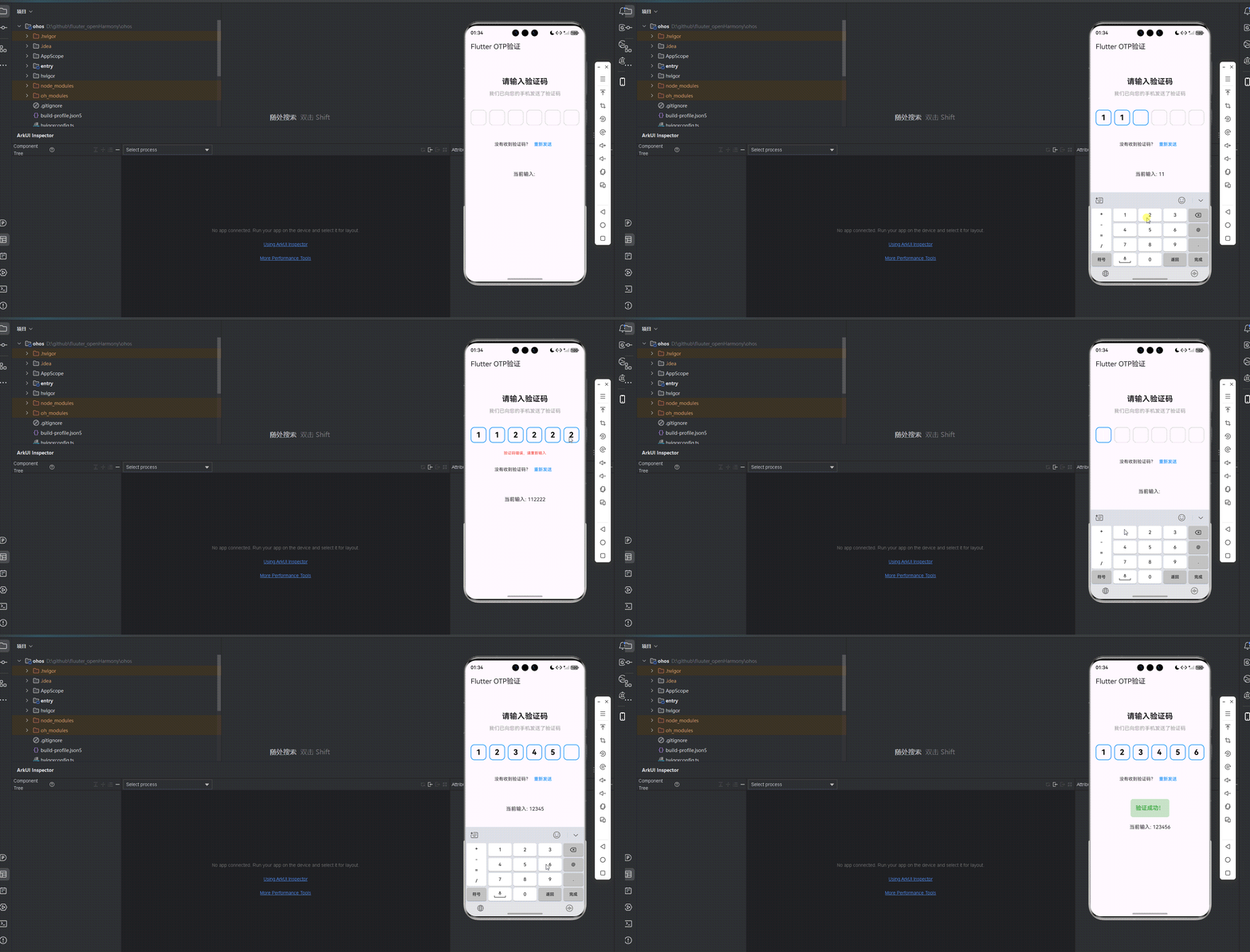
引入第三方库 pin_code_fields
依赖配置
在 pubspec.yaml 文件中添加 pin_code_fields 依赖:
dependencies:
  flutter:
    sdk: flutter
  cupertino_icons: ^1.0.8
  pin_code_fields: ^8.0.1
执行 flutter pub get 命令安装依赖:
flutter pub get
库版本选择
选择 pin_code_fields 8.0.1 版本,与 Flutter 3.6.2 完全兼容。在选择依赖版本时,应参考库的发布说明和兼容性文档,确保与当前 Flutter SDK 版本匹配。
功能代码实现
1. OTP 验证组件开发
创建 otp_verification.dart 文件,实现高度自定义的 OTP 验证组件。该组件封装了 pin_code_fields 库的核心功能,并添加了重新发送验证码的功能。
组件设计思路
- 参数化设计:通过丰富的参数配置,使组件适应不同的使用场景
- 状态管理:使用 StatefulWidget 管理组件内部状态,包括倒计时状态
- 用户交互:提供重新发送验证码功能,带有倒计时机制
- 错误处理:支持显示错误提示信息
核心代码实现
import 'package:flutter/material.dart';
import 'package:pin_code_fields/pin_code_fields.dart';
class OtpVerification extends StatefulWidget {
final int length;
final ValueChanged<String>? onCompleted;
final ValueChanged<String>? onChanged;
final TextStyle? textStyle;
final Color activeColor;
final Color inactiveColor;
final Color selectedColor;
final Color errorColor;
final double fieldWidth;
final double fieldHeight;
final double borderRadius;
final bool showError;
final String errorText;
final bool obscureText;
final Function()? onResend;
final int resendTimeout;
const OtpVerification({
Key? key,
this.length = 6,
this.onCompleted,
this.onChanged,
this.textStyle,
this.activeColor = Colors.blue,
this.inactiveColor = Colors.grey,
this.selectedColor = Colors.blue,
this.errorColor = Colors.red,
this.fieldWidth = 40,
this.fieldHeight = 40,
this.borderRadius = 8,
this.showError = false,
this.errorText = '验证码错误,请重新输入',
this.obscureText = false,
this.onResend,
this.resendTimeout = 60,
}) : super(key: key);
_OtpVerificationState createState() => _OtpVerificationState();
}
class _OtpVerificationState extends State<OtpVerification> {
TextEditingController _textEditingController = TextEditingController();
FocusNode _focusNode = FocusNode();
String _currentValue = '';
int _countdown = 0;
void initState() {
super.initState();
_startCountdown();
}
void _startCountdown() {
setState(() {
_countdown = widget.resendTimeout;
});
_countdownTimer();
}
void _countdownTimer() {
if (_countdown > 0) {
Future.delayed(const Duration(seconds: 1), () {
setState(() {
_countdown--;
});
_countdownTimer();
});
}
}
void _resendOtp() {
if (_countdown == 0) {
widget.onResend?.call();
_startCountdown();
}
}
void clear() {
_textEditingController.clear();
_currentValue = '';
setState(() {});
}
void dispose() {
_textEditingController.dispose();
_focusNode.dispose();
super.dispose();
}
Widget build(BuildContext context) {
return Column(
crossAxisAlignment: CrossAxisAlignment.center,
children: [
PinCodeTextField(
appContext: context,
length: widget.length,
controller: _textEditingController,
focusNode: _focusNode,
textStyle: widget.textStyle ?? TextStyle(fontSize: 20, fontWeight: FontWeight.bold),
pinTheme: PinTheme(
shape: PinCodeFieldShape.box,
borderRadius: BorderRadius.circular(widget.borderRadius),
fieldHeight: widget.fieldHeight,
fieldWidth: widget.fieldWidth,
activeColor: widget.activeColor,
inactiveColor: widget.inactiveColor,
selectedColor: widget.selectedColor,
),
keyboardType: TextInputType.number,
onCompleted: (v) {
setState(() {
_currentValue = v;
});
widget.onCompleted?.call(v);
},
onChanged: (value) {
setState(() {
_currentValue = value;
});
widget.onChanged?.call(value);
},
obscureText: widget.obscureText,
animationType: AnimationType.fade,
animationDuration: Duration(milliseconds: 300),
beforeTextPaste: (text) {
return true;
},
),
if (widget.showError)
Padding(
padding: const EdgeInsets.only(top: 8.0),
child: Text(
widget.errorText,
style: TextStyle(color: widget.errorColor, fontSize: 12),
),
),
const SizedBox(height: 20),
Row(
mainAxisAlignment: MainAxisAlignment.center,
children: [
const Text('没有收到验证码?'),
TextButton(
onPressed: _resendOtp,
child: Text(
_countdown > 0 ? '重新发送 ($_countdown)' : '重新发送',
style: TextStyle(
color: _countdown > 0 ? Colors.grey : widget.activeColor,
),
),
),
],
),
],
);
}
}
组件使用方法
OtpVerification(
  length: 6, // 验证码长度
  onCompleted: _onOtpCompleted, // 验证码输入完成回调
  onChanged: _onOtpChanged, // 验证码输入变化回调
  showError: _showError, // 是否显示错误
  errorText: '验证码错误,请重新输入', // 错误提示文本
  onResend: _onResendOtp, // 重新发送验证码回调
  activeColor: Colors.blue, // 激活状态颜色
  inactiveColor: Colors.grey[300]!, // 未激活状态颜色
  selectedColor: Colors.blue, // 选中状态颜色
  errorColor: Colors.red, // 错误状态颜色
  fieldWidth: 50, // 输入框宽度
  fieldHeight: 50, // 输入框高度
  borderRadius: 12, // 输入框圆角
  textStyle: const TextStyle(
    fontSize: 24,
    fontWeight: FontWeight.bold,
    color: Colors.black,
  ), // 文本样式
)
开发注意事项
-
参数配置:使用 pin_code_fields 8.0.1 版本时,需要注意某些参数名称与早期版本不同,例如
enableInteractiveSelection、errorColor(在 PinTheme 中)、showError和errorText等参数在该版本中不存在。 -
状态管理:倒计时功能需要在组件内部管理状态,使用递归的 Future.delayed 实现倒计时逻辑,确保在组件销毁时正确释放资源。
-
用户体验:为了提升用户体验,建议添加适当的动画效果,如验证码输入时的淡入淡出效果,并确保错误提示信息清晰可见。
-
安全性:如果需要保护用户隐私,可以设置
obscureText: true来遮挡验证码字符。
2. 首页集成实现
在 main.dart 文件中集成 OTP 验证组件,实现完整的 OTP 验证功能。
实现思路
- 状态管理:使用 StatefulWidget 管理验证码输入状态、错误状态和验证状态
- 用户反馈:提供验证码验证结果的视觉反馈,包括加载状态和成功提示
- 交互体验:添加重新发送验证码的交互逻辑
核心代码实现
import 'package:flutter/material.dart';
import 'otp_verification.dart';
void main() {
runApp(const MyApp());
}
class MyApp extends StatelessWidget {
const MyApp({super.key});
Widget build(BuildContext context) {
return MaterialApp(
title: 'Flutter OTP验证',
theme: ThemeData(
colorScheme: ColorScheme.fromSeed(seedColor: Colors.deepPurple),
useMaterial3: true,
),
debugShowCheckedModeBanner: false,
home: const MyHomePage(title: 'Flutter OTP验证'),
);
}
}
class MyHomePage extends StatefulWidget {
const MyHomePage({super.key, required this.title});
final String title;
State<MyHomePage> createState() => _MyHomePageState();
}
class _MyHomePageState extends State<MyHomePage> {
String _otpCode = '';
bool _showError = false;
bool _isValid = false;
bool _isLoading = false;
void _onOtpCompleted(String value) {
setState(() {
_otpCode = value;
_isLoading = true;
});
// 模拟验证过程
Future.delayed(const Duration(seconds: 1), () {
setState(() {
_isLoading = false;
// 简单的OTP验证,这里假设正确的验证码是123456
if (value == '123456') {
_isValid = true;
_showError = false;
} else {
_isValid = false;
_showError = true;
}
});
});
}
void _onOtpChanged(String value) {
setState(() {
_otpCode = value;
if (_showError && value.length < 6) {
_showError = false;
}
});
}
void _onResendOtp() {
// 模拟重新发送验证码
ScaffoldMessenger.of(context).showSnackBar(
const SnackBar(
content: Text('验证码已重新发送'),
duration: Duration(seconds: 2),
),
);
}
Widget build(BuildContext context) {
return Scaffold(
appBar: AppBar(
title: Text(widget.title),
),
body: Center(
child: Padding(
padding: const EdgeInsets.all(16.0),
child: Column(
crossAxisAlignment: CrossAxisAlignment.center,
children: [
const SizedBox(height: 50),
const Text(
'请输入验证码',
style: TextStyle(fontSize: 24, fontWeight: FontWeight.bold),
textAlign: TextAlign.center,
),
const SizedBox(height: 10),
const Text(
'我们已向您的手机发送了验证码',
style: TextStyle(fontSize: 16, color: Colors.grey),
textAlign: TextAlign.center,
),
const SizedBox(height: 40),
OtpVerification(
length: 6,
onCompleted: _onOtpCompleted,
onChanged: _onOtpChanged,
showError: _showError,
errorText: '验证码错误,请重新输入',
onResend: _onResendOtp,
activeColor: Colors.blue,
inactiveColor: Colors.grey[300]!,
selectedColor: Colors.blue,
errorColor: Colors.red,
fieldWidth: 50,
fieldHeight: 50,
borderRadius: 12,
textStyle: const TextStyle(
fontSize: 24,
fontWeight: FontWeight.bold,
color: Colors.black,
),
),
const SizedBox(height: 40),
if (_isLoading)
const CircularProgressIndicator(),
if (_isValid && !_isLoading)
Container(
padding: const EdgeInsets.all(16),
decoration: BoxDecoration(
color: Colors.green[100],
borderRadius: BorderRadius.circular(8),
),
child: const Text(
'验证成功!',
style: TextStyle(
fontSize: 18,
color: Colors.green,
fontWeight: FontWeight.bold,
),
),
),
const SizedBox(height: 20),
Text(
'当前输入: $_otpCode',
style: const TextStyle(fontSize: 16),
),
],
),
),
),
);
}
}
开发注意事项
-
状态管理:在集成 OTP 验证组件时,需要管理多个状态,包括验证码输入值、错误状态、加载状态和验证结果状态。使用 setState 方法更新这些状态时,应确保只在必要时调用,避免不必要的重绘。
-
用户反馈:为了提供良好的用户体验,应在验证码验证过程中显示加载指示器,并在验证完成后提供清晰的成功或失败反馈。
-
错误处理:当用户输入错误的验证码时,应显示错误提示信息,并在用户开始重新输入时自动清除错误状态。
-
交互设计:重新发送验证码按钮应在倒计时期间禁用,并显示剩余时间,提升用户体验。
开发中遇到的问题与解决方案
1. 依赖版本兼容性问题
问题:pin_code_fields 库的版本与当前 Flutter SDK 版本不兼容,导致构建失败。
解决方案:选择与 Flutter SDK 版本兼容的 pin_code_fields 版本。本次开发使用的是 8.0.1 版本,与 Flutter 3.6.2 完全兼容。在选择依赖版本时,应参考库的发布说明和兼容性文档。
2. 参数配置问题
问题:pin_code_fields 8.0.1 版本中某些参数名称与文档描述不一致,导致编译错误。
解决方案:
- 移除不存在的
enableInteractiveSelection参数 - 移除 PinTheme 中不存在的
errorColor参数 - 移除不存在的
showError和errorText参数 - 移除不存在的
obscureCharacter参数
注意事项:在使用第三方库时,应仔细查看对应版本的 API 文档,而不是依赖通用文档,因为不同版本的 API 可能存在差异。
3. 倒计时功能实现问题
问题:重新发送验证码的倒计时功能需要在组件内部管理状态,涉及到定时器的创建和销毁。
解决方案:
- 在组件初始化时启动倒计时
- 使用递归的 Future.delayed 实现倒计时逻辑
- 在组件销毁时确保所有资源被正确释放
实现细节:
void _startCountdown() {
  setState(() {
    _countdown = widget.resendTimeout;
  });
  _countdownTimer();
}

void _countdownTimer() {
  if (_countdown > 0) {
    Future.delayed(const Duration(seconds: 1), () {
      setState(() {
        _countdown--;
      });
      _countdownTimer();
    });
  }
}
4. OpenHarmony 平台适配问题
问题:在 OpenHarmony 平台上构建时出现依赖解析失败或运行时错误。
解决方案:
- 确保 Flutter SDK 版本 >= 3.18.0
- 确保 ohos_flutter 插件版本与当前 Flutter 版本兼容
- 遵循 OpenHarmony 平台的构建规范和要求
注意事项:不同平台可能有不同的构建要求和限制,应参考平台特定的文档和最佳实践。
技术点总结
1. Flutter 组件化开发
- 自定义组件设计:创建了高度可自定义的 OtpVerification 组件,通过丰富的参数配置适应不同场景
- 状态管理:使用 StatefulWidget 和 setState 管理组件内部状态,包括倒计时状态
- 生命周期管理:正确处理组件的初始化和销毁,避免内存泄漏
- 异步操作:使用 Future.delayed 实现倒计时功能
2. OTP 验证功能实现
- 核心组件使用:基于 pin_code_fields 库的 PinCodeTextField 组件实现验证码输入
- 验证码验证:实现简单的验证码验证逻辑,提供即时反馈
- 错误处理:通过条件渲染显示错误提示信息
- 用户体验:添加重新发送验证码功能,带有倒计时机制
- 安全性:支持验证码字符遮挡,保护用户隐私
3. 跨平台适配
- 依赖管理:正确配置 pubspec.yaml,选择与 Flutter SDK 兼容的依赖版本
- 平台差异处理:考虑不同平台的特性差异,确保代码在各平台正常运行
- 构建流程:熟悉 OpenHarmony 平台的构建流程和要求
4. 代码质量与优化
- 参数化设计:通过参数化设计使组件更具通用性和可复用性
- 代码组织:合理组织代码结构,提高代码可读性和可维护性
- 错误处理:添加适当的错误处理机制,提高应用的稳定性
- 性能优化:合理使用 setState,避免不必要的重绘
5. 用户体验优化
- 视觉设计:通过精心的颜色搭配和布局设计,提供美观的视觉效果
- 交互反馈:提供清晰的视觉反馈,如错误提示、成功提示、加载状态
- 动画效果:添加适当的动画效果,提升用户体验
- 响应式设计:确保在不同屏幕尺寸上都能正常显示
通过本次开发,我们成功实现了在 Flutter 项目中使用 pin_code_fields 库创建 OTP 验证功能,并将其适配到 OpenHarmony 平台。这一实践不仅展示了跨平台开发的可行性,也为开发者提供了在 OpenHarmony 平台上实现安全、美观 OTP 验证功能的解决方案。
欢迎加入开源鸿蒙跨平台社区: https://openharmonycrossplatform.csdn.net

腾讯云面向开发者汇聚海量精品云计算使用和开发经验,营造开放的云计算技术生态圈。
更多推荐
 16
16 0
0- 0


 已为社区贡献12条内容

所有评论(0)