uniapp开发微信H5授权登录笔记记录
·
uniapp在开发微信H5授权登录测试笔记,主要获取用户的openid、unionid、微信昵称及微信头像,
注意:此记笔记为纯前端获取,但是涉及敏感信息,如appid、secret等信息的请求请使用后端服务请求。
-
准备测试公众号并配置
-
开发授权页面
-
建议先看一遍官方文档:微信网页授权 | 微信服务号文档
1.准备公众号并配置
1.1 有正式公众号的配置授权回调域名:登录微信公众平台,进入“开发 - 接口权限 - 网页服务 - 网页帐号 - 网页授权获取用户基本信息”,在这里设置授权回调域名。这个域名是微信授权后跳转的地址,必须正确配置,否则授权会失败。
1.2 没有公众号的使用微信测试号:测试号支持调用所有的微信API,非常适合开发和调试。你可以在这里申请测试号:微信公众平台测试号。
这里主要讲解测试公众号
登录测试公众号
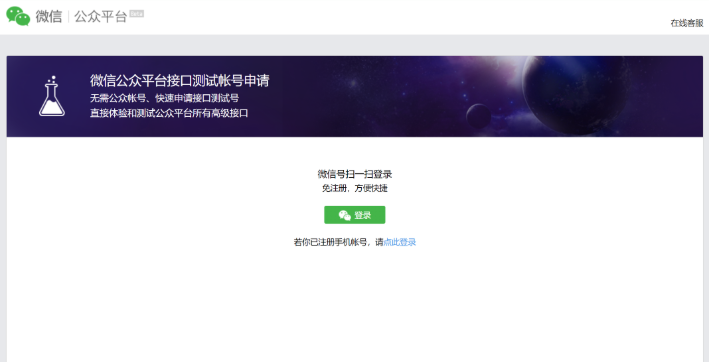
配置方式
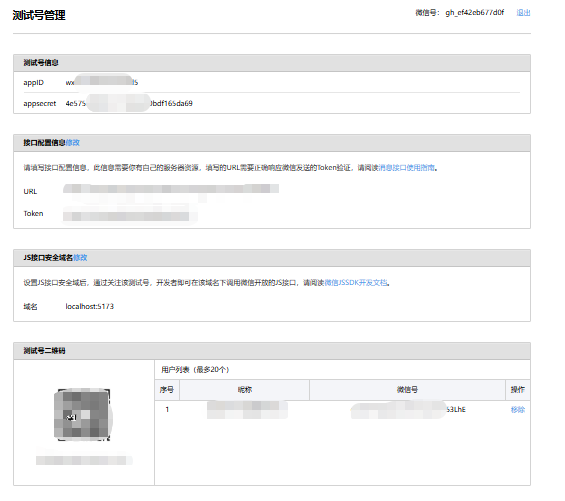
至此,测试公众号配置完成
2.开发并调试
2.1 HBuilder X创建uniapp项目
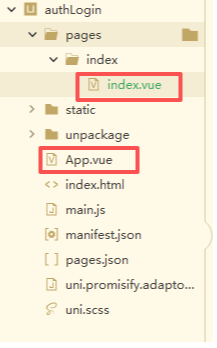
2.2 开发
App.vue
<script>
	// 这个几个参数一般是在后端代码里,不应该暴露在前端,这里由于是测试,直接写在前端代码中
	const appid = "开发公众号的appID" // 公众号的唯一标识
	const redirect_uri = "http://127.0.0.1:5173"; // 授权后重定向的回调链接地址 上面配置JS接口安全域名
	const scope = "snsapi_userinfo"; // 非静默授权:snsapi_userinfo  静默授权:snsapi_bas
	const secret = "开发公众号的secret";
	export default {

		onLaunch: function() {
			console.log('App Launch')
		},
		onShow: function() {
			console.log('App Show')
			// 在这里处理微信H5自动登录
			// #ifdef H5
			const openid = uni.getStorageSync('OPENID');
			// 不存在openid时获取code
			if (!openid && this.isWeiXin()) {
				this.getUrlCode(urlParams => {
					if (urlParams.code == undefined) {
						// 这里的url 可以是后端接口组装后返回给前端,因为是测试,所以就不做后端处理,直接在前端完成
						let  url =  `https://open.weixin.qq.com/connect/oauth2/authorize?appid=${appid}&redirect_uri=${redirect_uri}&response_type=code&scope=${scope}&state=STATE#wechat_redirect`
						location.href = url
					} else {
						// 拿到code ,应传递给后端服务器,后端服务需访问相应接口换取用户信息和授权 Token
						// 由于测试,咱们直接在前端获取 token
						console.log("拿到了code",urlParams.code)
						this.get_access_token(urlParams.code,(res)=>{
							console.log("res获取到access_token及openid",res)
							// 如果网页授权作用域为 snsapi_userinfo,则此时可以通过 access_token 和 openid 拉取用户信息。
							// 拿到access_token和openid 继续获取用户信息 注意 必须是snsapi_userinfo授权方式才能获取
							if(res.data && res.data.access_token && res.data.openid){
								this.get_userinfo(res.data.access_token,res.data.openid,(user)=>{
									console.log('获取到用户信息',user)
									uni.setStorageSync('OPENID',user.data.openid)
									uni.setStorageSync('userinfo',user.data)
									// 拿到用户信息后 根据实际情况做其他逻辑处理...
								})
							}

						})
					}
				});
			}
			// #endif
		},
		onHide: function() {
			console.log('App Hide')
		},
		methods:{
			/**
			 * 注意:该方法应该在服务器端处理 ,这里由于测试,直接在前端处理
			 * 根据获取access_token及openid
			 */
			get_access_token(code,callback){
				uni.request({
					url: 'https://api.weixin.qq.com/sns/oauth2/access_token?appid='+appid+'&secret='+secret+'&code='+code+'&grant_type=authorization_code',
					method: 'GET',
					data: {},
					header: {
						'content-type': 'application/x-www-form-urlencoded;application/json'
					},
					dataType: 'json',
					responseType: 'text',
					success: (res) => {
						callback(res)
					},
					fail: (res) => {
						console.log("get_access_token错误信息",res)
					},
					complete: (res) => {

					}
				});
			},
			/**
			 *  注意:该方法应该在服务器端处理 ,这里由于测试,直接在前端处理
			 * 根据access_token及openid获取用户的信息
			 */
			get_userinfo(access_token,openid,callback){
				uni.request({
					url: 'https://api.weixin.qq.com/sns/userinfo?access_token='+access_token+'&openid='+openid+'&lang=zh_CN',
					method: 'GET',
					data: {},
					header:{
						'content-type': 'application/x-www-form-urlencoded;application/json'
					},
					dataType: 'json',
					responseType: 'text',
					success: (res) => {
						callback(res)
					},
					fail: (res) => {
						console.log("get_access_token错误信息",res)
					},
					complete: (res) => {

					}
				});
			},
			/**
			 * 获取url参数
			 * @param {Object} callback
			 */
			getUrlCode(callback) {
				var url = location.search;
				var theRequest = new Object();
				if (url.indexOf('?') != -1) {
					var str = url.substr(1);
					var strs = str.split('&');
					for (var i = 0; i < strs.length; i++) {
						theRequest[strs[i].split('=')[0]] = strs[i].split('=')[1];
					}
				}
				typeof callback == 'function' && callback(theRequest);
			},
			/**
			 * 是否是微信浏览器
			 */
			isWeiXin() {
				// #ifndef H5
				return false;
				// #endif
				var ua = navigator.userAgent.toLowerCase();
				// debugger;;
				if (ua.match(/MicroMessenger/i) == "micromessenger") {
					return true;
				} else {
					return false;
				}

			},
			/*------------------------------以下方法跟授权登录无关,我用于处理其他的----------------------*/
			/**
			 * 是否处于小程序 web - view 环境
			*/
			isInMiniProgramWebView(){
				// #ifndef H5
				return false;
				// #endif
				const userAgent = navigator.userAgent.toLowerCase();
				console.log("判断是否在小程序的web-view环境",userAgent.includes('micromessenger') && userAgent.includes('miniprogram'))
				return userAgent.includes('micromessenger') && userAgent.includes('miniprogram');
			},
			/**
			 * 检测苹果X以上的手机
			 */
			isIPhoneX() {
				let res = uni.getSystemInfoSync();
				if (res.model.search('iPhone X') != -1) {
					return true;
				}
				return false;
			},
			//判断安卓还是iOS
			isAndroid() {
				let platform = uni.getSystemInfoSync().platform
				if (platform == 'ios') {
					return false;
				} else if (platform == 'android') {
					return true;
				}
			},
			/**
			 * 判断手机是否为iphoneX系列
			 */
			uniappIsIPhoneX() {
				let isIphoneX = false;
				let systemInfo = uni.getSystemInfoSync();
				// #ifdef MP
				if (systemInfo.model.search('iPhone X') != -1 || systemInfo.model.search('iPhone 11') != -1 || systemInfo.model.search(
						'iPhone12') != -1) {
					isIphoneX = true;
				}
				// #endif

				// #ifdef H5
				var u = navigator.userAgent;
				var isIOS = !!u.match(/\(i[^;]+;( U;)? CPU.+Mac OS X/); //ios终端

				if (isIOS) {
					if (systemInfo.screenWidth == 375 && systemInfo.screenHeight == 812 && systemInfo.pixelRatio == 3) {
						isIphoneX = true;
					} else if (systemInfo.screenWidth == 414 && systemInfo.screenHeight == 896 && systemInfo.pixelRatio == 3) {
						isIphoneX = true;
					} else if (systemInfo.screenWidth == 414 && systemInfo.screenHeight == 896 && systemInfo.pixelRatio == 2) {
						isIphoneX = true;
					}
				}
				// #endif
				return isIphoneX;
			},
			/**
			 * 判断该浏览器是否为safaria浏览器
			 */
			isSafari() {
				let res = uni.getSystemInfoSync();
				var ua = navigator.userAgent.toLowerCase();
				if (ua.indexOf('applewebkit') > -1 && ua.indexOf('mobile') > -1 && ua.indexOf('safari') > -1 &&
					ua.indexOf('linux') === -1 && ua.indexOf('android') === -1 && ua.indexOf('chrome') === -1 &&
					ua.indexOf('ios') === -1 && ua.indexOf('browser') === -1) {
					return true;
				} else {
					return false;
				}
			},
			//上传
			upload_file_server(tempFilePath, data, path, url = "") {
				let baseUrl="你自己的接收图片的url地址"
				if (url) {
					var uploadUrl = baseUrl + url
				} else {
					var uploadUrl = baseUrl + '/api/upload/' + path
				}
				return new Promise((resolve, reject) => {
					uni.uploadFile({
						url: uploadUrl,
						filePath: tempFilePath,
						name: 'file',
						formData: data,
						success: function(res) {
							var path_str = JSON.parse(res.data);
							if (path_str.code >= 0) {
								resolve(path_str.data.pic_path);
							} else {
								reject("error");
							}
						}
					});

				});

			},
			/**
			 * 复制
			 * @param {Object} message
			 * @param {Object} callback
			 */
			copy(value, callback) {
				// #ifdef H5
				var oInput = document.createElement('input'); //创建一个隐藏input(重要!)
				oInput.value = value; //赋值
				document.body.appendChild(oInput);
				oInput.select(); // 选择对象
				document.execCommand("Copy"); // 执行浏览器复制命令
				oInput.className = 'oInput';
				oInput.style.display = 'none';
				uni.hideKeyboard();
				this.showToast({
					title: '复制成功'
				});

				typeof callback == 'function' && callback();
				// #endif

				// #ifdef MP || APP-PLUS
				uni.setClipboardData({
					data: value,
					success: () => {
						typeof callback == 'function' && callback();
					}
				});
				// #endif
			},
		}
	}
</script>

<style>
	/*每个页面公共css */
</style>
index.vue
<template>
	<view class="content">
		<image class="logo" :src="headimgurl"></image>
		<view class="text-area">
			<text class="title">{{title}}</text>
		</view>
	</view>
</template>

<script>
	export default {
		data() {
			return {
				title: uni.getStorageSync('userinfo').nickname || 'Hello',
				headimgurl:uni.getStorageSync('userinfo').headimgurl || '/static/logo.png',
			}
		},
		onLoad() {
			if(uni.getStorageSync('userinfo') && uni.getStorageSync('userinfo').nickname){
				this.title = uni.getStorageSync('userinfo').nickname
				this.headimgurl = uni.getStorageSync('userinfo').headimgurl
			}else{
				setTimeout(()=>{
						window.location.reload()
				},1000)

			}
		},
		methods: {

		}
	}
</script>

<style>
	.content {
		display: flex;
		flex-direction: column;
		align-items: center;
		justify-content: center;
	}

	.logo {
		height: 200rpx;
		width: 200rpx;
		margin-top: 200rpx;
		margin-left: auto;
		margin-right: auto;
		margin-bottom: 50rpx;
	}

	.text-area {
		display: flex;
		justify-content: center;
	}

	.title {
		font-size: 36rpx;
		color: #8f8f94;
	}
</style>
可以复制这两个页面的代码到你的项目中先运行试试效果,在详细看看App.vue里面的授权登录方法
3. 运行测试
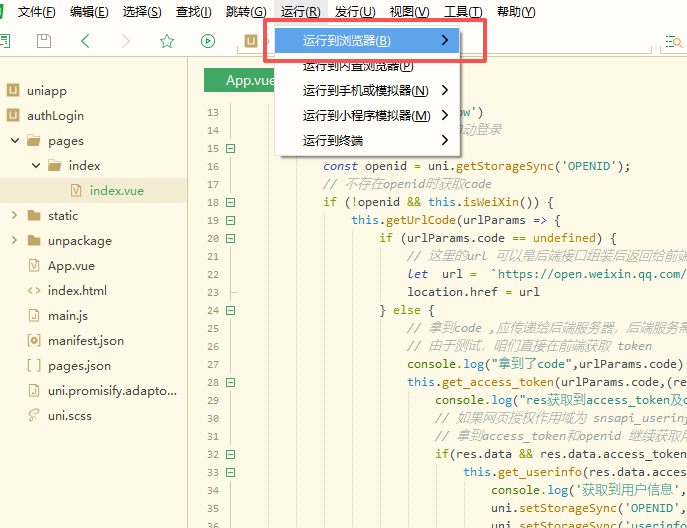
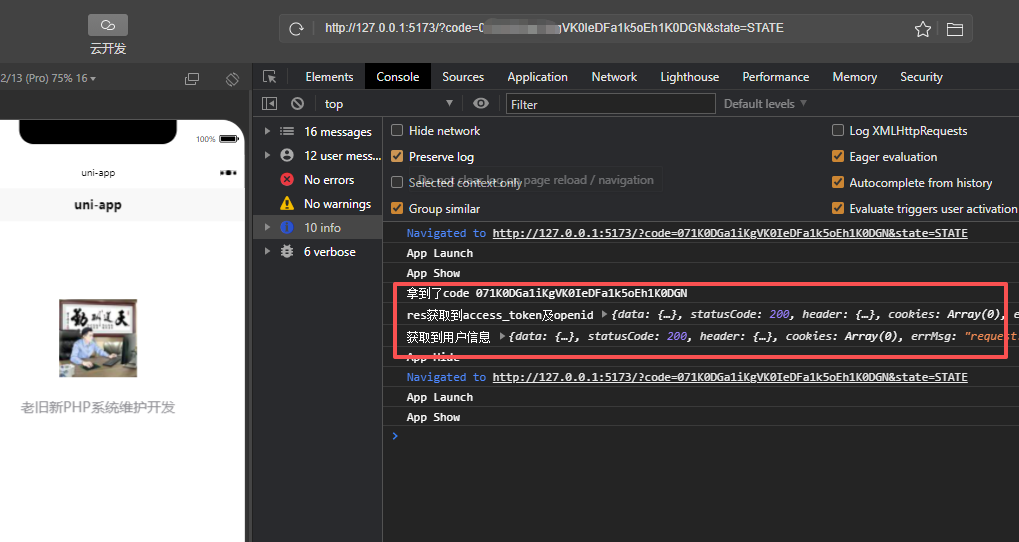
至此,uniapp开发微信H5授权开发测试完成,不明白的朋友可以多看几遍官方的文档https://developers.weixin.qq.com/doc/service/guide/h5/auth.html

腾讯云面向开发者汇聚海量精品云计算使用和开发经验,营造开放的云计算技术生态圈。
更多推荐
 19
19 0
0- 0


 已为社区贡献2条内容

所有评论(0)