Spring Boot集成Kafka 4.0.x(KRaft 模式,无 Zookeeper)
·
Kafka 是一个分布式、高吞吐、可持久化、可扩展的流平台,擅长海量日志、大数据实时处理、高并发消息缓冲,是现代大数据架构与微服务里的核心消息引擎。下面我们来试一下Spring Boot集成Kafka 4.0.x。
一、核心前提
- Kafka 4.0+:默认使用 KRaft 模式,彻底移除 Zookeeper
- Spring Boot + Spring-Kafka :完美兼容 Kafka 4.0
- 部署 Kafka 时:不用启动 ZK,直接用 KRaft 模式启动
- 代码层面:和旧版本完全一样,只是 Kafka 服务端变了
二、Maven 依赖
<dependencies>
    <!-- Spring Boot Web -->
    <dependency>
        <groupId>org.springframework.boot</groupId>
        <artifactId>spring-boot-starter-web</artifactId>
    </dependency>

    <!-- Spring Kafka 官方 Starter(自带 Kafka 4.0 客户端) -->
    <dependency>
        <groupId>org.springframework.kafka</groupId>
        <artifactId>spring-kafka</artifactId>
    </dependency>
</dependencies>
三、application.properties 核心配置(这里给的本地kafka地址)
# Kafka 服务器地址
spring.kafka.bootstrap-servers=localhost:9092

# 生产者
spring.kafka.producer.key-serializer=org.apache.kafka.common.serialization.StringSerializer
spring.kafka.producer.value-serializer=org.apache.kafka.common.serialization.StringSerializer
spring.kafka.producer.acks=1

# 消费者
spring.kafka.consumer.group-id=test-group
spring.kafka.consumer.key-deserializer=org.apache.kafka.common.serialization.StringDeserializer
spring.kafka.consumer.value-deserializer=org.apache.kafka.common.serialization.StringDeserializer
spring.kafka.consumer.auto-offset-reset=earliest
四、生产者、消费者代码
生产者:
import jakarta.annotation.Resource;
import org.springframework.kafka.core.KafkaTemplate;
import org.springframework.stereotype.Service;

@Service
public class KafkaProducerService {
    @Resource
    private KafkaTemplate<String, String> kafkaTemplate;

    /**
     * 发送普通消息
     */
    public void sendMessage(String topic, String message) {
        kafkaTemplate.send(topic, message);
        System.out.println("【Kafka 生产者】发送:" + message);
    }
    /**
     * 发送异步回调
     */
    public void sendAsync(String topic, String message) {
        kafkaTemplate.send(topic, message)
                .whenComplete((result, ex) -> { // 新版用 whenComplete
                    if (ex == null) {
                        System.out.println("【发送成功】" + message);
                    } else {
                        System.err.println("【发送失败】" + ex.getMessage());
                    }
                });
    }
}
消费者:
import org.springframework.kafka.annotation.KafkaListener;
import org.springframework.kafka.support.Acknowledgment;
import org.springframework.stereotype.Service;

@Service
public class KafkaConsumerService {
    /**
     * 监听主题:test-topic
     */
    @KafkaListener(topics = "test-topic", groupId = "default-group")
    public void listen(String message, Acknowledgment ack) {
        try {
            System.out.println("【Kafka 消费者】收到:" + message);

            // 业务处理成功 → 手动提交偏移量
            ack.acknowledge();
        } catch (Exception e) {
            // 异常不提交,会重新消费
            System.err.println("消费失败:" + e.getMessage());
        }
    }
}
topic的创建
import org.apache.kafka.clients.admin.NewTopic;
import org.springframework.context.annotation.Bean;
import org.springframework.context.annotation.Configuration;

@Configuration
public class KafkaTopicConfig {

    @Bean
    public NewTopic testTopic() {
        // 参数:主题名 | 分区数 | 副本数
        return new NewTopic("test-topic", 3, (short) 1);
    }
}
测试:
  @Autowired
    private KafkaProducerService kafkaProducerService;


    @Test
    public void testSendMessage() {
        kafkaProducerService.sendAsync("test-topic","我来自测试类!");
        System.out.println("测试消息发送成功");
    }
测试成功返回:


四、集群的监控与管理
Kafka 监控不是只看存活,还要关注以下几点:
- 集群健康:Broker 存活、Controller 状态、ISR 同步
- 消息生产 / 消费:生产 TPS、消费延迟、堆积量
- 分区状态:分区数量、Leader 分布、副本同步
- 磁盘 / 性能:磁盘使用率、网络 I/O、GC、内存
- 偏移量 / 消费组:消费组状态、offset 推进情况
补充--本地启动kafka
1、下载kafka_2.13-4.2.0.tgz(二进制包)
2、解压到新的目录D:\kafka_2.13-4.2.0\
3、Windows系统运行kafka-storage.bat文件,得到uuid
打开解压后的文件进入cmd,运行下面命令
bin\windows\kafka-storage.bat random-uuid4、格式化server.properties
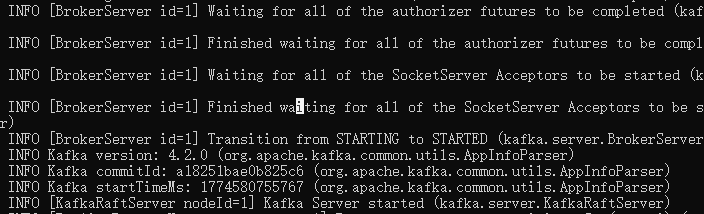
bin\windows\kafka-storage.bat format -t 这里换成你的UUID -c config/kraft/server.properties5、启动kafka
bin\windows\kafka-server-start.bat config/kraft/server.properties启动成功可在最后一行找到“Kafka Server started”.

腾讯云面向开发者汇聚海量精品云计算使用和开发经验,营造开放的云计算技术生态圈。
更多推荐
 20
20 0
0- 0


 已为社区贡献2条内容

所有评论(0)