基于深度学习的疲劳驾驶识别检测系统|全新web界面|多模态|AI大模型智能分析|YOLOv8、YOLOv10、YOLOv11、YOLOv12
一、 系统引言
随着社会经济的快速发展,汽车已成为不可或缺的交通工具,但随之而来的道路交通安全问题也日益严峻。其中,疲劳驾驶是导致重大交通事故的主要因素之一,对驾驶员和公众的生命财产安全构成了严重威胁。统计表明,长时间连续驾驶、睡眠不足等因素引发的驾驶员疲劳,会显著降低其反应速度、判断能力和警觉性。因此,开发一种能够实时、准确、非接触式地识别驾驶员疲劳状态的技术,并进行有效预警,对于提升道路交通安全水平具有极其重要的现实意义。
传统的疲劳检测方法多依赖于接触式传感器(如脑电图、心电图),这些方法不仅侵扰驾驶员,且成本高昂,难以在实际驾驶场景中大规模应用。近年来,随着深度学习技术在计算机视觉领域的突破,基于人脸表情和行为分析的非接触式疲劳检测方案展现出巨大的潜力。本项目旨在利用最先进的YOLO系列目标检测模型,结合现代化的Web开发框架,设计并实现一个高效、稳定、用户友好的前后端分离疲劳驾驶识别检测系统。
项目源码+数据集
在哔哩哔哩视频下方简介内
基于YOLOv8/v10/v11/v12与SpringBoot的前后端分离疲劳驾驶识别检测系统(DeepSeek智能分析+web交互界面)_哔哩哔哩_bilibili
https://www.bilibili.com/video/BV1V4kBBqE6H
目录
二、 项目背景
当前,人工智能技术正深刻改变着各个行业,特别是在安防、交通等领域的智能分析与预警系统中。YOLO(You Only Look Once)系列算法作为单阶段目标检测的标杆,以其惊人的速度和较高的精度,非常适合实时性要求极高的驾驶场景。从YOLOv8到最新提出的YOLOv12,模型在 backbone 网络、neck 结构、损失函数和训练策略上不断优化,为我们的疲劳检测任务提供了多样化的、强大的模型选择。
与此同时,软件架构的发展也为此类系统的实现提供了便利。SpringBoot 作为Java领域最流行的后端框架,以其简化配置、快速开发和强大的生态著称,能够稳健地构建系统后端服务。前后端分离的架构模式,使得前端界面(如Vue.js、React)与后端业务逻辑完全解耦,不仅提升了开发效率,也保证了系统的可维护性和可扩展性。
本系统通过整合前沿的深度学习模型与成熟的Web开发技术,构建了一个集模型推理、数据管理、用户交互和智能分析于一体的综合性平台。系统不仅实现了核心的检测功能,还提供了完善的用户管理和数据可视化模块,旨在为车队管理、驾校培训乃至未来集成到智能座舱系统提供一个实用的解决方案原型。
三、 数据集介绍
本系统的核心检测能力依赖于一个高质量、大规模的专用疲劳驾驶数据集。该数据集专注于驾驶员的面部状态,为模型的精准训练提供了坚实基础。
-
类别定义:数据集共包含 4 个关键类别,用于精确描述驾驶员的眼部与嘴部状态,这是判断疲劳的主要生理指标。
-
‘close’: 闭眼状态 -
‘open’: 睁眼状态 -
‘Yawn’: 打哈欠状态 -
‘noYawn’: 非打哈欠状态(闭嘴)
-
-
数据规模与划分:数据集经过精心划分,确保了模型训练的有效性和评估的公正性。
-
训练集:13,719 张图像,用于模型学习并拟合不同状态下的特征。
-
验证集:1,380 张图像,用于在训练过程中调整超参数和监控模型性能,防止过拟合。
-
测试集:1,147 张图像,用于最终评估模型的泛化能力和准确率。
-
该数据集的规模充足,类别定义清晰,划分科学,为YOLO系列模型(v8, v10, v11, v12)的性能验证与对比提供了可靠的数据支持,是构建高精度疲劳驾驶识别系统的关键保障。
功能模块
✅ 用户登录注册:支持密码检测,保存到MySQL数据库。
✅ 支持四种YOLO模型切换,YOLOv8、YOLOv10、YOLOv11、YOLOv12。
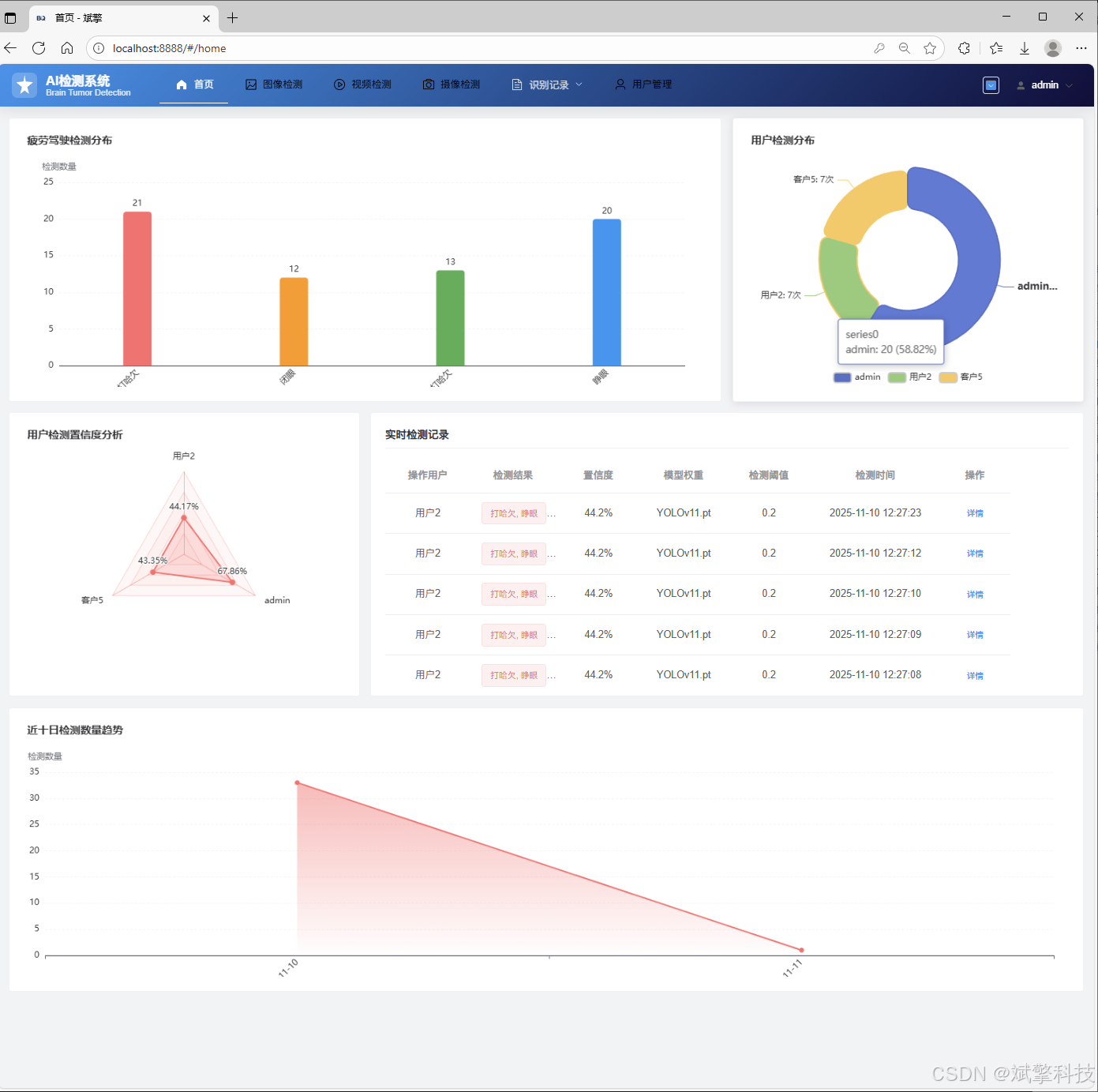
✅ 信息可视化,数据可视化。
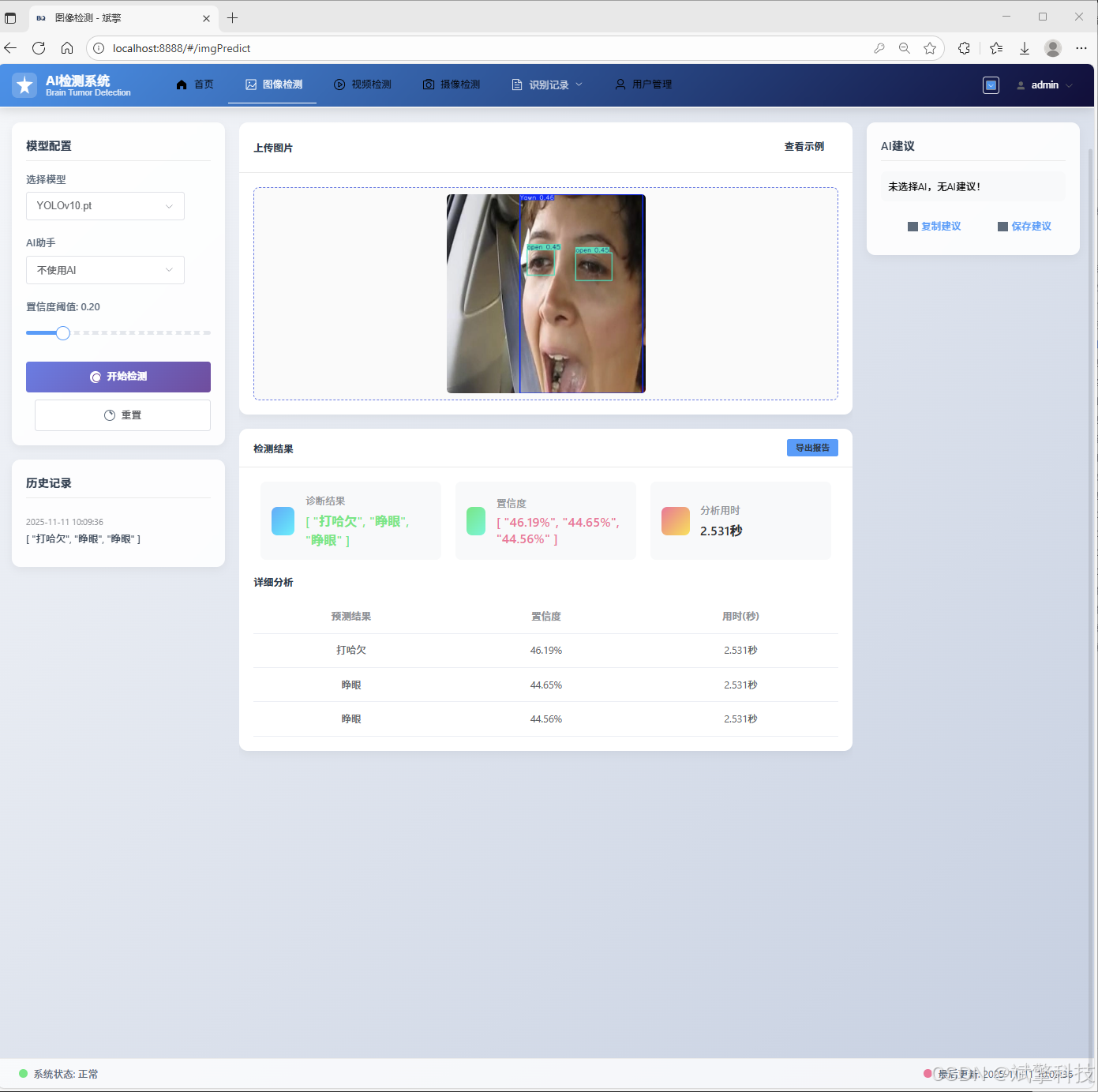
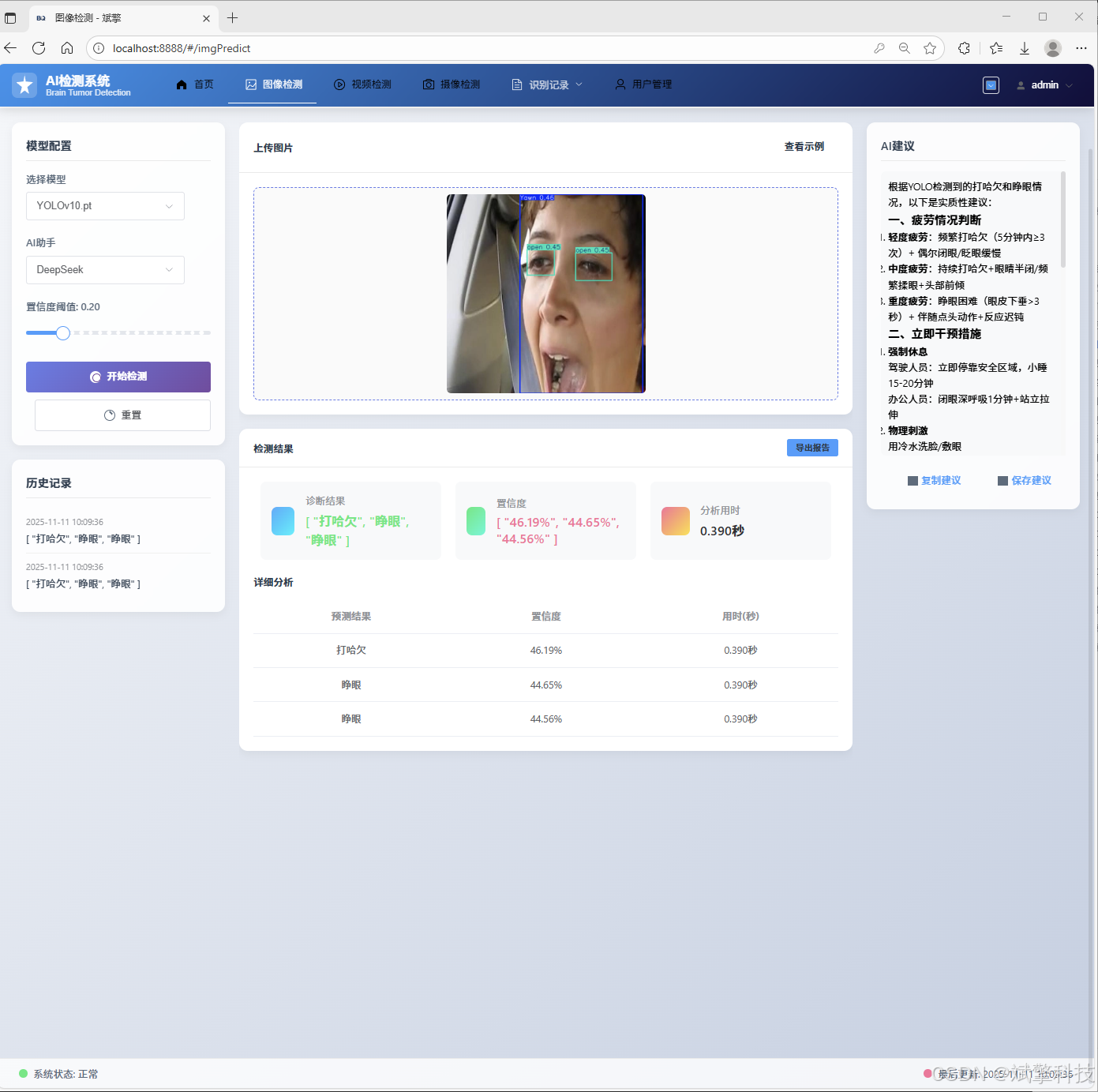
✅ 图片检测支持AI分析功能,deepseek
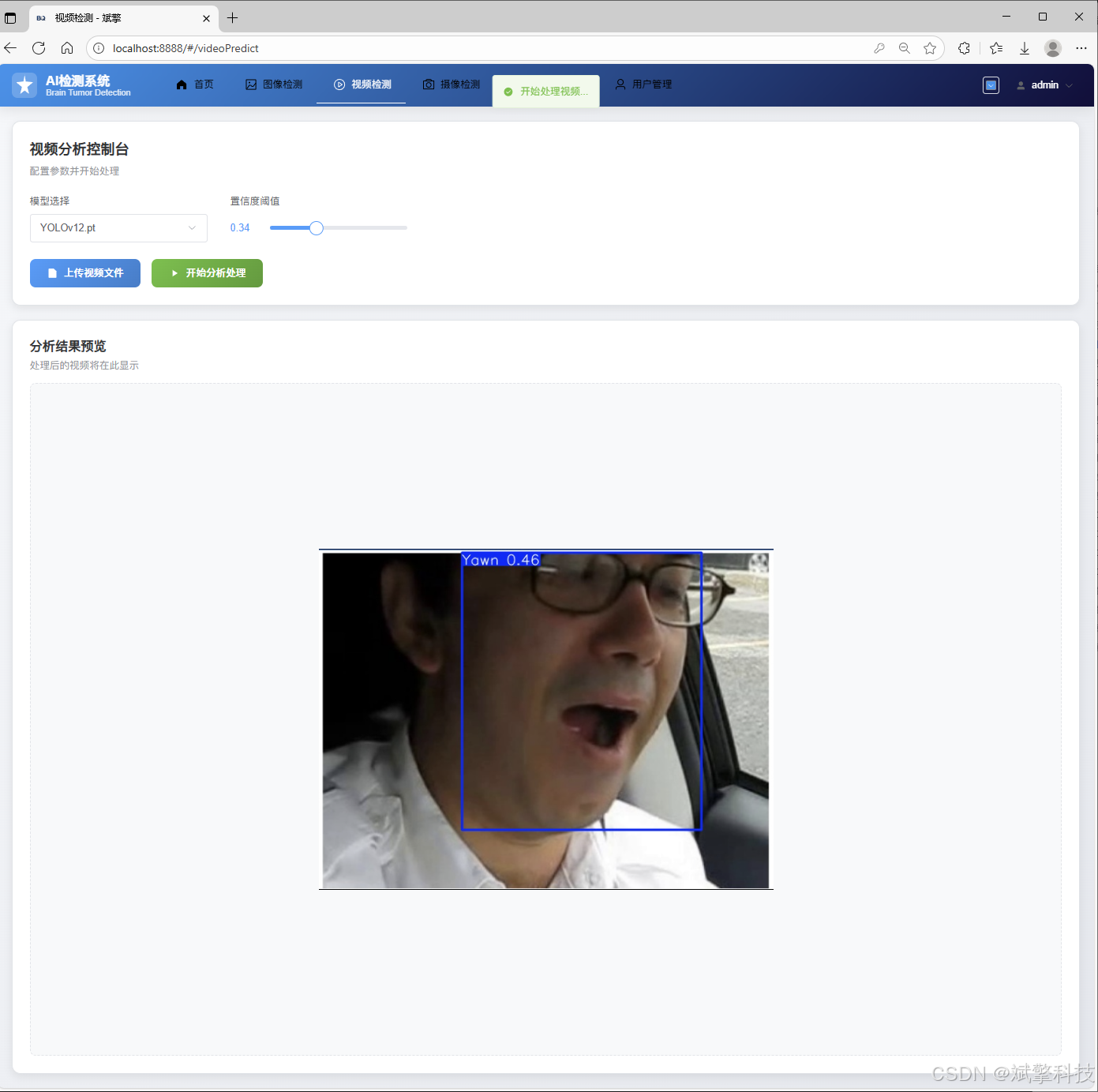
✅ 支持图像检测、视频检测和摄像头实时检测,检测结果保存到MySQL数据库。
✅ 图片识别记录管理、视频识别记录管理和摄像头识别记录管理。
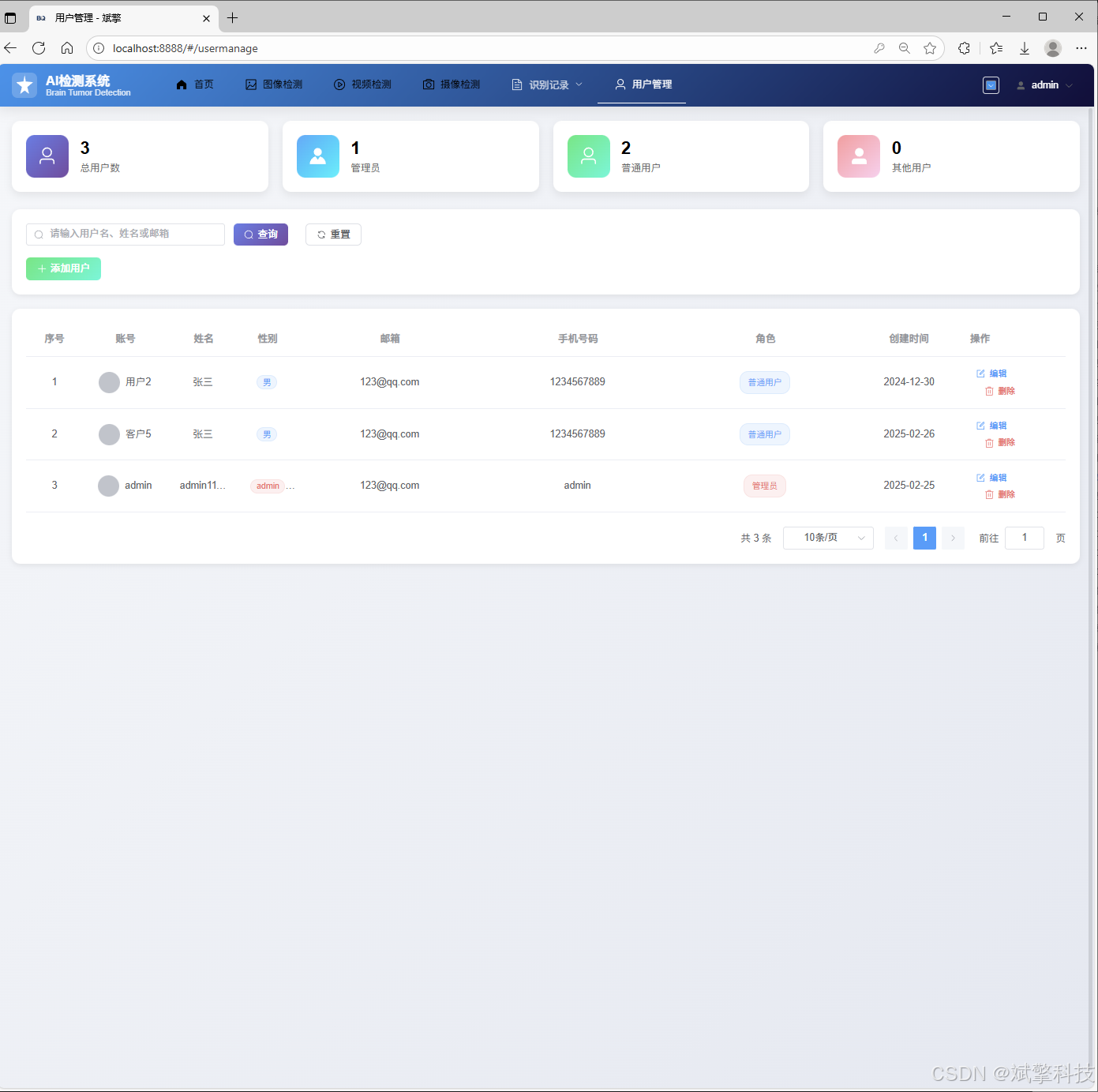
✅ 用户管理模块,管理员可以对用户进行增删改查。
✅ 个人中心,可以修改自己的信息,密码姓名头像等等。
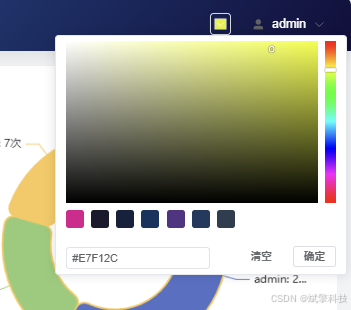
✅ 支持更换导航栏背景颜色
登录注册模块
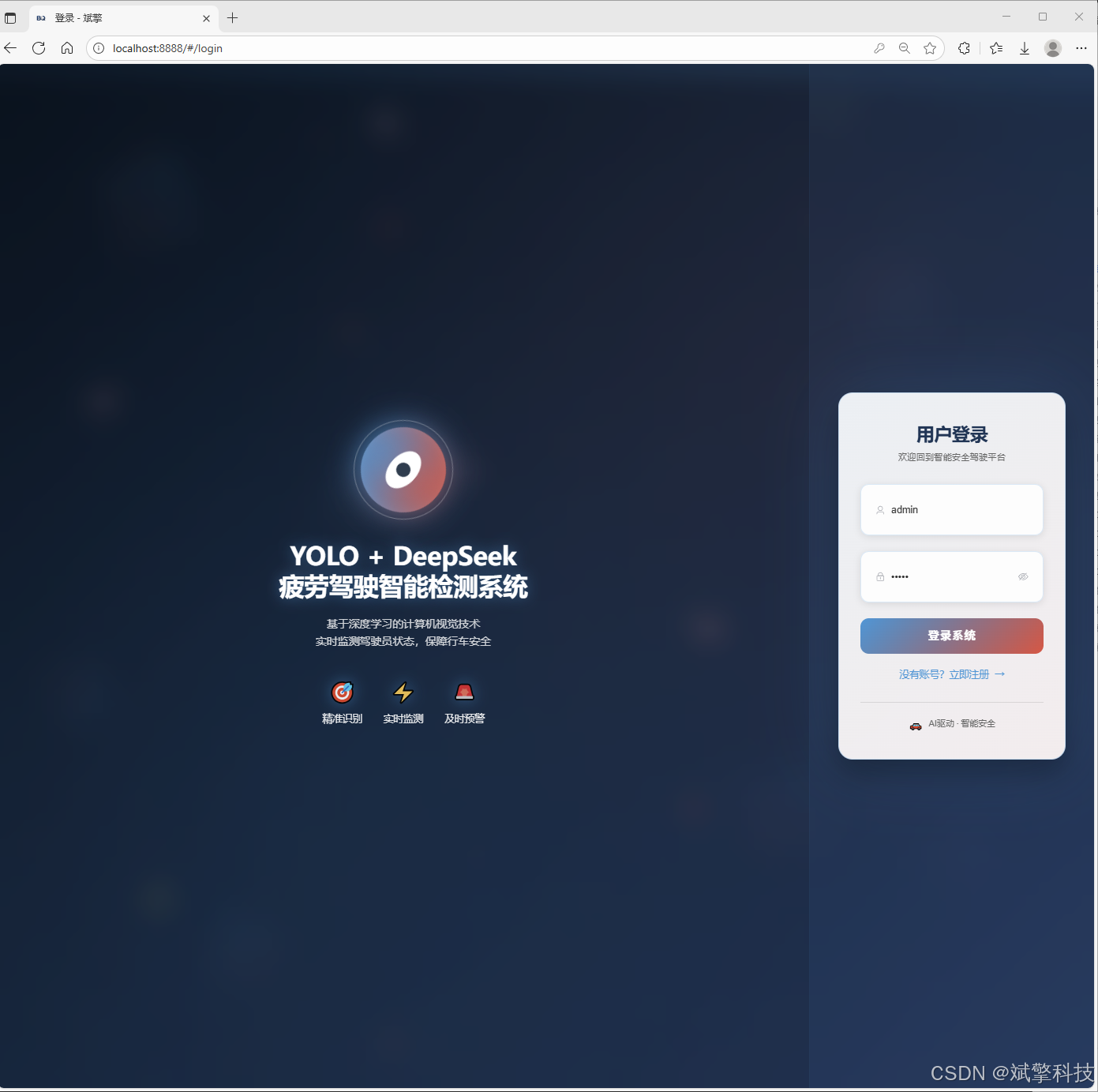
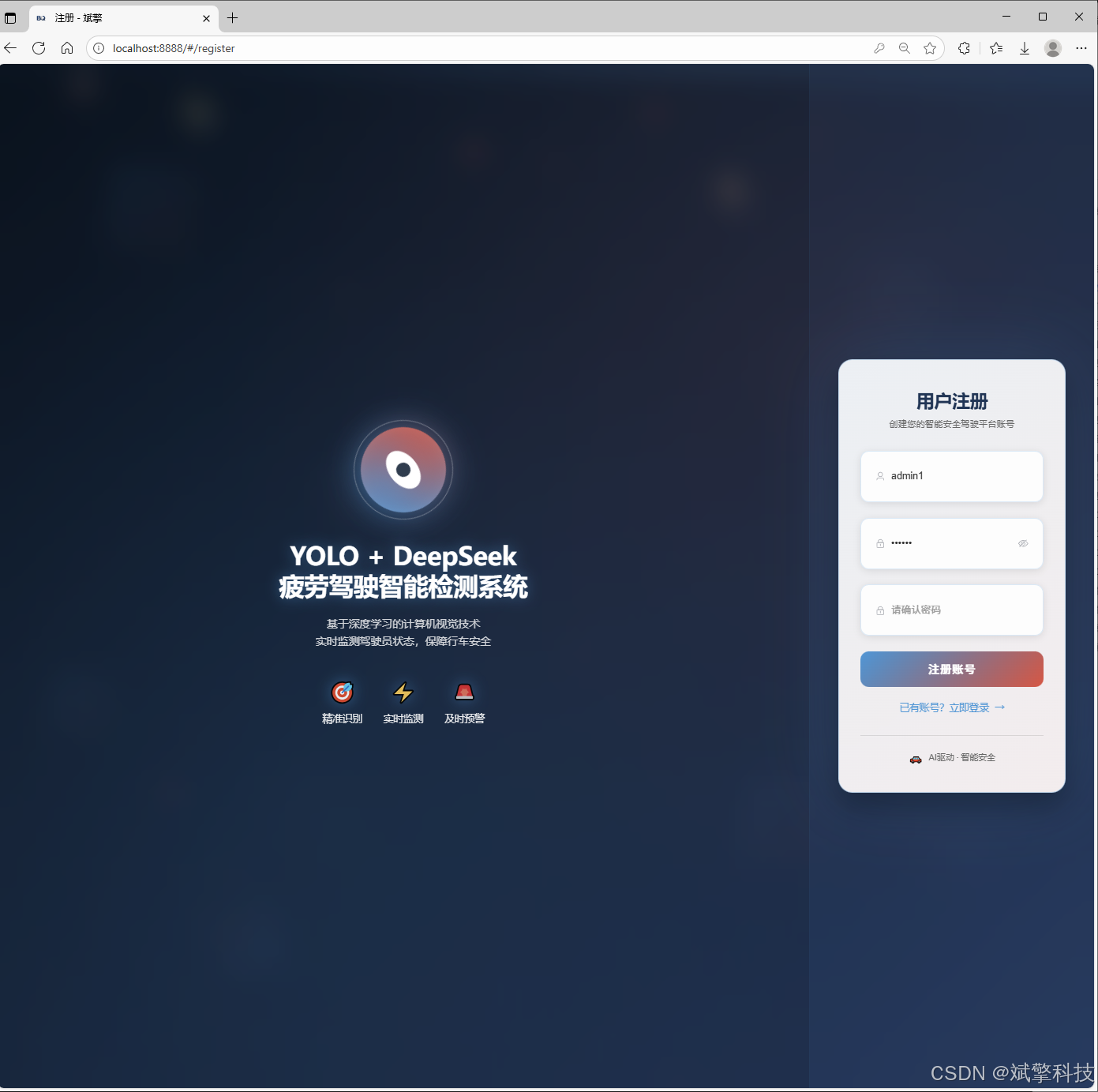
可视化模块
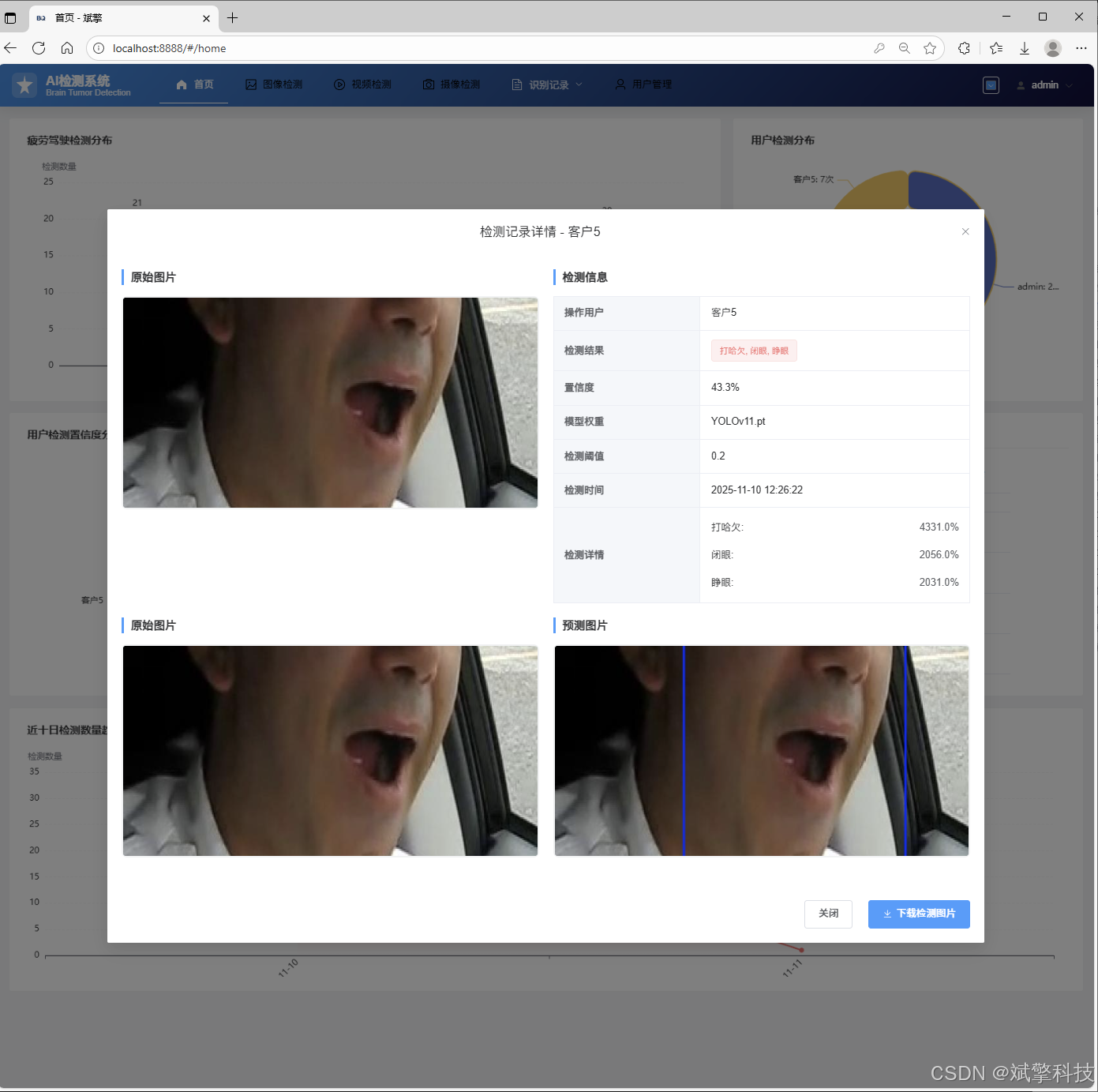
更换导航栏背景颜色
图像检测模块
-
YOLO模型集成 (v8/v10/v11/v12)
-
DeepSeek多模态分析
-
支持格式:JPG/PNG/MP4/RTSP
视频检测模块
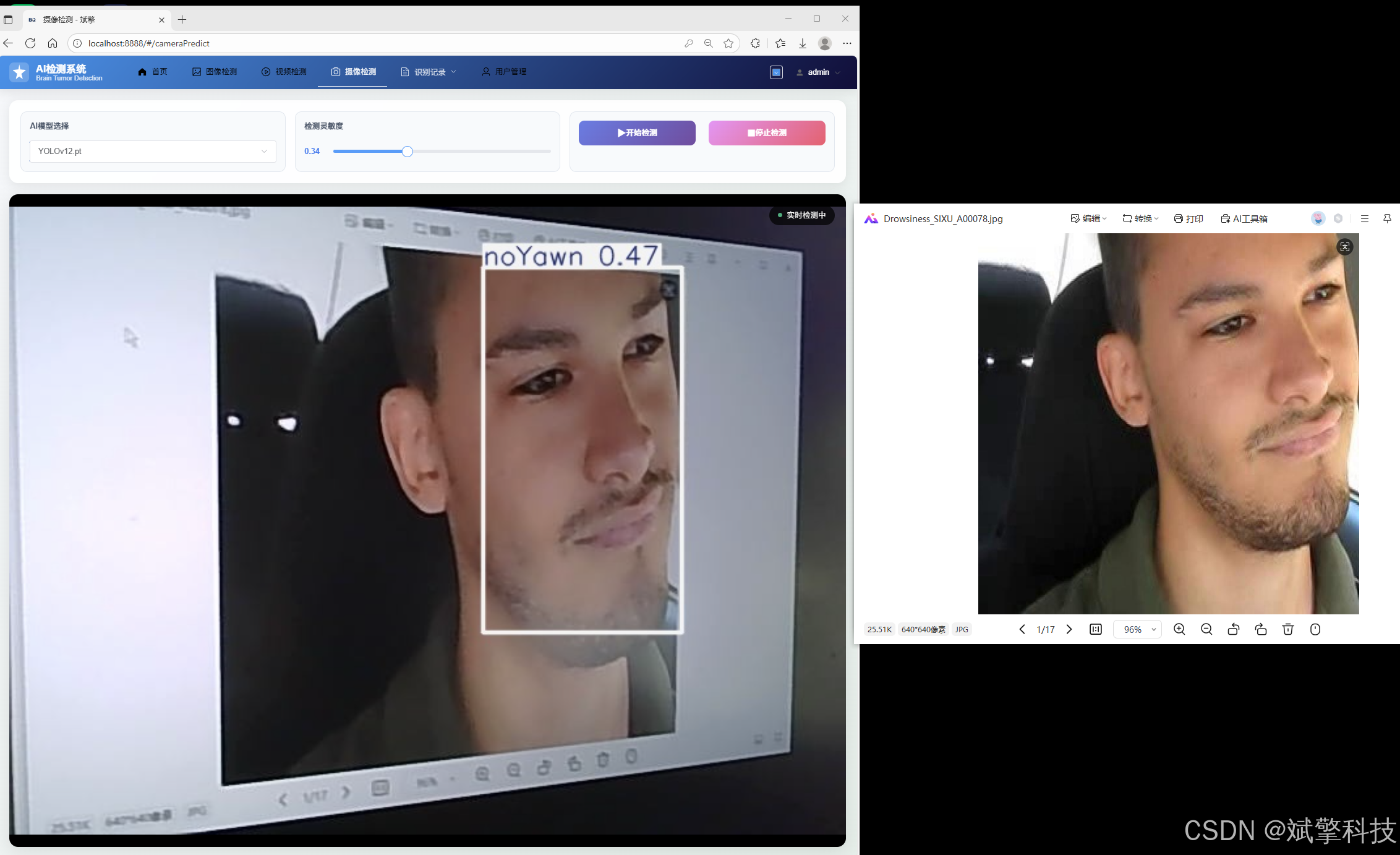
实时检测模块
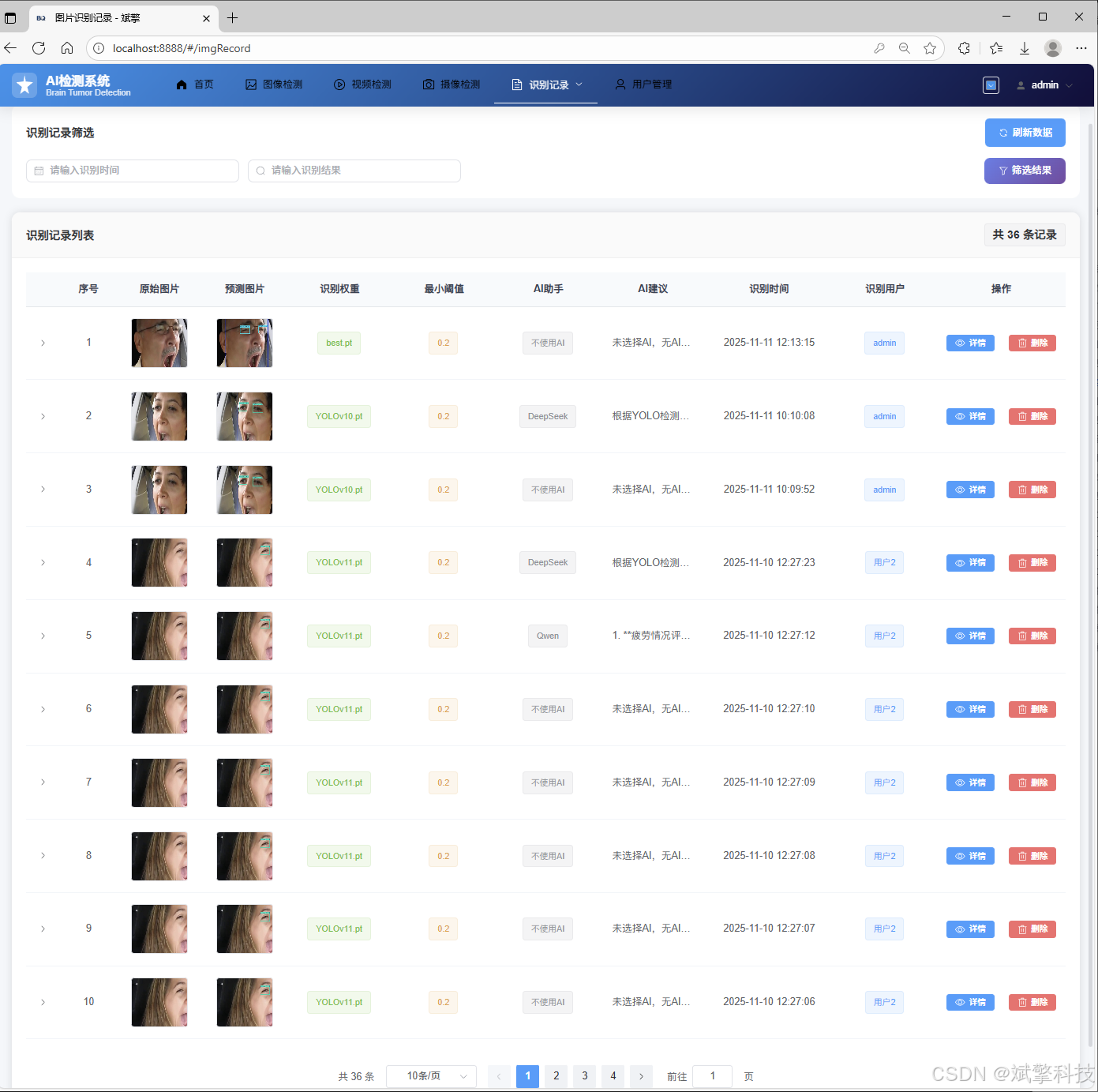
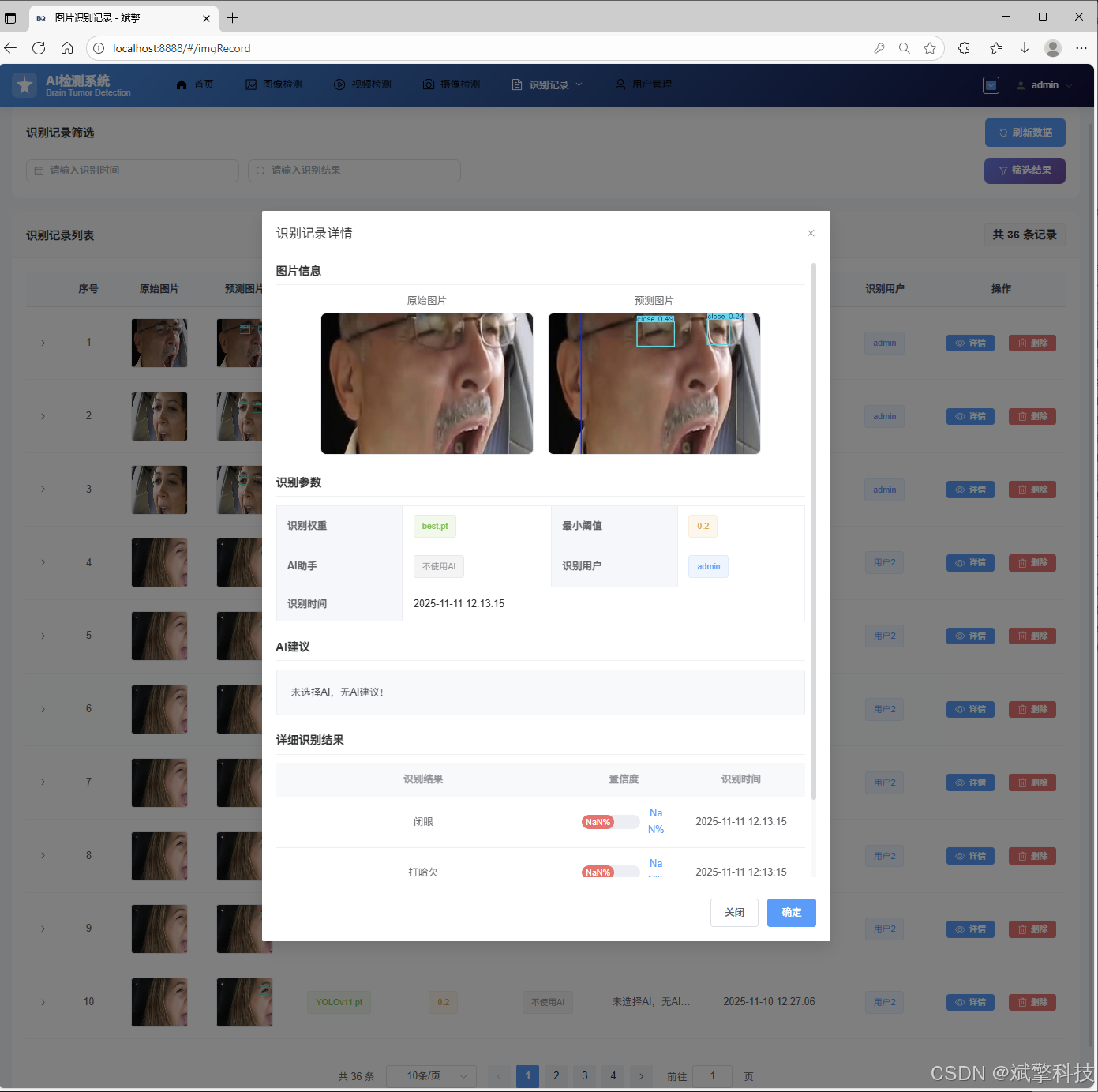
图片识别记录管理
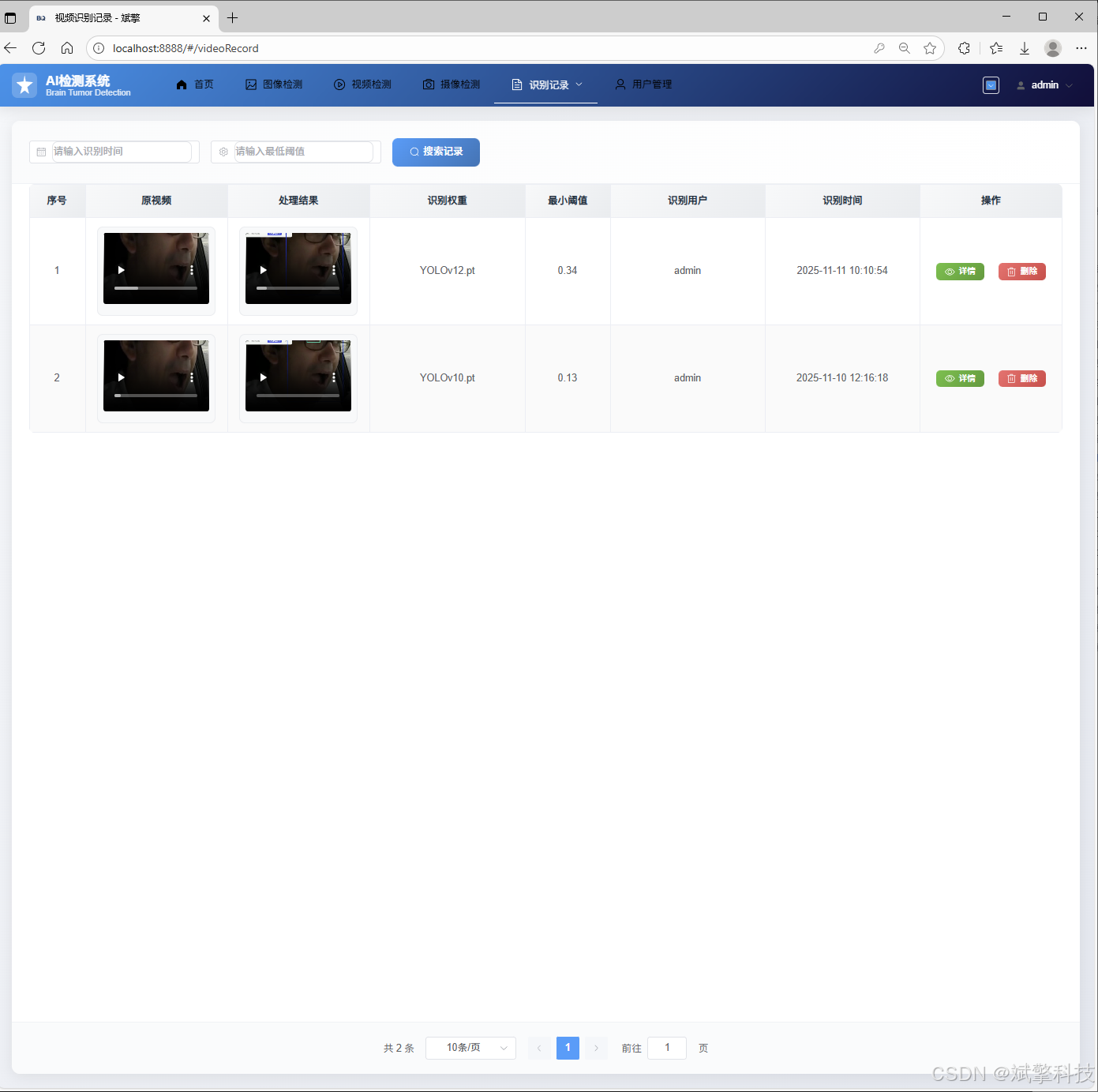
视频识别记录管理
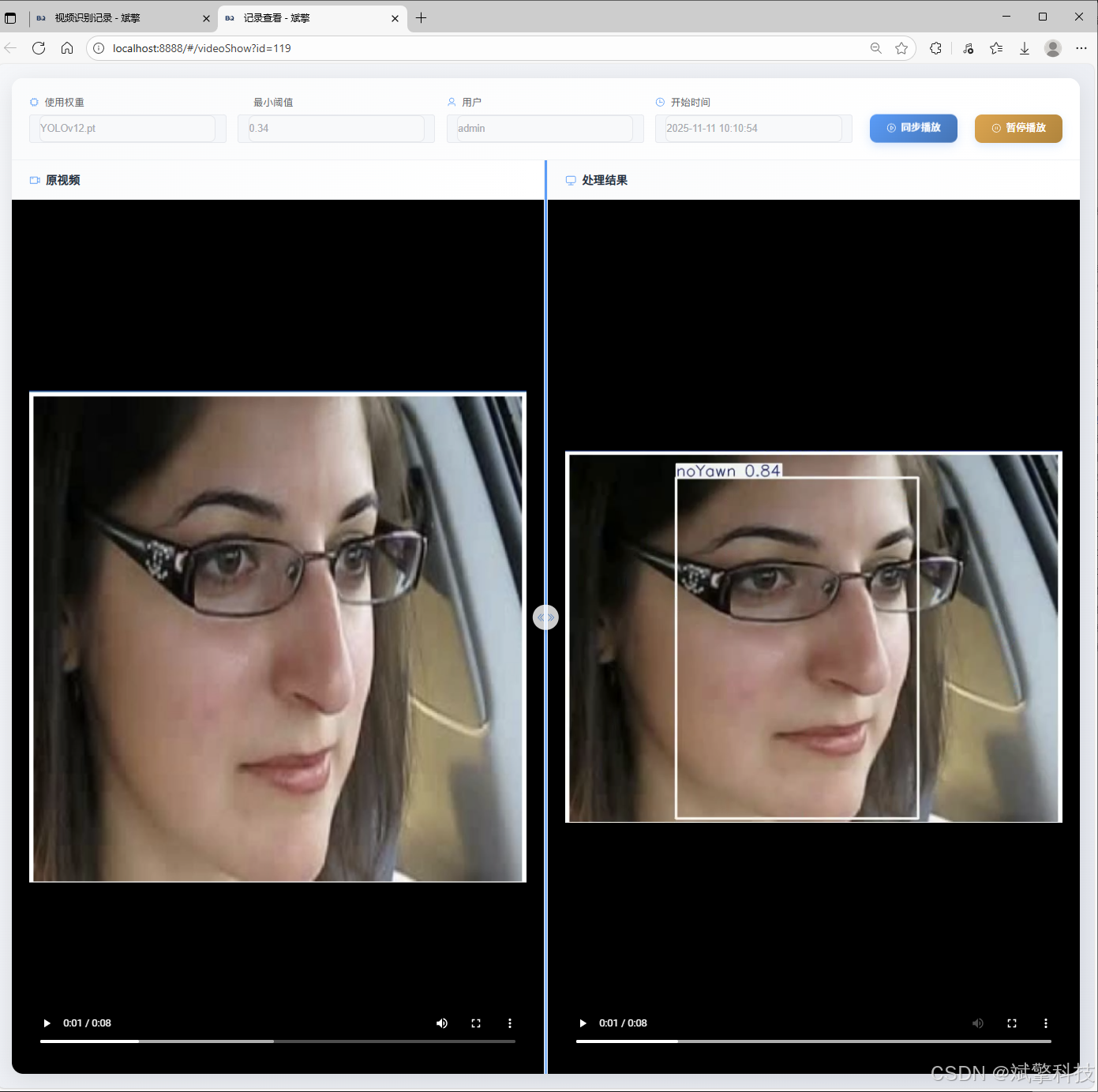
摄像头识别记录管理
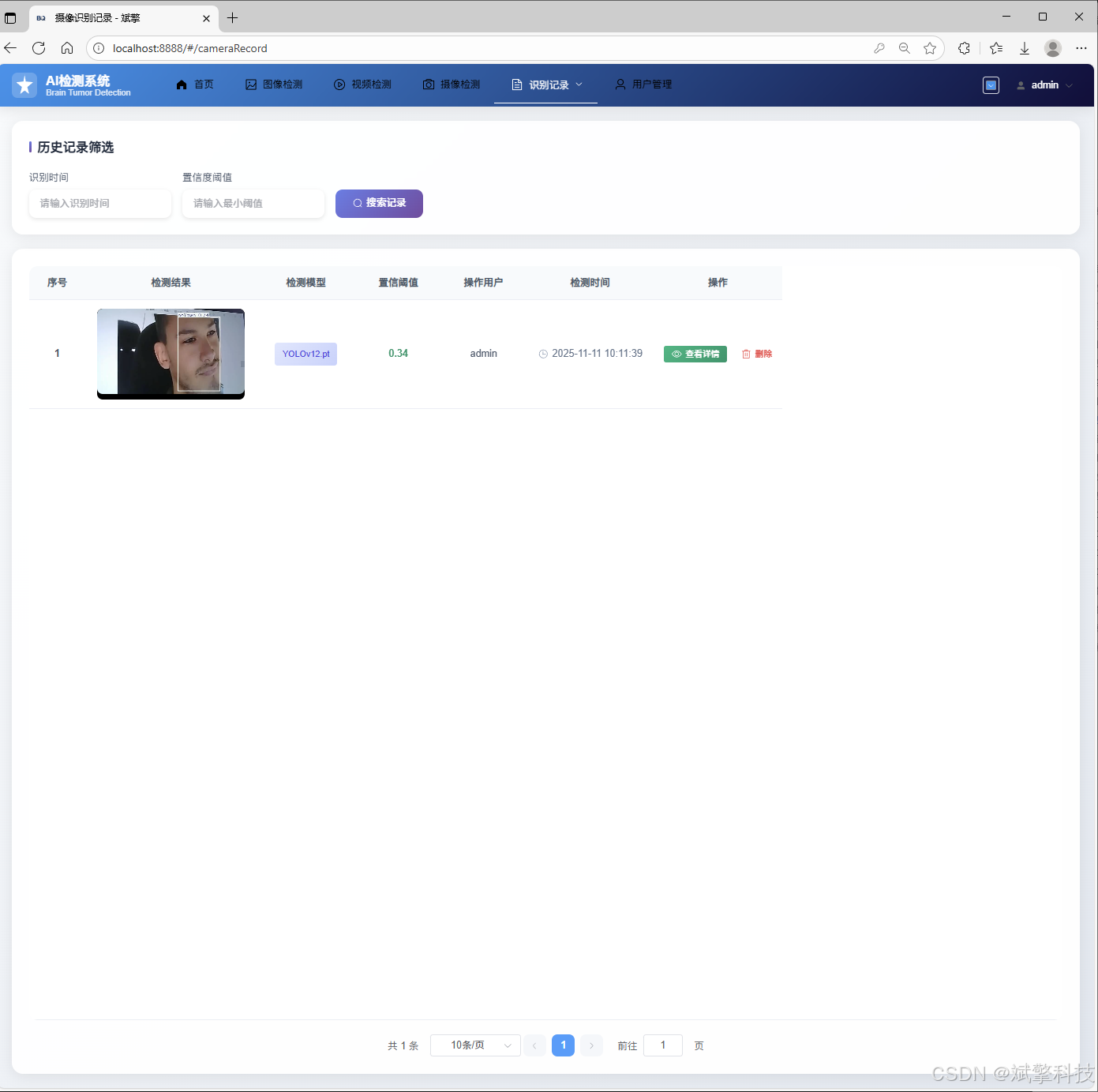
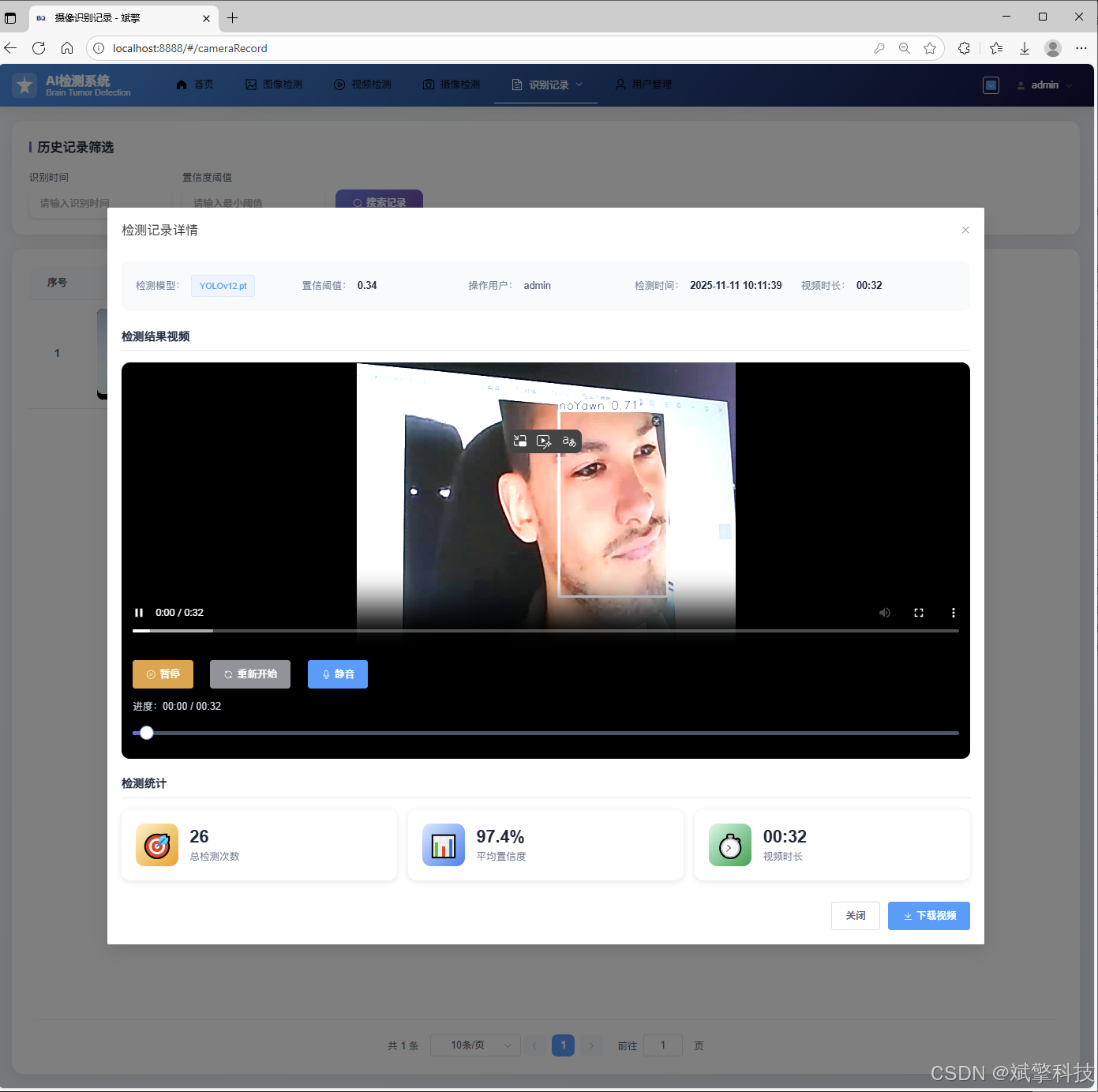
用户管理模块
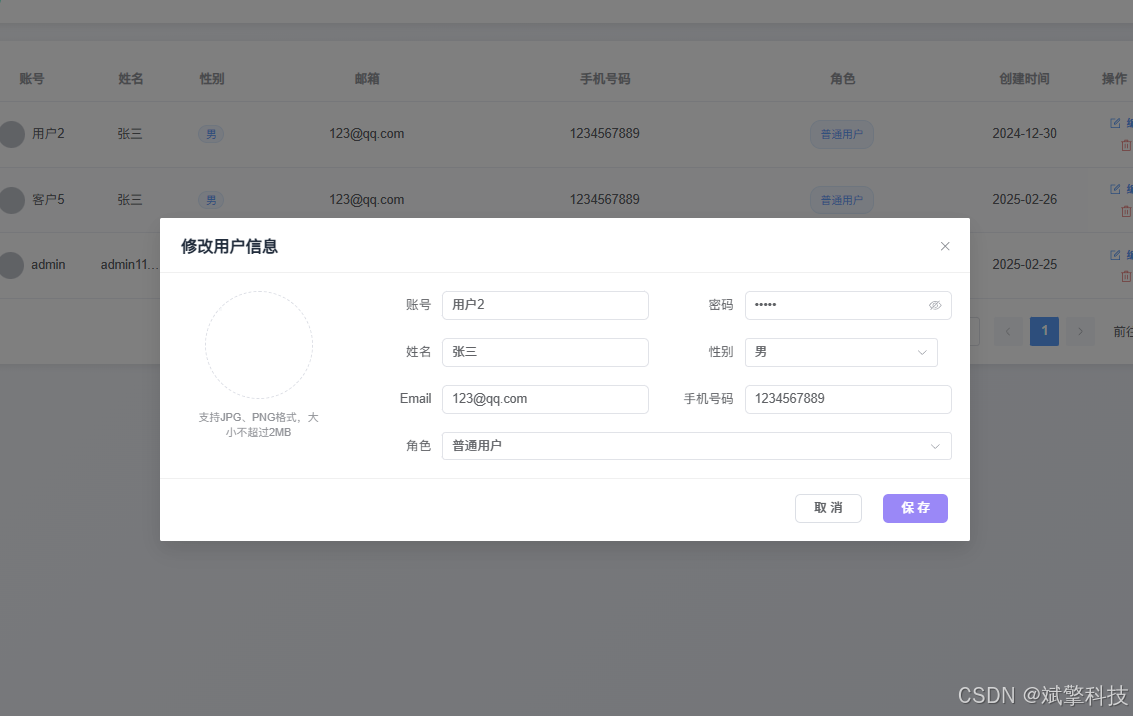
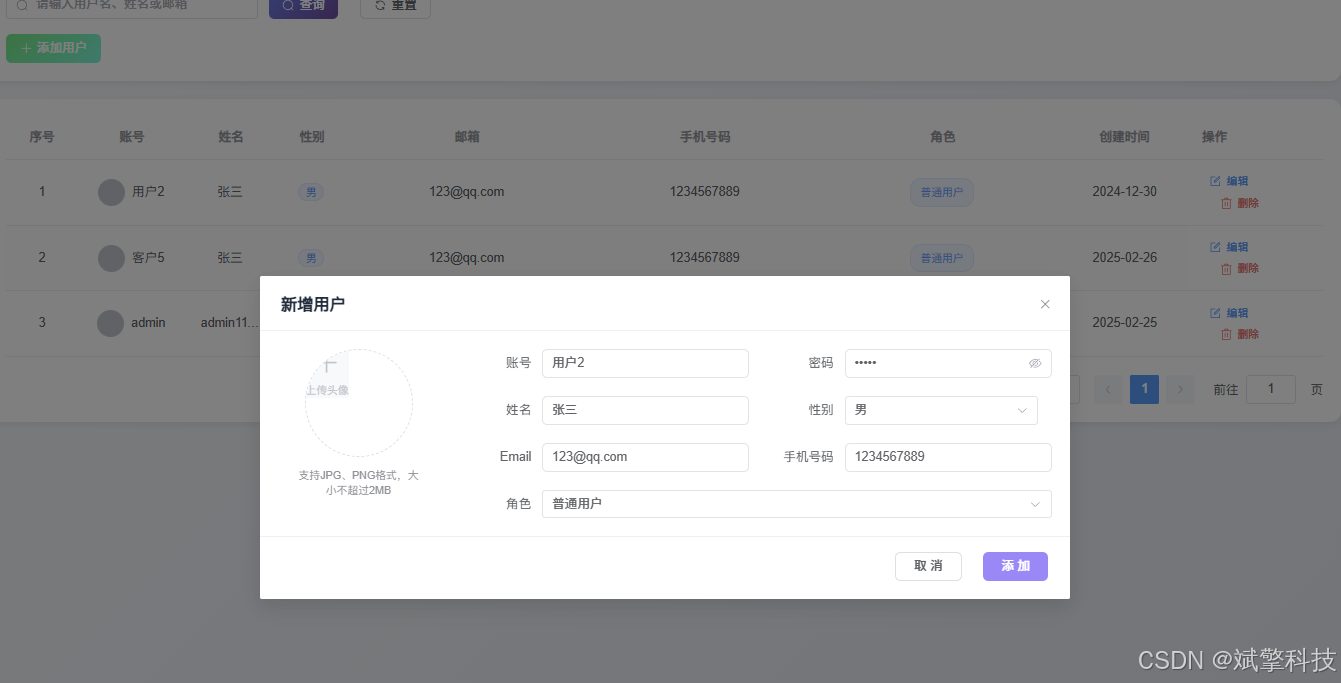
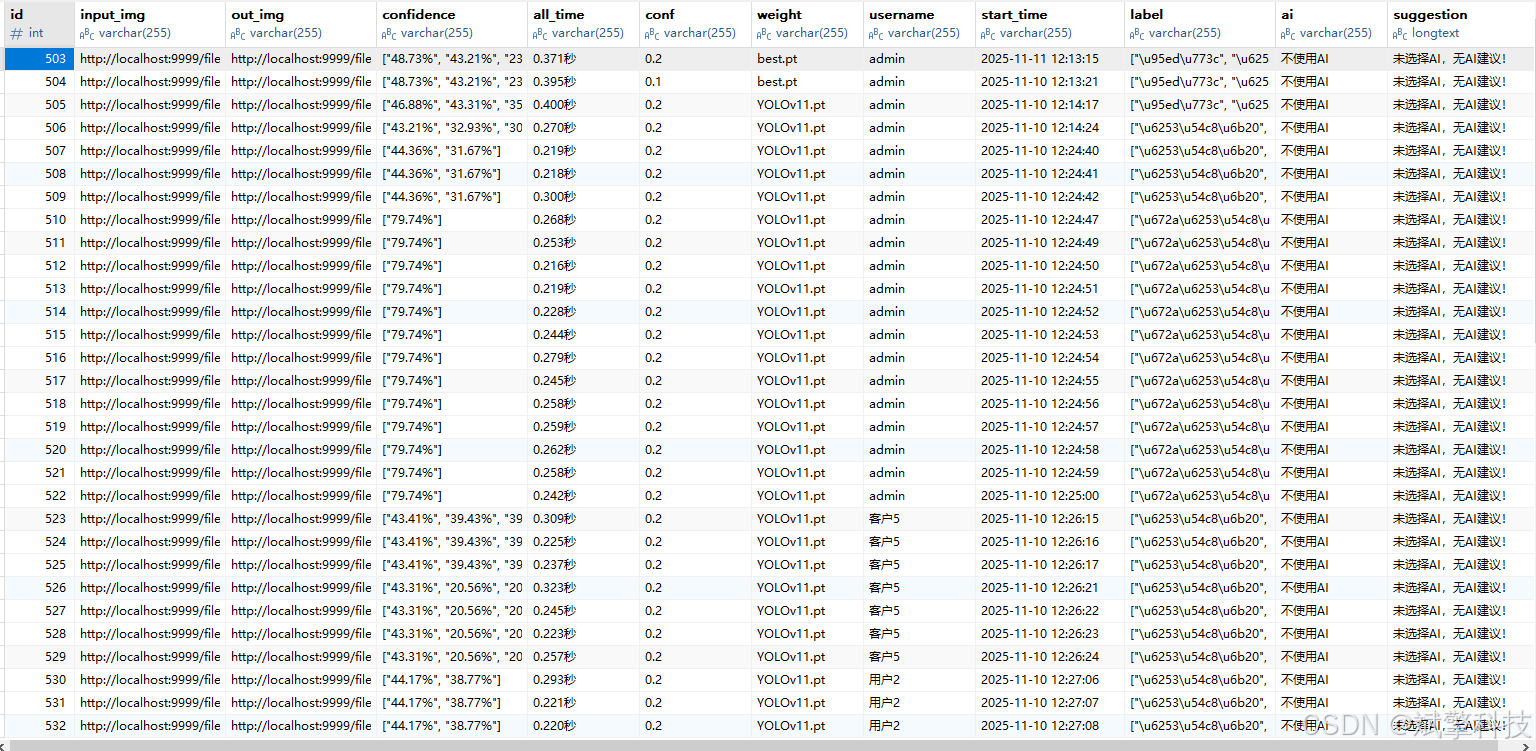
数据管理模块(MySQL表设计)
-
users- 用户信息表

-
imgrecords- 图片检测记录表
-
videorecords- 视频检测记录表

-
camerarecords- 摄像头检测记录表

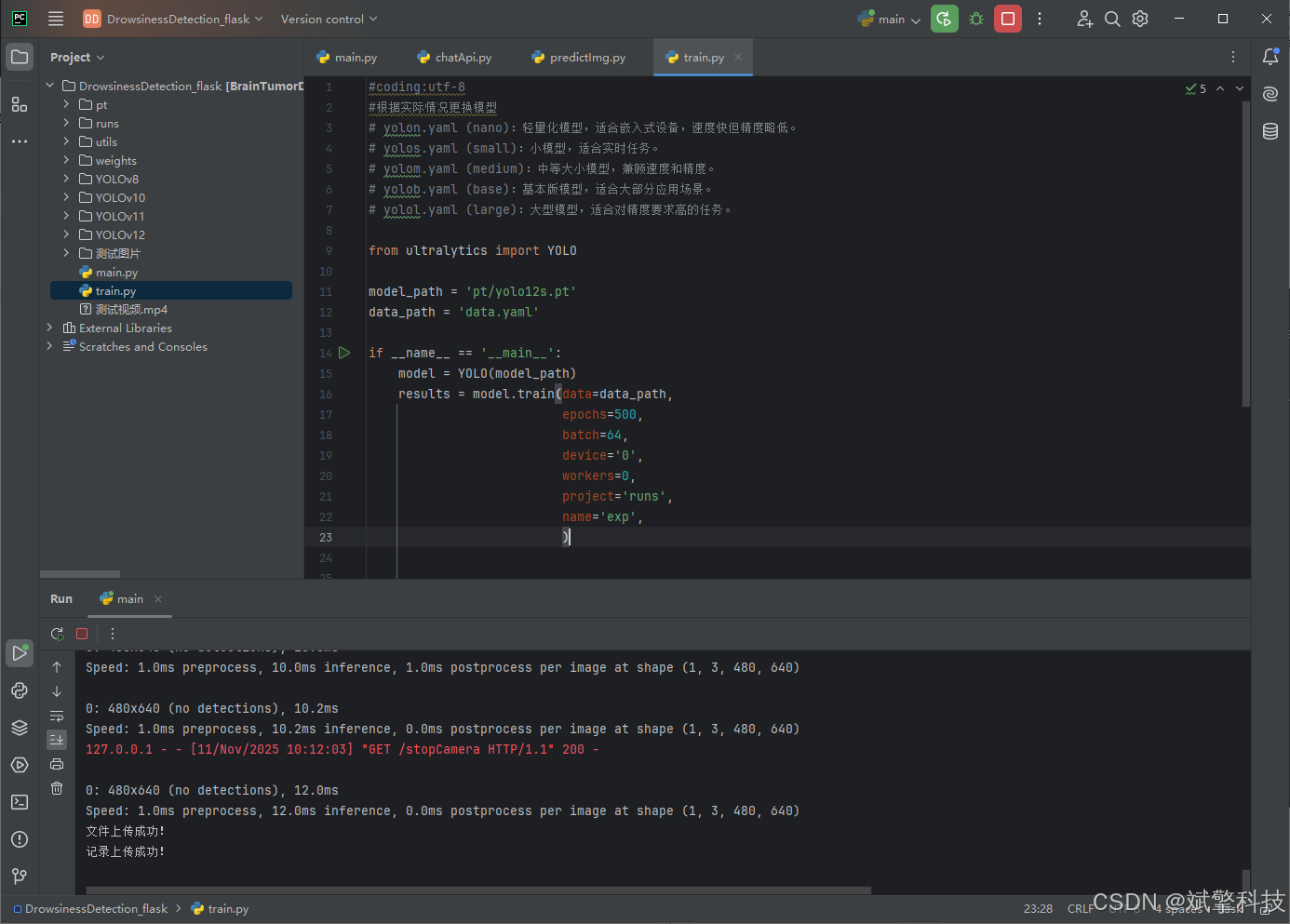
模型训练结果
#coding:utf-8
#根据实际情况更换模型
# yolon.yaml (nano):轻量化模型,适合嵌入式设备,速度快但精度略低。
# yolos.yaml (small):小模型,适合实时任务。
# yolom.yaml (medium):中等大小模型,兼顾速度和精度。
# yolob.yaml (base):基本版模型,适合大部分应用场景。
# yolol.yaml (large):大型模型,适合对精度要求高的任务。

from ultralytics import YOLO

model_path = 'pt/yolo12s.pt'
data_path = 'data.yaml'

if __name__ == '__main__':
    model = YOLO(model_path)
    results = model.train(data=data_path,
                          epochs=500,
                          batch=64,
                          device='0',
                          workers=0,
                          project='runs',
                          name='exp',
                          )
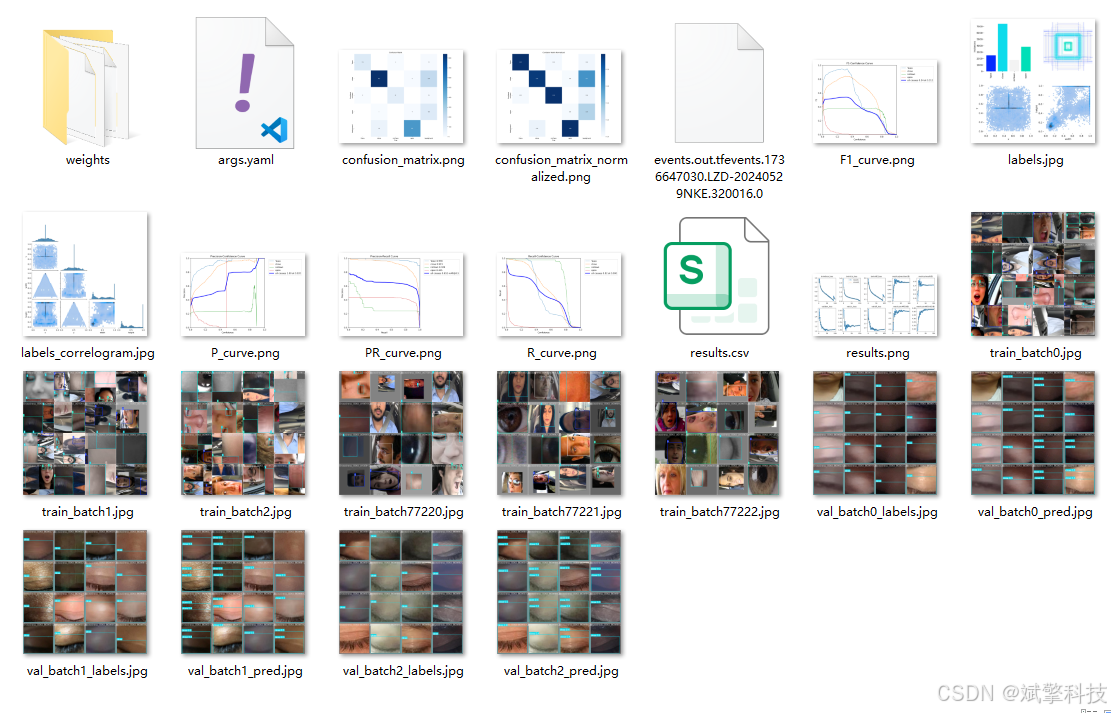
YOLOv8
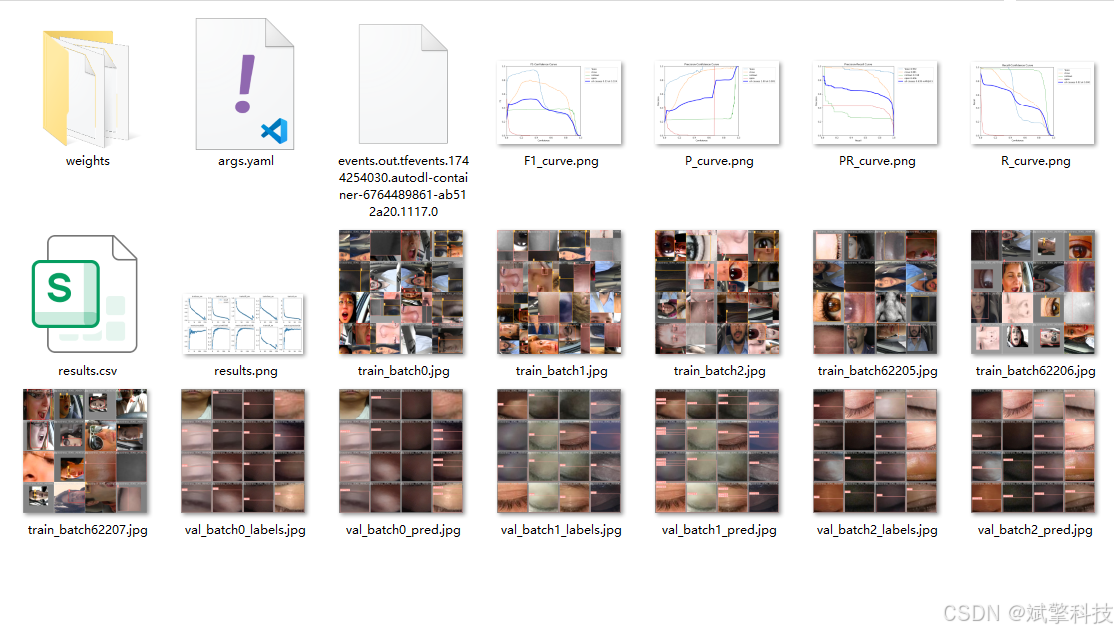
YOLOv10
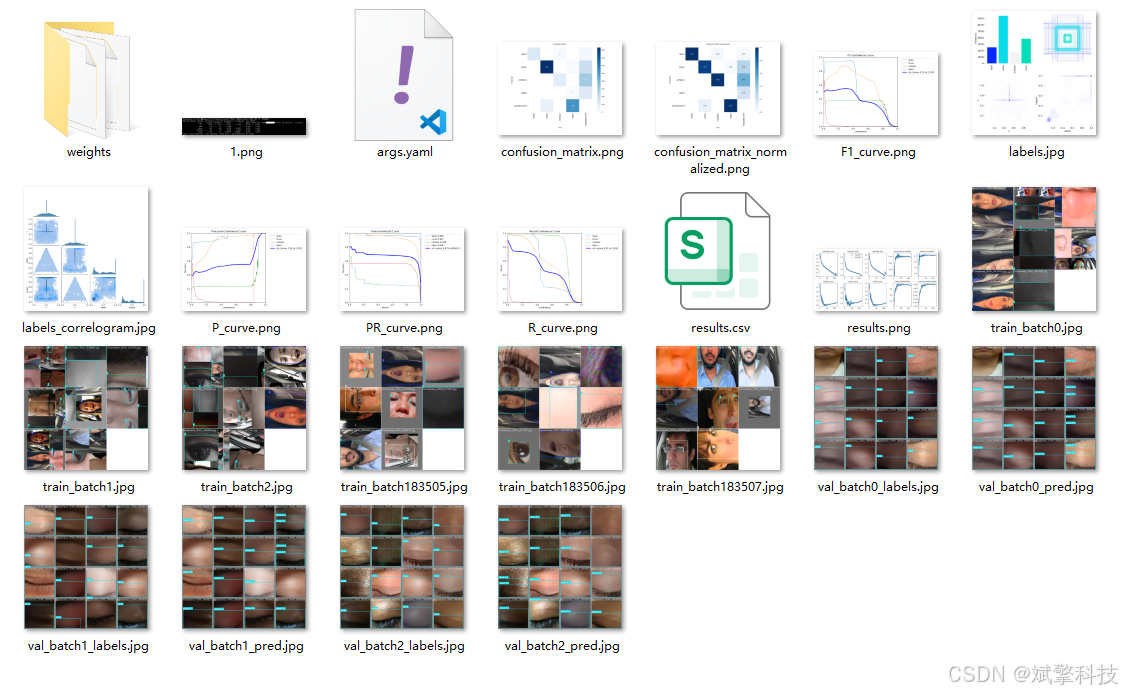
YOLOv11
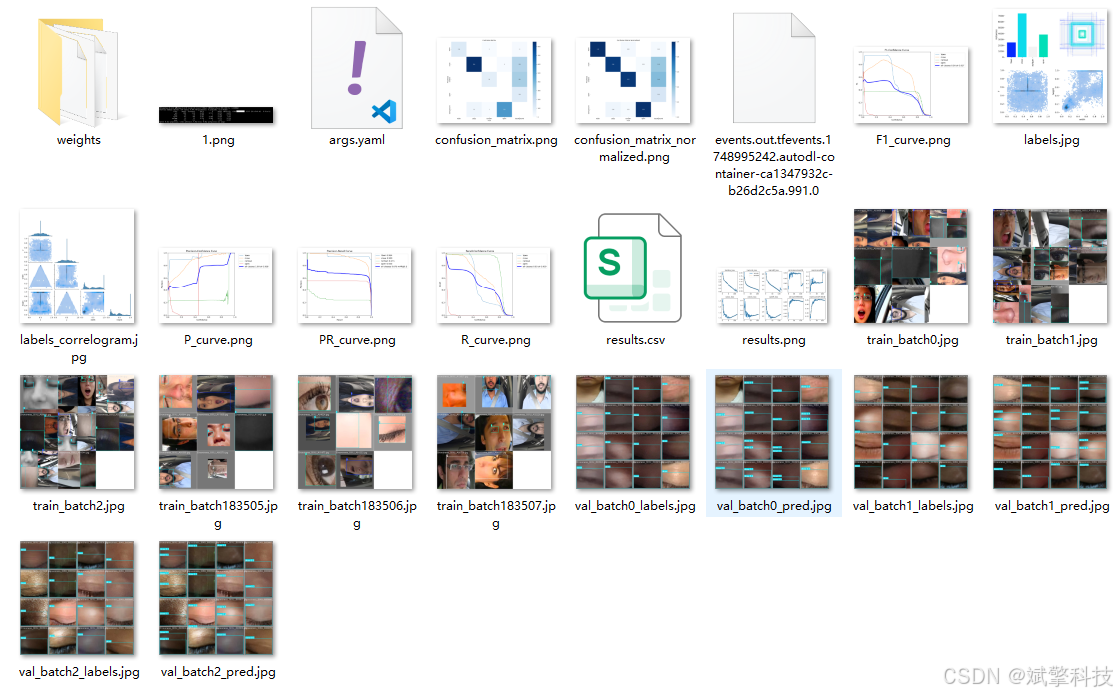
YOLOv12
前端代码展示

部分登录界面代码:
<template>
	<div class="login-container">
		<!-- 增强的动态科技背景 -->
		<div class="tech-background">
			<!-- 浮动几何体 -->
			<div class="floating-shapes">
				<div class="shape shape-1"></div>
				<div class="shape shape-2"></div>
				<div class="shape shape-3"></div>
				<div class="shape shape-4"></div>
				<div class="shape shape-5"></div>
				<div class="shape shape-6"></div>
				<div class="shape shape-7"></div>
			</div>

			<!-- 数据流动线 -->
			<div class="data-flow">
				<div class="flow-line" v-for="n in 12" :key="`flow-${n}`" :style="getFlowStyle(n)"></div>
			</div>

			<!-- 扫描网格 -->
			<div class="scan-grid"></div>

			<!-- 脉冲光点 -->
			<div class="pulse-dots">
				<div class="pulse-dot" v-for="n in 20" :key="`pulse-${n}`" :style="getPulseStyle(n)"></div>
			</div>

			<!-- 眼睛形状粒子 -->
			<div class="eye-particles">
				<div class="eye-particle" v-for="n in 8" :key="`eye-${n}`" :style="getEyeStyle(n)">👁️</div>
			</div>

			<!-- 动态光晕 -->
			<div class="dynamic-glow"></div>
		</div>

		<!-- 主要内容区域 -->
		<div class="main-content">
			<!-- 左侧系统介绍 -->
			<div class="system-intro">
				<div class="intro-content">
					<div class="tech-logo">
						<div class="logo-core">
							<div class="core-glow"></div>
							<div class="eye-silhouette"></div>
							<div class="logo-ring"></div>
						</div>
					</div>
					<h1 class="system-title">YOLO + DeepSeek<br>疲劳驾驶智能检测系统</h1>
					<p class="system-desc">
						基于深度学习的计算机视觉技术<br>
						实时监测驾驶员状态,保障行车安全
					</p>
					<div class="feature-list">
						<div class="feature-item">
							<div class="feature-icon">🎯</div>
							<span>精准识别</span>
						</div>
						<div class="feature-item">
							<div class="feature-icon">⚡</div>
							<span>实时监测</span>
						</div>
						<div class="feature-item">
							<div class="feature-icon">🚨</div>
							<span>及时预警</span>
						</div>
					</div>
				</div>
			</div>

			<!-- 右侧登录表单 -->
			<div class="login-section">
				<div class="login-card">
					<div class="card-header">
						<h2>用户登录</h2>
						<p>欢迎回到智能安全驾驶平台</p>
					</div>

					<div class="form-container">
						<el-form :model="ruleForm" :rules="registerRules" ref="ruleFormRef">
							<el-form-item prop="username">
								<el-input
									v-model="ruleForm.username"
									placeholder="请输入用户名"
									prefix-icon="User"
									class="custom-input"
									size="large"
									@focus="handleInputFocus('username')"
									@blur="handleInputBlur"
								/>
							</el-form-item>

							<el-form-item prop="password">
								<el-input
									v-model="ruleForm.password"
									type="password"
									placeholder="请输入密码"
									prefix-icon="Lock"
									show-password
									class="custom-input"
									size="large"
									@focus="handleInputFocus('password')"
									@blur="handleInputBlur"
								/>
							</el-form-item>

							<el-form-item>
								<el-button type="primary" class="login-btn" @click="submitForm(ruleFormRef)">
									<span class="btn-text">登录系统</span>
									<div class="btn-glow"></div>
									<div class="btn-particles"></div>
								</el-button>
							</el-form-item>
						</el-form>

						<div class="login-options">
							<router-link to="/register" class="register-link">
								<span>没有账号?立即注册</span>
								<div class="link-arrow">→</div>
							</router-link>
						</div>
					</div>

					<div class="card-footer">
						<div class="tech-tag">
							<div class="tag-icon">🚗</div>
							<span>AI驱动 · 智能安全</span>
						</div>
					</div>
				</div>
			</div>
		</div>
	</div>
</template>

<script lang="ts" setup>
import { reactive, ref, computed } from 'vue';
import { useRoute, useRouter } from 'vue-router';
import { ElMessage } from 'element-plus';
import { useI18n } from 'vue-i18n';
import Cookies from 'js-cookie';
import { storeToRefs } from 'pinia';
import { useThemeConfig } from '/@/stores/themeConfig';
import { initFrontEndControlRoutes } from '/@/router/frontEnd';
import { initBackEndControlRoutes } from '/@/router/backEnd';
import { Session } from '/@/utils/storage';
import { formatAxis } from '/@/utils/formatTime';
import { NextLoading } from '/@/utils/loading';
import type { FormInstance, FormRules } from 'element-plus';
import request from '/@/utils/request';

// 定义变量内容
const { t } = useI18n();
const storesThemeConfig = useThemeConfig();
const { themeConfig } = storeToRefs(storesThemeConfig);
const route = useRoute();
const router = useRouter();
const formSize = ref('default');
const ruleFormRef = ref<FormInstance>();

// 当前聚焦的输入框
const focusedInput = ref('');

const ruleForm = reactive({
	username: '',
	password: '',
});

const registerRules = reactive<FormRules>({
	username: [
		{ required: true, message: '请输入账号', trigger: 'blur' },
		{ min: 3, max: 15, message: '长度在3-15个字符', trigger: 'blur' },
	],
	password: [
		{ required: true, message: '请输入密码', trigger: 'blur' },
		{ min: 3, max: 15, message: '长度在3-15个字符', trigger: 'blur' },
	],
});

// 处理输入框聚焦
const handleInputFocus = (field: string) => {
	focusedInput.value = field;
};

// 处理输入框失焦
const handleInputBlur = () => {
	focusedInput.value = '';
};

// 数据流动线样式
const getFlowStyle = (index: number) => {
	const height = 2 + Math.random() * 3;
	const duration = 3 + Math.random() * 2;
	const delay = Math.random() * 5;
	const left = Math.random() * 100;
	const opacity = 0.3 + Math.random() * 0.5;

	return {
		height: `${height}px`,
		left: `${left}%`,
		animationDuration: `${duration}s`,
		animationDelay: `${delay}s`,
		opacity: opacity,
		background: `linear-gradient(90deg, transparent, #3498db, transparent)`
	};
};

// 脉冲点样式
const getPulseStyle = (index: number) => {
	const size = 4 + Math.random() * 8;
	const duration = 2 + Math.random() * 3;
	const delay = Math.random() * 5;
	const left = Math.random() * 100;
	const top = Math.random() * 100;
	const opacity = 0.2 + Math.random() * 0.5;

	return {
		width: `${size}px`,
		height: `${size}px`,
		left: `${left}%`,
		top: `${top}%`,
		animationDuration: `${duration}s`,
		animationDelay: `${delay}s`,
		opacity: opacity,
		background: `radial-gradient(circle, #3498db, #e74c3c, transparent)`
	};
};

// 眼睛粒子样式
const getEyeStyle = (index: number) => {
	const size = 20 + Math.random() * 30;
	const duration = 15 + Math.random() * 10;
	const delay = Math.random() * 10;
	const left = Math.random() * 100;
	const top = -10 - Math.random() * 20;
	const opacity = 0.1 + Math.random() * 0.3;

	return {
		fontSize: `${size}px`,
		left: `${left}%`,
		top: `${top}%`,
		animationDuration: `${duration}s`,
		animationDelay: `${delay}s`,
		opacity: opacity,
		filter: `hue-rotate(${Math.random() * 360}deg)`
	};
};

/*
 * 提交后的方法。
 */
// 时间获取
const currentTime = computed(() => {
	return formatAxis(new Date());
});
// 登录
const onSignIn = async () => {
	// 存储 token 到浏览器缓存
	Session.set('token', Math.random().toString(36).substr(0));
	// 模拟数据,对接接口时,记得删除多余代码及对应依赖的引入。用于 `/src/stores/userInfo.ts` 中不同用户登录判断(模拟数据)
	Cookies.set('userName', ruleForm.username);
	if (!themeConfig.value.isRequestRoutes) {
		// 前端控制路由,2、请注意执行顺序
		const isNoPower = await initFrontEndControlRoutes();
		signInSuccess(isNoPower);
	} else {
		// 模拟后端控制路由,isRequestRoutes 为 true,则开启后端控制路由
		// 添加完动态路由,再进行 router 跳转,否则可能报错 No match found for location with path "/"
		const isNoPower = await initBackEndControlRoutes();
		// 执行完 initBackEndControlRoutes,再执行 signInSuccess
		signInSuccess(isNoPower);
	}
};
// 登录成功后的跳转
const signInSuccess = (isNoPower: boolean | undefined) => {
	if (isNoPower) {
		ElMessage.warning('抱歉,您没有登录权限');
		Session.clear();
	} else {
		// 初始化登录成功时间问候语
		let currentTimeInfo = currentTime.value;
		// 登录成功,跳到转首页
		// 如果是复制粘贴的路径,非首页/登录页,那么登录成功后重定向到对应的路径中
		if (route.query?.redirect) {
			router.push({
				path: <string>route.query?.redirect,
				query: Object.keys(<string>route.query?.params).length > 0 ? JSON.parse(<string>route.query?.params) : '',
			});
		} else {
			router.push('/');
		}
		// 登录成功提示
		const signInText = t('message.signInText');
		ElMessage.success(`${currentTimeInfo},${signInText}`);
		// 添加 loading,防止第一次进入界面时出现短暂空白
		NextLoading.start();
	}
};
const submitForm = (formEl: FormInstance | undefined) => {
	if (!formEl) return;
	formEl.validate((valid) => {
		if (valid) {
			request.post('/api/user/login', ruleForm).then((res) => {
				console.log(res);
				if (res.code == 0) {
					Cookies.set('role', res.data.role); //  设置角色
					//登录成功
					onSignIn();
				} else {
					ElMessage({
						type: 'error',
						message: res.msg,
					});
				}
			});
		} else {
			console.log('error submit!');
			return false;
		}
	});
};
</script>

<style scoped>
/* 使用与注册界面相同的样式 */
.login-container {
	min-height: 100vh;
	display: flex;
	background: linear-gradient(135deg, #0a1929 0%, #1a3658 50%, #2a4a7a 100%);
	position: relative;
	overflow: hidden;
	font-family: 'Microsoft YaHei', sans-serif;
}

/* 科技背景样式 */
.tech-background {
	position: absolute;
	top: 0;
	left: 0;
	width: 100%;
	height: 100%;
	z-index: 1;
}

/* 浮动几何体 */
.floating-shapes {
	position: absolute;
	width: 100%;
	height: 100%;
}

.shape {
	position: absolute;
	border-radius: 8px;
	background: linear-gradient(135deg, rgba(52, 152, 219, 0.1), rgba(231, 76, 60, 0.05));
	border: 1px solid rgba(52, 152, 219, 0.2);
	backdrop-filter: blur(10px);
	animation: float 6s ease-in-out infinite;
}

.shape-1 {
	width: 120px;
	height: 120px;
	top: 10%;
	left: 10%;
	animation-delay: 0s;
}

.shape-2 {
	width: 80px;
	height: 80px;
	top: 60%;
	left: 5%;
	animation-delay: 1s;
}

.shape-3 {
	width: 100px;
	height: 100px;
	top: 20%;
	right: 15%;
	animation-delay: 2s;
}

.shape-4 {
	width: 60px;
	height: 60px;
	bottom: 20%;
	right: 10%;
	animation-delay: 3s;
}

.shape-5 {
	width: 90px;
	height: 90px;
	bottom: 10%;
	left: 20%;
	animation-delay: 4s;
}

.shape-6 {
	width: 70px;
	height: 70px;
	top: 40%;
	left: 30%;
	animation-delay: 5s;
}

.shape-7 {
	width: 110px;
	height: 110px;
	top: 70%;
	right: 25%;
	animation-delay: 6s;
}

@keyframes float {
	0%, 100% {
		transform: translateY(0) rotate(0deg);
	}
	50% {
		transform: translateY(-20px) rotate(180deg);
	}
}

/* 数据流动线 */
.data-flow {
	position: absolute;
	width: 100%;
	height: 100%;
}

.flow-line {
	position: absolute;
	width: 100%;
	background: linear-gradient(90deg, transparent, #3498db, transparent);
	animation: flowMove linear infinite;
	filter: blur(1px);
}

@keyframes flowMove {
	0% {
		transform: translateX(-100%);
		opacity: 0;
	}
	50% {
		opacity: 1;
	}
	100% {
		transform: translateX(100%);
		opacity: 0;
	}
}

/* 扫描网格 */
.scan-grid {
	position: absolute;
	top: 0;
	left: 0;
	width: 100%;
	height: 100%;
	background-image:
		linear-gradient(rgba(52, 152, 219, 0.05) 1px, transparent 1px),
		linear-gradient(90deg, rgba(52, 152, 219, 0.05) 1px, transparent 1px);
	background-size: 50px 50px;
	animation: gridMove 20s linear infinite;
}

@keyframes gridMove {
	0% {
		background-position: 0 0;
	}
	100% {
		background-position: 50px 50px;
	}
}

/* 脉冲光点 */
.pulse-dots {
	position: absolute;
	width: 100%;
	height: 100%;
}

.pulse-dot {
	position: absolute;
	border-radius: 50%;
	animation: pulseGlow ease-in-out infinite;
	filter: blur(1px);
}

@keyframes pulseGlow {
	0%, 100% {
		transform: scale(1);
		opacity: 0.3;
	}
	50% {
		transform: scale(1.5);
		opacity: 0.8;
	}
}

/* 眼睛粒子 */
.eye-particles {
	position: absolute;
	width: 100%;
	height: 100%;
	overflow: hidden;
}

.eye-particle {
	position: absolute;
	animation: eyeFall linear infinite;
	z-index: 1;
}

@keyframes eyeFall {
	0% {
		transform: translateY(0) rotate(0deg);
		opacity: 0;
	}
	10% {
		opacity: 0.5;
	}
	90% {
		opacity: 0.5;
	}
	100% {
		transform: translateY(110vh) rotate(360deg);
		opacity: 0;
	}
}

/* 动态光晕 */
.dynamic-glow {
	position: absolute;
	width: 100%;
	height: 100%;
	background: radial-gradient(circle at 30% 70%, rgba(52, 152, 219, 0.1) 0%, transparent 50%),
	            radial-gradient(circle at 70% 30%, rgba(231, 76, 60, 0.1) 0%, transparent 50%);
	animation: glowMove 15s ease-in-out infinite;
}

@keyframes glowMove {
	0%, 100% {
		transform: scale(1);
		opacity: 0.7;
	}
	50% {
		transform: scale(1.1);
		opacity: 1;
	}
}

/* 主要内容区域 */
.main-content {
	position: relative;
	z-index: 2;
	width: 100%;
	display: grid;
	grid-template-columns: 1fr 400px;
	min-height: 100vh;
}

/* 左侧系统介绍 */
.system-intro {
	display: flex;
	align-items: center;
	justify-content: center;
	padding: 40px;
	background: rgba(0, 0, 0, 0.3);
	backdrop-filter: blur(20px);
	border-right: 1px solid rgba(52, 152, 219, 0.1);
}

.intro-content {
	max-width: 500px;
	text-align: center;
}

.tech-logo {
	margin-bottom: 40px;
}

.logo-core {
	width: 120px;
	height: 120px;
	margin: 0 auto;
	background: linear-gradient(135deg, #3498db, #e74c3c);
	border-radius: 50%;
	position: relative;
	display: flex;
	align-items: center;
	justify-content: center;
	box-shadow:
		0 0 50px rgba(52, 152, 219, 0.5),
		inset 0 0 20px rgba(255, 255, 255, 0.1);
	animation: coreRotate 10s linear infinite;
}

.core-glow {
	position: absolute;
	width: 100%;
	height: 100%;
	border-radius: 50%;
	background: conic-gradient(from 0deg, #3498db, #e74c3c, #3498db);
	filter: blur(20px);
	opacity: 0.5;
	animation: glowPulse 3s ease-in-out infinite;
}

.eye-silhouette {
	width: 60px;
	height: 40px;
	background: #ffffff;
	border-radius: 50%;
	position: relative;
	z-index: 2;
}

.eye-silhouette::before {
	content: '';
	position: absolute;
	width: 20px;
	height: 20px;
	background: #2c3e50;
	border-radius: 50%;
	top: 10px;
	left: 20px;
}

.logo-ring {
	position: absolute;
	width: 140px;
	height: 140px;
	border: 2px solid rgba(255, 255, 255, 0.3);
	border-radius: 50%;
	animation: ringRotate 8s linear infinite reverse;
}

@keyframes coreRotate {
	from {
		transform: rotate(0deg);
	}
	to {
		transform: rotate(360deg);
	}
}

@keyframes ringRotate {
	from {
		transform: rotate(0deg);
	}
	to {
		transform: rotate(360deg);
	}
}

@keyframes glowPulse {
	0%, 100% {
		opacity: 0.3;
	}
	50% {
		opacity: 0.7;
	}
}

.system-title {
	font-size: 2.5em;
	font-weight: 700;
	color: #ffffff;
	margin-bottom: 20px;
	line-height: 1.2;
	text-shadow: 0 0 20px rgba(52, 152, 219, 0.5);
}

.system-desc {
	font-size: 1.1em;
	color: rgba(255, 255, 255, 0.8);
	margin-bottom: 40px;
	line-height: 1.6;
}

.feature-list {
	display: flex;
	justify-content: center;
	gap: 30px;
	margin-top: 40px;
}

.feature-item {
	display: flex;
	flex-direction: column;
	align-items: center;
	gap: 10px;
	color: rgba(255, 255, 255, 0.9);
	transition: transform 0.3s ease;
}

.feature-item:hover {
	transform: translateY(-5px);
}

.feature-icon {
	font-size: 2em;
	filter: drop-shadow(0 0 10px rgba(52, 152, 219, 0.5));
	transition: transform 0.3s ease;
}

.feature-item:hover .feature-icon {
	transform: scale(1.2);
}

/* 右侧登录区域 */
.login-section {
	display: flex;
	align-items: center;
	justify-content: center;
	padding: 40px;
	background: rgba(0, 0, 0, 0.2);
	backdrop-filter: blur(30px);
}

.login-card {
	width: 100%;
	max-width: 360px;
	background: rgba(255, 255, 255, 0.95);
	border-radius: 20px;
	padding: 40px 30px;
	box-shadow:
		0 20px 40px rgba(0, 0, 0, 0.3),
		0 0 100px rgba(52, 152, 219, 0.2);
	border: 1px solid rgba(52, 152, 219, 0.3);
	animation: cardSlideIn 0.8s ease-out;
	position: relative;
	overflow: hidden;
}

.login-card::before {
	content: '';
	position: absolute;
	top: 0;
	left: 0;
	width: 100%;
	height: 100%;
	background: linear-gradient(135deg, rgba(52, 152, 219, 0.05) 0%, rgba(231, 76, 60, 0.05) 100%);
	z-index: 0;
}

@keyframes cardSlideIn {
	from {
		opacity: 0;
		transform: translateX(50px);
	}
	to {
		opacity: 1;
		transform: translateX(0);
	}
}

.card-header {
	text-align: center;
	margin-bottom: 30px;
	position: relative;
	z-index: 1;
}

.card-header h2 {
	font-size: 1.8em;
	color: #1a3658;
	margin-bottom: 8px;
	font-weight: 600;
}

.card-header p {
	color: #666;
	font-size: 0.9em;
}

/* 表单样式 */
:deep(.form-container) {
	position: relative;
	z-index: 1;
}

:deep(.custom-input .el-input__wrapper) {
	box-shadow: 0 2px 10px rgba(0, 0, 0, 0.1);
	border-radius: 12px;
	padding: 16px 20px;
	background: rgba(255, 255, 255, 0.9);
	border: 1px solid rgba(52, 152, 219, 0.2);
	transition: all 0.3s ease;
}

:deep(.custom-input .el-input__inner) {
	color: #333 !important;
	font-size: 14px;
}

:deep(.custom-input .el-input__inner::placeholder) {
	color: #999 !important;
}

:deep(.custom-input .el-input__wrapper:hover) {
	border-color: rgba(52, 152, 219, 0.5);
	box-shadow: 0 2px 15px rgba(52, 152, 219, 0.2);
}

:deep(.custom-input .el-input__wrapper.is-focus) {
	border-color: #3498db;
	box-shadow: 0 0 0 2px rgba(52, 152, 219, 0.2);
}

/* 登录按钮 */
.login-btn {
	width: 100%;
	height: 50px;
	padding: 0;
	border: none;
	border-radius: 12px;
	background: linear-gradient(135deg, #3498db 0%, #e74c3c 100%);
	position: relative;
	overflow: hidden;
	transition: all 0.3s ease;
}

.btn-text {
	position: relative;
	z-index: 2;
	color: white;
	font-size: 16px;
	font-weight: 600;
	letter-spacing: 1px;
}

.btn-glow {
	position: absolute;
	top: 0;
	left: -100%;
	width: 100%;
	height: 100%;
	background: linear-gradient(90deg,
		transparent,
		rgba(255, 255, 255, 0.4),
		transparent);
	transition: left 0.6s ease;
}

.btn-particles {
	position: absolute;
	width: 100%;
	height: 100%;
	top: 0;
	left: 0;
	pointer-events: none;
}

.login-btn:hover {
	transform: translateY(-2px);
	box-shadow:
		0 10px 25px rgba(52, 152, 219, 0.4),
		0 0 30px rgba(231, 76, 60, 0.3);
}

.login-btn:hover .btn-glow {
	left: 100%;
}

.login-btn:active {
	transform: translateY(0);
}
后端代码展示
项目源码+数据集
哔哩哔哩视频下方简介内
基于YOLOv8/v10/v11/v12与SpringBoot的前后端分离疲劳驾驶识别检测系统(DeepSeek智能分析+web交互界面)_哔哩哔哩_bilibili

腾讯云面向开发者汇聚海量精品云计算使用和开发经验,营造开放的云计算技术生态圈。
更多推荐
 12
12 0
0- 0



 已为社区贡献373条内容

所有评论(0)