Flutter框架适配鸿蒙:TextSpan高级用法
TextSpan是RichText的核心,理解TextSpan的特性和使用方式对于创建复杂的富文本至关重要。baseline 基线对齐。middle 中间对齐。bottom 底部对齐。
·
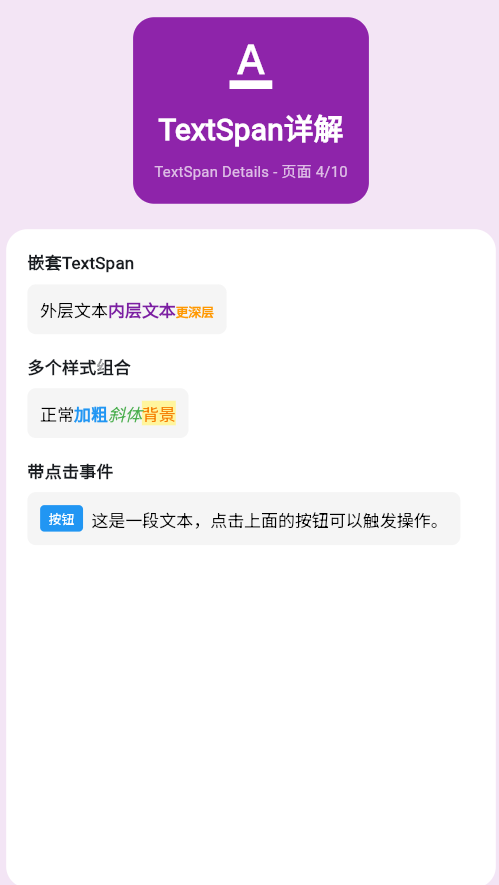
一、TextSpan深入理解
TextSpan是RichText的核心,理解TextSpan的特性和使用方式对于创建复杂的富文本至关重要。
TextSpan继承机制
样式继承规则
| 属性 | 是否继承 | 说明 |
|---|---|---|
| fontSize | 是 | 子span未指定则继承 |
| color | 是 | 子span未指定则继承 |
| fontWeight | 是 | 子span未指定则继承 |
| height | 是 | 子span未指定则继承 |
| decoration | 否 | 需要明确指定 |
| letterSpacing | 是 | 子span未指定则继承 |
二、复杂嵌套结构
多级嵌套示例
RichText(
  text: TextSpan(
    style: TextStyle(fontSize: 16, color: Colors.black87),
    children: [
      TextSpan(text: '第一级文本\n'),
      TextSpan(
        text: '第二级文本,包含:\n',
        style: TextStyle(fontSize: 18, color: Colors.blue),
        children: [
          TextSpan(
            text: '  第三级文本 A\n',
            style: TextStyle(color: Colors.red),
          ),
          TextSpan(
            text: '  第三级文本 B\n',
            style: TextStyle(color: Colors.green),
          ),
        ],
      ),
      TextSpan(text: '回到第一级文本'),
    ],
  ),
)
条件样式渲染
RichText(
  text: TextSpan(
    style: TextStyle(fontSize: 16),
    children: [
      TextSpan(text: '价格:'),
      TextSpan(
        text: '¥999',
        style: TextStyle(
          color: Colors.red,
          fontSize: 24,
          fontWeight: FontWeight.bold,
        ),
      ),
      TextSpan(text: '(原价'),
      TextSpan(
        text: '¥1299',
        style: TextStyle(
          decoration: TextDecoration.lineThrough,
          color: Colors.grey,
        ),
      ),
      TextSpan(text: ')'),
    ],
  ),
)
三、TextSpan手势识别
多种手势支持
RichText(
  text: TextSpan(
    style: TextStyle(fontSize: 18),
    children: [
      TextSpan(
        text: '点击这里',
        style: TextStyle(color: Colors.blue),
        recognizer: TapGestureRecognizer()
          ..onTap = () => print('Tap'),
      ),
      TextSpan(text: '  |  '),
      TextSpan(
        text: '长按这里',
        style: TextStyle(color: Colors.green),
        recognizer: LongPressGestureRecognizer()
          ..onLongPress = () => print('LongPress'),
      ),
      TextSpan(text: '  |  '),
      TextSpan(
        text: '双击这里',
        style: TextStyle(color: Colors.orange),
        recognizer: DoubleTapGestureRecognizer()
          ..onDoubleTap = () => print('DoubleTap'),
      ),
    ],
  ),
)
手势冲突处理
TextSpan(
  text: '支持多种手势',
  style: TextStyle(
    color: Colors.blue,
    fontSize: 18,
  ),
  recognizer: TapGestureRecognizer()
    ..onTapDown = (details) {
      print('按下位置:${details.globalPosition}');
    }
    ..onTapUp = (details) {
      print('抬起位置:${details.globalPosition}');
    }
    ..onTap = () {
      print('单击');
    },
)
四、TextSpan与Widget混合
TextSpan内联Widget
Text.rich(
  TextSpan(
    children: [
      TextSpan(text: '用户:'),
      WidgetSpan(
        child: Icon(Icons.person, size: 20, color: Colors.blue),
        alignment: PlaceholderAlignment.middle,
      ),
      TextSpan(text: ' 张三\n'),
      TextSpan(text: '状态:'),
      WidgetSpan(
        child: Container(
          padding: EdgeInsets.symmetric(horizontal: 8, vertical: 4),
          decoration: BoxDecoration(
            color: Colors.green,
            borderRadius: BorderRadius.circular(4),
          ),
          child: Text(
            '在线',
            style: TextStyle(color: Colors.white, fontSize: 12),
          ),
        ),
      ),
    ],
  ),
)
WidgetSpan对齐方式
Text.rich(
  TextSpan(
    style: TextStyle(fontSize: 20, color: Colors.black87),
    children: [
      TextSpan(text: '顶部'),
      WidgetSpan(
        child: Icon(Icons.star, color: Colors.yellow),
        alignment: PlaceholderAlignment.top,
      ),
      TextSpan(text: '\n'),
      TextSpan(text: '中间'),
      WidgetSpan(
        child: Icon(Icons.star, color: Colors.yellow),
        alignment: PlaceholderAlignment.middle,
      ),
      TextSpan(text: '\n'),
      TextSpan(text: '底部'),
      WidgetSpan(
        child: Icon(Icons.star, color: Colors.yellow),
        alignment: PlaceholderAlignment.bottom,
      ),
    ],
  ),
)
五、动态生成TextSpan
根据数据生成
class HighlightedText extends StatelessWidget {
final String text;
final List<String> highlights;
const HighlightedText({
super.key,
required this.text,
required this.highlights,
});
Widget build(BuildContext context) {
final spans = _buildSpans();
return RichText(
text: TextSpan(
style: TextStyle(fontSize: 16, color: Colors.black87),
children: spans,
),
);
}
List<InlineSpan> _buildSpans() {
final spans = <InlineSpan>[];
int currentIndex = 0;
for (final highlight in highlights) {
final index = text.indexOf(highlight, currentIndex);
if (index == -1) continue;
// 添加高亮前的普通文本
if (index > currentIndex) {
spans.add(TextSpan(text: text.substring(currentIndex, index)));
}
// 添加高亮文本
spans.add(
TextSpan(
text: highlight,
style: TextStyle(
backgroundColor: Colors.yellow,
fontWeight: FontWeight.bold,
),
),
);
currentIndex = index + highlight.length;
}
// 添加剩余的普通文本
if (currentIndex < text.length) {
spans.add(TextSpan(text: text.substring(currentIndex)));
}
return spans;
}
}
六、性能优化
避免不必要的重建
// 不好的做法:每次重建都创建新的recognizer
RichText(
  text: TextSpan(
    children: [
      TextSpan(
        text: '点击',
        recognizer: TapGestureRecognizer()..onTap = () => print('click'),
      ),
    ],
  ),
)

// 好的做法:使用const和缓存
final _tapRecognizer = TapGestureRecognizer()..onTap = () => print('click');

RichText(
  text: TextSpan(
    children: [
      TextSpan(
        text: '点击',
        recognizer: _tapRecognizer,
      ),
    ],
  ),
)
七、完整示例
class TextSpanAdvancedExample extends StatelessWidget {
const TextSpanAdvancedExample({super.key});
Widget build(BuildContext context) {
return Scaffold(
appBar: AppBar(title: Text('TextSpan高级用法')),
body: SingleChildScrollView(
padding: EdgeInsets.all(16),
child: Column(
crossAxisAlignment: CrossAxisAlignment.start,
children: [
_buildSection('复杂嵌套'),
_buildNestedExample(),
SizedBox(height: 24),
_buildSection('内联Widget'),
_buildWidgetSpanExample(),
SizedBox(height: 24),
_buildSection('高亮文本'),
_buildHighlightExample(),
],
),
),
);
}
Widget _buildSection(String title) {
return Text(
title,
style: TextStyle(fontSize: 20, fontWeight: FontWeight.bold),
);
}
Widget _buildNestedExample() {
return RichText(
text: TextSpan(
style: TextStyle(fontSize: 16),
children: [
TextSpan(text: '商品价格:'),
TextSpan(
text: '¥199',
style: TextStyle(
color: Colors.red,
fontSize: 24,
fontWeight: FontWeight.bold,
),
),
TextSpan(text: ' ('),
TextSpan(
text: '原价¥299',
style: TextStyle(
decoration: TextDecoration.lineThrough,
color: Colors.grey,
),
),
TextSpan(text: ')'),
],
),
);
}
Widget _buildWidgetSpanExample() {
return Text.rich(
TextSpan(
style: TextStyle(fontSize: 16),
children: [
TextSpan(text: '用户:'),
WidgetSpan(
child: Icon(Icons.person, size: 20, color: Colors.blue),
),
TextSpan(text: ' 张三\n'),
TextSpan(text: '等级:'),
WidgetSpan(
child: Container(
padding: EdgeInsets.symmetric(horizontal: 8, vertical: 2),
decoration: BoxDecoration(
gradient: LinearGradient(
colors: [Colors.orange, Colors.red],
),
borderRadius: BorderRadius.circular(12),
),
child: Text(
'VIP',
style: TextStyle(color: Colors.white, fontSize: 12),
),
),
),
],
),
);
}
Widget _buildHighlightExample() {
return HighlightedText(
text: 'Flutter是一个优秀的跨平台UI框架,Flutter使用Dart语言开发,Flutter性能出众。',
highlights: ['Flutter', 'Dart'],
);
}
}
八、最佳实践
| 实践 | 说明 | 效果 |
|---|---|---|
| 缓存recognizer | 避免重复创建 | 提升性能 |
| 合理嵌套 | 避免过深嵌套 | 提升可读性 |
| 样式复用 | 提取共用样式 | 代码简洁 |
| 条件渲染 | 根据需求动态生成 | 灵活高效 |
欢迎加入开源鸿蒙跨平台社区:https://openharmonycrossplatform.csdn.net

腾讯云面向开发者汇聚海量精品云计算使用和开发经验,营造开放的云计算技术生态圈。
更多推荐
 18
18 0
0- 0


 已为社区贡献11条内容

所有评论(0)