Flutter 框架跨平台鸿蒙开发 - 感恩杀手应用
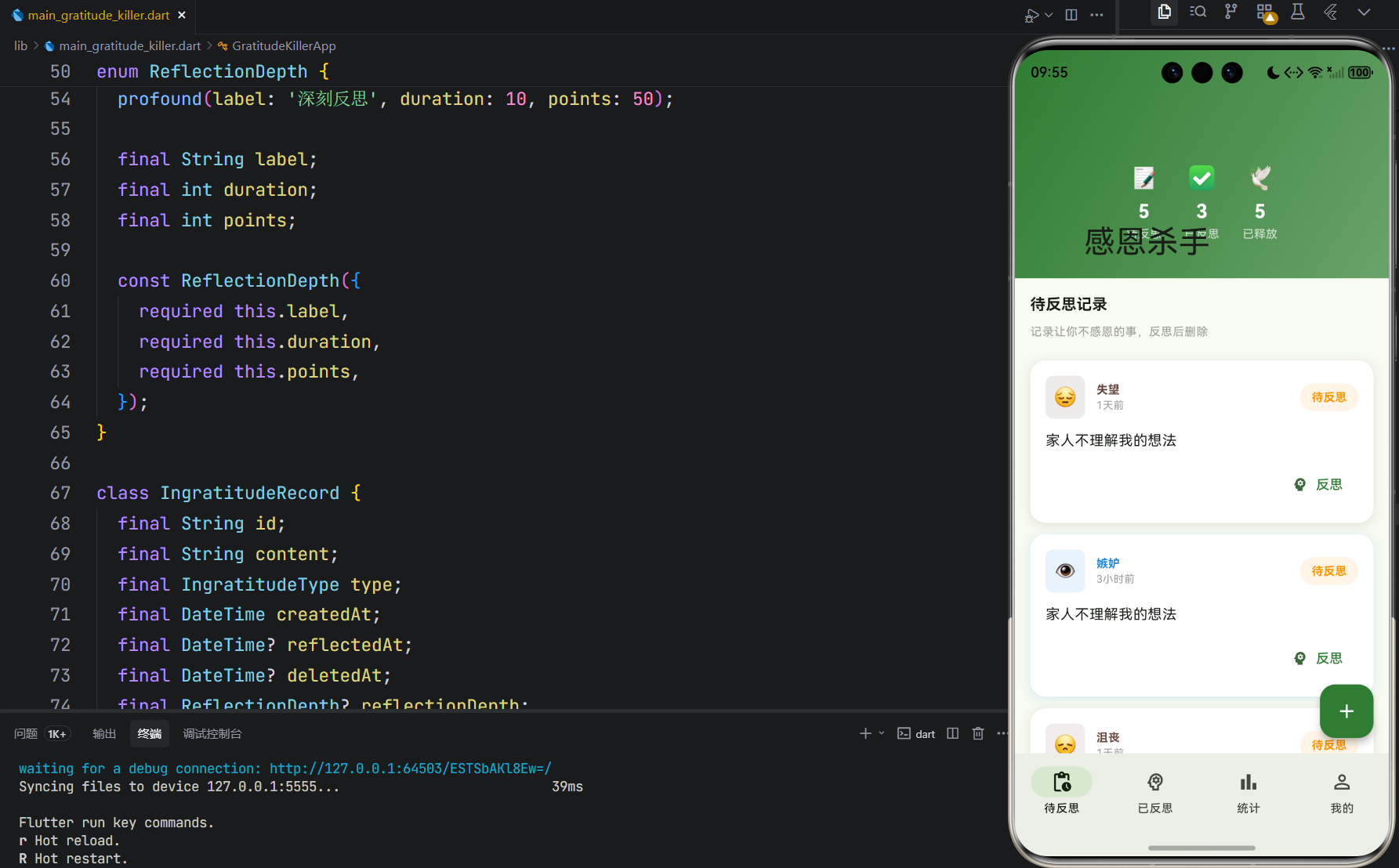
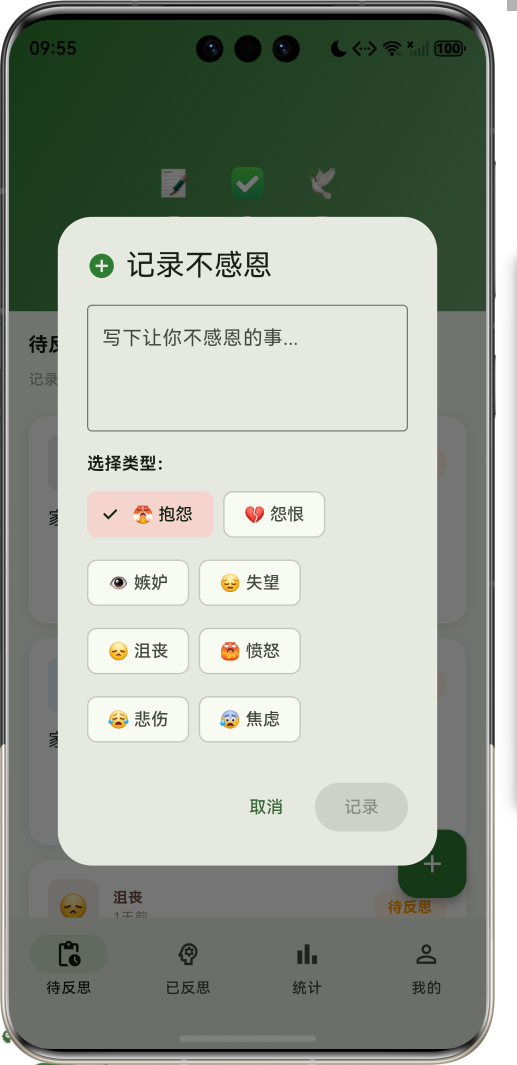
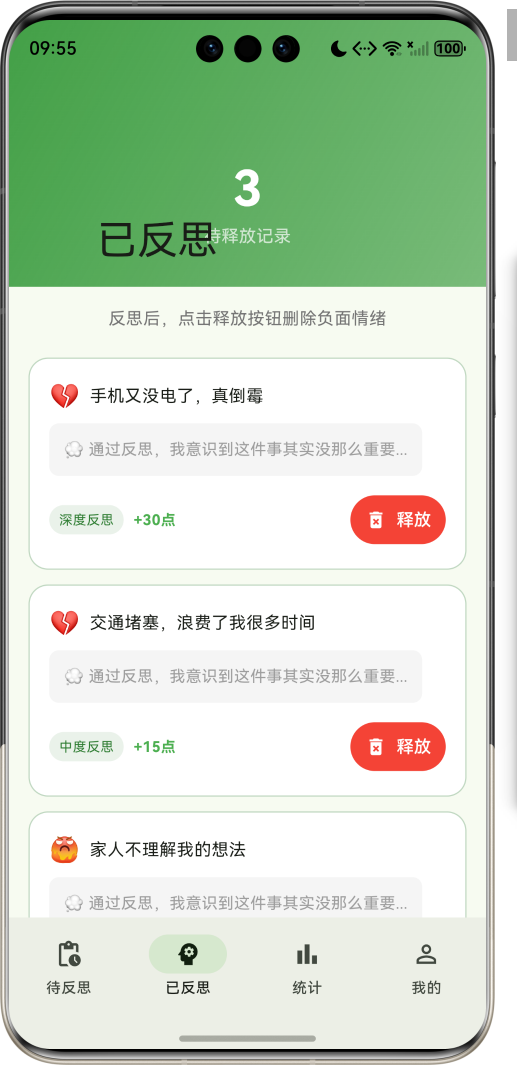
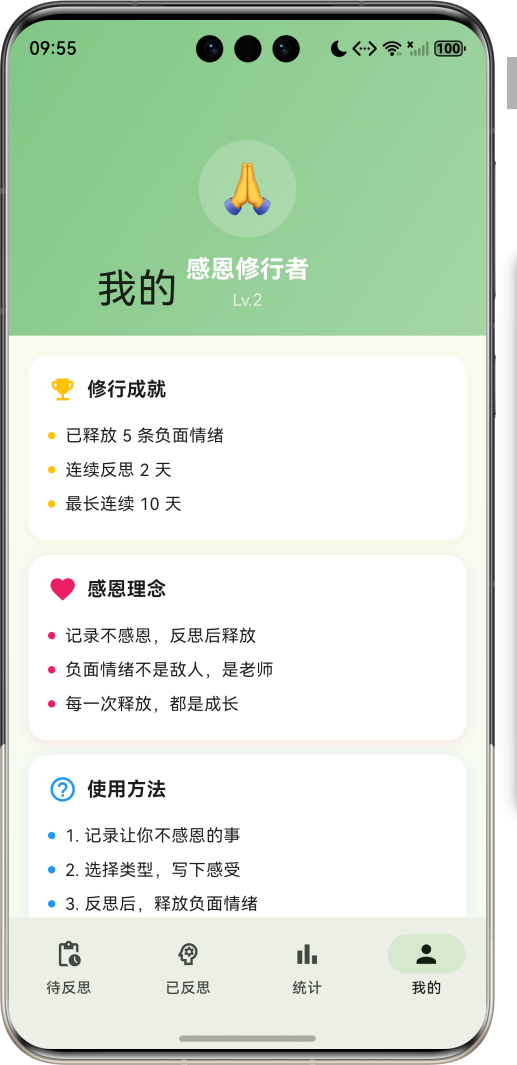
运行效果图感恩杀手是一款独特的心理疗愈应用。它颠覆了传统感恩日记的思路,让用户记录那些"不感恩"的事情——抱怨、怨恨、嫉妒、失望等负面情绪。通过深度反思后,将这些负面记录删除,实现心理上的净化与释放。应用以清新的绿色为主色调,象征心灵的净化与成长。涵盖记录管理、反思系统、统计分析、个人成长四大模块。用户可以通过记录负面情绪、深度反思、释放删除的流程,逐步培养感恩之心,净化心灵。序号类型名称Emoj
欢迎加入开源鸿蒙跨平台社区:
https://openharmonycrossplatform.csdn.net
一、项目概述
运行效果图
1.1 应用简介
感恩杀手是一款独特的心理疗愈应用。它颠覆了传统感恩日记的思路,让用户记录那些"不感恩"的事情——抱怨、怨恨、嫉妒、失望等负面情绪。通过深度反思后,将这些负面记录删除,实现心理上的净化与释放。
应用以清新的绿色为主色调,象征心灵的净化与成长。涵盖记录管理、反思系统、统计分析、个人成长四大模块。用户可以通过记录负面情绪、深度反思、释放删除的流程,逐步培养感恩之心,净化心灵。
1.2 核心功能
| 功能模块 | 功能描述 | 实现方式 |
|---|---|---|
| 记录管理 | 记录不感恩的事情 | 表单输入 |
| 反思系统 | 多深度反思机制 | 选择+文本 |
| 释放删除 | 删除负面情绪 | 动画效果 |
| 统计分析 | 数据可视化 | CustomPainter |
| 成长系统 | 积分与等级 | 计算逻辑 |
| 连续打卡 | 激励持续反思 | 状态追踪 |
1.3 不感恩类型定义
| 序号 | 类型名称 | Emoji | 颜色 | 描述 |
|---|---|---|---|---|
| 1 | 抱怨 | 😤 | #E53935 | 对现状不满,持续抱怨 |
| 2 | 怨恨 | 💔 | #8E24AA | 对他人或事物的怨恨 |
| 3 | 嫉妒 | 👁️ | #1E88E5 | 对他人的成功感到嫉妒 |
| 4 | 失望 | 😔 | #5D4037 | 期望落空,感到失望 |
| 5 | 沮丧 | 😞 | #6D4C41 | 情绪低落,感到沮丧 |
| 6 | 愤怒 | 😡 | #D32F2F | 强烈的不满和愤怒 |
| 7 | 悲伤 | 😢 | #1976D2 | 内心的悲伤和难过 |
| 8 | 焦虑 | 😰 | #7B1FA2 | 对未来的担忧和焦虑 |
1.4 反思深度定义
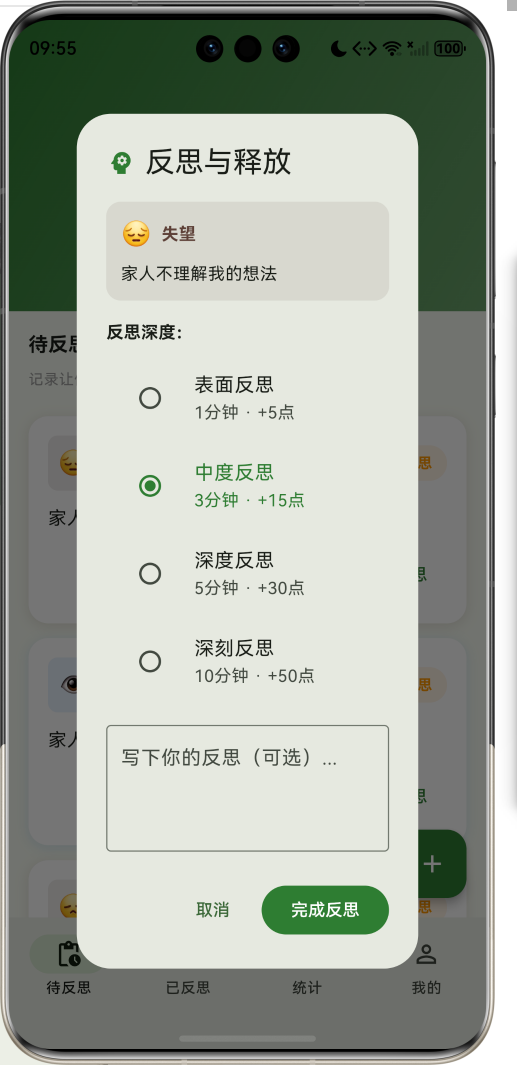
| 序号 | 深度名称 | 时长 | 积分 | 描述 |
|---|---|---|---|---|
| 1 | 表面反思 | 1分钟 | 5点 | 快速浏览,简单思考 |
| 2 | 中度反思 | 3分钟 | 15点 | 深入思考,寻找原因 |
| 3 | 深度反思 | 5分钟 | 30点 | 全面分析,寻找解决方案 |
| 4 | 深刻反思 | 10分钟 | 50点 | 彻底剖析,实现成长 |
1.5 技术栈
| 技术领域 | 技术选型 | 版本要求 |
|---|---|---|
| 开发框架 | Flutter | >= 3.0.0 |
| 编程语言 | Dart | >= 2.17.0 |
| 设计规范 | Material Design 3 | - |
| 动画控制 | AnimationController | - |
| 图表绘制 | CustomPainter | - |
| 状态管理 | setState | - |
| 目标平台 | 鸿蒙OS / Web | API 21+ |
1.6 项目结构
lib/
└── main_gratitude_killer.dart
    ├── GratitudeKillerApp           # 应用入口
    ├── IngratitudeType              # 不感恩类型枚举
    ├── ReflectionDepth              # 反思深度枚举
    ├── IngratitudeRecord            # 不感恩记录模型
    ├── UserStats                    # 用户统计模型
    ├── GratitudeKillerHomePage      # 主页面(底部导航)
    ├── _buildPendingPage            # 待反思页面
    ├── _buildReflectedPage          # 已反思页面
    ├── _buildStatsPage              # 统计分析页面
    ├── _buildProfilePage            # 个人中心页面
    └── TypeChartPainter             # 类型分布图绘制器
二、系统架构
2.1 整体架构图
2.2 类图设计
2.3 页面导航流程
2.4 记录生命周期
三、核心模块设计
3.1 数据模型设计
3.1.1 不感恩类型枚举 (IngratitudeType)
enum IngratitudeType {
  complaint(label: '抱怨', emoji: '😤', color: Color(0xFFE53935)),
  resentment(label: '怨恨', emoji: '💔', color: Color(0xFF8E24AA)),
  jealousy(label: '嫉妒', emoji: '👁️', color: Color(0xFF1E88E5)),
  disappointment(label: '失望', emoji: '😔', color: Color(0xFF5D4037)),
  frustration(label: '沮丧', emoji: '😞', color: Color(0xFF6D4C41)),
  anger(label: '愤怒', emoji: '😡', color: Color(0xFFD32F2F)),
  sadness(label: '悲伤', emoji: '😢', color: Color(0xFF1976D2)),
  anxiety(label: '焦虑', emoji: '😰', color: Color(0xFF7B1FA2));

  final String label;
  final String emoji;
  final Color color;
}
3.1.2 反思深度枚举 (ReflectionDepth)
enum ReflectionDepth {
  surface(label: '表面反思', duration: 1, points: 5),
  moderate(label: '中度反思', duration: 3, points: 15),
  deep(label: '深度反思', duration: 5, points: 30),
  profound(label: '深刻反思', duration: 10, points: 50);

  final String label;
  final int duration;  // 反思时长(分钟)
  final int points;    // 获得积分
}
3.1.3 不感恩记录模型 (IngratitudeRecord)
class IngratitudeRecord {
  final String id;
  final String content;
  final IngratitudeType type;
  final DateTime createdAt;
  final DateTime? reflectedAt;
  final DateTime? deletedAt;
  final ReflectionDepth? reflectionDepth;
  final String? reflection;
  final int? reflectionPoints;
  final bool isReflected;
  final bool isDeleted;

  Duration get age => DateTime.now().difference(createdAt);
}
3.1.4 用户统计模型 (UserStats)
class UserStats {
  int totalRecords;           // 总记录数
  int reflectedRecords;       // 已反思数
  int deletedRecords;         // 已释放数
  int totalReflectionPoints;  // 总积分
  int currentStreak;          // 当前连续天数
  int longestStreak;          // 最长连续天数
  Map<IngratitudeType, int> typeCounts;  // 类型统计
}
3.1.5 不感恩类型分布
3.2 页面结构设计
3.2.1 主页面布局
3.2.2 待反思页结构
3.2.3 反思弹窗结构
3.2.4 统计分析页结构
3.3 记录流转流程
3.4 积分计算逻辑
四、UI设计规范
4.1 配色方案
应用以清新的绿色为主色调,象征心灵的净化与成长:
| 颜色类型 | 色值 | 用途 |
|---|---|---|
| 主色 | #2E7D32 (Green) | 导航、主题元素 |
| 辅助色 | #43A047 | 已反思页面 |
| 第三色 | #66BB6A | 统计页面 |
| 强调色 | #81C784 | 个人中心 |
| 背景色 | #ECEFF1 | 页面背景 |
| 卡片背景 | #FFFFFF | 记录卡片 |
4.2 类型配色
| 不感恩类型 | 色值 | 视觉效果 |
|---|---|---|
| 抱怨 | #E53935 | 鲜红警示 |
| 怨恨 | #8E24AA | 深紫神秘 |
| 嫉妒 | #1E88E5 | 蓝色冷静 |
| 失望 | #5D4037 | 棕色沉稳 |
| 沮丧 | #6D4C41 | 深棕低沉 |
| 愤怒 | #D32F2F | 红色激烈 |
| 悲伤 | #1976D2 | 蓝色忧郁 |
| 焦虑 | #7B1FA2 | 紫色紧张 |
4.3 字体规范
| 元素 | 字号 | 字重 | 颜色 |
|---|---|---|---|
| 页面标题 | 24px | Bold | 主色 |
| 记录内容 | 15px | Regular | #000000 |
| 类型标签 | 12px | Bold | 类型色 |
| 积分显示 | 20px | Bold | 绿色 |
| 时间显示 | 11px | Regular | #9E9E9E |
4.4 组件规范
4.4.1 待反思卡片
┌──────────────────────────────────────────────────────┐
│  ┌────┐  抱怨                              ┌──────┐  │
│  │ 😤 │  2小时前                           │待反思│  │
│  └────┘                                    └──────┘  │
│                                                      │
│  今天同事说话语气不好,让我很不舒服                    │
│                                                      │
│                              [ 🧘 反思 ]              │
└──────────────────────────────────────────────────────┘
4.4.2 反思弹窗
┌─────────────────────────────────────────────────────┐
│  🧠 反思与释放                                       │
├─────────────────────────────────────────────────────┤
│  ┌─────────────────────────────────────────────┐   │
│  │ 😤 抱怨                                      │   │
│  │ 今天同事说话语气不好,让我很不舒服            │   │
│  └─────────────────────────────────────────────┘   │
│                                                     │
│  反思深度:                                         │
│  ○ 表面反思   1分钟 · +5点                         │
│  ● 中度反思   3分钟 · +15点                        │
│  ○ 深度反思   5分钟 · +30点                        │
│  ○ 深刻反思   10分钟 · +50点                       │
│                                                     │
│  ┌─────────────────────────────────────────────┐   │
│  │ 写下你的反思(可选)...                       │   │
│  └─────────────────────────────────────────────┘   │
│                                                     │
│         [取消]        [完成反思]                    │
└─────────────────────────────────────────────────────┘
4.4.3 已反思卡片
┌──────────────────────────────────────────────────────┐
│  😤 今天同事说话语气不好,让我很不舒服                 │
│                                                      │
│  ┌────────────────────────────────────────────────┐ │
│  │ 💭 通过反思,我意识到这件事其实没那么重要...    │ │
│  └────────────────────────────────────────────────┘ │
│                                                      │
│  [中度反思] +15点                    [🗑️ 释放]      │
└──────────────────────────────────────────────────────┘
4.4.4 释放动画
┌─────────────────────────────────────────────────────┐
│                                                     │
│                    🕊️                               │
│                   (飞翔)                            │
│                                                     │
│            负面情绪已释放                           │
│            感恩之心更加纯净                         │
│                                                     │
└─────────────────────────────────────────────────────┘
五、核心功能实现
5.1 添加记录实现
void _addRecord(String content, IngratitudeType type) {
  final record = IngratitudeRecord(
    id: 'record_${DateTime.now().millisecondsSinceEpoch}',
    content: content,
    type: type,
    createdAt: DateTime.now(),
  );

  setState(() {
    _pendingRecords.insert(0, record);
    _userStats.totalRecords++;
    _userStats.typeCounts[type] = (_userStats.typeCounts[type] ?? 0) + 1;
  });
}
5.2 完成反思实现
void _completeReflection(IngratitudeRecord record, ReflectionDepth depth, String reflection) {
  setState(() {
    _pendingRecords.removeWhere((r) => r.id == record.id);
    _reflectedRecords.insert(
      0,
      record.copyWith(
        isReflected: true,
        reflectedAt: DateTime.now(),
        reflectionDepth: depth,
        reflection: reflection.isEmpty ? null : reflection,
        reflectionPoints: depth.points,
      ),
    );
    _userStats.reflectedRecords++;
  });
}
5.3 释放记录实现
void _confirmDelete(IngratitudeRecord record) {
  setState(() {
    _reflectedRecords.removeWhere((r) => r.id == record.id);
    _deletedRecords.insert(
      0,
      record.copyWith(
        isDeleted: true,
        deletedAt: DateTime.now(),
      ),
    );
    _userStats.deletedRecords++;
    _userStats.totalReflectionPoints += record.reflectionPoints ?? 0;
    _userStats.currentStreak++;
    if (_userStats.currentStreak > _userStats.longestStreak) {
      _userStats.longestStreak = _userStats.currentStreak;
    }
  });

  _showDeleteAnimation();
}
5.4 释放动画实现
void _showDeleteAnimation() {
  showDialog(
    context: context,
    barrierDismissible: false,
    builder: (context) => AlertDialog(
      content: Column(
        mainAxisSize: MainAxisSize.min,
        children: [
          TweenAnimationBuilder<double>(
            tween: Tween(begin: 0, end: 1),
            duration: const Duration(milliseconds: 800),
            builder: (context, value, child) {
              return Transform.scale(
                scale: 1 + value * 0.2,
                child: Opacity(
                  opacity: 1 - value,
                  child: const Text('🕊️', style: TextStyle(fontSize: 80)),
                ),
              );
            },
          ),
          const Text('负面情绪已释放'),
        ],
      ),
    ),
  );

  Future.delayed(const Duration(seconds: 2), () {
    Navigator.pop(context);
  });
}
5.5 类型分布图绘制
class TypeChartPainter extends CustomPainter {
final Map<IngratitudeType, int> typeCounts;
void paint(Canvas canvas, Size size) {
final total = typeCounts.values.fold<int>(0, (sum, v) => sum + v);
if (total == 0) return;
final center = Offset(size.width / 2, size.height / 2);
final radius = size.height / 2 - 20;
var startAngle = -pi / 2;
typeCounts.forEach((type, count) {
if (count == 0) return;
final sweepAngle = (count / total) * 2 * pi;
final paint = Paint()
..color = type.color
..style = PaintingStyle.fill;
canvas.drawArc(
Rect.fromCircle(center: center, radius: radius),
startAngle,
sweepAngle,
true,
paint,
);
startAngle += sweepAngle;
});
final innerPaint = Paint()
..color = Colors.white
..style = PaintingStyle.fill;
canvas.drawCircle(center, radius * 0.5, innerPaint);
}
}
六、交互设计
6.1 记录添加流程
6.2 反思释放流程
6.3 积分等级系统
七、扩展功能规划
7.1 后续版本规划
7.2 功能扩展建议
7.2.1 反思提醒
提醒功能:
- 定时提醒反思
- 超时未反思提醒
- 连续反思激励
- 个性化提醒设置
7.2.2 成就系统
成就功能:
- 释放里程碑成就
- 连续反思成就
- 类型收集成就
- 等级提升奖励
7.2.3 冥想引导
冥想功能:
- 反思前冥想引导
- 呼吸练习
- 正念冥想
- 放松音乐
八、注意事项
8.1 开发注意事项
-
数据持久化:记录数据需要本地存储,支持数据导出
-
反思深度:不同深度对应不同积分,激励深度反思
-
释放动画:释放时播放动画,增强仪式感
-
连续打卡:记录连续反思天数,激励持续使用
-
类型统计:统计各类型记录数量,帮助用户了解自己
8.2 常见问题
| 问题 | 原因 | 解决方案 |
|---|---|---|
| 记录无法添加 | 内容为空 | 添加输入验证 |
| 反思后未移入列表 | 状态未更新 | 检查状态同步 |
| 积分计算错误 | 深度选择错误 | 确认深度积分 |
| 动画不播放 | 控制器未初始化 | 检查动画控制器 |
| 统计数据不准 | 数据未及时更新 | 每次操作后刷新 |
8.3 设计理念
🙏 感恩杀手理念 🙏
感恩不仅仅是记录美好的事物,
更是学会面对和释放负面情绪。
记录不感恩的事情,
不是为了沉溺其中,
而是为了看清它、理解它、释放它。
每一次反思,都是一次成长。
每一次释放,都是一次净化。
负面情绪不是敌人,是老师。
学会与它相处,才能真正感恩。
记录、反思、释放——净化心灵的旅程
九、运行说明
9.1 环境要求
| 环境 | 版本要求 |
|---|---|
| Flutter SDK | >= 3.0.0 |
| Dart SDK | >= 2.17.0 |
| 鸿蒙OS | API 21+ |
9.2 运行命令
# 查看可用设备
flutter devices

# 运行到Web服务器
flutter run -d web-server -t lib/main_gratitude_killer.dart --web-port 8131

# 运行到鸿蒙设备
flutter run -d 127.0.0.1:5555 lib/main_gratitude_killer.dart

# 运行到Windows
flutter run -d windows -t lib/main_gratitude_killer.dart

# 代码分析
flutter analyze lib/main_gratitude_killer.dart
十、总结
感恩杀手应用通过记录管理、反思系统、释放删除、统计分析四大模块,为用户提供了一个独特的心理疗愈平台。应用颠覆了传统感恩日记的思路,让用户记录负面情绪,通过反思后释放,实现心灵净化。
核心功能涵盖多类型记录、多深度反思、仪式感释放、积分成长四大模块。记录系统支持8种不感恩类型,帮助用户精准分类;反思系统提供4种深度选择,激励深度思考;释放系统配合动画效果,增强仪式感;积分系统记录成长轨迹,激励持续使用。
应用采用 Material Design 3 设计规范,以清新的绿色为主色调,象征心灵的净化与成长。通过本应用,希望能够帮助用户学会面对和释放负面情绪,培养真正的感恩之心。
感恩杀手——记录、反思、释放,净化心灵

腾讯云面向开发者汇聚海量精品云计算使用和开发经验,营造开放的云计算技术生态圈。
更多推荐
 10
10 0
0- 0


 已为社区贡献25条内容

所有评论(0)