Flutter for OpenHarmony软件开发助手app实战学习中心首页实现
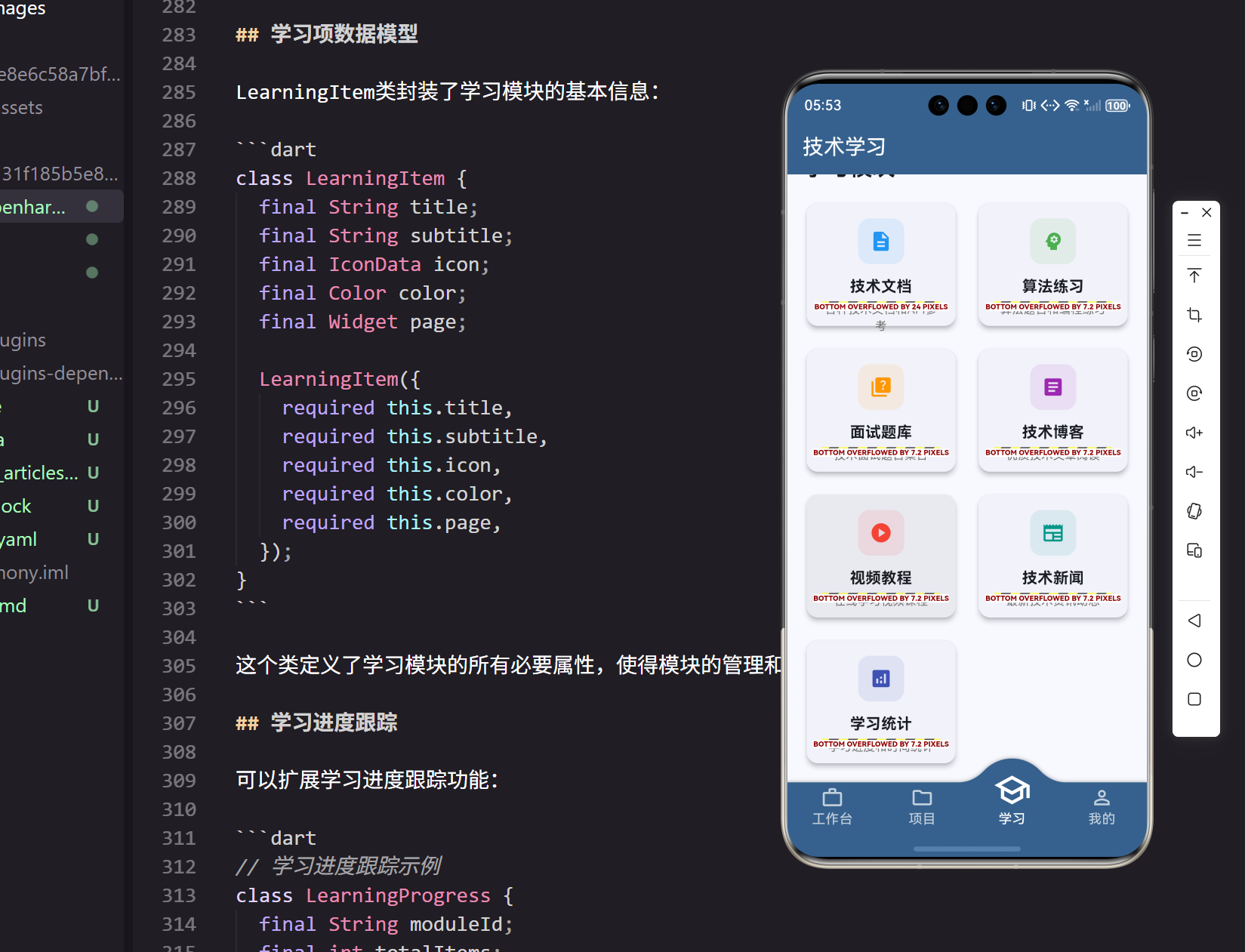
学习中心是开发者提升技能的重要平台,需要提供多样化的学习资源和进度跟踪功能。本文将详细介绍如何在Flutter for OpenHarmony应用中实现一个功能丰富的学习中心首页。
页面结构设计
学习中心首页采用模块化设计,包含学习统计和学习模块两个主要部分:
class LearningPage extends StatelessWidget {
  final List<LearningItem> learningItems = [
    LearningItem(
      title: '技术文档',
      subtitle: '各种技术文档和API参考',
      icon: Icons.description,
      color: Colors.blue,
      page: TechDocsPage(),
    ),
    LearningItem(
      title: '算法练习',
      subtitle: '算法题目和编程练习',
      icon: Icons.psychology,
      color: Colors.green,
      page: AlgorithmPracticePage(),
    ),
页面使用StatelessWidget实现,学习模块通过LearningItem数据结构统一管理,每个模块都有对应的页面和视觉标识。
学习模块配置
学习中心包含多个专业的学习模块:
LearningItem(
  title: '面试题库',
  subtitle: '技术面试题目集合',
  icon: Icons.quiz,
  color: Colors.orange,
  page: InterviewQuestionsPage(),
),
LearningItem(
  title: '技术博客',
  subtitle: '优质技术文章阅读',
  icon: Icons.article,
  color: Colors.purple,
  page: TechBlogPage(),
),
LearningItem(
  title: '视频教程',
  subtitle: '在线学习视频课程',
  icon: Icons.play_circle,
  color: Colors.red,
  page: VideoTutorialsPage(),
),
每个学习模块都有独特的颜色和图标,帮助用户快速识别不同类型的学习资源。模块配置采用声明式方式,便于扩展和维护。
页面布局实现
页面使用滚动视图容纳所有内容,确保在不同屏幕尺寸下都能正常显示:
Widget build(BuildContext context) {
return Scaffold(
appBar: AppBar(
title: const Text('技术学习'),
backgroundColor: Theme.of(context).primaryColor,
foregroundColor: Colors.white,
),
body: SingleChildScrollView(
padding: EdgeInsets.all(16.w),
child: Column(
crossAxisAlignment: CrossAxisAlignment.start,
children: [
// 学习进度卡片
Card(
child: Padding(
padding: EdgeInsets.all(16.w),
应用栏使用简洁的标题设计,主体内容使用单一滚动视图包装,确保内容可以完整显示。
学习统计卡片
页面顶部展示今日学习统计信息:
child: Column(
  crossAxisAlignment: CrossAxisAlignment.start,
  children: [
    Text(
      '今日学习',
      style: TextStyle(
        fontSize: 20.sp,
        fontWeight: FontWeight.bold,
      ),
    ),
    SizedBox(height: 12.h),
    Row(
      children: [
        Expanded(
          child: _buildStatCard('学习时长', '2.5小时', Icons.access_time, Colors.blue),
        ),
        SizedBox(width: 12.w),
        Expanded(
          child: _buildStatCard('完成题目', '8道', Icons.check_circle, Colors.green),
        ),
      ],
    ),
统计信息使用网格布局展示,包含学习时长、完成题目等关键指标。每个统计项都有对应的图标和颜色。
统计卡片构建
统计卡片使用统一的构建方法确保样式一致:
Widget _buildStatCard(String title, String value, IconData icon, Color color) {
  return Container(
    padding: EdgeInsets.all(12.w),
    decoration: BoxDecoration(
      color: color.withOpacity(0.1),
      borderRadius: BorderRadius.circular(8),
    ),
    child: Column(
      children: [
        Icon(
          icon,
          color: color,
          size: 24.sp,
        ),
        SizedBox(height: 8.h),
        Text(
          value,
          style: TextStyle(
            fontSize: 18.sp,
            fontWeight: FontWeight.bold,
            color: color,
          ),
        ),
        Text(
          title,
          style: TextStyle(
            fontSize: 12.sp,
            color: Colors.grey[600],
          ),
        ),
      ],
    ),
  );
}
每个统计卡片包含图标、数值和标题,使用对应的主题色创建视觉层次。背景色使用半透明效果,保持界面的轻盈感。
更多统计信息
统计区域还包含其他学习活动的记录:
SizedBox(height: 12.h),
Row(
  children: [
    Expanded(
      child: _buildStatCard('阅读文章', '3篇', Icons.article, Colors.orange),
    ),
    SizedBox(width: 12.w),
    Expanded(
      child: _buildStatCard('观看视频', '1个', Icons.play_circle, Colors.purple),
    ),
  ],
),
多样化的统计信息帮助用户全面了解自己的学习活动,包括理论学习和实践练习。
学习模块标题
统计区域下方是学习模块的标题:
SizedBox(height: 24.h),

// 学习模块
Text(
  '学习模块',
  style: TextStyle(
    fontSize: 24.sp,
    fontWeight: FontWeight.bold,
  ),
),
SizedBox(height: 16.h),
标题使用大字号粗体显示,与统计区域保持适当间距,形成清晰的内容分区。
学习模块网格
学习模块使用网格布局展示,提供直观的模块访问入口:
GridView.builder(
  shrinkWrap: true,
  physics: const NeverScrollableScrollPhysics(),
  gridDelegate: SliverGridDelegateWithFixedCrossAxisCount(
    crossAxisCount: 2,
    crossAxisSpacing: 16.w,
    mainAxisSpacing: 16.h,
    childAspectRatio: 1.2,
  ),
  itemCount: learningItems.length,
  itemBuilder: (context, index) {
    final item = learningItems[index];
    return Card(
      elevation: 4,
      child: InkWell(
        onTap: () => Get.to(() => item.page),
        borderRadius: BorderRadius.circular(12),
网格使用2列布局,模块卡片采用1.2的宽高比,确保内容能够完整显示。卡片使用阴影效果增强立体感。
模块卡片设计
每个学习模块卡片包含图标、标题和描述:
child: Padding(
  padding: EdgeInsets.all(16.w),
  child: Column(
    mainAxisAlignment: MainAxisAlignment.center,
    children: [
      Container(
        width: 48.w,
        height: 48.h,
        decoration: BoxDecoration(
          color: item.color.withOpacity(0.1),
          borderRadius: BorderRadius.circular(12),
        ),
        child: Icon(
          item.icon,
          color: item.color,
          size: 24.sp,
        ),
      ),
模块图标使用带背景色的容器包装,背景色是模块主色的半透明版本,创造层次感。图标容器采用圆角设计。
模块信息展示
模块卡片下方显示标题和副标题:
SizedBox(height: 12.h),
Text(
  item.title,
  style: TextStyle(
    fontSize: 16.sp,
    fontWeight: FontWeight.bold,
  ),
  textAlign: TextAlign.center,
),
SizedBox(height: 4.h),
Text(
  item.subtitle,
  style: TextStyle(
    fontSize: 12.sp,
    color: Colors.grey[600],
  ),
  textAlign: TextAlign.center,
  maxLines: 2,
  overflow: TextOverflow.ellipsis,
),
标题使用粗体显示,副标题使用较小字号和灰色,都采用居中对齐。副标题限制最大行数避免卡片过高。
学习项数据模型
LearningItem类封装了学习模块的基本信息:
class LearningItem {
  final String title;
  final String subtitle;
  final IconData icon;
  final Color color;
  final Widget page;

  LearningItem({
    required this.title,
    required this.subtitle,
    required this.icon,
    required this.color,
    required this.page,
  });
}
这个类定义了学习模块的所有必要属性,使得模块的管理和展示变得统一和规范。
学习进度跟踪
可以扩展学习进度跟踪功能:
// 学习进度跟踪示例
class LearningProgress {
  final String moduleId;
  final int totalItems;
  final int completedItems;
  final Duration studyTime;

  double get progress => completedItems / totalItems;

  LearningProgress({
    required this.moduleId,
    required this.totalItems,
    required this.completedItems,
    required this.studyTime,
  });
}
进度跟踪帮助用户了解自己在各个学习模块中的完成情况。
学习计划功能
可以添加学习计划功能,帮助用户制定学习目标:
// 学习计划示例
class StudyPlan {
  final String title;
  final DateTime startDate;
  final DateTime endDate;
  final List<String> modules;
  final int dailyGoal; // 每日学习分钟数

  StudyPlan({
    required this.title,
    required this.startDate,
    required this.endDate,
    required this.modules,
    required this.dailyGoal,
  });
}
学习计划功能帮助用户系统性地安排学习活动。
学习提醒功能
可以集成学习提醒功能,鼓励用户坚持学习:
// 学习提醒示例
class StudyReminder {
  final TimeOfDay time;
  final List<int> weekdays;
  final String message;
  final bool isEnabled;

  StudyReminder({
    required this.time,
    required this.weekdays,
    required this.message,
    this.isEnabled = true,
  });
}
提醒功能可以在指定时间发送通知,提醒用户进行学习。
学习成就系统
可以添加成就系统激励用户学习:
// 学习成就示例
class Achievement {
  final String id;
  final String title;
  final String description;
  final IconData icon;
  final Color color;
  final bool isUnlocked;
  final DateTime? unlockedAt;

  Achievement({
    required this.id,
    required this.title,
    required this.description,
    required this.icon,
    required this.color,
    this.isUnlocked = false,
    this.unlockedAt,
  });
}
成就系统通过游戏化的方式激励用户持续学习。
总结
通过以上实现,我们创建了一个功能完整的学习中心首页,包含学习统计展示、学习模块导航等功能。页面设计注重用户体验,通过统计信息帮助用户了解学习进度,通过模块化设计提供清晰的学习路径。在Flutter for OpenHarmony平台上,这样的学习平台能够为开发者提供系统化的技能提升支持。
欢迎加入开源鸿蒙跨平台社区:https://openharmonycrossplatform.csdn.net

腾讯云面向开发者汇聚海量精品云计算使用和开发经验,营造开放的云计算技术生态圈。
更多推荐
 13
13 0
0- 0


 已为社区贡献11条内容

所有评论(0)