Flutter 框架跨平台鸿蒙开发 - 时光倒流
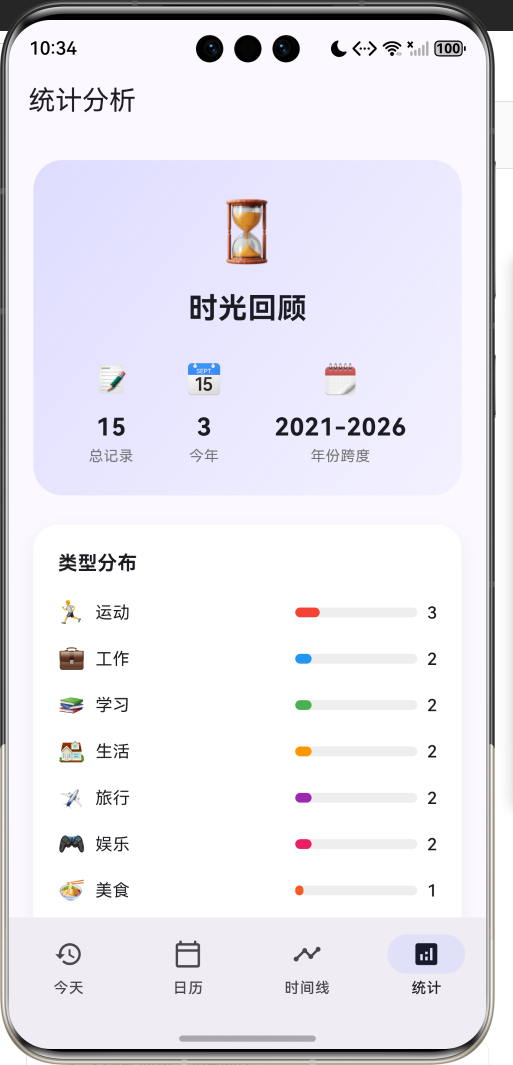
运行效果图时光倒流是一款帮助用户回顾历史的记忆管理应用。在这个快节奏的时代,我们常常忘记了过去的经历和成长。这款应用让用户能够轻松查看"历史上的今天"在做什么,重温那些珍贵的回忆。应用以梦幻的紫蓝色为主色调,营造出时光穿梭的神秘氛围。用户可以记录生活中的重要时刻,包括工作、学习、旅行、运动等各种类型,并添加心情标签。通过日历视图、时间线和统计分析,全方位展示用户的成长轨迹。时光倒流是一款帮助用户回
时光倒流应用
欢迎加入开源鸿蒙跨平台社区:
https://openharmonycrossplatform.csdn.net
一、项目概述
运行效果图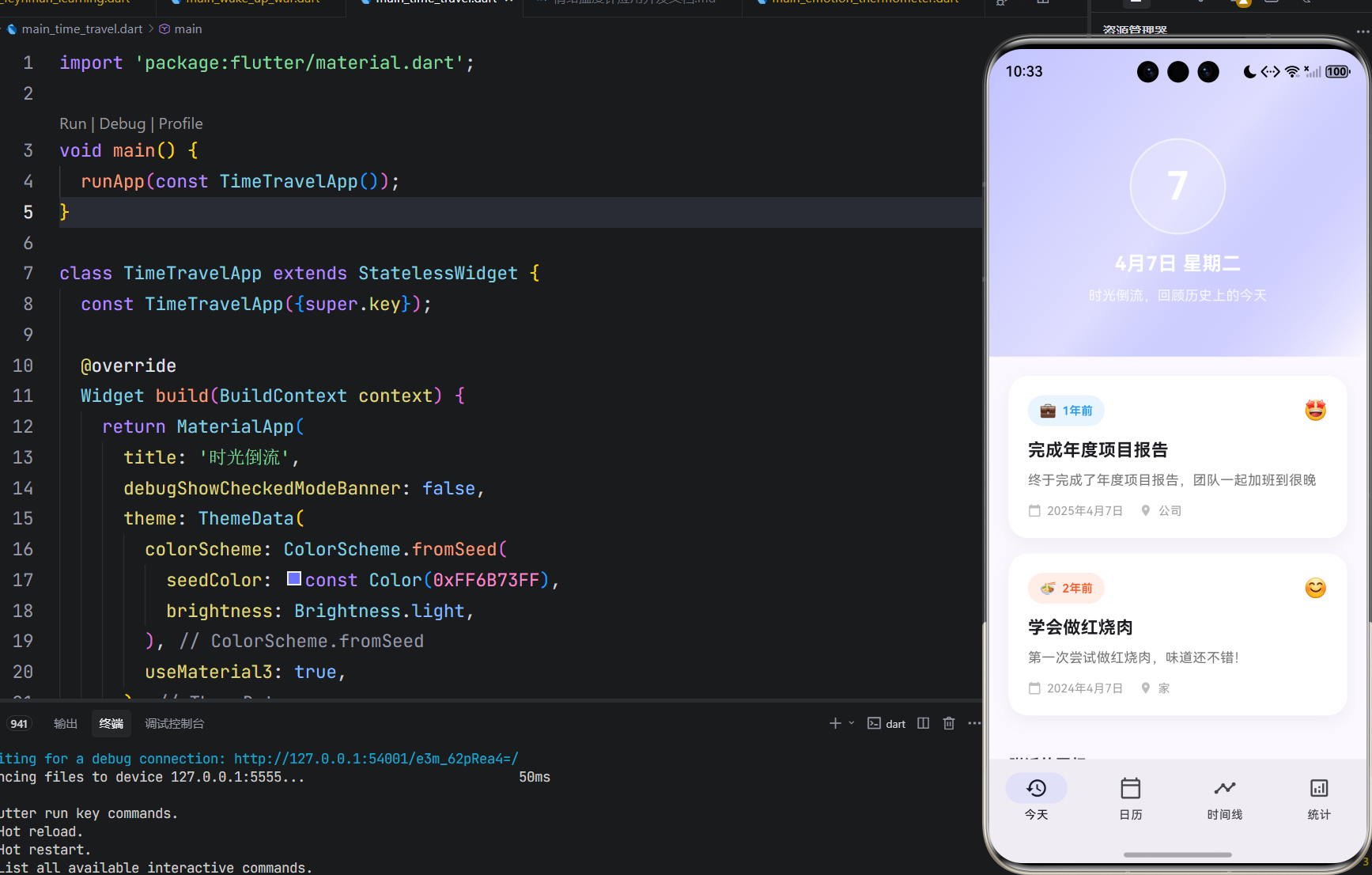
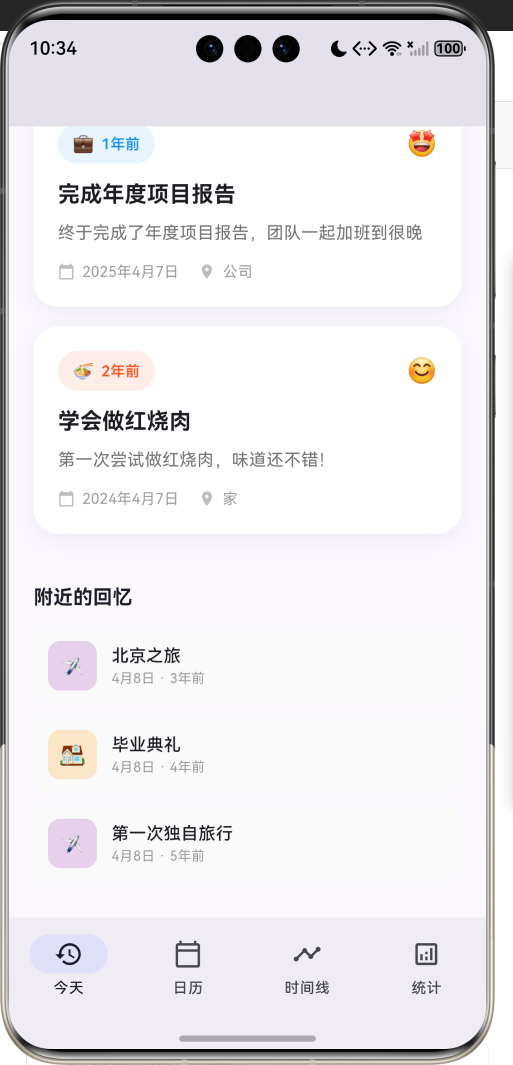
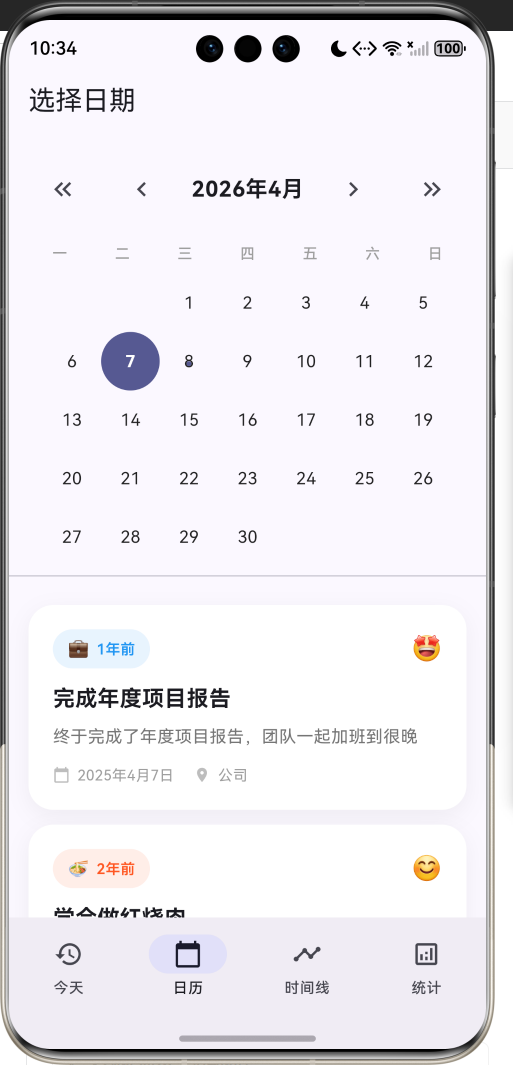
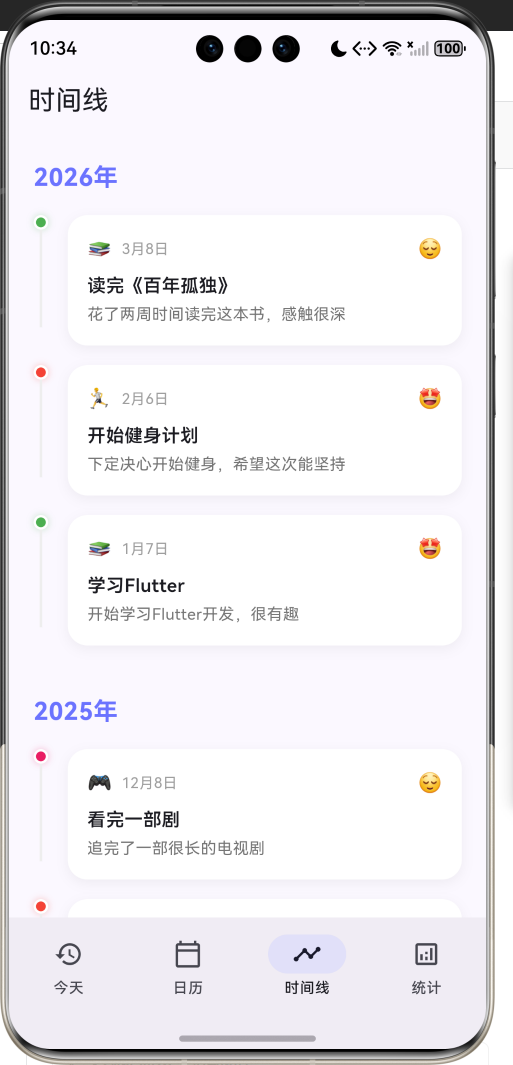
1.1 应用简介
时光倒流是一款帮助用户回顾历史的记忆管理应用。在这个快节奏的时代,我们常常忘记了过去的经历和成长。这款应用让用户能够轻松查看"历史上的今天"在做什么,重温那些珍贵的回忆。
应用以梦幻的紫蓝色为主色调,营造出时光穿梭的神秘氛围。用户可以记录生活中的重要时刻,包括工作、学习、旅行、运动等各种类型,并添加心情标签。通过日历视图、时间线和统计分析,全方位展示用户的成长轨迹。
1.2 核心功能
| 功能模块 | 功能描述 | 实现方式 |
|---|---|---|
| 历史上的今天 | 查看往年同日记录 | 日期筛选 |
| 日历视图 | 选择特定日期查看 | 自定义日历 |
| 时间线 | 按时间顺序展示 | 分组列表 |
| 记录管理 | 添加和管理记忆 | 底部弹窗 |
| 统计分析 | 类型和年度分布 | 自定义图表 |
1.3 记忆类型
| 序号 | 类型名称 | 图标 | 颜色 | 典型场景 |
|---|---|---|---|---|
| 1 | 工作 | 💼 | #2196F3 | 项目、加班、会议 |
| 2 | 学习 | 📚 | #4CAF50 | 读书、课程、考试 |
| 3 | 生活 | 🏠 | #FF9800 | 日常、搬家、纪念日 |
| 4 | 旅行 | ✈️ | #9C27B0 | 出游、景点、探索 |
| 5 | 运动 | 🏃 | #F44336 | 健身、跑步、比赛 |
| 6 | 娱乐 | 🎮 | #E91E63 | 游戏、追剧、音乐 |
| 7 | 美食 | 🍜 | #FF5722 | 烹饪、餐厅、美食 |
| 8 | 社交 | 👥 | #00BCD4 | 聚会、朋友、活动 |
| 9 | 其他 | 📝 | #607D8B | 杂项、记录、想法 |
1.4 心情类型
| 序号 | 心情名称 | 图标 | 颜色 |
|---|---|---|---|
| 1 | 开心 | 😊 | #FFEB3B |
| 2 | 兴奋 | 🤩 | #FF9800 |
| 3 | 平静 | 😌 | #8BC34A |
| 4 | 疲惫 | 😴 | #9E9E9E |
| 5 | 难过 | 😢 | #64B5F6 |
| 6 | 生气 | 😠 | #F44336 |
| 7 | 一般 | 😐 | #BDBDBD |
1.5 技术栈
| 技术领域 | 技术选型 | 版本要求 |
|---|---|---|
| 开发框架 | Flutter | >= 3.0.0 |
| 编程语言 | Dart | >= 2.17.0 |
| 设计规范 | Material Design 3 | - |
| 状态管理 | setState | - |
| 动画系统 | AnimationController | - |
| 目标平台 | 鸿蒙OS / Web | API 21+ |
1.6 项目结构
lib/
└── main_time_travel.dart
    ├── TimeTravelApp              # 应用入口
    ├── MemoryType                 # 记忆类型枚举
    ├── MoodType                   # 心情类型枚举
    ├── MemoryRecord               # 记忆记录模型
    ├── TimeTravelHomePage         # 主页面(底部导航)
    ├── _buildTodayPage            # 今天页面
    ├── _buildCalendarPage         # 日历页面
    ├── _buildTimelinePage         # 时间线页面
    ├── _buildStatsPage            # 统计页面
    └── YearChartPainter           # 年度图表绘制器
二、系统架构
2.1 整体架构图
2.2 类图设计
2.3 页面导航流程
2.4 数据查询流程时序图
三、核心模块设计
3.1 数据模型设计
3.1.1 记忆类型枚举 (MemoryType)
enum MemoryType {
  work('工作', '💼', Color(0xFF2196F3)),
  study('学习', '📚', Color(0xFF4CAF50)),
  life('生活', '🏠', Color(0xFFFF9800)),
  travel('旅行', '✈️', Color(0xFF9C27B0)),
  sport('运动', '🏃', Color(0xFFF44336)),
  entertainment('娱乐', '🎮', Color(0xFFE91E63)),
  food('美食', '🍜', Color(0xFFFF5722)),
  social('社交', '👥', Color(0xFF00BCD4)),
  other('其他', '📝', Color(0xFF607D8B));

  final String label;
  final String emoji;
  final Color color;

  const MemoryType(this.label, this.emoji, this.color);
}
3.1.2 心情类型枚举 (MoodType)
enum MoodType {
  happy('开心', '😊', Color(0xFFFFEB3B)),
  excited('兴奋', '🤩', Color(0xFFFF9800)),
  calm('平静', '😌', Color(0xFF8BC34A)),
  tired('疲惫', '😴', Color(0xFF9E9E9E)),
  sad('难过', '😢', Color(0xFF64B5F6)),
  angry('生气', '😠', Color(0xFFF44336)),
  neutral('一般', '😐', Color(0xFFBDBDBD));

  final String label;
  final String emoji;
  final Color color;

  const MoodType(this.label, this.emoji, this.color);
}
3.1.3 记忆记录模型 (MemoryRecord)
class MemoryRecord {
  final String id;              // 唯一标识
  final DateTime date;          // 记录日期
  final String title;           // 标题
  final String content;         // 内容描述
  final MemoryType type;        // 记忆类型
  final MoodType? mood;         // 心情(可选)
  final List<String> tags;      // 标签列表
  final String? location;       // 地点(可选)

  int get yearsAgo => DateTime.now().year - date.year;
}
3.1.4 记忆类型分布
3.2 页面结构设计
3.2.1 主页面布局
3.2.2 今天页面结构
3.2.3 日历页面结构
3.3 数据查询设计
四、UI设计规范
4.1 配色方案
应用采用梦幻的紫蓝色为主色调,营造时光穿梭的氛围:
| 颜色类型 | 色值 | 用途 |
|---|---|---|
| 主色 | #6B73FF | 导航、按钮、强调元素 |
| 渐变起始 | #6B73FF (40%透明) | 头部渐变 |
| 渐变结束 | #6B73FF (20%透明) | 头部渐变 |
| 工作色 | #2196F3 | 蓝色 |
| 学习色 | #4CAF50 | 绿色 |
| 生活色 | #FF9800 | 橙色 |
| 旅行色 | #9C27B0 | 紫色 |
| 运动色 | #F44336 | 红色 |
| 娱乐色 | #E91E63 | 粉色 |
| 美食色 | #FF5722 | 深橙 |
| 社交色 | #00BCD4 | 青色 |
| 其他色 | #607D8B | 灰色 |
4.2 字体规范
| 元素 | 字号 | 字重 | 颜色 |
|---|---|---|---|
| 应用标题 | 20px | Bold | #FFFFFF |
| 日期显示 | 40px | Bold | #FFFFFF |
| 记忆标题 | 18px | Bold | #000000 |
| 记忆内容 | 14px | Regular | #757575 |
| 年份标题 | 20px | Bold | #6B73FF |
| 类型标签 | 12px | Medium | 类型色 |
| 辅助文字 | 11-12px | Regular | #9E9E9E |
4.3 组件规范
4.3.1 记忆卡片
┌─────────────────────────────────────────────┐
│  💼 3年前                              😊   │
│                                             │
│  完成年度项目报告                           │
│                                             │
│  终于完成了年度项目报告,                   │
│  团队一起加班到很晚                         │
│                                             │
│  📅 2021年4月7日    📍 公司                │
└─────────────────────────────────────────────┘
4.3.2 日历格子
┌─────┬─────┬─────┬─────┬─────┬─────┬─────┐
│  一 │  二 │  三 │  四 │  五 │  六 │  日 │
├─────┼─────┼─────┼─────┼─────┼─────┼─────┤
│     │     │  1  │  2  │  3  │  4  │  5  │
│     │     │     │  ●  │     │     │     │
├─────┼─────┼─────┼─────┼─────┼─────┼─────┤
│  6  │  7  │  8  │  9  │ 10  │ 11  │ 12  │
│     │(●) │     │  ●  │     │     │     │
└─────┴─────┴─────┴─────┴─────┴─────┴─────┘
      ↑选中  ●有记录
4.3.3 时间线卡片
    ●──────────────────────────────
    │  💼 4月7日              😊
    │  完成年度项目报告
    │  终于完成了年度项目报告...
    │
────┴────────────────────────────────
五、核心功能实现
5.1 历史上的今天查询
List<MemoryRecord> _getMemoriesOnThisDay() {
  final now = DateTime.now();
  return _memories.where((m) {
    return m.date.month == now.month && m.date.day == now.day;
  }).toList();
}

List<MemoryRecord> _getMemoriesOnDate(DateTime date) {
  return _memories.where((m) {
    return m.date.month == date.month && m.date.day == date.day;
  }).toList();
}
5.2 统计数据计算
Map<String, dynamic> _getStatistics() {
  final now = DateTime.now();
  final thisYear = _memories.where((m) => m.date.year == now.year).toList();
  final lastYear = _memories.where((m) => m.date.year == now.year - 1).toList();

  final typeCounts = <MemoryType, int>{};
  for (var type in MemoryType.values) {
    typeCounts[type] = _memories.where((m) => m.type == type).length;
  }

  final moodCounts = <MoodType, int>{};
  for (var mood in MoodType.values) {
    moodCounts[mood] = _memories.where((m) => m.mood == mood).length;
  }

  final yearCounts = <int, int>{};
  for (var m in _memories) {
    yearCounts[m.date.year] = (yearCounts[m.date.year] ?? 0) + 1;
  }

  return {
    'total': _memories.length,
    'thisYear': thisYear.length,
    'lastYear': lastYear.length,
    'typeCounts': typeCounts,
    'moodCounts': moodCounts,
    'yearCounts': yearCounts,
    'oldestYear': _memories.isEmpty ? now.year : _memories.last.date.year,
    'newestYear': _memories.isEmpty ? now.year : _memories.first.date.year,
  };
}
5.3 日历网格实现
Widget _buildCalendarGrid() {
  final weekdays = ['一', '二', '三', '四', '五', '六', '日'];
  final firstDayOfMonth = DateTime(_selectedDate.year, _selectedDate.month, 1);
  final lastDayOfMonth = DateTime(_selectedDate.year, _selectedDate.month + 1, 0);
  final startWeekday = firstDayOfMonth.weekday;

  return Padding(
    padding: const EdgeInsets.symmetric(horizontal: 16),
    child: Column(
      children: [
        Row(
          children: weekdays.map((day) => Expanded(
            child: Center(
              child: Text(day, style: TextStyle(fontSize: 12, color: Colors.grey[500])),
            ),
          )).toList(),
        ),
        const SizedBox(height: 8),
        Wrap(
          children: List.generate(
            lastDayOfMonth.day + startWeekday - 1,
            (index) {
              if (index < startWeekday - 1) {
                return const SizedBox(width: 48, height: 48);
              }

              final day = index - startWeekday + 2;
              final date = DateTime(_selectedDate.year, _selectedDate.month, day);
              final isSelected = day == _selectedDate.day;
              final hasMemory = _memories.any((m) =>
                m.date.month == date.month && m.date.day == date.day);

              return GestureDetector(
                onTap: () {
                  setState(() {
                    _selectedDate = date;
                  });
                },
                child: Container(
                  width: 48,
                  height: 48,
                  decoration: BoxDecoration(
                    color: isSelected
                        ? Theme.of(context).colorScheme.primary
                        : null,
                    shape: BoxShape.circle,
                  ),
                  child: Center(
                    child: Stack(
                      alignment: Alignment.center,
                      children: [
                        Text('$day', style: TextStyle(fontSize: 14)),
                        if (hasMemory && !isSelected)
                          Positioned(
                            bottom: 6,
                            child: Container(
                              width: 4,
                              height: 4,
                              decoration: BoxDecoration(
                                color: Theme.of(context).colorScheme.primary,
                                shape: BoxShape.circle,
                              ),
                            ),
                          ),
                      ],
                    ),
                  ),
                ),
              );
            },
          ),
        ),
      ],
    ),
  );
}
5.4 时间线实现
Widget _buildTimelinePage() {
  final sortedMemories = List<MemoryRecord>.from(_memories)
    ..sort((a, b) => b.date.compareTo(a.date));

  return Scaffold(
    appBar: AppBar(title: const Text('时间线')),
    body: ListView.builder(
      padding: const EdgeInsets.all(20),
      itemCount: sortedMemories.length,
      itemBuilder: (context, index) {
        final memory = sortedMemories[index];
        final showYear = index == 0 ||
            sortedMemories[index - 1].date.year != memory.date.year;

        return Column(
          crossAxisAlignment: CrossAxisAlignment.start,
          children: [
            if (showYear)
              Padding(
                padding: const EdgeInsets.only(bottom: 16, top: index == 0 ? 0 : 24),
                child: Text(
                  '${memory.date.year}年',
                  style: const TextStyle(
                    fontSize: 20,
                    fontWeight: FontWeight.bold,
                    color: Color(0xFF6B73FF),
                  ),
                ),
              ),
            _buildTimelineItem(memory),
          ],
        );
      },
    ),
  );
}
5.5 年度图表绘制
class YearChartPainter extends CustomPainter {
final List<MapEntry<int, int>> data;
YearChartPainter(this.data);
void paint(Canvas canvas, Size size) {
if (data.isEmpty) return;
final paint = Paint()
..color = const Color(0xFF6B73FF)
..strokeWidth = 2
..style = PaintingStyle.stroke;
final fillPaint = Paint()
..color = const Color(0xFF6B73FF).withValues(alpha: 0.1)
..style = PaintingStyle.fill;
final maxVal = data.map((e) => e.value).reduce((a, b) => a > b ? a : b);
final stepX = size.width / (data.length - 1);
final path = Path();
final fillPath = Path();
for (int i = 0; i < data.length; i++) {
final x = i * stepX;
final y = size.height - (data[i].value / maxVal) * size.height * 0.8 - size.height * 0.1;
if (i == 0) {
path.moveTo(x, y);
fillPath.moveTo(x, size.height);
fillPath.lineTo(x, y);
} else {
path.lineTo(x, y);
fillPath.lineTo(x, y);
}
}
fillPath.lineTo(size.width, size.height);
fillPath.close();
canvas.drawPath(fillPath, fillPaint);
canvas.drawPath(path, paint);
// 绘制数据点和年份标签
for (int i = 0; i < data.length; i++) {
final x = i * stepX;
final y = size.height - (data[i].value / maxVal) * size.height * 0.8 - size.height * 0.1;
canvas.drawCircle(Offset(x, y), 4, Paint()..color = const Color(0xFF6B73FF));
}
}
bool shouldRepaint(covariant CustomPainter oldDelegate) => false;
}
六、交互设计
6.1 日历选择交互流程
6.2 时间线浏览流程
6.3 页面切换状态
七、扩展功能规划
7.1 后续版本规划
7.2 功能扩展建议
7.2.1 添加记录功能
用户主动记录:
- 添加新的记忆记录
- 上传照片附件
- 设置提醒回顾
7.2.2 搜索功能
快速查找回忆:
- 按关键词搜索
- 按类型筛选
- 按时间范围筛选
7.2.3 分享功能
社交分享能力:
- 生成精美卡片
- 分享到社交平台
- 创建回忆相册
八、注意事项
8.1 开发注意事项
-
日期处理:注意时区问题,使用DateTime.now()获取本地时间
-
动画控制:两个AnimationController需要在dispose时释放
-
状态管理:使用setState管理本地状态,注意_selectedDate更新
-
日历计算:注意月份第一天是星期几的计算
8.2 常见问题
| 问题 | 原因 | 解决方案 |
|---|---|---|
| 日历显示错误 | 月份起始计算问题 | 检查weekday计算 |
| 记录不显示 | 筛选条件问题 | 检查where条件 |
| 年份不显示 | 排序问题 | 检查sort逻辑 |
| 图表不显示 | 数据为空 | 检查yearCounts |
8.3 使用提示
⏳ 时光倒流使用小贴士 ⏳
记录生活中的重要时刻。
定期回顾,重温美好回忆。
通过时间线,见证自己的成长。
珍惜每一天,创造更多回忆!
九、运行说明
9.1 环境要求
| 环境 | 版本要求 |
|---|---|
| Flutter SDK | >= 3.0.0 |
| Dart SDK | >= 2.17.0 |
| 鸿蒙OS | API 21+ |
9.2 运行命令
# 查看可用设备
flutter devices

# 运行到Web服务器
flutter run -d web-server -t lib/main_time_travel.dart --web-port 8123

# 运行到鸿蒙设备
flutter run -d 127.0.0.1:5555 lib/main_time_travel.dart

# 运行到Windows
flutter run -d windows -t lib/main_time_travel.dart

# 代码分析
flutter analyze lib/main_time_travel.dart
十、总结
时光倒流是一款帮助用户回顾历史的记忆管理应用,通过"历史上的今天"功能让用户轻松重温过去的经历。应用内置九大记忆类型和七种心情标签,用户可以全方位记录生活中的重要时刻。
核心功能涵盖历史上的今天、日历视图、时间线展示、统计分析四大模块。历史上的今天自动展示往年同日的记录;日历视图支持选择特定日期查看回忆;时间线按年份分组展示所有记录;统计分析提供类型分布和年度分布图表。
应用采用Material Design 3设计规范,以梦幻的紫蓝色为主色调,营造时光穿梭的神秘氛围。通过本应用,希望能够帮助用户珍惜每一天,记录成长轨迹,创造更多美好回忆。
时光倒流,重温美好回忆

腾讯云面向开发者汇聚海量精品云计算使用和开发经验,营造开放的云计算技术生态圈。
更多推荐
 9
9 0
0- 0


 已为社区贡献11条内容

所有评论(0)