发布脚手架
·
初始化项目
npm init -y添加依赖和bin
{
  "name": "@jf/lowcode",
  "version": "1.0.1-beta.0",
  "description": "A simple lowcode CLI for project templates management.",
  "main": "bin/lowcode.js",
  "files": [
    "bin",
    "template.json"
  ],
  "bin": {
    "lowcode": "bin/lowcode.js",
    "lowcode-cli": "bin/lowcode.js",
    "lowcode-add": "bin/lowcode-add.js",
    "lowcode-update": "bin/lowcode-update.js",
    "lowcode-delete": "bin/lowcode-delete.js",
    "lowcode-list": "bin/lowcode-list.js",
    "lowcode-init": "bin/lowcode-init.js"
  },
  "scripts": {
    "test": "echo \"Error: no test specified\" && exit 1",
    "release:beta": "node scripts/publish-beta.js",
    "release:prod": "node scripts/publish-prod.js"
  },
  "keywords": [],
  "author": "",
  "license": "ISC",
  "dependencies": {
    "chalk": "^3.0.0",
    "commander": "^5.0.0",
    "download-git-repo": "^3.0.2",
    "inquirer": "^7.1.0",
    "ora": "^4.0.3"
  }
}
根目录创建文件夹bin以及文件
//lowcode.js

#!/usr/bin/env node
const program = require('commander')

// 定义当前版本
// 定义使用方法
// 定义四个指令
program
  .version(require('../package').version)
  .usage('<command> [options]')
  .command('add', 'add a new template')
  .command('delete', 'delete a template')
  .command('list', 'list all the templates')
  .command('init', 'generate a new project from a template')
  .command('update', 'update a template')

// 解析命令行参数
program.parse(process.argv)
//lowcode-add.js #!/usr/bin/env node // 交互式命令行 const inquirer = require('inquirer') // 修改控制台字符串的样式 const chalk = require('chalk') // node 内置文件模块 const fs = require('fs') // 读取根目录下的 template.json const tplObj = require(`${__dirname}/../template`) // 自定义交互式命令行的问题及简单的校验 let question = [ { name: "name", type: 'input', message: "请输入模板名称", validate (val) { if (val === '') { return 'Name is required!' } else if (tplObj[val]) { return 'Template has already existed!' } else { return true } } }, { name: "url", type: 'input', message: "请输入模板地址", validate (val) { if (val === '') return 'The url is required!' return true } } ] inquirer .prompt(question).then(answers => { // answers 就是用户输入的内容,是个对象 let { name, url } = answers; // 过滤 unicode 字符 tplObj[name] = url.replace(/[\u0000-\u0019]/g, '') // 把模板信息写入 template.json 文件中 fs.writeFile(`${__dirname}/../template.json`, JSON.stringify(tplObj), 'utf-8', err => { if (err) console.log(err) console.log('\n') console.log(chalk.green('Added successfully!\n')) console.log(chalk.grey('The latest template list is: \n')) console.log(tplObj) console.log('\n') }) })//lowcode-delete.js #!/usr/bin/env node const inquirer = require('inquirer') const chalk = require('chalk') const fs = require('fs') const tplObj = require(`${__dirname}/../template`) let question = [ { name: "name", message: "请输入要删除的模板名称", validate(val) { if (val === '') { return 'Name is required!' } else if (!tplObj[val]) { return 'Template does not exist!' } else { return true } } } ] inquirer .prompt(question).then(answers => { let { name } = answers; delete tplObj[name] // 更新 template.json 文件 fs.writeFile(`${__dirname}/../template.json`, JSON.stringify(tplObj), 'utf-8', err => { if (err) console.log(err) console.log('\n') console.log(chalk.green('Deleted successfully!\n')) console.log(chalk.grey('The latest template list is: \n')) console.log(tplObj) console.log('\n') }) })//lowcode-init.js #!/usr/bin/env node const program = require('commander') const chalk = require('chalk') const ora = require('ora') const download = require('download-git-repo') const tplObj = require(`${__dirname}/../template`) program .usage('<template-name> [project-name]') program.parse(process.argv) // 当没有输入参数的时候给个提示 if (program.args.length < 1) return program.help() // 好比 vue init webpack project-name 的命令一样,第一个参数是 webpack,第二个参数是 project-name let templateName = program.args[0] let projectName = program.args[1] // 小小校验一下参数 if (!tplObj[templateName]) { console.log(chalk.red('\n Template does not exit! \n ')) return } if (!projectName) { console.log(chalk.red('\n Project should not be empty! \n ')) return } url = tplObj[templateName] console.log(chalk.white('\n Start generating... \n')) // 出现加载图标 const spinner = ora("Downloading..."); spinner.start(); // 执行下载方法并传入参数 download( url, projectName, { clone: true }, err => { if (err) { spinner.fail(); console.log(chalk.red(`Generation failed. ${err}`)) return } // 结束加载图标 spinner.succeed(); console.log(chalk.cyan('\n Generation completed!')) console.log(chalk.cyan('\n To get started')) console.log(chalk.cyan(`\n cd ${projectName} \n`)) } )//lowcode-list.js #!/usr/bin/env node const tplObj = require(`${__dirname}/../template`) console.log(tplObj)//lowcode-update.js #!/usr/bin/env node const inquirer = require('inquirer') const chalk = require('chalk') const fs = require('fs') const tplObj = require(`${__dirname}/../template.json`) let question = [ { name: "name", type: 'input', message: "请输入要更新的模板名称", validate (val) { if (val === '') { return 'Name is required!' } else if (!tplObj[val]) { return 'Template does not exist!' } else { return true } } }, { name: "url", type: 'input', message: "请输入新的模板地址", validate (val) { if (val === '') return 'The url is required!' return true } } ] inquirer .prompt(question).then(answers => { let { name, url } = answers; tplObj[name] = url.replace(/[\u0000-\u0019]/g, '') fs.writeFile(`${__dirname}/../template.json`, JSON.stringify(tplObj), 'utf-8', err => { if (err) console.log(err) console.log('\n') console.log(chalk.green('Updated successfully!\n')) console.log(chalk.grey('The latest template list is: \n')) console.log(tplObj) console.log('\n') }) })创建.npmignore
node_modules
.DS_Store
package-lock.json
*.log
创建template.json
{}完成后需要执行根目录终端执行:
npm link配置模版,根目录终端执行:
lowcode-add配置模版名称和仓库即可:
最终会在template.js中生成模版。
{
  "jf-lowcode-cli": "direct:http://gitlab.yintech.net/rjhy/jfzt/frontend/business-lines/jf-lowcode-core/jf-lowcode-cli.git"
}
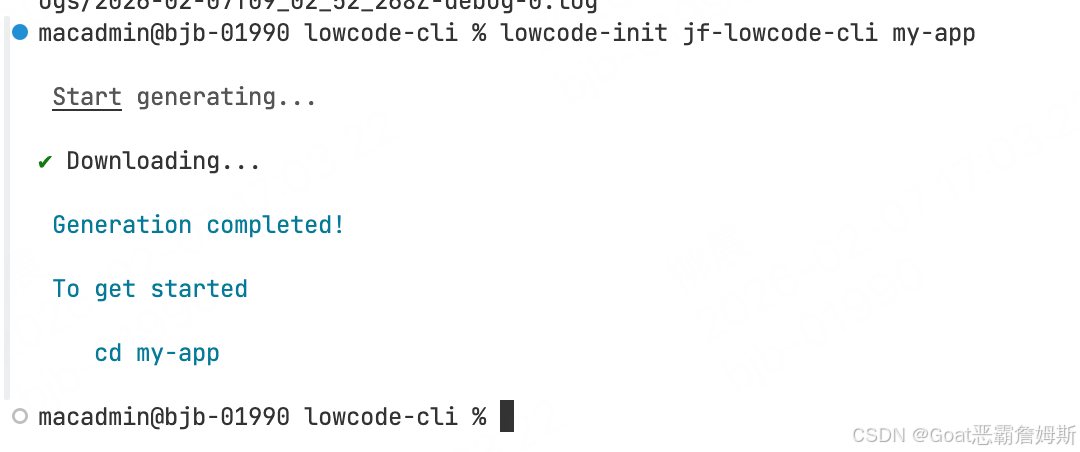
此时尝试本地拉项目:
lowcode-init jf-lowcode-cli my-app
最后配置好以后发布到npm包即可
npm publish使用npx可以直接创建脚手架
npx @jf/lowcode init jf-lowcode-cli my-project


腾讯云面向开发者汇聚海量精品云计算使用和开发经验,营造开放的云计算技术生态圈。
更多推荐
 0
0 0
0- 0


 已为社区贡献6条内容

所有评论(0)