Flutter 框架跨平台鸿蒙开发 - 全国特色明信片店应用开发教程
简洁的数据模型设计:专注于明信片店的核心信息清爽的UI界面:突出明信片的美感和文艺气息实用的功能实现优雅的交互设计:流畅的用户体验可扩展的架构:便于后续功能扩展这款应用界面简洁、功能实用,非常适合明信片爱好者和旅游者使用。通过本教程的学习,你可以掌握Flutter应用开发的核心技能,为开发更复杂的应用打下坚实基础。欢迎加入开源鸿蒙跨平台社区:https://openharmonycrossplat
·
Flutter全国特色明信片店应用开发教程
项目概述
本教程将带你开发一个简洁实用的Flutter全国特色明信片店应用。这款应用专为明信片爱好者和旅游者设计,提供全国各地特色明信片店的查找、浏览和收藏功能,让用户轻松找到心仪的明信片店铺。
运行效果图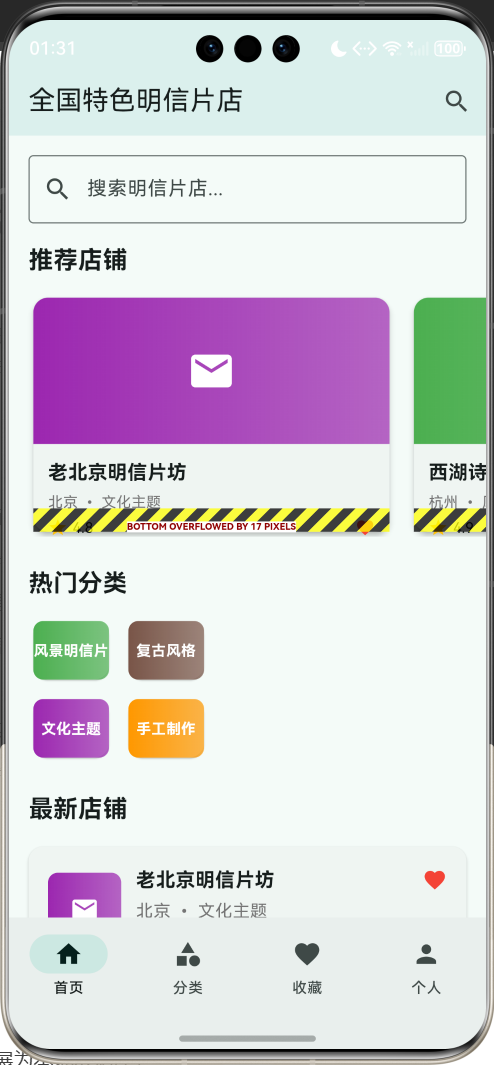
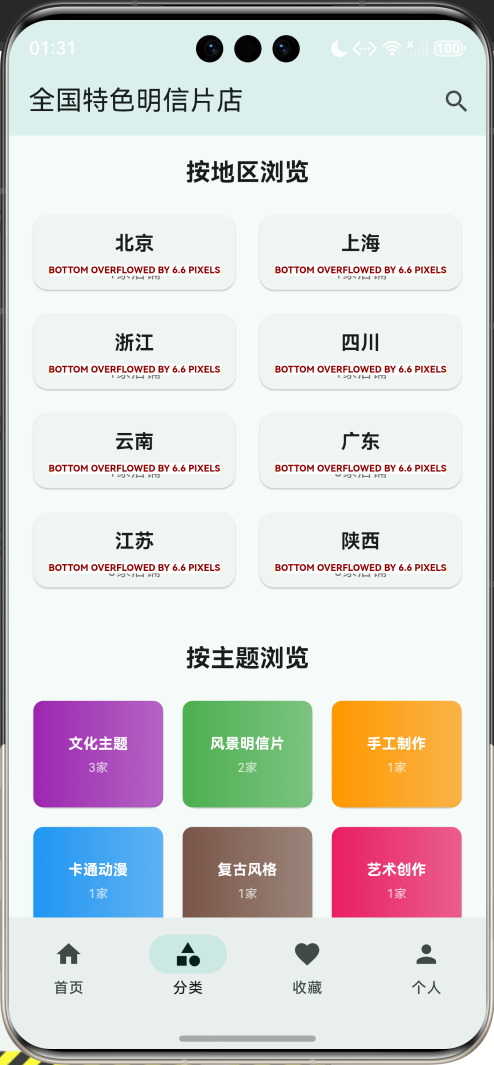
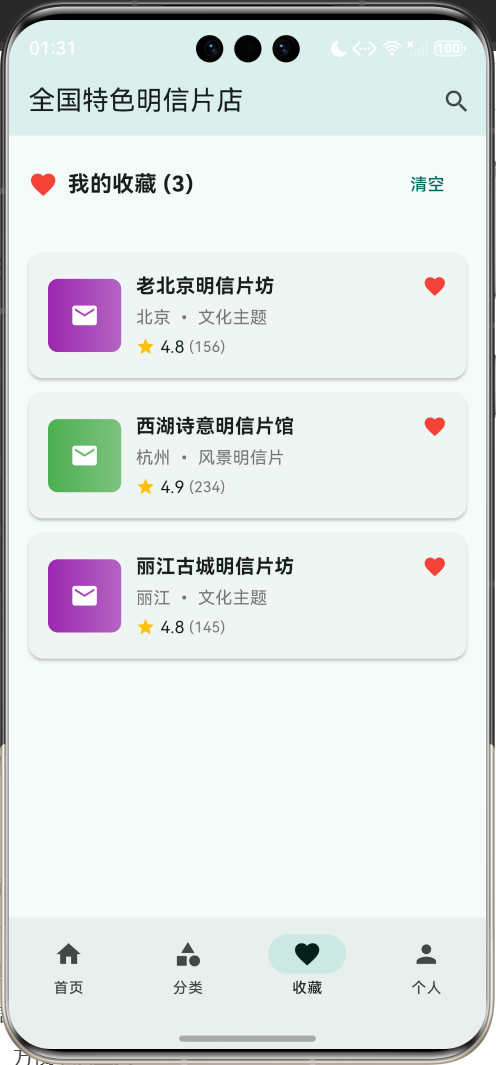
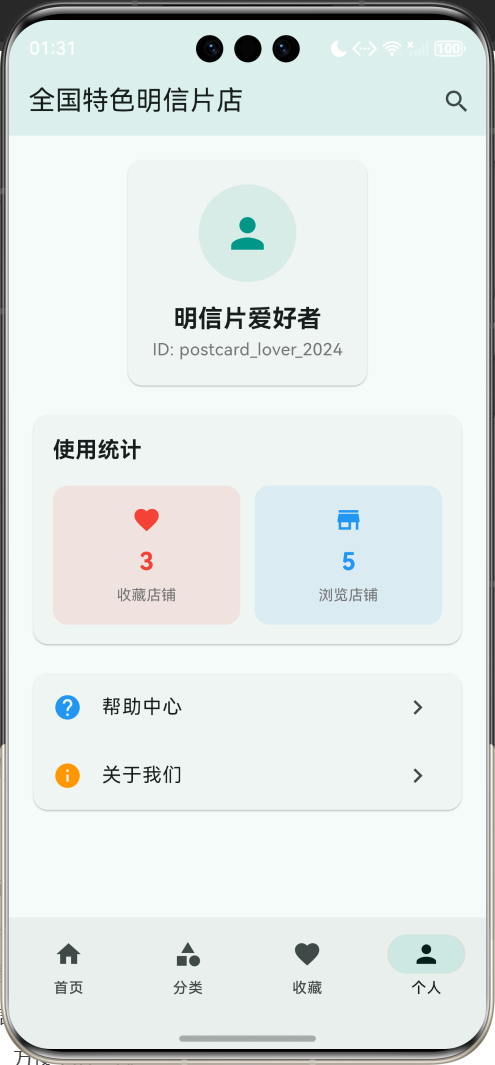
应用特色
- 简洁界面设计:清爽的UI界面,突出明信片的美感
- 全国店铺覆盖:收录全国各地特色明信片店铺信息
- 分类浏览功能:按地区、主题、风格等分类查看
- 店铺详情展示:详细的店铺信息和明信片样式展示
- 收藏管理:收藏喜欢的店铺,方便下次查找
- 搜索筛选:快速搜索和筛选功能
- 联系导航:一键拨打电话和地图导航
技术栈
- 框架:Flutter 3.x
- 语言:Dart
- UI组件:Material Design 3
- 状态管理:StatefulWidget
- 数据存储:内存存储(可扩展为本地数据库)
项目结构设计
核心数据模型
1. 明信片店模型(PostcardShop)
class PostcardShop {
  final String id;              // 唯一标识
  final String name;            // 店铺名称
  final String address;         // 详细地址
  final String city;            // 所在城市
  final String province;        // 所在省份
  final String phone;           // 联系电话
  final String description;     // 店铺描述
  final List<String> categories; // 明信片分类
  final List<String> styles;    // 明信片风格
  final double rating;          // 评分
  final int reviewCount;        // 评价数量
  final String operatingHours;  // 营业时间
  final List<String> images;    // 店铺图片
  final DateTime lastUpdated;   // 最后更新时间
  bool isFavorite;             // 是否收藏
  final String ownerName;       // 店主姓名
  final List<String> specialties; // 特色明信片
  final bool hasCustomService;  // 是否提供定制服务
  final bool hasOnlineStore;    // 是否有网店
}
2. 明信片分类枚举
enum PostcardCategory {
  scenic,       // 风景明信片
  cultural,     // 文化主题
  vintage,      // 复古风格
  handmade,     // 手工制作
  artistic,     // 艺术创作
  local,        // 地方特色
  festival,     // 节日主题
  cartoon,      // 卡通动漫
}
页面架构
应用采用底部导航栏设计,包含四个主要页面:
- 首页:展示推荐店铺和热门明信片
- 分类页面:按地区和主题分类浏览
- 收藏页面:管理收藏的店铺
- 个人页面:用户信息和应用设置
详细实现步骤
第一步:项目初始化
创建新的Flutter项目:
flutter create postcard_shop_finder
cd postcard_shop_finder
第二步:主应用结构
class MyApp extends StatelessWidget {
const MyApp({super.key});
Widget build(BuildContext context) {
return MaterialApp(
title: 'Flutter全国特色明信片店',
theme: ThemeData(
colorScheme: ColorScheme.fromSeed(seedColor: Colors.teal),
useMaterial3: true,
),
home: const PostcardShopHomePage(),
debugShowCheckedModeBanner: false,
);
}
}
第三步:数据初始化
创建示例明信片店数据:
void _initializeShops() {
  _postcardShops = [
    PostcardShop(
      id: '1',
      name: '老北京明信片坊',
      address: '北京市东城区南锣鼓巷45号',
      city: '北京',
      province: '北京市',
      phone: '010-12345678',
      description: '专营老北京风情明信片,胡同文化、四合院、传统建筑等主题丰富。',
      categories: ['文化主题', '地方特色', '复古风格'],
      styles: ['传统中式', '怀旧复古', '黑白摄影'],
      rating: 4.8,
      reviewCount: 156,
      operatingHours: '09:00-21:00',
      images: [],
      lastUpdated: DateTime.now().subtract(const Duration(hours: 2)),
      isFavorite: true,
      ownerName: '张师傅',
      specialties: ['胡同系列', '故宫系列', '老北京小吃系列'],
      hasCustomService: true,
      hasOnlineStore: false,
    ),
    // 更多店铺数据...
  ];
}
第四步:首页设计
推荐店铺展示
Widget _buildHomePage() {
  return SingleChildScrollView(
    child: Column(
      crossAxisAlignment: CrossAxisAlignment.start,
      children: [
        // 搜索栏
        Container(
          padding: const EdgeInsets.all(16),
          child: TextField(
            decoration: const InputDecoration(
              hintText: '搜索明信片店...',
              prefixIcon: Icon(Icons.search),
              border: OutlineInputBorder(),
            ),
            onChanged: _performSearch,
          ),
        ),

        // 推荐店铺
        const Padding(
          padding: EdgeInsets.symmetric(horizontal: 16),
          child: Text(
            '推荐店铺',
            style: TextStyle(fontSize: 20, fontWeight: FontWeight.bold),
          ),
        ),
        const SizedBox(height: 12),
        SizedBox(
          height: 200,
          child: ListView.builder(
            scrollDirection: Axis.horizontal,
            padding: const EdgeInsets.symmetric(horizontal: 16),
            itemCount: _recommendedShops.length,
            itemBuilder: (context, index) {
              return Container(
                width: 300,
                margin: const EdgeInsets.only(right: 12),
                child: _buildRecommendedShopCard(_recommendedShops[index]),
              );
            },
          ),
        ),

        const SizedBox(height: 24),

        // 热门分类
        const Padding(
          padding: EdgeInsets.symmetric(horizontal: 16),
          child: Text(
            '热门分类',
            style: TextStyle(fontSize: 20, fontWeight: FontWeight.bold),
          ),
        ),
        const SizedBox(height: 12),
        _buildCategoryGrid(),

        const SizedBox(height: 24),

        // 最新店铺
        const Padding(
          padding: EdgeInsets.symmetric(horizontal: 16),
          child: Text(
            '最新店铺',
            style: TextStyle(fontSize: 20, fontWeight: FontWeight.bold),
          ),
        ),
        const SizedBox(height: 12),
        ...(_filteredShops.take(5).map((shop) =>
          Padding(
            padding: const EdgeInsets.symmetric(horizontal: 16, vertical: 4),
            child: _buildShopCard(shop),
          )
        )),
      ],
    ),
  );
}
推荐店铺卡片
Widget _buildRecommendedShopCard(PostcardShop shop) {
  return Card(
    elevation: 4,
    child: InkWell(
      onTap: () => _showShopDetail(shop),
      child: Column(
        crossAxisAlignment: CrossAxisAlignment.start,
        children: [
          // 店铺图片区域
          Container(
            height: 120,
            width: double.infinity,
            decoration: BoxDecoration(
              gradient: LinearGradient(
                colors: [
                  _getCategoryColor(shop.categories.first),
                  _getCategoryColor(shop.categories.first).withOpacity(0.7),
                ],
              ),
              borderRadius: const BorderRadius.vertical(top: Radius.circular(12)),
            ),
            child: const Center(
              child: Icon(Icons.mail, size: 40, color: Colors.white),
            ),
          ),

          // 店铺信息
          Padding(
            padding: const EdgeInsets.all(12),
            child: Column(
              crossAxisAlignment: CrossAxisAlignment.start,
              children: [
                Text(
                  shop.name,
                  style: const TextStyle(
                    fontSize: 16,
                    fontWeight: FontWeight.bold,
                  ),
                  maxLines: 1,
                  overflow: TextOverflow.ellipsis,
                ),
                const SizedBox(height: 4),
                Text(
                  '${shop.city} • ${shop.categories.first}',
                  style: TextStyle(
                    color: Colors.grey.shade600,
                    fontSize: 12,
                  ),
                ),
                const SizedBox(height: 4),
                Row(
                  children: [
                    const Icon(Icons.star, color: Colors.amber, size: 16),
                    const SizedBox(width: 4),
                    Text(
                      '${shop.rating.toStringAsFixed(1)}',
                      style: const TextStyle(fontSize: 12),
                    ),
                    const Spacer(),
                    Icon(
                      shop.isFavorite ? Icons.favorite : Icons.favorite_border,
                      color: shop.isFavorite ? Colors.red : Colors.grey,
                      size: 16,
                    ),
                  ],
                ),
              ],
            ),
          ),
        ],
      ),
    ),
  );
}
第五步:分类页面
分类网格展示
Widget _buildCategoryPage() {
  return SingleChildScrollView(
    child: Column(
      children: [
        // 地区分类
        const Padding(
          padding: EdgeInsets.all(16),
          child: Text(
            '按地区浏览',
            style: TextStyle(fontSize: 20, fontWeight: FontWeight.bold),
          ),
        ),
        _buildProvinceGrid(),

        const SizedBox(height: 24),

        // 主题分类
        const Padding(
          padding: EdgeInsets.all(16),
          child: Text(
            '按主题浏览',
            style: TextStyle(fontSize: 20, fontWeight: FontWeight.bold),
          ),
        ),
        _buildThemeGrid(),
      ],
    ),
  );
}

Widget _buildProvinceGrid() {
  final provinces = ['北京', '上海', '广东', '浙江', '江苏', '四川', '云南', '西藏'];

  return GridView.builder(
    shrinkWrap: true,
    physics: const NeverScrollableScrollPhysics(),
    padding: const EdgeInsets.symmetric(horizontal: 16),
    gridDelegate: const SliverGridDelegateWithFixedCrossAxisCount(
      crossAxisCount: 2,
      childAspectRatio: 2.5,
      crossAxisSpacing: 12,
      mainAxisSpacing: 12,
    ),
    itemCount: provinces.length,
    itemBuilder: (context, index) {
      final province = provinces[index];
      final shopCount = _postcardShops.where((shop) =>
          shop.province.contains(province)).length;

      return Card(
        child: InkWell(
          onTap: () => _filterByProvince(province),
          child: Padding(
            padding: const EdgeInsets.all(12),
            child: Column(
              mainAxisAlignment: MainAxisAlignment.center,
              children: [
                Text(
                  province,
                  style: const TextStyle(
                    fontSize: 16,
                    fontWeight: FontWeight.bold,
                  ),
                ),
                const SizedBox(height: 4),
                Text(
                  '$shopCount家店铺',
                  style: TextStyle(
                    color: Colors.grey.shade600,
                    fontSize: 12,
                  ),
                ),
              ],
            ),
          ),
        ),
      );
    },
  );
}
第六步:店铺详情页面
class ShopDetailPage extends StatelessWidget {
final PostcardShop shop;
const ShopDetailPage({super.key, required this.shop});
Widget build(BuildContext context) {
return Scaffold(
appBar: AppBar(
title: Text(shop.name),
actions: [
IconButton(
icon: Icon(
shop.isFavorite ? Icons.favorite : Icons.favorite_border,
color: shop.isFavorite ? Colors.red : null,
),
onPressed: () {
// 切换收藏状态
},
),
],
),
body: SingleChildScrollView(
child: Column(
crossAxisAlignment: CrossAxisAlignment.start,
children: [
// 店铺头图
Container(
height: 200,
width: double.infinity,
decoration: BoxDecoration(
gradient: LinearGradient(
colors: [
_getCategoryColor(shop.categories.first),
_getCategoryColor(shop.categories.first).withOpacity(0.7),
],
),
),
child: const Center(
child: Icon(Icons.mail, size: 80, color: Colors.white),
),
),
// 店铺基本信息
Padding(
padding: const EdgeInsets.all(16),
child: Column(
crossAxisAlignment: CrossAxisAlignment.start,
children: [
Row(
children: [
Expanded(
child: Text(
shop.name,
style: const TextStyle(
fontSize: 24,
fontWeight: FontWeight.bold,
),
),
),
Container(
padding: const EdgeInsets.symmetric(
horizontal: 12,
vertical: 6,
),
decoration: BoxDecoration(
color: Colors.amber.withOpacity(0.1),
borderRadius: BorderRadius.circular(16),
),
child: Row(
mainAxisSize: MainAxisSize.min,
children: [
const Icon(Icons.star, color: Colors.amber, size: 16),
const SizedBox(width: 4),
Text(
shop.rating.toStringAsFixed(1),
style: const TextStyle(fontWeight: FontWeight.bold),
),
],
),
),
],
),
const SizedBox(height: 8),
Row(
children: [
const Icon(Icons.location_on, size: 16, color: Colors.grey),
const SizedBox(width: 4),
Expanded(
child: Text(
shop.address,
style: TextStyle(color: Colors.grey.shade600),
),
),
],
),
const SizedBox(height: 8),
Row(
children: [
const Icon(Icons.access_time, size: 16, color: Colors.grey),
const SizedBox(width: 4),
Text(
shop.operatingHours,
style: TextStyle(color: Colors.grey.shade600),
),
],
),
const SizedBox(height: 16),
Text(
shop.description,
style: const TextStyle(fontSize: 16, height: 1.5),
),
const SizedBox(height: 16),
// 明信片分类
const Text(
'明信片分类',
style: TextStyle(fontSize: 18, fontWeight: FontWeight.bold),
),
const SizedBox(height: 8),
Wrap(
spacing: 8,
runSpacing: 8,
children: shop.categories.map((category) => Container(
padding: const EdgeInsets.symmetric(
horizontal: 12,
vertical: 6,
),
decoration: BoxDecoration(
color: _getCategoryColor(category).withOpacity(0.1),
borderRadius: BorderRadius.circular(16),
),
child: Text(
category,
style: TextStyle(
color: _getCategoryColor(category),
fontWeight: FontWeight.w500,
),
),
)).toList(),
),
const SizedBox(height: 16),
// 特色明信片
if (shop.specialties.isNotEmpty) ...[
const Text(
'特色明信片',
style: TextStyle(fontSize: 18, fontWeight: FontWeight.bold),
),
const SizedBox(height: 8),
...shop.specialties.map((specialty) => Padding(
padding: const EdgeInsets.symmetric(vertical: 2),
child: Row(
children: [
const Icon(Icons.star_border, size: 16, color: Colors.teal),
const SizedBox(width: 8),
Text(specialty),
],
),
)),
const SizedBox(height: 16),
],
// 服务特色
Row(
children: [
if (shop.hasCustomService)
Container(
padding: const EdgeInsets.symmetric(
horizontal: 8,
vertical: 4,
),
decoration: BoxDecoration(
color: Colors.green.withOpacity(0.1),
borderRadius: BorderRadius.circular(12),
),
child: const Text(
'定制服务',
style: TextStyle(
fontSize: 12,
color: Colors.green,
),
),
),
if (shop.hasOnlineStore) ...[
const SizedBox(width: 8),
Container(
padding: const EdgeInsets.symmetric(
horizontal: 8,
vertical: 4,
),
decoration: BoxDecoration(
color: Colors.blue.withOpacity(0.1),
borderRadius: BorderRadius.circular(12),
),
child: const Text(
'网店',
style: TextStyle(
fontSize: 12,
color: Colors.blue,
),
),
),
],
],
),
],
),
),
],
),
),
bottomNavigationBar: Container(
padding: const EdgeInsets.all(16),
child: Row(
children: [
Expanded(
child: ElevatedButton.icon(
onPressed: () {
// 拨打电话
},
icon: const Icon(Icons.phone),
label: const Text('拨打电话'),
),
),
const SizedBox(width: 12),
Expanded(
child: OutlinedButton.icon(
onPressed: () {
// 地图导航
},
icon: const Icon(Icons.directions),
label: const Text('地图导航'),
),
),
],
),
),
);
}
}
核心功能详解
1. 搜索和筛选
实现简单高效的搜索功能:
void _performSearch(String query) {
  setState(() {
    _searchQuery = query;
    _filteredShops = _postcardShops.where((shop) {
      return shop.name.toLowerCase().contains(query.toLowerCase()) ||
          shop.city.toLowerCase().contains(query.toLowerCase()) ||
          shop.categories.any((category) =>
              category.toLowerCase().contains(query.toLowerCase()));
    }).toList();
  });
}
2. 收藏管理
简单的收藏功能实现:
void _toggleFavorite(PostcardShop shop) {
  setState(() {
    shop.isFavorite = !shop.isFavorite;
    _updateFavoriteShops();
  });

  ScaffoldMessenger.of(context).showSnackBar(
    SnackBar(
      content: Text(shop.isFavorite ? '已添加到收藏' : '已从收藏中移除'),
      duration: const Duration(seconds: 1),
    ),
  );
}
3. 颜色主题系统
根据明信片分类设置主题色:
Color _getCategoryColor(String category) {
  switch (category) {
    case '风景明信片': return Colors.green;
    case '文化主题': return Colors.purple;
    case '复古风格': return Colors.brown;
    case '手工制作': return Colors.orange;
    case '艺术创作': return Colors.pink;
    case '地方特色': return Colors.teal;
    case '节日主题': return Colors.red;
    case '卡通动漫': return Colors.blue;
    default: return Colors.grey;
  }
}
性能优化
1. 列表优化
使用ListView.builder实现高效列表:
ListView.builder(
  itemCount: _filteredShops.length,
  itemBuilder: (context, index) {
    final shop = _filteredShops[index];
    return _buildShopCard(shop);
  },
)
2. 图片占位符
使用渐变色作为图片占位符:
Container(
  decoration: BoxDecoration(
    gradient: LinearGradient(
      colors: [
        _getCategoryColor(shop.categories.first),
        _getCategoryColor(shop.categories.first).withOpacity(0.7),
      ],
    ),
  ),
  child: const Center(
    child: Icon(Icons.mail, size: 40, color: Colors.white),
  ),
)
扩展功能
1. 地图集成
可以集成地图服务显示店铺位置:
dependencies:
  google_maps_flutter: ^2.5.0
  geolocator: ^10.1.0
2. 本地存储
使用SharedPreferences保存收藏数据:
dependencies:
  shared_preferences: ^2.2.2
3. 网络请求
集成HTTP服务获取在线数据:
dependencies:
  http: ^1.1.0
测试策略
1. 单元测试
测试核心业务逻辑:
test('should filter shops by search query', () {
  final shops = [/* 测试数据 */];
  final result = filterShops(shops, '北京');
  expect(result.length, equals(1));
});
2. Widget测试
测试UI组件:
testWidgets('should display shop name', (WidgetTester tester) async {
  await tester.pumpWidget(MyApp());
  expect(find.text('老北京明信片坊'), findsOneWidget);
});
部署发布
1. Android打包
flutter build apk --release
2. iOS打包
flutter build ios --release
总结
本教程详细介绍了Flutter全国特色明信片店应用的完整开发过程,涵盖了:
- 简洁的数据模型设计:专注于明信片店的核心信息
- 清爽的UI界面:突出明信片的美感和文艺气息
- 实用的功能实现:搜索、分类、收藏等核心功能
- 优雅的交互设计:流畅的用户体验
- 可扩展的架构:便于后续功能扩展
这款应用界面简洁、功能实用,非常适合明信片爱好者和旅游者使用。通过本教程的学习,你可以掌握Flutter应用开发的核心技能,为开发更复杂的应用打下坚实基础。
欢迎加入开源鸿蒙跨平台社区:https://openharmonycrossplatform.csdn.net

腾讯云面向开发者汇聚海量精品云计算使用和开发经验,营造开放的云计算技术生态圈。
更多推荐
 13
13 0
0- 0


 已为社区贡献17条内容

所有评论(0)