Flutter 框架跨平台鸿蒙开发 - 简易童谣大全应用开发教程
Flutter简易童谣大全应用开发教程
项目概述
本教程将带你开发一个功能完整的Flutter简易童谣大全应用。这款应用专为儿童设计,提供丰富的童谣内容、便捷的播放功能和个性化设置,让孩子们在欢快的音乐中学习和成长。
运行效果图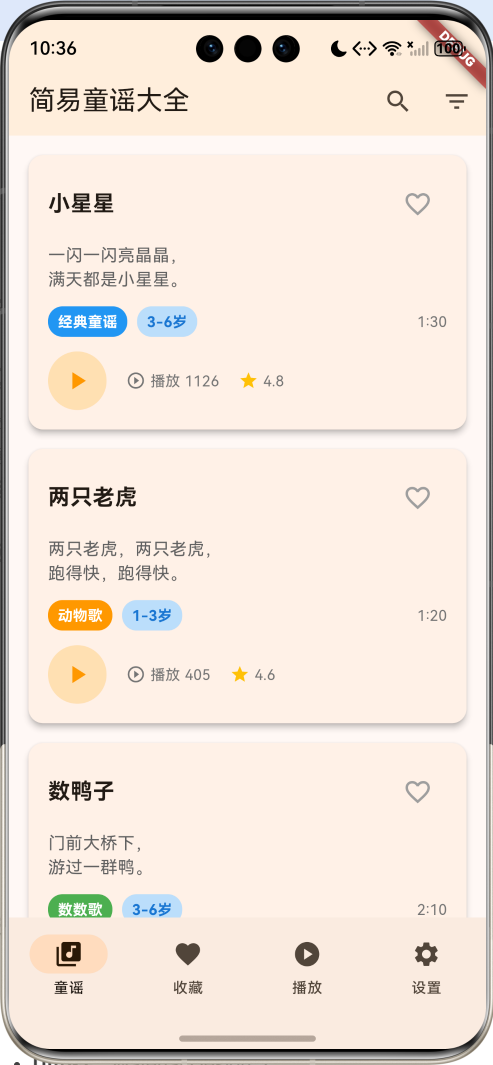
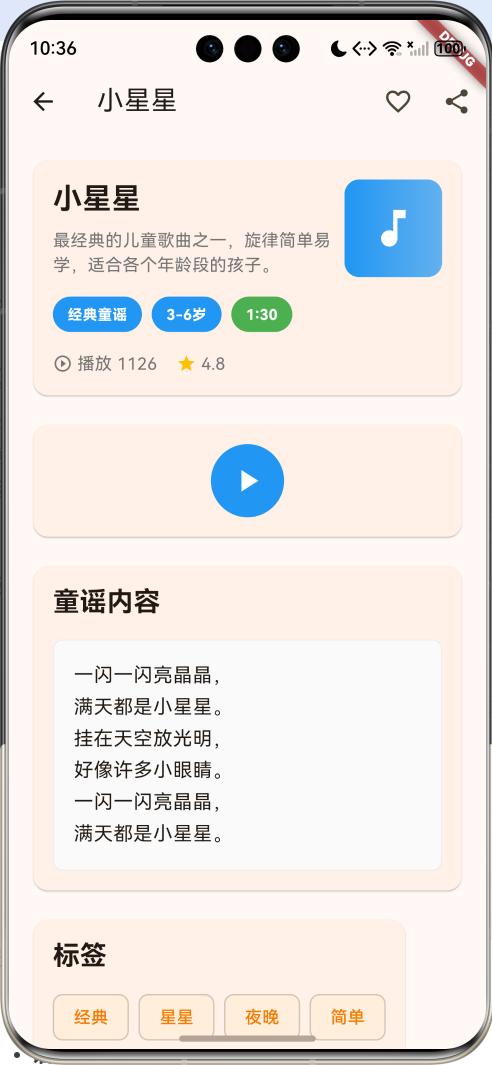
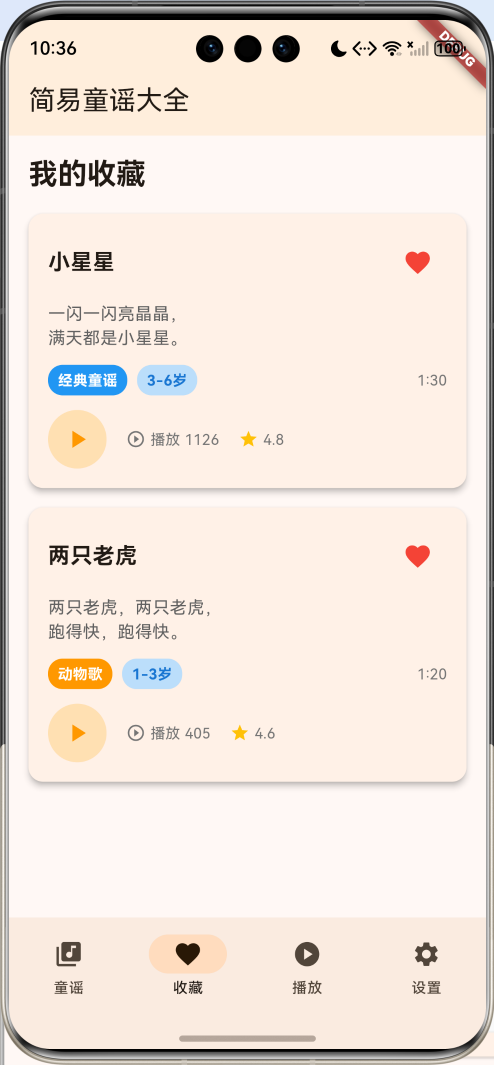
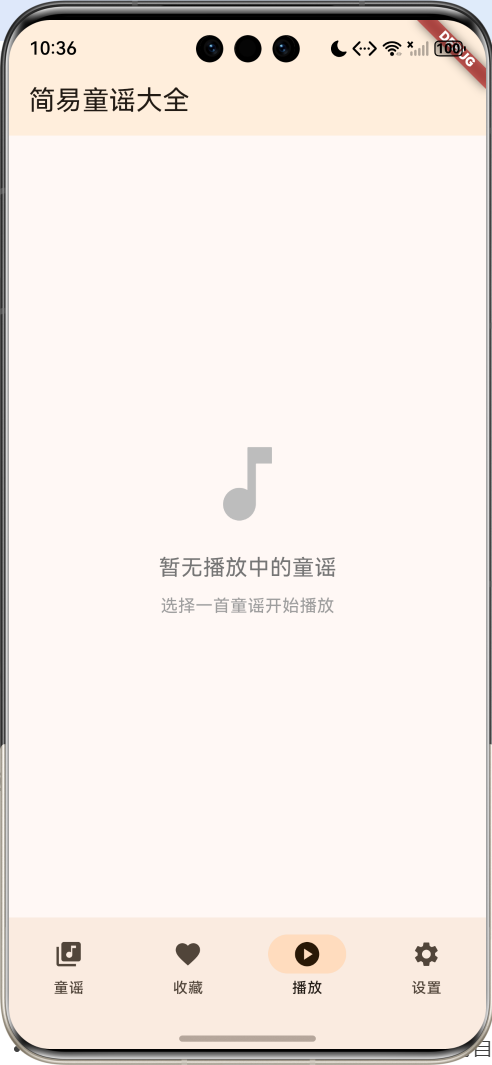
应用特色
- 丰富的童谣库:包含经典童谣、摇篮曲、数数歌、动物歌等多种类型
- 智能分类系统:按年龄组和主题分类,便于查找
- 播放控制功能:支持播放、暂停、上一首、下一首等操作
- 收藏管理:可以收藏喜欢的童谣,方便重复播放
- 搜索筛选:支持按名称、内容、标签等多维度搜索
- 个性化设置:主题颜色、字体大小、播放速度等可自定义
- 统计分析:播放次数、收藏数量等数据统计
技术栈
- 框架:Flutter 3.x
- 语言:Dart
- UI组件:Material Design 3
- 状态管理:StatefulWidget
- 动画:AnimationController + Tween
- 数据存储:内存存储(可扩展为本地数据库)
项目结构设计
核心数据模型
1. 童谣模型(NurseryRhyme)
class NurseryRhyme {
  final String id;              // 唯一标识
  final String title;           // 童谣标题
  final String content;         // 童谣内容
  final String category;        // 分类
  final int ageGroup;          // 适合年龄组
  final List<String> tags;     // 标签
  final String description;    // 描述
  final DateTime createdAt;    // 创建时间
  bool isFavorite;            // 是否收藏
  int playCount;              // 播放次数
  double rating;              // 评分
  final String? audioUrl;     // 音频文件路径
  final Duration? duration;   // 童谣时长
}
2. 分类枚举
enum RhymeCategory {
  classic,      // 经典童谣
  lullaby,      // 摇篮曲
  counting,     // 数数歌
  animal,       // 动物歌
  nature,       // 自然歌
  festival,     // 节日歌
  educational,  // 教育歌
  game,         // 游戏歌
}
3. 年龄组枚举
enum AgeGroup {
  toddler,      // 1-3岁
  preschool,    // 3-6岁
  school,       // 6-12岁
}
页面架构
应用采用底部导航栏设计,包含四个主要页面:
- 童谣页面:浏览所有童谣,支持搜索和筛选
- 收藏页面:管理收藏的童谣
- 播放页面:当前播放的童谣详情和控制
- 设置页面:个性化设置和应用信息
详细实现步骤
第一步:项目初始化
创建新的Flutter项目:
flutter create nursery_rhyme_app
cd nursery_rhyme_app
第二步:主应用结构
class MyApp extends StatelessWidget {
const MyApp({super.key});
Widget build(BuildContext context) {
return MaterialApp(
title: '简易童谣大全',
theme: ThemeData(
colorScheme: ColorScheme.fromSeed(seedColor: Colors.orange),
useMaterial3: true,
),
home: const NurseryRhymeHomePage(),
);
}
}
第三步:数据初始化
创建示例童谣数据:
void _initializeNurseryRhymes() {
  _nurseryRhymes = [
    NurseryRhyme(
      id: '1',
      title: '小星星',
      content: '''一闪一闪亮晶晶,
满天都是小星星。
挂在天空放光明,
好像许多小眼睛。''',
      category: _getCategoryName(RhymeCategory.classic),
      ageGroup: 2,
      tags: ['经典', '星星', '夜晚', '简单'],
      description: '最经典的儿童歌曲之一,旋律简单易学。',
      createdAt: DateTime.now().subtract(const Duration(days: 30)),
      playCount: _random.nextInt(1000) + 500,
      rating: 4.8,
      duration: const Duration(minutes: 1, seconds: 30),
    ),
    // 更多童谣数据...
  ];
}
第四步:童谣列表页面
童谣卡片组件
Widget _buildRhymeCard(NurseryRhyme rhyme) {
  final isCurrentlyPlaying = _currentPlayingRhyme?.id == rhyme.id;

  return Card(
    elevation: 4,
    margin: const EdgeInsets.only(bottom: 16),
    child: InkWell(
      onTap: () => _showRhymeDetail(rhyme),
      child: Padding(
        padding: const EdgeInsets.all(16),
        child: Column(
          crossAxisAlignment: CrossAxisAlignment.start,
          children: [
            // 标题和收藏按钮
            Row(
              children: [
                Expanded(
                  child: Text(
                    rhyme.title,
                    style: const TextStyle(
                      fontSize: 18,
                      fontWeight: FontWeight.bold,
                    ),
                  ),
                ),
                IconButton(
                  icon: Icon(
                    rhyme.isFavorite ? Icons.favorite : Icons.favorite_border,
                    color: rhyme.isFavorite ? Colors.red : Colors.grey,
                  ),
                  onPressed: () => _toggleFavorite(rhyme),
                ),
              ],
            ),

            // 内容预览
            Text(
              rhyme.content.split('\n').take(2).join('\n'),
              style: TextStyle(color: Colors.grey.shade700, height: 1.4),
              maxLines: 2,
              overflow: TextOverflow.ellipsis,
            ),

            // 播放控制和统计信息
            Row(
              children: [
                Container(
                  decoration: BoxDecoration(
                    color: isCurrentlyPlaying && _isPlaying
                        ? Colors.orange
                        : Colors.orange.shade100,
                    shape: BoxShape.circle,
                  ),
                  child: IconButton(
                    icon: Icon(
                      isCurrentlyPlaying && _isPlaying
                          ? Icons.pause
                          : Icons.play_arrow,
                    ),
                    onPressed: () => _togglePlay(rhyme),
                  ),
                ),
                // 统计信息...
              ],
            ),
          ],
        ),
      ),
    ),
  );
}
搜索和筛选功能
void _filterRhymes() {
  setState(() {
    _filteredRhymes = _nurseryRhymes.where((rhyme) {
      bool matchesSearch = _searchQuery.isEmpty ||
          rhyme.title.toLowerCase().contains(_searchQuery.toLowerCase()) ||
          rhyme.content.toLowerCase().contains(_searchQuery.toLowerCase());

      bool matchesCategory = _selectedCategory == null ||
          rhyme.category == _getCategoryName(_selectedCategory!);

      bool matchesAgeGroup = _selectedAgeGroup == null ||
          rhyme.ageGroup == _getAgeGroupValue(_selectedAgeGroup!);

      return matchesSearch && matchesCategory && matchesAgeGroup;
    }).toList();
  });
}
第五步:播放功能实现
播放状态管理
void _togglePlay(NurseryRhyme rhyme) {
  setState(() {
    if (_currentPlayingRhyme?.id == rhyme.id) {
      // 当前童谣,切换播放状态
      _isPlaying = !_isPlaying;
    } else {
      // 新童谣,开始播放
      _currentPlayingRhyme = rhyme;
      _isPlaying = true;
      _playProgress = 0.0;
      rhyme.playCount++;
    }
  });

  if (_isPlaying) {
    _playAnimationController.repeat();
    _simulatePlayProgress();
  } else {
    _playAnimationController.stop();
  }
}
播放进度模拟
void _simulatePlayProgress() {
  if (_currentPlayingRhyme?.duration != null && _isPlaying) {
    final totalSeconds = _currentPlayingRhyme!.duration!.inSeconds;
    final progressIncrement = 1.0 / totalSeconds;

    Future.delayed(const Duration(seconds: 1), () {
      if (_isPlaying && _currentPlayingRhyme != null) {
        setState(() {
          _playProgress += progressIncrement;
          if (_playProgress >= 1.0) {
            _playProgress = 1.0;
            _isPlaying = false;
            _playAnimationController.stop();
          }
        });

        if (_playProgress < 1.0) {
          _simulatePlayProgress();
        }
      }
    });
  }
}
第六步:播放页面设计
Widget _buildPlayingPage() {
  if (_currentPlayingRhyme == null) {
    return Center(
      child: Column(
        mainAxisAlignment: MainAxisAlignment.center,
        children: [
          Icon(Icons.music_note, size: 80, color: Colors.grey.shade400),
          const SizedBox(height: 16),
          Text('暂无播放中的童谣',
               style: TextStyle(fontSize: 18, color: Colors.grey.shade600)),
        ],
      ),
    );
  }

  return Padding(
    padding: const EdgeInsets.all(24),
    child: Column(
      children: [
        // 童谣封面
        Container(
          width: 200,
          height: 200,
          decoration: BoxDecoration(
            gradient: LinearGradient(
              colors: [
                _getCategoryColor(_currentPlayingRhyme!.category),
                _getCategoryColor(_currentPlayingRhyme!.category)
                    .withValues(alpha: 0.7),
              ],
            ),
            borderRadius: BorderRadius.circular(20),
            boxShadow: [
              BoxShadow(
                color: Colors.black.withValues(alpha: 0.2),
                blurRadius: 20,
                spreadRadius: 5,
              ),
            ],
          ),
          child: AnimatedBuilder(
            animation: _playAnimation,
            builder: (context, child) {
              return Transform.scale(
                scale: _isPlaying ? 1.0 + (_playAnimation.value * 0.05) : 1.0,
                child: Center(
                  child: Icon(Icons.music_note, size: 60, color: Colors.white),
                ),
              );
            },
          ),
        ),

        // 播放控制按钮
        Row(
          mainAxisAlignment: MainAxisAlignment.spaceEvenly,
          children: [
            IconButton(
              icon: const Icon(Icons.skip_previous, size: 32),
              onPressed: _playPrevious,
            ),
            Container(
              width: 80,
              height: 80,
              decoration: BoxDecoration(
                color: _getCategoryColor(_currentPlayingRhyme!.category),
                shape: BoxShape.circle,
              ),
              child: IconButton(
                icon: Icon(
                  _isPlaying ? Icons.pause : Icons.play_arrow,
                  size: 40,
                  color: Colors.white,
                ),
                onPressed: () => _togglePlay(_currentPlayingRhyme!),
              ),
            ),
            IconButton(
              icon: const Icon(Icons.skip_next, size: 32),
              onPressed: _playNext,
            ),
          ],
        ),
      ],
    ),
  );
}
第七步:收藏功能
void _toggleFavorite(NurseryRhyme rhyme) {
  setState(() {
    rhyme.isFavorite = !rhyme.isFavorite;

    if (rhyme.isFavorite) {
      if (!_favoriteRhymes.contains(rhyme)) {
        _favoriteRhymes.add(rhyme);
      }
    } else {
      _favoriteRhymes.remove(rhyme);
    }
  });

  ScaffoldMessenger.of(context).showSnackBar(
    SnackBar(
      content: Text(rhyme.isFavorite ? '已添加到收藏' : '已从收藏中移除'),
      duration: const Duration(seconds: 1),
    ),
  );
}
第八步:设置页面
Widget _buildSettingsPage() {
  return Padding(
    padding: const EdgeInsets.all(16),
    child: Column(
      children: [
        // 播放设置
        Card(
          child: Column(
            children: [
              ListTile(
                leading: const Icon(Icons.volume_up, color: Colors.blue),
                title: const Text('音量控制'),
                subtitle: const Text('调节播放音量'),
                trailing: const Icon(Icons.chevron_right),
                onTap: _showVolumeSettings,
              ),
              ListTile(
                leading: const Icon(Icons.timer, color: Colors.green),
                title: const Text('定时关闭'),
                subtitle: const Text('设置自动停止播放时间'),
                onTap: _showTimerSettings,
              ),
            ],
          ),
        ),

        // 显示设置
        Card(
          child: Column(
            children: [
              ListTile(
                leading: const Icon(Icons.palette, color: Colors.purple),
                title: const Text('主题颜色'),
                subtitle: const Text('选择应用主题颜色'),
                onTap: _showThemeSettings,
              ),
              ListTile(
                leading: const Icon(Icons.text_fields, color: Colors.indigo),
                title: const Text('字体大小'),
                subtitle: const Text('调节文字显示大小'),
                onTap: _showFontSettings,
              ),
            ],
          ),
        ),
      ],
    ),
  );
}
第九步:童谣详情页面
class RhymeDetailPage extends StatefulWidget {
final NurseryRhyme rhyme;
final VoidCallback onFavoriteToggle;
final VoidCallback onPlay;
final bool isPlaying;
final double playProgress;
const RhymeDetailPage({
super.key,
required this.rhyme,
required this.onFavoriteToggle,
required this.onPlay,
required this.isPlaying,
required this.playProgress,
});
State<RhymeDetailPage> createState() => _RhymeDetailPageState();
}
核心功能详解
1. 动画效果
应用中使用了多种动画效果来提升用户体验:
void _setupAnimations() {
  _playAnimationController = AnimationController(
    duration: const Duration(milliseconds: 1000),
    vsync: this,
  );

  _playAnimation = Tween<double>(
    begin: 0.0,
    end: 1.0,
  ).animate(CurvedAnimation(
    parent: _playAnimationController,
    curve: Curves.easeInOut,
  ));
}
2. 颜色主题系统
根据童谣分类动态设置颜色:
Color _getCategoryColor(String category) {
  switch (category) {
    case '经典童谣': return Colors.blue;
    case '摇篮曲': return Colors.purple;
    case '数数歌': return Colors.green;
    case '动物歌': return Colors.orange;
    case '自然歌': return Colors.teal;
    case '节日歌': return Colors.red;
    case '教育歌': return Colors.indigo;
    case '游戏歌': return Colors.pink;
    default: return Colors.grey;
  }
}
3. 搜索算法
实现多维度搜索功能:
bool matchesSearch = _searchQuery.isEmpty ||
    rhyme.title.toLowerCase().contains(_searchQuery.toLowerCase()) ||
    rhyme.content.toLowerCase().contains(_searchQuery.toLowerCase()) ||
    rhyme.tags.any((tag) =>
        tag.toLowerCase().contains(_searchQuery.toLowerCase()));
性能优化
1. 列表优化
使用ListView.builder实现虚拟滚动:
ListView.builder(
  padding: const EdgeInsets.all(16),
  itemCount: _filteredRhymes.length,
  itemBuilder: (context, index) {
    final rhyme = _filteredRhymes[index];
    return _buildRhymeCard(rhyme);
  },
)
2. 状态管理优化
合理使用setState,避免不必要的重建:
void _filterRhymes() {
  setState(() {
    _filteredRhymes = _nurseryRhymes.where((rhyme) {
      // 筛选逻辑
    }).toList();
  });
}
3. 内存管理
及时释放动画控制器:
void dispose() {
_playAnimationController.dispose();
super.dispose();
}
扩展功能
1. 音频播放
可以集成audio_players插件实现真实音频播放:
dependencies:
  flutter:
    sdk: flutter
  audioplayers: ^5.0.0
2. 本地存储
使用shared_preferences保存用户设置:
dependencies:
  shared_preferences: ^2.2.0
3. 网络功能
集成http插件实现在线童谣下载:
dependencies:
  http: ^1.1.0
测试策略
1. 单元测试
测试核心业务逻辑:
test('should toggle favorite status', () {
  final rhyme = NurseryRhyme(/* 参数 */);
  expect(rhyme.isFavorite, false);

  // 模拟收藏操作
  rhyme.isFavorite = true;
  expect(rhyme.isFavorite, true);
});
2. Widget测试
测试UI组件:
testWidgets('should display rhyme title', (WidgetTester tester) async {
  await tester.pumpWidget(MyApp());
  expect(find.text('小星星'), findsOneWidget);
});
3. 集成测试
测试完整用户流程:
testWidgets('should play rhyme when play button is tapped',
    (WidgetTester tester) async {
  await tester.pumpWidget(MyApp());
  await tester.tap(find.byIcon(Icons.play_arrow));
  await tester.pump();

  expect(find.byIcon(Icons.pause), findsOneWidget);
});
部署发布
1. Android打包
flutter build apk --release
2. iOS打包
flutter build ios --release
3. 应用商店发布
准备应用图标、截图和描述,提交到各大应用商店。
总结
本教程详细介绍了Flutter简易童谣大全应用的完整开发过程,涵盖了:
- 数据模型设计:合理的数据结构设计
- UI界面开发:Material Design 3风格界面
- 功能实现:播放控制、收藏管理、搜索筛选
- 动画效果:提升用户体验的动画设计
- 性能优化:列表优化、状态管理、内存管理
- 扩展功能:音频播放、本地存储、网络功能
- 测试策略:单元测试、Widget测试、集成测试
这款应用不仅功能完整,而且代码结构清晰,易于维护和扩展。通过本教程的学习,你可以掌握Flutter应用开发的核心技能,为后续开发更复杂的应用打下坚实基础。
欢迎加入开源鸿蒙跨平台社区:https://openharmonycrossplatform.csdn.net
高级功能实现
1. 自定义动画效果
播放按钮动画
AnimatedBuilder(
  animation: _playAnimation,
  builder: (context, child) {
    return Transform.scale(
      scale: isCurrentlyPlaying && _isPlaying
          ? 1.0 + (_playAnimation.value * 0.1)
          : 1.0,
      child: Icon(
        isCurrentlyPlaying && _isPlaying ? Icons.pause : Icons.play_arrow,
        color: isCurrentlyPlaying && _isPlaying ? Colors.white : Colors.orange,
      ),
    );
  },
)
封面旋转动画
AnimatedBuilder(
  animation: _playAnimation,
  builder: (context, child) {
    return Transform.rotate(
      angle: _playAnimation.value * 2 * pi,
      child: Container(
        width: 200,
        height: 200,
        decoration: BoxDecoration(
          gradient: LinearGradient(
            colors: [
              _getCategoryColor(_currentPlayingRhyme!.category),
              _getCategoryColor(_currentPlayingRhyme!.category)
                  .withValues(alpha: 0.7),
            ],
          ),
          shape: BoxShape.circle,
        ),
      ),
    );
  },
)
2. 数据持久化
SharedPreferences实现
class PreferencesService {
  static const String _favoritesKey = 'favorite_rhymes';
  static const String _settingsKey = 'app_settings';

  // 保存收藏列表
  static Future<void> saveFavorites(List<String> favoriteIds) async {
    final prefs = await SharedPreferences.getInstance();
    await prefs.setStringList(_favoritesKey, favoriteIds);
  }

  // 加载收藏列表
  static Future<List<String>> loadFavorites() async {
    final prefs = await SharedPreferences.getInstance();
    return prefs.getStringList(_favoritesKey) ?? [];
  }

  // 保存应用设置
  static Future<void> saveSettings(Map<String, dynamic> settings) async {
    final prefs = await SharedPreferences.getInstance();
    await prefs.setString(_settingsKey, jsonEncode(settings));
  }

  // 加载应用设置
  static Future<Map<String, dynamic>> loadSettings() async {
    final prefs = await SharedPreferences.getInstance();
    final settingsJson = prefs.getString(_settingsKey);
    if (settingsJson != null) {
      return jsonDecode(settingsJson);
    }
    return {};
  }
}
数据库存储(SQLite)
class DatabaseHelper {
  static final DatabaseHelper _instance = DatabaseHelper._internal();
  factory DatabaseHelper() => _instance;
  DatabaseHelper._internal();

  static Database? _database;

  Future<Database> get database async {
    if (_database != null) return _database!;
    _database = await _initDatabase();
    return _database!;
  }

  Future<Database> _initDatabase() async {
    String path = join(await getDatabasesPath(), 'nursery_rhymes.db');
    return await openDatabase(
      path,
      version: 1,
      onCreate: _onCreate,
    );
  }

  Future<void> _onCreate(Database db, int version) async {
    await db.execute('''
      CREATE TABLE nursery_rhymes(
        id TEXT PRIMARY KEY,
        title TEXT NOT NULL,
        content TEXT NOT NULL,
        category TEXT NOT NULL,
        age_group INTEGER NOT NULL,
        tags TEXT NOT NULL,
        description TEXT NOT NULL,
        is_favorite INTEGER NOT NULL DEFAULT 0,
        play_count INTEGER NOT NULL DEFAULT 0,
        rating REAL NOT NULL DEFAULT 0.0,
        created_at TEXT NOT NULL
      )
    ''');

    await db.execute('''
      CREATE TABLE play_history(
        id INTEGER PRIMARY KEY AUTOINCREMENT,
        rhyme_id TEXT NOT NULL,
        played_at TEXT NOT NULL,
        FOREIGN KEY (rhyme_id) REFERENCES nursery_rhymes (id)
      )
    ''');
  }

  // 插入童谣
  Future<int> insertRhyme(NurseryRhyme rhyme) async {
    final db = await database;
    return await db.insert('nursery_rhymes', rhyme.toMap());
  }

  // 查询所有童谣
  Future<List<NurseryRhyme>> getAllRhymes() async {
    final db = await database;
    final List<Map<String, dynamic>> maps = await db.query('nursery_rhymes');
    return List.generate(maps.length, (i) {
      return NurseryRhyme.fromMap(maps[i]);
    });
  }

  // 更新收藏状态
  Future<int> updateFavoriteStatus(String id, bool isFavorite) async {
    final db = await database;
    return await db.update(
      'nursery_rhymes',
      {'is_favorite': isFavorite ? 1 : 0},
      where: 'id = ?',
      whereArgs: [id],
    );
  }

  // 记录播放历史
  Future<int> insertPlayHistory(String rhymeId) async {
    final db = await database;
    return await db.insert('play_history', {
      'rhyme_id': rhymeId,
      'played_at': DateTime.now().toIso8601String(),
    });
  }
}
3. 网络功能
HTTP请求管理
class ApiService {
  static const String baseUrl = 'https://api.nurseryrhymes.com';
  static final http.Client _client = http.Client();

  // 获取在线童谣列表
  static Future<List<NurseryRhyme>> fetchOnlineRhymes() async {
    try {
      final response = await _client.get(
        Uri.parse('$baseUrl/rhymes'),
        headers: {'Content-Type': 'application/json'},
      );

      if (response.statusCode == 200) {
        final List<dynamic> data = jsonDecode(response.body);
        return data.map((json) => NurseryRhyme.fromJson(json)).toList();
      } else {
        throw Exception('Failed to load rhymes: ${response.statusCode}');
      }
    } catch (e) {
      throw Exception('Network error: $e');
    }
  }

  // 下载音频文件
  static Future<String> downloadAudio(String audioUrl, String fileName) async {
    try {
      final response = await _client.get(Uri.parse(audioUrl));

      if (response.statusCode == 200) {
        final directory = await getApplicationDocumentsDirectory();
        final file = File('${directory.path}/$fileName');
        await file.writeAsBytes(response.bodyBytes);
        return file.path;
      } else {
        throw Exception('Failed to download audio: ${response.statusCode}');
      }
    } catch (e) {
      throw Exception('Download error: $e');
    }
  }

  // 上传用户反馈
  static Future<bool> submitFeedback(String feedback, String contact) async {
    try {
      final response = await _client.post(
        Uri.parse('$baseUrl/feedback'),
        headers: {'Content-Type': 'application/json'},
        body: jsonEncode({
          'feedback': feedback,
          'contact': contact,
          'timestamp': DateTime.now().toIso8601String(),
        }),
      );

      return response.statusCode == 200;
    } catch (e) {
      return false;
    }
  }
}
4. 音频播放功能
AudioPlayer集成
class AudioPlayerService {
  static final AudioPlayer _audioPlayer = AudioPlayer();
  static StreamSubscription<Duration>? _positionSubscription;
  static StreamSubscription<Duration>? _durationSubscription;
  static StreamSubscription<PlayerState>? _playerStateSubscription;

  static Function(Duration)? onPositionChanged;
  static Function(Duration)? onDurationChanged;
  static Function(PlayerState)? onPlayerStateChanged;

  static Future<void> initialize() async {
    _positionSubscription = _audioPlayer.onPositionChanged.listen((position) {
      onPositionChanged?.call(position);
    });

    _durationSubscription = _audioPlayer.onDurationChanged.listen((duration) {
      onDurationChanged?.call(duration);
    });

    _playerStateSubscription = _audioPlayer.onPlayerStateChanged.listen((state) {
      onPlayerStateChanged?.call(state);
    });
  }

  static Future<void> play(String audioPath) async {
    try {
      if (audioPath.startsWith('http')) {
        await _audioPlayer.play(UrlSource(audioPath));
      } else {
        await _audioPlayer.play(DeviceFileSource(audioPath));
      }
    } catch (e) {
      print('Error playing audio: $e');
    }
  }

  static Future<void> pause() async {
    await _audioPlayer.pause();
  }

  static Future<void> resume() async {
    await _audioPlayer.resume();
  }

  static Future<void> stop() async {
    await _audioPlayer.stop();
  }

  static Future<void> seek(Duration position) async {
    await _audioPlayer.seek(position);
  }

  static Future<void> setVolume(double volume) async {
    await _audioPlayer.setVolume(volume);
  }

  static Future<void> setPlaybackRate(double rate) async {
    await _audioPlayer.setPlaybackRate(rate);
  }

  static void dispose() {
    _positionSubscription?.cancel();
    _durationSubscription?.cancel();
    _playerStateSubscription?.cancel();
    _audioPlayer.dispose();
  }
}
5. 主题系统
动态主题切换
class ThemeProvider extends ChangeNotifier {
  ThemeData _currentTheme = ThemeData(
    colorScheme: ColorScheme.fromSeed(seedColor: Colors.orange),
    useMaterial3: true,
  );

  ThemeData get currentTheme => _currentTheme;

  void setTheme(Color seedColor) {
    _currentTheme = ThemeData(
      colorScheme: ColorScheme.fromSeed(seedColor: seedColor),
      useMaterial3: true,
    );
    notifyListeners();
    _saveThemePreference(seedColor);
  }

  void _saveThemePreference(Color color) async {
    final prefs = await SharedPreferences.getInstance();
    await prefs.setInt('theme_color', color.value);
  }

  Future<void> loadThemePreference() async {
    final prefs = await SharedPreferences.getInstance();
    final colorValue = prefs.getInt('theme_color');
    if (colorValue != null) {
      setTheme(Color(colorValue));
    }
  }
}
夜间模式
class DarkModeProvider extends ChangeNotifier {
  bool _isDarkMode = false;

  bool get isDarkMode => _isDarkMode;

  ThemeData get lightTheme => ThemeData(
    colorScheme: ColorScheme.fromSeed(
      seedColor: Colors.orange,
      brightness: Brightness.light,
    ),
    useMaterial3: true,
  );

  ThemeData get darkTheme => ThemeData(
    colorScheme: ColorScheme.fromSeed(
      seedColor: Colors.orange,
      brightness: Brightness.dark,
    ),
    useMaterial3: true,
  );

  void toggleDarkMode() {
    _isDarkMode = !_isDarkMode;
    notifyListeners();
    _saveDarkModePreference();
  }

  void _saveDarkModePreference() async {
    final prefs = await SharedPreferences.getInstance();
    await prefs.setBool('dark_mode', _isDarkMode);
  }

  Future<void> loadDarkModePreference() async {
    final prefs = await SharedPreferences.getInstance();
    _isDarkMode = prefs.getBool('dark_mode') ?? false;
    notifyListeners();
  }
}
6. 国际化支持
多语言配置
// l10n.yaml
arb-dir: lib/l10n
template-arb-file: app_en.arb
output-localization-file: app_localizations.dart
语言文件
// lib/l10n/app_en.arb
{
  "appTitle": "Nursery Rhyme Collection",
  "rhymes": "Rhymes",
  "favorites": "Favorites",
  "playing": "Playing",
  "settings": "Settings",
  "search": "Search",
  "filter": "Filter",
  "play": "Play",
  "pause": "Pause",
  "addToFavorites": "Add to Favorites",
  "removeFromFavorites": "Remove from Favorites"
}
// lib/l10n/app_zh.arb
{
  "appTitle": "简易童谣大全",
  "rhymes": "童谣",
  "favorites": "收藏",
  "playing": "播放",
  "settings": "设置",
  "search": "搜索",
  "filter": "筛选",
  "play": "播放",
  "pause": "暂停",
  "addToFavorites": "添加到收藏",
  "removeFromFavorites": "从收藏中移除"
}
7. 错误处理和日志
全局错误处理
class ErrorHandler {
  static void initialize() {
    FlutterError.onError = (FlutterErrorDetails details) {
      FlutterError.presentError(details);
      _logError(details.exception, details.stack);
    };

    PlatformDispatcher.instance.onError = (error, stack) {
      _logError(error, stack);
      return true;
    };
  }

  static void _logError(Object error, StackTrace? stack) {
    print('Error: $error');
    if (stack != null) {
      print('Stack trace: $stack');
    }

    // 可以集成Crashlytics等崩溃报告服务
    // FirebaseCrashlytics.instance.recordError(error, stack);
  }

  static void handleApiError(Exception error) {
    String message = 'Unknown error occurred';

    if (error is SocketException) {
      message = 'No internet connection';
    } else if (error is TimeoutException) {
      message = 'Request timeout';
    } else if (error is FormatException) {
      message = 'Invalid data format';
    }

    _showErrorSnackBar(message);
  }

  static void _showErrorSnackBar(String message) {
    // 显示错误提示
    final context = navigatorKey.currentContext;
    if (context != null) {
      ScaffoldMessenger.of(context).showSnackBar(
        SnackBar(
          content: Text(message),
          backgroundColor: Colors.red,
          action: SnackBarAction(
            label: 'Retry',
            onPressed: () {
              // 重试逻辑
            },
          ),
        ),
      );
    }
  }
}
日志系统
class Logger {
  static const String _tag = 'NurseryRhymeApp';

  static void debug(String message) {
    _log('DEBUG', message);
  }

  static void info(String message) {
    _log('INFO', message);
  }

  static void warning(String message) {
    _log('WARNING', message);
  }

  static void error(String message, [Object? error, StackTrace? stack]) {
    _log('ERROR', message);
    if (error != null) {
      print('Error details: $error');
    }
    if (stack != null) {
      print('Stack trace: $stack');
    }
  }

  static void _log(String level, String message) {
    final timestamp = DateTime.now().toIso8601String();
    print('[$timestamp] [$_tag] [$level] $message');
  }
}
8. 性能监控
性能指标收集
class PerformanceMonitor {
  static final Map<String, Stopwatch> _stopwatches = {};

  static void startTimer(String name) {
    _stopwatches[name] = Stopwatch()..start();
  }

  static void endTimer(String name) {
    final stopwatch = _stopwatches[name];
    if (stopwatch != null) {
      stopwatch.stop();
      final duration = stopwatch.elapsedMilliseconds;
      Logger.info('Performance: $name took ${duration}ms');
      _stopwatches.remove(name);
    }
  }

  static void measureWidgetBuild(String widgetName, VoidCallback build) {
    startTimer('build_$widgetName');
    build();
    endTimer('build_$widgetName');
  }

  static Future<T> measureAsyncOperation<T>(
    String operationName,
    Future<T> Function() operation,
  ) async {
    startTimer(operationName);
    try {
      final result = await operation();
      endTimer(operationName);
      return result;
    } catch (e) {
      endTimer(operationName);
      rethrow;
    }
  }
}
9. 缓存管理
图片缓存
class ImageCacheManager {
  static final Map<String, Uint8List> _cache = {};
  static const int maxCacheSize = 50; // 最大缓存数量

  static Future<Uint8List?> getImage(String url) async {
    if (_cache.containsKey(url)) {
      return _cache[url];
    }

    try {
      final response = await http.get(Uri.parse(url));
      if (response.statusCode == 200) {
        final imageData = response.bodyBytes;
        _addToCache(url, imageData);
        return imageData;
      }
    } catch (e) {
      Logger.error('Failed to load image: $url', e);
    }

    return null;
  }

  static void _addToCache(String url, Uint8List data) {
    if (_cache.length >= maxCacheSize) {
      // 移除最旧的缓存项
      final firstKey = _cache.keys.first;
      _cache.remove(firstKey);
    }
    _cache[url] = data;
  }

  static void clearCache() {
    _cache.clear();
  }

  static int getCacheSize() {
    return _cache.length;
  }
}
10. 测试覆盖
单元测试示例
// test/models/nursery_rhyme_test.dart
import 'package:flutter_test/flutter_test.dart';
import 'package:nursery_rhyme_app/models/nursery_rhyme.dart';

void main() {
  group('NurseryRhyme', () {
    test('should create a nursery rhyme with correct properties', () {
      final rhyme = NurseryRhyme(
        id: '1',
        title: 'Test Rhyme',
        content: 'Test content',
        category: 'Test Category',
        ageGroup: 2,
        tags: ['test'],
        description: 'Test description',
        createdAt: DateTime.now(),
      );

      expect(rhyme.id, '1');
      expect(rhyme.title, 'Test Rhyme');
      expect(rhyme.isFavorite, false);
      expect(rhyme.playCount, 0);
    });

    test('should toggle favorite status', () {
      final rhyme = NurseryRhyme(
        id: '1',
        title: 'Test Rhyme',
        content: 'Test content',
        category: 'Test Category',
        ageGroup: 2,
        tags: ['test'],
        description: 'Test description',
        createdAt: DateTime.now(),
      );

      expect(rhyme.isFavorite, false);

      rhyme.isFavorite = true;
      expect(rhyme.isFavorite, true);
    });
  });
}
Widget测试示例
// test/widgets/rhyme_card_test.dart
import 'package:flutter/material.dart';
import 'package:flutter_test/flutter_test.dart';
import 'package:nursery_rhyme_app/models/nursery_rhyme.dart';
import 'package:nursery_rhyme_app/widgets/rhyme_card.dart';

void main() {
  group('RhymeCard', () {
    late NurseryRhyme testRhyme;

    setUp(() {
      testRhyme = NurseryRhyme(
        id: '1',
        title: 'Test Rhyme',
        content: 'Test content\nSecond line',
        category: 'Test Category',
        ageGroup: 2,
        tags: ['test'],
        description: 'Test description',
        createdAt: DateTime.now(),
      );
    });

    testWidgets('should display rhyme title and content', (tester) async {
      await tester.pumpWidget(
        MaterialApp(
          home: Scaffold(
            body: RhymeCard(
              rhyme: testRhyme,
              onTap: () {},
              onFavoriteToggle: () {},
              onPlay: () {},
            ),
          ),
        ),
      );

      expect(find.text('Test Rhyme'), findsOneWidget);
      expect(find.text('Test content\nSecond line'), findsOneWidget);
    });

    testWidgets('should show play button', (tester) async {
      await tester.pumpWidget(
        MaterialApp(
          home: Scaffold(
            body: RhymeCard(
              rhyme: testRhyme,
              onTap: () {},
              onFavoriteToggle: () {},
              onPlay: () {},
            ),
          ),
        ),
      );

      expect(find.byIcon(Icons.play_arrow), findsOneWidget);
    });

    testWidgets('should call onPlay when play button is tapped', (tester) async {
      bool playPressed = false;

      await tester.pumpWidget(
        MaterialApp(
          home: Scaffold(
            body: RhymeCard(
              rhyme: testRhyme,
              onTap: () {},
              onFavoriteToggle: () {},
              onPlay: () => playPressed = true,
            ),
          ),
        ),
      );

      await tester.tap(find.byIcon(Icons.play_arrow));
      expect(playPressed, true);
    });
  });
}
集成测试示例
// integration_test/app_test.dart
import 'package:flutter/material.dart';
import 'package:flutter_test/flutter_test.dart';
import 'package:integration_test/integration_test.dart';
import 'package:nursery_rhyme_app/main.dart' as app;

void main() {
  IntegrationTestWidgetsFlutterBinding.ensureInitialized();

  group('App Integration Tests', () {
    testWidgets('should navigate through all tabs', (tester) async {
      app.main();
      await tester.pumpAndSettle();

      // 验证初始页面
      expect(find.text('简易童谣大全'), findsOneWidget);
      expect(find.text('童谣'), findsOneWidget);

      // 点击收藏标签
      await tester.tap(find.text('收藏'));
      await tester.pumpAndSettle();
      expect(find.text('我的收藏'), findsOneWidget);

      // 点击播放标签
      await tester.tap(find.text('播放'));
      await tester.pumpAndSettle();
      expect(find.text('暂无播放中的童谣'), findsOneWidget);

      // 点击设置标签
      await tester.tap(find.text('设置'));
      await tester.pumpAndSettle();
      expect(find.text('设置'), findsOneWidget);
    });

    testWidgets('should search and filter rhymes', (tester) async {
      app.main();
      await tester.pumpAndSettle();

      // 点击搜索按钮
      await tester.tap(find.byIcon(Icons.search));
      await tester.pumpAndSettle();

      // 输入搜索内容
      await tester.enterText(find.byType(TextField), '小星星');
      await tester.tap(find.text('搜索'));
      await tester.pumpAndSettle();

      // 验证搜索结果
      expect(find.text('搜索: 小星星'), findsOneWidget);
    });

    testWidgets('should play and pause rhyme', (tester) async {
      app.main();
      await tester.pumpAndSettle();

      // 找到第一个播放按钮并点击
      final playButton = find.byIcon(Icons.play_arrow).first;
      await tester.tap(playButton);
      await tester.pumpAndSettle();

      // 验证播放状态
      expect(find.byIcon(Icons.pause), findsOneWidget);

      // 再次点击暂停
      await tester.tap(find.byIcon(Icons.pause).first);
      await tester.pumpAndSettle();

      // 验证暂停状态
      expect(find.byIcon(Icons.play_arrow), findsWidgets);
    });
  });
}
项目部署和发布
1. 构建配置
Android配置
// android/app/build.gradle
android {
    compileSdkVersion 34

    defaultConfig {
        applicationId "com.example.nursery_rhyme_app"
        minSdkVersion 21
        targetSdkVersion 34
        versionCode 1
        versionName "1.0.0"
    }

    buildTypes {
        release {
            signingConfig signingConfigs.release
            minifyEnabled true
            proguardFiles getDefaultProguardFile('proguard-android.txt'), 'proguard-rules.pro'
        }
    }
}
iOS配置
<!-- ios/Runner/Info.plist -->
<key>CFBundleDisplayName</key>
<string>简易童谣大全</string>
<key>CFBundleVersion</key>
<string>1.0.0</string>
<key>NSMicrophoneUsageDescription</key>
<string>This app needs microphone access for recording features</string>
<key>NSCameraUsageDescription</key>
<string>This app needs camera access for photo features</string>
2. 应用图标和启动页
图标生成
# pubspec.yaml
dev_dependencies:
  flutter_launcher_icons: ^0.13.1

flutter_icons:
  android: true
  ios: true
  image_path: "assets/icon/app_icon.png"
  adaptive_icon_background: "#FF9800"
  adaptive_icon_foreground: "assets/icon/app_icon_foreground.png"
启动页配置
# pubspec.yaml
dev_dependencies:
  flutter_native_splash: ^2.3.2

flutter_native_splash:
  color: "#FF9800"
  image: "assets/splash/splash_logo.png"
  android_12:
    image: "assets/splash/splash_logo_android12.png"
    color: "#FF9800"
3. 代码混淆和优化
ProGuard规则
# android/app/proguard-rules.pro
-keep class io.flutter.app.** { *; }
-keep class io.flutter.plugin.**  { *; }
-keep class io.flutter.util.**  { *; }
-keep class io.flutter.view.**  { *; }
-keep class io.flutter.**  { *; }
-keep class io.flutter.plugins.**  { *; }
-dontwarn io.flutter.embedding.**
构建优化
# 构建优化版本
flutter build apk --release --obfuscate --split-debug-info=build/debug-info
flutter build ios --release --obfuscate --split-debug-info=build/debug-info
这个完整的Flutter简易童谣大全应用教程涵盖了从基础开发到高级功能实现的全过程,包括数据管理、UI设计、动画效果、性能优化、测试策略和部署发布等各个方面。通过学习本教程,开发者可以掌握Flutter应用开发的核心技能,并能够独立开发出功能完整、性能优良的移动应用。
欢迎加入开源鸿蒙跨平台社区:https://openharmonycrossplatform.csdn.net

腾讯云面向开发者汇聚海量精品云计算使用和开发经验,营造开放的云计算技术生态圈。
更多推荐
 10
10 0
0- 0


 已为社区贡献23条内容

所有评论(0)