Openclaw接入飞书
·
Openclaw接入飞书
环境还是使用前一篇的基本环境,其中OpenClaw 2026.3.2 => 2026.3.13,feishu-2026.3.2 => 2026.3.13
飞书的接入,一定要注意版本对应
# 检查飞书版本
npm list @openclaw/feishu
# 检查openclaw版本
npm list -g openclaw
# 更新核心库到指定版本(推荐)
npm install -g openclaw@2026.3.13
# 更新飞书到指定版本
--cd /root/.openclaw/extensions/feishu && npm install openclaw@2026.3.2 --save
cd /home/claw/.openclaw/extensions/feishu && npm install @openclaw/feishu@2026.3.13 --save --force
其次,需要理解openclaw的plugin用户目录和核心库目录,如果两个目录都有飞书插件,导致「重复 ID」警告,系统不知道该用哪一个。
| 目录类型 | 路径示例 | 作用(通俗解释) | 特点 |
|---|---|---|---|
| 核心库目录 | /usr/lib/node_modules/openclaw/ OpenClaw | 安装时自带的 “系统文件” | 不可随便改,卸载会删 |
| 用户目录 | ~/.openclaw/(即 /root/.openclaw/) | 你自己配置、安装的 “个人文件” | 持久化,卸载不丢 |
一、创建飞书企业账号
必须使用飞书企业账号,只有个人账号的话那就申请一个。
手机端点击左上角的头像会出来侧边框,点击加号,创建新账号,输入手机号和验证码后选择企业或组织负责人创建。
电脑端在左下角的加号,点击创建新账号,也是选择企业或组织负责人创建。
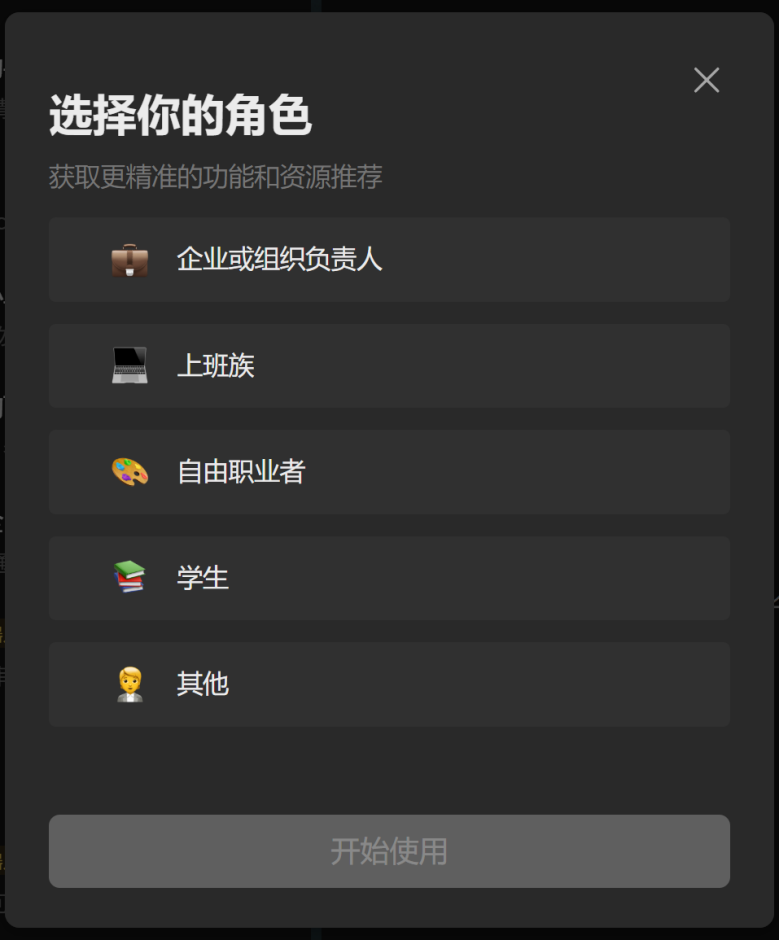
二、安装飞书插件
claw@openclaw-server:~$ openclaw plugins install @openclaw/feishu

🦞 OpenClaw 2026.3.2 (85377a2) — Less clicking, more shipping, fewer "where did that file go" moments.

Downloading @openclaw/feishu…
Extracting /tmp/openclaw-npm-pack-pdCHj5/openclaw-feishu-2026.3.2.tgz…
Plugin "feishu" has 1 suspicious code pattern(s). Run "openclaw security audit --deep" for details.
Installing to /home/claw/.openclaw/extensions/feishu…
Installing plugin dependencies…
06:04:35 [plugins] plugins.allow is empty; discovered non-bundled plugins may auto-load: feishu (/home/claw/.openclaw/extensions/feishu/index.ts). Set plugins.allow to explicit trusted ids.
Config warnings:
- plugins.entries.feishu: plugin feishu: duplicate plugin id detected; later plugin may be overridden (/home/claw/.openclaw/extensions/feishu/index.ts)
Config overwrite: /home/claw/.openclaw/openclaw.json (sha256 e9bec62cb934062b419bd7620580b1869b83631091315a9037acca88423e84bd -> 41a767e5bdabba4880e23d5d80b0c5c9b971736ba37753aae7db3fa0f8e61e7d, backup=/home/claw/.openclaw/openclaw.json.bak)
Installed plugin: feishu
Restart the gateway to load plugins.
三、创建飞书应用
访问https://open.feishu.cn/app
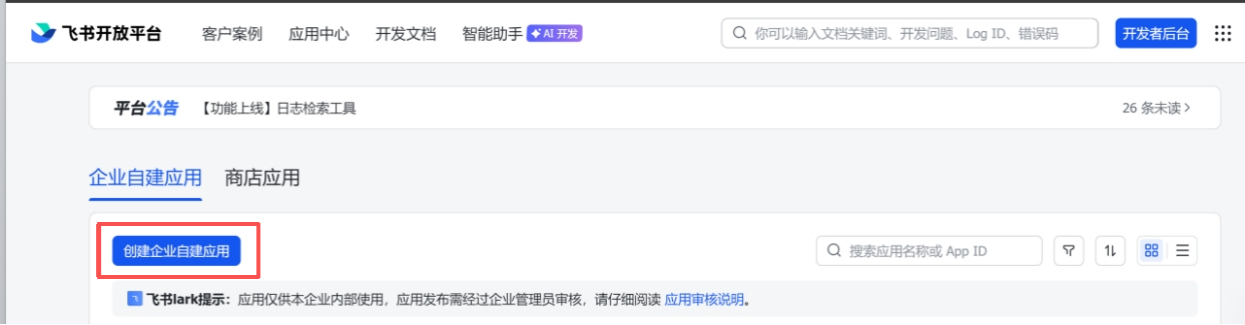
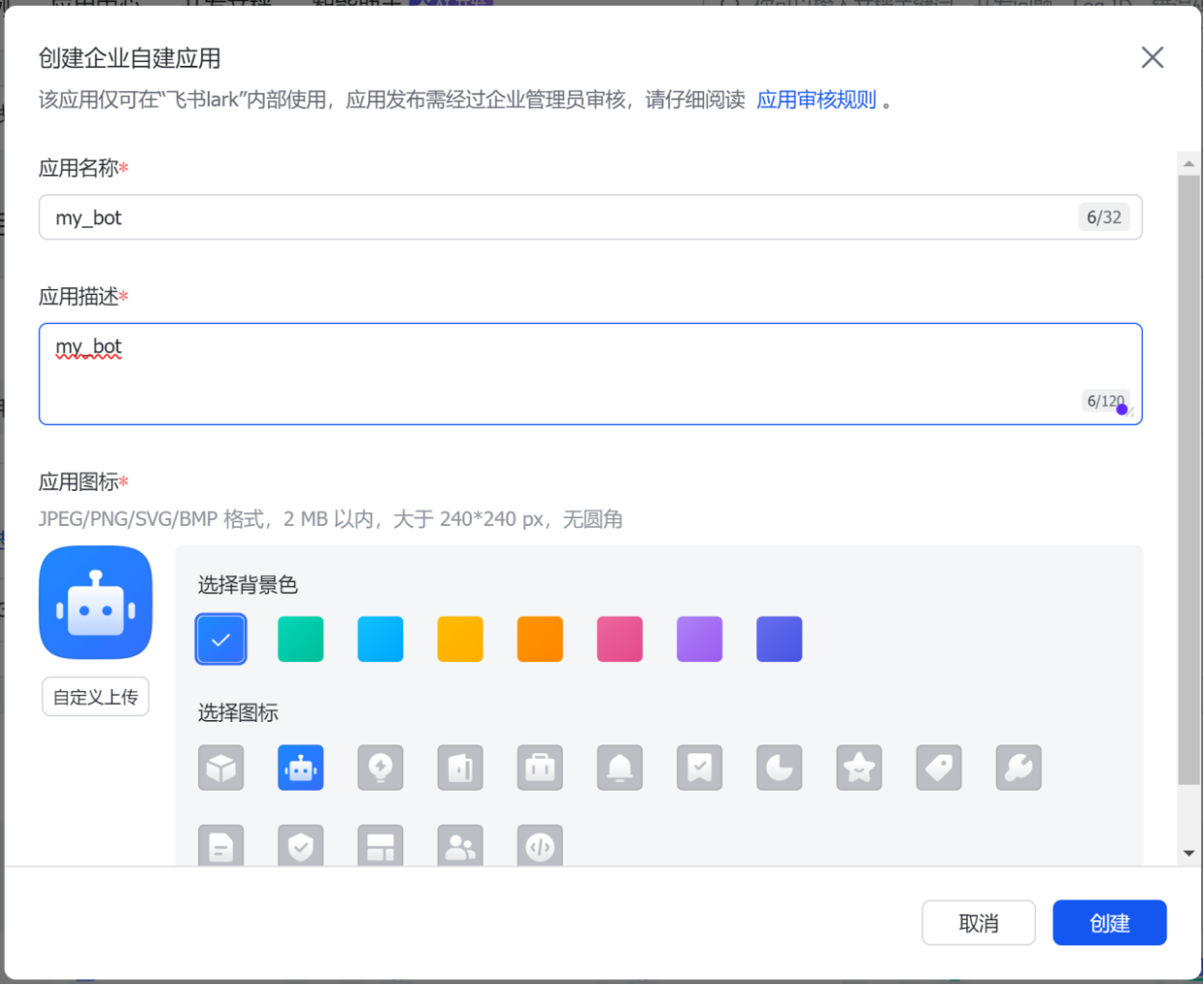
自己创建一个机器人
权限管理 - 批量导入/导出权限
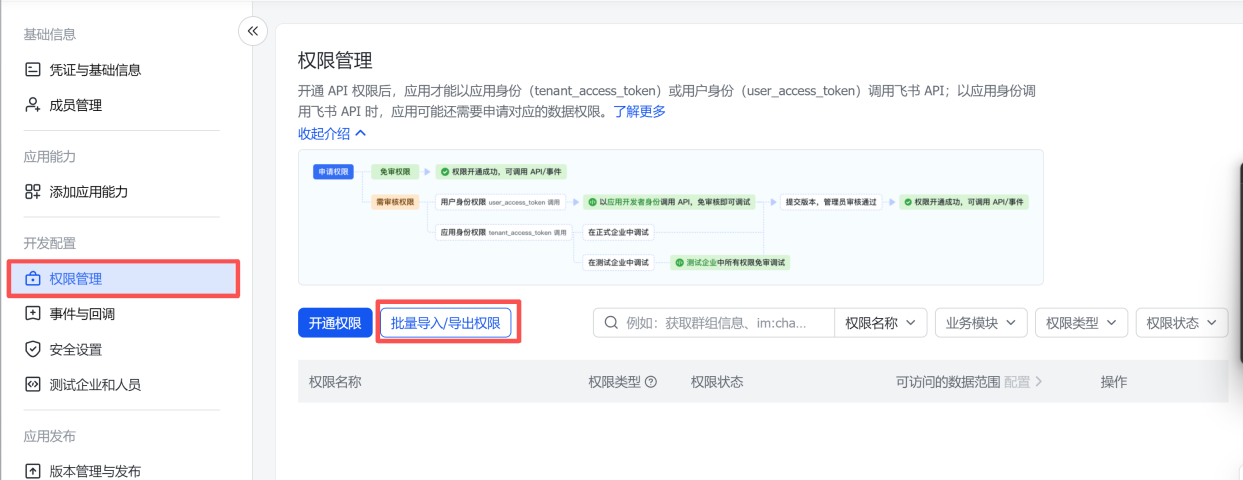
{
  "scopes": {
    "tenant": [
      "aily:file:read",
      "aily:file:write",
      "application:application.app_message_stats.overview:readonly",
      "application:application:self_manage",
      "application:bot.menu:write",
      "cardkit:card:read",
      "cardkit:card:write",
      "contact:user.employee_id:readonly",
      "corehr:file:download",
      "event:ip_list",
      "im:chat.access_event.bot_p2p_chat:read",
      "im:chat.members:bot_access",
      "im:message",
      "im:message.group_at_msg:readonly",
      "im:message.p2p_msg:readonly",
      "im:message:readonly",
      "im:message:send_as_bot",
      "im:resource"
    ],
    "user": ["aily:file:read", "aily:file:write", "im:chat.access_event.bot_p2p_chat:read"]
  }
}
全部粘贴进去后,点击下一步,确认新增权限 - 申请开通 - 确认开启
记录应用凭证

四、添加飞书渠道
Openclaw官方推荐使用引导式设置
(大致过程:前面配置了AI模型qwen-portal/coder-model,有一个需要访问网址的。飞书配置完后,skill跳过了,然后启动了gateway,就直接访问了)
claw@openclaw-server:~$ openclaw onboard
Config warnings:\n- plugins.entries.feishu: plugin feishu: duplicate plugin id detected; later plugin may be overridden (/home/claw/.openclaw/extensions/feishu/index.ts)
Config warnings:\n- plugins.entries.feishu: plugin feishu: duplicate plugin id detected; later plugin may be overridden (/home/claw/.openclaw/extensions/feishu/index.ts)
🦞 OpenClaw 2026.3.2 (85377a2) — WhatsApp automation without the "please accept our new privacy policy".
│
◇ Config warnings ─────────────────────────────────────────────────────────────────────────╮
│ │
│ - plugins.entries.feishu: plugin feishu: duplicate plugin id detected; later plugin may │
│ be overridden (/home/claw/.openclaw/extensions/feishu/index.ts) │
│ │
├───────────────────────────────────────────────────────────────────────────────────────────╯
06:22:51 [plugins] plugins.allow is empty; discovered non-bundled plugins may auto-load: feishu (/home/claw/.openclaw/extensions/feishu/index.ts). Set plugins.allow to explicit trusted ids.
Config warnings:\n- plugins.entries.feishu: plugin feishu: duplicate plugin id detected; later plugin may be overridden (/home/claw/.openclaw/extensions/feishu/index.ts)
▄▄▄▄▄▄▄▄▄▄▄▄▄▄▄▄▄▄▄▄▄▄▄▄▄▄▄▄▄▄▄▄▄▄▄▄▄▄▄▄▄▄▄▄▄▄▄▄▄▄▄▄
██░▄▄▄░██░▄▄░██░▄▄▄██░▀██░██░▄▄▀██░████░▄▄▀██░███░██
██░███░██░▀▀░██░▄▄▄██░█░█░██░█████░████░▀▀░██░█░█░██
██░▀▀▀░██░█████░▀▀▀██░██▄░██░▀▀▄██░▀▀░█░██░██▄▀▄▀▄██
▀▀▀▀▀▀▀▀▀▀▀▀▀▀▀▀▀▀▀▀▀▀▀▀▀▀▀▀▀▀▀▀▀▀▀▀▀▀▀▀▀▀▀▀▀▀▀▀▀▀▀▀
🦞 OPENCLAW 🦞
┌ OpenClaw onboarding
│
◇ Security ─────────────────────────────────────────────────────────────────────────────────╮
│ │
│ Security warning — please read. │
│ │
│ OpenClaw is a hobby project and still in beta. Expect sharp edges. │
│ By default, OpenClaw is a personal agent: one trusted operator boundary. │
│ This bot can read files and run actions if tools are enabled. │
│ A bad prompt can trick it into doing unsafe things. │
│ │
│ OpenClaw is not a hostile multi-tenant boundary by default. │
│ If multiple users can message one tool-enabled agent, they share that delegated tool │
│ authority. │
│ │
│ If you’re not comfortable with security hardening and access control, don’t run │
│ OpenClaw. │
│ Ask someone experienced to help before enabling tools or exposing it to the internet. │
│ │
│ Recommended baseline: │
│ - Pairing/allowlists + mention gating. │
│ - Multi-user/shared inbox: split trust boundaries (separate gateway/credentials, ideally │
│ separate OS users/hosts). │
│ - Sandbox + least-privilege tools. │
│ - Shared inboxes: isolate DM sessions (`session.dmScope: per-channel-peer`) and keep │
│ tool access minimal. │
│ - Keep secrets out of the agent’s reachable filesystem. │
│ - Use the strongest available model for any bot with tools or untrusted inboxes. │
│ │
│ Run regularly: │
│ openclaw security audit --deep │
│ openclaw security audit --fix │
│ │
│ Must read: https://docs.openclaw.ai/gateway/security │
│ │
├────────────────────────────────────────────────────────────────────────────────────────────╯
│
◆ I understand this is personal-by-default and shared/multi-user use requires lock-down. Continue?
│ ● Yes / ○ No
└
◆ Onboarding mode
│ ● QuickStart (Configure details later via openclaw configure.)
│ ○ Manual
└
◇ Existing config detected ─────────╮
│ │
│ workspace: ~/.openclaw/workspace │
│ model: qwen-portal/coder-model │
│ gateway.mode: local │
│ gateway.port: 18789 │
│ gateway.bind: loopback │
│ │
├────────────────────────────────────╯
│
◆ Config handling
│ ● Use existing values
│ ○ Update values
│ ○ Reset
└
◇ QuickStart ─────────────────────────────╮
│ │
│ Keeping your current gateway settings: │
│ Gateway port: 18789 │
│ Gateway bind: Loopback (127.0.0.1) │
│ Gateway auth: Token (default) │
│ Tailscale exposure: Off │
│ Direct to chat channels. │
│ │
├──────────────────────────────────────────╯
Config warnings:\n- plugins.entries.feishu: plugin feishu: duplicate plugin id detected; later plugin may be overridden (/home/claw/.openclaw/extensions/feishu/index.ts)
│
◆ Model/auth provider
│ ○ OpenAI
│ ○ Anthropic
│ ○ Chutes
│ ○ vLLM
│ ○ MiniMax
│ ○ Moonshot AI (Kimi K2.5)
│ ○ Google
│ ○ xAI (Grok)
│ ○ Mistral AI
│ ○ Volcano Engine
│ ○ BytePlus
│ ○ OpenRouter
│ ○ Kilo Gateway
│ ● Qwen (OAuth)
│ ○ Z.AI
│ ○ Qianfan
│ ○ Copilot
│ ○ Vercel AI Gateway
│ ○ OpenCode Zen
│ ○ Xiaomi
│ ○ Synthetic
│ ○ Together AI
│ ○ Hugging Face
│ ○ Venice AI
│ ○ LiteLLM
│ ○ Cloudflare AI Gateway
│ ○ Custom Provider
│ ○ Skip for now
└
◓ Starting Qwen OAuth…│
◇ Qwen OAuth ─────────────────────────────────────────────────────────────────────────╮
│ │
│ Open https://chat.qwen.ai/authorize?user_code=ZHUZ3JXV&client=qwen-code to approve │
│ access. │
│ If prompted, enter the code ZHUZ3JXV. │
│ │
├──────────────────────────────────────────────────────────────────────────────────────╯
# 没有看上一个文章的记得看一下这个,这需要浏览器访问这个地址点确认
◇ Qwen OAuth complete
│
◇ Model configured ─────────────────────────────╮
│ │
│ Default model set to qwen-portal/coder-model │
│ │
├────────────────────────────────────────────────╯
│
◇ Provider notes ──────────────────────────────────────────────────────────────────────╮
│ │
│ Qwen OAuth tokens auto-refresh. Re-run login if refresh fails or access is revoked. │
│ Base URL defaults to https://portal.qwen.ai/v1. Override │
│ models.providers.qwen-portal.baseUrl if needed. │
│ │
├───────────────────────────────────────────────────────────────────────────────────────╯
│
◆ Default model
│ ● Keep current (qwen-portal/coder-model)
│ ○ Enter model manually
│ ○ qwen-portal/coder-model
│ ○ qwen-portal/vision-model
└
◇ Channel status ────────────────────────────╮
│ │
│ Telegram: needs token │
│ WhatsApp (default): not linked │
│ Discord: needs token │
│ Slack: needs tokens │
│ Signal: needs setup │
│ signal-cli: missing (signal-cli) │
│ iMessage: needs setup │
│ imsg: missing (imsg) │
│ Feishu: needs app credentials │
│ IRC: not configured │
│ Google Chat: not configured │
│ Google Chat: install plugin to enable │
│ Nostr: install plugin to enable │
│ Microsoft Teams: install plugin to enable │
│ Mattermost: install plugin to enable │
│ Nextcloud Talk: install plugin to enable │
│ Matrix: install plugin to enable │
│ BlueBubbles: install plugin to enable │
│ LINE: install plugin to enable │
│ Zalo: install plugin to enable │
│ Zalo Personal: install plugin to enable │
│ Synology Chat: install plugin to enable │
│ Tlon: install plugin to enable │
│ │
├─────────────────────────────────────────────╯
│
◇ How channels work ───────────────────────────────────────────────────────────────────────╮
│ │
│ DM security: default is pairing; unknown DMs get a pairing code. │
│ Approve with: openclaw pairing approve <channel> <code> │
│ Public DMs require dmPolicy="open" + allowFrom=["*"]. │
│ Multi-user DMs: run: openclaw config set session.dmScope "per-channel-peer" (or │
│ "per-account-channel-peer" for multi-account channels) to isolate sessions. │
│ Docs: channels/pairing │
│ │
│ Telegram: simplest way to get started — register a bot with @BotFather and get going. │
│ WhatsApp: works with your own number; recommend a separate phone + eSIM. │
│ Discord: very well supported right now. │
│ IRC: classic IRC networks with DM/channel routing and pairing controls. │
│ Google Chat: Google Workspace Chat app with HTTP webhook. │
│ Slack: supported (Socket Mode). │
│ Signal: signal-cli linked device; more setup (David Reagans: "Hop on Discord."). │
│ iMessage: this is still a work in progress. │
│ Feishu: 飞书/Lark enterprise messaging. │
│ Nostr: Decentralized protocol; encrypted DMs via NIP-04. │
│ Microsoft Teams: Bot Framework; enterprise support. │
│ Mattermost: self-hosted Slack-style chat; install the plugin to enable. │
│ Nextcloud Talk: Self-hosted chat via Nextcloud Talk webhook bots. │
│ Matrix: open protocol; install the plugin to enable. │
│ BlueBubbles: iMessage via the BlueBubbles mac app + REST API. │
│ LINE: LINE Messaging API bot for Japan/Taiwan/Thailand markets. │
│ Zalo: Vietnam-focused messaging platform with Bot API. │
│ Zalo Personal: Zalo personal account via QR code login. │
│ Synology Chat: Connect your Synology NAS Chat to OpenClaw with full agent capabilities. │
│ Tlon: decentralized messaging on Urbit; install the plugin to enable. │
│ │
├───────────────────────────────────────────────────────────────────────────────────────────╯
│
◆ Select channel (QuickStart)
│ ○ Telegram (Bot API)
│ ○ WhatsApp (QR link)
│ ○ Discord (Bot API)
│ ○ IRC (Server + Nick) (not configured)
│ ○ Google Chat (Chat API)
│ ○ Slack (Socket Mode)
│ ○ Signal (signal-cli)
│ ○ iMessage (imsg)
│ ● Feishu/Lark (飞书)
│ ○ Nostr (NIP-04 DMs)
│ ○ Microsoft Teams (Bot Framework)
│ ○ Mattermost (plugin)
│ ○ Nextcloud Talk (self-hosted)
│ ○ Matrix (plugin)
│ ○ BlueBubbles (macOS app)
│ ○ LINE (Messaging API)
│ ○ Zalo (Bot API)
│ ○ Zalo (Personal Account)
│ ○ Synology Chat (Webhook)
│ ○ Tlon (Urbit)
│ ○ Skip for now
└
◇ Feishu credentials ──────────────────────────────────────────────────────────────╮
│ │
│ 1) Go to Feishu Open Platform (open.feishu.cn) │
│ 2) Create a self-built app │
│ 3) Get App ID and App Secret from Credentials page │
│ 4) Enable required permissions: im:message, im:chat, contact:user.base:readonly │
│ 5) Publish the app or add it to a test group │
│ Tip: you can also set FEISHU_APP_ID / FEISHU_APP_SECRET env vars. │
│ Docs: feishu │
│ │
├───────────────────────────────────────────────────────────────────────────────────╯
│
◆ How do you want to provide this App Secret?
│ ● Enter App Secret (Stores the credential directly in OpenClaw config)
│ ○ Use external secret provider
└
◆ Enter Feishu App Secret
│ _ # 输入前面需要记住的网页上的应用凭证,看第三部分最后一句话
└
◇ Enter Feishu App ID
│ _ # 输入前面需要记住的网页上的应用凭证,看第三部分最后一句话
[info]: [ 'client ready' ]
│
◇ Feishu connection test ───────────────────────────╮
│ │
│ Connected as ou_61147327b900a6350d92db863f0571d9 │
│ │
├────────────────────────────────────────────────────╯
│
◆ Feishu connection mode
│ ● WebSocket (default)
│ ○ Webhook
└
◆ Which Feishu domain?
│ ● Feishu (feishu.cn) - China
│ ○ Lark (larksuite.com) - International
└
◆ Group chat policy
│ ○ Allowlist - only respond in specific groups
│ ● Open - respond in all groups (requires mention)
│ ○ Disabled - don't respond in groups
└
◇ Selected channels ──────────────────────────────────────────╮
│ │
│ Feishu — 飞书/Lark enterprise messaging. Docs: │
│ feishu │
│ │
├──────────────────────────────────────────────────────────────╯
Config warnings:
- plugins.entries.feishu: plugin feishu: duplicate plugin id detected; later plugin may be overridden (/home/claw/.openclaw/extensions/feishu/index.ts)
Config overwrite: /home/claw/.openclaw/openclaw.json (sha256 41a767e5bdabba4880e23d5d80b0c5c9b971736ba37753aae7db3fa0f8e61e7d -> 8350a498b845c068a1d4949c5469557161150c4375bbba7f3dffa176c7047593, backup=/home/claw/.openclaw/openclaw.json.bak)
Updated ~/.openclaw/openclaw.json
Workspace OK: ~/.openclaw/workspace
Sessions OK: ~/.openclaw/agents/main/sessions
│
◇ Skills status ─────────────╮
│ │
│ Eligible: 8 │
│ Missing requirements: 40 │
│ Unsupported on this OS: 7 │
│ Blocked by allowlist: 0 │
│ │
├─────────────────────────────╯
│
◆ Configure skills now? (recommended)
│ ○ Yes / ● No
└
◇ Hooks ──────────────────────────────────────────────────────────────────╮
│ │
│ Hooks let you automate actions when agent commands are issued. │
│ Example: Save session context to memory when you issue /new or /reset. │
│ │
│ Learn more: https://docs.openclaw.ai/automation/hooks │
│ │
├──────────────────────────────────────────────────────────────────────────╯
│
◆ Enable hooks?
│ ◻ Skip for now
│ ◻ 🚀 boot-md
│ ◻ 📎 bootstrap-extra-files
│ ◼ 📝 command-logger (Log all command events to a centralized audit file)
│ ◼ 💾 session-memory (Save session context to memory when /new or /reset command is issued)
└
◇ Hooks Configured ────────────────────────────────╮
│ │
│ Enabled 2 hooks: command-logger, session-memory │
│ │
│ You can manage hooks later with: │
│ openclaw hooks list │
│ openclaw hooks enable <name> │
│ openclaw hooks disable <name> │
│ │
├───────────────────────────────────────────────────╯
Config warnings:
- plugins.entries.feishu: plugin feishu: duplicate plugin id detected; later plugin may be overridden (/home/claw/.openclaw/extensions/feishu/index.ts)
Config overwrite: /home/claw/.openclaw/openclaw.json (sha256 8350a498b845c068a1d4949c5469557161150c4375bbba7f3dffa176c7047593 -> f654f1c6a6d6724ec64b000e02ce0757539da5cf43a3825360984eba6a1f1357, backup=/home/claw/.openclaw/openclaw.json.bak)
│
◇ Gateway service runtime ────────────────────────────────────────────╮
│ │
│ QuickStart uses Node for the Gateway service (stable + supported). │
│ │
├──────────────────────────────────────────────────────────────────────╯
│
◆ Gateway service already installed
│ ● Restart
│ ○ Reinstall
│ ○ Skip
└
◒ Restarting Gateway service…Restarted systemd service: openclaw-gateway.service
◇ Gateway service restarted.
Config warnings:\n- plugins.entries.feishu: plugin feishu: duplicate plugin id detected; later plugin may be overridden (/home/claw/.openclaw/extensions/feishu/index.ts)
Config warnings:\n- plugins.entries.feishu: plugin feishu: duplicate plugin id detected; later plugin may be overridden (/home/claw/.openclaw/extensions/feishu/index.ts)
│
◇
Feishu: ok
Agents: main (default)
Heartbeat interval: 30m (main)
Session store (main): /home/claw/.openclaw/agents/main/sessions/sessions.json (0 entries)
│
◇ Optional apps ────────────────────────╮
│ │
│ Add nodes for extra features: │
│ - macOS app (system + notifications) │
│ - iOS app (camera/canvas) │
│ - Android app (camera/canvas) │
│ │
├────────────────────────────────────────╯
│
◇ Control UI ─────────────────────────────────────────────────────────────────────╮
│ │
│ Web UI: http://127.0.0.1:18789/ │
│ Web UI (with token): │
│ http://127.0.0.1:18789/#token=60a388d32601af7b254144d9487c32c64914c4aa67864cbf │
│ Gateway WS: ws://127.0.0.1:18789 │
│ Gateway: reachable │
│ Docs: https://docs.openclaw.ai/web/control-ui │
│ │
├──────────────────────────────────────────────────────────────────────────────────╯
│
◇ Start TUI (best option!) ─────────────────────────────────╮
│ │
│ This is the defining action that makes your agent you. │
│ Please take your time. │
│ The more you tell it, the better the experience will be. │
│ We will send: "Wake up, my friend!" │
│ │
├────────────────────────────────────────────────────────────╯
│
◇ Token ─────────────────────────────────────────────────────────────────────────────────╮
│ │
│ Gateway token: shared auth for the Gateway + Control UI. │
│ Stored in: ~/.openclaw/openclaw.json (gateway.auth.token) or OPENCLAW_GATEWAY_TOKEN. │
│ View token: openclaw config get gateway.auth.token │
│ Generate token: openclaw doctor --generate-gateway-token │
│ Web UI stores a copy in this browser's localStorage (openclaw.control.settings.v1). │
│ Open the dashboard anytime: openclaw dashboard --no-open │
│ If prompted: paste the token into Control UI settings (or use the tokenized dashboard │
│ URL). │
│ │
├─────────────────────────────────────────────────────────────────────────────────────────╯
│
◆ How do you want to hatch your bot?
│ ○ Hatch in TUI (recommended)
│ ○ Open the Web UI
│ ● Do this later
└
◇ Later ───────────────────────────────────────────╮
│ │
│ When you're ready: openclaw dashboard --no-open │
│ │
├───────────────────────────────────────────────────╯
│
◇ Workspace backup ────────────────────────────────────────╮
│ │
│ Back up your agent workspace. │
│ Docs: https://docs.openclaw.ai/concepts/agent-workspace │
│ │
├───────────────────────────────────────────────────────────╯
│
◇ Security ──────────────────────────────────────────────────────╮
│ │
│ Running agents on your computer is risky — harden your setup: │
│ https://docs.openclaw.ai/security │
│ │
├─────────────────────────────────────────────────────────────────╯
│
◇ Web search (optional) ─────────────────────────────────────────────────────────────────╮
│ │
│ If you want your agent to be able to search the web, you’ll need an API key. │
│ │
│ OpenClaw uses Brave Search for the `web_search` tool. Without a Brave Search API key, │
│ web search won’t work. │
│ │
│ Set it up interactively: │
│ - Run: openclaw configure --section web │
│ - Enable web_search and paste your Brave Search API key │
│ │
│ Alternative: set BRAVE_API_KEY in the Gateway environment (no config changes). │
│ Docs: https://docs.openclaw.ai/tools/web │
│ │
├─────────────────────────────────────────────────────────────────────────────────────────╯
│
◇ What now ─────────────────────────────────────────────────────────────╮
│ │
│ What now: https://openclaw.ai/showcase ("What People Are Building"). │
│ │
├────────────────────────────────────────────────────────────────────────╯
│
└ Onboarding complete. Use the dashboard link above to control OpenClaw.
五、飞书开放平台事件配置
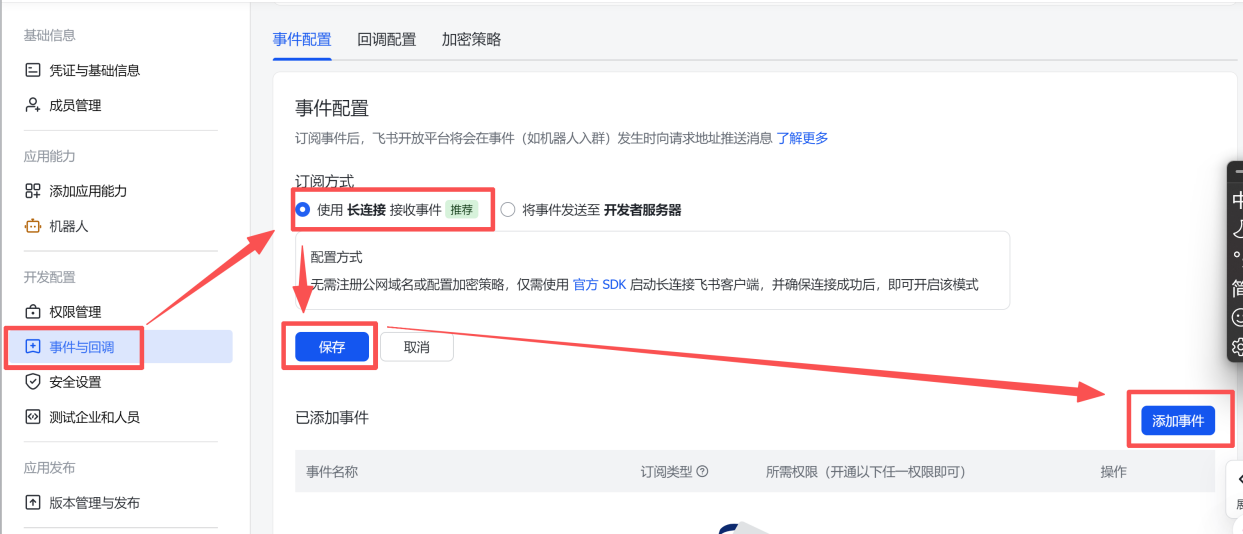
搜索 im.message.receive_v1
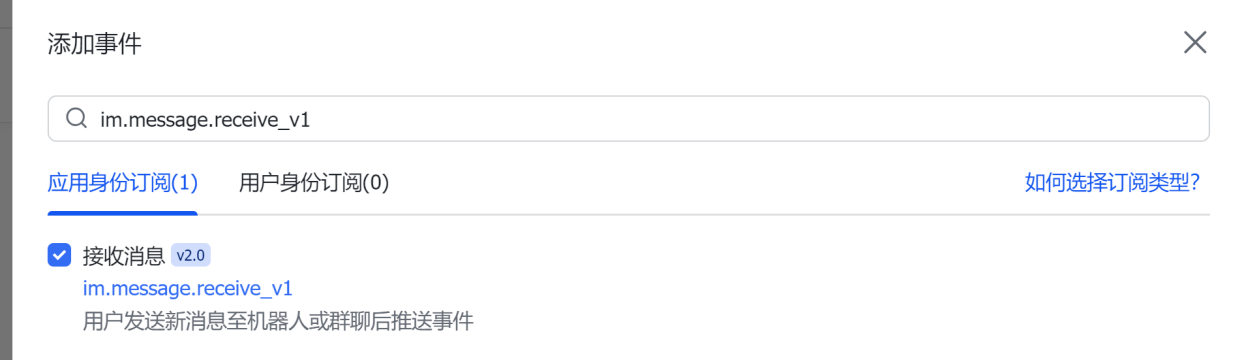
点击确认添加,然后配置机器人

六、版本发布
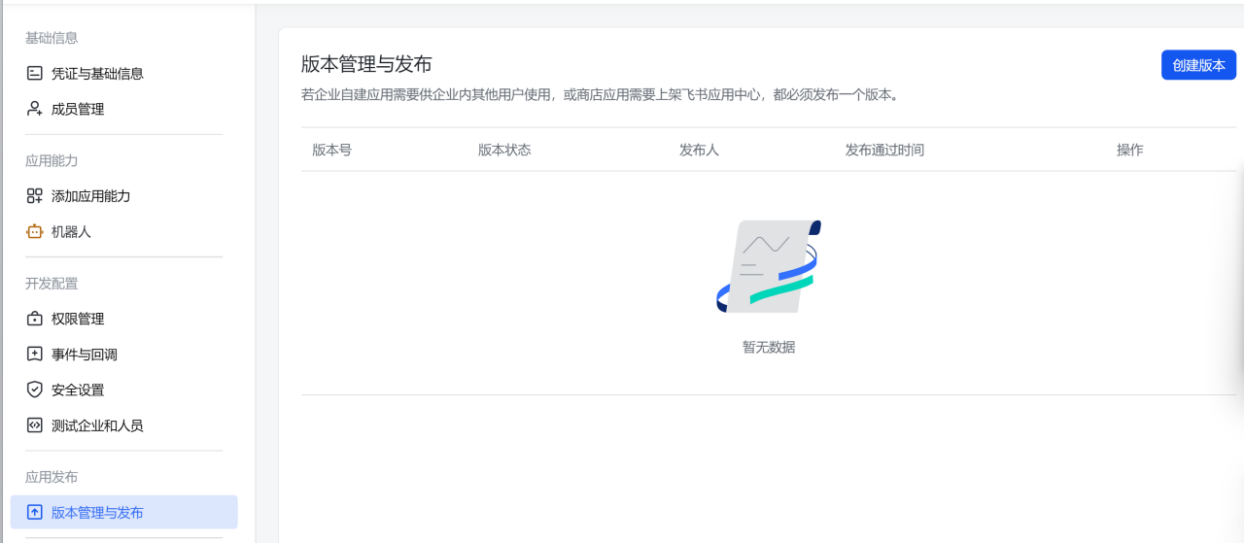
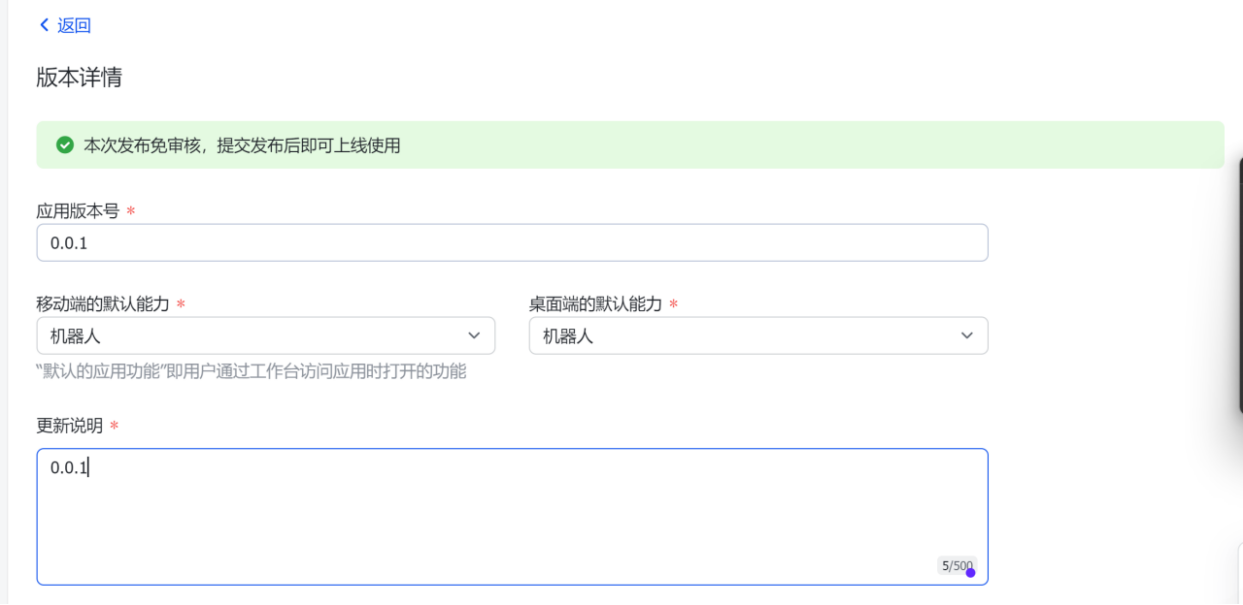
最下面点击保存 - 确认发布
七、飞书对话
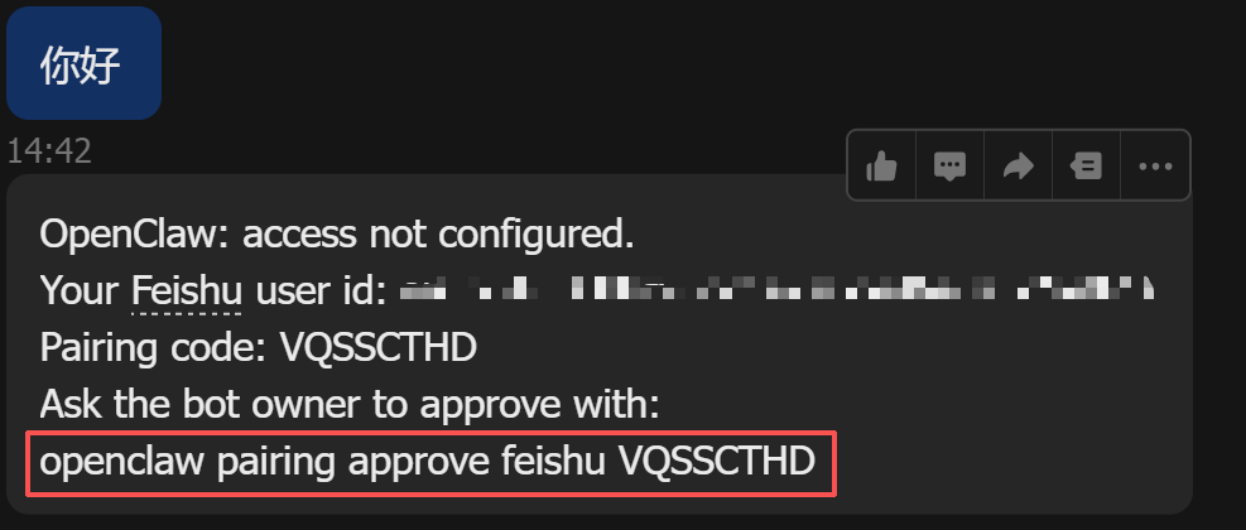
出现这个回复,在命令行输入你的红框里面的内容执行。
openclaw pairing approve feishu VQSSCTHD
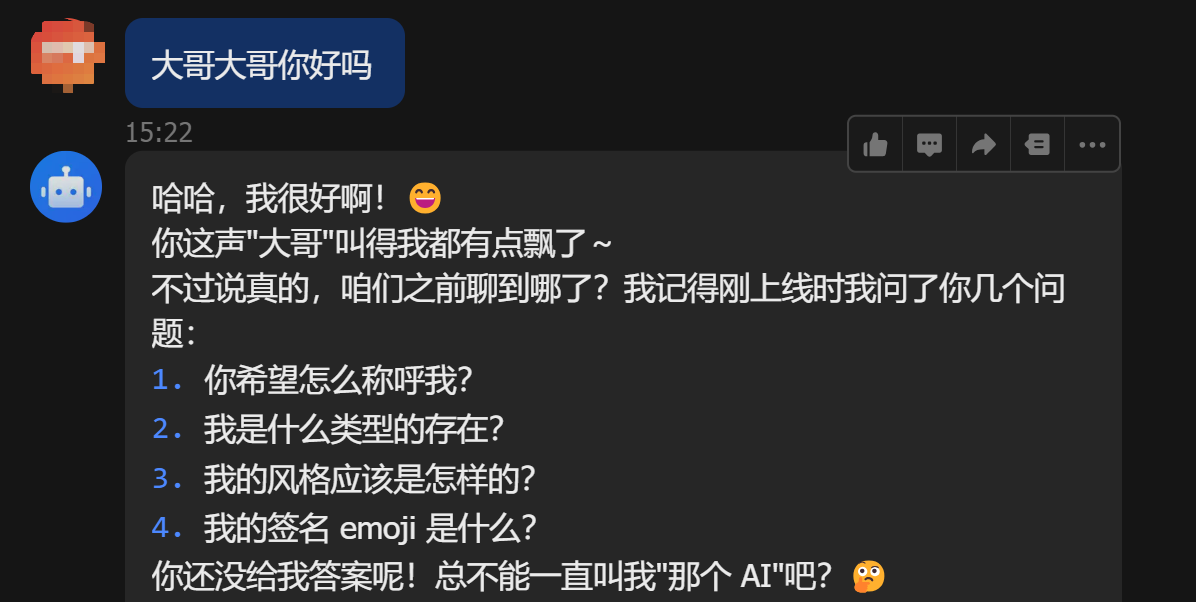
八、飞书接入完成

腾讯云面向开发者汇聚海量精品云计算使用和开发经验,营造开放的云计算技术生态圈。
更多推荐
 6
6 0
0- 0


 已为社区贡献3条内容

所有评论(0)