Flutter for OpenHarmony游戏集合App实战之炸金花手牌展示
本文围绕炸金花游戏的手牌展示功能展开,基于Flutter/OpenHarmony开发。定义PokerCard类封装牌的点数、花色等属性,通过Unicode符号和标准配色实现牌面显示,区分看牌/未看牌、弃牌等状态。玩家手牌采用标准尺寸展示,对手牌为迷你版,通过颜色、边框区分当前回合和弃牌状态。设计牌型枚举实现大小比较,搭配绿色渐变背景模拟赌桌氛围,核心通过条件渲染适配不同游戏场景,为炸金花游戏搭建了
通过网盘分享的文件:game_flutter_openharmony.zip
链接: https://pan.baidu.com/s/1ryUS1A0zcvXGrDaStu530w 提取码: tqip
前言
炸金花是一种流行的扑克游戏,每人发三张牌,比大小。要做这个游戏,首先得把手牌展示出来。
和蜘蛛纸牌不同,炸金花的牌有四种花色,还有"看牌"和"不看牌"两种状态。这篇就来聊聊怎么展示炸金花的手牌。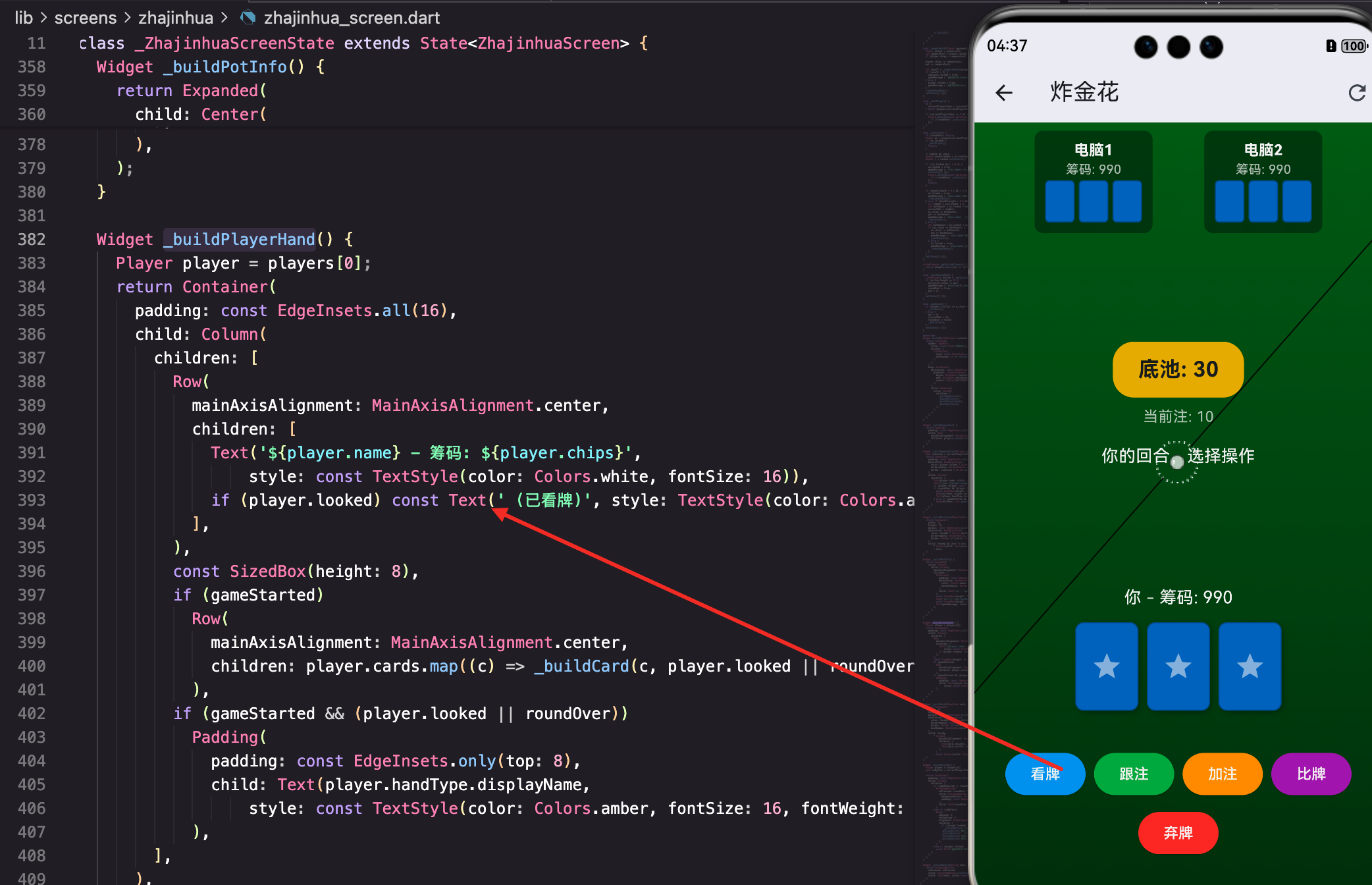
扑克牌数据结构
class PokerCard {
  final int value; // 2-14 (2-A)
  final int suit; // 0:spade, 1:heart, 2:club, 3:diamond

  PokerCard({required this.value, required this.suit});
两个属性:
- value: 点数,2-14。2就是2,14是A(A最大)
- suit: 花色,0-3分别是黑桃、红心、梅花、方块
为什么A是14而不是1?因为炸金花里A是最大的牌,用14方便比较大小。
点数显示
  String get valueStr {
    if (value <= 10) return '$value';
    return ['J', 'Q', 'K', 'A'][value - 11];
  }
2-10直接显示数字,11-14显示J、Q、K、A。
value - 11把11-14映射到0-3,正好对应数组索引。
花色显示
String get suitStr => ['♠', '♥', '♣', '♦'][suit];
用Unicode字符显示花色符号。这些符号大多数字体都支持,不需要图片。
颜色
Color get color => (suit == 1 || suit == 3) ? Colors.red : Colors.black;
红心(1)和方块(3)是红色,黑桃(0)和梅花(2)是黑色。
这是扑克牌的标准配色。
完整显示
String get display => '$valueStr$suitStr';
点数加花色,比如"A♠"、“K♥”。用在小尺寸的牌上。
手牌展示区域
玩家的手牌在屏幕下方:
Widget _buildPlayerHand() {
  Player player = players[0];
  return Container(
    padding: const EdgeInsets.all(16),
    child: Column(
      children: [
        Row(
          mainAxisAlignment: MainAxisAlignment.center,
          children: [
            Text('${player.name} - 筹码: ${player.chips}',
                style: const TextStyle(color: Colors.white, fontSize: 16)),
            if (player.looked) const Text(' (已看牌)', style: TextStyle(color: Colors.amber)),
          ],
        ),
玩家信息
显示玩家名字和筹码数量。如果已经看过牌,后面加个"(已看牌)"标记。
if (player.looked)是Dart的集合if语法,条件为真时才添加这个Widget。
手牌显示
        if (gameStarted)
          Row(
            mainAxisAlignment: MainAxisAlignment.center,
            children: player.cards.map((c) => _buildCard(c, player.looked || roundOver)).toList(),
          ),
游戏开始后才显示牌。三张牌水平排列,居中。
player.looked || roundOver决定是否显示正面:
- 玩家看过牌了,显示正面
- 这局结束了,显示正面(亮牌)
- 否则显示背面
牌型显示
        if (gameStarted && (player.looked || roundOver))
          Padding(
            padding: const EdgeInsets.only(top: 8),
            child: Text(player.handType.displayName,
                style: const TextStyle(color: Colors.amber, fontSize: 16, fontWeight: FontWeight.bold)),
          ),
看牌后或结束时,显示牌型名称,比如"对子"、“顺子”、“豹子”。
金色文字,加粗,比较醒目。
_buildCard方法
单张牌的绘制:
Widget _buildCard(PokerCard card, bool faceUp) {
  return Container(
    width: 60,
    height: 84,
    margin: const EdgeInsets.all(4),
尺寸60×84,比例约1:1.4,标准扑克牌比例。
margin让牌之间有间隔,不会挤在一起。
装饰
    decoration: BoxDecoration(
      color: faceUp ? Colors.white : Colors.blue[800],
      borderRadius: BorderRadius.circular(8),
      border: Border.all(color: Colors.black26),
      boxShadow: [BoxShadow(color: Colors.black26, blurRadius: 4, offset: const Offset(2, 2))],
    ),
- color: 正面白色,背面深蓝
- borderRadius: 8像素圆角
- border: 浅黑色边框
- boxShadow: 阴影,增加立体感
正面内容
    child: faceUp
        ? Column(
            mainAxisAlignment: MainAxisAlignment.center,
            children: [
              Text(card.valueStr, style: TextStyle(fontSize: 20, fontWeight: FontWeight.bold, color: card.color)),
              Text(card.suitStr, style: TextStyle(fontSize: 24, color: card.color)),
            ],
          )
正面用Column垂直排列点数和花色,都居中。
点数字号20,花色字号24(花色符号大一点好看)。颜色用card.color,红心方块是红色,黑桃梅花是黑色。
背面内容
        : const Center(child: Icon(Icons.star, color: Colors.white54, size: 30)),
  );
}
背面就一个星星图标,简单明了。
对手的牌
对手的牌显示在屏幕上方:
Widget _buildOpponents() {
  return Padding(
    padding: const EdgeInsets.all(8.0),
    child: Row(
      mainAxisAlignment: MainAxisAlignment.spaceEvenly,
      children: players.skip(1).map((p) => _buildOpponentCard(p)).toList(),
    ),
  );
}
players.skip(1)跳过第一个玩家(自己),只显示对手。
spaceEvenly让对手卡片均匀分布。
对手卡片
Widget _buildOpponentCard(Player player) {
  bool isActive = currentPlayerIndex == players.indexOf(player);
  return Container(
    padding: const EdgeInsets.all(8),
    decoration: BoxDecoration(
      color: player.folded ? Colors.grey.withOpacity(0.5) : Colors.black38,
      borderRadius: BorderRadius.circular(8),
      border: isActive ? Border.all(color: Colors.yellow, width: 2) : null,
    ),
状态区分
- 弃牌了: 灰色半透明背景
- 还在玩: 黑色半透明背景
- 当前回合: 黄色边框高亮
这样一眼就能看出谁还在玩,轮到谁了。
对手信息
    child: Column(
      children: [
        Text(player.name, style: const TextStyle(color: Colors.white, fontWeight: FontWeight.bold)),
        Text('筹码: ${player.chips}', style: const TextStyle(color: Colors.white70, fontSize: 12)),
        if (player.folded) const Text('已弃牌', style: TextStyle(color: Colors.red, fontSize: 12)),
显示名字、筹码、弃牌状态。
弃牌用红色文字,很醒目。
对手的牌
        if (roundOver && !player.folded) ...[
          const SizedBox(height: 4),
          Row(children: player.cards.map((c) => _buildMiniCard(c, true)).toList()),
          Text(player.handType.displayName, style: const TextStyle(color: Colors.amber, fontSize: 10)),
        ] else if (gameStarted && !player.folded)
          Row(children: List.generate(3, (_) => _buildMiniCard(null, false))),
两种情况:
- 游戏结束且没弃牌: 显示正面,亮牌比大小
- 游戏进行中且没弃牌: 显示背面,三张盖着的牌
...[]是Dart的展开操作符,把列表里的元素展开到外层列表。
迷你牌
对手的牌用小尺寸显示:
Widget _buildMiniCard(PokerCard? card, bool faceUp) {
  return Container(
    width: 28,
    height: 40,
    margin: const EdgeInsets.all(2),
    decoration: BoxDecoration(
      color: faceUp ? Colors.white : Colors.blue[800],
      borderRadius: BorderRadius.circular(4),
      border: Border.all(color: Colors.black26),
    ),
    child: faceUp && card != null
        ? Center(child: Text(card.display, style: TextStyle(fontSize: 10, color: card.color)))
        : null,
  );
}
尺寸28×40,比玩家的牌小很多。
正面只显示card.display(如"A♠"),字号10,够小但还能看清。
背面什么都不显示,就一个蓝色方块。
牌型枚举
enum HandType {
  highCard,
  pair,
  straight,
  flush,
  straightFlush,
  threeOfAKind;

  String get displayName {
    switch (this) {
      case HandType.highCard: return '高牌';
      case HandType.pair: return '对子';
      case HandType.straight: return '顺子';
      case HandType.flush: return '金花';
      case HandType.straightFlush: return '顺金';
      case HandType.threeOfAKind: return '豹子';
    }
  }
}
六种牌型,从小到大排列。枚举的index正好可以用来比较大小。
displayName返回中文名称,用于显示。
💡 枚举顺序很重要。highCard的index是0,threeOfAKind的index是5。比较牌型时直接比index就行。
背景渐变
body: Container(
  decoration: const BoxDecoration(
    gradient: LinearGradient(
      begin: Alignment.topCenter,
      end: Alignment.bottomCenter,
      colors: [Color(0xFF1B5E20), Color(0xFF0D3010)],
    ),
  ),
从上到下的绿色渐变,模拟赌桌的感觉。
上面浅一点(0xFF1B5E20),下面深一点(0xFF0D3010),有层次感。
看牌状态
炸金花有个特殊规则:可以选择不看牌,闷着玩。
if (player.looked) const Text(' (已看牌)', style: TextStyle(color: Colors.amber)),
看过牌的玩家会有标记。
看牌和不看牌的区别:
- 不看牌: 跟注只需要当前注的1倍
- 看过牌: 跟注需要当前注的2倍
这个规则在操作按钮那里体现,但显示上要让玩家知道自己的状态。
弃牌显示
if (player.folded) const Text('已弃牌', style: TextStyle(color: Colors.red, fontSize: 12)),
弃牌的玩家显示红色"已弃牌"文字。
弃牌后:
- 背景变灰
- 不再显示牌(或显示灰色的牌)
- 不参与后续操作
当前回合高亮
bool isActive = currentPlayerIndex == players.indexOf(player);
...
border: isActive ? Border.all(color: Colors.yellow, width: 2) : null,
当前回合的玩家卡片有黄色边框,提示轮到谁了。
这个视觉反馈很重要,特别是AI操作时,玩家能看到游戏进度。
小结
这篇讲了炸金花的手牌展示,核心知识点:
- PokerCard类:封装点数、花色、颜色、显示字符串
- 花色符号:用Unicode字符♠♥♣♦,不需要图片
- 条件渲染:根据looked和roundOver决定显示正面还是背面
- 大小两种牌:玩家的牌大,对手的牌小
- 状态区分:弃牌灰色、当前回合黄边框
- 牌型枚举:用index比较大小,displayName显示中文
- 渐变背景:LinearGradient营造赌桌氛围
手牌展示是炸金花的基础,看牌、比牌、亮牌都依赖这个。展示做好了,游戏体验就有了。
欢迎加入开源鸿蒙跨平台社区:https://openharmonycrossplatform.csdn.net

腾讯云面向开发者汇聚海量精品云计算使用和开发经验,营造开放的云计算技术生态圈。
更多推荐
 27
27 0
0- 0


 已为社区贡献21条内容

所有评论(0)